
A clinic manager hears about a newly disclosed software flaw before the first patient arrives. A law firm partner gets an email from a software vendor warning that an update should be applied quickly. A finance office realizes its accounting platform, document system, and remote laptops all need attention at the same time. In many small and mid-sized businesses, that moment triggers the same response. Confusion, rushed emails, and a vague hope that automatic updates are covering more than they are.
That's not a patch management process. That's improvisation.
For healthcare, legal, and financial firms in North Texas, improvisation is expensive. It creates audit problems, leaves obvious gaps in systems that store sensitive data, and increases the odds that a routine update will break something important because nobody tested it properly. A real patch management process turns patching into a controlled business operation with owners, timelines, verification, and documented exceptions.
Table of Contents
- Beyond Reacting A Proactive Approach to Patch Management
- Laying the Foundation Your Patch Policy and Scope
- From Chaos to Control Asset Inventory and Risk Prioritization
- Test Twice Deploy Once Staging and Deployment Workflows
- Closing the Loop Verification Monitoring and Reporting
- Navigating Compliance and Handling Exceptions in Regulated Fields
- When to Partner with an MSP The Smart Scaling Strategy
Beyond Reacting A Proactive Approach to Patch Management
A business owner usually sees patching only when something goes wrong. A critical flaw hits the news. A vendor sends an urgent notice. An employee complains that a machine keeps rebooting. That's the wrong time to start deciding who owns the issue, which systems are affected, and whether the update can be applied safely.
A proactive patch management process removes that chaos. It identifies affected devices in advance, assigns responsibility, and puts updates through a repeatable workflow instead of a panic-driven scramble. That matters because the workload is larger than most SMBs assume. The average computer requires approximately 76 patches annually from 22 different vendors, which is exactly why manual tracking breaks down.

For regulated firms, patching isn't just maintenance. It's preventive risk control. A missed browser update on a billing workstation, an unpatched server handling client documents, or an outdated remote laptop can all create exposure that no owner intended to accept.
What proactive looks like
A disciplined process usually includes these business habits:
- Known asset coverage: Every laptop, server, business application, and remote endpoint is in scope.
- Defined ownership: Someone approves, someone tests, someone deploys, and someone verifies.
- Priority by risk: The team doesn't treat every update the same.
- Proof of action: The business can show what was patched, what failed, and what remains open.
Practical rule: If a company can't quickly answer which devices are exposed to a newly announced vulnerability, it doesn't have a mature patch management process.
Businesses that want better visibility before deployment often pair patching with vulnerability scanning basics from Technovation. For firms also evaluating how AI can support security operations without adding more noise, Cyndra expertise in IT security AI offers useful context on where intelligent analysis can help teams focus faster.
Laying the Foundation Your Patch Policy and Scope
Without a written policy, patching becomes a collection of habits. One technician updates servers on weekends. Another waits for user complaints. A department head asks to delay reboots indefinitely. That inconsistency is exactly what creates audit findings and operational surprises.
A patch policy fixes that by setting the business rules before the next urgent issue appears.
A policy is an operating rulebook
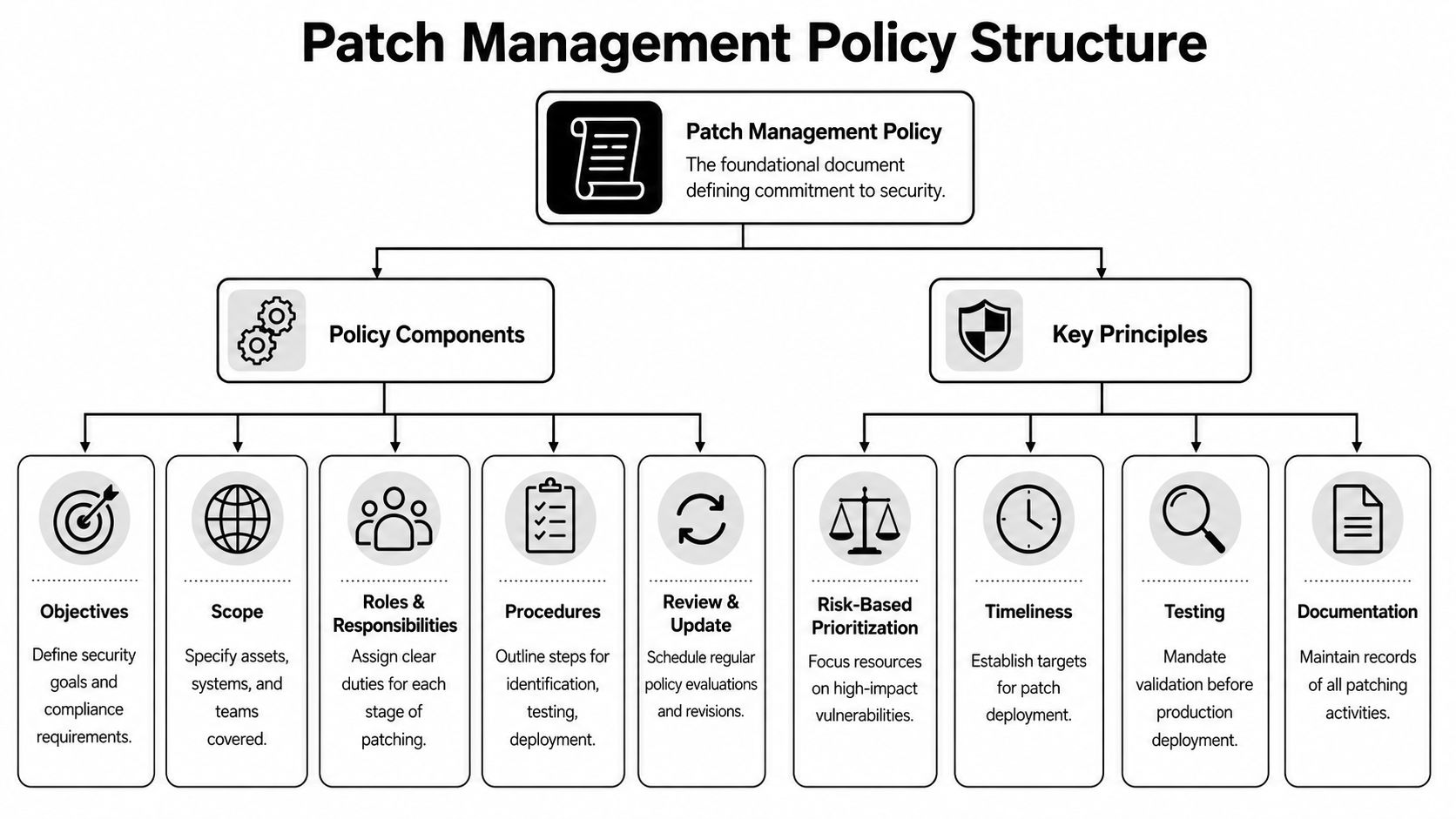
A strong patch policy doesn't need legalistic language. It needs clarity. It should tell staff what systems are covered, who makes patch decisions, what timelines apply, how testing works, and how exceptions are documented.
For most SMBs, the most important timeline comes from NIST. According to NIST Special Publication 800-40, organizations should install critical security patches within 30 days of release, with 90 days as the absolute maximum under SI-2. That creates a defensible standard for business owners who need a firm answer to “How fast is fast enough?”
What the policy must define
A practical patch policy should answer five questions.
| Policy area | What it should say |
|---|---|
| Scope | Which assets are covered, including servers, laptops, cloud workloads, mobile devices, and line-of-business applications |
| Roles | Which team approves changes, who performs testing, who executes deployment, and who signs off on exceptions |
| Timelines | When critical, high, moderate, and routine patches must be addressed |
| Testing rules | Which systems require staging, pilot deployment, rollback planning, and business-owner validation |
| Documentation | What records must be kept for audits, reviews, and internal accountability |
That scope matters more than many owners expect. In healthcare, the scope often includes front-desk devices, imaging workstations, remote access systems, and specialty applications tied to patient workflows. In legal and finance, it often includes document platforms, billing tools, tax or accounting software, and executive laptops that hold highly sensitive material.
A policy should remove debate during a patch cycle. If teams are negotiating timelines while a vulnerability is already known, the business is late.
A useful policy also separates patch categories. Critical security patches should follow the fastest path. Routine quality updates can move through a normal maintenance cadence. Feature updates should face tighter review because they often affect workflows and training.
A business owner should also insist on one more item. Every exception must expire unless it's re-approved. Too many SMBs treat exceptions as permanent, which means a temporary risk decision settles into normal operations.
From Chaos to Control Asset Inventory and Risk Prioritization
Most SMB patch failures start long before deployment. They start with incomplete visibility. A forgotten desktop in an exam room, a retired file share still running in a closet, a remote employee's laptop that rarely checks in, or an old application nobody wants to touch can all sit outside the process until they become a problem.
That's why inventory comes first.
Inventory first or everything else fails
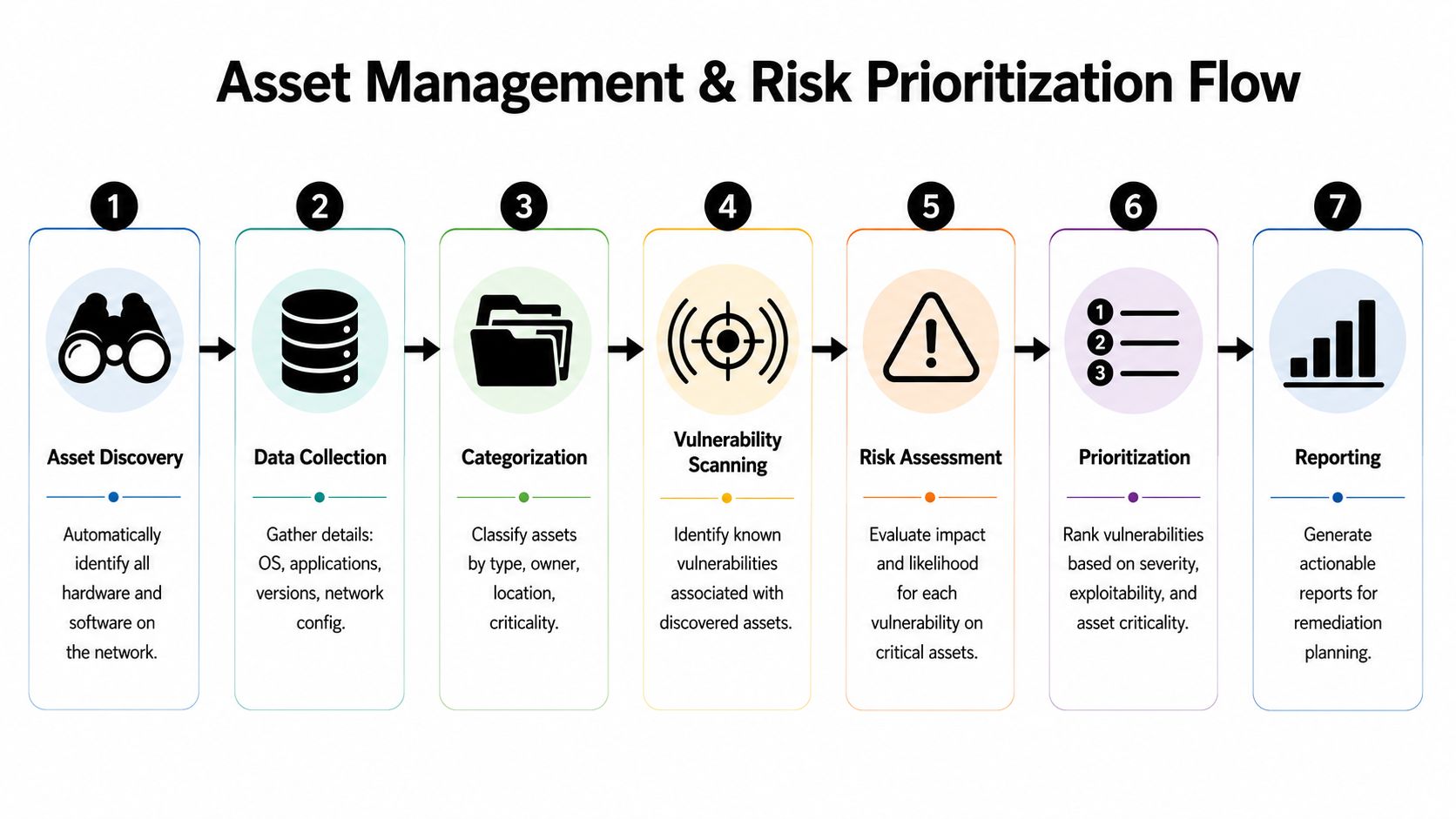
A business can't patch what it can't see. Every workable patch management process begins with a current inventory of hardware, operating systems, installed software, ownership, business purpose, and location. That inventory should include remote endpoints and cloud-hosted systems, not just devices inside the office.
For regulated SMBs, inventory is also a compliance issue. If a firm doesn't know where sensitive data is accessed or processed, it can't convincingly show that those systems are maintained in a controlled way.
A good inventory records more than device names. It should also capture:
- Business owner: Which department depends on the asset
- Criticality: Whether failure would interrupt revenue, client service, or regulated operations
- Exposure: Whether the asset is public-facing, remote-access enabled, or isolated
- Software dependency: Which applications or integrations would break if a patch goes badly
Prioritization has to reflect business reality
Once the inventory exists, the next mistake is treating patching like a calendar exercise. That approach looks organized, but it ignores actual risk. Mature teams prioritize vulnerabilities by combining severity scoring, active exploit information, and the business importance of the affected system. Effective patch management requires prioritizing vulnerabilities by combining CVSS scores with real-time exploit availability and business context, not patching everything on a fixed schedule.
That changes the order of work in practical ways. A serious flaw on an internet-facing portal deserves faster action than a similar flaw on an isolated internal machine. A vulnerability on a system handling patient records or legal documents deserves tighter attention than the same issue on a kiosk with limited access. A patch that affects payroll processing during quarter close may need a controlled deployment window, even if it remains high priority.
The smartest patch queue is not the longest one completed. It's the one that reduces the most business risk first.
This matters even more as companies adopt AI-assisted coding, automation, and custom integrations. New scripts and internal tools can expand the attack surface in ways business owners don't immediately see. For firms assessing that side of exposure, understanding Claude's AI code risks is a useful example of why modern risk review has to include software generated or adapted outside a traditional development process.
A simple decision model for SMBs
A practical prioritization model should rank each issue using four filters:
- How severe is the vulnerability? Use vendor and industry severity guidance as a starting point.
- Is there evidence of active exploitation? If attackers are already using it, the timeline should compress.
- How exposed is the system? Public-facing and remote-access systems move to the front.
- What happens if this system fails or is breached? Tie patching to patient care, client confidentiality, billing, operations, and compliance.
Businesses that haven't mapped those dependencies usually benefit from an IT infrastructure assessment from Technovation before trying to enforce strict patching timelines. Otherwise, teams end up patching blind, which is only slightly better than not patching at all.
Test Twice Deploy Once Staging and Deployment Workflows
Some business owners resist formal patch testing because it sounds slow. In reality, skipping testing is what slows the business down. The wrong patch can break a medical application, disrupt billing, knock out a document integration, or force staff into manual workarounds for hours.
That's why staging isn't optional.

Why rushed patching causes avoidable outages
A bad deployment usually doesn't fail for dramatic reasons. It fails because a device is short on disk space, a key application conflicts with the patch, a network issue interrupts delivery, or a reboot sequence hits the wrong system at the wrong time. Best practices mandate sandbox testing and phased rollouts because compatibility conflicts, insufficient disk space, or network issues can cause patch failures that disrupt operations.
For SMBs in regulated industries, those disruptions have business consequences. A broken update in a clinic can delay intake and records access. In a law office, it can interrupt time tracking or document review. In finance, it can delay month-end work and create immediate pressure on staff.
A safer deployment sequence
A controlled workflow is usually straightforward:
- Stage the patch first: Apply updates to a test environment or a small group of representative systems.
- Validate business functions: Check logins, printing, file access, specialty software, and integrations that matter to daily operations.
- Use phased rollouts: Expand deployment in waves instead of pushing to every endpoint at once.
- Schedule around business impact: Reboots and service interruptions should happen during approved windows.
- Prepare rollback steps: If the patch causes instability, the team needs a documented way back to a known-good state.
A small pilot group should include systems that reflect reality, not just easy machines. If the accounting department uses a specific application heavily, one of those systems belongs in the pilot. If the front desk depends on a browser-based workflow, that use case needs validation before broad rollout.
Operational advice: Test the business process, not just the installation. A patch can install cleanly and still break the work people actually need to do.
Documentation matters here as much as the technical work. Change windows, approval records, test results, and rollback notes should all be captured. Firms that already follow structured transition steps in other projects usually adapt well to patch governance, which is why a documented data migration procedure is often a good model for disciplined change control.
Closing the Loop Verification Monitoring and Reporting
Many SMBs stop the process at deployment. The patch was approved, the job ran, and the console looks mostly green, so the team moves on. That's incomplete. Deployment is an action. Verification is proof.
Deployment is not completion
A mature patch management process confirms the precise outcome on each intended system. Some endpoints fail without reporting. Some were offline. Some reported success while a required component didn't install correctly. Others completed the patch but introduced application issues that only appear when staff start working.
Verification should include several checks:
- Patch presence: Confirm the update is installed on the targeted systems.
- Failure review: Identify endpoints that missed the patch, failed installation, or never reported back.
- Function validation: Confirm core workflows still operate after deployment.
- Exception tracking: Record systems that couldn't be patched and why.
That verification step should produce a closed loop. An endpoint doesn't disappear from attention because a deployment task was launched. It remains open until the business can verify compliance or formally accept and manage the exception.
Reporting should answer business questions
Patch reports often fail because they're written for technicians instead of decision-makers. A business owner doesn't need a giant list of update IDs. That owner needs answers to a few direct questions.
| Business question | Reporting should show |
|---|---|
| Are critical systems current? | Compliance status for high-risk assets and systems handling sensitive data |
| Where are the gaps? | Failed installations, missing devices, and unresolved exceptions |
| Is the process stable? | Whether deployments are completing without disrupting business operations |
| Can the firm prove diligence? | Audit-ready records of approval, testing, deployment, verification, and exception handling |
The most useful dashboards also show trends. If one office, device type, or business application keeps generating patch failures, leadership should know. That's no longer just an IT detail. It's an operational weakness.
Monitoring after patch cycles matters too. User complaints, repeated login issues, new performance slowdowns, and service interruptions should feed back into the process so future rollouts improve. Firms that already rely on network monitoring practices often adapt faster here because they're used to watching system health continuously instead of assuming success.
Navigating Compliance and Handling Exceptions in Regulated Fields
In healthcare, legal, and finance, patching has to satisfy two audiences at once. The first is the attacker who looks for an opening. The second is the auditor who asks whether the organization managed known risk in a documented, consistent way.
Those two audiences care about different details, but they both punish sloppy process.
Auditors want proof not good intentions
Regulated firms need more than a patching habit. They need a record. Auditors and compliance reviewers want evidence that the business defined timelines, prioritized risk, tested changes responsibly, and verified what happened afterward.
That's where many SMBs get exposed. The technical team may be trying hard, but if patch records live in scattered emails or someone's memory, the firm can't prove control. In a clinic, that raises questions about systems tied to protected health information. In a law office, it raises questions about safeguarding confidential client data. In finance, it raises questions about whether systems supporting sensitive financial information were maintained responsibly.
A structured patch management process also helps businesses explain newer forms of risk. AI-assisted handling of records, documents, and workflows introduces compliance questions that many leaders are still sorting out. For firms exploring that overlap, managing data compliance with AI is a practical reference for understanding how governance and security expectations are expanding.
Exceptions need structure
Some systems can't be patched on the standard timeline. A legacy medical device may depend on an older operating environment. A legal application may not yet support a vendor update. A finance workflow may face a temporary freeze during a sensitive reporting period.
That doesn't excuse inaction. It requires formal exception handling.
A defensible exception process should include:
- Documented business reason: Why the patch can't be applied right now
- Risk statement: What exposure remains while the system stays unpatched
- Compensating controls: Network isolation, tighter access limits, enhanced monitoring, or reduced permissions
- Review date: A clear deadline to revisit the decision
An exception is a risk decision, not a forgotten task. If nobody reviews it, it isn't an exception program. It's unmanaged exposure.
That distinction matters in regulated environments because it shows the business recognized the issue, evaluated it, and put controls in place instead of ignoring it.
When to Partner with an MSP The Smart Scaling Strategy
A proper patch management process demands more than software updates. It requires inventory discipline, risk triage, staged testing, controlled deployment windows, verification, reporting, and exception management. That's a lot for a small internal team that also handles user support, vendors, onboarding, security alerts, and day-to-day operations.
Many SMBs hit the same wall. They know patching matters, but they don't have the time or structure to do it consistently.
The hidden cost of doing patching informally
The inefficiency is already visible across the market. 55% of companies spend excessive time manually navigating patching processes, while 63% of MSPs incorrectly use support ticket volume as a primary success metric. Both habits miss the point. Manual work slows remediation, and ticket volume is a lagging indicator that doesn't prove systems are secure or compliant.
For a business owner, the cost shows up in three places:
- Leadership distraction: Managers spend time chasing update status instead of running the business.
- Operational risk: Patches are delayed, inconsistently tested, or poorly documented.
- Compliance stress: Audit preparation turns into a search for missing records.
What a managed approach changes
A managed service provider becomes useful when the business wants patching treated as an ongoing control, not a recurring fire drill. That means automated discovery, risk-based prioritization, maintenance scheduling, deployment governance, and compliance-ready reporting handled as a defined service.
For North Texas businesses that need that structure, Technovation LLC provides patch management as part of its managed IT and cybersecurity services, including automated update handling, monitoring, and documentation aligned to regulated environments. That type of model makes sense when internal staff can't reasonably maintain a mature patch cadence on their own.
The right time to outsource isn't after a failed audit or a disruptive incident. It's when the business can already see that patching depends too heavily on memory, spare time, and good luck.
Businesses across Dallas-Fort Worth that want a clearer patch management process can start with a conversation with Technovation LLC. A focused review of asset coverage, patch workflows, testing discipline, and reporting gaps can show where the current process is holding up and where it's accumulating risk. For healthcare, legal, finance, and other security-conscious organizations, that kind of outside assessment often turns patching from a recurring operational headache into a controlled, defensible business process.