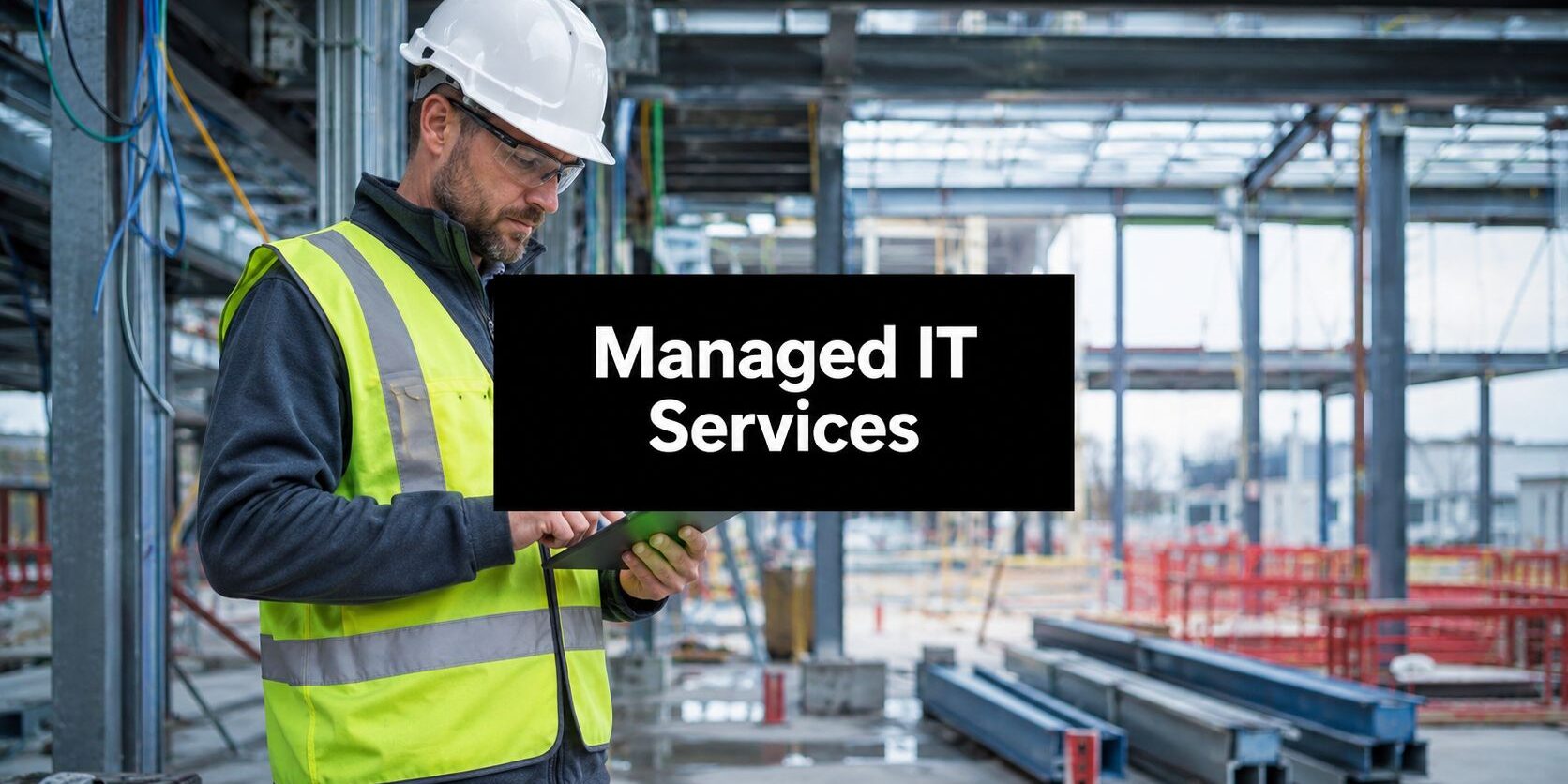
A project manager is standing in a job trailer outside Dallas, trying to pull the latest drawing set before concrete gets poured. The revision was saved back at the office. The tablet connects, then drops. The superintendent calls. A subcontractor waits. Nobody is sure which version is current, and a small IT problem starts turning into a scheduling problem, a cost problem, and eventually a client problem.
That scenario isn't unusual. For many construction firms, technology still gets treated like office overhead even though it now sits in the middle of estimating, scheduling, document control, field reporting, payroll, compliance, and client communication. Construction companies don't just need computers that work. They need systems that stay available across offices, trucks, trailers, and active job sites.
That's why managed IT services for construction matter. They aren't a fancy add-on. They're the operating framework that keeps crews connected, project data protected, and decisions moving when work happens in the field instead of behind a desk.
Table of Contents
- Building a Foundation for Modern Construction
- What Are Managed IT Services in Construction
- The Essential IT Service Bundle for Construction Firms
- Solving Construction's Costliest IT Headaches
- How to Choose the Right DFW Managed IT Partner
- Calculating the ROI of Your IT Investment
- Your Managed IT Services Questions Answered
Building a Foundation for Modern Construction
Construction companies already understand coordination. Crews, trades, suppliers, inspectors, owners, and internal staff all depend on timing and accuracy. Technology now belongs on that same coordination list. If file access fails, communication lags, or remote devices fall out of compliance, the project doesn't slow down because of IT alone. It slows down because operations stall.
A lot of firms still run with patched-together systems. The office has one setup. The field has another. Devices get added as jobs expand. Permissions pile up. Backup practices get assumed instead of verified. That approach works right up until a drawing can't be opened, a job trailer loses connectivity, or a stolen tablet exposes project and financial data.
The job site is now part of the network
The old assumption was simple. Real IT lived at headquarters, and the field just checked in. That model no longer fits construction. Field staff need current plans, schedules, RFIs, safety documents, and photos wherever they are, not after they drive back to the office.
That changes the conversation. Managed IT is no longer about keeping a few office desktops online. It's about building a stable operating environment across every location where work happens.
Construction firms should treat every active site as an extension of the business network, not as a temporary exception to it.
A smart first step is a formal IT infrastructure assessment for construction operations. It shows where the weak points sit before they turn into missed deadlines, finger-pointing, and rushed spending on emergency fixes.
Profitability depends on reliability
Construction margins don't leave much room for preventable disruption. The firms that run cleaner projects usually aren't just better builders. They're better at controlling information flow, limiting downtime, and making sure the field and office work from the same source of truth.
That's the foundation. Concrete and steel build the structure. Reliable systems keep the business behind the structure from leaking money every week.
What Are Managed IT Services in Construction
Managed IT services for construction are an ongoing operational partnership. A provider monitors, maintains, secures, and supports the company's technology before small problems turn into project interruptions. That's very different from the break-fix model, where someone gets called only after the system fails and the damage is already spreading through the schedule.
Construction needs that proactive model more than most industries because work is distributed. Staff move between office and field. Devices travel constantly. Large files have to stay available. Temporary locations still need secure connectivity. Compliance expectations don't disappear because the project team is working from a trailer instead of a corporate office.
Break-fix is a bad fit for construction
Break-fix support sounds cheaper because it delays spending until something breaks. In reality, it shifts cost into delays, confusion, and reactive decisions. When a file sync issue, login problem, or failed update affects estimating, project management, field reporting, or payroll, the business pays far more than the repair bill.
A managed service provider acts more like a technology foreman. The role isn't just answering tickets. It's keeping systems organized, patched, backed up, secured, and aligned with how crews work.
According to a 2026 construction technology survey on modernization barriers, approximately 66.7% of construction professionals said increased technology adoption is a top strategic priority, while 48% cited legacy IT infrastructure and security gaps as major barriers. That should get every owner's attention. Most firms know they need better technology. Nearly half are still being held back by the foundation underneath it.
What the service actually includes
For construction, managed IT usually covers a practical mix of support and planning:
- System monitoring: Watching servers, networks, endpoints, and remote connections so failures are caught early.
- Cybersecurity controls: Protecting field devices, user accounts, email, and shared files from common threats.
- User support: Helping office staff, project managers, and field teams resolve issues without long delays.
- Backup and recovery: Making sure drawings, financial records, and operational data can be restored when something goes wrong.
- Strategic planning: Standardizing how the business scales devices, connectivity, access, and software across new jobs.
A construction company that needs this kind of structure can review what IT support for construction firms in DFW should look like before committing to a provider.
Practical rule: If the company only talks to IT when something is broken, IT is already too late.
The Essential IT Service Bundle for Construction Firms
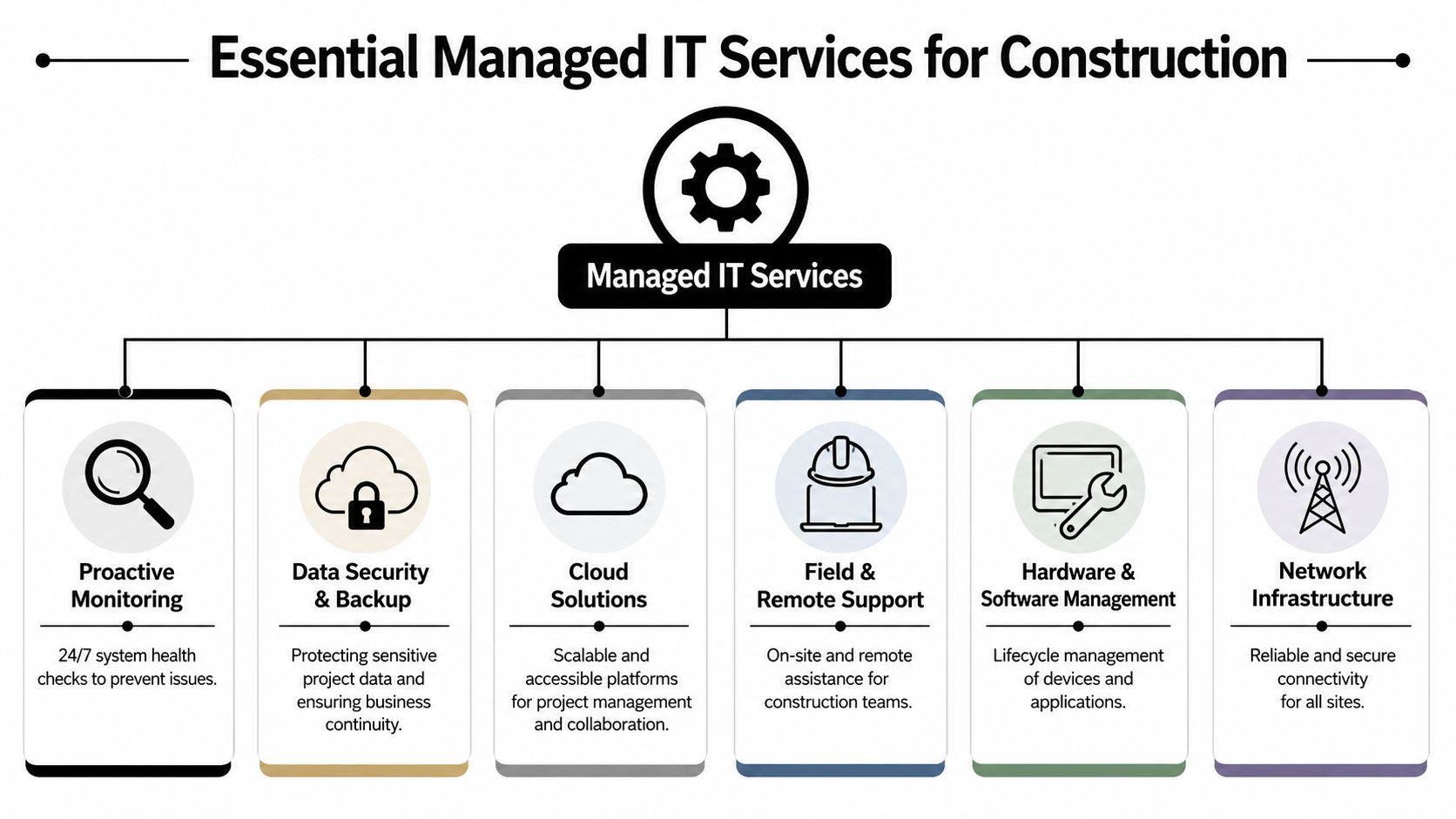
A solid managed IT plan for construction shouldn't be vague. It should cover the exact operational risks that show up between the office and the job site. That means connectivity, device control, backup, security monitoring, and support for heavy project files.
Current content often skips the biggest field issue. According to NAHB-related reporting on remote job site communication problems, over 60% of project delays in 2025 stemmed from communication breakdowns between field and office teams due to poor network access on remote job sites. That's not an abstract inconvenience. It's a direct hit to labor coordination and project timing.
Job site connectivity has to be engineered
Too many firms treat connectivity like a utility that should somehow work on its own. It won't. Temporary offices, mobile users, changing site layouts, and varying carrier performance make construction connectivity a design issue.
That means every site needs a repeatable setup standard. Internet access, secure wireless, device enrollment, user authentication, and failover planning should be established before the site gets busy. If those basics aren't in place, every field app and file system becomes unreliable no matter how good the software is.
The five service pillars that matter most
1. Job Site Connectivity and Security
This is the base layer. If field teams can't connect reliably, nothing above it matters. A managed provider should standardize secure access for trailers, mobile devices, and temporary workspaces so project data is reachable without exposing the company network.
2. Mobile Device Management
Phones and tablets are now production tools. They hold project documents, photos, approvals, and email. Mobile device management keeps those devices configured, updated, encrypted, and recoverable. If one gets lost on a site, the company shouldn't be hoping the screen lock is enough.
3. Cloud Backup and Disaster Recovery for Large Files
Construction files aren't lightweight. Drawings, models, closeout documents, and archived project records demand a backup strategy built for volume and recovery speed. Backup isn't just about retention. It's about restoring the right data fast enough that operations keep moving.
4. 24/7 Cybersecurity Monitoring
Construction firms handle contracts, financial information, employee data, and project documentation. That makes them attractive targets. Monitoring needs to look for suspicious logins, unusual device behavior, email threats, and access issues across both office and field environments.
5. Specialized Software Support
Construction workflows depend on software behaving consistently across users, roles, and locations. Permissions, updates, file sync, workstation performance, and printer or plotting issues all affect productivity. General IT support often misses these workflow details.
For firms trying to tighten day-to-day response and accountability, help desk support built around business operations should be part of the service bundle, not a separate afterthought.
The right bundle doesn't just keep systems running. It removes friction from field decisions, document control, and project execution.
A practical option in DFW is Technovation LLC, which provides managed services, cybersecurity, cloud backup, and strategic support for organizations that need stronger control across distributed operations.
Solving Construction's Costliest IT Headaches
Construction companies don't lose money because technology is imperfect. They lose money because unresolved IT issues ripple into labor waste, missed handoffs, slow approvals, and avoidable downtime.
According to construction downtime cost reporting, construction firms lose an average of 15–20% of annual revenue due to IT downtime, and field teams experience job delays of 3–5 days per incident when cloud-based project management tools fail. That number is big because the impact is operational, not technical. When field access goes down, people still stand around waiting.

When downtime hits the field
A failed sync, expired account, dead hotspot, or overloaded file environment can stop progress on a live site. The office may still be functioning, but the project team can't pull plans, upload documentation, or confirm revisions. That's where reactive IT falls apart. It fixes the symptom after the crew has already lost time.
Managed IT addresses that through layered controls:
- Proactive monitoring: Finds service issues early, before staff start calling from the field.
- Patch and device management: Reduces failures caused by outdated systems and inconsistent configurations.
- Reliable backup and recovery: Restores documents and operational systems without scrambling.
- Remote support processes: Resolves access and account problems fast, even when the user isn't in the office.
Security and compliance failures aren't office problems
Construction leaders sometimes treat cybersecurity as an administrative issue. It isn't. A compromised account can expose contracts, payment details, insurance documents, employee records, and project correspondence. A lost tablet can become a legal problem if access wasn't controlled correctly.
That's why construction firms should pay attention to broader cyber patterns. UTMStack's 2023 internet trend analysis is useful reading because it frames the kinds of security pain points that show up across modern business environments, including distributed workforces and growing attack surfaces.
Security controls should follow the user and device into the field. They can't stop at the office firewall.
The smartest move is to stop treating IT headaches as isolated annoyances. In construction, every recurring access failure, every unmanaged mobile device, and every weak backup process is a profitability issue wearing a technical disguise.
How to Choose the Right DFW Managed IT Partner
Most providers can talk about support tickets, antivirus, and cloud services. That isn't enough for construction. A DFW construction firm needs a partner that understands field conditions, temporary locations, heavy file workflows, and the pressure of keeping projects moving without excuses.
The wrong provider will sound polished in meetings and struggle the first time a superintendent needs access from a remote site, a device goes missing, or a project team can't open current files before a deadline. The right provider will ask hard operational questions early and build around how the company operates.
Questions that expose a weak provider fast
A serious evaluation should include questions like these:
- How do they support remote job sites? The answer should include secure connectivity, mobile users, and temporary environments.
- Can they support large project files? Construction firms need a provider that understands file access, sync reliability, backup, and restore priorities.
- What's their approach to mobile device control? Lost phones and tablets should be manageable, not chaotic.
- How do they handle cybersecurity and compliance? The provider should explain controls clearly, not hide behind jargon.
- Can they scale with new projects and new users? Growth shouldn't trigger a rebuild every time.
For firms comparing options, this managed service provider selection guide gives a useful decision framework.
| Evaluation Criteria | What to Look For | Why It Matters |
|---|---|---|
| IT support model | Proactive monitoring, documented response process, strategic planning | Construction firms need prevention, not just repair |
| Construction workflow fit | Familiarity with field access, file-heavy environments, and mobile teams | Generic office support misses job site realities |
| Local presence in DFW | Ability to support offices and job locations across the metroplex | Faster response matters when projects are live |
| Security discipline | Clear standards for access control, endpoint protection, backup, and recovery | A weak security posture creates financial and legal exposure |
| Scalability | Repeatable onboarding for users, devices, and new sites | Growth shouldn't create operational chaos |
| Communication style | Plain language, accountability, and regular reporting | Owners need clarity, not technical fog |
A construction owner should also look for business maturity. Technovation has 25 years of experience in the DFW market and works with regulated and security-conscious industries, which matters because construction firms increasingly face the same expectations around data protection, accountability, and uptime that other high-risk sectors already deal with.
A provider that doesn't ask about the field, file access, and device control doesn't understand construction well enough to support it.
Calculating the ROI of Your IT Investment
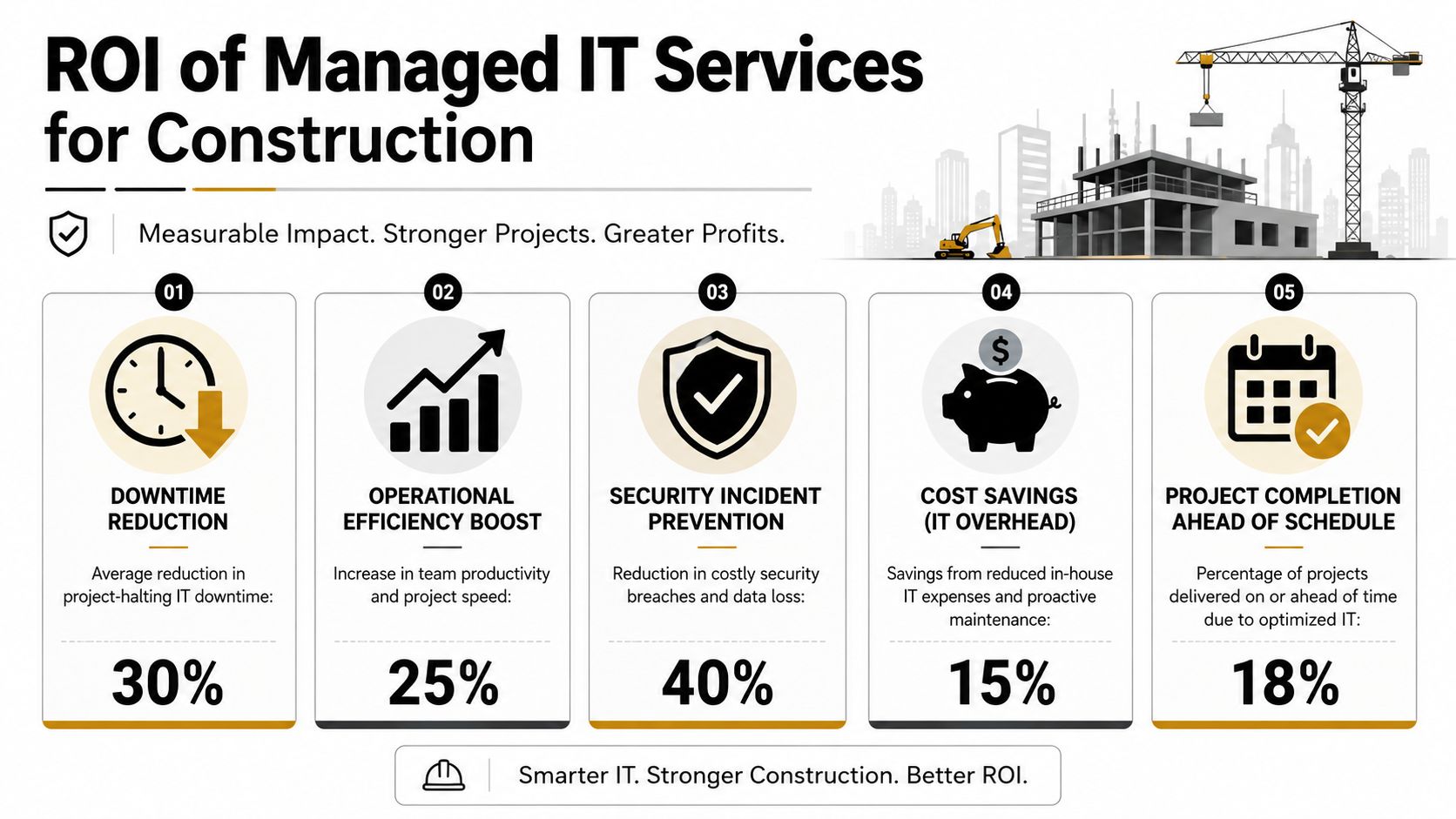
Managed IT gets dismissed as overhead when owners only look at the monthly service fee. That's a narrow view. The real question is what the company spends today on downtime, delays, inconsistent support, recovery failures, and preventable risk.
The broader market points in one direction. According to managed services market projections, the global managed services market is projected to grow at a CAGR of 8.1% through 2028, and 44.9% of providers prioritize disaster recovery. Construction should pay attention to that second number. Disaster recovery matters when a company depends on uninterrupted access to large project files and live operational systems.
Where the return actually shows up
The return usually appears in three places.
First, downtime costs fall. Fewer service failures mean fewer stalled crews, fewer rushed workarounds, and fewer office staff pulled off productive work to chase technical issues.
Second, project execution gets cleaner. When field teams can access current documents, upload updates, and communicate without friction, decisions happen faster and avoidable confusion drops.
Third, risk becomes manageable. Security incidents, failed backups, and poor access control are expensive even before they become public problems. Managed IT reduces the odds that one bad event turns into a financial mess.
A useful way to evaluate return is to track practical measures instead of abstract IT metrics:
- Operational impact: How often do site teams lose access to needed data?
- Recovery readiness: How quickly can critical files and systems be restored?
- Support efficiency: How long do users stay stuck before getting help?
- Risk reduction: Are devices, accounts, and backup processes controlled consistently?
Owners shouldn't ask whether managed IT costs money. They should ask what unmanaged IT is already costing the business every month.
That's the shift. Managed IT isn't a support line item. It's a control system for productivity, resilience, and margin protection.
Your Managed IT Services Questions Answered
Construction owners usually have a few practical questions before moving forward. They should. The right provider should answer them plainly.
How long does onboarding take
It depends on the number of users, devices, locations, and the condition of the current environment. A capable provider won't rush the assessment. It should document systems, review access, verify backups, standardize devices, and map support priorities before making major changes.
Will managed IT work with existing construction software
Yes, if the provider is doing the job correctly. The goal isn't to force a company to replace working software. It's to support the environment around it so users can access files, stay updated, and avoid performance and permission issues that slow work down.
What does 24/7 monitoring actually mean for a construction firm
It means someone is watching the health of core systems, connections, endpoints, and alerts even when the office is closed. According to construction IT support performance benchmarks, managed IT services for construction can deliver 99.8% network uptime and sub-15-minute response times for critical issues, while preventing 30-45% of project delays caused by miscommunication. For a construction business, that means fewer surprises and faster intervention when something affects active work.
Does a firm need fully managed or co-managed support
That depends on internal staff capacity. Some firms want an outside provider to handle the entire environment. Others need a partner to strengthen security, backup, compliance, and field support while internal staff keep ownership of day-to-day administration. The right answer is the one that closes gaps without creating overlap and confusion.
Construction companies don't need more complexity. They need stable systems, clear accountability, and support that understands the field as well as the office.
A construction firm that's tired of reactive fixes and unreliable field access should talk with Technovation LLC. The company provides managed IT, cybersecurity, cloud backup, risk mitigation, and strategic support for DFW businesses that need stronger uptime, better protection, and a more disciplined technology foundation. A free security audit or IT health check is a practical next step for any owner who wants to find the weak points before the next project delay does.