
A lot of business owners reach the point where their current system is holding them back. The office has outgrown an old database. Staff need secure remote access. A clinic wants a newer platform that supports compliance better. A law firm is tired of digging through disconnected records. The software change gets the attention, but the project is the data.
That’s why a data migration procedure should be treated as a business initiative, not a one-night IT task. The records being moved often drive billing, reporting, customer service, case work, scheduling, and audit readiness. If the move is rushed, the new system may go live on time and still fail the business in practice.
The good news is that a migration is manageable when it follows a clear process. The historical shift toward automated ETL-style pipelines helped standardize that process, and modern guidance consistently frames migration as staged work: assess, map, transform, test, and validate so structure, governance, and integrity survive the move, not just the raw records (data migration process guidance). For business owners who want a simpler outside perspective, this overview of data migration for non-technical founders is a useful companion to the planning work described below.
Table of Contents
- Why Your Next Big Move Involves Your Data
- Your Pre-Migration Blueprint and Strategy
- Navigating the Live Migration Phase
- Verifying Success and Creating a Rollback Plan
- Defining Roles and Choosing Your Tools
- Beyond the Migration Your Path to a Smarter Business
Why Your Next Big Move Involves Your Data
When a business replaces a core system, the conversation usually starts with features. Better workflows. Easier reporting. Stronger security. Better access for remote staff. Those are valid reasons to change platforms, but none of them matter if the underlying data arrives incomplete, mislabeled, or unusable.
That’s why data migration is usually tied to a bigger business decision. A practice adopts a new management platform. A finance team moves away from a legacy environment. A growing company shifts to a secure cloud model. In each case, the move is really about continuity. Staff still need to do their jobs on Monday morning. Clients still expect answers. Regulators still expect records.
The migration is really a business handoff
A clean migration protects more than files. It preserves relationships between records, permissions, document histories, reporting categories, and operational trust. If customer IDs no longer match, if matter records lose attachments, or if billing codes land in the wrong fields, the damage shows up in operations first.
A successful migration doesn’t feel dramatic to the business. Staff log in, do their work, and trust what they see.
For regulated small and mid-sized businesses, that trust is tied to compliance as much as convenience. Historical guidance around migration has moved away from manual database transfers and toward repeatable workflows because the objective isn’t just to copy information. It’s to preserve integrity across systems while keeping the project controlled and auditable.
Why owners should care early
Owners often get involved too late, usually when someone asks for emergency approvals or more budget. The stronger approach is to get involved at the start and ask practical questions:
- What business problem is driving the move
- Which teams are affected first
- What data is mission-critical
- How will success be proven after go-live
Those questions turn a stressful technical event into a planned operational change. They also reduce one of the biggest sources of cost creep: moving data no one needs.
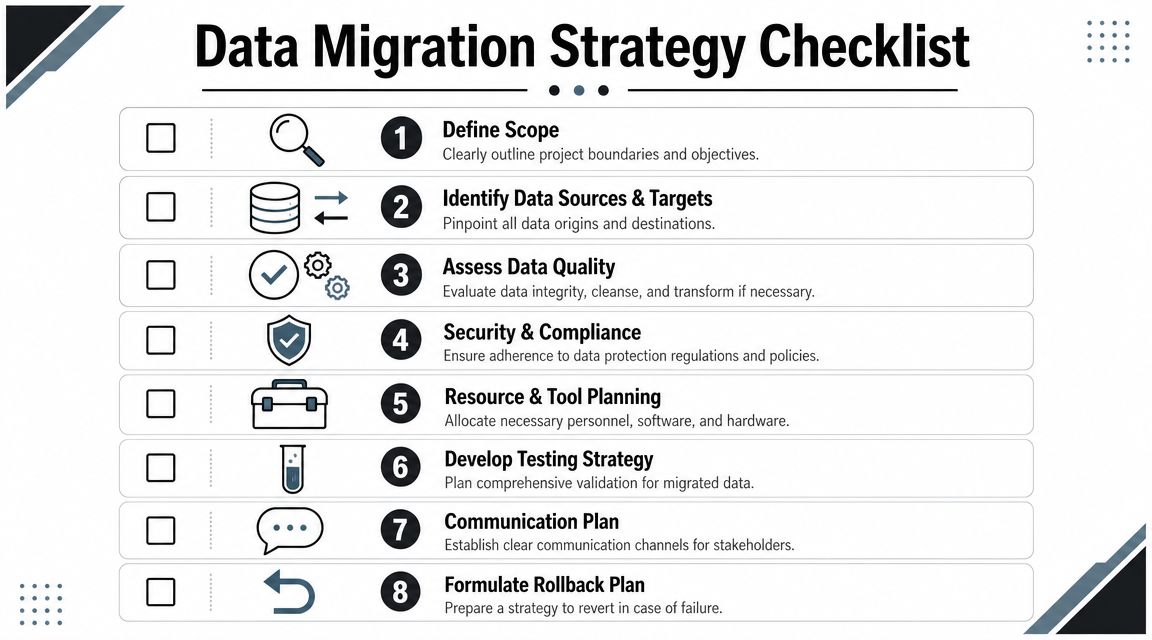
Your Pre-Migration Blueprint and Strategy
A migration usually goes off course during planning, not during transfer. The warning signs show up early. One department wants every historical record moved. Another wants only current files. Compliance wants retention rules preserved. Finance wants a firm budget. If those conflicts stay unresolved, the technical team ends up guessing, and guessing gets expensive.
Start with scope, not software
The first decision is scope. Define what is moving, what is staying, who needs access on day one, and which records carry legal, financial, or operational risk if they arrive incomplete or incorrect.
For regulated SMBs, this is a business decision before it becomes a technical one. A patient record, client file, employee document, invoice history, or audit trail does not have the same value solely because it exists in the old system. It has value because the business may need it to serve customers, defend a dispute, pass an audit, or keep work moving without interruption.
A scoping workshop should answer four practical questions:
-
What data supports current operations
These are the records staff need immediately to do their jobs. -
What data supports reference and history
These records may not be used daily, but they matter for renewals, disputes, reporting, and context. -
What data must be retained for compliance
This includes records tied to retention schedules, legal holds, audits, privacy obligations, or industry rules. -
What data can be retired or archived
Duplicate files, outdated fields, abandoned records, and stale attachments increase migration cost without improving business outcomes.
The businesses that control cost early are the ones that refuse to treat every old record as equally important.
Decide what deserves to move
Full migration is not always the right answer. For many SMBs, the better plan is a controlled split between live production data and archived history. That lowers cleanup effort, shortens testing, and reduces the amount of sensitive information exposed during the project.
This matters even more in regulated environments. If the business only needs active customer records in the new system, older closed files may belong in a searchable archive with documented retention controls instead of the production platform. The result is usually simpler validation and fewer surprises after cutover.
Good scope reduction often looks like this:
- Active records move into the new environment for day-to-day work.
- Closed matters, completed projects, or aged transactions stay in archive if they still need to be searchable.
- Duplicate records are removed before mapping starts.
- Unused custom fields are dropped when they no longer serve reporting, billing, or compliance needs.
Owners often worry that archiving sounds like losing data. It is not. The distinction lies in whether the business needs that information operationally, historically, or only for retention.
A useful outside checklist for structured planning appears in this SharePoint migration planning guide, especially for businesses trying to organize scope, stakeholders, and dependencies before execution.
Map, clean, and protect before transfer
Once scope is approved, the next job is mapping. Every important field needs a defined destination, a conversion rule, a business owner, and a way to confirm the result. That includes identifiers, dates, statuses, notes, file attachments, permissions, and links between related records.
Regulated SMB projects frequently become more complicated. A field mismatch is not just a formatting issue if it affects billing history, client matter ownership, document retention category, or access permissions. Small mapping decisions can create larger business problems later.
A practical blueprint should cover these items:
-
Data cleanup
Remove duplicates, standardize naming conventions, and decide how incomplete or conflicting records will be handled. -
Business rules
Set rules for missing target fields, conflicting formats, merged values, and records that should be flagged for manual review. -
Backup protection
Confirm recovery options before any cutover work starts. For many SMBs, that means checking whether existing cloud backup protections for small businesses support rollback, retention, and secure recovery. -
Budget and approval controls
Set milestones, sign-off points, and decision owners so scope changes do not expand cost and risk.
Planning does not remove complexity. It puts the hard decisions in front of the business early, where they can be reviewed, documented, and controlled.
Navigating the Live Migration Phase
The live migration phase feels tense only when the groundwork is weak. When planning has been done properly, execution looks less like a gamble and more like a managed operational event with checklists, schedules, and decision points.

Two ways the move usually happens
Most businesses choose between two broad approaches.
The first is a big bang migration. Everything moves in a defined window, often after hours or over a weekend. This is like moving offices in one trip. It can be faster and simpler to coordinate, but it demands confidence because the business is betting on a successful cutover in a short window.
The second is a trickle migration. Data moves in phases while old and new systems operate side by side for a period. This is more like moving department by department. It can lower immediate disruption, but it adds complexity because teams may work across both environments until the transition is complete.
Some businesses prefer speed. Others prefer optionality. The right approach depends on downtime tolerance, workflow complexity, and how easily staff can operate during a transition period.
What a calm migration weekend looks like
A well-run migration day is quiet on purpose. Staff know what is frozen, when systems will be unavailable, who to contact, and what to expect next. The team handling the move follows a runbook instead of improvising.
That runbook usually includes:
-
System freeze timing
Define the moment when users stop entering new data in the source system. -
Backup confirmation
Confirm recoverable copies exist before transfer begins. -
Secure transfer controls
Protect sensitive information in transit and restrict access to authorized personnel only. -
Checkpoint communication
Send updates when extraction finishes, when loading begins, when validation starts, and when users can log in. -
Issue triage
Separate minor formatting problems from true stop-ship issues that affect billing, reporting, or compliance.
The most practical advice during execution is to protect focus. Too many migrations get derailed because people start making changes in the middle of the move. New requests, extra reports, extra fields, and “quick fixes” create risk at exactly the wrong time.
Staff communication matters just as much as technical execution. A receptionist, case manager, scheduler, or bookkeeper doesn’t need a lecture about transformation logic. They need to know whether they can work, what changed, and who approves the final return to normal operations.
Verifying Success and Creating a Rollback Plan
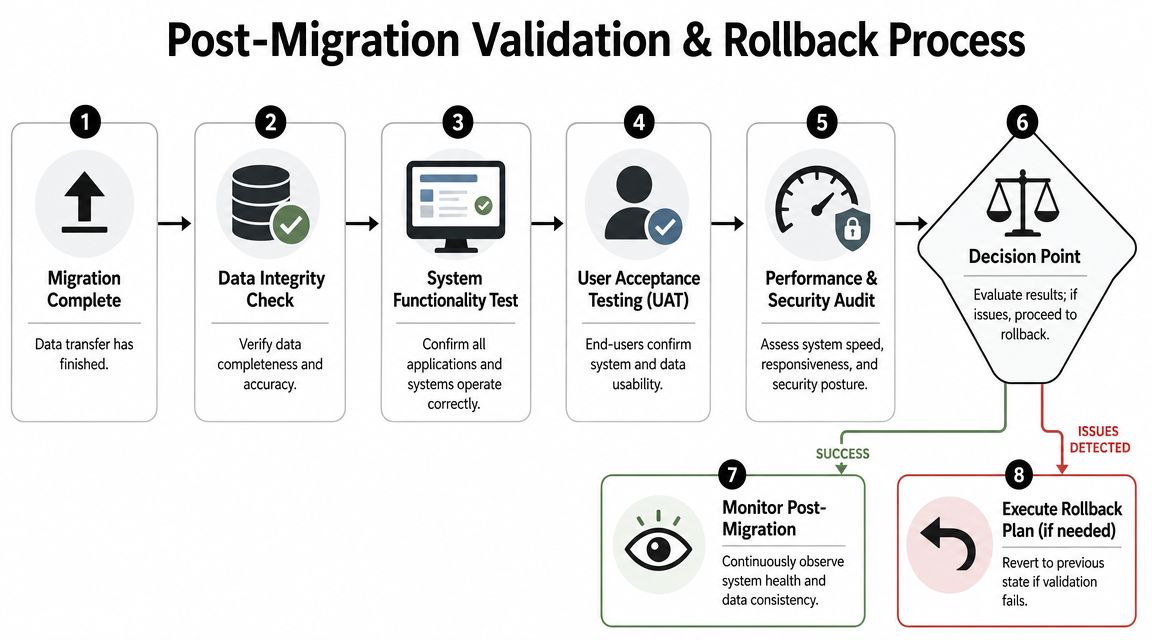
Monday morning is where a migration proves itself. Staff log in, run reports, process invoices, pull client histories, and expect the business to work. If finance cannot reconcile, if a regulated record cannot be traced, or if the wrong employee can view restricted information, the migration has not succeeded, even if every file technically transferred.
For regulated SMBs, the business question is simple. Can you prove the new system is accurate, auditable, and ready for daily operations after the old system is shut down? Post-migration validation matters because many failures show up after cutover, in reporting, billing, permissions, and record relationships, not during the copy itself (post-migration verification perspective).
Why record counts are not enough
Record counts are a starting point, not a sign-off standard. Matching totals can still hide serious business problems.
Common examples include:
- A financial report no longer matches source transactions.
- A patient, customer, or case record exists, but attached documents are missing.
- Billing screens open, but rates, tax settings, or service codes mapped incorrectly.
- Historical notes transferred, but timestamps, ownership, or status values changed.
- User accounts came over, but permissions expose data to the wrong staff.
If users cannot bill, reconcile, search, report, or defend records during an audit, the job is incomplete.
What validation should include
Strong validation answers two separate questions. First, did the data arrive correctly? Second, can the business operate without creating compliance or service problems? Treating those as separate checks keeps teams from signing off too early.
Technical checks
These checks confirm the migration loaded data into the right place and flagged exceptions that need review.
- Completeness checks compare expected loads to actual results.
- Field validation confirms required values, formats, and transformed data.
- Relationship checks confirm linked records still connect properly.
- Exception review identifies rejected rows, partial loads, and records needing manual decisions.
Operational checks
These checks confirm the system supports real work, not just a successful import log.
- Billing or invoicing tests confirm pricing, codes, outputs, and downstream posting.
- Reporting tests confirm management, tax, and compliance reports still produce trusted numbers.
- Workflow tests confirm staff can complete day-to-day tasks from start to finish.
- Permission reviews confirm access matches job roles and privacy requirements.
User acceptance testing
At this stage, department leaders earn their place in the project. They should test like users, not like technicians. Can front-desk staff complete intake? Can accounting close a cycle? Can a manager find an old record and export it for an audit request? Those answers matter more than a clean technical log.
If you are relying on outside help for sign-off discipline and escalation paths, it helps to understand how to choose a managed service provider before the project starts. Validation gets weaker when nobody is clearly accountable for business acceptance.
Rollback is part of risk control
A rollback plan protects the business from a bad go-live decision. It reduces pressure on the team because leadership does not have to choose between forcing a broken launch and making up a recovery process under stress.
The plan should define the exact conditions that trigger rollback, who can approve that decision, how the prior environment is restored, and what happens to any data entered during testing or limited production use.
| Decision Area | What should be defined |
|---|---|
| Trigger conditions | Problems serious enough to stop go-live, such as failed business-critical workflows, inaccurate reports, or compliance-impacting errors |
| Authority | The person or group authorized to approve rollback without delay |
| Recovery steps | How the prior environment is restored and how interim data is handled |
| Communication | What staff, customers, vendors, and stakeholders are told if cutover is reversed |
Good rollback planning also forces honest decision-making. If the business cannot restore the old system cleanly, leadership needs to know that before go-live, not after a failed launch.
Keep a defined stabilization period after go-live. Some issues only appear during payroll, month-end close, customer invoicing, records requests, or audit preparation. Catching those problems in the first days is far cheaper than discovering them weeks later, after staff have already built new workarounds around bad data.
Defining Roles and Choosing Your Tools
Many SMB migration projects stall because nobody is sure who owns the decisions. IT expects leadership to define priorities. Leadership assumes IT will sort it out. Department heads get involved only after something looks wrong. A reliable data migration procedure assigns responsibility early and makes every group accountable for a different kind of success.
Who owns what during the project
The table below keeps ownership clear without creating a complicated project chart.
| Role | Primary Responsibility |
|---|---|
| Business Owner or Executive Sponsor | Sets business goals, approves budget, resolves priority conflicts, and signs off on go-live readiness |
| Department Lead | Identifies critical records, validates workflows, and confirms the migrated data supports real daily work |
| Compliance or Risk Stakeholder | Reviews retention, access, auditability, and policy requirements for regulated data |
| Internal IT Lead | Coordinates technical dependencies, access, infrastructure readiness, and internal communications |
| External IT Partner | Manages migration execution, mapping support, testing discipline, issue resolution, and rollback readiness |
The owner shouldn’t be choosing field mappings line by line. The owner should be deciding what the business can’t afford to get wrong.
How to think about migration tools
Businesses usually have three broad options for execution, and each comes with trade-offs.
Manual scripting
This can work for narrow, well-understood projects handled by experienced technical staff. It offers flexibility, but it also puts more risk on documentation, testing discipline, and individual expertise. For SMBs without a deep internal bench, it can become fragile fast.
Automated migration platforms
These are better for repeatable workflows, structured mapping, and easier validation. They can reduce manual handling and improve consistency, but they still require strong planning. Software doesn’t solve bad scope decisions or missing business rules.
Managed migration support
This approach is often the best fit when the data affects compliance, billing, legal records, or operational continuity. It combines process control, technical execution, and business validation support. For many owners, the value isn’t just the toolset. It’s having a team that already knows how to avoid avoidable mistakes.
A useful way to evaluate outside support is to look at the provider’s broader operating model, not just the migration offer. This guide on how to choose a managed service provider is helpful because it frames the decision around accountability, responsiveness, and fit rather than generic promises.
Tool choice matters, but not as much as role clarity, testing discipline, and decision speed when issues appear.
Beyond the Migration Your Path to a Smarter Business
A well-run migration does more than replace one system with another. It gives the business cleaner records, clearer ownership, better reporting confidence, and a more resilient operating environment. For regulated companies, it also creates a stronger foundation for compliance because data is easier to locate, validate, protect, and govern.
The most important shift is mindset. Migration shouldn’t be treated as a one-time disruption that ends on go-live day. It should be treated as the first disciplined step in a broader effort to improve how the business manages information. That includes backup maturity, access controls, security monitoring, retention policy enforcement, and better operational visibility.
Three ideas usually separate strong outcomes from disappointing ones:
-
Plan the business outcome first
Decide what the new environment must enable, then design the migration around that outcome. -
Reduce unnecessary movement
Move what the business needs, archive what it must keep, and retire what no longer serves a purpose. -
Prove success in operations
Validate through real workflows, real users, and defined rollback rules, not just technical completion.
Businesses that handle migration this way usually come out with more than a new platform. They come out with better discipline around data itself. That pays off long after the cutover weekend is over.
If a business in North Texas is preparing for a system change, cloud move, compliance upgrade, or legacy platform replacement, Technovation LLC can help assess the current environment and map the safest next step. Their team supports DFW organizations with managed IT, cybersecurity, compliance-focused guidance, and practical project planning that keeps technology aligned with business risk. A free IT health check or security audit is a smart way to identify migration risks before they become expensive problems.