Vulnerability scanning is an automated process for finding known security weaknesses, and by 2022 roughly 92% of organizations had implemented automated vulnerability scanning as part of their security posture, with over 78% of U.S. midmarket enterprises scanning at least monthly and nearly 41% scanning weekly or more often according to Palo Alto Networks. For a small business, that means scanning isn't an advanced extra. It's basic maintenance, like checking every door and window in an office before locking up for the night.
A business owner in Dallas Fort Worth is usually dealing with the same reality. Staff use laptops in and out of the office, cloud apps pile up, a line-of-business system lags on updates, and nobody has spare time to manually inspect every device. That's where vulnerability scanning matters. It works like a security guard systematically checking the digital office for outdated locks, exposed entry points, and known weak spots before someone else finds them first.
This isn't about movie-style hacking. It's about routine business discipline. A scan helps uncover missing updates, weak passwords, open services, and poor configurations that raise risk, increase compliance headaches, and make incidents more expensive to clean up. Business owners trying to get smarter about third-party exposure should also spend time understanding vendor vulnerabilities, because risk doesn't stop at the office firewall. For companies that aren't sure where their weak spots are, an IT infrastructure assessment is often the practical first move.
Table of Contents
- Introduction Your Business's Digital Security Checkup
- What a Vulnerability Scan Actually Uncovers
- How the Vulnerability Scanning Process Works
- Scanning vs Penetration Testing What Is the Difference
- Building a Practical Scanning Strategy for Your Business
- How Technovation Turns Scan Data into Real Security
Introduction Your Business's Digital Security Checkup
Most small businesses already understand physical security. They lock the front door, change bad locks, and don't leave side entrances open. What is vulnerability scanning in business terms? It's that same habit applied to computers, servers, cloud systems, and connected devices.
A vulnerability scan checks for known weaknesses such as missing software updates, weak passwords, exposed services, and systems configured the wrong way. It does this automatically, at scale, and on a repeatable schedule. That matters because nobody on a busy team is going to manually inspect every machine with the same consistency every week.
Practical rule: If a business depends on email, cloud apps, remote access, or shared files, it already has enough digital doors and windows to justify routine scanning.
The point isn't perfection. The point is visibility. A business can't fix what it can't see, and hidden weaknesses tend to stay hidden until an outage, compliance review, or security incident forces attention.
Business owners often ask whether this is only for large companies. It isn't. Smaller firms usually have less in-house security capacity, fewer spare hands, and less room for downtime. That makes automated checks more valuable, not less.
A scan also brings discipline to decision-making. Instead of guessing whether systems are “probably fine,” leadership gets an evidence-based list of what needs attention. That's a much better way to manage cost, risk, and compliance than waiting for a problem to become public, urgent, and expensive.
What a Vulnerability Scan Actually Uncovers
A scan doesn't magically discover every possible security issue. It's built to find known weaknesses in systems by comparing what's running in the environment against known vulnerability data. Splunk explains that vulnerability scanning is the automated process of identifying known security weaknesses by comparing system configurations against databases like the NIST National Vulnerability Database, and that these databases use CVSS severity scores, typically 0 to 10, to help teams prioritize what to fix first.
Known flaws with known fixes
That's the part many business owners need to understand. A vulnerability scan is excellent at finding the digital equivalent of a lock model that's already been recalled. If a server, laptop, or application is running a version tied to a known flaw, the scanner can flag it.
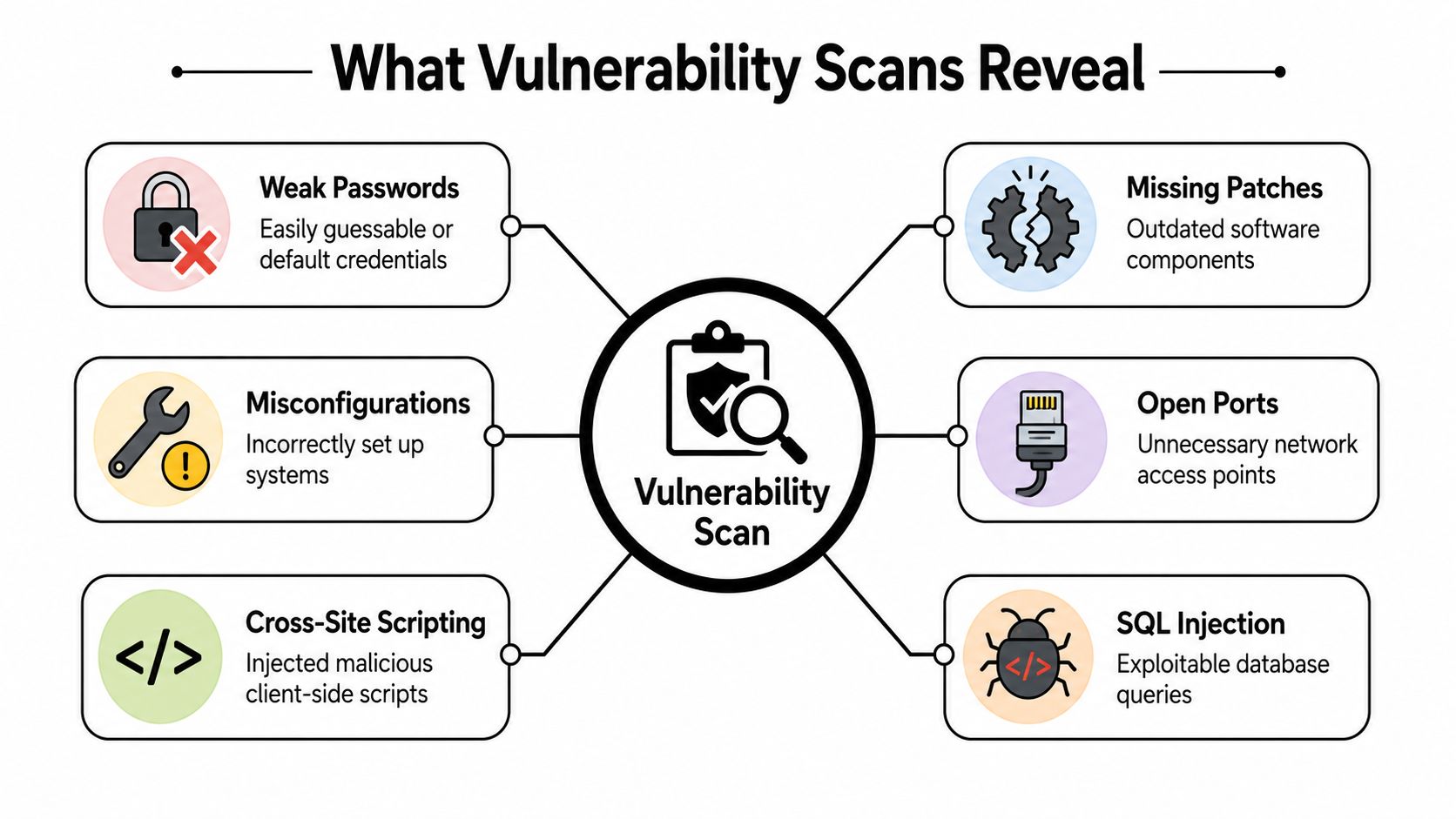
Common findings usually fall into a handful of categories:
- Outdated software: A system is running an older version with a published weakness.
- Missing patches: The fix exists, but the business hasn't installed it yet.
- Weak or default credentials: Accounts still rely on easy-to-guess or unchanged login details.
- Misconfigurations: Security settings, permissions, or access rules were set up poorly.
- Unnecessary exposure: Services are reachable that don't need to be open to the network.
For an SMB, the value is simple. The scan translates vague technical risk into a list the business can act on. Teams that also need to strengthen the devices employees use every day should review this guide to business endpoint protection, because endpoints are usually where weak passwords, missing patches, and poor configurations pile up first.
The four-stage workflow
A practical way to view the process is as a workflow, not a mystery box.
Discovery
The scanner identifies what systems are present. If an asset isn't known, it won't be checked.Scanning
It inspects those systems for visible traits such as software versions, running services, and configuration details.Analysis
It matches those traits to known vulnerabilities and assigns severity.Reporting
It produces findings so the business can decide what gets fixed now, what gets scheduled, and what gets monitored.
A report full of technical terms isn't the real output. The real output is a repair list tied to business risk.
That's why CVSS matters. A 0 to 10 score gives decision-makers a plain way to rank findings. It's not perfect, but it's far better than treating every issue as equally urgent.
How the Vulnerability Scanning Process Works
Most business owners don't need a deep engineering lesson. They do need to know enough to ask the right questions and avoid buying a report that nobody acts on.
Secureframe notes that modern scanners perform full-stack enumeration, starting with asset discovery, then port scanning to detect services, and finally fingerprinting applications to correlate against vulnerability databases. It also points out why this matters. An accurate, continuously updated asset inventory is foundational to vulnerability management, because anything that isn't enumerated becomes a blind spot.
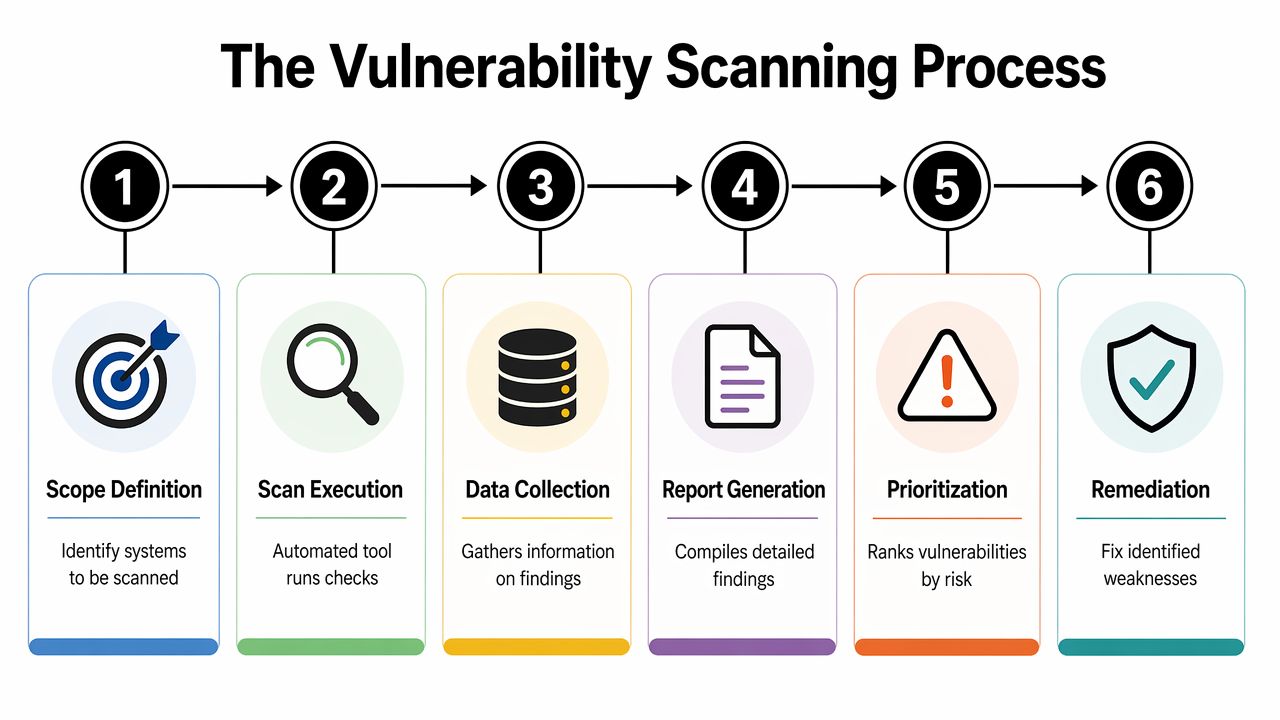
What the scanner does step by step
A solid scanning process usually follows a sequence like this:
| Step | What happens | Why it matters |
|---|---|---|
| Scope definition | The business decides which systems, locations, and assets are in scope | Prevents blind spots and confusion |
| Asset discovery | The scanner maps devices and reachable systems | Builds the inventory |
| Port and service review | The scanner checks what's listening and exposed | Finds unnecessary access points |
| Fingerprinting | It identifies operating systems and application versions | Ties real assets to known flaws |
| Correlation and reporting | Findings are matched to known vulnerability data and ranked | Creates an action list |
The business takeaway is straightforward. If scanning starts without a clear scope, the report will be incomplete. If there's no inventory, the business doesn't know whether every device was checked. If nobody owns remediation, the scan becomes paperwork.
Some firms evaluating scanning programs also want a sense of how managed platforms package these capabilities. Stackingo's ManageEngine offerings provide a useful example of how vulnerability management features are commonly grouped around discovery, prioritization, and remediation workflows.
Scanning and pen testing are not the same job
Confusion often results in inefficient spending decisions. A vulnerability scan checks for doors that are not secured. A penetration test tries to use those doors, force side entrances, and see how far an attacker could get.
Scanning is broad and repeatable. It's the routine inspection. Pen testing is deeper and more selective. It's a specialist exercise designed to validate real-world exploit paths.
Businesses that skip routine scanning and jump straight to occasional deep testing usually learn less than they expect, because the basics weren't handled first.
For most SMBs, regular scanning should come first. It gives leadership a durable process. Then, when the basics are under control, deeper testing makes more sense.
Scanning vs Penetration Testing What Is the Difference
A lot of owners hear both terms and assume they mean the same thing. They don't. They solve different problems, and treating them as interchangeable usually leads to wasted budget.
This NIST-aligned reference notes that vulnerability scanning tools commonly rely on the CVE naming convention and OVAL to identify and test for known weaknesses through repeatable, structured checks of patch levels, services, and configurations. That repeatability is the key distinction. Scanning is built for consistency.
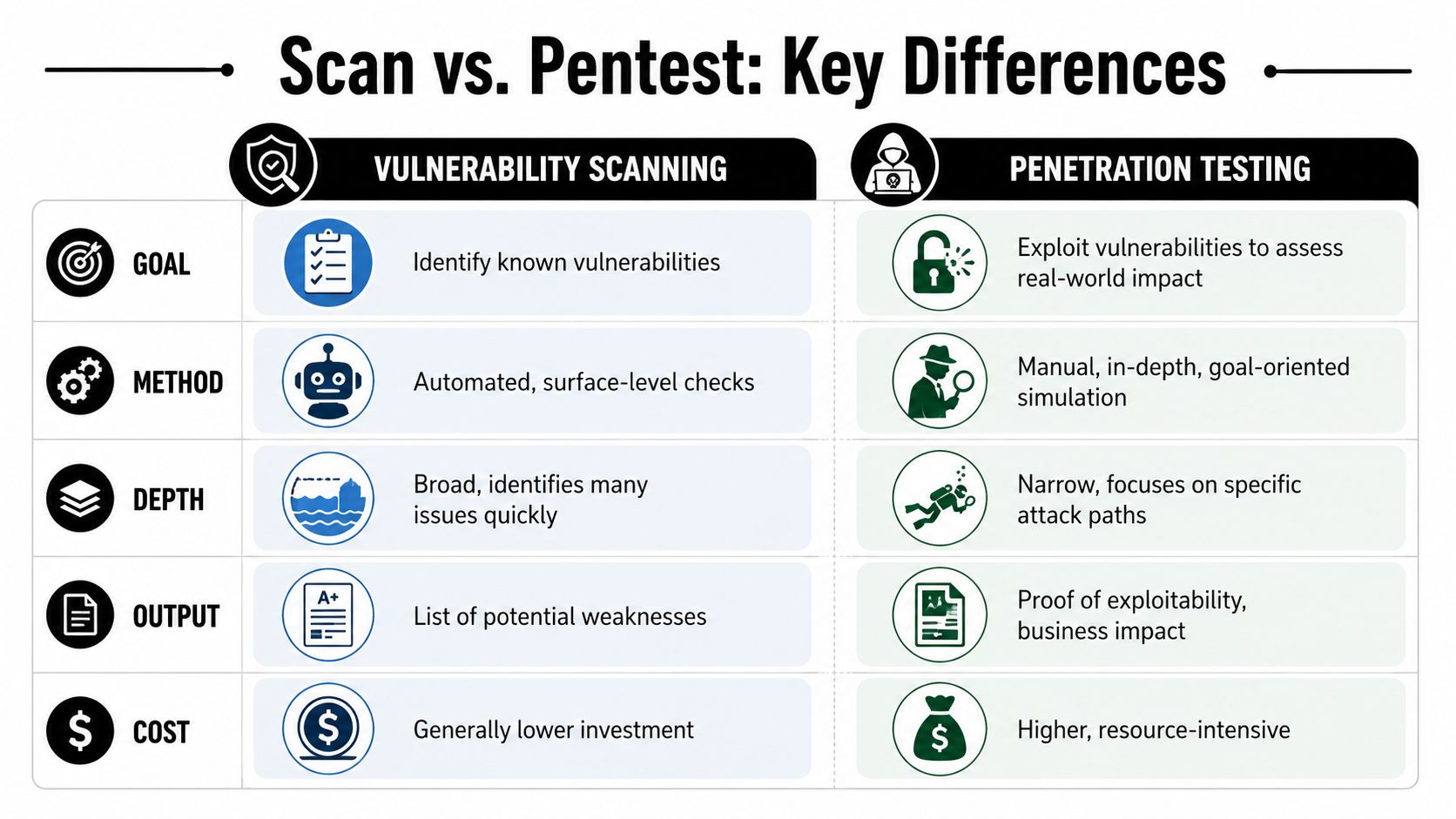
A simple business comparison
| Question | Vulnerability scanning | Penetration testing |
|---|---|---|
| Main goal | Identify known weaknesses | Prove how weaknesses could be exploited |
| Method | Automated checks | Manual, expert-driven testing |
| Coverage style | Broad coverage across many assets | Deeper focus on selected systems or attack paths |
| Output | Prioritized findings list | Demonstrated exploitability and business impact |
| Best use | Ongoing hygiene and compliance support | Periodic validation of real attack exposure |
Business owners exploring a deeper offensive-security exercise can review pen testing services for a practical example of how that category is typically framed. For a side-by-side explanation suited for business decision-making, this comparison of vulnerability assessments and penetration testing is useful.
What an SMB should actually do
An SMB shouldn't debate scanning versus pen testing as if only one deserves budget. The smarter question is which comes first and how often each should happen.
A sensible rule set looks like this:
- Start with scanning: It builds visibility and catches the common issues that create avoidable risk.
- Use pen testing selectively: It's better for validating exposure on critical systems, sensitive data paths, or major environment changes.
- Fix findings before buying more testing: There's no value in paying for depth while basic patching and configuration problems remain open.
A penetration test can show how bad things could get. A vulnerability scan helps stop the easy failures from staying open month after month.
That's the practical difference. One is a recurring control. The other is a targeted exercise.
Building a Practical Scanning Strategy for Your Business
The hard part isn't understanding what is vulnerability scanning. The hard part is turning it into a business routine that gets results.
According to Palo Alto Networks, roughly 92% of organizations had implemented automated vulnerability scanning by 2022. In regulated sectors, over 78% of U.S. midmarket enterprises reported scanning at least monthly, while nearly 41% scanned weekly or more often. That tells business owners something important. The market has already decided this is a baseline control.

Choose a cadence and stick to it
The right frequency depends on the business, its compliance obligations, and how often systems change. But sporadic scanning doesn't work well. A company that scans only when someone remembers is choosing inconsistency.
A practical approach for most SMBs is:
- Scan on a recurring schedule: Monthly is a common baseline for many businesses.
- Increase frequency for change-heavy environments: If systems change often, the scanning cadence should keep up.
- Include key internal and external assets: Public-facing systems matter, but internal devices matter too.
This isn't just a security issue. It's an operations issue. If updates, remote access tools, and cloud-connected endpoints change every week, yesterday's clean report doesn't mean much today.
Treat the report like a work queue
The report shouldn't become a PDF graveyard. It should feed a fix process.
A good business workflow looks like this:
Sort by severity first
High-severity findings deserve immediate review because they usually represent the fastest path to preventable trouble.Apply business context
A weakness on a critical server matters differently than the same weakness on an isolated test machine.Assign ownership
Every finding needs a person or provider responsible for action.Verify remediation
After patches or configuration changes, scan again and confirm the issue is closed.
The scan isn't the finish line. Remediation is.
This is also where many SMBs stall. They buy a scanner or outsource a scan, then nobody translates the findings into patching, hardening, policy changes, or executive decisions. That gap is exactly where outside guidance becomes valuable. A managed security partner can handle not only the toolset, but also the triage, the business prioritization, and the follow-through that most small teams don't have time to sustain.
How Technovation Turns Scan Data into Real Security
Most SMBs don't struggle with the idea of vulnerability scanning. They struggle with execution. The report arrives, it's technical, the team is busy, and nobody wants to break a production system by patching the wrong thing at the wrong time.
Why most SMBs get stuck
The issue usually comes down to three constraints:
- Time: Internal staff already handle support tickets, vendors, onboarding, and day-to-day operations.
- Expertise: Reading findings is one skill. Knowing what matters, what can wait, and what could impact business systems is another.
- Follow-through: Scanning without remediation creates activity, not protection.
That's why a managed approach is often the right one. The business needs more than alerts. It needs interpretation, prioritization, change planning, and confirmation that fixes worked.
Cal Poly's vulnerability standard shows the kind of discipline many compliance-focused environments expect: authenticated vulnerability scans using enterprise-class tools at least quarterly against networked devices, documented findings, and detailed remediation plans for each issue. That model matters because it proves security work happened. Businesses with ongoing oversight needs should also look at 24/7 cybersecurity monitoring, since scanning is strongest when it sits inside a broader monitoring and response program.
What business owners should expect from a security partner
A competent security partner shouldn't just hand over a list of technical findings and disappear. The business should expect help with:
- Scope definition: Which systems need to be scanned and how often.
- Prioritization: Which findings create material business risk right now.
- Remediation planning: What should be patched, reconfigured, restricted, or monitored.
- Validation: Whether the issue is fixed after action is taken.
- Compliance support: Documentation that stands up to client reviews, audits, and industry expectations.
When a critical issue appears, the right response isn't panic. It's process. Is the affected system exposed? Is there compensating control already in place? Can the fix be applied immediately, or does the business need a safe maintenance window? Those are business decisions as much as technical ones, and they're exactly where experienced guidance pays off.
Technovation LLC helps Dallas Fort Worth businesses turn vulnerability scanning from a confusing report into a clear security process. The team handles the assessment, prioritizes findings in business terms, supports remediation, and helps clients stay aligned with compliance and operational goals. Businesses that want a practical starting point can contact Technovation LLC for a free security audit and a straightforward view of where risk stands today.