A DFW business owner usually sees the same signal and draws the same conclusion. Email works. The internet is up. Staff can log in. The network must be fine.
That's the dangerous assumption.
A medical office can have unusual outbound traffic for hours before anyone notices. A law firm can pass files all day while a bad switch port creates intermittent delays that frustrate staff and slows billable work. A finance team can stay “online” while a configuration change weakens visibility into the very systems auditors expect them to control. Nothing looks broken, until something expensive happens.
That's why what network monitoring is matters less than what it proves. It tells a business whether systems are healthy, whether performance is degrading, whether odd traffic needs investigation, and whether the company can document control over critical technology. It turns gut feeling into evidence.
For companies that depend on websites and client portals, the same mindset applies outside the office walls. Teams that want to protect revenue with website monitoring already understand the principle. If customer-facing systems matter, silent failures can't be left to chance.
Table of Contents
- Introduction Your Network Feels Fine But Is It Safe
- What Network Monitoring Actually Means for Your Business
- How Network Monitoring Works Under the Hood
- Choosing Your Monitoring Approach Active vs Passive and Cloud vs On-Premise
- The Future Is Here Moving From Monitoring to Observability
- The Business Case How Monitoring Protects DFW Companies
- Your Network Monitoring Implementation Checklist
Introduction Your Network Feels Fine But Is It Safe
A network can feel normal while small failures stack up in the background. That's common in growing DFW firms where leadership is focused on clients, payroll, compliance, hiring, and deadlines, not packet loss or traffic baselines. If nobody is actively measuring the environment, nobody knows whether “fine” is fine.
Network monitoring is the business equivalent of security cameras plus a financial dashboard. It doesn't just catch outages. It shows patterns, verifies system health, and surfaces changes that deserve attention before they interrupt revenue or trigger a compliance issue.
Why business owners should care
For a small or mid-sized business, the point isn't to build a technical command center. The point is to answer practical questions fast:
- Is the staff slowdown a user issue or a network issue
- Did a device fail, or is a cloud service path degrading
- Is unusual traffic harmless, or the start of a security problem
- Can the business prove its controls are working during an audit
Network monitoring transforms guessing into knowing.
That matters because the cost of guessing is high. Delayed response means longer outages, frustrated employees, and more time spent chasing symptoms instead of fixing root causes.
What monitoring should answer every day
Good monitoring should give owners and managers confidence in three areas:
- Performance: Applications should stay responsive, remote access should stay stable, and shared systems should work when teams need them.
- Security: Strange traffic, unmanaged devices, or sudden behavioral changes should stand out quickly.
- Compliance: Logs, visibility, and evidence should exist before an auditor or incident response call asks for them.
If a company wants a broader operational relationship around infrastructure, not just alerting, resources on complete network infrastructure partnership help frame what long-term support should look like.
What Network Monitoring Actually Means for Your Business
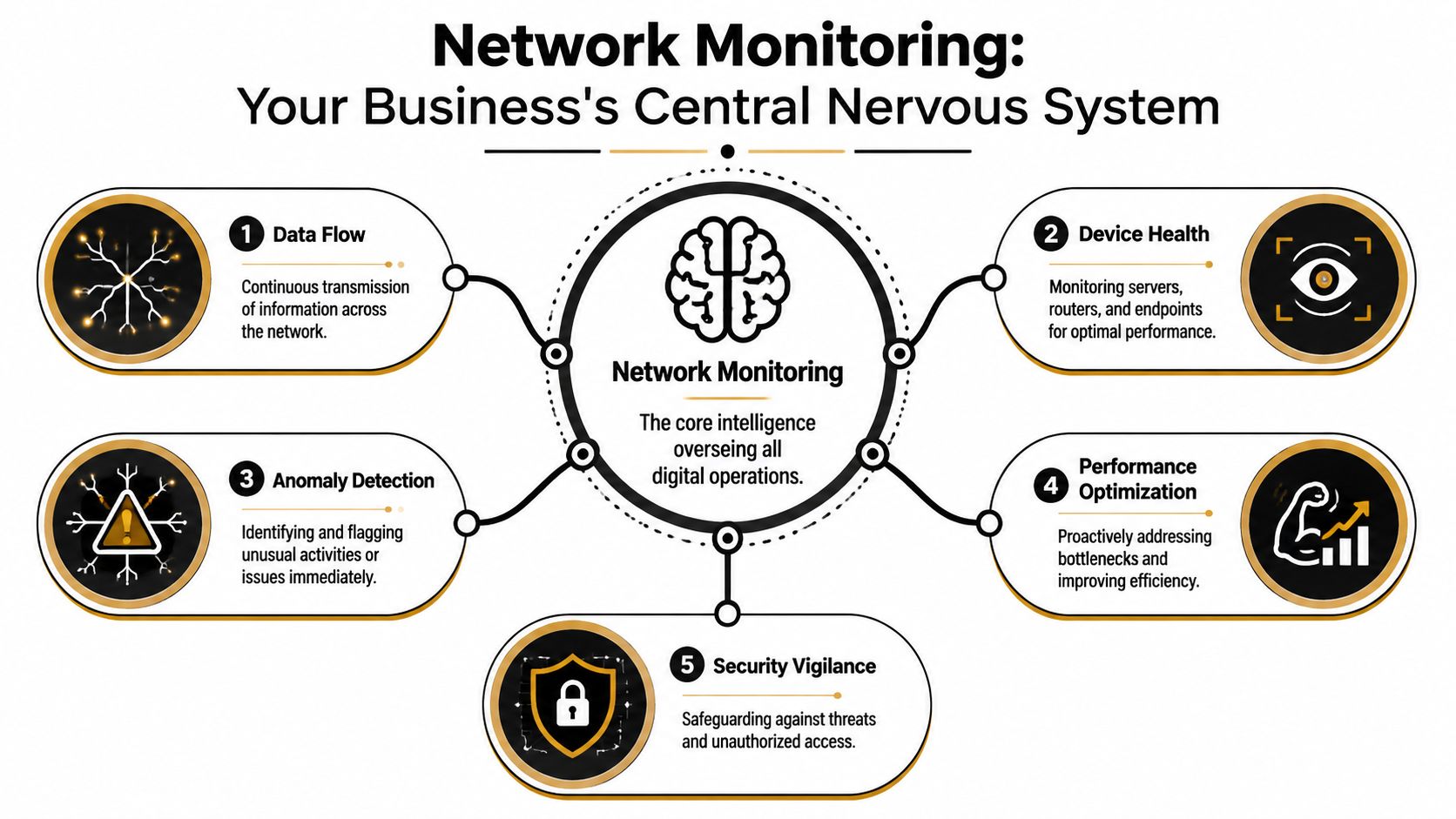
A business owner in Dallas should read "network monitoring" as visibility with consequences. It tells you whether your systems are healthy, whether risk is building, and whether your team can prove control when clients, auditors, or attorneys start asking questions.
For a small or midsize business, that matters more than the textbook definition. Healthcare practices need stable access to EHRs, imaging, VoIP, and patient portals. Law firms need document systems, email, and remote access to stay available during filings, discovery, and hearings. Financial firms need reliable trading, reporting, payment, and recordkeeping systems. If the network slows down or behaves strangely, revenue slows down with it.
Monitoring should do more than confirm a device is online. It should show whether the business is drifting toward an outage, a security incident, or a compliance problem.
What a good monitoring program should tell you
A useful monitoring system watches the signals that affect business operations, not just technical uptime. That includes bandwidth use, latency, packet loss, reachability, traffic patterns, device health, and unusual behavior across servers, endpoints, firewalls, and cloud connections.
Those signals only matter when they are tied to business context. A clinic may see heavy traffic during image transfers. A law office may push large files during litigation support work. A finance team may generate predictable spikes around reporting deadlines. Good monitoring learns those patterns and helps your team identify the root problem quickly instead of treating every spike like an emergency.
That is the line many SMBs miss.
They buy a tool that pings devices and sends alerts, then assume they are covered. They are not. Basic alerting tells you something broke. A stronger approach shows performance drift, suspicious traffic changes, failed connections, and recurring weak points before they turn into downtime or an incident response bill. If you are evaluating stronger security visibility alongside monitoring, review how intrusion detection systems for SMB networks fit into that picture.
Why baselines matter to healthcare, legal, and finance firms
Raw numbers do not protect a business. Context does.
A mature monitoring setup builds a baseline for normal activity, then flags changes that matter. That is how a medical office separates routine backup traffic from a ransomware encryption event. It is how a law firm spots abnormal file movement tied to a data exposure risk. It is how a financial company catches unusual traffic paths or service degradation before clients notice delays.
Monitoring transitions into observability. Instead of reacting to alarms after users complain, the business gains enough historical and real-time insight to see patterns, predict issues, and document what happened. That shift reduces downtime, shortens troubleshooting, and gives regulated firms cleaner evidence during audits and investigations.
Owners should expect that standard.
If your current setup only tells you whether something is up or down, it is incomplete. A modern SMB needs monitoring tied to performance, security, and compliance outcomes. Businesses that want that broader operational model should expect a complete network infrastructure partnership, not just a noisy dashboard.
How Network Monitoring Works Under the Hood
A monitoring system should answer one business question fast. What is about to break, who will feel it, and how expensive will that be if nobody acts?
That is the standard DFW healthcare groups, law firms, and financial companies should hold. If your network tools only report that a device went down after phones start ringing, you do not have enough visibility.
The signals a monitoring system watches
Under the hood, monitoring collects three kinds of information and ties them together in one view.
- Device status: Routers, switches, firewalls, servers, and other assets report whether they are reachable and whether performance is slipping.
- Traffic behavior: Flow and path data show where traffic is going, what is consuming capacity, and where delays are building.
- Event context: Logs and system events show changes, warnings, failed processes, and suspicious activity that explain why performance changed.
This correlation matters more than any single metric. A slowdown in a legal office might trace back to a failed switch port feeding the document system. In a medical practice, it might be a backup job crowding out EHR traffic. In a finance firm, it could be a security event creating unusual east-west traffic inside the network.
For businesses that need stronger threat visibility alongside performance monitoring, intrusion detection systems for SMB networks add another layer of evidence.
Why baselines matter more than raw numbers
Raw metrics are noise until the system knows what normal looks like.
Good monitoring platforms build a baseline from regular business activity, then compare current behavior against that pattern. That is what turns monitoring from a pile of alerts into an early warning system. It helps a team connect performance issues with potential security concerns and separate routine spikes from events that need immediate attention.
The business impact is direct:
- Latency: Staff wait on cloud apps, client calls drag, and transactions slow down.
- Packet loss: File transfers fail, voice quality drops, and remote sessions become unreliable.
- Bandwidth saturation: One heavy workload can choke shared access and make the whole office feel broken.
The right system does one more thing. It maps those symptoms back to the device, link, application, or change that caused them. That is how an SMB moves beyond reactive troubleshooting and into observability. Instead of asking why users are angry, your team sees the pattern early, fixes the root cause faster, and keeps downtime, compliance exposure, and billable-hour losses under control.
A healthy network is not the one with the fewest alerts. It is the one that gives your team enough context to prevent the expensive ones.
Choosing Your Monitoring Approach Active vs Passive and Cloud vs On-Premise
The wrong monitoring setup wastes money twice. First in downtime, then again in staff time spent chasing alerts that never explained the problem.
For a DFW business owner, this choice is less about tools and more about exposure. A medical office needs to catch network issues before they interrupt EHR access or create compliance headaches. A law firm needs proof of performance and visibility when attorneys cannot reach case files or document systems. A finance company needs fast detection when transaction delays, unusual traffic, or service interruptions start putting client trust and revenue at risk.
Active and passive monitoring serve different business goals
Active monitoring sends test traffic on purpose. It checks whether a circuit, device, application path, or service is available and responsive.
Passive monitoring watches the traffic already moving through the network. It shows how employees, devices, and applications behave during the workday.
Both matter. Use active monitoring to verify that your critical systems are reachable before users call. Use passive monitoring to spot the patterns behind slowdowns, misuse, congestion, and suspicious behavior that a simple up-or-down test will miss.
| Approach | What It Does | Best For Detecting |
|---|---|---|
| Active | Sends test traffic to verify response and availability | Outages, slow links, failed services |
| Passive | Observes real traffic and behavior patterns | Congestion, abnormal flows, usage trends |
A busy SMB should not pick one and ignore the other. Active checks tell you whether something is broken. Passive visibility shows what changed, who was affected, and whether the issue points to a performance problem, a security concern, or a compliance risk.
That distinction matters in regulated industries. Healthcare practices need a record of service availability and abnormal activity. Legal firms need to protect billable hours and client confidentiality. Financial companies need early warning when latency, failed connections, or unusual traffic starts affecting transactions or exposing sensitive data.
Cloud and on-premise come down to ownership, speed, and accountability
On-premise monitoring fits companies with internal IT depth, clear operational ownership, and time to maintain the monitoring system itself. That means updates, tuning, retention, access controls, and regular review. If nobody owns those tasks, the system degrades fast and turns into another blind spot.
Cloud-based or managed monitoring usually fits SMBs better because it shortens deployment time and gives leadership visibility across offices, remote staff, and cloud apps without adding another server stack to babysit. Businesses reviewing hybrid connectivity and remote access often end up rethinking their broader cloud-based network design at the same time.
My recommendation is simple. If your business depends on uptime but does not have a dedicated team to tune alerts, review trends, and investigate anomalies every week, choose a cloud-based or managed model. It gives you faster coverage and a clearer path to the outcome that matters: fewer disruptions, faster root-cause analysis, and stronger documentation for audits and client expectations.
One local option is Technovation LLC, which provides 24/7 monitoring as part of managed IT and cybersecurity support for DFW organizations. That approach makes sense for companies that need continuous oversight and response, not just a dashboard someone checks after the damage is already done.
The Future Is Here Moving From Monitoring to Observability
Traditional monitoring answers one question well. Is something wrong?
That's no longer enough for a modern SMB with cloud apps, remote staff, branch offices, compliance obligations, and limited internal IT time. What matters now is whether the business can understand why something is wrong without hours of manual digging.
Monitoring sees symptoms
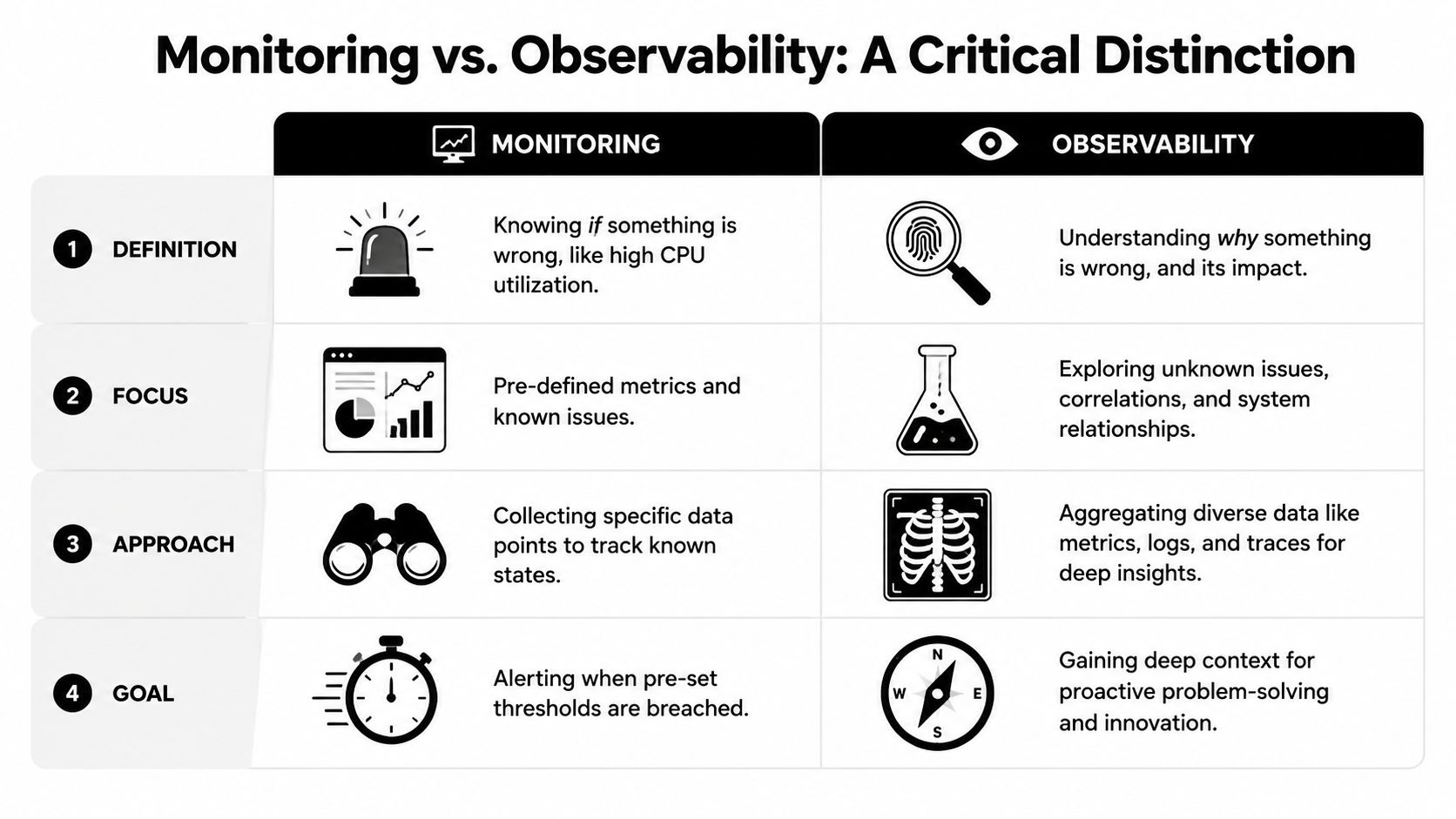
Monitoring is threshold-driven. It watches preselected metrics, compares them to expected values, and raises a flag when they cross a line.
That's useful, but limited. A warning may show high latency, increased traffic, or a failing path. It still may not explain whether the root cause is a misconfiguration, an overloaded device, a suspicious transfer, or an application dependency elsewhere.
Observability explains causes
Observability pulls together metrics, logs, flow data, and system relationships so a team can investigate the unknown, not just react to the known. It supports predictive insight instead of simple threshold response.
That distinction matters more than most mid-market companies realize. A 2025 Gartner report notes that 68% of IT leaders in mid-market organizations struggle to distinguish monitoring from observability, leading to 40% longer incident resolution times because they rely on reactive alerts rather than predictive flow analysis according to the verified reference to the cited Gartner discussion.
For a DFW clinic, law office, or financial firm, the difference shows up in real operations:
- A monitoring-only setup says a connection is slow.
- An observability-driven setup links the slowdown to a change, traffic path, or abnormal behavior fast enough to prevent wider disruption.
Businesses don't need more dashboards. They need fewer mysteries.
That's the standard a modern SMB should use when evaluating any network oversight strategy. If the system only reports failure after users complain, it's late. If it can't connect performance symptoms to security and compliance context, it's incomplete.
The Business Case How Monitoring Protects DFW Companies
The value of network monitoring becomes obvious when tied to actual business risk. In DFW, that often means regulated data, client confidentiality, uptime expectations, and lean internal teams.
A healthcare clinic, a law firm, and a financial office all use technology differently. They share the same problem. They can't afford invisible issues.
Healthcare needs proof not assumptions
A clinic depends on stable access to schedules, records, communication systems, and connected services. If those systems slow down or traffic starts moving in unusual ways, patient operations suffer quickly.
Monitoring helps staff detect patterns that don't belong, investigate changes faster, and keep records of what happened and when. For healthcare and other regulated sectors, that evidence matters as much as the response itself. For regulated industries, deep insight from monitoring is essential, providing the audit trails and real-time evidence necessary to demonstrate that security controls are functioning correctly and that data integrity is maintained across all network nodes, as described in Cisco's explanation of what network monitoring is.
Around-the-clock oversight also matters. Businesses that need continuous visibility into cyber risk often pair network visibility with 24/7 cybersecurity monitoring so performance issues and security events aren't treated as separate conversations.
Legal and finance need defensible visibility
Law firms handle privileged data, document-heavy workflows, and strict client expectations. When file access lags or traffic behaves oddly, the issue isn't just inconvenience. It affects productivity, trust, and case work.
Financial firms and accounting offices face a similar pressure. They need dependable access, consistent performance during close periods, and records that show controls are being watched. Good monitoring supports all three.
A useful way to think about the business case is this:
- Downtime hurts revenue: Staff lose working time and clients feel the delay.
- Poor visibility hurts response: Teams spend longer isolating the cause.
- Missing audit evidence hurts compliance: Even a resolved issue becomes harder to defend later.
That's why monitoring should be treated as operational control, not a background utility.
Your Network Monitoring Implementation Checklist
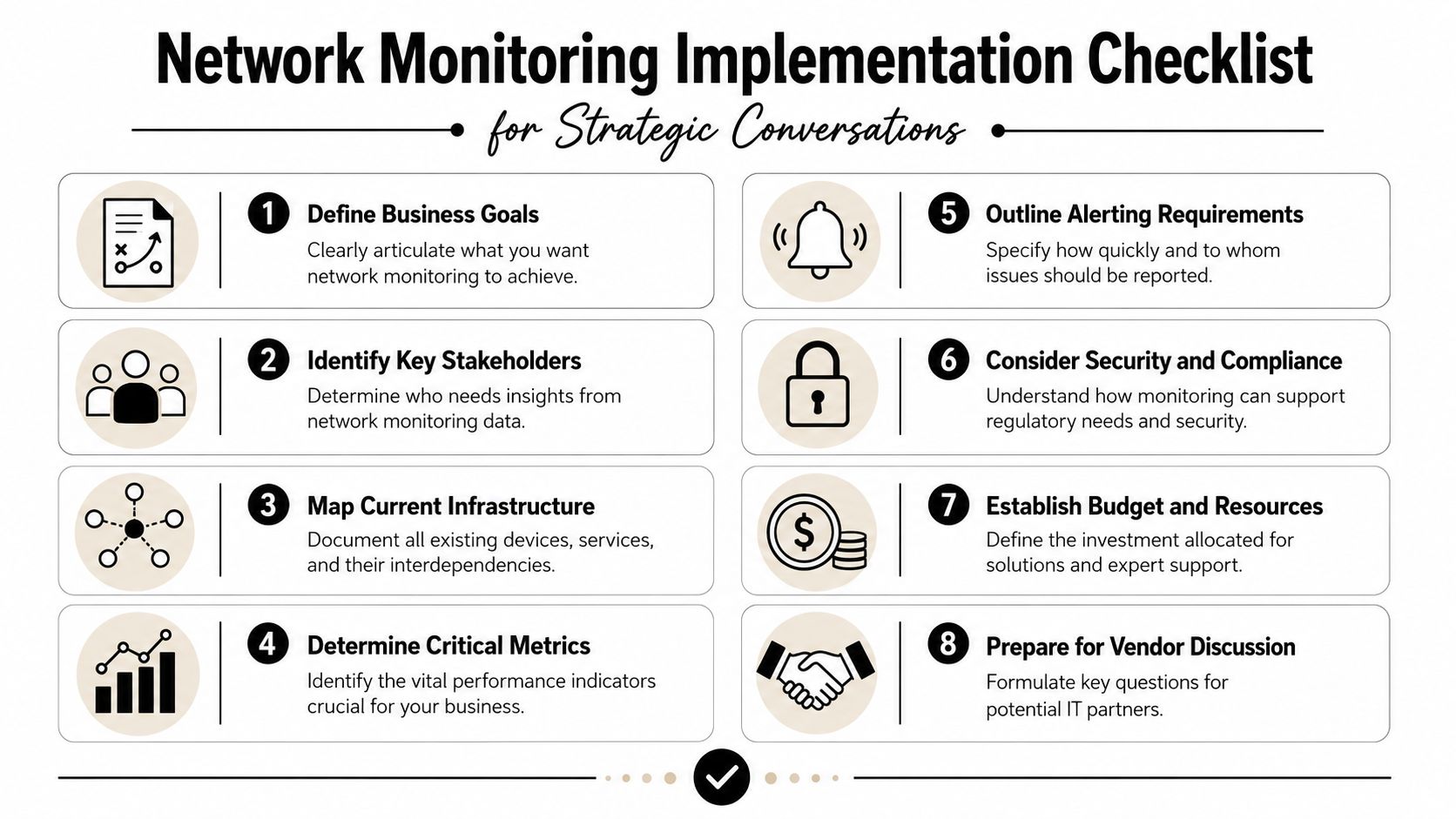
Most SMBs shouldn't start by shopping for features. They should start by deciding what the business needs to protect, what evidence it needs to keep, and who will act on alerts.
That sounds basic. It isn't. Many companies buy monitoring before they define what success looks like, and that's how they end up with noisy dashboards and weak follow-through.
What to decide before buying anything
Start with decisions that affect the business, not the hardware:
- Identify critical systems and data. Billing, client files, scheduling, remote access, line-of-business apps, and communication tools usually belong on the short list first.
- Review compliance obligations. Healthcare, legal, and finance firms need monitoring that supports evidence, retention, and response discipline.
- Define tolerance for downtime. Some interruptions are annoying. Others stop revenue or client service immediately.
- Clarify alert ownership. If an alert fires at night, someone must see it, understand it, and know what happens next.
What a smart rollout looks like
The implementation should stay simple and deliberate:
- Map the environment: Document sites, devices, critical paths, and external dependencies.
- Set meaningful thresholds: Alerting should reflect business reality, not generic defaults.
- Tune for relevance: False positives waste time and train staff to ignore the dashboard.
- Plan maintenance and review: Monitoring is a living operational process, not a one-time install.
That tuning step matters a lot. A 2025 IDC study reveals that 72% of small business IT teams in North America spend 15+ hours weekly filtering false-positive alerts, which is why expert configuration matters so much, according to LogicMonitor's discussion of network monitoring explained.
Businesses that want monitoring to stay useful over time usually need ongoing network support and maintenance alongside the initial setup.
Technovation LLC helps DFW organizations turn network monitoring into a practical business control, not just another dashboard. Healthcare practices, law firms, financial offices, construction companies, and other security-conscious teams can use a conversation with Technovation LLC to review risk, compliance needs, monitoring gaps, and what a right-sized managed approach should look like.