
If a Dallas-Fort Worth business is juggling patient records, payroll, file shares, and a cloud budget nobody fully trusts, hybrid cloud usually enters the conversation at the right time. Not because it sounds modern, but because it solves a messy operational problem, which systems should stay close, which ones should stretch, and how much risk the business can live with when something goes sideways. The best hybrid cloud benefits are practical ones, better control, better resilience, and less waste from forcing every workload into the same box.
For regulated SMBs, that matters more than the buzz around cloud transformation. A hybrid setup lets sensitive data stay in a controlled environment while elastic workloads move to public cloud capacity when demand spikes, which is one reason the model keeps gaining ground in sectors where compliance and uptime matter as much as scale (hybrid cloud market overview). It also gives business owners a cleaner way to answer the hard question, what belongs where, and who is responsible when the answer is wrong.
Table of Contents
- The Day a Dallas Clinic Almost Lost Everything
- What Hybrid Cloud Actually Means for SMBs
- The Hybrid Cloud Benefits That Move the Needle
- How DFW Industries Use Hybrid Cloud Differently
- Risks and Common Mistakes to Plan Around
- The Hybrid Cloud Evaluation Checklist for SMBs
- Your 90-Day Hybrid Cloud Roadmap and Next Steps
The Day a Dallas Clinic Almost Lost Everything
A multi-location clinic in Dallas had the usual setup that looks fine until it doesn't. Patient records lived in one system, payroll sat somewhere else, telemedicine traffic came through a separate service, and the internal IT lead was trying to keep up with backup reports after hours. The practice had cloud subscriptions, but nobody could clearly say which workloads were protected, which were merely available, and which were just assumed to be safe.
Then a ransomware scare hit a shared folder used by two offices. Staff froze, the front desk started calling the same people twice, and the operations manager realized the backup process was partly manual. That is the danger of scattered cloud ownership, not that cloud fails, but that the business no longer knows where its real control points are. For a practice facing a HIPAA audit, uncertainty is a problem all by itself.
Practical rule: if a team cannot say where a workload lives, who restores it, and how quickly it can come back, the environment is already too loose.
The clinic did not need a dramatic reinvention. It needed a workload-by-workload decision, patient data and retention-sensitive files in a controlled environment, burstable traffic and secondary services in public cloud, and a recovery plan that didn't depend on somebody remembering a manual step at 7 p.m. The right hybrid cloud benefits show up exactly there, in fewer blind spots and less panic when a ransomware event or hardware issue exposes a weak backup habit.
A local response matters too. For Dallas-Fort Worth SMBs, a managed service partner that understands recovery design and regulated data can tighten the gap between “backed up” and recoverable. A practical starting point is a review of IT disaster recovery services, because the recovery story is where hybrid cloud either earns trust or loses it.
What Hybrid Cloud Actually Means for SMBs
Hybrid cloud is simpler than most vendors make it sound. It works like a business that keeps its day-to-day operations in its own building, rents extra warehouse space during busy season, and still taps into the big logistics network when demand jumps. The private environment is the building you control. The public cloud is the rented overflow. The connection between them is what makes the whole thing useful instead of confusing.
For an SMB, that split is the point. Sensitive records, systems with strict retention needs, or apps that need low-latency local access stay closer to home. Variable workloads, backup copies, testing, analytics, and temporary scale can move outward when the business needs room. That's why hybrid cloud isn't a Fortune 500 vanity project, it's a workload placement strategy.
The model also explains who runs what. An internal IT lead, a co-managed team, or a local MSP usually handles the private side and the policy decisions. Public cloud services carry the elastic workloads, while the connection, identity controls, and backup rules keep the two halves from drifting apart. Intel describes hybrid cloud as combining the control and visibility of private resources with the flexibility, scalability, and reduced capital cost of public cloud, which is the cleanest way to think about it (Intel hybrid cloud overview).
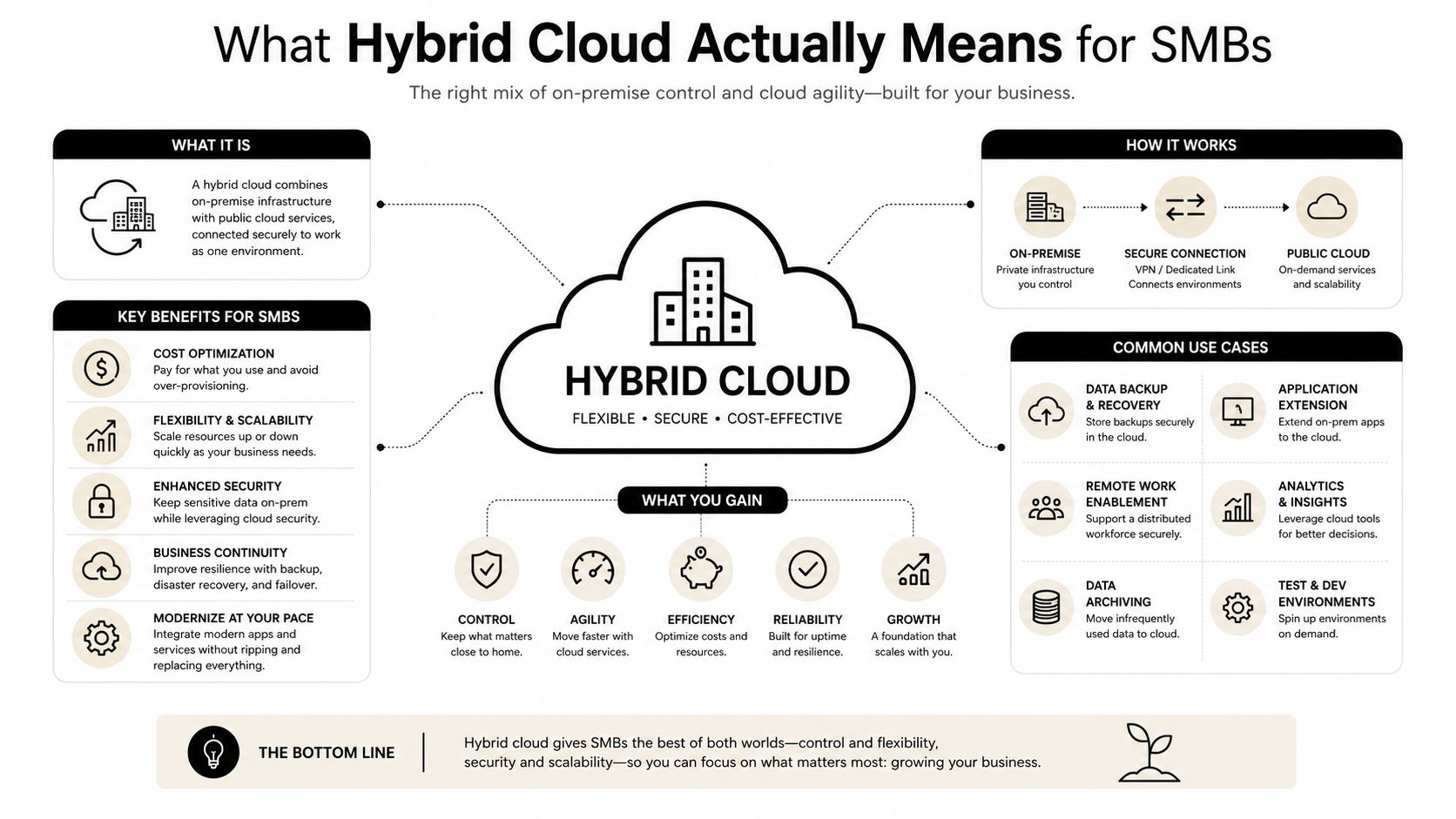
A solid hybrid design starts with workload fit, not with a cloud subscription.
If an operations manager can explain hybrid cloud in under a minute, the business is probably close to doing it right. If the explanation turns into “we moved everything because cloud,” the setup is already too expensive or too vague. A readiness review like cloud computing readiness assessment helps expose that difference before money gets tied up in the wrong places.
The Hybrid Cloud Benefits That Move the Needle
Hybrid cloud only matters if it changes outcomes. The strongest hybrid cloud benefits are not abstract, they show up in lower pressure on infrastructure, better continuity during outages, and clearer control over what stays private versus what can scale. That matters because the business case is not just cost or just security. It is the ability to place each workload where it creates the least risk and the most value.
| Benefit | Workload Example | Typical SMB Outcome |
|---|---|---|
| Cost control | Seasonal client portals or backup archives | Spends more only when demand rises |
| Security and compliance | Patient records, client files, payment-related data | Sensitive data stays in a tighter environment |
| Performance and latency | Local production systems or office apps | Faster access for nearby users |
| Scalability | Public-facing forms, campaign traffic, reporting jobs | Capacity expands without permanent overbuild |
| Resilience | Backup copies and failover systems | Faster recovery when the primary site has trouble |
| Integration | Legacy line-of-business software | Older systems keep working while modern services are added |
| Vendor flexibility | Mixed workloads across environments | Less dependence on one platform's limits |
Cost and control without overbuying
Hybrid cloud can reduce infrastructure pressure because the business does not have to buy for peak demand up front. It can also avoid some hardware and software maintenance burden by shifting overflow to public capacity only when needed (Confluent hybrid cloud guide). In practical terms, that keeps capital tied to systems that need to sit nearby.
The trade-off is discipline. If teams move every workload outward because it feels easier, monthly spend climbs fast and nobody notices until the invoice does. That is why some SMBs use hybrid cloud to right-size steady workloads and push temporary demand into shared capacity instead of building permanent excess.
Security, compliance, and continuity
A good hybrid design keeps sensitive data under tighter control while less sensitive work uses public cloud capacity, which is why the model fits healthcare, legal, and financial environments so well (Oracle hybrid cloud overview). It also supports business continuity because workloads can fail over between environments and keep users moving when one side has trouble (Azure hybrid cloud definition). That combination matters more than a glossy cloud pitch.
The limitation is obvious. Separate environments create more places where policy can drift. That is why security baselines, access control, and restore testing have to be built into the design, not added later.
For teams that want a broader view of operating models, SMB hybrid IT strategies offers useful context on how mixed environments are being used without forcing every workload into one place.
Bottom line: hybrid cloud works when each application has a reason to be where it is. If there is no reason, the architecture is probably just clutter with a better logo.
A practical backup plan also matters, which is why a review of cloud backup solutions for small business belongs in the conversation early, not after the first outage.
How DFW Industries Use Hybrid Cloud Differently
Dallas-Fort Worth businesses do not use hybrid cloud for the same reason, and that is exactly why generic cloud advice falls flat. A clinic is not a construction firm. A law practice is not a nonprofit. Each one has different data gravity, different compliance pressure, and different tolerance for disruption.

Healthcare clinics
Medical practices usually keep patient records and tightly controlled workflows in a private environment, while using public cloud for analytics, patient engagement, or overflow traffic. That split protects sensitive data without strangling the front office when patient demand spikes. It also makes the audit conversation more manageable because the practice can show where regulated data lives and who touches it.
Law firms
Legal teams need privileged files, litigation holds, and matter-specific retention to stay under close control. At the same time, document review and e-discovery often benefit from public cloud scale because they are temporary and compute-heavy. The hybrid move is straightforward, keep the crown jewels private, let the large review work happen where scale is easier.
Financial services and accounting firms
These firms often want tiered storage and tighter control over client records, while still using cloud for reporting, collaboration, or seasonal workload bursts. The benefit is not just technical, it is operational calm. Staff spend less time wrestling systems and more time serving clients.
Construction, engineering, and architecture
Large CAD files, project histories, and field collaboration do not belong in the same environment by default. A mixed model lets the firm keep heavy design assets and core records closer to home, while project portals and sharing tools sit in the cloud for easier access across job sites. That reduces friction without turning every office into a mini data center.
Nonprofits
Nonprofits usually have donor data and sensitive records that need careful handling, but they also need collaboration tools that make staff and volunteers productive. Hybrid cloud lets them separate those needs instead of compromising on both. That means better access for everyday work and tighter control where it counts.
A local practice that already works with regulated SMBs can make those splits cleaner. For medical organizations in particular, managed IT services for medical practices becomes relevant because the environment has to support both access and restraint.
Risks and Common Mistakes to Plan Around
Hybrid cloud is not hard because it is magical, it is hard because it creates more decisions. The most common mistake is letting those decisions happen by accident, across too many hands. A business ends up with a private server room, a public billing app, three file-sharing tools, and no consistent policy for any of them.
Skill gaps and overconfidence
Small IT teams often know the systems they inherited, but not the full chain between private and public environments. That is where projects stall or get patched together poorly. The fix is to document ownership, training, and escalation paths before migration, not after.
Hidden networking and transfer costs
A familiar problem is bursting workloads to public cloud, then discovering the bill changed because nobody tracked data movement. That is a planning issue, not a cloud issue. A simple traffic review and alerting plan can stop that surprise before it starts.
Security blind spots between environments
If identity, logging, and access rules differ from one side to the other, attackers and mistakes find the gap. The answer is a single policy baseline for authentication, backup, and monitoring, even when the workloads live in different places. The earlier section on recovery matters here because a backup that cannot be restored under pressure is just storage.
For a deeper look at this topic from a security standpoint, the data security tag can help teams frame the questions that matter before they move anything.
If nobody can say who owns the connection between environments, the connection is already a risk.
Compliance drift also shows up when a business treats “moved to cloud” as the finish line. It isn't. Policies still need review, access still needs trimming, and retention still needs checking. A strong MSP helps keep that work steady instead of occasional.
The Hybrid Cloud Evaluation Checklist for SMBs
A good hybrid cloud decision can be scored in an afternoon. Business leaders do not need a whiteboard full of jargon, they need a clean way to tell whether the environment fits the work.
Use these questions to grade the environment
Business goal: What problem is hybrid cloud solving, continuity, compliance, or capacity?
- Good answer, one clear business issue.
- Red flag, “because cloud” or “because everyone is doing it.”
Data classification: Which workloads are sensitive, and which ones are routine?
- Good answer, a written split between regulated and non-regulated data.
- Red flag, no one can describe the difference.
Compliance needs: What rules apply to this data and who reviews them?
- Good answer, the rules are named and assigned.
- Red flag, compliance is assumed but not owned.
Performance expectations: Which apps need low latency or local processing?
- Good answer, the team knows which systems need fast response.
- Red flag, users complain but the cause is guessed at.
Integration points: What has to connect across environments?
- Good answer, key dependencies are mapped.
- Red flag, the map only exists in one technician's head.
Security baseline: Are identity, logging, backup, and restore rules consistent?
- Good answer, the same standards apply across environments.
- Red flag, each system uses its own habits.
Total cost of ownership: Does the cost model include network, storage, management, and exit?
- Good answer, the full lifecycle is considered.
- Red flag, only monthly subscription cost is discussed.
Exit strategy: Can the business move workloads again if the current design stops fitting?
- Good answer, portability is planned.
- Red flag, the team is locked into one direction.
Prioritize every item as must-have, nice-to-have, or future. That keeps the rollout focused and stops the business from overbuilding because someone liked the demo. A clean assessment like this is also how Technovation approaches a free security audit or IT health check, because the first job is to expose weak points before they become expensive habits.
Your 90-Day Hybrid Cloud Roadmap and Next Steps
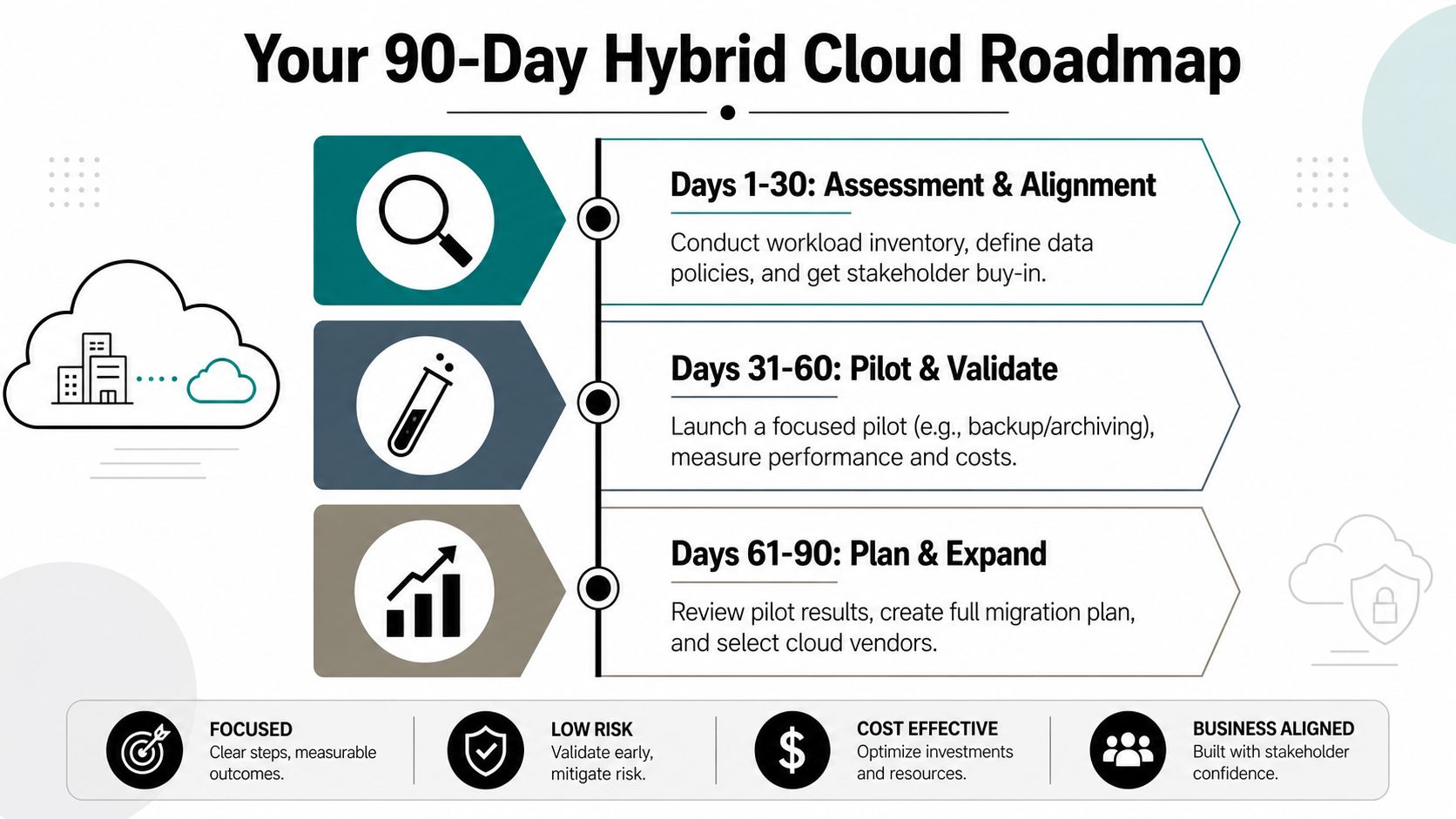
A hybrid cloud project should not take forever. The cleanest rollout is a 90-day plan with visible checkpoints, named owners, and one practical win at each stage.
Days 1 through 30, assess and align
Start with a workload inventory, data classification, and stakeholder alignment. Finance needs to understand the cost shape, operations needs to understand downtime risk, and IT needs to understand what can move without breaking the business. The deliverable here is a short list of workloads by priority, not a giant architecture deck.
Days 31 through 60, pilot and validate
Choose one focused pilot, often backup, archiving, or a single line-of-business app. Measure restore behavior, performance, and cost before expanding the design. A business learns whether its assumptions are real or just comfortable.
Days 61 through 90, plan and expand
Review the pilot, document what worked, then build the broader rollout plan. Select vendors, define ownership, and decide what stays private, what goes public, and what should be retired instead of migrated. The goal is not to move everything, the goal is to make each move earn its place.
For many DFW SMBs, the partnership question matters as much as the technology question. Internal staff can run part of the program, but a local managed service provider can hold the seams together between private systems, public services, security controls, and recovery planning. Technovation LLC fits that role as a Dallas-Fort Worth MSP with 25 years of cybersecurity and compliance experience, which matters when the business needs practical coordination instead of another layer of tool sprawl.
The right partner does not sell more cloud, it makes the cloud decision easier to live with six months later.
A free security audit or IT health check should leave the business with a clear workload map, a cleaner backup posture, and a realistic next move. That is the point, less guessing, more control, and no expensive DIY rollout that teaches hard lessons in production.
Technovation LLC helps Dallas-Fort Worth businesses sort out hybrid cloud, recovery, and compliance without overbuying infrastructure they do not need. For a straightforward look at what belongs private, what belongs in public cloud, and how to tighten resilience, visit Technovation LLC and ask for a free security audit or IT health check.





