A lot of Dallas-Fort Worth business owners think they’ve handled backup because files sync to the cloud, a server runs overnight jobs, or someone set up a copy process years ago and it still shows green. That’s not a backup strategy. That’s a hope strategy.
The test happens on a random Tuesday at 9:07 a.m. A server won’t boot. A shared folder is corrupted. A staff member clicks the wrong attachment. A line-of-business app breaks and takes client records with it. At that moment, the question isn’t whether data existed yesterday. The question is whether the business can restore clean data fast enough to keep operating, meet compliance obligations, and avoid a long scramble.
For regulated small businesses in healthcare, legal, finance, construction, and nonprofit operations, cloud backup solutions for small business need to do more than copy files off-site. They need to support recovery, auditability, and practical business continuity in a region where internet performance and compliance pressure can complicate a simple-looking backup plan.
Table of Contents
- Is Your Business Data Really Safe?
- Cloud Backup vs Cloud Storage Explained
- Meeting Your Business and Compliance Demands
- How to Choose the Right Backup Strategy and Solution
- Implementing and Testing Your Cloud Backup Plan
- Integrating Backup into Your Disaster Recovery Strategy
- Why a Local DFW Partner Makes Cloud Backup Better
Is Your Business Data Really Safe?
A small business can go years without a serious restore event. That’s why weak backup plans survive for so long. They aren’t exposed until something breaks for real.
A familiar pattern plays out like this. The office has backups. The owner has heard that backups complete every night. Then a crash hits a core system, and the team discovers nobody has tested a full restore in months. The backup exists, but the recovery process is slow, unclear, or incomplete.
That gap is bigger than most companies realize. A 2025 backup confidence study found that only 40% of IT professionals fully trust their backup systems to protect critical data during a crisis.
That number matters because confidence usually drops for a reason. Teams worry about restore speed, corrupted backup chains, missing application data, ransomware exposure, and backup jobs that look healthy until someone tries to recover a system under pressure.
Having backups is not the same as having recovery
Business owners often ask whether they “have backup covered.” The better question is simpler.
- Can the company restore a single file quickly?
- Can the company restore a full server or workstation?
- Can the company prove what was backed up and when?
- Can the company recover clean data after a cyber incident, not just any data?
If those answers aren’t documented and tested, the business doesn’t have certainty. It has assumptions.
Practical rule: A backup that hasn’t been restored and verified is still unproven.
For a law office, that can mean delayed filings and missing client records. For a clinic, it can mean disruption around patient information and audit pressure. For a construction firm, it can mean project drawings, bids, and field documentation sitting in limbo while deadlines keep moving.
Reliable cloud backup solutions for small business solve a business problem first. They reduce uncertainty. They give leadership a realistic answer to one question that matters during an incident: how fast can operations come back?
Cloud Backup vs Cloud Storage Explained
Business owners often lump cloud storage and cloud backup into the same category. That’s a costly mistake.
Cloud storage is built for access and collaboration. Cloud backup is built for restoration after deletion, corruption, ransomware, device loss, or system failure. Those are different jobs.

The simplest way to think about it
Cloud storage is a digital filing cabinet. Staff use it every day. They open files, share them, edit them, and sync them across devices.
Cloud backup is a fire-resistant vault with a recovery process attached. It keeps separate restore points so the business can roll back to a clean version when something goes wrong.
That distinction matters because synced storage can also sync mistakes. If a file is deleted, overwritten, encrypted by malware, or corrupted locally, that bad change can move everywhere. Backup exists to break that chain and preserve a recoverable copy from an earlier point in time.
A business comparing day-to-day file access and true protection should first understand the difference between backup and storage in this guide on choosing the right cloud storage for your small business.
Three terms business owners should know
- Versioning means the system keeps earlier versions of files so the business can recover from a bad edit or accidental overwrite.
- Immutability means backup data can’t be altered or deleted during a protected period, which matters when ransomware tries to destroy recovery points.
- Automation means backups run on schedule without relying on staff to remember them.
These aren’t nice extras. They’re part of what turns an online file repository into an actual backup system.
Storage helps people work. Backup helps the business recover.
A proper cloud backup solution also reaches beyond shared folders. It can protect endpoints, servers, application data, and cloud workloads in a way that supports restoration rather than just access. That’s why cloud backup solutions for small business should be evaluated based on restore capability, retention controls, and separation from production data, not just where files happen to live.
Meeting Your Business and Compliance Demands
For regulated businesses, backup isn’t just an IT task. It’s part of risk management, audit readiness, and client trust.
A healthcare practice needs to protect patient records and prove controls. A law firm needs to preserve confidentiality and retain recoverable matter data. A financial firm needs to show that critical records are secured and recoverable under pressure. Generic backup advice rarely goes far enough for any of them.

RTO and RPO in business language
Two backup terms matter more than most owners realize.
Recovery Time Objective (RTO) asks how long the business can afford to be down.
Recovery Point Objective (RPO) asks how much data the business can afford to lose between backup points.
Those aren’t technical trivia. They shape the whole design.
- A law firm may tolerate a short slowdown in one department, but not the loss of active case files or email history tied to deadlines.
- A medical office may need tighter recovery expectations because patient scheduling, chart access, and documentation interruptions hit operations quickly.
- A construction company may focus on preserving project files, financial records, and field data while balancing bandwidth across office and jobsite locations.
If leadership never defines acceptable downtime and acceptable data loss, the backup platform gets chosen on price or convenience. That usually ends badly.
Security controls that matter during audits
Encryption is one of the first things auditors and insurers ask about. Business-grade cloud backup solutions for small business typically use AES 256-bit encryption for data at rest and in transit, and this backup security overview describes that standard along with layered controls like two-factor authentication and 24/7 datacenter monitoring.
The important business issue isn’t just that encryption exists. It’s how key management works.
If a provider controls all encryption keys, that may create concerns for organizations with stricter governance requirements. Private key management can be the better fit when the business needs stronger custody over protected information. That’s especially relevant in legal and healthcare environments where confidentiality obligations aren’t optional.
Compliance questions worth asking before signing anything
A serious buyer should ask for more than a feature sheet.
- Retention clarity: How long are backups kept, and can retention rules match legal, financial, or healthcare requirements?
- Restore evidence: Can the provider document successful test restores in a way that supports internal reviews or audits?
- Access control: Who can delete backup sets, change retention rules, or initiate restores?
- Separation of duties: Can backup administration be limited so one compromised account doesn’t control everything?
A compliant backup system isn’t the one with the most features. It’s the one that can stand up to an audit and still restore data when the pressure is on.
For North Texas companies, that means backup architecture should map to the business’s actual obligations, not a generic “secure by default” promise.
How to Choose the Right Backup Strategy and Solution
Most backup buying mistakes happen before any software is installed. The company picks a product first and asks operational questions later.
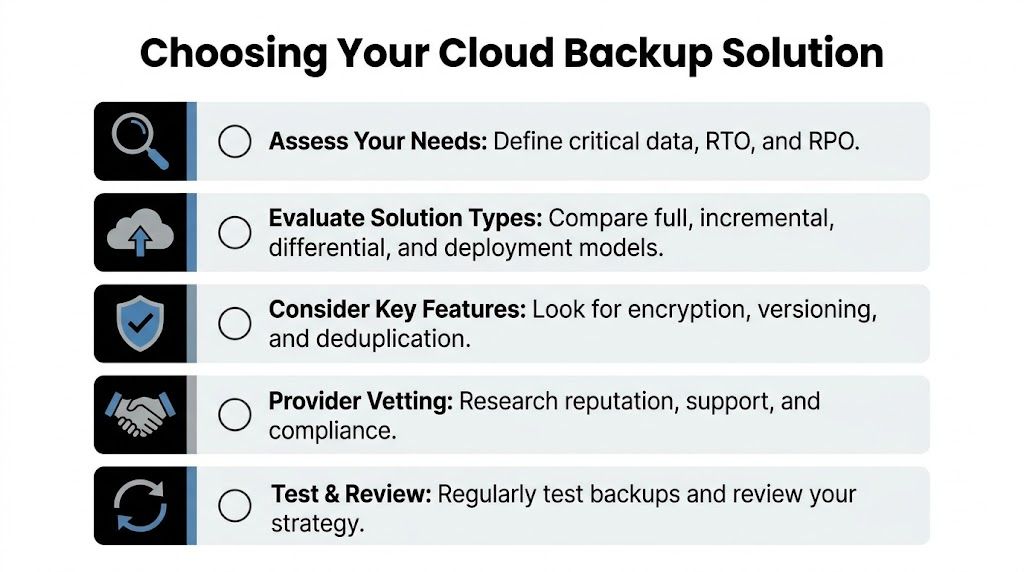
That should be reversed. The business should define what needs protection, how fast it must recover, and how much complexity the team can realistically manage. Then the backup method should follow.
What each backup type actually means
The backup methodology guidance for small businesses is clear on the core trade-off. Full backups restore fastest but use the most storage, while incremental backups save storage and run quickly but can create a slower, more complex recovery path. Differential backups sit in the middle.
That trade-off should drive the decision.
A business that needs simple, fast restoration may accept more storage use. A business with limited bandwidth or a lot of changing data may need a more layered approach. For many small organizations, a blended schedule makes the most sense.
Comparing backup methodologies
| Method | Backup Speed | Storage Usage | Restore Speed |
|---|---|---|---|
| Full | Slowest backup window | Highest storage use | Fastest restore |
| Incremental | Fastest ongoing backups | Lowest storage use | Slowest, most complex restore |
| Differential | Moderate | Moderate | Faster than incremental |
A short decision checklist
A backup strategy should survive real operating conditions, not just look clean in a demo.
- Define critical systems first: Identify the systems that stop revenue, service delivery, or compliance work when they go down.
- Match the method to recovery needs: If restore simplicity matters most, lean toward more frequent full backups or a hybrid pattern that reduces recovery complexity.
- Check support coverage: Someone must monitor failed jobs, retention errors, storage growth, and restore readiness.
- Verify security controls: Look for encryption, role-based access, immutability, and clear reporting.
- Plan for growth: The solution should still work when the company adds users, locations, and cloud workloads.
One practical model for small and midsized businesses is a hybrid schedule of periodic full backups with more frequent differential or incremental backups. It balances storage use with a recovery process that doesn’t become unmanageable during a crisis.
For companies that don’t want to run that program internally, Technovation LLC offers managed cloud backup as part of broader IT and cybersecurity services, including monitoring, implementation, and recovery planning.
Implementing and Testing Your Cloud Backup Plan
The deployment phase is where good intentions usually get sloppy. A company buys the service, turns on a schedule, and assumes the job is done.
It isn’t. Backup success depends on clean rollout, policy tuning, alert monitoring, and restore testing. The implementation process should be treated like an operational control, not a one-time setup task.
Rollout without disrupting the workday
A strong implementation usually follows a disciplined sequence.
- Start with the first full backup. This establishes the baseline copy that later backup jobs depend on.
- Set schedules around operations. Backup timing should reflect how the business works, including remote staff, after-hours processing, and high-use systems.
- Watch the first cycles closely. Early failures often reveal permissions gaps, excluded data, missed devices, or bandwidth issues.
- Document what is protected. The company should know exactly which endpoints, servers, folders, and business systems are in scope.
A practical backup rollout also benefits from a written recovery plan. This resource on simple backup and recovery plans every small business needs is useful for turning backup settings into a repeatable process people can follow under pressure.
Testing is the point
Many firms test backup completion but never test restore performance. That’s the wrong priority.
A useful testing routine includes several levels:
- Single-file restore: Confirms staff can recover a deleted or overwritten item quickly.
- Folder or project restore: Verifies permissions, structure, and version consistency.
- System-level restore: Proves the business can recover a workstation, server, or core service in a realistic timeframe.
- Documented results: Creates evidence for leadership, insurance reviews, and compliance discussions.
Test restores should be scheduled work, not emergency improvisation.
An untested backup plan can still fail because of missing application dependencies, broken credentials, retention errors, or recovery steps that nobody documented. Testing exposes those weaknesses before a real incident does.
Integrating Backup into Your Disaster Recovery Strategy
Backup is foundational, but it isn’t the whole disaster recovery plan.
A business can restore data and still remain down if users can’t access systems, remote staff can’t connect, line-of-business applications won’t launch, or recovery responsibilities are unclear. Disaster recovery turns backup data into operating capability.
Backup supports continuity, not just recovery
A credible disaster recovery strategy connects several practical questions:
- Where will staff work if the office is unavailable?
- Which systems come back first?
- Who approves restores and validates recovered data?
- How will clients, patients, or stakeholders be served during the outage?
Cloud backup solutions for small business matter here because they create the off-site recovery layer that local-only backups can’t provide. If a building issue, hardware failure, or broad ransomware event affects the office, a separated backup copy gives the business options.
The most effective plans also prioritize by business function, not by server count. Accounting may need one recovery sequence. Client records may need another. Shared file access, email continuity, and remote login processes all need to be aligned with the company’s real operating priorities.
Recovery should follow business order of operations, not the order the equipment happens to sit in the rack.
When backup and disaster recovery are aligned, leadership gets a realistic continuity model. The company knows what returns first, what can wait, and what evidence exists to prove recovery worked.
Why a Local DFW Partner Makes Cloud Backup Better
National backup advice tends to flatten everything into generic recommendations. Dallas-Fort Worth businesses don’t operate in a generic environment.
A local legal office with deadline-sensitive filings, a clinic with compliance pressure, or a construction company with field data all face different realities than a textbook backup scenario. Regional internet conditions, hybrid work patterns, and sector-specific audit expectations all affect whether a backup plan will perform when it counts.

DFW conditions change the backup conversation
Local performance matters more than many buyers expect. According to 2025 DFW backup performance findings, DFW SMBs can face 25-40% higher latency spikes during peak hours, which can degrade cloud backup speeds by up to 60% and lead to incomplete backups in over 30% of cases for self-managed solutions.
That means a backup policy that looks fine on paper can break down in practice if it ignores local conditions. Restore expectations can also become unrealistic when network variability, endpoint sprawl, and field access are not part of the design.
What managed accountability looks like
A local managed partner brings something many backup products do not. Accountability.
That includes:
- Tuning schedules to real DFW conditions: Backup windows, caching choices, and recovery priorities can be adjusted around how the business uses its systems.
- Supporting regulated workflows: Healthcare, legal, and financial firms need backup processes that make sense during audits and incident reviews.
- Monitoring continuously: Failed jobs, missed endpoints, retention problems, and restore readiness need active oversight.
- Owning the test process: Someone should verify that recovery works before leadership has to rely on it.
For small and midsized businesses, that’s where managed cloud backup stops being a commodity and becomes operational risk control. A local partner can translate backup settings into a business-ready recovery plan with support that matches the reality on the ground in North Texas.
Businesses that aren’t sure whether their backups will hold up under real pressure should get a second set of eyes on the plan. Technovation LLC works with Dallas-Fort Worth organizations that need practical cloud backup, compliance alignment, and recoverability that can be tested, documented, and trusted. A consultation can uncover weak restore paths, audit gaps, and performance issues before they become an expensive disruption.