A server crash rarely waits for a slow day. In a Dallas-Fort Worth office, it usually shows up right when phones are ringing, invoices are due, and a client wants an answer now. That is the moment business owners learn the difference between having backups and having IT disaster recovery services that can restore operations.
The hard part is that most small and mid-sized firms do not need more jargon. They need a practical way to decide what has to come back first, how much downtime is tolerable, and which parts of the recovery plan belong in-house versus with a partner. For regulated teams in healthcare, legal, finance, construction, and nonprofit work, the right plan is less about technology bragging rights and more about keeping trust intact when something breaks.
Table of Contents
- When Operations Grind to a Halt
- Beyond Backups What Are IT Disaster Recovery Services
- The Business Case for Disaster Recovery
- Comparing Your Disaster Recovery Architecture Options
- Understanding the Metrics That Define Success RTO and RPO
- Building Your Plan and Choosing a DFW Partner
- Your Next Step Toward Business Resilience in North Texas
When Operations Grind to a Halt
A receptionist opens the morning queue and the key application is down. The phones still work, the internet still works, but the business feels stuck because nothing important can move. Payroll, patient records, client files, and approvals all sit behind the same invisible wall.
That's why recovery planning is not a side project. It's a continuity decision. When the first instinct is to ask whether the system is backed up, the core question should be whether the business can keep serving customers while recovery happens.
For a DFW owner, the stakes are local and immediate. A missed filing, a delayed appointment, or a frozen accounting workflow can create a chain reaction that reaches customers, vendors, and regulators. In a small team, one outage can consume everyone's attention at once.
Practical rule: if a system outage would force staff to improvise with spreadsheets, phones, and memory, that system already deserves a recovery plan.
Local businesses often discover that the cheapest day to prepare for an outage was last quarter. The second-cheapest day is today. A competent plan gives leadership a way to answer the hard questions before the interruption starts, and that's where a trusted guide matters. For organizations that want a straightforward next step after a breach or outage, this recovery checklist is a sensible place to begin.
Beyond Backups What Are IT Disaster Recovery Services
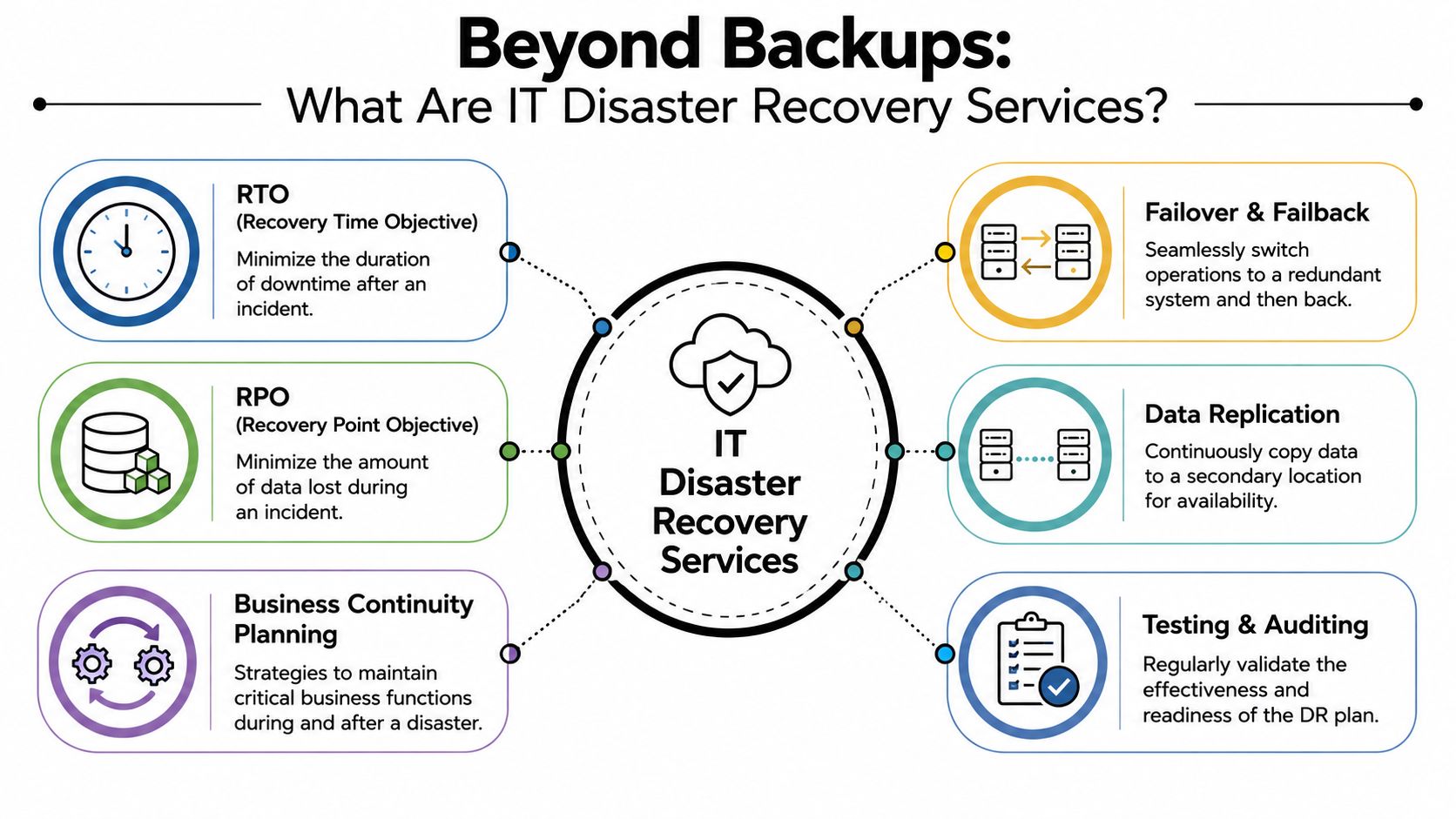
A backup is a spare tire. IT disaster recovery services are the roadside assistance, the tow truck, the temporary vehicle, and the route home. One preserves a copy of what happened before. The other gets the business moving again when the main system is down.
What a real recovery service includes
A useful DR service combines data replication, failover planning, failback orchestration, and documented recovery procedures. It also needs clear ownership, because technology alone will not decide which system comes up first or who signs off that users can work again. Guidance for disaster recovery planning puts RTO and RPO at the center of that design, because recovery quality depends on whether critical systems return within the agreed window and with acceptable data loss. That same guidance recommends proving that a provider can orchestrate failover and failback safely, and, in regulated environments, showing controls such as HIPAA, SOC 2, or ISO 27001 evidence to support availability and integrity claims.
For a DFW business, that matters in practical terms. A clinic, law office, or accounting team cannot afford guesswork when a system is down and clients are waiting.
Why backup alone falls short
Backup is necessary, but it does not finish the job. A backup task can complete successfully and still leave the business unable to operate if identity, email, line-of-business apps, or dependent databases are missing from the recovery plan. A government disaster recovery standard recommends three generations of backups for critical systems and storing them off site, which helps protect against corruption, accidental deletion, and ransomware that may sit unnoticed across multiple backup cycles (MN IT disaster recovery standard).
The bigger issue is recovery method. Some applications only need backup and restore. Some systems justify automated failover because downtime carries a higher cost than the added complexity. That trade-off is where many SMBs either overspend or underprepare. A recovery plan should match the workload, and the right backup design is only one part of that picture, as cloud backup strategy explains in the context of small business planning.
The Business Case for Disaster Recovery
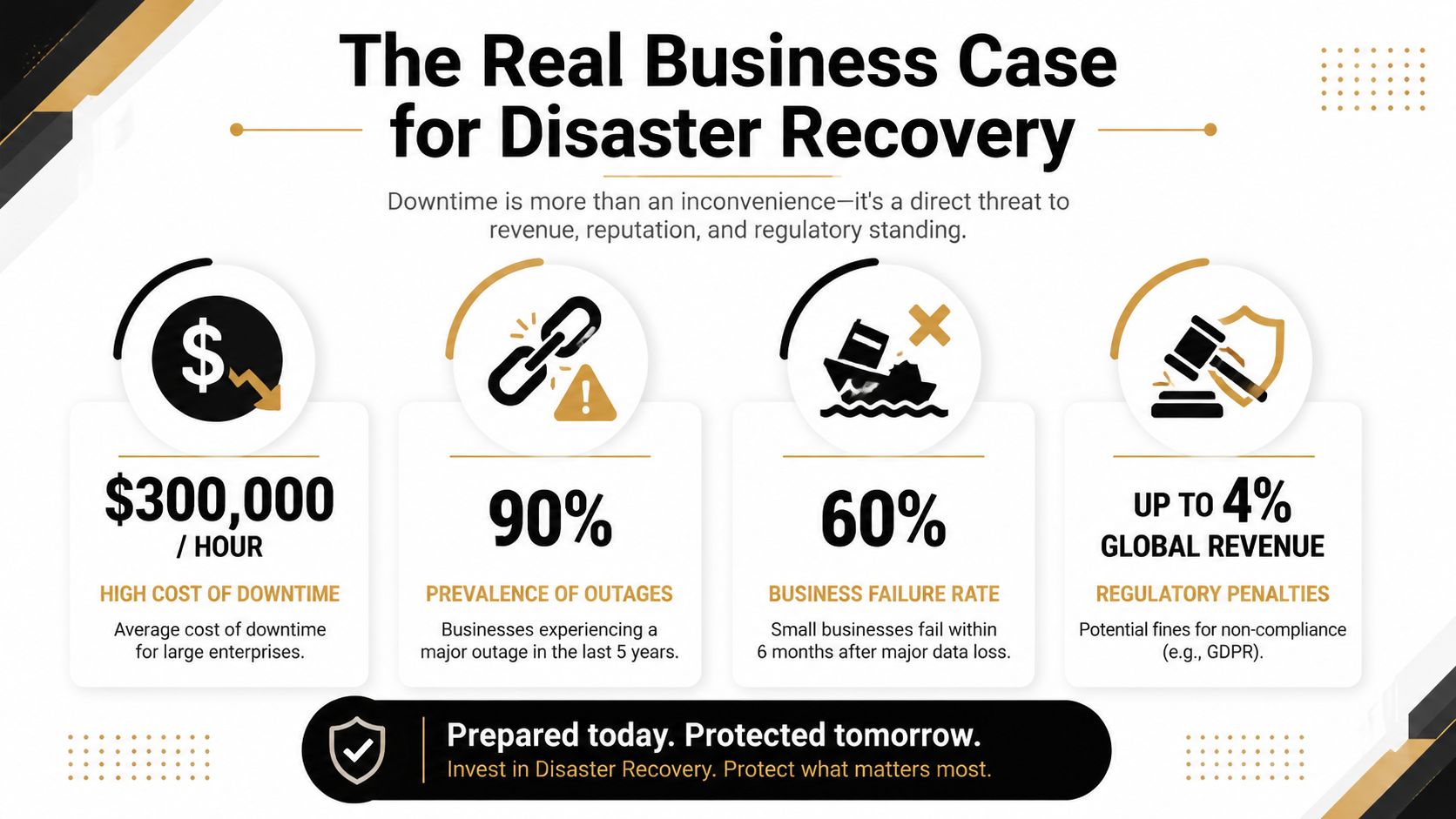
The business case starts with interruption, not IT. When systems go down, staff sit idle, customers wait, and leaders lose visibility into the work that still has to get done. That creates direct cost, and it also puts pressure on trust, especially in industries where clients expect confidentiality and continuity.
The financial side is hard to dismiss. One industry compilation reports that the average cost of recovering from a data breach without a proper disaster recovery plan is USD 4.35 million, while enterprises usually allocate 2% to 5% of IT budgets to disaster recovery (worldmetrics industry statistics). Those figures explain why preparation matters. A controlled recovery budget can help protect the business from a far larger loss when a breach or outage hits.
Why regulated firms feel the impact faster
Healthcare clinics, law offices, financial firms, and construction teams with project commitments all live under different rules, but they share the same weak point. If records, communications, or scheduling systems are down, the business cannot wait and hope. The operational gap quickly turns into a compliance issue and a reputation issue.
Recovery planning should be treated like insurance with instructions, not insurance with a shrug.
For DFW businesses, that matters because local firms often run lean teams and still have to meet regulatory and client expectations. When one person manages several critical systems, there is less room for improvisation during an outage. Disaster recovery has to answer practical questions, like who can access what, how fast records can be restored, and how much downtime the business can absorb before it starts missing obligations.
The larger market trend supports that shift. DRaaS is projected to move from USD 16.43 billion in 2026 to USD 48.72 billion by 2035 (Market Research Future), which shows how many organizations are choosing service-based resilience instead of building and maintaining everything themselves. For DFW businesses, that matters because resilience is no longer reserved for large enterprises with deep internal teams. It is becoming a practical operating decision.
Comparing Your Disaster Recovery Architecture Options
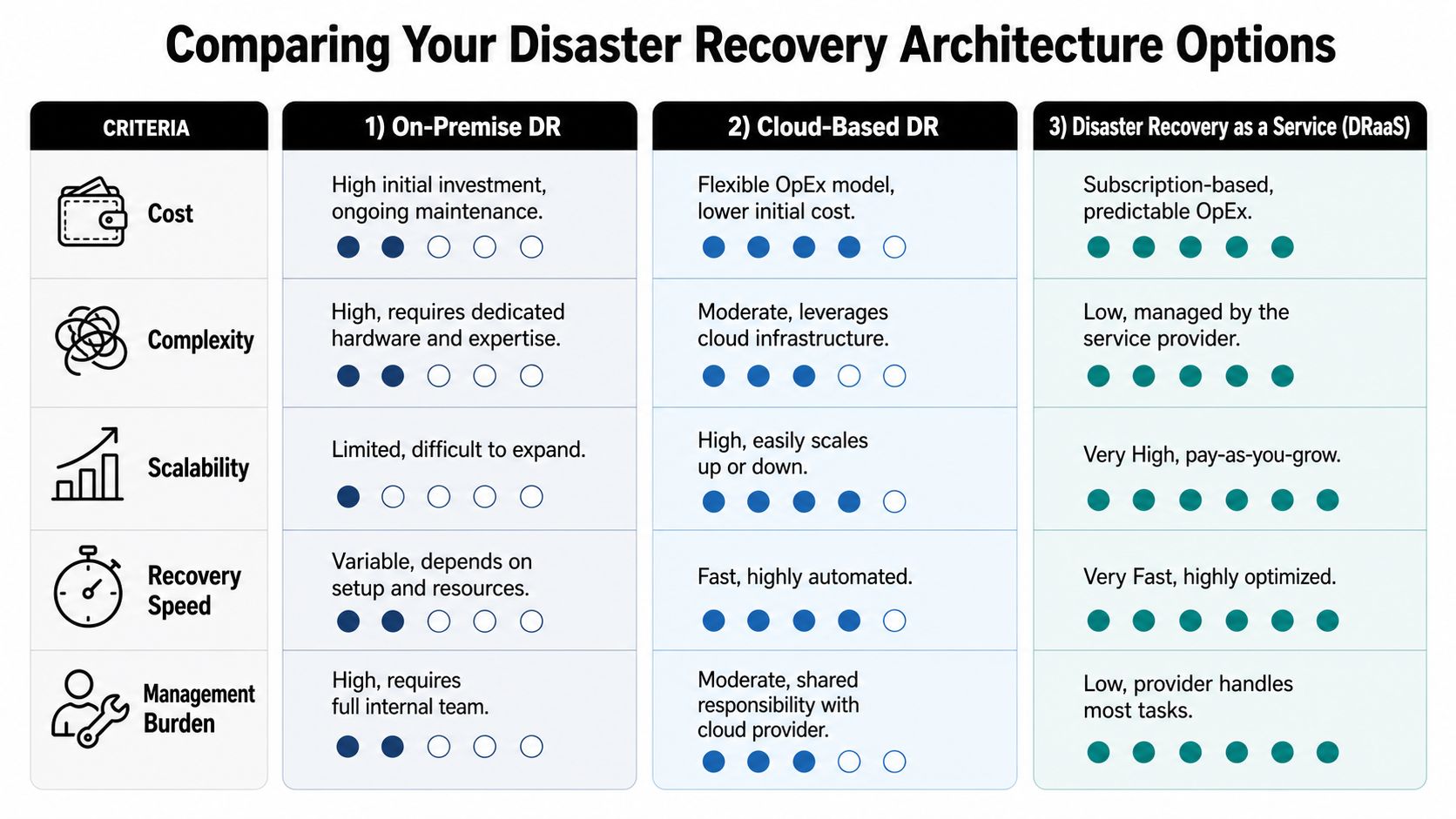
A recovery plan only works if the architecture fits the business behind it. For a DFW company, that usually means choosing between on-premise disaster recovery, cloud-based recovery, and Disaster Recovery as a Service (DRaaS). Each option shifts a different mix of cost, control, and day-to-day workload onto the business or the provider.
| Option | Strength | Trade-off |
|---|---|---|
| On-premise DR | High control over hardware and environment | More hardware, more maintenance, more internal responsibility |
| Cloud-based DR | Flexibility and easier scaling | Still requires planning, configuration, and oversight |
| DRaaS | Service-based simplicity with provider-managed recovery | Less hands-on control, so the provider relationship matters more |
How the trade-offs usually play out
On-premise recovery fits organizations that want direct control and already have the staff to maintain it. That model can work well, but every hardware change, patch cycle, and capacity decision stays inside the business. For a small team, that can feel like keeping a second office just so the first one can keep running if the lights go out.
Cloud-based recovery reduces the hardware burden and usually scales more easily. The internal team still has to set the recovery design, test the process, and stay ready to act. It gives more flexibility than a fully owned environment, but it does not remove the need for discipline. If the setup is wrong, the cloud only gives you a faster way to fail.
DRaaS moves more of the complexity to the provider. That is one reason the category has grown, and it has become a practical option for organizations that want service-based resilience instead of building and maintaining a second environment themselves Market Research Future. For a small team, the appeal is straightforward. It can lower the barrier to recovery without forcing the business to support duplicate infrastructure on its own.
The catch is fit. A company should not buy full failover for every workload by default, because that drives cost without adding much value where downtime is tolerable. A scheduling app, a records archive, and a core transaction system do not deserve the same recovery design. The better move is to match the architecture to the business impact, then use the service model to support that decision. Your service level agreement should spell out those expectations in plain language, not hide them in fine print. More detail on that belongs in a clear service level agreement before anyone signs off.
Understanding the Metrics That Define Success RTO and RPO
A recovery plan gets real the moment someone asks, “How long can this be down?” and “How much data can disappear?” Those are the two metrics that matter most, Recovery Time Objective (RTO) and Recovery Point Objective (RPO). RTO sets the maximum acceptable downtime. RPO sets the maximum acceptable data loss (Resolver guidance).
What business owners should ask
RTO works like a stopwatch. If the clock starts at the moment of failure, how much elapsed time can the business tolerate before the system is back in service? RPO works like a save point in a game. If the system crashes, how far back can the business afford to roll without creating serious damage?
Those questions matter more than generic promises of “fast recovery.” A payroll system, a scheduling platform, and a file archive do not need the same answer. Mapping each critical system to its own RTO and RPO turns backup from a vague promise into a measurable business service (Resolver guidance).
What to push for in plain language
- Ask for system-by-system targets. A plan that treats every application the same usually ignores business reality.
- Ask what happens first. The order of recovery matters because dependencies can block everything behind them.
- Ask how the target is proven. If a provider can't show that a recovery target is realistic, it's just a hope.
Practical rule: if staff can't explain which system comes up first, the recovery design isn't finished yet.
That logic also belongs in service agreements. A clear SLA should match the RTO and RPO targets the business needs. For DFW firms reviewing those commitments, service level agreement language should be written in business terms, not just technical ones.
Building Your Plan and Choosing a DFW Partner
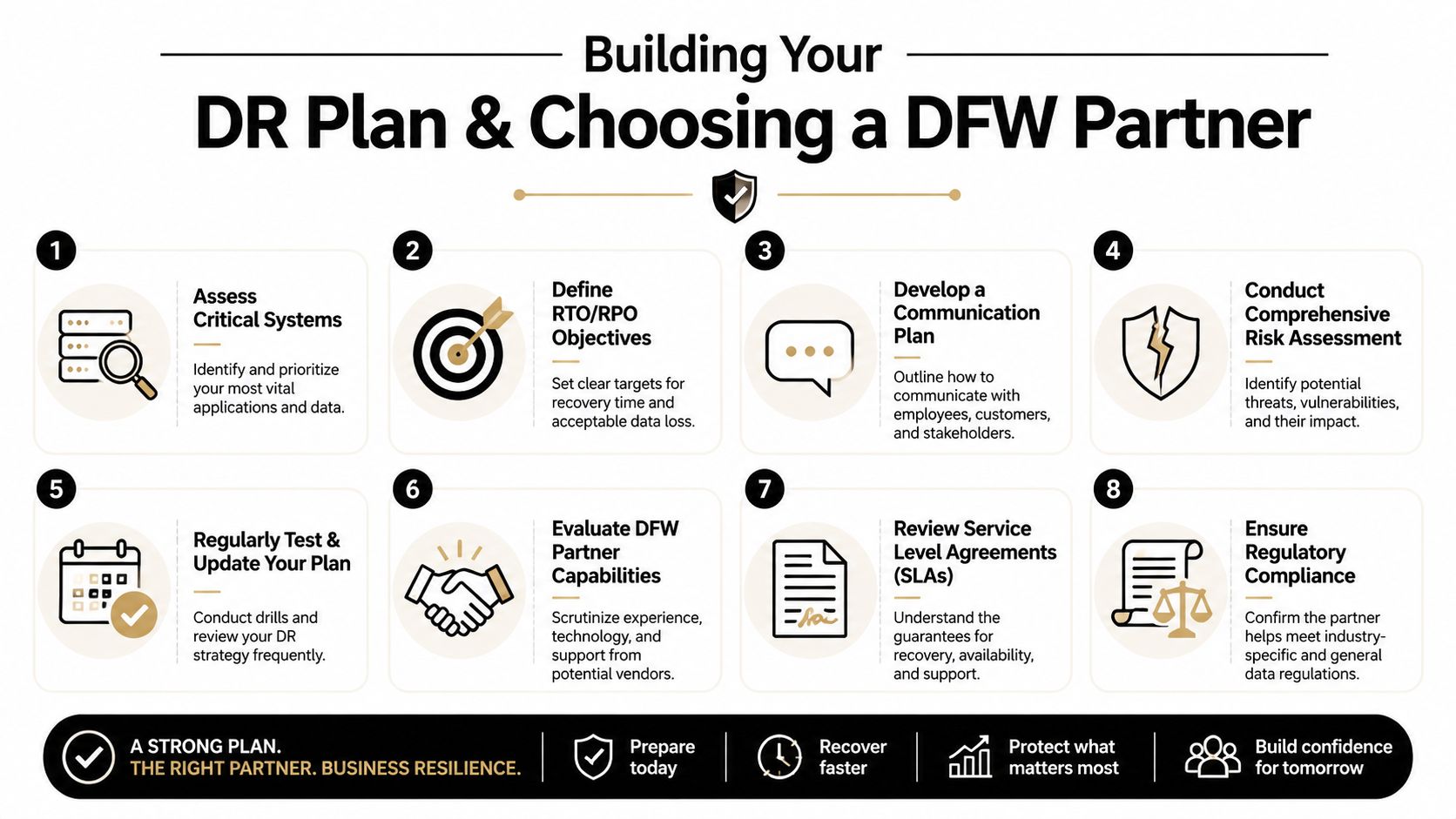
A recovery plan starts with a working map of the business. If a system goes dark, which parts stop revenue, which parts create compliance exposure, and which parts keep people informed? Once those questions are answered, each system can get a recovery target, a backup method, and a named owner.
A practical planning sequence keeps the work grounded.
- Assess the critical stack. Start with identity, email, accounting, document storage, scheduling, and the applications that keep the business running day to day.
- Set recovery targets. Give each key system a realistic RTO and RPO instead of copying the same target across the board.
- Write the communication path. Staff need to know who declares an incident, who speaks to customers, and who signs off on restoration steps.
- Test the sequence. Recovery plans usually fail because the order of restoration was never checked, not because the document is missing.
- Update after change. New apps, migrations, and office growth can break an older plan without warning.
That same discipline should shape partner selection. Regulated firms need vendors who can prove failover and failback will support application-specific targets, while also showing compliance evidence for requirements such as HIPAA or SOC 2 controls. A solid RFP guide for disaster recovery planning helps buyers ask the right questions before they commit, which matters in DFW where small teams often need outside help without giving up oversight.
A local partner should also understand how small businesses operate. That means responsive support, direct answers, and a recovery design that fits the way the company works. For organizations weighing provider fit, how to choose a managed service provider is a useful reference point before signing anything.
Your Next Step Toward Business Resilience in North Texas
Recovery readiness is not a luxury item. It's a business decision that affects cash flow, compliance, and customer confidence. The firms that handle it well usually do three things consistently, they define what matters most, they test the plan on a schedule, and they choose help that matches their risk profile.
Mature programs use quarterly tabletop exercises, biannual partial failover tests, and annual full simulations to keep the plan usable, not theoretical (Atlassian guidance). That cadence makes sense for DFW businesses too, especially where small teams can't afford to discover gaps during a real outage. The goal is not perfect paperwork. The goal is a recovery path that staff can execute under pressure.
For a North Texas business owner, the next step should be low friction and useful. A clear review of systems, recovery targets, and support gaps can show whether the business is protected well enough, or whether it is one incident away from a rough week.
A CTA for Technovation LLC.