If a medical practice thinks of IT as a back-office utility, it’s already behind.
Clinical care now depends on stable systems, secure patient data, reliable access to records, and staff who aren’t wasting time fighting printers, logins, failed backups, or EHR slowdowns. The question isn’t whether a practice needs better IT. The question is whether current IT supports patient care every day, or creates operational drag and compliance exposure.
For Dallas-Fort Worth practices, that distinction matters. The right managed it services for medical practices don’t just fix tickets. They reduce disruption, protect revenue, support HIPAA obligations, and give practice leaders a clearer way to plan growth without guessing what technology failure will cost next.
Table of Contents
- Is Your IT Protecting Patients or Creating Risk?
- Beyond the Break-Fix Model
- Essential IT Services for Modern Healthcare
- From IT Cost Center to Strategic Asset
- Your Vendor Selection Checklist
- A Smooth Transition to Managed IT Support
- Secure Your Practice with a DFW IT Partner
Is Your IT Protecting Patients or Creating Risk?
What happens to patient trust when your EHR stalls at check-in, a workstation goes down before the first appointment, or staff have to guess their way through a system problem?
For a medical practice, IT performance shows up in patient care fast. Delayed chart access slows visits. Front-desk workarounds create scheduling errors. Weak security controls put protected health information at risk and expose the practice to compliance trouble. Patients may never ask about your network, backups, or endpoint policies. They will notice long waits, repeated forms, billing mistakes, and a practice that feels disorganized.
That is why managed it services for medical practices belong in operational planning, not in a drawer labeled "technical issues." In DFW, where many practices are adding providers, locations, telehealth workflows, and digital intake, the payoff is practical. Stable systems protect revenue, reduce staff frustration, support faster visits, and lower the odds of a disruptive security event. Good IT produces measurable ROI when it keeps the day on schedule and prevents avoidable downtime.

Outdated assumptions create avoidable exposure
Many practices still rely on a simple test: if there is someone to call after a failure, IT must be handled.
That standard is too low for healthcare. A reactive arrangement leaves long stretches with no one confirming patches were applied, backups were tested, access rights still made sense, antivirus alerts were reviewed, or aging hardware was putting the schedule at risk. Problems accumulate in those gaps, then hit all at once during clinic hours.
Practical rule: If your team only hears from IT after something breaks, risk is already building inside the practice.
What managed IT should mean in a medical setting
A medical practice needs active oversight, not occasional rescue. The right managed service covers day-to-day system health, security monitoring, maintenance, backup verification, user access control, vendor coordination, and planning tied to clinical operations.
For a practice manager, the targets are straightforward:
- Keep clinicians productive: Exam rooms, front-desk stations, and EHR workflows should work consistently throughout the day.
- Protect patient information: Security controls need regular review, enforcement, and documentation.
- Reduce avoidable downtime: Issues should be found early, before they disrupt appointments or billing.
- Support practice growth: New hires, added locations, devices, and workflow changes should fit a clear technology plan.
- Avoid hidden costs: Surprise invoices, emergency replacements, and unplanned outages usually point to poor management, not bad luck.
The strongest IT model gives your practice predictability under pressure. That is the standard to expect, and it is the foundation for safer care, stronger operations, and steady growth.
Beyond the Break-Fix Model
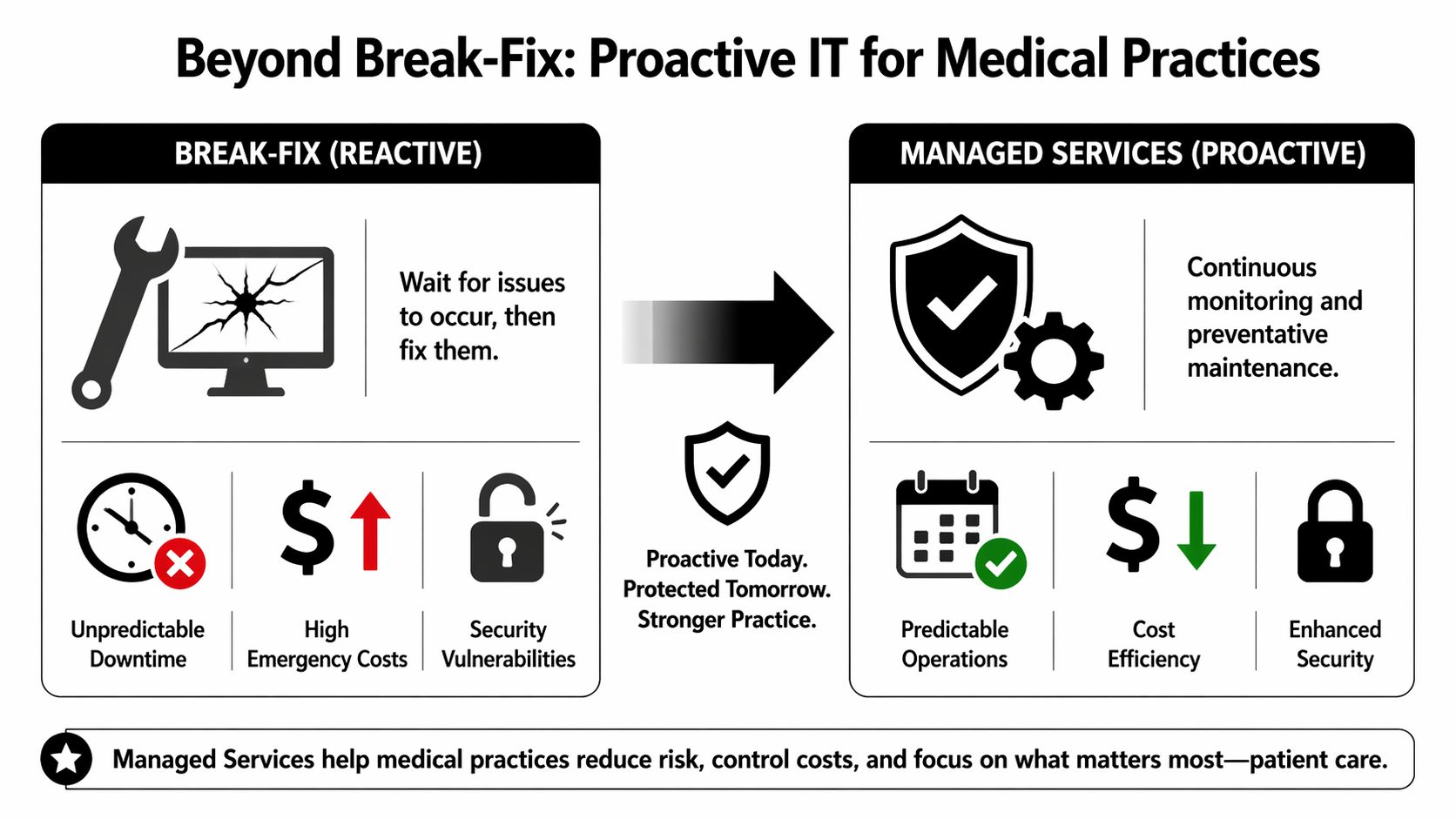
Break-fix support fails medical practices for a simple reason. It turns every IT issue into a decision made under pressure.
That approach hurts operations in ways practice managers feel immediately. A frozen front-desk workstation slows check-in. A failed printer backs up clinical staff. A server issue delays billing and forces leadership to approve emergency spending at the worst possible moment. Over time, the practice pays more through lost productivity, disrupted schedules, rushed hardware purchases, and staff frustration.
Managed IT changes the operating model. The goal is steady performance, fewer interruptions, and a predictable budget that supports patient care instead of reacting to preventable failures. For DFW practices, that shift has clear ROI. Fewer canceled appointments, faster room turnover, cleaner billing workflows, and less time spent chasing vendors all affect revenue and patient experience.
Preventive care is the right analogy
Medical professionals already work this way. They monitor, screen, and intervene early because small issues are easier and cheaper to address before they become emergencies.
IT requires the same discipline. Systems need continuous monitoring. Updates need to follow a schedule. Backups need to be tested. Security alerts need review. Aging hardware needs a replacement plan before it fails during clinic hours.
A reactive setup leaves all of that until something breaks. Then the practice absorbs the disruption.
Here’s the practical difference:
| Model | How it works | What the practice feels |
|---|---|---|
| Break-fix | Support starts after failure | Delays, surprise invoices, disrupted schedules |
| Managed services | Support runs continuously with oversight and planning | Stable operations, clearer budgeting, fewer urgent decisions |
Why the pricing model matters
Pricing shapes behavior.
Hourly support rewards tickets, emergencies, and after-hours calls. A managed agreement pushes the provider to reduce incidents, standardize systems, and keep users working. That incentive matters in healthcare, where every outage affects patients, staff, and cash flow.
Practice managers should view this as an operational control, not just a line item. A flat monthly service model makes budgeting easier, but the bigger benefit is accountability. You can measure response times, review recurring issues, track device health, and plan upgrades before they become expensive disruptions. That is how IT starts contributing to growth instead of draining attention.
Managed IT should reduce interruptions, shrink avoidable risk, and give leadership a clear plan for the next 12 to 24 months.
What a mature managed service relationship includes
A serious managed service relationship includes both daily execution and strategic oversight. If a provider only offers a help desk and basic monitoring, the practice is still doing too much risk management on its own.
Look for these capabilities:
- Continuous monitoring: Devices, servers, networks, and critical systems are watched for early signs of failure.
- Scheduled maintenance: Patching, performance checks, and system cleanup happen on a defined cadence.
- Responsive user support: Staff get fast help with access problems, device issues, and workflow interruptions.
- Security operations: Threat detection, policy enforcement, backup verification, and incident readiness stay active.
- Lifecycle and budget planning: Leadership gets a replacement schedule, risk priorities, and visibility into upcoming costs.
- Vendor coordination: Someone owns communication with internet, phone, cloud, imaging, and software vendors when issues cross systems.
That is the standard medical practices should expect. Anything less creates hidden costs, more downtime, and preventable risk that eventually shows up in patient care and practice performance.
Essential IT Services for Modern Healthcare
Not every IT service matters equally in a medical office. A practice doesn’t need a pile of features. It needs the services that protect care delivery, support compliance, and keep staff moving.
EHR and EMR system support
The EHR sits at the center of the practice. If it slows down, crashes, or behaves inconsistently, everything else gets harder. Scheduling, rooming, chart review, order entry, coding, and billing all feel the impact.
Strong support in this area means more than restarting workstations and calling the software vendor. It includes environment stability, user access management, workstation performance, printer reliability, interface troubleshooting, and coordination with the practice’s application partners when something breaks across systems.
A qualified provider should also be prepared for transitions. Medical practices often underestimate the hidden complexity of EHR and EMR changes, including legacy migration, staff training, and vendor coordination delays, as noted in healthcare IT implementation guidance for medical organizations. That’s where many projects go sideways. Not in software selection, but in the messy period before and after go-live.
Advanced cybersecurity that works in the background
Most practices don’t need more security jargon. They need defenses that are deployed, monitored, and enforced without creating daily friction for staff.
That typically includes endpoint protection, access controls, email security, network hardening, vulnerability review, suspicious activity monitoring, and a clear escalation path when something looks wrong. In healthcare, cybersecurity also has to respect clinical workflows. If controls are too loose, risk rises. If they’re too clumsy, staff start bypassing them.
- Protect logins and devices: Access to patient data should be limited by role and reviewed regularly.
- Watch for abnormal behavior: Monitoring should catch unusual activity before a staff member notices damage.
- Reduce human error exposure: Security awareness and support protocols should make the safe action the easy action.
The best healthcare security program is the one staff can follow consistently on a busy clinic day.
HIPAA compliance as an ongoing process
HIPAA compliance shouldn’t be treated like an annual paperwork event. It’s an operating discipline tied to access, data handling, backups, device management, risk review, and staff behavior.
That’s why managed it services for medical practices should include continuous attention to compliance-related controls. Policies have to map to real systems. Permissions have to reflect real roles. Risk assessments have to connect to actual remediation work.
Practices that leave compliance fragmented usually create two problems. First, they can’t clearly show what controls exist. Second, nobody owns the follow-through.
Business continuity and recovery readiness
Every medical practice needs a recovery plan that assumes something will fail. The only real question is whether recovery will be organized or chaotic.
HIPAA-compliant disaster recovery services can achieve a recovery time objective of under one hour, according to healthcare disaster recovery guidance for medical offices. That matters because a single ransomware event can cause an average downtime of 21 days and cost millions, as noted in the same source.
A good continuity plan should cover:
- Backup integrity: Backups must be encrypted, verified, and restorable.
- Recovery priorities: The practice should know which systems come back first.
- Remote access readiness: If the office is disrupted, critical users still need secure access.
- Communication steps: Staff should know what happens during an outage, not improvise it.
When recovery is planned well, disruption becomes manageable. When it isn’t, the practice discovers its weaknesses during the worst possible week.
From IT Cost Center to Strategic Asset
The wrong way to evaluate managed IT is to ask what the monthly fee costs.
The right way is to ask what unmanaged risk, avoidable downtime, scattered support, and distracted staff are already costing the practice. That’s the true comparison.
Healthcare providers using managed IT services have shown a 27% increase in operational efficiency, can reduce overall operational costs by up to 35%, and can avoid downtime costs that range from $10,000 to $50,000 per hour, according to healthcare managed IT efficiency and downtime cost analysis. For a practice manager, those numbers turn IT from a support line item into a business decision.

What practice leaders should actually measure
A useful ROI discussion starts with operations, not hardware.
Practice leaders should review four categories:
- Downtime exposure: How much revenue is affected when scheduling, charting, or billing is interrupted?
- Staff productivity loss: How often do front-desk employees, billers, or clinicians stop work to deal with technology friction?
- Risk containment: What would a breach, failed recovery, or compliance issue do to operations and trust?
- Planning quality: Is the practice replacing systems intentionally, or only after something fails?
A lot of practices discover that they’re already paying for IT dysfunction in hidden ways. Overtime. Delayed claims. Slower intake. Provider frustration. Rework. None of that shows up cleanly on an invoice, but it shows up in the business.
Why strategic guidance matters
Support alone isn’t enough. Medical practices also need someone translating business goals into technology decisions. That’s where a virtual CIO service for business technology planning fits. It gives leadership a structured way to prioritize upgrades, manage risk, budget intelligently, and stop making infrastructure decisions in a panic.
Technovation LLC is one DFW-based option that provides managed services, cybersecurity oversight, cloud backup, monitoring, and strategic planning for regulated organizations. For a medical practice, that kind of support is useful when leadership wants both day-to-day stability and a roadmap for growth.
A practice that treats IT as strategy usually spends more intentionally and scrambles less often.
The upside is bigger than cost control. Better IT discipline helps practices scale providers, onboard staff faster, support new locations, and protect the patient experience while they grow.
Your Vendor Selection Checklist
Most practices ask managed service providers the wrong questions.
They ask how many technicians are on staff, whether support is available after hours, or how quickly someone can answer the phone. Those questions matter, but they don’t reveal whether the provider can handle a medical environment with compliance pressure, EHR dependencies, and zero appetite for disruption.
A stronger selection process should uncover whether the provider can operate inside healthcare reality, not just whether they can market to it.
Questions that reveal real healthcare capability
Medical practices often underestimate the hidden costs of EHR and EMR transitions, including legacy migration, staff training, and vendor coordination delays. A qualified MSP should manage those issues proactively, as described in the earlier healthcare implementation discussion.
That means the vendor checklist should include questions like these:
- How do they support EHR-related incidents? Ask who owns coordination when the issue sits between the practice, the software vendor, the workstation, and the network.
- What happens during onboarding? A serious provider should describe discovery, documentation, risk review, and stabilization before promising a smooth experience.
- How do they handle compliance responsibilities? The answer should include access controls, backup oversight, device standards, user processes, and documented risk remediation.
- What is included in the monthly service and what is project-based? Hidden costs often surface here.
- How do they manage high-risk changes? EHR rollouts, server replacements, and cloud migrations need planned support windows and escalation procedures.
- How do they support staff adoption? Training and user support matter because even a good system fails if employees don’t know how to work with it.
A helpful next step for buyers is this guide on how to choose a managed service provider, especially for practices trying to separate polished sales talk from operational capability.
What a strong answer sounds like
The best answers are specific. Not flashy. Specific.
A good provider should be able to explain:
| Selection area | Weak answer | Strong answer |
|---|---|---|
| Healthcare knowledge | “We work with many industries” | “We understand protected data workflows, role-based access, recovery priorities, and vendor coordination in medical settings” |
| EHR support | “We’ll call the vendor if needed” | “We document dependencies, manage escalation, and stay involved through root-cause resolution” |
| Implementation planning | “It’s usually seamless” | “We run discovery, identify legacy risks, plan cutover support, and prepare staff” |
| Pricing clarity | “It depends” | “Here is what’s covered, what triggers projects, and where transition work may add cost” |
A practice manager should leave vendor meetings with fewer assumptions and more written detail. If the provider can’t explain process clearly before the contract, it probably won’t deliver clarity after the contract.
A Smooth Transition to Managed IT Support
Switching IT providers worries medical practices for a good reason. If the transition is sloppy, patient care feels it immediately. That’s why the handoff has to be structured, not improvised.
The safest transitions follow a phased model that reduces disruption and exposes hidden risk early.
Phase one assessment and prioritization
The first step is a full review of the current environment. That includes users, devices, access rights, backup status, security controls, internet reliability, network design, vendor relationships, and known problem areas.
This stage should also map business impact. Which systems are critical to same-day operations? Which departments lose time most often? Which weaknesses create compliance or continuity risk?
Start with visibility. A practice can’t prioritize what it hasn’t documented.
Phase two stabilization and onboarding
After discovery, the provider should stabilize the environment before making major changes. That usually means cleaning up administrative access, standardizing endpoint protection, validating backups, documenting assets, and addressing obvious vulnerabilities or failure points.
This is also where communication matters. Staff should know what’s changing, what support channels to use, and what to expect during the early weeks. Silence creates confusion. Confusion creates resistance.
A DFW practice evaluating managed it services for medical practices should also expect a concrete onboarding plan, not a vague promise. Technovation’s free security audit or IT health check fits naturally at this point because it gives leadership a low-risk way to identify gaps before committing to broader remediation.
Phase three staff adoption and ongoing management
The final stage isn’t really final. It’s where managed service begins to work as intended.
Users get support. Systems are monitored. Risks are reviewed. Backups are checked. Recurring issues are analyzed instead of repeatedly patched over. Leadership gets visibility into what needs attention now and what can wait for budget planning.
The transition succeeds when the practice notices less drama, fewer recurring interruptions, and better confidence in day-to-day operations. That’s the sign the provider isn’t just taking tickets. It’s managing the environment.
Secure Your Practice with a DFW IT Partner
A medical practice doesn’t need to become an IT expert. It does need to stop treating IT like an occasional repair problem.
Managed IT is now part of patient safety, operational continuity, staff productivity, and business growth. When systems are stable and secure, the whole practice works better. Front-desk teams move faster. Clinicians stay focused. Leadership gets fewer surprises. Patients experience a more organized office.

Many practices struggle to calculate ROI because generic content rarely gives them a concrete model. A custom audit from a DFW MSP can build a clearer financial case for whether managed services are more economical than in-house or break-fix support, according to healthcare MSP ROI and pricing gap analysis.
That’s the smart next step. Not a rushed contract. Not another year of hoping current systems hold together. A real assessment.
A local partner matters here because medical practices need more than remote advice. They need responsive support, practical planning, and someone who understands how healthcare operations work in practice. For DFW clinics, that’s the difference between generic IT coverage and a support model built around actual practice risk.
Technovation LLC helps North Texas medical practices evaluate security gaps, reduce downtime risk, and build a practical roadmap for compliance, continuity, and growth. A no-obligation IT health check or security audit gives practice leaders a concrete starting point instead of another generic sales pitch. For teams that want clearer answers about risk, support coverage, and ROI, Technovation LLC is a sensible next conversation.