
A clinic manager in North Texas discovers that the new patient-monitoring gateway, security cameras, remote backup appliance, and reception workstation all connect to the business network, but nobody owns the full security picture. The law firm across town has a similar problem, with home-office equipment, document workflows, and remote access added over time. Each device solves a business need. Together, they create a distributed environment that requires continuous oversight.
That's the operational reality behind edge computing security for SMBs. The challenge isn't drawing an impressive architecture diagram. It's knowing what exists, controlling who can reach it, patching it on schedule, watching for abnormal behavior, and preserving evidence when staff and devices are spread across multiple locations. This guide focuses on the controls and operating habits that resource-constrained organizations can sustain, including how Technovation can help close the gaps.
Table of Contents
- The Distributed Branch Office Nobody Planned For
- What Edge Computing and Edge Security Mean
- The Threat Categories Hitting Edge Environments
- Where These Risks Land in Real SMB Verticals
- The Core Controls That Reduce Edge Risk
- Why Edge Security Is Really an Operations Problem
- A 90-Day Roadmap and Compliance Checklist for SMBs
- What to Do This Week and Who to Call
The Distributed Branch Office Nobody Planned For
A small DFW medical clinic rarely announces an edge-computing project. Instead, a vendor installs a gateway for imaging equipment. A facilities contractor adds smart temperature sensors. The office manager requests cameras with remote viewing. A backup appliance arrives at a second location, and a physician needs secure access from a home office.
Six months later, the clinic has several local systems processing or transmitting sensitive information, but its documentation still treats the business as one office with one firewall. The same pattern appears in law firms. A practice adds remote workstations, client-portal access, document scanners, conference-room systems, and vendor-managed equipment. IT may know each item individually, yet lack a single inventory showing ownership, firmware status, exposed services, and approved access paths.
Practical rule: If a device can collect data, process data, connect to another system, or provide remote access, it belongs in the security inventory.
The business benefits from distributed processing. Local systems can keep essential workflows moving when connectivity is poor, reduce unnecessary data transfers, and support fast responses. The tradeoff is that every branch, job site, gateway, and remote workstation becomes part of the security perimeter.
A cloud-based network strategy can help centralize policy and visibility, but technology alone won't maintain the environment. Someone still has to reconcile asset lists, approve access, schedule updates, review alerts, and document exceptions. Technovation's managed approach is designed around that recurring work, consolidating monitoring and remediation across distributed locations instead of leaving each site to operate as an isolated outpost.
What Edge Computing and Edge Security Mean
A medical gateway in a North Texas clinic can process patient data locally while supporting equipment and staff workflows. That device still needs the same disciplined controls as any server in a data center. The same applies to a production sensor, document system, camera, or remote workstation at a small business site.
Edge computing places processing close to where data is created or used, rather than sending every task to a distant centralized environment. An edge device may be a gateway, on-site server, IoT endpoint, camera, AI inference box, or remote workstation. It can filter information, run an application, make a decision, or store data temporarily before synchronizing selected information elsewhere.
The operational benefits are clear. Local processing can reduce latency, keep workflows running during intermittent connectivity, limit bandwidth demand, and help an organization retain certain data within a defined location. Those benefits matter to clinics monitoring equipment, manufacturers tracking production conditions, and firms handling confidential documents across multiple offices.
Edge computing security protects the devices, local workloads, connections, identities, and data involved in that distributed model. The program must cover device hardening, authentication, authorization, encryption, segmentation, monitoring, physical protection, update management, and recovery procedures. A control that exists only in a written policy does not protect an unmanaged device.
Each edge workload can introduce a separate trust boundary. A local server, vendor gateway, sensor, and remote workstation may use different operating systems, update processes, and access methods. Security teams must therefore map controls to the workload and identity, while maintaining inventory, patching, monitoring, and access reviews across every site.
NIST's platform-security guidance emphasizes protecting the platform where workloads and data are executed and accessed, including hardware-enabled techniques for cloud and edge environments in NIST IR 8320. For an SMB, the physical and virtual foundation belongs in the security program. Technovation's managed approach helps keep those recurring controls running across distributed locations, even when internal staff cannot monitor every gateway and workstation continuously.
The Threat Categories Hitting Edge Environments
Edge incidents usually start with an operational gap. A stolen administrator credential exposes a gateway. Unpatched firmware gives an attacker a foothold. An open remote-management service bypasses controls applied to ordinary office traffic. In a small organization, each gap also creates a recurring task for a lean IT team.
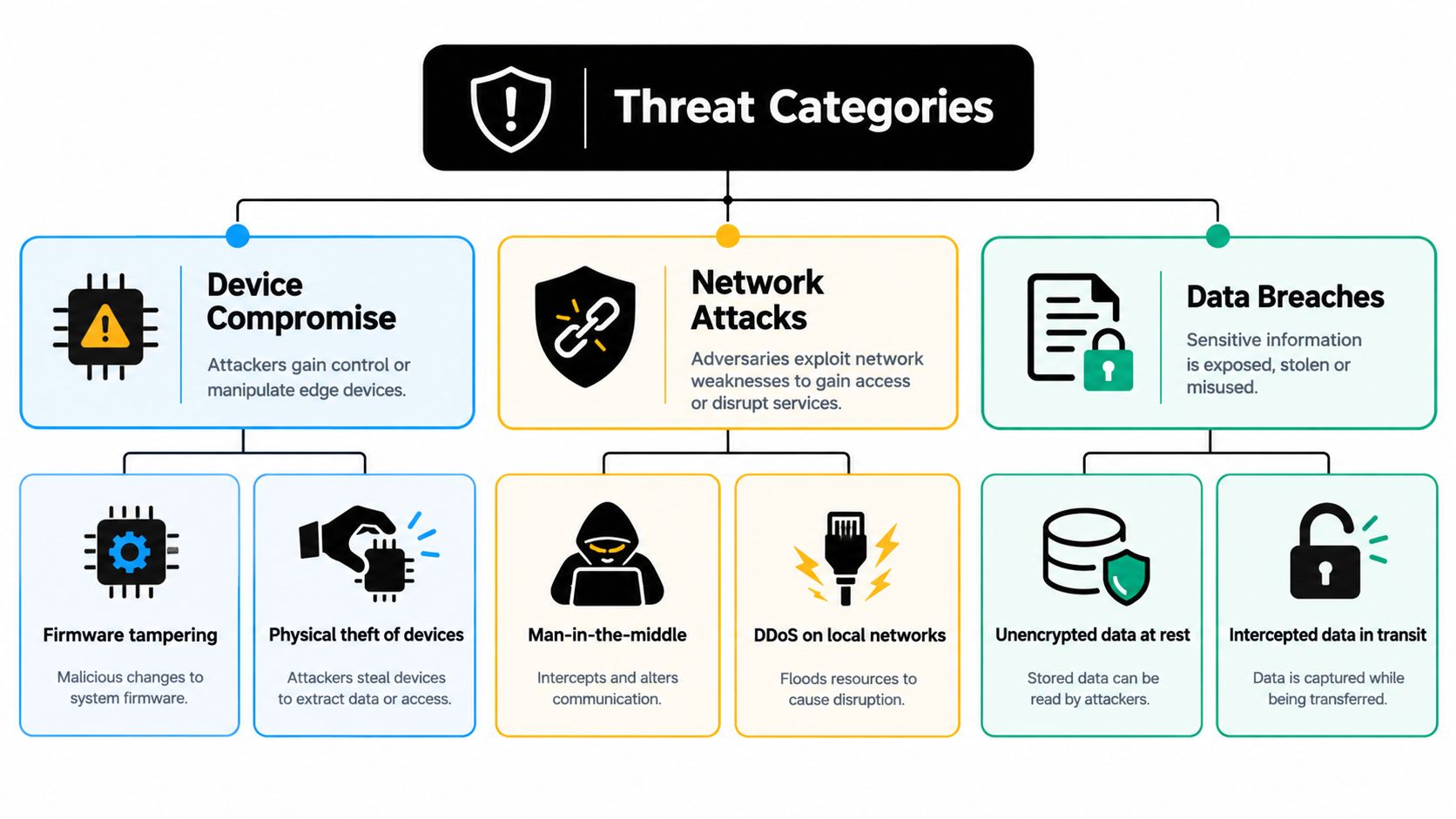
A 2019 IEEE survey identified four attack classes, DDoS, side-channel attacks, malware injection, and authentication or authorization attacks, as accounting for 82% of edge-computing attacks in the referenced Statista data. The paper also cited projected U.S. edge-computing market growth from 84.3 million dollars to 1,031 million dollars by 2025, showing that security exposure expanded with deployment in the IEEE survey paper.
Use each category to assign an owner, a control, and proof that the control is operating:
- Credential abuse: A vendor account keeps broad access after a project ends, or an employee reuses a password on a management portal. Require MFA, named accounts, least privilege, and scheduled access reviews.
- Exposed services: A gateway or local server leaves remote administration available without a business need. Audit open ports regularly and permit management only through approved access paths.
- Device compromise: Outdated firmware, malicious software, or weak local settings can give an attacker control. Apply configuration baselines, signed updates, endpoint protection where supported, and physical safeguards.
- Network interception: A compromised connection can enable man-in-the-middle activity or lateral movement. Segmentation, encrypted connections, and workload-level authorization restrict the attacker's route.
- Physical tampering: A device at a job site or unattended office can be removed, reset, or altered. Use locked enclosures, tamper evidence, and encrypted storage.
- Corrupt or stolen data: Local records may be copied, changed, or left unencrypted. Encryption, integrity checks, backups, and documented recovery procedures protect operations.
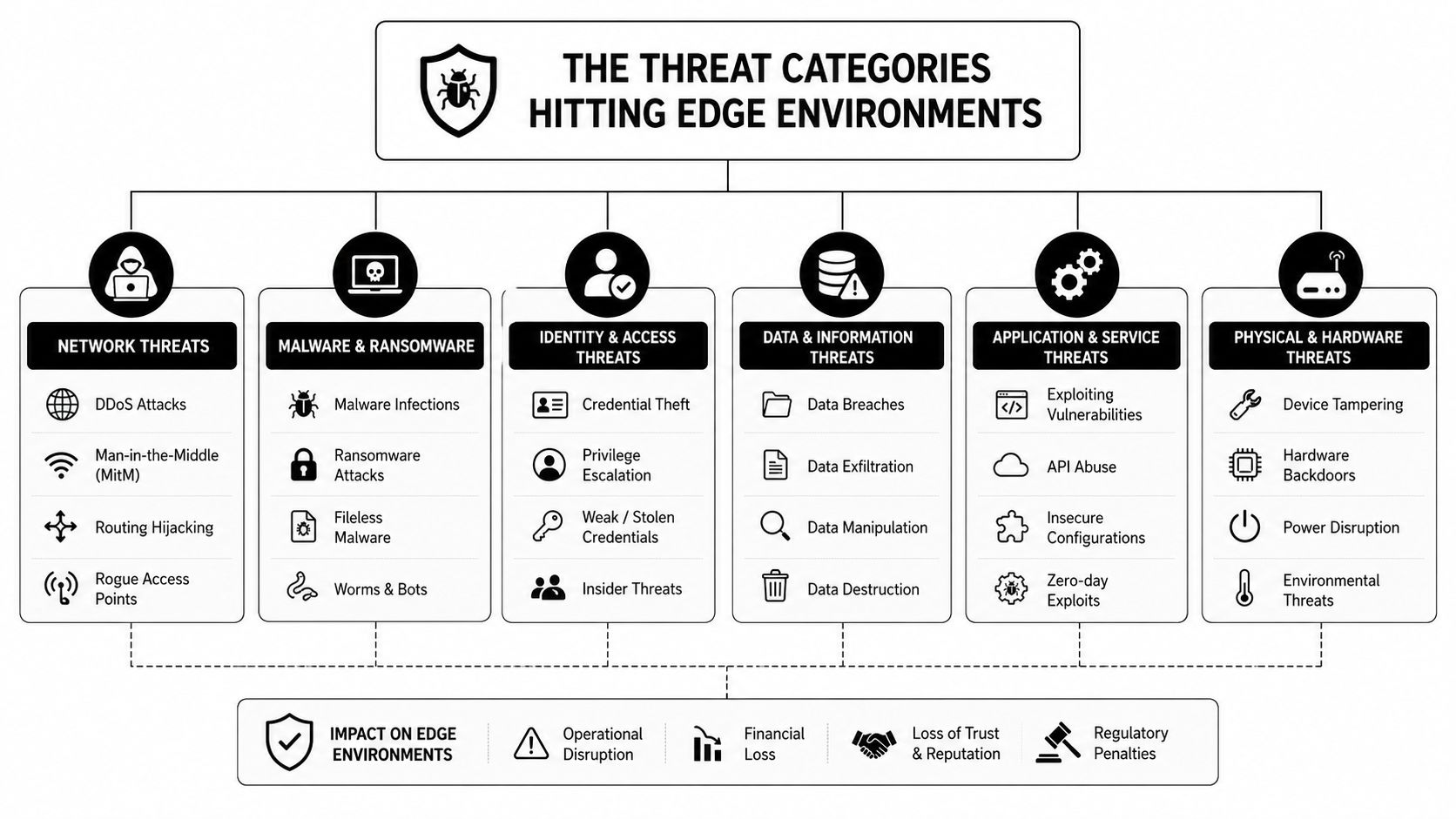
A newer survey cited about 159,700 cyberattacks targeting edge networks in a Statista-based 2017 report. Its six categories included DDoS, side-channel, malware injection, man-in-the-middle, authentication or authorization, and corrupt data injection attacks in the referenced IEEE material. The practical lesson for an SMB is straightforward: map every threat to a routine task, an accountable owner, and completion evidence. Technovation's managed approach helps keep those tasks running across small sites when internal staff cannot continuously patch, monitor, and review access.
Where These Risks Land in Real SMB Verticals
An edge failure does not affect every SMB the same way. In a healthcare clinic, an unavailable gateway can interrupt patient care. A law firm faces exposure of privileged files and communications. A construction company may lose secure connectivity at a job site where equipment sits outside a controlled office.
A 2024 survey of more than 300 engineering and security professionals identified security as the top challenge in edge deployments. Respondents focused on data, network, device, and physical or digital security, citing cyberattacks, vulnerabilities, and misconfigurations as risks that grow as deployments expand in Red Hat's State of Edge Security report.
| Vertical | Top Edge Risks | Operational Impact |
|---|---|---|
| Healthcare | Unmanaged gateways, weak vendor access, exposed patient-data paths | Privacy incidents, interrupted clinical workflows, difficult audit response |
| Legal | Remote document access, excessive privileges, insecure home-office endpoints | Loss of confidentiality, unavailable files, client trust damage |
| Financial and accounting | Payment-connected devices, insecure transfers, incomplete logs | Transaction disruption, audit findings, weak evidence trails |
| Construction and engineering | Job-site connectivity, mobile workstations, vendor hardware | Project delays, stolen plans, unreliable field access |
| Nonprofits | Distributed staff, donor data, limited security capacity | Service interruption, exposed records, delayed remediation |
Healthcare operators should identify every edge system connected to patient-related workflows, including devices that do not store complete records. Law practices need separate access paths for general collaboration and matter-specific files. Financial and accounting teams should retain useful records around payment systems and sensitive transfers. Construction companies need an inventory that follows equipment between offices, vehicles, and job sites.
The operating requirement is consistent across these verticals: assign ownership for patching, monitoring, and access reviews at each location. A small internal team cannot rely on occasional site visits to catch a failed update or unnecessary account. Technovation's managed approach keeps those routines visible across distributed sites, with escalation when staff or connectivity gaps prevent completion.
Organizations starting with a baseline can also use guidance on how to secure your small business network. Begin by documenting the data, users, devices, and business process tied to each connection. Then set review responsibilities by site and vertical.
The Core Controls That Reduce Edge Risk
A small business needs controls that remain effective through staff changes, vendor visits, new locations, and unreliable connectivity. Build for routine execution, not for an architecture diagram that no one maintains.
Harden each device before connection
Remove unused services, change default credentials, establish an approved firmware baseline, and secure equipment in public or lightly supervised areas. Record the owner, location, purpose, support contact, and update method. Hardware that cannot support current security controls should be isolated, with the limitation documented and assigned for replacement.
Put identity at the gate
Require MFA on every management surface that supports it. Use named administrative accounts, assign permissions by role, and remove access as soon as an employee or vendor no longer needs it. A technician assigned to one gateway should not receive unrestricted access across every site.
Protect data and divide the network
Encrypt data in transit and at rest where the system supports it. Separate clinical devices, payment-connected equipment, cameras, guest systems, and ordinary workstations so a compromised endpoint cannot move directly through the environment. Technovation's guidance on network segmentation outlines a practical way to separate systems by function and risk.
Monitor continuously and update with control
Centralized logs, endpoint detection, health checks, and alerts help staff spot unusual access, failed updates, service changes, and resource problems. Use a controlled update process with testing, scheduled maintenance windows, rollback procedures, and records that show what changed. For small teams, those records also expose locations where connectivity or staffing prevents routine work from finishing.
Zero trust suits distributed sites because each request is verified rather than accepted solely because a user or device is inside a building. Apply that review to identity, device, location, service, API call, and workload. Physical or network location should not grant automatic trust, as described in Dell's zero-trust edge guidance.
Operational test: A control is useful only when someone can show who checked it, what the check found, and what happened next.
API connections require the same discipline as user logins. Teams responsible for an edge application or integration can review how to secure your Expo API layer, then apply the relevant practices to authentication, authorization, secrets, rate controls, and logging. Technovation's managed approach can keep these checks visible across small sites, while supplier reviews should confirm support and update commitments. Maintain an approved component list and remove unsupported hardware from production.
Why Edge Security Is Really an Operations Problem
Architecture determines what a system can do. Operations determine whether the promised protection remains in place.
A lean IT team may design a segmented network correctly, then struggle to review configuration drift across multiple sites. A vendor may patch a gateway once, but no one confirms that the update completed on every device. A remote-access rule may be approved for a legitimate project, then remain active after the work ends.
Government guidance for edge devices emphasizes routine auditing of exposed services and practical mitigation steps in the federal security considerations for edge devices. That sounds simple until a business has distributed equipment, competing maintenance windows, vendor dependencies, and no dedicated security operations team.
The control burden is recurring
The hard questions aren't theoretical:
- Who reviews new devices before installation?
- Who confirms patches reached disconnected locations?
- Who investigates an alert outside office hours?
- Who checks open services and stale accounts?
- Who preserves the evidence needed for a compliance review?
- Who coordinates containment when a local endpoint behaves abnormally?
Edge investment is expanding. Allianz Commercial reported expected global edge-computing investment of 228 billion dollars in 2024, up 14% from 2023, with a projection of 378 billion dollars by 2028 in its edge computing and cyber security report. The larger the footprint, the more important repeatable operations become.
Technovation addresses that gap with managed monitoring, risk mitigation, structured change windows, compliance-ready documentation, and security audits that review device configurations, operating systems, applications, and security software. The firm's 24/7 monitoring and free security audit or IT health check give an SMB a practical way to establish visibility without hiring an entire internal operations function. A documented patch management process turns updates from occasional cleanup into scheduled maintenance.
A 90-Day Roadmap and Compliance Checklist for SMBs
A useful roadmap starts with evidence, not purchases. The business should know what it has, what each asset touches, and which controls can be maintained before adding more technology.
Weeks 1 through 3, discover and inventory
Create one working register for gateways, local servers, sensors, cameras, remote workstations, backup systems, applications, vendor connections, and physical locations. Add the owner, business purpose, data handled, operating system or firmware, support contact, access method, and last review date.
Mark unknown assets as a risk category, not as an administrative inconvenience. The inventory should also identify systems that can continue operating locally, systems that depend on cloud synchronization, and systems that require special maintenance windows.
Weeks 4 through 6, close obvious gaps
Apply MFA to management access, remove stale accounts, change default credentials, patch supported systems, disable unused services, and audit exposed remote administration. Establish basic segmentation for high-sensitivity systems and record approved vendor access.
The goal is not to redesign everything at once. It's to remove avoidable exposure while creating a repeatable process for exceptions.
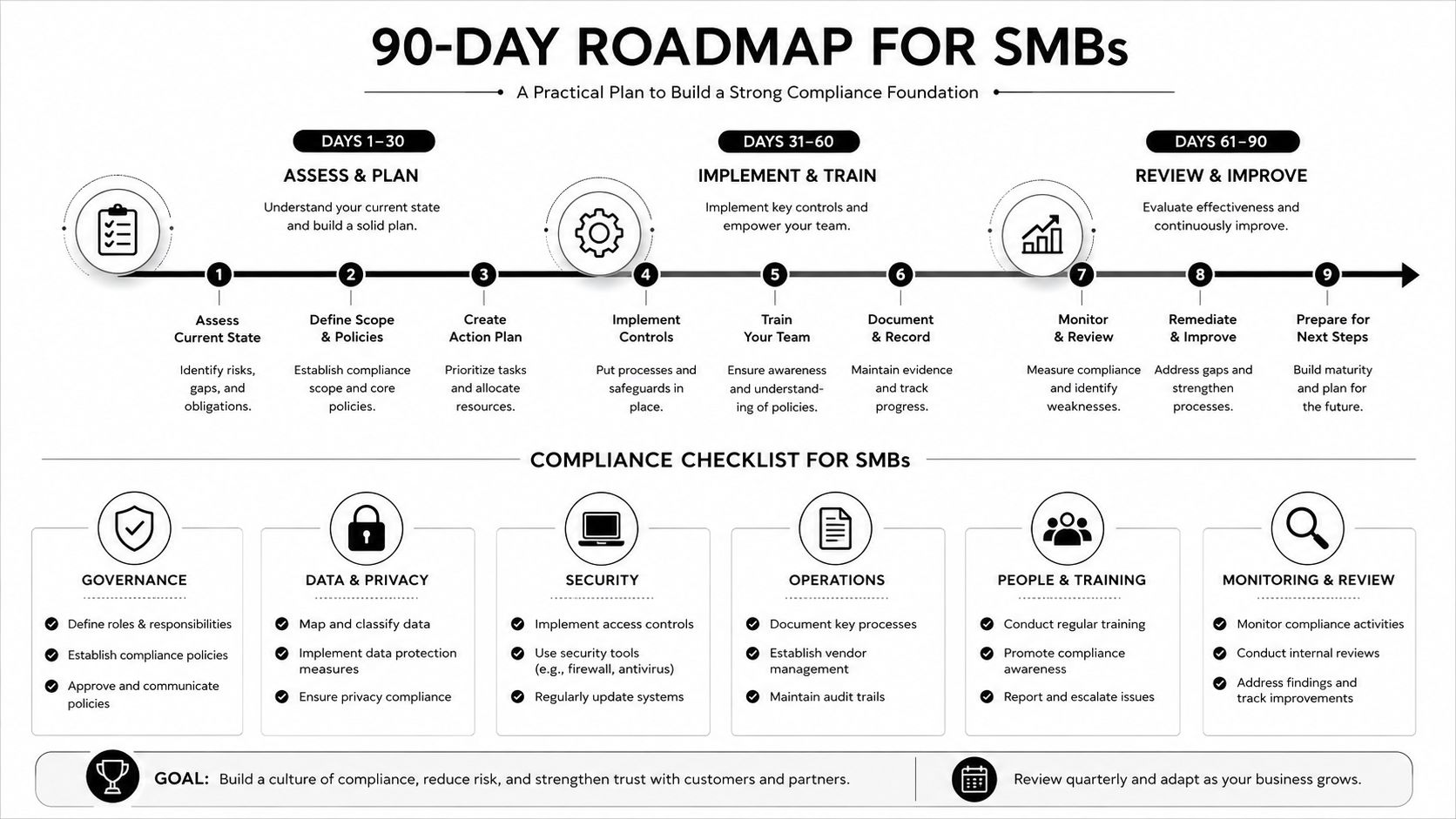
Weeks 7 through 10, add visibility and policy
Centralize relevant logs and alerts. Deploy endpoint detection where supported, monitor device health, and define zero-trust policies for users, devices, APIs, and workloads. Set alert ownership and escalation rules so notifications reach a person who can act.
Weeks 11 through 12, document and test
Run a tabletop exercise for a compromised gateway, stolen device, unavailable local server, and unauthorized vendor account. Document containment, recovery, communication, and evidence preservation. Align the records with the organization's obligations and contracts.
For a HIPAA-adjacent healthcare workload, confirm access reviews, device inventories, vendor responsibilities, backup procedures, and incident records. For PCI-adjacent financial work, document payment-connected systems, segmentation, access controls, update status, and monitoring. For legal practices, map confidentiality requirements to matter access, remote workstations, document repositories, and vendor connections.
The compliance file should contain:
- Asset evidence: Current inventory, ownership, location, and business purpose.
- Access evidence: MFA status, privileged accounts, vendor approvals, and review dates.
- Maintenance evidence: Patch records, exceptions, testing notes, and rollback procedures.
- Monitoring evidence: Alert ownership, review records, incident tickets, and escalation results.
- Recovery evidence: Backup status, restoration tests, tabletop outcomes, and corrective actions.
What to Do This Week and Who to Call
Three actions create immediate clarity:
- Inventory every edge asset: Walk through offices, equipment rooms, remote locations, and vendor-managed systems. Record what each device does, who supports it, and what information it can reach.
- Secure management access: Enforce MFA, remove stale accounts, patch supported systems, and confirm that vendors use approved named access.
- Audit exposed services: Review remote-management paths, disable unnecessary exposure, and document every exception with an owner and expiration date.
These actions won't replace a full security program, but they reveal whether the business has control of its distributed environment. They also produce a useful starting record for an internal IT lead, compliance officer, or managed service provider.
Technovation's free security audit and IT health check can operationalize that review by examining device configurations, operating systems, applications, and security software. For organizations that need ongoing response rather than a one-time assessment, a documented incident management process clarifies who investigates, contains, communicates, and restores service.
The right question isn't whether edge computing is too risky for a small business. It's whether the business has assigned the recurring work required to keep distributed systems secure. A focused audit this week can show exactly where that work starts.
Technovation LLC provides managed cybersecurity, compliance support, 24/7 monitoring, endpoint hardening, cloud backup, and business IT services for North Texas organizations with distributed environments. Visit Technovation LLC to request a free security audit or IT health check and turn edge computing security gaps into a documented remediation plan.





