
Patch management is the systematic process of identifying, testing, deploying, and tracking software updates across all business systems to fix security vulnerabilities and maintain regulatory compliance. In 2024, the global patch management market was estimated at $950 million, with projections to reach $2.25 billion by 2034 at a 9% CAGR (Expert Insights).
A Dallas business owner is usually dealing with the same mess right now. Servers need updates, laptops keep asking for reboots, and someone in the office keeps postponing the patch because payroll, patient records, or client deadlines matter more in the moment. That's exactly why patch management has to be treated as a business control, not a nuisance that interrupts the day.
Table of Contents
- What Is Patch Management and Why It Matters for Your Business
- The Hidden Costs of Ignoring Software Updates
- How Patch Management Works the Complete Lifecycle
- MSP Versus In-House Patch Management for DFW SMBs
- Essential Patch Management Tools and Evaluation Criteria
- Compliance and Documentation for Regulated DFW Businesses
- Patch Management Questions From North Texas Business Owners
What Is Patch Management and Why It Matters for Your Business
A small firm in North Texas usually notices patching only when a pop-up appears at the worst possible time. That is the wrong mental model. Patch management is a controlled process for finding, testing, deploying, and verifying updates across operating systems, applications, and firmware. It is disciplined work, not a reactive click on install now when a device nags someone enough.
NIST defines patch management as the systematic notification, identification, deployment, installation, and verification of software revisions, including patches, hot fixes, and service packs. That definition matters because it makes the point clear, patching is a repeatable business process, not a one-time fix. If a company only installs updates when users remember, it does not have a patch management program, it has luck.

What a patch actually covers
Patches do more than close security holes. They also correct bugs, improve performance, and keep systems usable as software ages. Intel describes patch management as a way to keep systems up to date and proactively combat emerging cyber threats, and it applies across software applications, operating systems, and device firmware (Intel).
That scope is where many businesses get sloppy. They patch a few desktops, ignore third-party apps, and forget firmware on devices that sit in the corner until they fail. Mature patching treats the full stack as the target, because attackers do not care whether the weak point sits in a workstation, server, or embedded device.
Practical rule: If a system can be updated, it belongs in the patch inventory.
A regulated DFW business has one more job that most explainers skip. It has to prove patching happened correctly. That means keeping records of what was tested, what was deployed, what failed, and what got fixed later. Without that documentation, an auditor sees process gaps, even if the updates eventually went out.
The business case is simple. When patching is ad hoc, exposure lingers. When it is governed, tested, and verified, the business gets fewer surprises, cleaner audits, and less downtime. That is why patch management belongs in operational planning, not in the “someone should get to that” bucket.
The Hidden Costs of Ignoring Software Updates
Bad patching starts showing up before anyone sees a breach headline. Work slows down, staff lose confidence in the tools they use every day, and systems drift until the environment feels unreliable. Once attackers find a known vulnerability, the business is already behind.
One industry compilation reported that 60% of data breaches are caused by unpatched vulnerabilities, and 43% of organizations experienced at least one ransomware attack in 2023 due to unpatched vulnerabilities. This is a boardroom issue, especially for firms handling regulated data in healthcare, legal, and finance.
Why delays create real exposure
The same source found the average patch management delay is about 22 days after vulnerability disclosure, while automated patch management can reduce remediation time by 40 days. Those numbers matter because exposure does not wait. Every day a known flaw stays open, the odds get worse for the business that is still planning to patch it.
A 2025 report also found that 87% of organizations encountered third-party application vulnerabilities requiring patching in the past year, yet fewer than half include third-party applications in their patching process. That gap is exactly how local businesses get hit. The laptop gets patched, the accounting app does not, and the attacker goes where the controls are weakest.
For companies that think ransomware is a “big enterprise” problem, that thinking is outdated. A business with weak patch discipline is easier to exploit than a business with disciplined patching. The attacker does not care about company size, only whether the door is open.
A structured patch program gives the business a clean return because it reduces known risk without adding complexity to daily operations. Owners who want the continuity side handled too should pair patching with ransomware protection for small business. Patch the vulnerabilities, then make sure the response plan is ready if something still gets through.
How Patch Management Works the Complete Lifecycle
A patch program fails fast when the business treats it as a one-time cleanup. The right process starts with a full inventory of devices, applications, and versions, then moves in order through risk ranking, testing, staged deployment, verification, and documentation. Tenable describes that sequence as risk-based, and Rapid7 adds a practical safeguard, test patches on a representative sample of assets in a lab, then roll them out in batches so one bad update does not spread across the whole environment.
Inventory and priority come first
The first job is straightforward, but businesses still get it wrong, find every device, application, and version that needs attention. If the inventory is incomplete, the patch cycle will miss something. After that, the team has to rank fixes by exposure, business criticality, and vulnerability severity. That separates a real control from a routine maintenance habit.
A patch schedule should also reflect what the business runs, not what the software list says it owns. Old laptops, remote devices, forgotten apps, and shadow systems create gaps that attackers love. A clean inventory gives IT a real target list and gives leadership a real picture of what is exposed.
Test, deploy, verify, and document
Testing matters because a patch that breaks a line-of-business system still creates business interruption. Mature teams use a non-production environment first, then push updates in stages to limit compatibility failures and downtime. Deployment should be controlled, not a push-and-pray exercise.
Verification is a required step in the patch process. The team needs to confirm the update installed, then confirm the vulnerability is gone. That is also where vulnerability scanning for businesses fits into the workflow, because scanning shows what still needs remediation after deployment. Documentation closes the loop for leadership, auditors, and incident response, and it should show what was patched, where it was patched, and what was verified.
The teams that do this well assign clear ownership. IT operations handles deployment. Security sets priority. Application owners approve exceptions when a patch needs extra care. Compliance keeps the record complete. When those roles blur, patching slows down and nobody can explain why a system stayed exposed.
MSP Versus In-House Patch Management for DFW SMBs
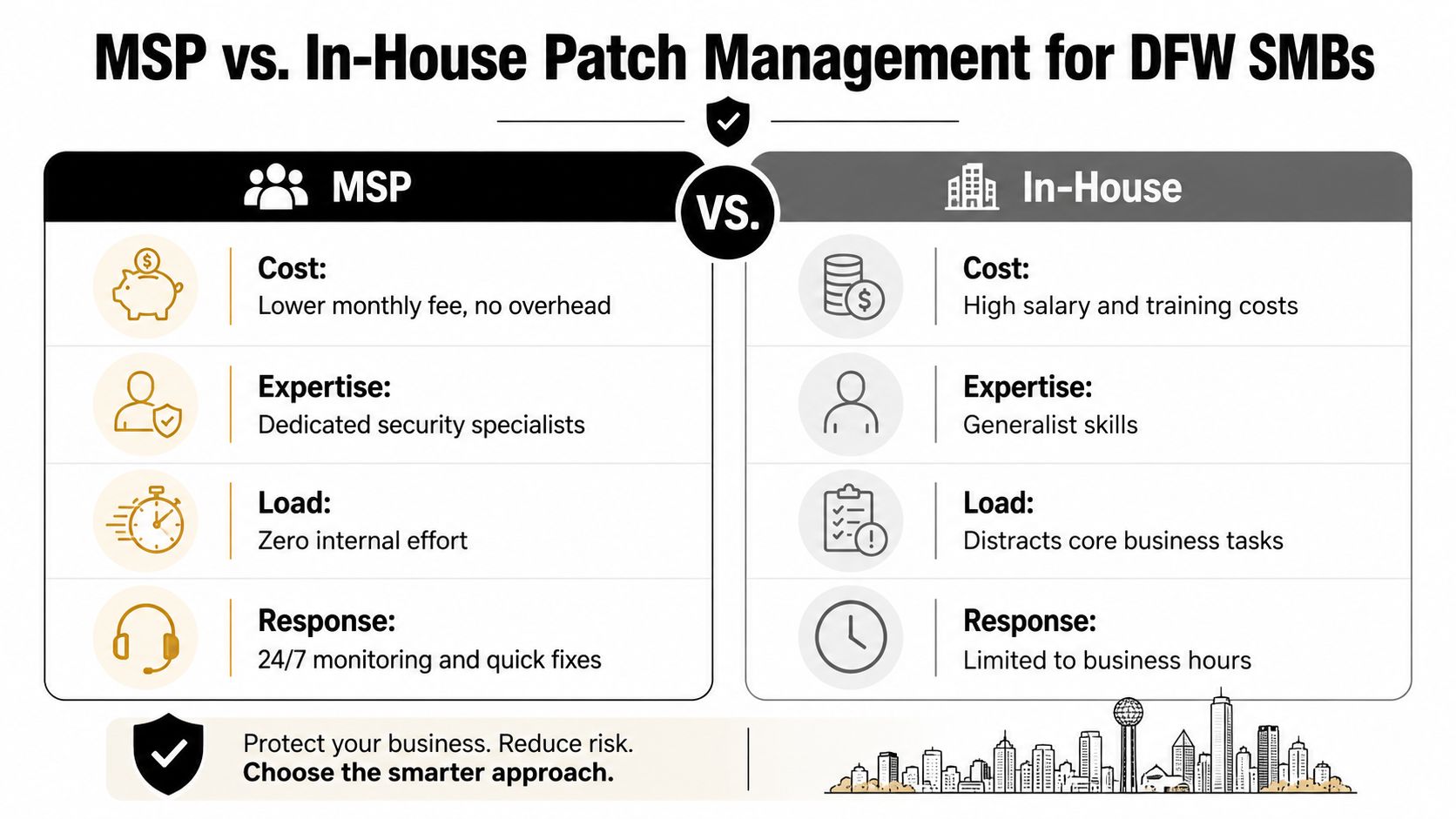
Most DFW small businesses are not deciding between perfect and imperfect patching. They're deciding between patching with limited internal time and patching with outside help. That choice should be made on staffing, risk, and reporting needs, not on habit.
An in-house model can work when the environment is small, stable, and lightly regulated. It gets harder when the business has multiple locations, remote devices, regulated records, and a small IT team that already wears too many hats. In that situation, patching becomes the thing that gets pushed back because urgent tickets always win.
What in-house teams usually underestimate
The hidden cost isn't just labor. It's the time spent chasing device check-ins, managing reboots, reviewing failures, and keeping documentation current enough for management review. If the person who knows the patch process leaves, a lot of institutional memory leaves with them.
An MSP model shifts that burden to a team that lives in the process daily. That usually means automated discovery, scheduled deployment, reporting, and faster follow-up when something fails. It also helps when the business needs patching evidence for audits, insurer questionnaires, or client due diligence.
| Factor | In-House | MSP |
|---|---|---|
| Coverage | Depends on internal staffing and attention | Broader operational coverage across more devices |
| Documentation | Often manual and inconsistent | Usually built into the service process |
| Response | Limited by office hours and internal capacity | More consistent monitoring and follow-up |
| Scalability | Gets harder as the environment grows | Easier to expand without adding headcount |
| Compliance support | Often bolted on after the fact | Usually part of the workflow |
For DFW organizations comparing models, how to choose a managed service provider is worth reading before a contract is signed. That decision should be based on proof, not sales language.
Technovation LLC is one option in that space, and it provides patch management as part of managed IT and cybersecurity services, including monitoring and documentation. The point isn't to outsource responsibility, it's to make sure responsibility is being executed consistently.
Essential Patch Management Tools and Evaluation Criteria
Good patch management tools do a few specific things well. They discover assets, rank what matters, support testing, control rollout timing, and produce reports that a manager can use. If a product only installs updates, it's not enough.
What to look for
The first filter is asset discovery. If the tool can't find a device or application, it can't patch it. The second is risk-based prioritization, because the business should not treat every update like an emergency. The third is staged deployment, which keeps one bad patch from becoming a company-wide outage.
- Discovery coverage: The tool should identify endpoints, servers, and software without relying on manual spreadsheets.
- Testing controls: It should support a non-production test group or pilot ring.
- Deployment control: It should let IT roll patches out in phases, not all at once.
- Reporting: It should show what changed, what failed, and what still needs attention.
- Third-party coverage: It should reach beyond operating systems to include common applications and firmware.
Rule of thumb: If the dashboard shows “installed” but can't show “verified,” the tool is hiding risk.
The other trap is tool sprawl. A business that uses one tool for updates, another for reporting, and a third for vulnerability checks creates blind spots between systems. Fewer moving parts usually mean fewer excuses and better follow-through. That's especially true for SMBs that need clean oversight without building a mini enterprise stack.
An effective tool should also fit the team that has to live with it. If the interface is so awkward that nobody trusts the reports, the product has failed. Patch management tools are supposed to reduce uncertainty, not create another screen everyone ignores.
Compliance and Documentation for Regulated DFW Businesses
A regulated business can patch systems and still fail an audit if it cannot show the work. The requirement is proof that updates were approved, deployed, verified, and tracked with exceptions explained. That is the gap most explainers miss, and it is the gap auditors focus on.
Canada's government guidance treats patch management as a controlled process with notification, assessment, acquisition, testing, deployment, and validation (Government of Canada). The NIST special publication on patch management frames it as a repeatable enterprise process for correcting security and functionality problems, and that process includes documentation and traceability (NIST special publication). In practice, that means the paper trail is part of the control, not an extra chore.
What auditors want to see
Auditors care about control, not guesswork. They want records that identify which systems were affected, when updates were approved, when they were deployed, and why any exceptions existed. They also want evidence that the business can repeat the process without depending on one person's memory.
That turns patch records into a compliance artifact. A solid record includes the patch name or update group, affected assets, test results, deployment date, verification status, and any deferred items with a reason attached. If a patch had to wait for a maintenance window, that reason should be documented. If a patch failed, the failure and the remediation path should be documented too.
Best practice: Keep a patch log that a non-technical reviewer can follow without guessing what happened.
For a local healthcare clinic, law office, or financial practice, the value is obvious. When a regulator, client, or auditor asks whether the business handled updates responsibly, the answer should not depend on memory. For firms that want a clearer sense of how an audit review works, what a compliance audit really checks is the right companion topic, because patch records often become part of the audit story.
Patch Management Questions From North Texas Business Owners
A lot of business owners ask the same questions once they realize patching is more than a nuisance. The first one is usually whether patching really needs to be ongoing if nothing has broken yet. The answer is yes, because an unpatched system can be vulnerable long before any visible failure appears.
Another common question is whether every patch should go out immediately. That's the wrong goal. The better approach is to patch the highest-risk systems first, test where needed, and document the rollout so the business can defend the decision later. Speed matters, but blind speed causes its own outages.
Some owners ask whether patching covers only laptops and desktops. It doesn't. Servers, applications, and firmware all belong in the program, and the business should assume third-party software is part of the patch surface too. If a device or application is supporting the business, it needs a patch owner.
A third question is whether a small firm can manage this without outside help. Sometimes yes, but only if the team has enough time, a stable environment, and a reliable reporting process. Once compliance pressure, remote workers, or scattered devices enter the picture, outside support starts making more sense.
The right question isn't whether patching is possible. It's whether the business can prove it, repeat it, and sustain it.
North Texas firms that want fewer gaps and better accountability usually need a patching process that is built around evidence, not guesswork. That is where a strong partner becomes useful, because the process has to survive vacations, turnover, and the next urgent ticket that lands in the queue.
Technovation LLC helps DFW businesses put patch management on a repeatable, documented footing through managed IT and cybersecurity services, including monitoring, update handling, and compliance-minded support. If patching has become another task that's easy to postpone, visit Technovation LLC and start a conversation about closing the gaps before they turn into the next preventable incident.





