A DFW business owner doesn’t need another abstract cloud explainer. The issue is simpler. The office network that worked when everyone sat in one location often starts failing the business the moment the team spreads out, more data moves into hosted apps, and compliance obligations tighten.
That failure rarely looks dramatic at first. It shows up as remote staff fighting lag, line-of-business apps behaving differently from one location to another, and leaders wondering whether sensitive files are protected once they leave the office firewall. At that point, the network isn’t just plumbing anymore. It becomes a growth constraint.
Table of Contents
- Is Your Office Network Holding Your Business Back
- What Exactly Is a Cloud Based Network
- The Business Case Benefits and Realistic Tradeoffs
- Securing Your Network for Regulated Industries
- Balancing Network Performance and Costs
- A High-Level Migration Checklist for Your Business
- The Smart Way to Manage Your Cloud Network with a Local Partner
Is Your Office Network Holding Your Business Back
A lot of small and mid-sized companies in Dallas Fort Worth are running modern businesses on yesterday’s network model. The file server may still be in a back room. The firewall may still be sized for a team that no longer exists. The internet connection may still assume everyone works from one office. That setup creates friction every time the company adds a location, hires remote staff, or adopts another cloud app.
The problem isn’t only speed. It’s control. When users, applications, and data are spread across offices, homes, and hosted platforms, an office-only network starts acting like a warehouse loading dock being asked to run an airport. It wasn’t built for that traffic pattern.
Cloud based networks solve that mismatch by moving connectivity, access control, and segmentation into a software-defined model that can support distributed work without bolting on one appliance after another. That matters because the shift isn’t niche anymore. The global cloud managed network market was valued at USD 31.14 billion in 2024 and is projected to reach USD 66.24 billion by 2030, which reflects how many organizations are moving away from hardware-heavy network designs.
What owners usually notice first
- Remote access gets messy: Staff can reach systems, but the experience is inconsistent and support tickets keep piling up.
- Growth becomes expensive: Every new office, user group, or application seems to require another piece of hardware or another one-off fix.
- Security turns fragmented: Policies in the office don’t automatically follow users working from home or staff using hosted applications.
- Compliance gets harder to prove: Regulated firms often know they need safeguards, but they can’t easily show who has access to what.
Practical rule: If the network only makes sense when everyone is in one building, it’s already behind the business.
A cloud-based approach doesn’t mean throwing away every local device. It means redesigning the network around how the company operates today. For most SMBs, that’s the difference between reactive IT and infrastructure that can support hiring, expansion, and tighter compliance expectations.
What Exactly Is a Cloud Based Network
A cloud based network is a network delivered through virtual services instead of relying only on physical boxes sitting in a closet or server room. The simplest way to think about it is utility service versus self-built infrastructure. One model gives the business flexible capacity when it needs it. The other forces the business to own, maintain, and replace the underlying equipment itself.
The easiest way to understand it
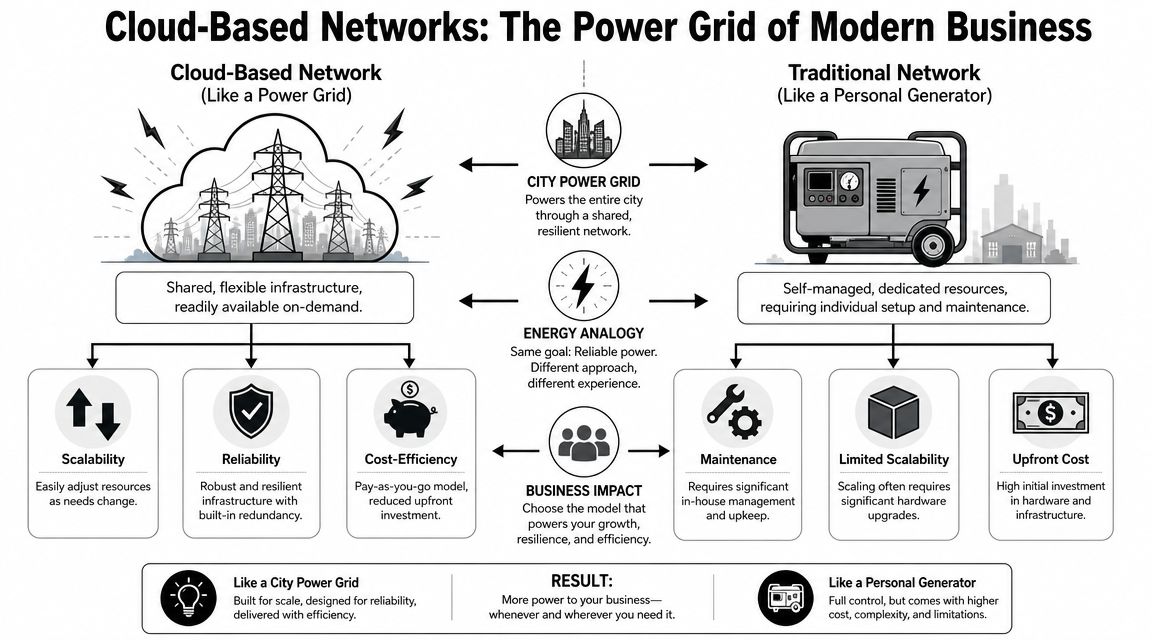
A traditional network is like running the whole building on a personal generator. It can work, but the business has to maintain the machinery, plan every upgrade, and hope it keeps up when demand changes. A cloud-based network is closer to using a power grid. Capacity, redundancy, and management are built into a larger service model.
That doesn’t make it vague or unsecured. It makes it abstracted. The hardware still exists somewhere, but the business interacts with logical networking components instead of manually managing every physical layer decision.
What sits inside the architecture
At the center is a virtual private cloud, or VPC. That’s the business’s isolated section of the cloud network. It functions like a private suite inside a larger office tower. Other tenants may be in the building, but they aren’t walking through the company’s rooms.
Inside that environment, architects break the network into subnets. Those subnets are tied to specific availability zones for resilience, and route tables plus security groups control how traffic moves. That structure allows segmentation without requiring a separate physical appliance for every protected area, as outlined in this explanation of VPCs, subnets, route tables, and security groups.
For a regulated business, this matters more than the terminology. It means a clinic can separate systems handling patient data from less sensitive workloads. A law firm can restrict who can reach document repositories. A financial office can reduce the blast radius of a compromised account.
Why this matters to an SMB
- Isolation without hardware sprawl: Separate environments can be created logically instead of buying another stack of gear.
- Cleaner traffic control: Rules can define what talks to what, instead of trusting broad open access inside the network.
- Better resilience: Workloads can be placed across fault domains instead of tying everything to one physical location.
A well-designed cloud network works like a building with controlled entry, locked suites, and monitored hallways. A flat legacy network works more like one giant room with a single front door.
That’s why cloud based networks aren’t just “internet access plus hosted apps.” They’re a different operating model for connectivity. The primary value isn’t that the network moves somewhere else. The value is that the business gains a network it can shape, segment, and manage much more precisely.
The Business Case Benefits and Realistic Tradeoffs
The business case for cloud based networks is strong, but it shouldn’t be oversold. Owners make better decisions when they see both the upside and the limits clearly. The upside is flexibility, cleaner support for distributed work, and less dependence on forklift hardware upgrades. The tradeoff is that the business has to manage the environment with discipline.
A big reason this model keeps gaining ground is that it aligns with how companies already operate. Over 94% of enterprises use cloud services, and companies run about 50% of workloads in public clouds. For an SMB, that means a cloud-based network isn’t a fringe architecture choice. It lines up with the broader shift in where applications and data already live.
Where the business upside shows up
The first benefit is scalability. A traditional network often forces a company to buy for future demand, then wait for that demand to arrive. Cloud networking flips that. Capacity and segmentation can be adjusted as the business changes.
The second benefit is support for hybrid work. If the staff, applications, and data are distributed, the network should be distributed too. Trying to backhaul everything through one location usually creates complexity and frustration.
The third benefit is financial. Instead of repeated capital purchases for every expansion, the company can move more of the networking model toward operating expense and planned service management.
Traditional vs. Cloud Based Networks at a Glance
| Factor | Traditional On-Premise Network | Cloud Based Network |
|---|---|---|
| Scalability | Often requires new hardware purchases and manual reconfiguration | Can expand or adjust through software-defined changes |
| Remote work support | Commonly depends on office-centric access patterns | Better suited to users, apps, and data spread across locations |
| Segmentation | May require separate appliances or more complex physical design | Can be handled logically with policy-driven controls |
| Upgrade cycle | Tied to hardware refreshes and local capacity limits | More flexible planning with less dependence on physical upgrades |
| Management style | Reactive fixes are common when the environment grows unevenly | Works best with ongoing policy, visibility, and optimization |
The tradeoffs owners should face directly
Cloud networking does create dependence on connectivity. If internet access is poorly designed, users will feel it. That’s not a reason to reject the model. It’s a reason to build the right connectivity and failover plan from the start.
Cost is another area where SMBs get tripped up. Cloud can be efficient, but it isn’t automatically cheap. If the environment grows without standards, costs sprawl just like hardware sprawl used to.
- Poor planning creates waste: Unused services, overbuilt environments, and duplicate paths can inflate spend.
- Loose governance creates risk: Different teams may build different rules, which leads to inconsistency and security gaps.
- Break-fix support falls short: Cloud networking needs ongoing review, not occasional cleanup after a complaint.
The right conclusion isn’t “move everything overnight.” The right conclusion is that businesses should treat cloud networking as an operating model that needs strategy, not a product purchase.
Securing Your Network for Regulated Industries
Healthcare practices, law firms, financial offices, and other regulated organizations can’t treat cloud based networks as a convenience project. The network now spans office systems, remote users, cloud applications, and often multiple locations. Security has to follow all of it.
That’s where many SMBs struggle. For SMBs, the key challenge is governing risk across hybrid environments, and many organizations struggle with policy consistency and visibility across different platforms, especially in regulated industries. That’s the key issue. Not whether cloud networking can be secure, but whether the company can manage it consistently.

Why regulated SMBs struggle more than large enterprises
Large organizations usually have dedicated network, compliance, and security teams. SMBs often have one internal IT generalist, an outsourced support relationship, or a patchwork of both. That makes hybrid policy enforcement harder.
A medical clinic may secure systems inside the office but miss gaps in remote access. A legal practice may protect its document system but fail to apply the same access rules to supporting tools. A financial firm may have good authentication controls in one environment and weak segmentation in another.
Security in a regulated business has to be portable. If the control only works in one location, it isn’t a control the business can rely on.
What good governance looks like in practice
A secure cloud network doesn’t depend on one giant perimeter. It depends on layered control.
- Segment sensitive systems: Keep critical records and business functions separated from general-purpose traffic.
- Tie access to identity: Users should only reach the systems they need, based on role and policy.
- Centralize visibility: Logs, alerts, and access activity should be reviewed across the full environment, not one slice of it.
- Standardize policies: The same rules should apply whether the user is in the office, remote, or connecting to hosted systems.
For firms under heavier scrutiny, governance also needs to support documentation and audit readiness. That’s one reason many DFW businesses look for outside operational help instead of building everything internally. A managed service model can put process around network segmentation, access controls, monitoring, and review cycles without forcing the company to hire a full internal compliance engineering team.
Businesses that handle financial data should also review how network controls fit into broader protection efforts such as data protection for financial services.
Only one point really matters here. In regulated industries, security can’t be a side effect of the network. It has to be designed into the network from the beginning.
Balancing Network Performance and Costs
Owners usually ask two practical questions. Will the network be fast enough, and will the bill stay under control. Both are valid. Neither gets solved by guesswork.
Performance is a design decision
Performance in cloud networking depends on architecture, path selection, application placement, and policy. If voice traffic, video meetings, file access, and business applications all fight for the same path without prioritization or planning, users will feel the drag. If those services are mapped properly, performance becomes far more predictable.
This is especially important for businesses with multiple offices, remote staff, or field teams. The goal isn’t to chase perfect technical elegance. The goal is to make the systems employees use feel responsive and stable throughout the workday.
Cost control requires guardrails
Cloud spend gets out of hand when businesses treat it like an open tab. It stays reasonable when leadership sets standards.
A practical approach includes:
- Define business priorities first: Not every workload needs the same level of performance, redundancy, or isolation.
- Review consumption regularly: Leadership should understand which services are necessary and which are legacy leftovers.
- Match design to actual use: An SMB doesn’t need enterprise-scale architecture in places where business risk is low.
- Assign accountability: Someone needs ownership of policy, visibility, and billing review.
Cheap infrastructure that fails during business hours is expensive. Well-governed infrastructure usually costs less over time because it avoids rework, downtime, and panic purchases.
Resilience matters more than most owners think
Performance discussions often stop at speed. That’s too narrow. Resilience is part of performance because a network that disappears during an outage has a performance problem no dashboard can hide.
Cloud networking can be architected for high availability, and non-terrestrial networks using satellites can provide backup connectivity when local broadband fails. For DFW businesses with field operations, temporary sites, or continuity concerns, that opens a useful conversation about backup paths and disaster readiness.
A smart design asks a blunt question. When the primary connection fails, what keeps the business moving? If there’s no clear answer, the network plan isn’t finished.
A High-Level Migration Checklist for Your Business
Most network migrations go sideways for one reason. The business treats them like a technical swap instead of an operational change. A cloud-based network touches users, applications, security, workflows, and support. The move has to be planned at that level.
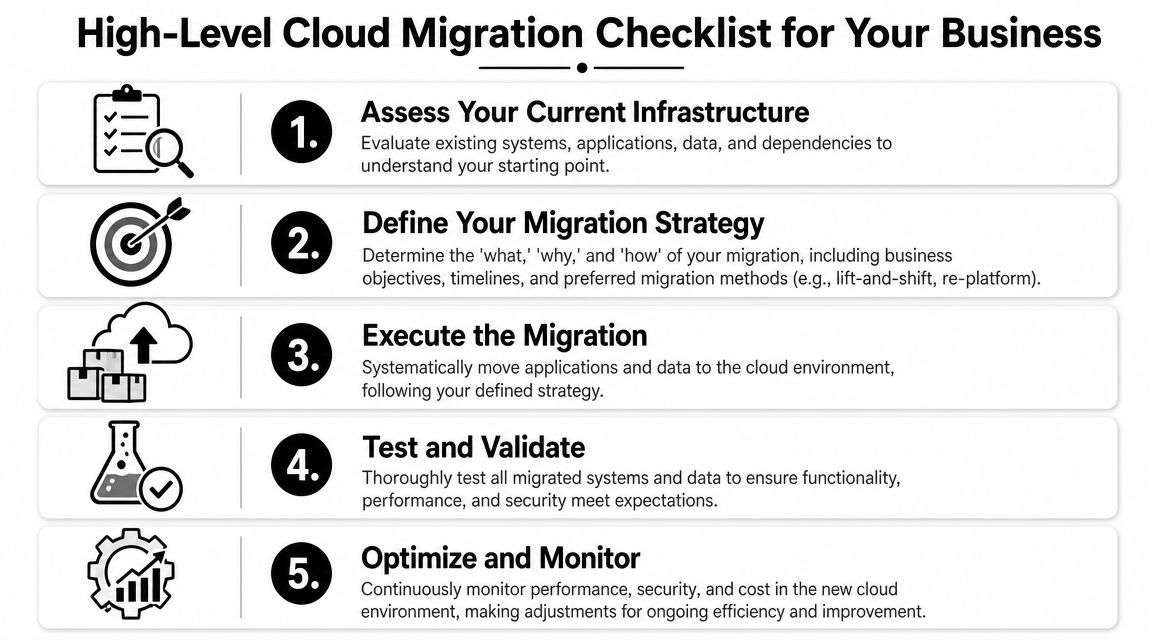
Five moves that keep migrations under control
-
Assess the current environment
Inventory the systems that matter most. That includes business applications, shared data, remote access needs, compliance requirements, and dependencies between locations or teams. If leadership can’t see what the network supports today, it can’t design the next version well. -
Set the target architecture and security rules
Decide what should stay local, what should move, how users will connect, and how sensitive data will be segmented, enabling many firms to save themselves from future chaos. Clear policy beats cleanup. -
Choose a partner that can manage the transition
SMBs rarely need a giant transformation program, but they do need someone who can coordinate architecture, cutover planning, security controls, and support readiness. That’s especially true in regulated environments. -
Migrate in phases
Don’t force every workload across at once. Start with lower-risk systems, validate access and performance, then move core functions in a controlled sequence. The phased approach reduces disruption and gives leadership time to fix issues before they spread. -
Monitor and optimize after go-live
Migration day is not the finish line. Teams should review performance, security events, access patterns, and costs once the new environment is active. The first version of the design is rarely the final version.
A migration checklist isn’t paperwork. It’s protection against rushed decisions. The businesses that move cleanly are the ones that decide in advance how the network should support growth, security, and daily operations.
The Smart Way to Manage Your Cloud Network with a Local Partner
A cloud network isn’t self-managing. It still needs policy decisions, monitoring, access reviews, performance tuning, and cost discipline. The only thing worse than a brittle legacy network is a cloud environment nobody owns properly.
That’s why the break-fix approach doesn’t hold up here. Waiting for complaints means users become the monitoring system. Waiting for an audit means compliance becomes a scramble. Waiting for the monthly bill means waste has already happened.
A better model is proactive management with a local partner that understands both the technical side and the business realities of North Texas firms. For companies that need outside operational support, Technovation LLC provides managed services around cybersecurity, compliance, strategic IT planning, and infrastructure oversight. Businesses evaluating ongoing cloud operations can review cloud managed data center services as part of that model.
The local angle matters. A DFW business doesn’t just need generic advice about cloud based networks. It needs practical decisions about office connectivity, remote staff, compliance pressure, growth plans, and response expectations. That’s where a managed relationship creates value. Not by selling the cloud as magic, but by keeping the network aligned with what the business is trying to do next.
A DFW business that’s serious about scalability, security, and cost control should treat its network like core strategy, not background utility. Technovation LLC helps North Texas organizations plan, secure, and manage business IT with a proactive model built for regulated and growth-minded companies.