A Dallas-Fort Worth business owner usually notices Wi-Fi problems long before anyone checks the access points. The front desk says the system lags every afternoon. A lawyer loses part of a client call. A medical office watches tablets spin while staff move between rooms. Someone says, “The internet is slow again,” but the internet often isn't the actual problem.
The issue is frequently inside the building. More specifically, it's the version of Wi-Fi running the network, the way that network is designed, and whether it can handle the number of devices fighting for airtime at the same time. For a DFW clinic, law firm, accounting office, or warehouse team, that difference shows up in productivity, client experience, and security posture. The versions of WiFi matter because newer generations don't just chase higher speed. They change how capacity is shared and how modern protections are delivered.
Table of Contents
- Is Your Wi-Fi Holding Your Business Back
- Decoding the Wi-Fi Alphabet Soup From 80211ax to Wi-Fi 6
- The Technologies That Drive Wi-Fi Performance
- Why Your Wi-Fi Version Is a Critical Security Matter
- Choosing the Right Wi-Fi for Your DFW Business
- Building a Future-Proof Network with a Strategic Partner
Is Your Wi-Fi Holding Your Business Back
A common DFW scenario looks harmless at first. The office opens fine. Email works. The guest network is up. Then the day gets busy. More phones join, laptops wake up, printers reconnect, cameras stay active, and cloud applications compete for the same wireless space.
That's when the hidden cost appears.
A point-of-sale station pauses during a rush. Intake staff in a doctor's office switch from room to room and lose consistency in the connection. A conference room full of people joins one video meeting and everyone blames the service provider. In many businesses, Wi-Fi gets treated like electricity. It's expected to work, but no one asks whether the wiring behind the wall is still built for the current load.
Slow isn't always about internet service
The phrase “slow internet” often hides three different problems:
- Congestion inside the office: Too many devices are trying to share the same wireless airtime.
- Aging Wi-Fi standards: Older equipment can still connect, but it may not manage busy conditions well.
- Poor layout and support: Access points may be in the wrong place, set up poorly, or left without ongoing network support and maintenance.
A business owner doesn't need to memorize radio engineering to understand the impact. Wi-Fi works like office hallways. If the hall is narrow, one person with a cart slows everyone behind them. A newer Wi-Fi version can widen the hallway, but only if the rest of the building workflow makes sense too.
Practical rule: If problems show up most often during busy hours, the issue is usually capacity, not just raw speed.
The business effect is bigger than annoyance
For regulated industries, these disruptions aren't minor. A law office depends on stable calls, document access, and protected communications. A healthcare practice needs reliable tablet access, connected devices, and guest isolation. An accounting team can't afford a flaky connection during peak client periods.
That's why the versions of WiFi matter in business terms. Each generation changes what the network can realistically support. Some versions were fine for light browsing and occasional email. Others were built for offices packed with devices. If the wireless network was installed years ago and never reviewed, it may still be operating like a small side road while the business now expects freeway traffic.
Decoding the Wi-Fi Alphabet Soup From 80211ax to Wi-Fi 6
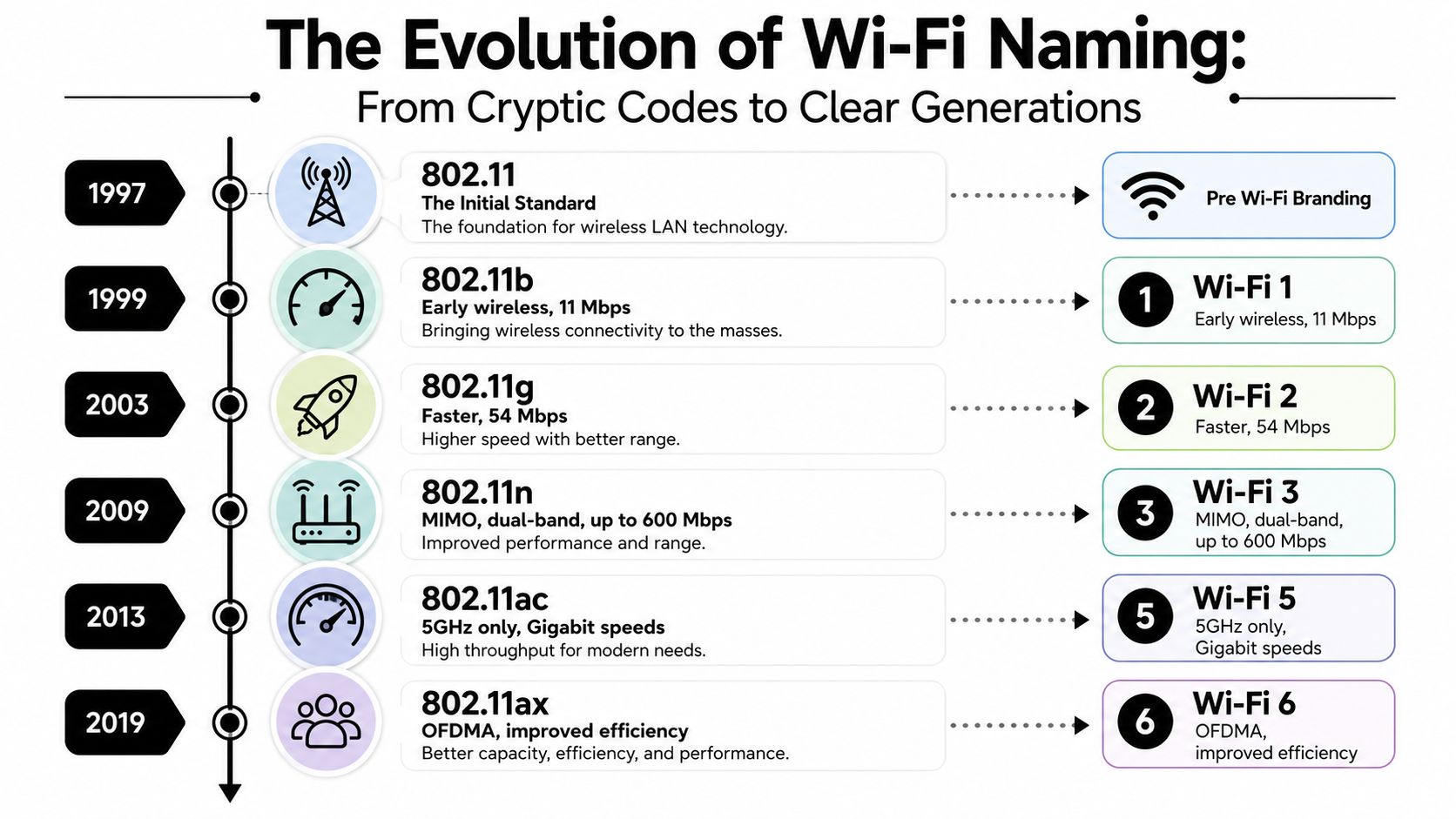
The naming is where many business owners disengage. Terms like 802.11n, 802.11ac, and 802.11ax sound like engineering shorthand because they are. The industry later adopted simpler labels such as Wi-Fi 4, Wi-Fi 5, and Wi-Fi 6 so non-engineers could tell one generation from another without decoding a standards document.
Why the names changed
The short version is simple. 802.11ax and Wi-Fi 6 refer to the same generation. The first is the technical standard name. The second is the consumer-friendly name.
That change helped because business decisions aren't easier when labels feel cryptic. A firm comparing equipment should be able to ask a clean question. Is this an older wireless generation built for lighter use, or a newer one designed for denser, busier environments?
This visual makes the evolution easier to follow.
A simple timeline of major versions
The early history of Wi-Fi shows how quickly the standard matured. The first IEEE 802.11 standard in 1997 defined net bit rates of 1 or 2 Mbit/s. By 1999, 802.11b pushed that to up to 11 Mbit/s, while 802.11a, also released in 1999, used the 5 GHz band and reached a maximum net data rate of 54 Mbit/s. Later, 802.11n (Wi-Fi 4) introduced MIMO and supported both 2.4 GHz and 5 GHz with maximum net data rates of up to 600 Mbit/s according to CableFree's history of Wi-Fi technology.
A practical cheat sheet helps:
| Standard name | Common name | What mattered most |
|---|---|---|
| 802.11 | Early Wi-Fi | Basic wireless connectivity |
| 802.11b | Early mainstream Wi-Fi | First broadly adopted consumer version |
| 802.11a | Early 5 GHz Wi-Fi | Faster throughput on a less crowded band |
| 802.11n | Wi-Fi 4 | Dual-band operation and MIMO |
| 802.11ac | Wi-Fi 5 | Faster 5 GHz performance |
| 802.11ax | Wi-Fi 6 | Better efficiency in busy environments |
| 802.11be | Wi-Fi 7 | Higher-end capacity and lower-latency potential |
For readers comparing generations in business environments, this overview of Wi-Fi 5 versus Wi-Fi 6 differences is useful because it frames the change in plain operational terms instead of just product labels.
A router box may advertise “fast Wi-Fi,” but the version tells a more important story about how that speed is managed under pressure.
The key takeaway is that the versions of WiFi are not cosmetic naming updates. They signal real shifts in how networks use bands, share airtime, and handle a building full of connected devices.
The Technologies That Drive Wi-Fi Performance
Business owners usually hear about speed first because that's the easiest number to market. Speed matters, but it's only one part of wireless performance. In a real office, the better question is this: what happens when many devices need service at once?
Bands are highways, not magic
Wi-Fi traffic travels on frequency bands. The simplest way to think about them is road design.
- 2.4 GHz acts like an older city road. It travels well through obstacles, but it's crowded and slower.
- 5 GHz is more like a multi-lane urban highway. It offers more room and usually better performance.
- 6 GHz is the newer express lane. It opens up cleaner space for newer equipment.
That doesn't mean every business should rush toward the newest band. It means network planning has to match the device mix and the building. A warehouse with challenging coverage needs a different design approach than a compact legal office.
For readers who want a plain-English explanation of band trade-offs, this guide on how to optimise your home network does a good job of explaining why 2.4 GHz and 5 GHz behave differently. The same core logic applies in business, just at higher stakes.
Why Wi-Fi 6 changed busy environments
The most important business jump in recent years was the move from Wi-Fi 5 to Wi-Fi 6. Wi-Fi 4 reached up to 600 Mbit/s, and Wi-Fi 5 raised maximum theoretical data rates to about 3.5 Gbit/s, with channel width and antenna configuration becoming major capacity levers according to the IEEE overview of Wi-Fi evolution.
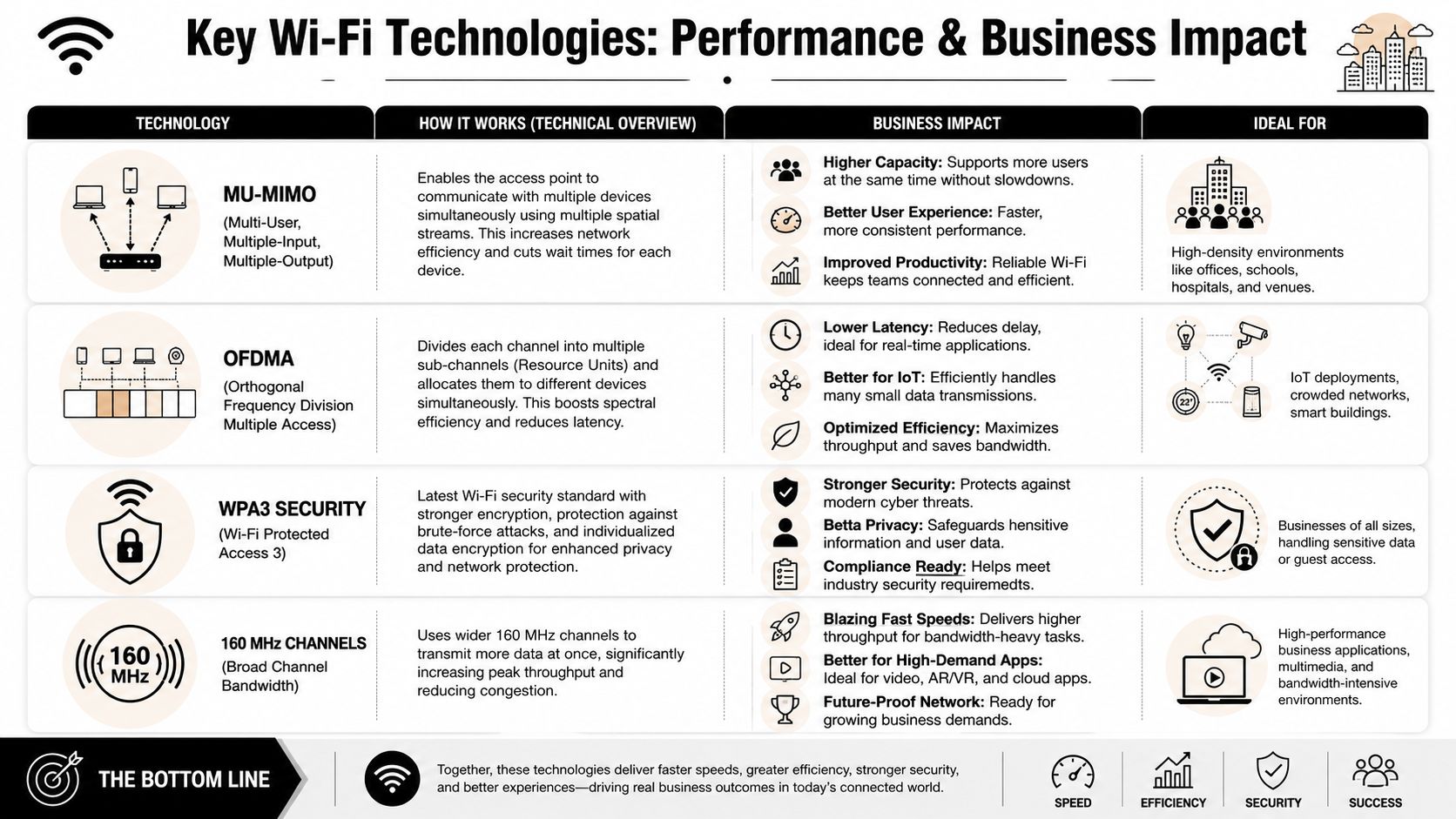
But the bigger operational leap came with Wi-Fi 6. In dense environments, Wi-Fi 6 added OFDMA and MU-MIMO, which improve airtime efficiency when many devices compete simultaneously. Intel lists a theoretical peak of 2.4 Gbps on 20/40/80/160 MHz channels, and the same evolutionary path continues into Wi-Fi 7 with 320 MHz channels and much higher link rates in high-density, latency-sensitive environments according to Intel's wireless standards summary.
This infographic captures the ideas behind those terms.
Three concepts matter most in plain language:
- MIMO: Multiple streams move data more effectively. Think of adding lanes to a road.
- MU-MIMO: Multiple users can be served more efficiently. Think of opening more checkout counters at once.
- OFDMA: The network can split a channel into smaller pieces for different devices. Think of one delivery truck dropping off many small packages in one trip instead of sending separate trucks.
Security belongs in the performance conversation
Many owners separate performance from protection. That's a mistake. Network design affects both. A crowded, poorly segmented wireless environment is harder to secure, troubleshoot, and support over time.
That's why wireless planning should sit next to broader perimeter strategy, including tools such as small business firewalls. The access point may be the visible part of Wi-Fi, but business protection depends on how traffic is segmented, authenticated, and controlled after the device connects.
Capacity is what keeps a busy office usable. Security is what keeps it trustworthy. A business network needs both at the same time.
Why Your Wi-Fi Version Is a Critical Security Matter
Many companies still treat Wi-Fi upgrades as optional performance projects. For regulated industries, that's the wrong frame. Wireless security is part of risk management, not just convenience.
Old hardware usually means old protection
Older Wi-Fi equipment often drags old security assumptions along with it. Even when a business patches systems carefully, outdated wireless gear can limit modern protections, force weaker compatibility settings, or make proper segmentation harder to enforce.
That matters because sensitive work doesn't stay at desks anymore. Staff move with laptops, tablets, phones, scanners, and specialty devices. If wireless access isn't protected at a modern baseline, the business has a weak door on a busy entrance.
Newer Wi-Fi generations also changed the spectrum story. Traditional Wi-Fi used 2.4 GHz and 5 GHz, while newer generations added 6 GHz support, and Wi-Fi 6E specifically extended operation into that band to reduce interference and improve capacity. Industry reporting in 2025 said Wi-Fi 6 devices had surpassed 5.2 billion cumulative shipments, with about 41% incorporating Wi-Fi 6E capability. The same source reported that Wi-Fi 7 adoption was accelerating three times faster than previous generations, with enterprise adoption already at 11%, as summarized in Wikipedia's Wi-Fi overview.
That mainstream adoption matters for one reason. Businesses are no longer early adopters for expecting newer wireless security and cleaner wireless operation.
What regulated businesses should care about
A healthcare office, legal practice, or financial firm shouldn't ask only whether Wi-Fi is fast enough. It should ask whether wireless access supports a defensible security posture.
That means looking at issues such as:
- Authentication strength: Can the business enforce a modern standard instead of stretching legacy support?
- Network separation: Are guest devices, employee devices, and operational systems isolated appropriately?
- Device lifecycle risk: Are old endpoints forcing the network to tolerate weaker configurations?
- Policy consistency: Can wireless controls align with broader secure business requirements?
A practical security review often starts with simple questions. Which devices connect to wireless today? Which of them are old enough to limit policy choices? Which areas of the office need stricter separation?
For owners who want a straightforward checklist of good wireless hygiene, this expert WiFi protection guide is a useful companion read. The technical details vary by environment, but the principle holds. Strong wireless security is no longer optional if client information, case files, payment data, or patient information cross that network.
A business wouldn't keep a worn-out front door lock because the key still turns. Wireless security deserves the same standard.
Choosing the Right Wi-Fi for Your DFW Business
The right answer depends less on the newest label and more on the building, device mix, workflow, and risk profile. A Dallas clinic, a Fort Worth logistics operation, and a downtown law office may all need modern Wi-Fi, but not for the same reasons.
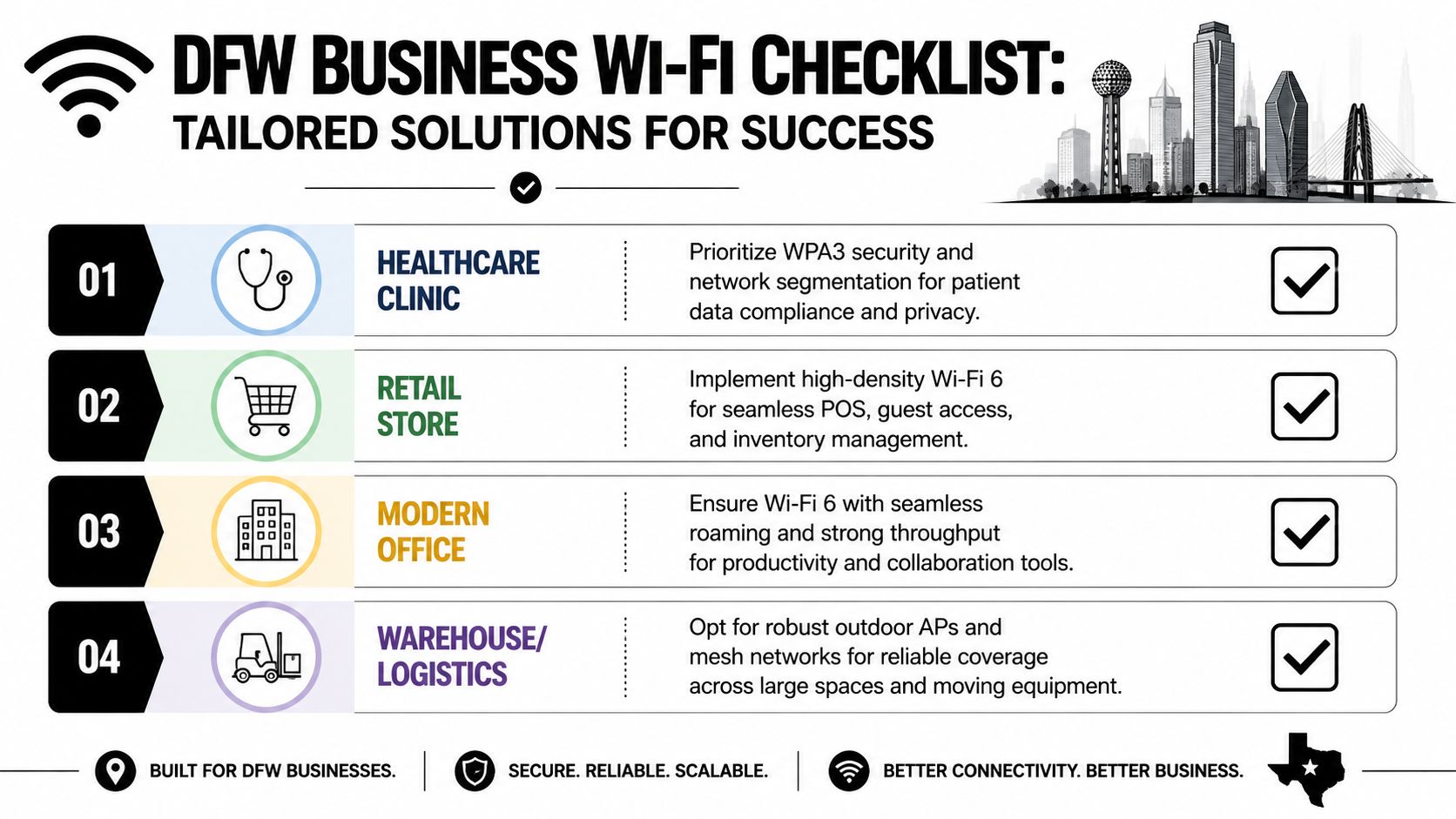
Healthcare clinics need clean capacity
In a clinic, wireless congestion isn't theoretical. Tablets move between rooms. Staff share applications throughout the day. Guest access may run beside clinical workflows. Medical devices may add another layer of constant connectivity.
Versions of WiFi should be judged by capacity and stability, not headline speed. Cisco says Wi-Fi 6 can support up to four times more devices than earlier standards in congested environments while also improving power efficiency for client devices, as outlined in Cisco's discussion of Wi-Fi 6 capacity in dense environments.
For a clinic, that means Wi-Fi 6 is often the practical floor for modern operations. It handles contention more efficiently and gives the network room to stay dependable when waiting rooms fill and devices multiply.
Law firms and financial offices need controlled reliability
A legal or financial office rarely needs a flashy wireless headline. It needs predictability.
Confidential calls, document systems, secure file access, and conference traffic all depend on a network that doesn't wobble under normal load. In these environments, a strong fit is usually a Wi-Fi design that emphasizes modern security, dependable roaming, and stable performance for dense office use. The work itself is sensitive. The network has to reflect that.
A cloud-managed approach can also help centralize visibility and policy, especially across suites or multiple locations using cloud-based networks. The goal isn't gadget appeal. It's operational control.
Warehouses and field-driven teams need design before speed
A warehouse, contractor office, or mixed indoor-outdoor operation has a different problem set. Wide spaces, shelving, moving equipment, and awkward materials can create coverage dead zones or inconsistent roaming.
In that environment, buying a newer router without redesigning access point placement won't fix much. The first priority is coverage and handoff behavior. A second priority is separating operational devices from guest and office traffic. A third is matching equipment to the physical layout.
That's why many businesses don't need the newest Wi-Fi generation first. They need a plan first.
When not to buy the newest thing
A fast upgrade can still underperform if the client devices are old. That's one of the most important truths in wireless planning.
Dell notes that Wi-Fi 7 (802.11be) is the latest generation and is designed to use the 6 GHz band alongside existing bands, while Wi-Fi 6E is specifically the extension of Wi-Fi 6 into 6 GHz, as summarized in Dell's overview of Wi-Fi network standards. In plain terms, a business won't see full gains unless endpoints, access points, and spectrum conditions line up.
A practical buying filter looks like this:
- Choose Wi-Fi 6 first if the main problem is a crowded office with lots of active devices.
- Consider Wi-Fi 6E if the business has enough compatible devices to benefit from cleaner 6 GHz capacity.
- Look at Wi-Fi 7 carefully when low latency, high density, and forward-looking device refresh plans justify it.
- Pause the purchase if the primary bottleneck is layout, interference, or an aging client fleet.
Some DFW businesses will benefit more from replacing outdated laptops and redesigning wireless coverage than from jumping straight to the newest access point generation. That's the difference between shopping for hardware and making a strategy decision.
Building a Future-Proof Network with a Strategic Partner
A strong wireless network isn't just an internet accessory. It's part of the operating system of the business. Staff collaboration, client communication, cloud access, guest connectivity, mobile workflows, and security controls all pass through it.
That's why a future-proof wireless plan starts with diagnosis, not shopping. The business needs to know what devices connect, where congestion happens, which parts of the building create weak spots, and whether the current environment supports the required security posture. The versions of WiFi matter, but version alone doesn't solve design problems, client compatibility gaps, or policy weaknesses.
Many upgrade projects tend to go sideways. The company buys newer hardware, plugs it into an old design, and expects a different result. A better approach evaluates the building, the workflows, the endpoint fleet, and the risk profile together.
The difference is especially important in North Texas businesses handling regulated data, multiple offices, hybrid work patterns, or growth-driven change. Those environments need wireless decisions that fit a roadmap, not a quick retail purchase.

The best Wi-Fi upgrade is the one that fixes the real constraint. Sometimes that's the wireless version. Sometimes it's the design. Often it's both.
A professional assessment can separate symptoms from root causes. It can also prevent overbuying, underdesigning, or locking a business into equipment that doesn't match its actual needs.
If a DFW business is seeing dropped calls, inconsistent office coverage, or wireless security concerns, Technovation LLC can help assess the environment and map out a practical upgrade path. That can start with an IT health check, a security-focused review, or a broader conversation about how wireless performance and protection fit the business's growth plans.