
A large number of small business owners still trust the firewall built into the internet provider’s router. That is a risky bet. It works fine until the business grows, staff start working remotely, cloud apps multiply, and nobody can clearly answer who is watching the network when something suspicious happens.
This is the core issue with small business firewalls. This is not just a box on a shelf or a line item on an IT invoice. It is a business operations decision. The right firewall helps protect client trust, keeps staff productive, supports compliance, and gives leadership a clear answer when auditors, customers, or insurers ask how the network is secured. The wrong firewall, or the right firewall with nobody managing it properly, creates a false sense of safety.
Table of Contents
- Your Business Is More Exposed Than You Think
- What Is a Firewall Really Your Digital Bouncer
- Decoding the Main Types of Business Firewalls
- Key Features That Matter for Regulated Industries
- The Critical Decision DIY vs Managed Firewall Services
- Your Firewall Selection and Deployment Checklist
- The Smart Next Step Toward Total Protection
Your Business Is More Exposed Than You Think
A Dallas office with a basic router, a few laptops, cloud file storage, and remote staff may look simple. It is not simple anymore. That setup creates multiple entry points, and the standard router from the internet provider was never built to act like a serious security platform.

The market tells the story clearly. The small business firewall market is valued at $2.5 billion in 2025 and projected to reach $6.2 billion by 2033, with a 12% CAGR, driven by remote work, cloud adoption, and higher cybersecurity concern among SMEs, according to Data Insights Market’s small business firewall forecast. Businesses do not spend that kind of money because firewalls are fashionable. They spend it because the old approach is failing.
A router is not a security strategy
A consumer or ISP-provided router is like a lock on the front door of a warehouse. Useful, yes. Enough, no.
A business firewall does more than allow internet access. It filters traffic, enforces policy, logs activity, supports secure remote access, and gives a business control over what enters and leaves the network. That matters for a law firm handling client files, a clinic working with patient data, or a construction company moving plans between office staff and field teams.
Small businesses often underestimate their exposure because they picture cyber risk as a problem for giant enterprises. That mindset is expensive. Attackers do not care about company size nearly as much as they care about weak controls, exposed services, and easy paths into email, files, and financial systems.
The purchase is continuity
The firewall decision should sit next to insurance, contracts, and compliance. It belongs in risk management, not in the junk drawer of office hardware.
Consider what is being protected:
- Client trust: Customers assume their data is handled responsibly.
- Daily operations: Staff need secure access to files, apps, and communication tools.
- Compliance posture: Healthcare, legal, finance, and nonprofit organizations need reliable controls and logs.
- Leadership accountability: Owners need confidence that someone can explain what is protected, how, and by whom.
A small business firewall should be judged the same way any critical business system is judged. By whether it reduces risk, supports operations, and can be managed consistently.
A business that still asks, “Do we really need a firewall?” is asking the wrong question. The useful questions are these: Which firewall architecture fits the business, and who is going to manage it well enough for it to matter?
What Is a Firewall Really Your Digital Bouncer
A firewall is best understood as a digital bouncer.
It stands at the entrance to the business network and checks traffic before it gets in or out. Some traffic belongs there. Some does not. The firewall’s job is to know the difference and enforce the rules every time.
It checks IDs and enforces the guest list
Think about a busy event with a serious security team at the door. Guests arrive, IDs are checked, names are matched against a list, and suspicious behavior gets attention. The bouncer does not care whether someone looks trustworthy. The bouncer follows policy.
A firewall works the same way. It reviews network traffic and applies rules. It decides what should be allowed, blocked, inspected more closely, or logged for follow-up.
That basic function protects business assets that owners care about, not abstract technical concepts:
- Patient records in a medical practice
- Case files in a law office
- Financial documents in an accounting firm
- Project files and field connections in a construction business
It protects both the front door and the side door
Many owners think of cyber threats as outsiders breaking in. A firewall also controls what leaves the network. That matters because malware often tries to call outward, users sometimes connect to risky services, and unsanctioned applications can create exposure without anyone intending harm.
A well-configured firewall helps answer practical questions:
| Business question | Firewall role |
|---|---|
| Can remote staff connect securely? | Supports controlled access methods such as VPN |
| Can suspicious traffic be stopped? | Blocks or flags traffic that violates policy |
| Can risky apps be limited? | Enforces rules on application use |
| Can activity be reviewed later? | Keeps logs for troubleshooting and compliance |
The important point is this. A firewall is not just “network gear.” It is a policy enforcement tool. It turns business decisions into technical controls.
If leadership would not leave the office unlocked overnight, leadership should not leave network traffic ungoverned during the workday.
That is why small business firewalls matter. They give the business a way to control digital access with the same discipline it expects in the physical world.
Decoding the Main Types of Business Firewalls
Not every business needs the same firewall design. A single-office accounting practice has different needs than a healthcare group with multiple clinics or a construction firm with remote job sites. Choosing the wrong type creates friction, gaps, or unnecessary complexity.
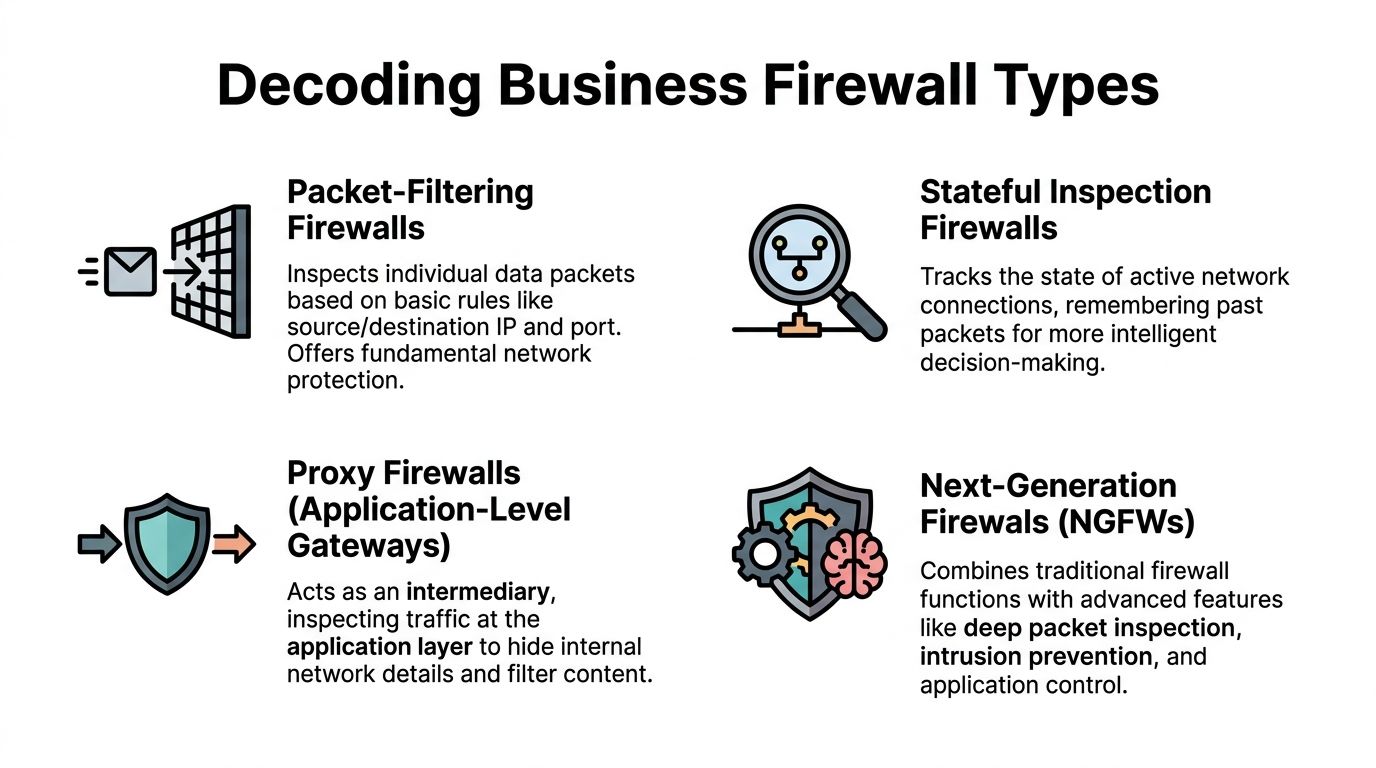
One market trend is hard to ignore. SMEs are rapidly adopting next-generation firewall solutions, and that segment is projected to grow by 3.0 times between 2025 and 2035 because cloud-based applications make them more cost-effective, according to Future Market Insights’ next-generation firewall market report. That growth makes sense. Small businesses need stronger controls without building enterprise-scale IT departments.
Hardware firewalls
A hardware firewall is the dedicated device sitting at the office edge, between the internal network and the internet connection.
This is a solid fit for businesses with a central location and on-site infrastructure. If the office has servers, on-premise line-of-business systems, or a stable in-office workforce, hardware can make sense. It gives the business a physical control point and usually simplifies local network segmentation.
Good fit:
- A law office with one main location
- A clinic with local systems in the building
- A professional services firm with predictable in-office traffic
Poor fit:
- A company that relies heavily on remote workers and cloud applications but expects the office appliance to solve everything
Next-generation firewalls
A next-generation firewall, often called an NGFW, takes the basic firewall concept and adds deeper inspection and smarter control. Features like intrusion prevention, application awareness, and more advanced threat filtering are integrated into the package.
For many small and mid-sized businesses, this is the practical middle ground. It is strong enough for regulated environments and modern enough for hybrid work, without forcing the business into a cloud-only model before it is ready.
A few common examples in the market include FortiGate, Sophos Firewall, SonicWall, Cisco Secure Firewall, and Meraki MX. The brand matters less than the fit, the configuration quality, and the management model.
Cloud-based firewalls and SASE
A cloud-based firewall moves much of the inspection and policy enforcement away from a single office appliance and closer to users, devices, and cloud services. This is often part of a broader secure access model that some vendors group under SASE.
This approach fits businesses that no longer operate mainly from one building. If users are spread across home offices, clinics, branch locations, and job sites, cloud-based controls can provide more consistent security than trying to tunnel everyone back through one office firewall.
Best fit examples:
- A construction company with changing field locations
- A medical group with multiple sites
- A legal or financial firm with hybrid staff using cloud systems daily
The mistake is assuming one architecture works for everyone. It does not. The smartest buying decision usually comes from matching the firewall to how the business operates, not how it used to operate.
Key Features That Matter for Regulated Industries
A firewall spec sheet can get crowded fast. Most of it is noise. Regulated businesses should focus on the features that support secure access, threat prevention, visibility, and defensible records.
Healthcare, legal, financial, and nonprofit organizations often handle sensitive data with small teams and limited internal security depth. That makes feature selection more important, not less.
The features that pull their weight
Some capabilities deserve attention because they solve real business problems.
- VPN support: Remote staff need a secure way to reach internal resources. A weak remote access setup invites trouble.
- Intrusion prevention: A firewall should not just observe suspicious activity. It should help block known malicious behavior.
- Application awareness: Staff use cloud apps all day. The firewall should understand application traffic well enough to apply sensible policy.
- Logging and reporting: If a business has to review an incident, answer an auditor, or prove controls are working, logs matter.
- Segmentation support: Not every device and user should move freely across the same network.
A clinic, for example, may need tighter separation between administrative systems, guest access, and devices tied to patient workflows. A law firm may need visibility into remote file access and stronger policy enforcement around cloud services.
Why SSL inspection throughput matters
One feature deserves special attention because it sounds technical and gets ignored too often. That feature is SSL inspection throughput.
Most business traffic now travels in encrypted form. That is good for privacy, but it creates a problem. If the firewall cannot inspect encrypted traffic effectively, threats can hide inside what looks like normal web activity.
The difference can be huge. According to Manx Tech Group’s small business firewall guide, entry-level devices handling only 35 Mbps of SSL inspection create major blind spots, while better SMB models handling 300+ Mbps can inspect encrypted traffic far more effectively, reducing undetected threats by 40% to 60%.
That is not a minor technical detail. It is the difference between a guard who checks every bag and a guard who waves many people through because the line is too long.
A firewall that cannot inspect encrypted traffic at the pace of normal business use can look fine on paper and fail where it counts.
For regulated organizations, that matters twice. First, hidden threats can pass through. Second, logging and control claims become harder to defend if the inspection capability is undersized for the actual workload.
This is why buying based only on brand, price, or a salesperson’s “best for small business” label is careless. The useful question is whether the firewall can support the business’s real traffic, user behavior, and compliance obligations without becoming a bottleneck or a blind spot.
The Critical Decision DIY vs Managed Firewall Services
Most online advice stops at product selection. That is where the easy part ends.
The hard part is running the firewall well after purchase. That ongoing burden is ignored too often. Meter’s review of small business firewall guidance highlights a major gap in the market. Many guides call firewalls essential but do not explain the actual time, skill, or cost involved for an IT-lean business.

A firewall is not a toaster. It is not bought once, plugged in, and forgotten. It needs attention. Regularly.
What firewall ownership includes
The business that chooses a do-it-yourself model takes on more than setup. It takes on responsibility for the full lifecycle.
Typically, this includes:
- Policy design: Deciding what traffic should be allowed, blocked, segmented, or restricted
- Firmware updates: Keeping the device current so known weaknesses are not left open
- Threat review: Looking at alerts and deciding what is routine versus what demands action
- Remote access control: Managing VPN or related access rules as staff join, leave, or change roles
- Log retention and reporting: Preserving the right records for troubleshooting, audits, and internal reviews
- Change management: Adjusting rules when new software, sites, vendors, or workflows are introduced
One person in the office “being good with computers” is not a management model. It is a gamble.
When managed service is the smarter move
Managed firewall service makes sense when leadership wants the protection without assigning security administration as a side job to already-busy staff.
That is especially true for businesses in healthcare, legal, finance, construction, and nonprofits. Those organizations often need stable operations, documented controls, and quick response when something looks off. They rarely want to build an internal security team just to maintain one critical layer of defense.
A useful rule is simple. If the business would not trust an untrained employee to review contracts, payroll, or insurance exclusions, it should not expect casual firewall administration to protect the network.
A business weighing broader outsourced support should also understand what managed IT services are and why businesses cannot afford to ignore them. Firewall management works best when it is part of a larger operational discipline, not an isolated task.
The key decision is not whether a firewall can be bought cheaply. The critical question is whether the business can manage it reliably when nobody has spare time and potential consequences are severe.
Your Firewall Selection and Deployment Checklist
Most firewall mistakes happen before the device is turned on. Businesses buy too small, architect for yesterday’s office layout, or forget that remote users and cloud apps changed the perimeter.
Current guidance often focuses on a single office and ignores distributed operations. Cisco’s small business firewall content leaves a clear gap around businesses with multiple offices, remote workers, or job sites, which is a common reality for construction, healthcare, and similar sectors, as noted in Cisco’s small business firewall solutions overview.

A practical checklist
Use this checklist before selecting or replacing small business firewalls.
-
Count real users and workflows
Do not buy based on employee count alone. Include contractors, guest access, cloud app usage, video traffic, and remote connections. -
Map the full business perimeter
List the office, branch locations, home workers, cloud platforms, and any field sites. The perimeter is wherever staff and systems do business now. -
Define regulated data paths
Identify where sensitive information is stored, transmitted, and accessed. Patient records, legal documents, accounting systems, and donor data should drive design choices. -
Separate must-have features from nice-to-have marketing
Focus on secure remote access, inspection capability, logging, segmentation, and manageable policy control. -
Budget for ownership, not just purchase
The hardware or subscription is only part of the commitment. Administration, updates, monitoring, and support belong in the budget discussion too. -
Design for multi-location operations early
A business with several clinics, offices, or job sites should avoid bolting on remote connectivity later. That usually creates inconsistent policy and harder troubleshooting. -
Plan the cutover carefully
Firewall deployment affects internet access, applications, remote work, and vendor connections. Schedule the implementation to minimize disruption and test critical workflows first. -
Decide who owns the outcome
Name the person or provider responsible for monitoring, changes, incident review, and documentation. Shared responsibility without clear ownership fails fast.
Businesses evaluating broader network protection should also review practical guidance on protecting the security of a business network. Firewall success depends on how it fits into the larger security environment.
The strongest firewall purchase is the one tied to a clear operating plan. Product first and process later usually ends badly.
The Smart Next Step Toward Total Protection
A modern firewall belongs in every serious small business. That part is not controversial. The bigger issue is whether the firewall matches the way the business works and whether someone is managing it with enough discipline to make it effective.
That is where many businesses get stuck. They buy a capable product, then under-resource the operation. The result is predictable. Weak policies, stale rules, ignored alerts, and uncertainty during audits or incidents.
The smarter move is straightforward. Treat the firewall as a business control, not a gadget. Choose architecture based on users, locations, compliance needs, and cloud reliance. Then assign management to people who have the time, skill, and accountability to run it properly.
For most small and mid-sized organizations, especially in regulated industries, managed security is the practical answer. It reduces guesswork, supports consistency, and lets internal teams focus on the work that drives revenue and service delivery.
Technovation LLC helps North Texas businesses turn firewall decisions into a clear security plan. Organizations in healthcare, legal, finance, construction, and nonprofit sectors can work with Technovation LLC to assess current exposure, choose the right firewall approach, and put managed protection behind it. A security audit is a smart first step for any business that wants a realistic view of risk without the usual sales noise.