The old server is still running. The vendor still answers emails. The spreadsheet process still limps along because nobody wants to touch the thing that keeps payroll, billing, or case files moving. That's the point where most SMB owners finally admit the truth, the business is paying a quiet tax every day for systems that outlived their design.
Legacy system modernization is not a vanity project. It's the hard choice to stop protecting old habits and start protecting the business. For SMBs, that usually means deciding what to keep, what to change, what to retire, and what should stay intentionally stable so the team can move without breaking the operation.
Table of Contents
- The Moment Every SMB Owner Finally Looks at the Old Server
- What Legacy System Modernization Actually Means
- Why SMBs Modernize and What Happens If They Wait
- Comparing the Six Common Modernization Approaches
- A Phased Roadmap Built Around Business Goals
- Real-World Vignettes From Healthcare, Legal, and Nonprofits
- Cost, ROI, and When an Outside Partner Makes the Difference
- Migration Checklist and Common Questions SMBs Ask
The Moment Every SMB Owner Finally Looks at the Old Server
A clinic manager sees the server rack getting louder and colder at the same time, which usually means one of two things, the fans are failing or the room is about to become everybody's emergency. A law firm keeps a matter workflow alive through a patchwork of email, shared drives, and a custom system nobody fully understands anymore. A nonprofit still depends on a donor database that only works because one longtime staff member knows every awkward workaround.
That's the starting point for legacy system modernization, not a strategy deck. It starts when daily operations depend on equipment, code, or processes that feel increasingly fragile, and everybody knows it.
Practical rule: if one outage, one departure, or one software change could stop a core workflow, the system is already a business risk, not just an IT asset.
The owner usually does not need a dramatic failure to see the issue. They need one more near miss, one more support call that goes nowhere, or one more workaround that turns a simple task into a small project. That's when the old server stops being background noise and becomes a question about continuity.
A good first move is not guessing. It's getting a clear look at what is currently in place, how it is used, and where the weak points sit. An IT infrastructure assessment can expose the hidden dependencies that keep a business running longer than anyone expected, and it gives the owner a defensible starting point instead of a hunch. Technovation's IT infrastructure assessment is the kind of practical first step SMBs need when they're tired of guessing.
What Legacy System Modernization Actually Means
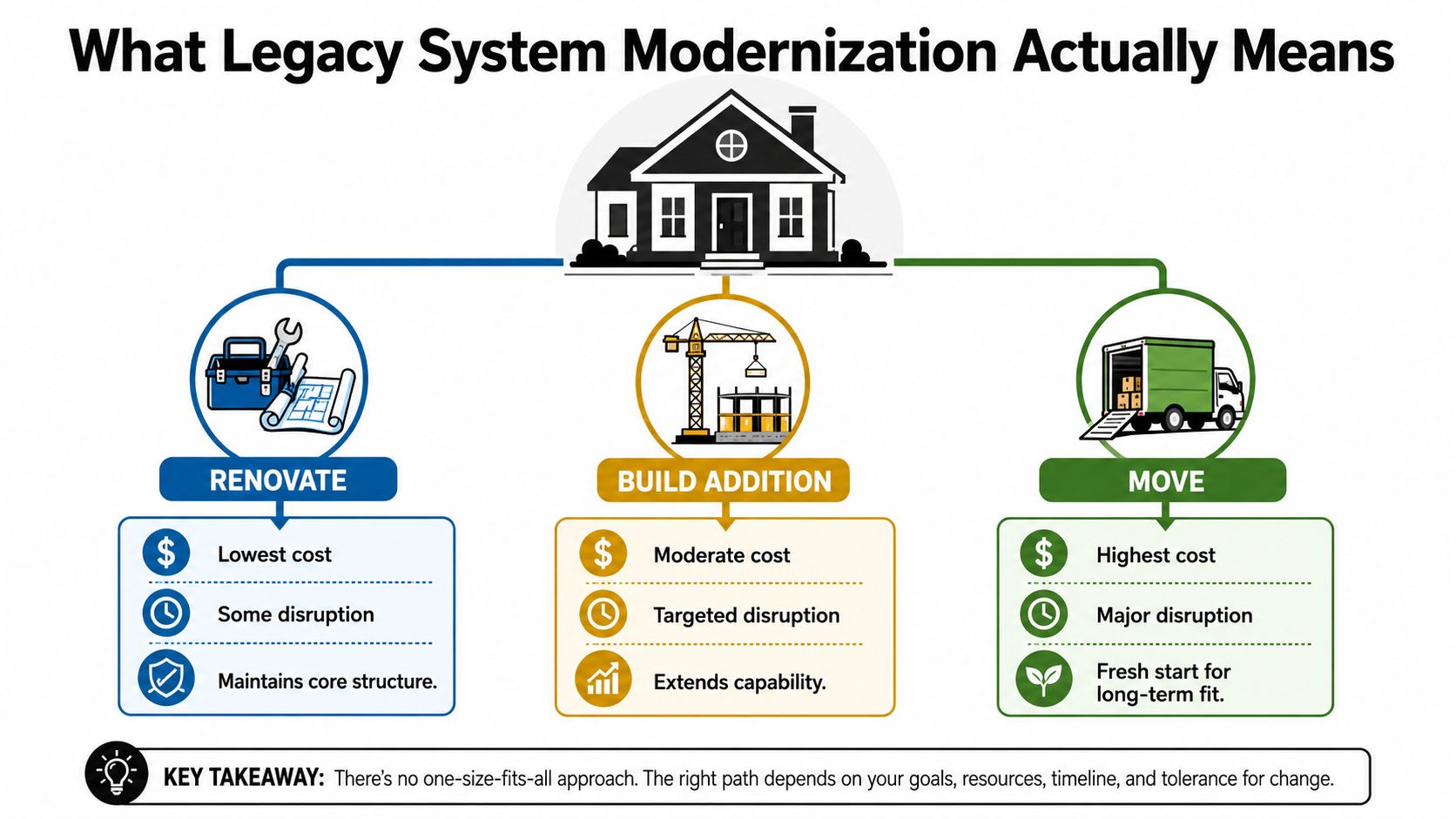
Legacy system modernization is not the same thing as “move everything to the cloud.” It's more like deciding whether to renovate a house, add a room, or move to a different building altogether. Each option changes cost, disruption, and long-term fit in a different way, and the wrong choice is usually the one made too fast.
Renovate, add on, or move
A legacy system can be a dated server, a monolithic application, a database setup no one documented properly, or a workflow stitched together by custom scripts and human memory. Some systems still work but resist change. Others work only because a few people know where the bodies are buried in the code and the process.
Modernization means changing that situation deliberately. Sometimes the right move is to keep the core and update the plumbing. Sometimes the system needs a deeper redesign. Sometimes it should be retired because the business no longer needs it.
The mistake SMBs make is treating modernization like a technical badge. It's not. It's a business decision about durability, flexibility, and risk.
Clear distinction: cloud migration is a hosting choice. Modernization is a business strategy that may include cloud, but also includes security, integration, process fit, and governance.
A modernized system should be easier to support, easier to connect, and easier to change without fear. That does not always mean a shiny new rebuild. It often means a smarter fit between the system and the business.
Why SMBs Modernize and What Happens If They Wait
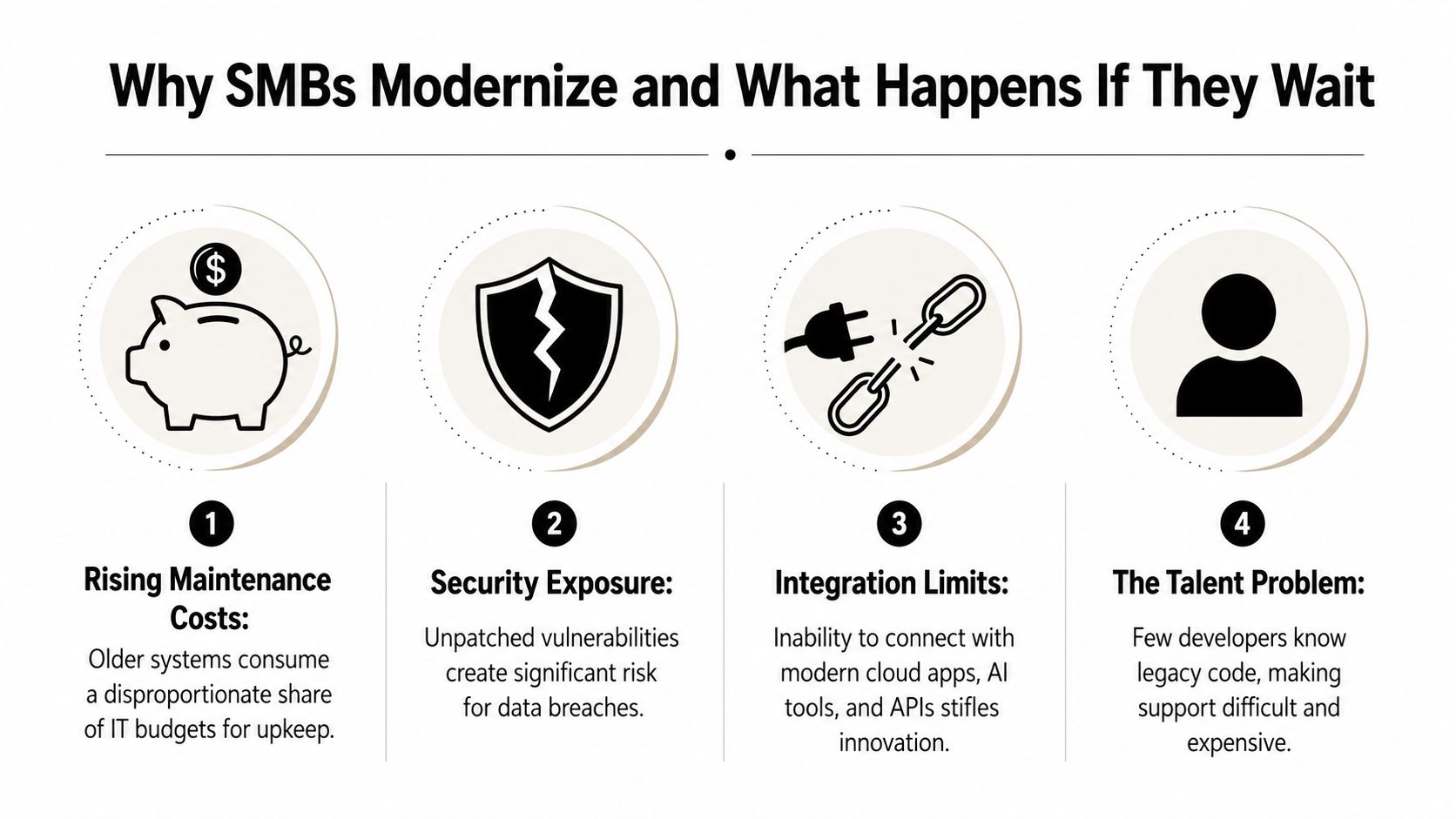
An SMB does not usually modernize because the team wants a fresh system for the sake of it. The push comes from friction that shows up in daily work. Maintenance starts taking more time and money, security gaps get harder to ignore, integrations become brittle, and good people avoid an old stack because they want to build on something current. Modernization is a response to stacked pressure, not a single decision.
The broader market movement reflects that reality. One industry estimate places the legacy modernization market at USD 24.98 billion in 2025, rising to USD 29.39 billion in 2026 and projected to reach USD 66.21 billion by 2031 at a 17.64% CAGR (market estimate). That growth matters because modernization has moved from a back-office cleanup project to a mainstream business priority.
The pressures SMBs feel first
A practice owner feels it in maintenance bills, because every patch, workaround, and hardware refresh gets harder to justify. A finance firm feels it when an unpatched application sits inside a workflow that handles regulated data. A construction company feels it when an old system cannot communicate cleanly with cloud apps, field tools, or modern reporting layers.
The talent problem shows up fast too. If only one person can read the code or keep the workflow alive, the business is one resignation away from a mess. That is not theoretical. It is concentration risk in daily operations.
Data center and infrastructure planning belong in the same conversation. Data center design principles are useful because they force the conversation toward resilience, redundancy, access, cooling, and growth planning, not just software change. That is why a disciplined physical and architectural review belongs alongside application change, especially for SMBs that still run critical work on-premises.
What waiting actually costs
Waiting does not usually create one dramatic failure. It creates steady erosion. Teams work around systems instead of through them. Reporting slips. New tools take longer to adopt. Audits become more painful because the system does not produce clean evidence.
Industry summaries citing McKinsey report that modernization can reduce infrastructure costs by 25%–35%, accelerate release cycles by 40%–60%, and cut security breach risk by 50%, while total cost of ownership can fall 20%–40% over three years (operational impact summary). Those figures matter because they frame modernization as finance and risk management, not just technical cleanup.
A waiting strategy also makes the next move harder. The longer an SMB delays, the more it has to protect around the legacy system, instead of fixing the system itself. That is where a scoped modernization plan, or a cloud migration service such as Technovation's cloud migration services, can turn a stalled project into one that finishes.
Comparing the Six Common Modernization Approaches
The six common options are useful only if they are treated as choices, not slogans. SMBs do not need a dogmatic “rewrite everything” mindset. They need a practical fit between business value, disruption, and the system's current condition.
The 6Rs of Legacy Modernization at a Glance
| Approach | What It Means | Best Fit for SMBs When | Disruption Level | Common Pitfall |
|---|---|---|---|---|
| Rehost | Move the system to new infrastructure with minimal code change | The business needs speed and the system mostly works as-is | Low | Carrying old problems into new infrastructure |
| Replatform | Update the platform layer, such as hosting, database, or runtime, without changing the core logic much | The system is stable but needs better compatibility or performance | Low to medium | Assuming platform change fixes bad architecture |
| Refactor | Clean up code and structure without changing what the system does | The code works but is hard to support or extend | Medium | Underestimating time because hidden dependencies surface late |
| Rearchitect | Redesign the system's structure for better scalability and flexibility | The business has a long-term growth plan and the system blocks it | High | Treating architecture change like a simple upgrade |
| Rewrite | Rebuild the system from scratch | The current system is too constrained to salvage and the business can absorb the risk | Very high | Recreating old flaws in a new stack |
| Retire | Shut it down and replace the capability elsewhere | The system no longer adds value or duplicates something better | Low to medium | Keeping dead systems alive because nobody wants the cleanup work |
The mistake is believing every system deserves the same treatment. Some systems are worth a careful refactor. Some are worth a quick rehost. Some should be retired and removed from the budget.
The contrarian option most SMBs overlook is leave it intentionally stable. That is not laziness. It is portfolio discipline. The 2026 IEEE framework says to think portfolio, not projects, preserve transplantability through standard platforms with minimal tailoring, and limit customization because it creates hard-to-unwind technical debt (IEEE framework). For SMBs, that means not every system deserves transformation. Some systems should stay boring on purpose.
A useful next step is to map the system against the business outcome first, then choose the lightest viable option. If the business only needs a host change, don't buy a redesign. If the system is blocking growth, don't pretend a cosmetic refresh will solve it.
For teams comparing cloud options, cloud migration services only make sense once the business has decided whether the underlying application deserves to move, change, or remain stable.
A Phased Roadmap Built Around Business Goals
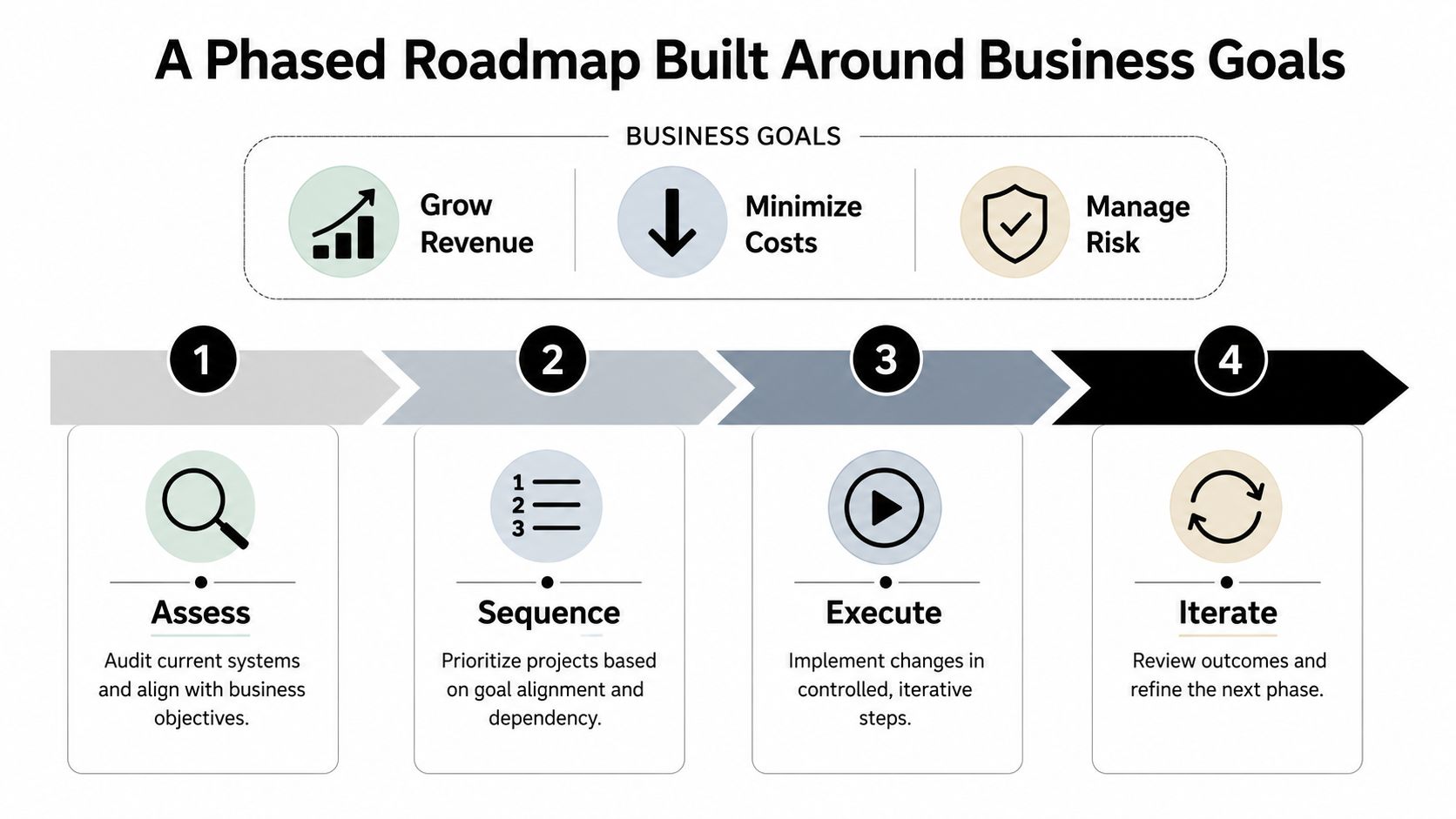
A bad modernization plan starts with the stack. A good one starts with the business result. SMBs should sort every system by one of three goals, grow revenue, minimize costs, or manage risk. If a proposed change does not support one of those outcomes, the work deserves a hard look before anyone spends time or money on it.
Start with the business, not the architecture
The strongest SMBs pick one high-value, low-risk move first. That approach keeps finance involved, lowers anxiety across the business, and gives the team a concrete reference point before the next phase begins. It also stops the project from turning into a giant rewrite that nobody can defend.
The rule is simple, modernize the smallest thing that can still prove the point. That may be one workflow, one integration, one reporting layer, or one service blocking broader change.
Sequencing rule: start where the business can feel progress without betting the operation on a single release.
Four phases that keep the work controlled
Assess. Inventory systems, dependencies, data flows, and ownership. A disciplined assessment can cost $50,000–$150,000 when the discovery effort is thorough and includes code analysis, interviews, and business process mapping (assessment guidance). That sounds expensive until the business compares it with the cost of guessing. A cloud computing readiness assessment can help SMBs determine if their infrastructure is prepared for the next phase of modernization.
Sequence. Rank systems by business criticality, dependency risk, and goal alignment. Portfolio triage matters here. The strongest candidates are not always the oldest systems. They are the ones creating the most friction relative to the value they still deliver.
Migrate. Move in waves, not all at once. Teams should define contracts, reconciliation checks, and staged cutovers before they touch production. That lowers the blast radius if a hidden dependency surfaces.
Stabilize. Verify data, watch support tickets, and hold the line until the new workflow settles. Skipping stabilization is how SMBs turn a successful cutover into a long tail of avoidable pain.
The hardest call is often what not to modernize. Heavy customization creates technical debt that is difficult to unwind later, so the right answer may be to keep a stable system stable and avoid adding unnecessary change. Precisely's modernization guidance is blunt on the sequencing point, begin with a high-impact, low-risk initiative, prove value, then scale.
Real-World Vignettes From Healthcare, Legal, and Nonprofits
The same framework lands differently depending on the sector, which is why generic modernization advice usually disappoints. Regulated organizations need tighter controls. Mission-driven organizations need to preserve service continuity with limited staff. Professional services firms need speed without blowing up client work.
Three SMB patterns that keep repeating
A healthcare clinic hits the trigger when its aging EHR server becomes a reliability concern and the staff can't afford a weekend outage. The chosen path is usually a careful migration with security and data validation built in, because clinical workflows can't absorb chaos. The lesson is simple, healthcare modernization must respect the workflow first, not just the software.
A mid-sized law firm usually hits the wall when a custom matter-management tool keeps adding friction but no longer deserves more custom code. The firm often does better by retiring the old tool and consolidating onto a standard platform that supports the way the practice functions. The lesson there is that legal teams should stop paying for uniqueness when standardization solves the problem cleanly.
A nonprofit often starts with donor database customization that seemed smart years ago and now just makes reporting, onboarding, and volunteer handoffs harder. The better move is frequently to accept the standard version and stop trying to bend the system around one person's memory of how things used to work. The lesson is practical, mission alignment beats custom complexity.
What these stories have in common
Each organization first identified the trigger, then chose the least disruptive option that still solved the core business problem. None of them won by chasing elegance. They won by reducing fragility.
The best modernization choice is usually the one that removes risk without creating a new layer of ceremony.
That is why SMBs should not ask, “How do we modernize everything?” They should ask, “What is the smallest meaningful change that improves the business and doesn't create a bigger cleanup later?” The answer varies by sector, but the discipline stays the same.
Cost, ROI, and When an Outside Partner Makes the Difference
SMBs should think about modernization in terms of discovery cost, phase-one cost, and the cost of delay. The upfront work is real, and so is the operational drag of trying to do it all internally with a team that is already busy keeping the business alive. IBM's modernization guidance is right on the core point, security needs to be built in early, not bolted on later.
Why outside help often pays for itself
The hidden cost of internal-only execution is staffing strain. Recent guidance notes that 75% of organizations lack sufficient internal modernization expertise (roadmap guidance). That doesn't mean the internal team is weak. It means modernization requires a rare mix of discovery, governance, security, application knowledge, and change management.
A managed service partner can compress timelines because the work does not stop when internal staff are pulled into daily fires. It can also reduce execution risk because the partner brings repeatable process, better sequencing discipline, and experience with regulated environments where compliance can't be an afterthought.
For SMBs in healthcare, legal, finance, construction, and nonprofits, that matters. A partner like Technovation is useful when the business needs more than advice, it needs someone to own the boring but critical parts of planning, monitoring, and transition support without turning the project into a drain on internal staff.
Use financial logic, not hope
The right ROI story is not “new technology feels modern.” It is lower operating friction, better resilience, and a clearer path to future changes. The business should be able to name the goal in plain language before it spends the first dollar.
How to choose a managed service provider becomes a meaningful question only after leadership admits the internal team probably can't carry every phase alone. That's not a failure. It's a capacity decision.
Migration Checklist and Common Questions SMBs Ask
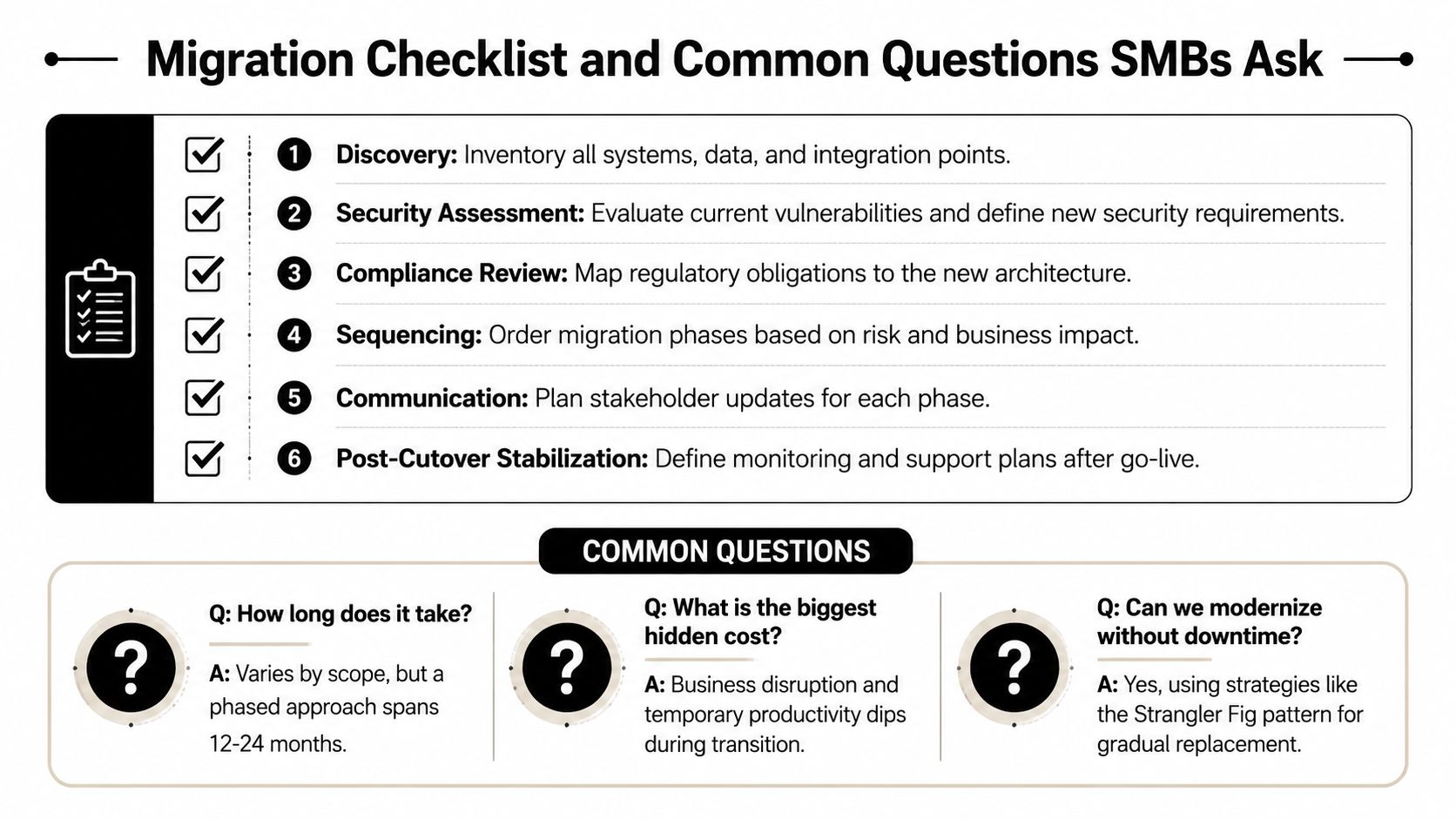
Migration checklist
- Discovery: Inventory systems, data, and integration points.
- Security assessment: Define current vulnerabilities and new security requirements.
- Compliance review: Map obligations to the new architecture.
- Sequencing: Order phases by risk and business impact.
- Communication: Set stakeholder updates before each cutover.
- Post-cutover stabilization: Monitor and support the new environment after go-live.
For organizations retiring hardware or decommissioning legacy gear, a structured disposal plan matters too. A practical server decommissioning checklist helps keep the end of the lifecycle as disciplined as the start.
Common questions
Can a business modernize during a busy season? Yes, if the scope is small and the cutover plan is tight. If the system is core to customer service, billing, or patient care, timing should favor stability over convenience.
How long does a phase usually take? A phased approach can span 12 to 24 months depending on scope and complexity, according to the checklist guidance already noted. Smaller pilots move faster, but the business should plan for a multi-stage effort.
What if a critical system has no modern replacement yet? Keep it intentionally stable, wrap it with controls, and document the dependency chain. Waiting for a perfect replacement usually creates more risk than maintaining a controlled legacy hold.
Can modernization happen without downtime? Sometimes, yes, especially with gradual replacement patterns and parallel systems. The key question is not whether there's zero disruption, it's whether the business can control the disruption and recover quickly.
Modernization should become a capability, not a one-time rescue mission. The businesses that win are the ones that keep making better choices about what to keep, what to change, and what to retire before the old system makes the choice for them.
Technovation LLC helps SMBs turn legacy system modernization into a controlled business decision instead of a stalled internal project. If the goal is to reduce risk, protect compliance, and move without breaking daily operations, visit Technovation LLC and start the conversation with a team that understands regulated, security-conscious environments.