A Dallas accounting firm opens on Monday and finds shared files encrypted. A law firm gets a call from a client asking why draft settlement documents are showing up elsewhere. A clinic can't access its EHR, and the front desk starts improvising with paper forms while phones keep ringing. None of those owners needs a lecture on theory. They need a response structure before the next outage turns into a compliance problem, a client trust problem, and a business continuity problem.
That's where an incident response team stops being a nice-to-have and becomes operational insurance. Without one, the first 24 hours are usually a blur of vendor calls, confused ownership, and second-guessing about what to shut down, what to preserve, and who gets notified. With one, the organization has a chain of command, a set of decisions already made, and a documented way to protect evidence, restore systems, and keep leadership informed.
For regulated SMBs in DFW, that difference matters. A breach response is never just a technical cleanup. It intersects with legal exposure, data privacy obligations, and business downtime, which is why resources like data privacy compliance help are useful when the clock starts running. And for teams that already know they need a recovery plan, Technovation's disaster recovery resources are a practical place to compare response readiness with continuity planning.
Table of Contents
- When an Hour of Downtime Costs More Than a Year of Preparedness
- What an Incident Response Team Actually Does
- The Incident Response Lifecycle in Practice
- Metrics and SLAs That Prove the Team Is Working
- Build vs Buy for Dallas-Fort Worth SMBs
- Practical Playbook Outline and Checklist
- Next Steps and How Technovation Can Help
When an Hour of Downtime Costs More Than a Year of Preparedness
A clinic manager notices the appointment system is lagging. An accountant can't open a tax file. A managing partner gets a message from a staff member who says files have strange extensions and the backup drive doesn't look right. At that point, the business has already moved from inconvenience to incident. The question is whether the response is organized or chaotic.
Without a defined incident response team, the first calls go everywhere at once. The owner calls IT. IT calls the vendor. Someone asks whether the backup is clean. Someone else asks whether the email system should be shut off. In the middle of all that noise, no one is preserving logs, no one is making a clear severity call, and no one is documenting what changed.
Practical rule: The first job isn't to solve everything. It's to stop the incident from getting worse while preserving the evidence needed to understand what happened.
That's why legal and privacy concerns show up so quickly in real events. A business doesn't need to wait for a formal notice letter to realize that client data, patient records, or financial records may have been touched. If the organization doesn't already know who owns legal review, communications, and technical containment, it starts making high-stakes decisions under pressure. That's a bad place to improvise.
A right-sized response team changes the first day completely. The incident commander assigns roles. The technical lead isolates the affected systems. Legal gets involved early. Leadership gets one clear status update instead of fragments. If the business already has a response path aligned with cybersecurity continuity planning, the outage still hurts, but it doesn't spiral. The goal isn't to eliminate pain. The goal is to avoid preventable damage.
What an Incident Response Team Actually Does
An incident response team is a cross-functional crew that activates when systems, accounts, or data stop behaving the way they should. It brings together technical containment, legal judgment, and leadership decisions under one response path. The value is not the title on paper. The value is clear decision rights when the business is under pressure.
The core jobs that matter
The incident commander runs the response and keeps the effort from splintering. The technical lead owns containment and recovery calls. Security analysts handle triage, pull logs, and confirm what is happening. A forensic specialist preserves evidence and rebuilds the attack path. Legal and compliance review notification and handling obligations. An executive sponsor clears obstacles and keeps the response tied to business priorities.
Some of those roles can live in the same person in a small organization. Others cannot. A 30-person firm may have one person serving as both technical lead and security analyst. That is workable. Legal review, executive approval, and technical containment should not sit in the same unstructured inbox. Separation of duties matters because confusion slows response and creates avoidable mistakes.
What the team actually delivers
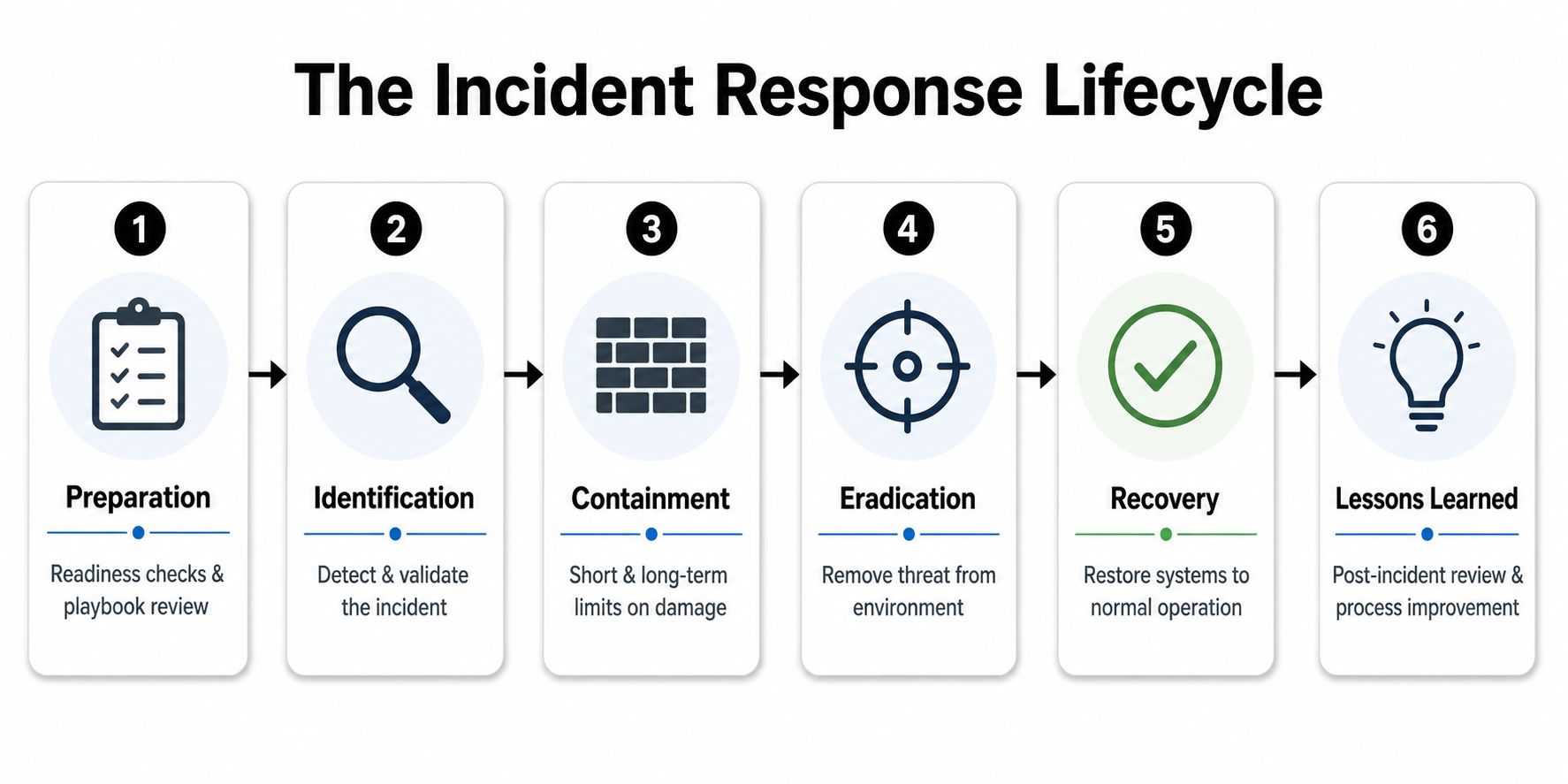
A functioning team moves through detection and triage, containment, evidence preservation, eradication, recovery, and post-incident review. Canadian guidance on incident response planning recommends defining measurable indicators and named owners, because a team that cannot be measured cannot be improved. It also calls for clear thresholds, not just a contact list. Fluxtail's incident management guide reflects the same operating reality, response only works when people know who decides, who executes, and who reports.
An effective team is built around roles and decisions, not personalities. If a key person is unavailable, the response still has to move.
For a DFW SMB, the right structure usually starts with a small internal lead backed by documented runbooks and external escalation paths. That setup should connect to endpoint management practices because endpoint visibility is where early containment usually begins. If the team also aligns with broader cybersecurity continuity planning, it can contain the event without turning a bad day into a business-wide outage. The point is simple. An incident response team is the people, rights, and routines that keep a serious incident from becoming a management failure.
The Incident Response Lifecycle in Practice
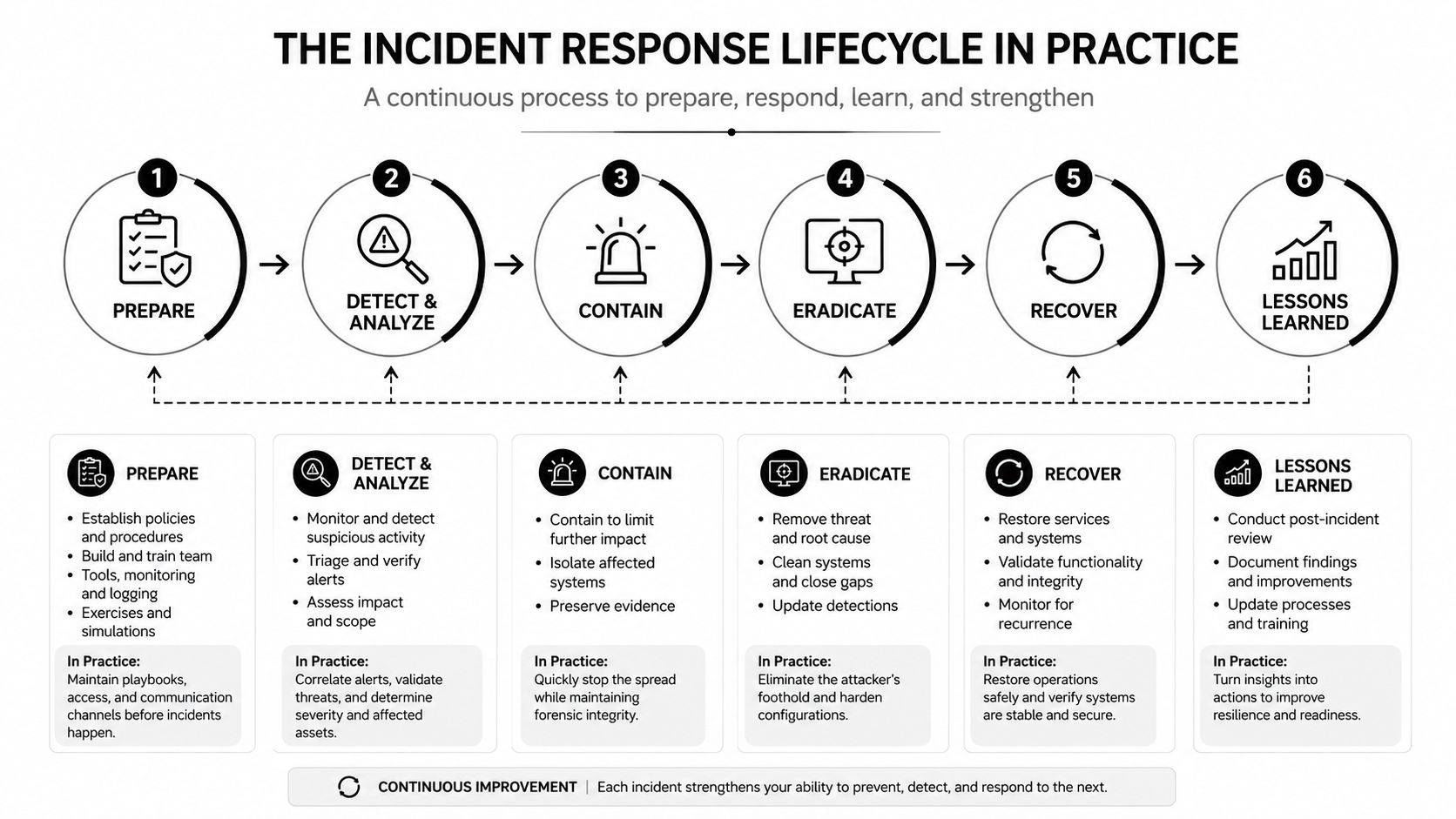
A ransomware event makes the lifecycle obvious because every skipped step gets expensive fast. The suspicious login alert arrives first. Then a shared drive starts locking up. Then someone says the backup looks untouched, which is the moment the team stops guessing and follows the plan.
Preparation and identification
Preparation is the part most SMBs undervalue. The team needs a runbook, a severity scale, a contact tree, backup validation, and a way to communicate if email is down. For DFW healthcare, legal, and financial firms, that prep has to fit a small staff and a busy office, not a fantasy war room.
Identification is the first real decision point. The team confirms whether the event is a false alarm, a credential compromise, or a live ransomware incident. That is where the triage checklist earns its keep.
Containment, eradication, and recovery
Containment comes next, and it has to be deliberate. The team isolates affected systems, blocks known bad access, and preserves what it needs before anyone starts wiping machines. That sequencing matters because backup restoration without validation can reintroduce the same problem.
For teams that need endpoint-level control to make that containment work, Technovation's endpoint management category is the right place to start the discussion. In practice, endpoint visibility usually decides whether the response stays contained or spreads across the business.
After containment, eradication removes the threat from the environment, and recovery restores systems only after integrity checks are complete. A useful outside reference for this operating rhythm is Fluxtail's incident management guide, especially if the organization is trying to formalize tasks, ownership, and handoffs in one place. The mechanics matter more than the label on the process.
Lessons learned and the artifact trail
The last phase is where weak teams usually shortcut themselves. They restore systems, say “we're good,” and never write the after-action review. That is a mistake.
The team should finish with an isolation log, a restoration record, and a lessons-learned document that shows what broke, what worked, and what needs to change. In regulated SMBs, that paper trail matters because it supports the next response, the next audit conversation, and the next budget request.
The businesses that recover cleanly are the ones that document while the facts are still fresh.
The point is repeatability. A lifecycle only helps if the team can run it the same way every time.
Metrics and SLAs That Prove the Team Is Working
The market talks a lot about response maturity, but the team only becomes credible when it can show time-based discipline. In 2024, incident management shifted toward prevention and automation, with 68% of responders described as proactive, 63% of organizations using AI in incident response, and MTTR used by 86% of respondents as the dominant performance metric, according to the incident management statistics report from InvGate (incident management statistics). That tells a clear story. Modern teams are expected to move faster and judge themselves by recovery speed.
The SLA mindset SMBs should use
SMBs don't need a bloated scorecard. They need a tight set of service levels tied to business impact. Triage should happen fast enough to tell leadership whether the event is noise or a live outage. Containment should be measured against a documented threshold. Recovery should be measured against the organization's own restoration target, not a vague promise that it'll be “soon.”
| Example SLAs for a Right-Sized SMB Incident Response Team | ||||
|---|---|---|---|---|
| Severity | Triage SLA | Containment SLA | Recovery Target | Executive Update |
| Critical | Same business hour | Same business hour | Documented restoration target | Immediate and then regular status updates |
| High | Same hour | Same business day | Documented restoration target | Same day |
| Medium | Same business day | Same business day | Documented restoration target | Next scheduled update |
| Low | Planned review window | As needed | Documented restoration target | Summary only |
What the numbers should tell the owner
A team that works well creates cleaner audit trails, fewer repeat incidents, and faster executive decisions. It also makes vendor oversight simpler because the SLA language turns into evidence. That matters for regulated firms where downtime and documentation both carry weight.
For readers who want a practical operations lens, Technovation's IT management category lines up with this way of thinking. Metrics shouldn't exist to impress auditors. They should prove the team can move under pressure, recover cleanly, and keep leadership informed without guessing.
Build vs Buy for Dallas-Fort Worth SMBs
Most owners get realistic. Building an in-house incident response function sounds reassuring, until the firm has to staff it, train it, test it, and keep it awake after hours. A fully internal model works best when the company already has mature security leadership, enough headcount for coverage, and the discipline to keep playbooks fresh. Most DFW SMBs in healthcare, legal, and finance don't live in that world.
The comparison that actually matters
An internal model gives direct control, but it also demands continuous investment in people, tools, and on-call coverage. A fully outsourced model gives access to outside expertise, but it can create distance if no one inside the business owns the decision process. The co-managed model sits in the middle and usually makes the most sense for regulated SMBs. One internal owner handles policy, business context, and approvals. An external partner handles detection support, incident coordination, and forensic backup.
That middle path is usually the right answer because it matches the scale of the organization. A 50-person firm usually doesn't need a full security operations center. It needs clear ownership, fast escalation, and someone who can step in after hours without the owner playing dispatcher.
A quick decision check
If the business can answer yes to these, building more internally may make sense:
- Dedicated security staff exists: The organization already has people who can own response and training.
- After-hours coverage is real: Someone is available when the office is closed.
- Compliance pressure is high: The business needs frequent documentation and structured evidence handling.
- Runbooks are already tested: The team practices instead of hoping.
If those answers are mostly no, buying help is the smarter move.
Direct advice: Don't build for ego. Build for continuity. If coverage, legal coordination, and evidence handling are weak, the response model is too thin.
A service like Technovation LLC fits naturally into the buy side of that decision because it supports monitoring, readiness, and local response for DFW SMBs that need structure without hiring a full internal team. The right model is the one that reduces confusion when the clock is running.
Practical Playbook Outline and Checklist
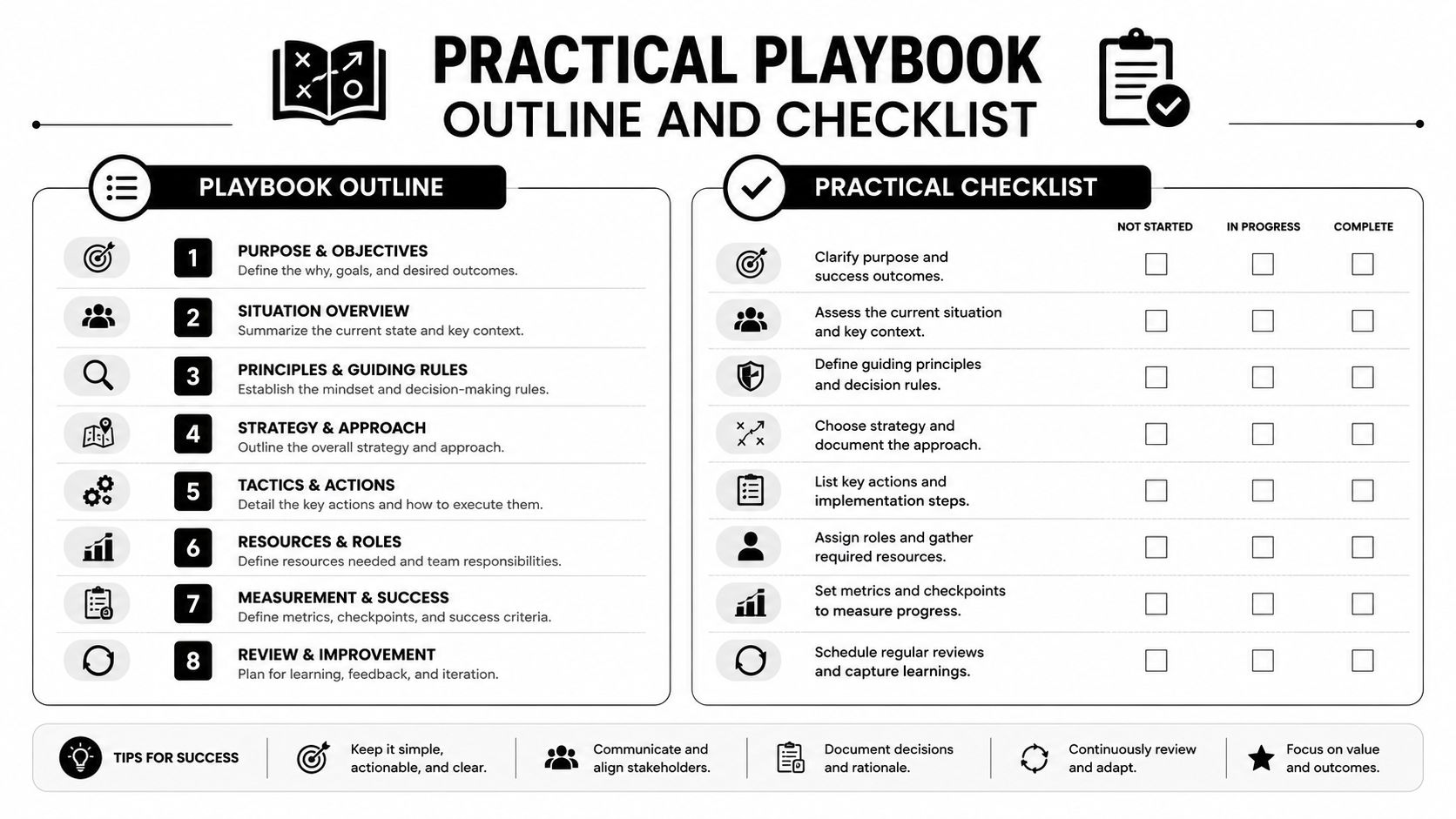
A usable playbook is short, specific, and easy to follow when people are tired. For each event type, the team should keep one page for detection signals, immediate action, communication, evidence preservation, and recovery. That's enough structure to act without turning the document into a binder nobody opens.
A working outline by incident type
For ransomware, the team needs immediate isolation steps, backup verification, and a negotiation decision path if leadership ever has to consider one. For phishing, the focus is account suspension, email tracing, and user follow-up. For DDoS, the team should know who activates traffic filtering, who contacts the provider, and who updates leadership. For a lost device, the priorities are remote wipe, access revocation, and proof of what data may have been stored locally. For an insider incident, the team should preserve access logs, limit privileges, and route the issue through HR and legal.
The pre-incident checklist that should already exist
- Asset inventory: Know what systems, devices, and data matter most.
- Backup validation: Confirm restores work, not just that backups exist.
- Out-of-band communication: Have a backup channel if email or chat fails.
- Legal contacts: Know who gets called for breach review and notification.
- Evidence handling: Preserve logs, memory captures, and affected systems before cleanup.
- Decision ownership: Write down who can approve containment, disclosure, and recovery.
The biggest mistake SMBs make is rushing cleanup before preservation. Once logs disappear and devices are reimaged, the team loses the trail it needs for review, legal support, and insurance questions. That's why the playbook has to be operational, not aspirational.
For teams in healthcare, legal, and financial services, the playbook should be reviewed with the same seriousness as a continuity plan. If the current version still lives in someone's head, it isn't a playbook. It's a hope.
Next Steps and How Technovation Can Help
The next move is straightforward. Validate backups this week. Compare current response roles against the playbook outline above. Identify who owns legal, communications, and executive escalation. Then decide whether the business needs an internal owner, a co-managed model, or outside incident response support that can step in quickly.
That's where Technovation fits for DFW SMBs that need practical coverage instead of vague assurances. The firm provides 24/7 monitoring, incident response support, compliance-oriented guidance for healthcare, legal, and financial clients, and local help when minutes matter. For organizations that want a tighter response posture without overbuilding an internal team, that combination is usually where the gap gets closed.
If the current environment still depends on guesswork, now is the right time to fix it. Technovation LLC helps Dallas–Fort Worth businesses build response readiness, validate recovery, and close the gaps that turn small incidents into long outages. Visit Technovation LLC to start a conversation about incident response coverage, backups, and the right operating model for a regulated SMB.