Most business owners ask one narrow question about their network. “Is it up right now?” That question overlooks the core issue.
A network can appear fine while draining money through slow file access, failed backups, poor Wi-Fi coverage, outdated firmware, messy permissions, and compliance gaps nobody catches until an audit or an outage. For a healthcare clinic, law firm, accounting office, or construction company in Dallas-Fort Worth, that hidden drag is not just an IT nuisance. It is an operational problem.
That is why network support and maintenance deserves executive attention. The stakes are rising as infrastructure grows more complex. The global IT Maintenance & Support Services market was valued at $66.39 billion in 2025 and is projected to reach $104.19 billion by 2033, growing at a 5.3% CAGR according to Data Insights Market’s IT Maintenance & Support Services report. Businesses are not spending more on support because it is fashionable. They are doing it because modern operations break when networks are ignored.
For regulated businesses, generic support is rarely enough. HIPAA, client confidentiality, financial controls, remote access, cloud apps, and cyber insurance requirements all put pressure on the same foundation. The network has to stay available, secure, documented, and predictable.
Table of Contents
- Is Your Network Costing You Money
- What Network Support Involves
- The Business Case for Proactive Maintenance
- Choosing Your Support Model In-House vs Managed
- A Practical Network Maintenance Checklist for Business Owners
- Why Local DFW Support Matters for Your Business
- Building a Resilient and Future-Ready Network
Is Your Network Costing You Money

Most network problems do not start as dramatic outages. They start as friction.
Staff wait for cloud apps to load. Video calls stutter. Printers disappear from the network. A VPN connection works for one user and fails for another. Backup jobs complete sometimes, not always. None of that may trigger an emergency ticket, but all of it wastes payroll, delays client work, and chips away at confidence.
Silence is not stability
A quiet help desk does not prove a healthy network. It often means people have adapted to bad conditions.
In many SMBs, teams stop reporting recurring issues because they assume nothing will change. That is a leadership problem, not a user problem. If employees build workarounds around slow systems, the business ends up normalizing inefficiency.
Regulated businesses pay a higher price for neglect
Healthcare practices, legal offices, financial firms, and nonprofits handling sensitive data cannot treat maintenance as optional. They need reliable access, clean audit trails, secure remote connectivity, and consistent patching. A network that “mostly works” is not good enough when a patient record, client file, or financial system has to be available and protected.
Key takeaway: Network support and maintenance should be judged by business outcomes, not by whether anyone noticed a router failure this week.
A DFW business owner should ask a harder question than “Are there problems?” The better question is “What hidden costs is the network creating right now?” That question leads to better decisions about uptime, compliance, budgeting, and growth.
What Network Support Involves
Good network support and maintenance looks a lot like disciplined vehicle maintenance. Waiting for smoke under the hood is expensive. Regular inspection, tuning, and replacement of worn parts is cheaper and far less disruptive.
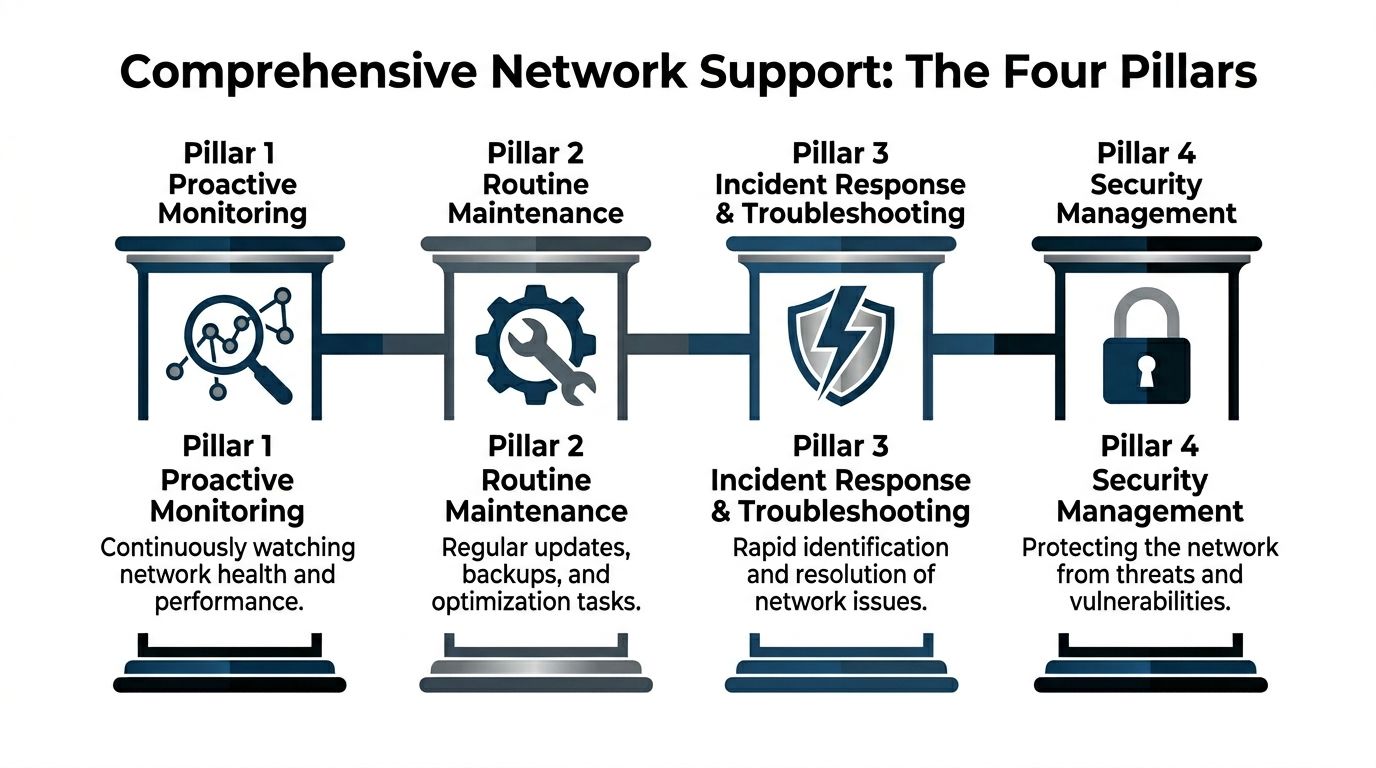
Monitoring that catches trouble early
Professional support teams do not just wait for users to complain. They watch dashboards, logs, and alerts for patterns that suggest failure is developing.
According to CCI Training’s network support technician overview, technicians monitor anomalies such as a 20% to 50% spike in traffic that can signal bandwidth saturation, and routine maintenance includes firmware updates because unpatched devices face 3 to 5 times higher exploit rates. That is the practical side of proactive support. Spot the warning signs early, then intervene before users feel the impact.
Examples of useful monitoring include:
- Traffic anomaly review: Spikes in traffic, unusual east-west movement, or repeated disconnects can reveal congestion or security issues.
- Device health alerts: Switches, routers, firewalls, and wireless access points should report when performance degrades or hardware behaves abnormally.
- Service availability checks: VPN, internet connectivity, cloud access, and critical line-of-business systems need continuous visibility.
Maintenance that prevents avoidable failures
Routine maintenance is not glamorous. It is where the value lives.
A serious provider handles the work many internal teams postpone because the day gets busy:
- Firmware patching: Routers, switches, and firewalls need regular updates to close known vulnerabilities.
- Configuration reviews: VLANs, DHCP scopes, and access rules should be checked before a small misconfiguration isolates a department.
- Backup verification: Backups that have not been tested are assumptions, not safeguards.
- Performance testing: Tools like PRTG, SolarWinds, Wireshark, and iPerf help verify whether links, devices, and traffic flows are behaving as expected.
Endpoint visibility matters too, because many network issues start at the device layer. A business reviewing its broader management posture should also understand what endpoint management means for an IT network.
Security and planning are part of maintenance
Some companies separate “network maintenance” from “security.” That is a mistake.
A firewall rule review, VPN policy cleanup, multi-site segmentation check, and access audit all belong inside network support and maintenance. So does documentation. If nobody can explain how the environment is configured, then nobody can fix it quickly under pressure.
Practical advice: If maintenance only happens after complaints, the business does not have a support strategy. It has a repair habit.
The best support model combines daily operational discipline with longer-term planning. Hardware lifecycles, cloud changes, office moves, compliance reviews, and remote workforce needs should all feed into the maintenance roadmap.
The Business Case for Proactive Maintenance
A company does not invest in proactive maintenance to make the IT team feel organized. It invests because instability costs real money.

Downtime is a financial event
The cost of poor network support is not abstract. It shows up in lost billable time, delayed appointments, payroll waste, missed deadlines, and damaged trust.
According to Motadata’s roundup of network monitoring statistics, the average cost of a single hour of network downtime exceeds $300,000 for over 90% of mid-size and large enterprises. In healthcare, downtime can reach $7,500 per minute. Those figures explain why maintenance belongs in business planning, not just in the server room.
Even SMB owners who do not operate at enterprise scale should take the lesson seriously. If a clinic cannot access records, a law firm loses secure access to documents, or an accounting team cannot reach its systems during a critical deadline, the damage moves fast.
Stable networks support compliance and daily execution
Proactive maintenance also makes ordinary business operations smoother.
A stable network helps employees work without friction. It supports reliable cloud access, secure remote work, predictable VoIP quality, and consistent performance across offices and job sites. In regulated industries, it also supports the controls that auditors and insurers care about, such as patching discipline, documented changes, access management, and incident response readiness.
Three business outcomes matter most:
-
Fewer business interruptions
Maintenance reduces the odds that a small issue turns into a company-wide outage. -
Cleaner compliance posture
Routine patching, documented changes, and controlled access make it easier to demonstrate operational discipline. -
More predictable IT spending
Planned maintenance is easier to budget than emergency replacements, rushed projects, and repeated triage.
A business owner does not need a deep technical background to see the difference. Reactive environments create surprise costs. Proactive environments create control.
Bottom line: Network support and maintenance is not overhead when it reduces risk, supports compliance, and protects productive time.
Choosing Your Support Model In-House vs Managed
At this point, many DFW businesses get stuck. They know the network needs attention, but they are unsure how to structure support without overspending or surrendering control.
The decision usually comes down to three models. In-house IT, co-managed IT, and fully managed IT. Each can work. Each can also fail if leadership picks the model that does not match the company’s size, risk profile, and internal capabilities.
When in-house support works
An internal IT team can be the right choice when the company already has strong technical leadership, enough staff coverage, and documented processes.
That model gives the business direct control. It can also create concentration risk. If one key technician handles networking, security, vendor management, and troubleshooting, coverage becomes fragile. Vacation, turnover, and after-hours incidents expose the gap quickly.
In-house support tends to work best when leadership is willing to fund tools, training, redundancy, and clear accountability.
Where co-managed support fits
Co-managed IT is often the smartest option for SMBs that already have internal talent but need depth, coverage, or specialized expertise.
According to ConsultNet’s discussion of network maintenance, co-managed models can reduce IT costs by 28% for SMBs in sectors like healthcare, averaging $42K per year in savings, while still retaining internal control. The same source notes that 67% of North Texas SMBs report confusion over split responsibilities. That is the primary risk. Not the model itself, but poor role definition.
A good co-managed relationship works when both sides agree on who owns:
- Monitoring and alert response
- Patch scheduling and documentation
- User support escalation
- Vendor coordination
- Compliance-related controls
- After-hours incidents
Businesses comparing options should review the benefits of managed IT services with a specific question in mind. Which responsibilities should remain internal, and which ones should move to a partner with stronger coverage?
When fully managed support makes more sense
Fully managed support fits companies that want one accountable partner to handle the environment end to end.
That model is usually the cleanest for small internal teams, regulated firms without dedicated network specialists, and businesses that need consistency across multiple locations. It reduces management overhead because leadership is not stitching together tools, staff, contractors, and telecom providers on its own.
The trade-off is obvious. The business gives up some day-to-day control in exchange for specialization, process maturity, and broader coverage.
Network Support Model Comparison
| Aspect | In-House IT | Co-Managed IT | Fully Managed IT |
|---|---|---|---|
| Control | Highest direct control | Shared control | Lower day-to-day internal control |
| Coverage | Depends on staffing depth | Broader than in-house alone | Broadest operational coverage |
| Specialized expertise | Limited by team skills | Expanded through partner support | Delivered by provider |
| Budget predictability | Can fluctuate with projects and staffing | More predictable if scope is clear | Usually the most predictable |
| Compliance support | Depends on internal maturity | Strong if responsibilities are defined | Strong when provider processes are mature |
| Best fit | Larger SMBs with capable IT leadership | SMBs wanting balance | SMBs wanting simplicity and accountability |
A business owner should not ask which model is best in general. The better question is which model creates the least operational ambiguity.
A Practical Network Maintenance Checklist for Business Owners
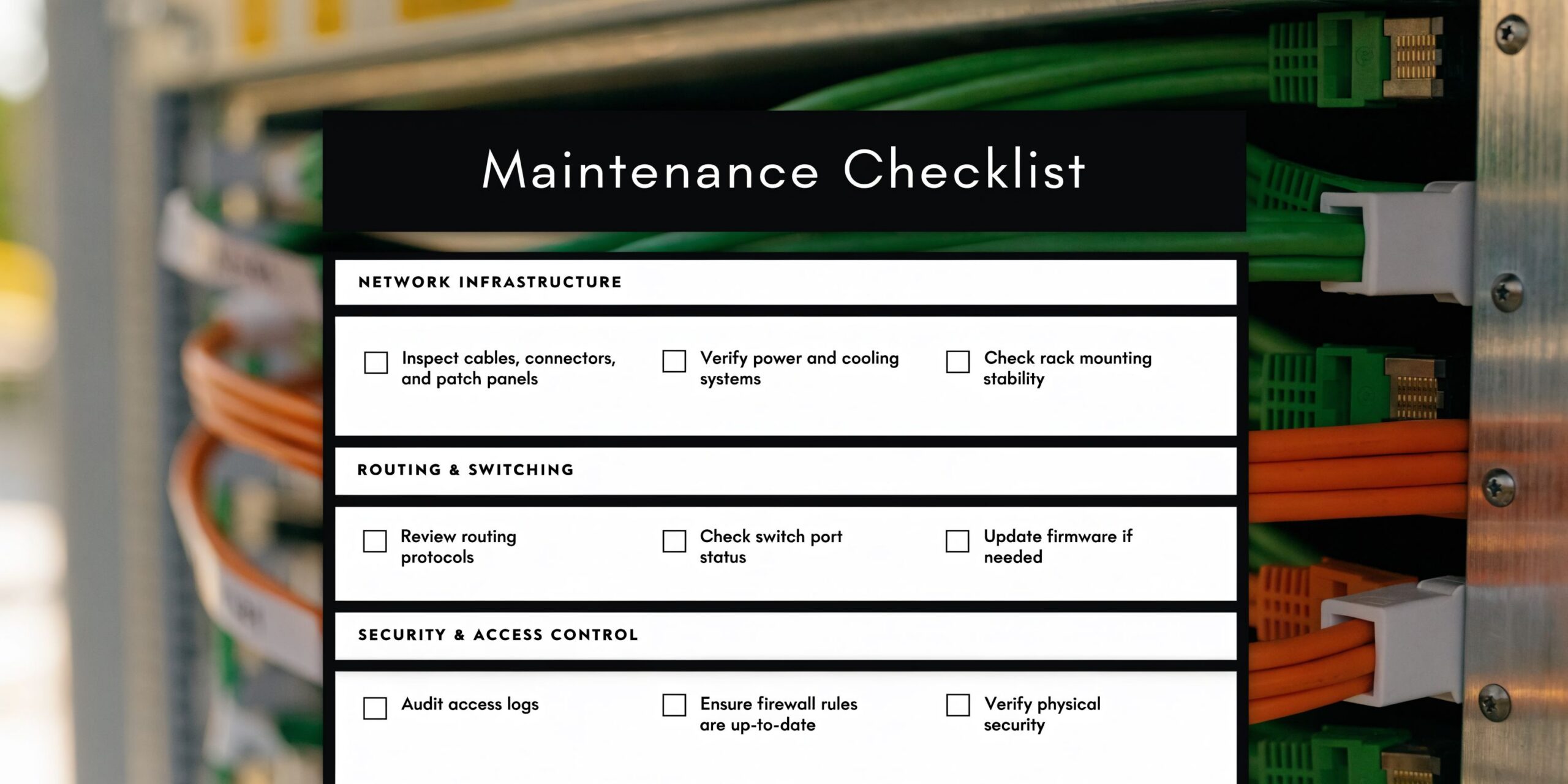
A business owner does not need to log into switches or read packet captures to judge whether support is solid. Leadership only needs to ask the right questions and demand clear answers.
Questions leadership should ask
Use this checklist in the next IT review meeting.
-
Are critical network devices actively monitored around the clock?
Routers, switches, firewalls, wireless systems, VPN services, and internet connections should all generate actionable alerts. -
Are firmware and security patches applied on a defined schedule?
“We update when there is time” is not a process. -
Are backups tested, not just reported?
A green backup dashboard means little if recovery has never been verified. -
Are network diagrams and configurations documented?
During an incident, undocumented environments waste time. -
Are remote access and permissions reviewed regularly?
Former staff, third parties, and over-permissioned users create unnecessary exposure. -
Is there a written response plan for outages and hardware failures?
Every owner should know who gets called, who makes decisions, and how communication works. -
Are recurring complaints tracked by pattern, not ticket by ticket?
Repeated Wi-Fi issues, slow branches, or unstable VPN performance usually point to root causes that need real fixes.
Where predictive maintenance changes the game
Modern support should do more than monitor static thresholds. It should identify abnormal behavior before users report it. Many businesses are still relying on manual review and reactive troubleshooting when newer tools can flag developing issues earlier.
Smart move: If a provider cannot explain how it detects emerging problems before users open tickets, the business is buying reactive support with a nicer label.
The checklist is simple by design. If leadership cannot get clear answers to these questions, the network likely has blind spots.
Why Local DFW Support Matters for Your Business
A network provider does not need to share a ZIP code to sell a contract. It does need local context to support a business well.
Local context improves decisions
DFW companies deal with multi-site growth, distributed staff, industry-specific compliance pressure, and a business culture that moves quickly. A local support partner understands how those realities affect infrastructure decisions.
That matters in practical ways. On-site hardware issues need local hands. Office expansions need someone who can evaluate the environment in person. Construction firms, clinics, law offices, and nonprofits all operate differently, and a provider serving North Texas full time tends to understand those operating patterns better than a national help desk reading from a script.
Local support also improves communication. Business owners should not have to explain regional context, office footprint, or operational priorities every time they call. A nearby team can build institutional knowledge that shortens diagnosis and sharpens recommendations.
A national provider may still be useful for some businesses. But for regulated SMBs that need accountability, context, and occasional on-site intervention, local support is usually the more practical choice.
Building a Resilient and Future-Ready Network
The strongest takeaway is simple. Network support and maintenance is not a back-office chore. It is part of risk management, compliance, and operational planning.
The smart move is clarity
A resilient network does not happen because equipment is expensive. It happens because someone is monitoring, patching, documenting, testing, and planning with discipline.
That is also why the support model matters. Some businesses need to strengthen an internal team with co-managed help. Others should stop trying to assemble coverage from scattered vendors and move to a fully managed model. The right answer is the one that removes ambiguity and creates accountability.
A DFW business owner should expect clear standards:
- Defined monitoring and escalation
- Routine maintenance windows
- Documented configurations and recovery plans
- Security controls tied to business risk
- A support structure that matches compliance obligations
The goal is not perfection. The goal is a network that supports growth without becoming a constant source of uncertainty.
A business that wants a stronger security posture should also review practical guidance on protecting the security of a network. Maintenance and security work best together, not as separate conversations.
The next step should be straightforward. Get an honest view of the current environment, identify blind spots, and decide whether the business needs in-house improvement, co-managed support, or full outsourcing.
Technovation LLC helps DFW organizations turn network support and maintenance into a business advantage. From proactive monitoring and compliance-focused hardening to co-managed and fully managed IT support, the team provides practical guidance built for healthcare, legal, financial, construction, nonprofit, and general business environments. Businesses that want a clear picture of their current network risks can contact Technovation LLC for an IT health check and a direct conversation about the right support model.