
An architecture firm manager can lose an entire morning to a problem that has nothing to do with design. A linked model takes too long to open, a remote workstation stutters during a client review, and a consultant can't find the current drawing set. Meanwhile, project files sit across email threads, shared folders, and cloud accounts with unclear permissions.
That combination creates more than frustration. It slows decisions, increases rework, and makes confidential project data harder to control. Generic help desk support can replace a laptop or reset a password, but it often misses the relationship between CAD performance, BIM data, cloud architecture, and security.
Specialized IT support for architects treats those systems as one operating environment. Technovation helps DFW architecture firms assess workstation capacity, organize storage, secure remote access, manage backups, and build practical technology roadmaps. The result should be a design environment that supports the way architects work, including coordination with consultants, field teams, clients, and specialists in areas such as 3D printing for architecture.
Table of Contents
- Introduction to IT Support for Architects
- Understanding IT Requirements for CAD and BIM Workflows
- Choosing High-Performance Workstations and GPUs
- Architecting Network Storage and Backup Strategies
- Evaluating Cloud and On-Premise Solutions
- Enabling Secure Collaboration and Remote Access
- Ensuring Cybersecurity Compliance and Data Confidentiality
- Conclusion and MSP Selection Checklist
Introduction to IT Support for Architects
The typical architecture technology problem rarely arrives alone. A designer reports slow model navigation, the project manager notices inconsistent file versions, and the firm's administrator discovers that a former consultant still has access to a project folder. Each issue appears separate, but all three can come from an IT environment that grew reactively instead of being designed around architectural workflows.
BIM projects place unusual demands on hardware and infrastructure. Designers need responsive workstations, dependable storage, predictable synchronization, and access controls that follow the project rather than the office location. A remote employee, outside engineer, and client reviewer shouldn't receive the same level of access when their access requirements are limited to viewing related information.
Practical rule: Treat every project file, workstation, user identity, and external collaborator as part of one workflow, not as separate help desk tickets.
Technovation's role is to connect those pieces. A useful engagement starts with an assessment of model performance, workstation specifications, network design, cloud permissions, backup status, and recovery procedures. The firm can then separate urgent fixes from longer-term improvements, so managers aren't forced into an expensive migration before the underlying workflow is understood.
The right question isn't, “Can the firm move more systems to the cloud?” It's, “Where should each workload run so designers get speed, managers get control, and clients get reliable collaboration?” That distinction shapes every recommendation that follows.
Understanding IT Requirements for CAD and BIM Workflows
A BIM coordinator opens a linked model and waits while the workstation, local cache, and network exchange data. The same delay can come from limited memory, storage latency, graphics capacity, or a cloud workflow that sends too much work across the connection. IT support for architects must identify the actual constraint before anyone replaces equipment or moves project data.
Revit and CAD workloads often depend on sustained single-thread CPU speed. Three-dimensional views and rendering place greater demands on the GPU, while large linked models require memory headroom. Fast storage affects application launches, model loading, local caching, and synchronization. These components must be assessed together because a fast workstation can still feel slow when storage or network access becomes the limiting factor.
Find the actual bottleneck
Use performance evidence, not processor branding or core count, to plan upgrades. IT support should examine:
- CPU behavior: Determine whether sustained clock speed limits model interaction before adding more cores.
- Memory pressure: Check whether linked models, rendering, browser sessions, and coordination tools force disk-based paging.
- GPU workload: Review viewport and rendering requirements instead of assigning identical graphics hardware to every designer.
- Storage latency: Measure whether project libraries, local caches, and model files load quickly enough for daily production.
- Network dependency: Establish whether delays occur on the workstation or only when users access shared resources.
Independent guidance recommends at least 32GB of RAM for standard BIM, 64GB or more for complex linked models, and 96GB to 128GB for heavy coordination projects. It also points to 1TB to 2TB of NVMe storage for demanding project environments, alongside high-clock CPUs. The detailed recommendations appear in this CAD workstation guide for architecture firms, which belongs with the workstation planning discussed in the following section.
Cloud adoption adds a separate design decision. A firm can place project files in cloud storage while keeping model-heavy applications and active caches local, or shift more processing to managed remote access. The trade-off is speed versus centralized control. Poorly scoped permissions, unreliable synchronization, and dependence on wide-area connectivity can erase the productivity gains of migration. Project folders, identities, backup copies, and recovery procedures need defined ownership before a cloud move.
Connect technology to design intent
Spatial interfaces, visualization, and digital production can change the performance profile of a design team. Managers reviewing insights on spatial design for digital production should ask whether their current hardware, network, and storage support those workflows without weakening project controls.
Technovation should finish its assessment with a workload map. It should identify tasks that require local performance, tasks suited to managed remote access, data that belongs in project-scoped cloud storage, and systems requiring tighter oversight. Firms can also evaluate managed IT services for construction when architecture teams share technology requirements with construction and engineering partners.
Choosing High-Performance Workstations and GPUs
A project architect opens a complex coordinated model, switches between detailed views, and sends a rendering job before a client meeting. If the workstation was selected from a standard office template, the delay appears in several places at once. Procurement should start with actual project behavior, not identical machines for every employee. Documentation-focused roles may need less capacity, while model coordination and visual production require stronger hardware.
For interactive CAD and BIM work, sustained clock speed often matters more than adding CPU cores. Extra cores still support rendering and batch processing. Technovation should profile each user's recurring tasks, test representative files, and separate workstation needs from cloud delivery requirements before approving a configuration.
Match components to the workload
Use the following baseline as a starting point, then validate it against real project files and the firm's collaboration model (workstation recommendations).
| Component | Recommendation |
|---|---|
| CPU | Choose a high-clock processor for interactive CAD and BIM work. Add cores when rendering or parallel processing justifies the cost. |
| RAM | Use 32GB for standard BIM, 64GB or more for complex linked models, and 96GB to 128GB for heavy coordination workloads. |
| GPU | Match graphics capacity to model complexity, viewport behavior, rendering needs, and remote delivery requirements. |
| Storage | Use fast NVMe storage, with 1TB to 2TB as the guidance range for demanding project environments. |
| Peripherals | Provide reliable displays, docking equipment, input devices, and network connectivity that fit the workstation's performance. |
A high-performance workstation does not automatically produce a strong cloud workflow. Keep model-heavy applications and active caches local when responsiveness depends on them, while placing controlled project data in project-scoped cloud storage. Define which files synchronize, who can access them, and how remote users receive display output. Otherwise, faster hardware can be undermined by poor synchronization, weak permissions, or an unsuitable remote access design.
Make the GPU decision deliberately
Professional graphics hardware can offer predictable driver support and visualization performance. Consumer-oriented graphics hardware may deliver better value for selected roles. Choose based on application compatibility, rendering expectations, support requirements, and the firm's replacement cycle. A strong benchmark result means little if drivers, remote delivery, or the application workflow create instability.
GPU memory becomes more relevant as models grow visually dense. More memory will not correct a weak CPU, insufficient system RAM, or slow storage. Test linked references and typical views from a real project file before approving the purchase.
Use procurement as a lifecycle decision
A workstation creates an operating commitment beyond its purchase price. Technovation can standardize approved configurations, document user profiles, coordinate procurement, apply security controls, plan refreshes, and maintain asset records. Firms can use IT procurement services to connect purchasing with deployment, supportability, warranty handling, and ongoing support.
Procurement advice: Buy for the heaviest recurring workflow, but do not equip every employee for the firm's most extreme project unless the role requires it.
Architecting Network Storage and Backup Strategies
Large BIM files expose weak network design quickly. A workstation can have ample memory and fast local storage, yet users still wait if shared libraries sit behind congested links, poorly organized permissions, or storage that wasn't designed for simultaneous access. Architecture firms need a storage plan that separates active collaboration from backup and recovery.
The first step is to map data movement. Managers should document where users open models, where teams store shared libraries, how consultants exchange files, and which information must remain available during an outage. That map helps IT determine whether a local network appliance, a dedicated storage system, cloud repositories, or a hybrid design fits the firm.
Build for active project work
A resilient local environment typically includes:
- Capacity planning: Reserve space for active models, libraries, coordination exports, and growth instead of filling storage until performance suffers.
- Fast internal connectivity: Design the LAN to move large files consistently between workstations, servers, and storage.
- Controlled project structure: Separate active, archived, and administrative data so users don't confuse working files with retained records.
- Permission design: Assign access by project role and organization, not by broad shared-folder membership.
- Monitoring: Track storage health, capacity, failed jobs, and unusual access activity before users discover a problem.
A NAS or SAN can provide fast local access and centralized project storage, but it shouldn't become the only copy of the firm's data. Local systems can fail, suffer from environmental damage, or become unavailable during a security incident. Cloud backup and backup-as-a-service can reduce the operational burden of managing backup media, while in-house disk or tape strategies can still serve specific retention or recovery requirements.
Use layered recovery
A sound backup plan creates multiple recovery paths. Automated local backups can support quick restoration of recently changed files. An isolated offsite or cloud copy protects against local equipment failure and site-level incidents. Versioned retention helps recover from accidental overwrites or malicious encryption, provided the backup environment isn't exposed through the same credentials as production data.
Technovation can assess backup frequency, retention, immutability, recovery testing, and ownership responsibilities through cloud backup benefits. The important test isn't whether a dashboard says “successful.” The firm should know which files can be restored, how long restoration takes, and who authorizes recovery.
Recovery standard: A backup that hasn't been restored in a controlled test is an assumption, not a recovery plan.
Evaluating Cloud and On-Premise Solutions
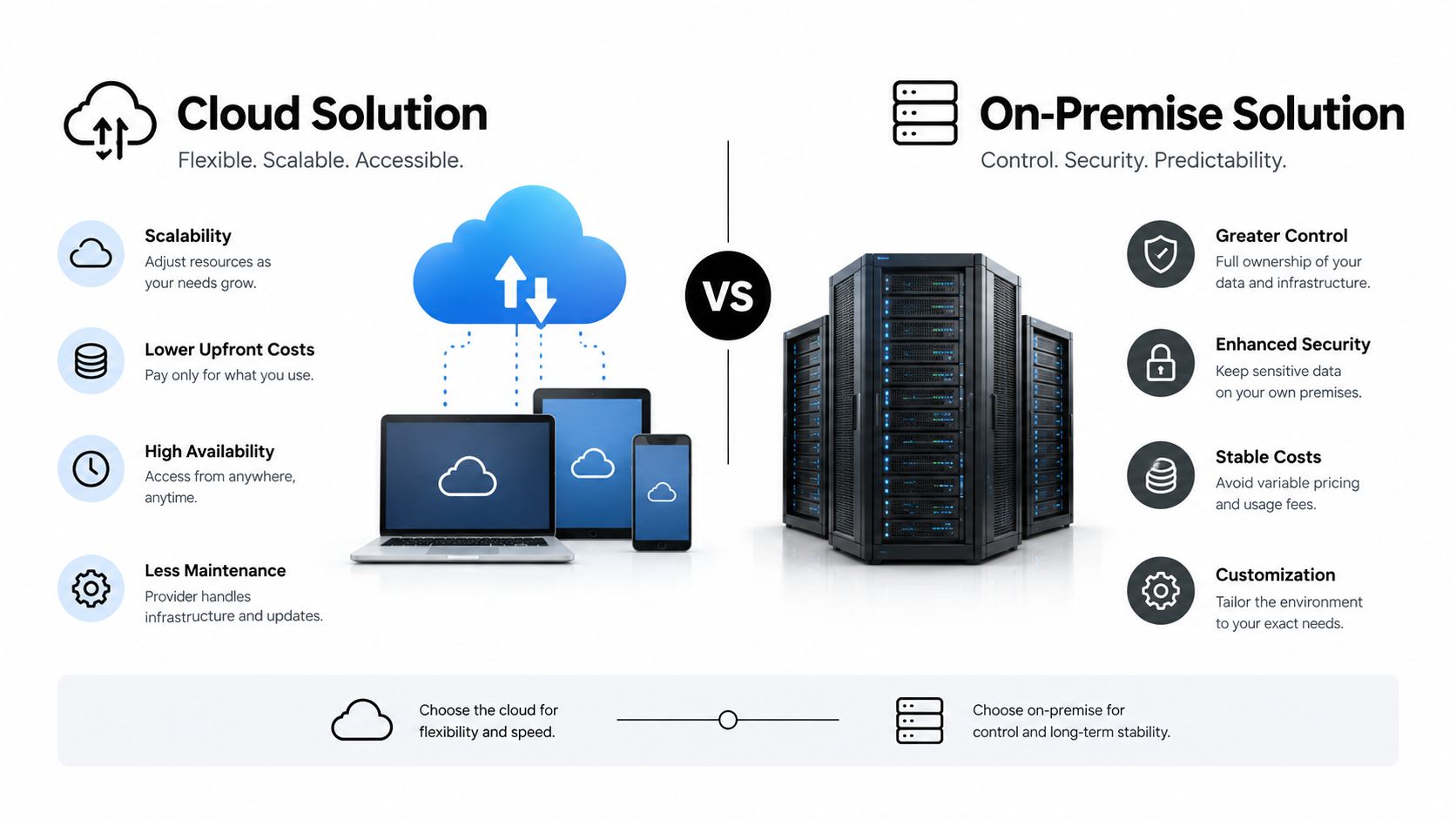
Cloud and on-premise systems solve different problems. Local infrastructure can deliver predictable access to active project data and reduce dependence on internet latency. Cloud environments can support distributed teams, flexible access, centralized administration, and collaboration beyond the office.
Neither option deserves automatic priority. A cloud-first plan can fail when it treats GPU-intensive design as ordinary document access. An on-premise plan can fail when outside collaborators, remote employees, and multiple offices need controlled access that local systems weren't designed to provide.
Compare the trade-offs
| Decision area | Cloud approach | On-premise approach |
|---|---|---|
| Performance | Can support remote access, but results depend on network quality and virtual GPU design. | Offers direct local access and predictable performance when hardware is properly sized. |
| Cost model | Shifts spending toward recurring services, access, storage, and licensing. | Requires capital purchases, maintenance, space, power, and replacement planning. |
| Collaboration | Supports distributed access when permissions and project structures are well designed. | Can work well for office-centered teams, but remote access requires careful architecture. |
| Control | Provider-managed infrastructure can simplify operations while adding dependency on service design. | Firm retains more direct control, along with more responsibility for maintenance and recovery. |
AEC cloud guidance identifies a deeper challenge: firms may need GPU-accelerated remote CAD access without purchasing expensive hardware for every designer, which makes selective virtualization more cost-effective than moving everything to the cloud (AEC cloud use cases).
Choose by workload
Keep latency-sensitive active work where users get the most predictable response. Virtualize selected workloads when remote GPU access makes financial and operational sense. Place collaboration and controlled project sharing in cloud services when they provide better access governance than ad hoc file exchanges.
Technovation can document those decisions in a hybrid architecture plan. The objective isn't cloud migration for its own sake. It's a deliberate mix that balances model performance, licensing complexity, collaboration needs, recovery, and project economics.
Enabling Secure Collaboration and Remote Access
Architecture projects cross organizational boundaries by default. A project may involve internal designers, structural and mechanical consultants, contractors, owners, and field personnel. Giving everyone a broad folder or VPN connection may feel efficient at first, but it creates unnecessary exposure and makes offboarding difficult.
Role-based access control provides a better model. A project architect may need broad access to active design data, while a consultant may need only the files relevant to a defined discipline. A client reviewer may need controlled viewing access, and a former subcontractor should lose access when the engagement ends. AEC security guidance emphasizes this project-aware approach because limiting access reduces exposure when teams share large BIM files through cloud platforms or remote desktops (AEC remote-team security guidance).
Replace broad access with project scope
Managers should require a written answer to four questions before granting external access:
- Who needs access? Identify the person and organization, not merely the company domain.
- What must they reach? Define folders, models, documents, or applications by project role.
- How long should access last? Attach an expiration or review date to every external account.
- Who approves removal? Assign responsibility when a consultant's work ends or a project closes.
Generic file-sharing systems often break down because they don't reflect model dependencies, revision discipline, or the need for a complete audit trail. When users can't find the right version, they fall back to email and uncontrolled copies. That creates confusion even when no security incident occurs.
Secure the path and the session
A managed VPN, secure remote desktop, and protected file portal can support distributed work, but each requires identity controls, logging, endpoint protection, and clear administration. The architecture firm should know whether a user is downloading a file, accessing a live application, or viewing a controlled project portal. Those activities carry different risks and should not receive identical permissions.
Technovation can align managed remote access with project roles, endpoint policies, and collaboration requirements through remote access security. The design should preserve productive access without turning every remote user into a trusted insider.
Ensuring Cybersecurity Compliance and Data Confidentiality
Architecture firms hold valuable intellectual property, contractual information, building details, and client data. Attackers may target them through phishing, ransomware, insider activity, cloud misconfiguration, or weaknesses in design software. The AIA Trust risk report describes these attack vectors and the regulatory and reputational consequences of privacy violations (AIA Trust cybersecurity risk report).
Security should therefore connect three obligations: protect the firm's work, satisfy contractual or regulatory requirements, and preserve project continuity. A healthcare project may include contractual privacy controls, a legal client may impose strict confidentiality terms, and a defense-related engagement may involve controlled information. Each requirement belongs in the firm's access, logging, backup, and incident-response design.
Establish the baseline controls
Multi-factor authentication should cover cloud design platforms, email, VPNs, and administrative accounts because stolen passwords create a common path into business systems (cybersecurity controls for architects). A practical security policy should also define:
- Encryption: Protect data in transit and at rest, especially during external collaboration.
- Segmentation: Separate administrative systems, user devices, servers, guest access, and sensitive project environments.
- Permissions: Grant the minimum access required for each role and review it when project responsibilities change.
- Backups: Maintain layered, versioned copies with recovery procedures and testing.
- Monitoring: Record authentication, access, endpoint, and backup events for investigation.
- Incident response: Document who isolates systems, communicates with clients, preserves evidence, and restores operations.
Independent AEC guidance recommends network segmentation, multifactor authentication, layered backups, logging and monitoring, and documented procedures to reduce breach risk and preserve continuity (AEC cybersecurity best practices).
Prepare for contractual compliance
Defense contractors and firms handling controlled unclassified information face CMMC 2.0 requirements. Industry guidance states that CMMC 2.0 moved most contractors from self-attestation toward independent validation, and that enforcement for DoD contracts began in November 2025, making compliance a condition of contract awards rather than an optional best practice (CMMC guidance for AEC firms).
Technovation can help translate those requirements into documented policies, managed controls, monitoring, backup oversight, and remediation plans. Compliance isn't a certificate kept in a binder. It's evidence that the firm can control access, detect problems, recover data, and explain how its environment operates.
Conclusion and MSP Selection Checklist
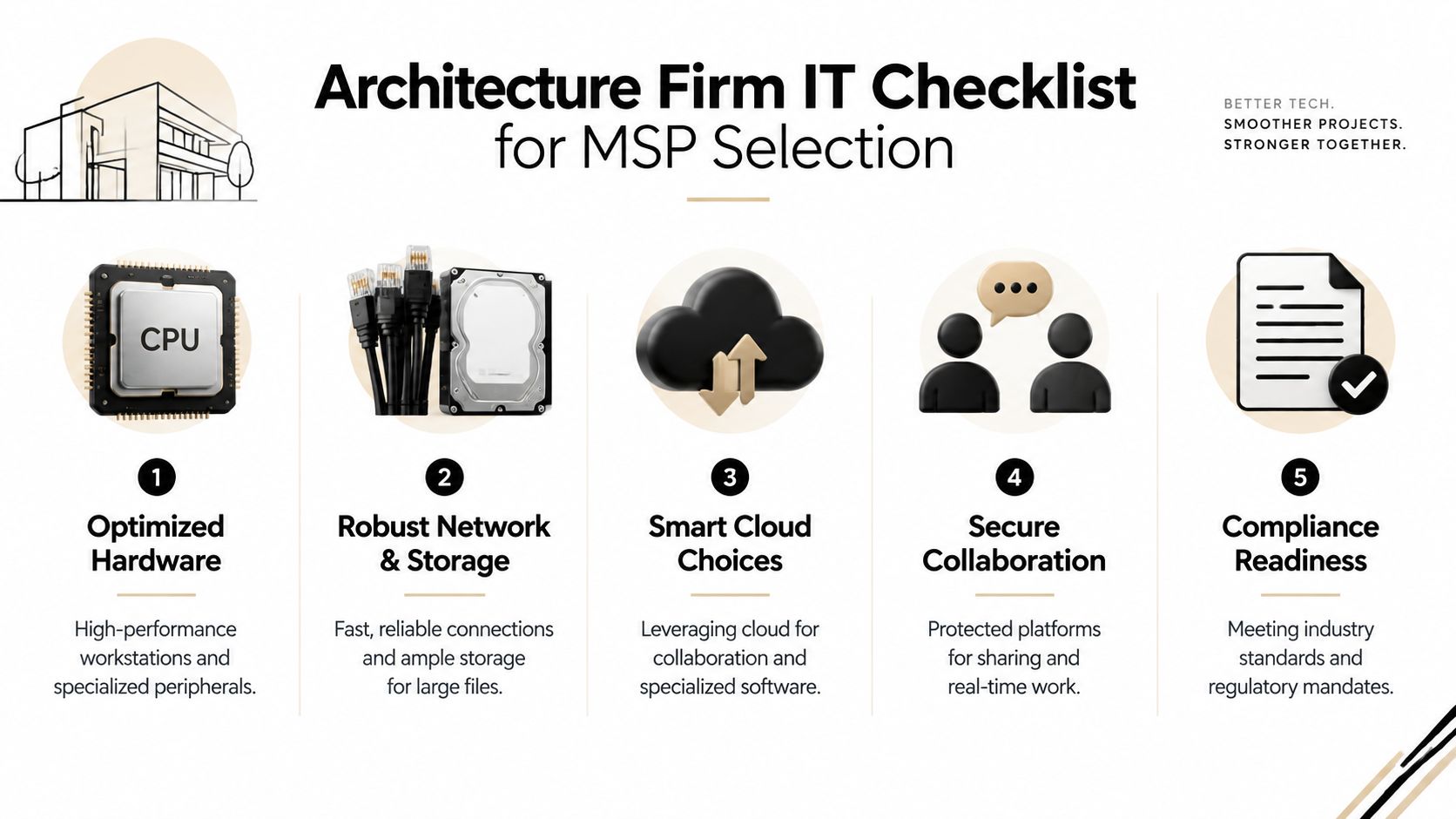
Architecture firms need an IT partner that understands why a fast workstation can still produce a slow workflow, why cloud access can still create security gaps, and why a backup dashboard doesn't prove recoverability. The practical solution combines optimized hardware, resilient storage, selective cloud use, secure collaboration, and compliance readiness.
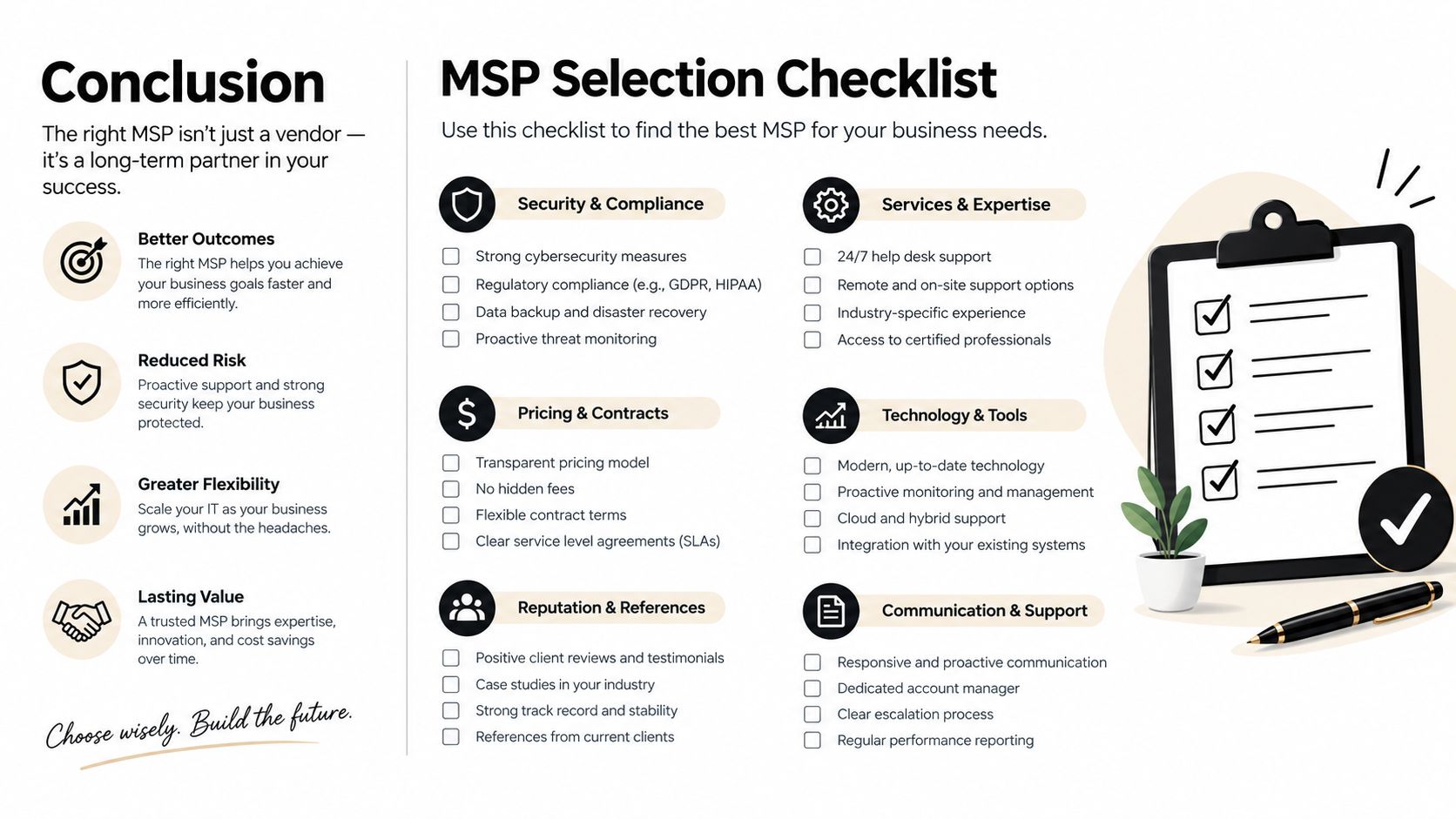
Managers evaluating an MSP should ask for evidence in five areas:
- AEC workflow knowledge: Can the provider assess CAD and BIM performance instead of treating every workstation as a standard office computer?
- Proactive coverage: Does the service include continuous monitoring, endpoint oversight, help desk support, and escalation procedures?
- Recovery capability: Can the provider explain backup architecture, retention, restoration testing, and response during an outage?
- Security discipline: Does the MSP implement multifactor authentication, segmentation, least-privilege access, logging, and documented incident procedures?
- Local responsiveness: Can the team provide practical support for a DFW firm when a project deadline, office outage, or access problem cannot wait?
Demand a roadmap, not a stack of products
A credible provider should begin with an IT health check and produce a prioritized roadmap. That roadmap should identify immediate workstation or access problems, medium-term infrastructure improvements, and longer-term decisions about cloud, virtualization, compliance, and lifecycle planning.
Technovation supports North Texas organizations with managed IT, cybersecurity, cloud backup, remote access, strategic technology planning, and compliance-oriented services. Its DFW presence gives architecture managers a local point of contact, while its support model can include proactive monitoring, risk mitigation, and co-managed assistance where an internal IT employee remains part of the operation.
The next step should be concrete. Managers can inventory workstations, identify the projects that create the most performance pressure, list every external collaborator with access, and request evidence of backup restoration. Those findings give Technovation a practical starting point for an architecture-specific improvement plan instead of a generic technology proposal.
Technovation LLC offers managed IT support, 24/7 monitoring, cybersecurity, cloud backup, secure remote access, and compliance-focused planning for DFW architecture firms. Visit Technovation LLC to request a security audit or IT health check that connects workstation performance with protected, project-scoped collaboration.





