A DFW business owner doesn't need a lecture on why remote work stuck. Staff want flexibility, clients expect responsiveness, and operations don't stop because someone's at home, on the road, or at a satellite office. For many small and mid-sized firms, hybrid work now feels normal.
What doesn't feel normal is how much company risk now lives outside the office walls. A lawyer reviews client files from home. A medical biller logs in before sunrise. A controller approves payments from a hotel Wi-Fi connection. None of that is reckless by itself. It's business. But it does mean the company network now extends into living rooms, personal devices, and vendor sessions most owners never see.
That shift changed the security conversation. Remote access isn't just a convenience feature anymore. It's one of the main ways attackers get in, and one of the easiest ways a well-meaning employee can expose sensitive data by mistake. Businesses that still treat remote access as an afterthought are taking on silent risk. Businesses that tighten it up gain something more useful than “better IT.” They get continuity, client confidence, and fewer ugly surprises. For companies reviewing their current remote workforce setup, this is the right time to rethink what secure access should look like.
Table of Contents
- The New Reality of Remote Work and Hidden Risks
- Rethinking Access What Is Remote Access Security
- Choosing Your Security Architecture VPN vs ZTNA
- Four Practical Controls You Must Implement Now
- A Prioritized Implementation Checklist for SMBs
- Meeting Compliance and Responding to Incidents
- Build a Resilient Business with a Secure Workforce
The New Reality of Remote Work and Hidden Risks
A typical North Texas company may have solid people, decent processes, and no obvious technology crisis. The trouble starts because remote access problems usually don't announce themselves. They exist in a reused password, an unmanaged laptop, or a vendor account nobody reviewed after a project ended.
The broader numbers are hard to ignore. The FBI has reported a 300% increase in cybercrimes since remote work became mainstream, 63% of businesses have suffered data breaches directly linked to remote access vulnerabilities, and remote workers are 3 times more likely to accidentally expose sensitive data, according to research on remote work cyber risk. Those aren't abstract enterprise problems. They map directly to how smaller regulated businesses operate.
What changed for SMBs
The office used to be the main security boundary. Now the boundary is scattered across homes, phones, laptops, and third-party connections.
That creates a few business realities:
- Employees work from mixed environments. One person uses a company laptop on a secured connection. Another checks email from a personal tablet.
- Owners assume known people equal low risk. But most access issues come from ordinary activity, not movie-style hacking.
- Vendors often have quiet backdoor access. They need it for support, billing systems, line-of-business apps, or maintenance.
A business can be disciplined in the office and still be exposed everywhere else.
For regulated firms, that exposure lands harder. A legal practice doesn't just lose time when access goes wrong. It risks client confidentiality. A healthcare group risks protected data. A finance office risks trust that took years to build.
The hidden cost of “it's working fine”
A lot of owners delay action because remote access seems functional. Staff can log in. Files sync. Nobody's complaining. That's exactly why this issue gets missed.
Remote access security should be treated like insurance on business operations. It protects revenue, reputation, and compliance posture. It also prevents the all-too-common situation where a company discovers its weak point only after an account is misused or a file system goes offline.
Rethinking Access What Is Remote Access Security
A Dallas office manager approves a vendor login so payroll can get fixed before lunch. An employee signs in from home to finish client work after hours. A partner checks a file from a phone while traveling. All three actions feel normal. All three create risk if access is too broad, lasts too long, or isn't being watched.
Remote access security is the set of controls that decides who gets in, what they can reach, what device they can use, and what gets recorded. For a regulated SMB, that is not an IT theory. It is a business control tied to privacy, audit readiness, cyber insurance, and vendor accountability.
A good way to judge your setup is with a simple maturity model.
| Maturity level | What it looks like in practice |
|---|---|
| Good | Unique logins, MFA, encrypted connections, no shared accounts |
| Better | Role-based access, approved devices, vendor access limits, activity logs |
| Best | Access tied to identity, device health, business need, and time-based approval |
The business goal is simple. Let the right person reach the right system, from an approved device, for a valid reason, with a record your team can review later.
That standard matters more in regulated industries because remote access is rarely limited to employees. Bookkeepers, software support teams, managed service providers, and compliance consultants often need some level of entry. If you do not control that access with the same discipline you use for internal staff, you are leaving a side door open.
Controlled access beats broad trust
Older setups were built on an assumption that once someone connected, they were probably safe. That assumption fails in practice. Passwords get reused. Personal devices get mixed into work. Vendor accounts stay active long after the project ends.
Use this test. If a user account was misused today, could you answer four questions fast?
- Who signed in
- What system they accessed
- Whether the device met your standards
- When that access should have expired
If the answer is no, your remote access model needs work.
Least privilege is just good management
Least privilege means each person gets only the access required to do the job. Nothing extra. For a medical office, that may mean billing staff can reach billing systems but not clinical records they never need. For a law firm, it may mean a contractor can update one application without browsing shared client files.
This reduces fallout when an account is compromised. It also reduces everyday mistakes, which cause plenty of security incidents on their own.
Practical rule: If you cannot explain an access permission in one plain-English sentence, remove it or tighten it.
What stronger remote access actually includes
Strong remote access is layered. Identity checks matter. Device standards matter. Logging matters. Limited permissions matter. Federal guidance from CISA on securing remote access makes the same point. No single control carries the whole load.
For many SMBs, the fastest improvement comes from standardizing access methods and cutting down on one-off exceptions. If you are reviewing options, this guide to remote access software and security tools for SMBs can help you sort out what belongs in a practical stack. If part of your environment still depends on perimeter hardware, a VPN router for secure remote ops may still play a role, but only if permissions, identity checks, and logging are handled properly.
Choosing Your Security Architecture VPN vs ZTNA
Most business owners don't need a deep networking lesson. They need to know which access model creates manageable risk and which one leaves too many doors open.
The old default was the VPN. It's still common, and in some cases it's still part of the picture. But it was built for a world where remote access was occasional, users were mostly internal, and the network itself was the asset being protected. That's not how most SMBs operate now.
What each model really means
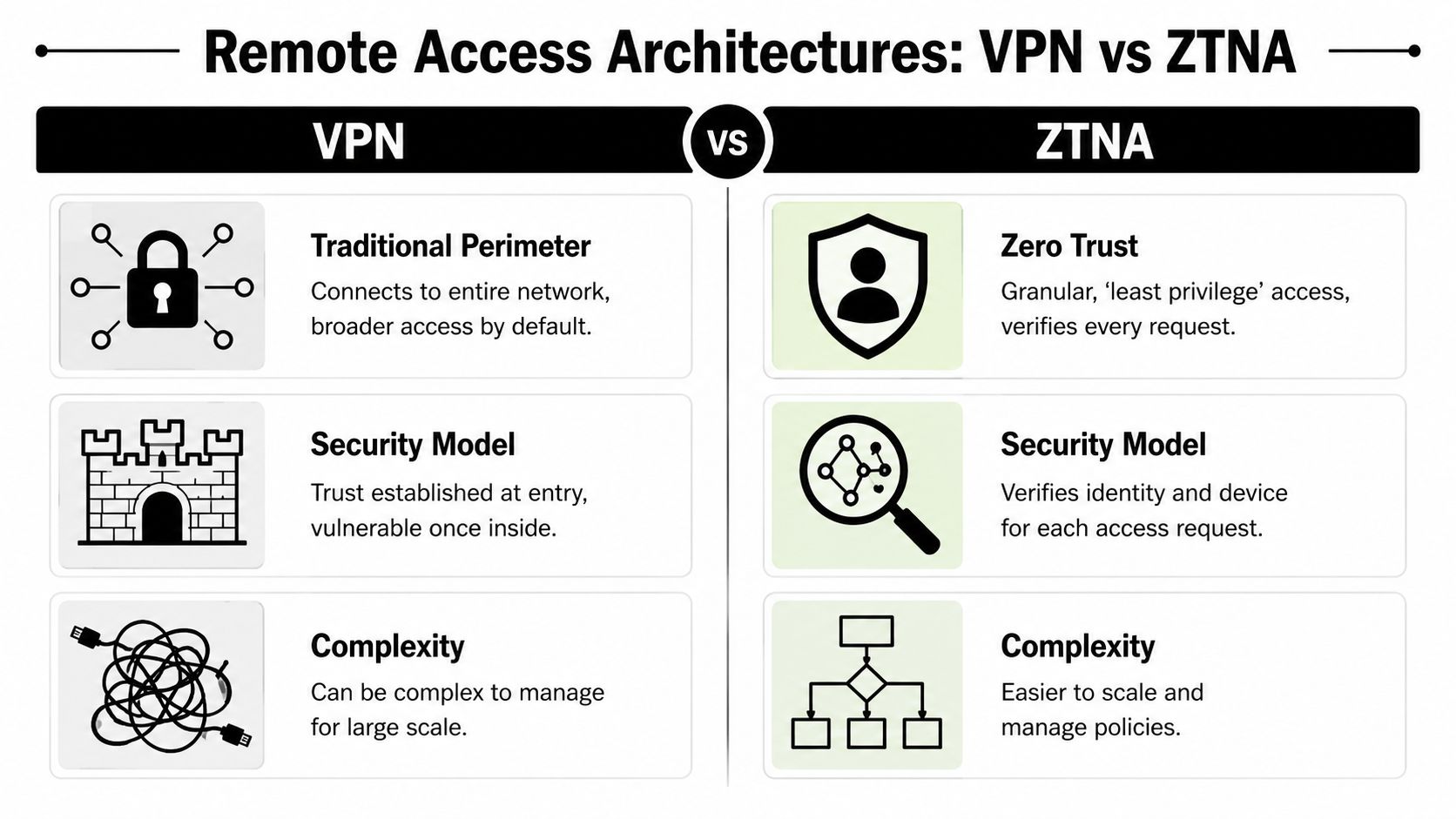
A VPN is like handing someone a badge that opens the main building. Once connected, that user often gets broad network-level access unless the environment is tightly segmented and carefully managed.
RDP-style direct access is even riskier when it's exposed or loosely controlled. It can be convenient for a quick support need, but convenience is a poor basis for security design.
ZTNA, or Zero Trust Network Access, works more like a smart access pass. The user doesn't enter the whole building. The system checks identity, device posture, and policy, then allows access only to the application or resource needed.
Side-by-side business impact
VPN
- Strength: Familiar and widely used
- Weakness: Often grants broader access than necessary
- Business problem: Harder to scale cleanly as teams, devices, and vendors grow
RDP
- Strength: Direct access to a specific machine
- Weakness: Easy to misuse or expose if not tightly controlled
- Business problem: Creates avoidable risk around privileged access
ZTNA
- Strength: Granular access with continuous verification
- Weakness: Requires better planning up front
- Business benefit: Cleaner control over who reaches what, and under what conditions
For firms still using traditional setups, a secure edge device can still matter. This practical resource on a VPN router for secure remote ops is useful context for owners evaluating the infrastructure side of remote connectivity.
The performance excuse doesn't hold up
A lot of companies tolerate weaker security because leadership thinks stronger controls will slow everyone down. That's outdated. Emerging ZTNA models eliminate the performance-security conflict by verifying users and device posture continuously without tunneling entire networks, reducing latency while enhancing security and delivering smooth, auditable sessions, according to Spectrum Business guidance on secure remote access.
That matters because users bypass what frustrates them. If secure access is clunky, people find workarounds. If secure access is smooth, adoption gets easier.
A practical decision standard
A company doesn't need the newest acronym. It needs an access model that answers these questions:
- Can access be limited to only the apps or systems needed?
- Can the business verify both the user and the device?
- Can vendor sessions be controlled and reviewed?
- Can the environment grow without becoming a policy mess?
If the answer is no, the architecture is outdated. Businesses reviewing modern remote access platforms and policy tools should think less about legacy familiarity and more about what reduces exposure without creating friction.
The best remote access setup is the one employees can use easily and attackers can't expand through.
Four Practical Controls You Must Implement Now
Architecture matters, but controls are what keep the business from relying on luck. Four of them should be regarded as essential.
Start with MFA and stop trusting passwords alone
Passwords fail for ordinary reasons. People reuse them, fall for phishing, or approve access on autopilot when they're busy. That's why multi-factor authentication is foundational.
App-based authenticators are significantly more secure than SMS codes, which are vulnerable to SIM-swapping, and conditional access policies can enforce MFA only for high-risk scenarios, according to remote access MFA guidance.
That leads to a clear recommendation:
- Use app-based MFA: It's stronger than text-message codes.
- Apply conditional access: Require extra verification when risk is higher.
- Cover every remote path: Email, cloud apps, VPN access, admin portals, vendor logins.
A weak email environment can undermine the rest of the stack, which is why this guide for securing email infrastructure is a worthwhile companion read for businesses tightening remote access controls.
Treat the device like part of the identity
An approved user on an unsafe laptop is still a problem. Device health has to matter.
A practical policy should check whether the device is company-managed, encrypted, updated, and protected before sensitive access is allowed. That's especially important when businesses support hybrid work but still allow exceptions for personal devices.
Log activity like the company may need evidence later
Logs are the digital version of security cameras. They help answer the questions every owner asks after something goes wrong: who signed in, from where, to what, and what happened next?
Good logging should cover:
- Authentication activity: Successful and failed sign-ins
- Administrative changes: New accounts, permission changes, policy edits
- Remote sessions: Vendor access, after-hours activity, unusual locations
If a business can't see remote access activity, it can't manage it. It can only hope.
Segment access so one problem doesn't become ten
Segmentation keeps a small issue from turning into a company-wide event. If one compromised account reaches only one application, the fallout stays contained. If that same account reaches file shares, finance systems, and client data, the incident gets expensive fast.
This doesn't have to mean a giant infrastructure project. It starts with separating systems by sensitivity and role. Admin access should be isolated. Vendor access should be narrower than employee access. High-risk systems should require tighter controls than general office tools.
Businesses that need these protections tied together usually benefit from formal identity management services, especially when access decisions are spread across cloud apps, local systems, and third-party support arrangements.
A Prioritized Implementation Checklist for SMBs
Most SMBs don't need a giant security transformation on day one. They need an order of operations. Good, better, and best works far better than trying to copy an enterprise program overnight.
Good means closing obvious gaps
This phase is about fixing the exposures that cause the most preventable trouble.
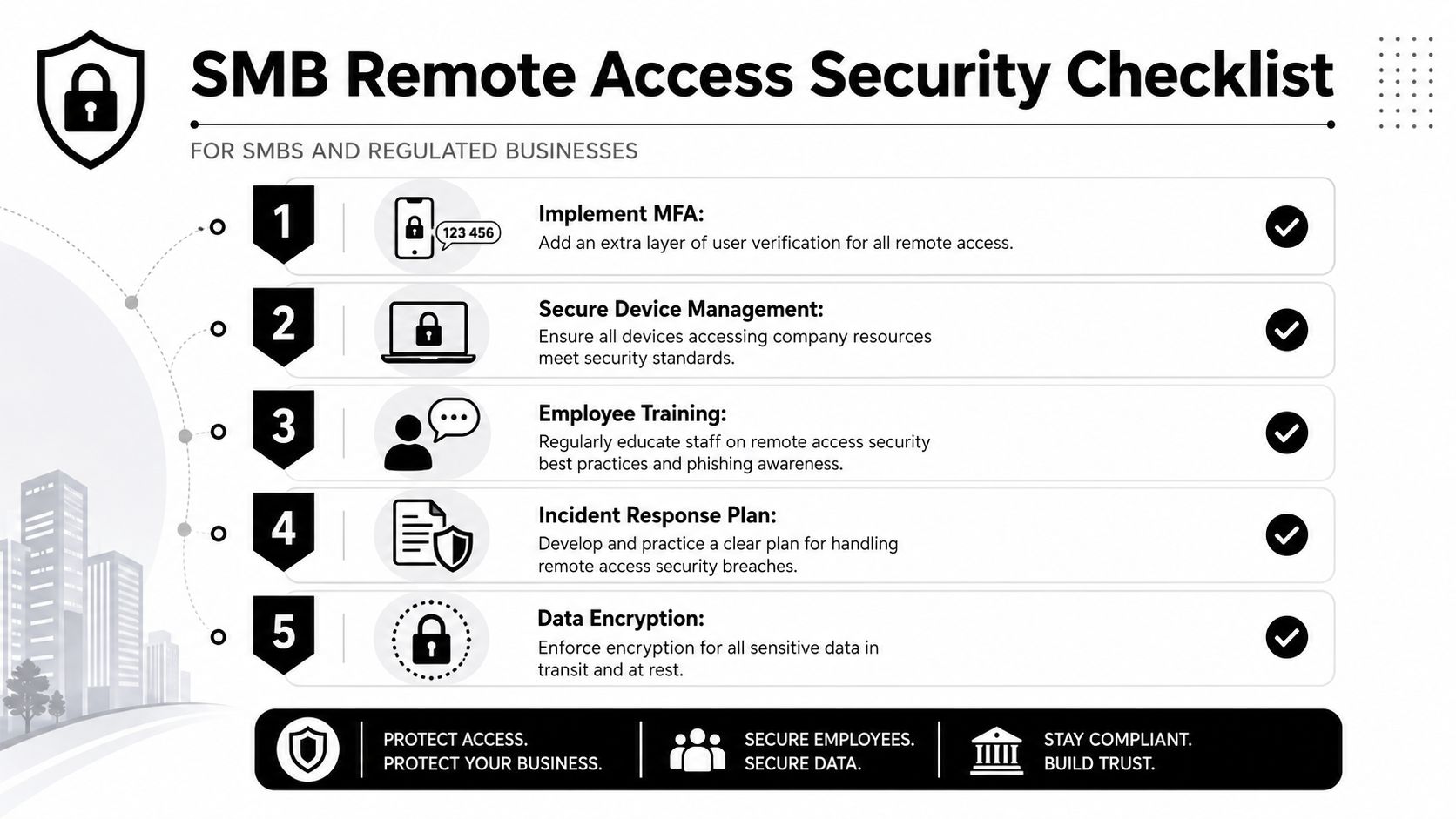
- Enforce MFA everywhere remote access exists. No exceptions for owners, administrators, or long-time staff.
- Create an acceptable use policy. Staff need simple rules on device use, public Wi-Fi, file handling, and personal device restrictions.
- Inventory remote access paths. Many businesses have more than they think, including old VPN accounts, cloud app logins, vendor portals, and direct admin access.
- Remove stale accounts. Former employees, old contractors, and legacy service accounts should not remain active.
A company in this stage isn't immature. It's normal. But it's also exposed if these basics aren't done consistently.
Better means controlling who gets in and why
The business starts acting intentionally rather than reactively.
Key moves include:
- Require managed devices for sensitive work: Especially in healthcare, legal, and finance.
- Review permissions by role: Access should match job function, not convenience.
- Control third-party vendor access: Restrict vendors to specific systems, approved times, and named users.
- Record and review remote sessions: High-risk access should be auditable.
This point matters more than many owners realize. In regulated industries like healthcare and legal, third-party vendor access is a top remote access vulnerability, and the Colonial Pipeline breach stemmed from a legacy VPN account with no MFA used by a third party, as noted in Bitsight's analysis of remote access vulnerabilities. Vendor access is often the weakest link because businesses assume trusted partners operate under the same controls they enforce internally. Often, they don't.
Best means building resilience, not just prevention
Mature remote access security isn't only about blocking bad events. It's about staying operational when something still slips through.
That stage usually includes:
| Maturity level | What it looks like |
|---|---|
| Good | MFA, policy basics, account cleanup |
| Better | Managed devices, role-based access, vendor controls |
| Best | Continuous monitoring, compliance alignment, practiced response plans |
What regulated SMBs should prioritize first
A DFW clinic, law office, or accounting firm should move in this order:
- First: Lock down identity and remove unnecessary access
- Next: Tighten vendor permissions and device standards
- Then: Improve visibility, evidence, and response readiness
That sequencing keeps the workload realistic. It also prevents the classic mistake of buying advanced tools while basic access hygiene is still weak.
Meeting Compliance and Responding to Incidents
A DFW medical practice or law office usually feels compliant right up until an auditor asks a simple question. Who accessed a client file from home last Thursday, from what device, and what changed during that session? If your team cannot answer that quickly, you do not have a remote access program. You have a gap.
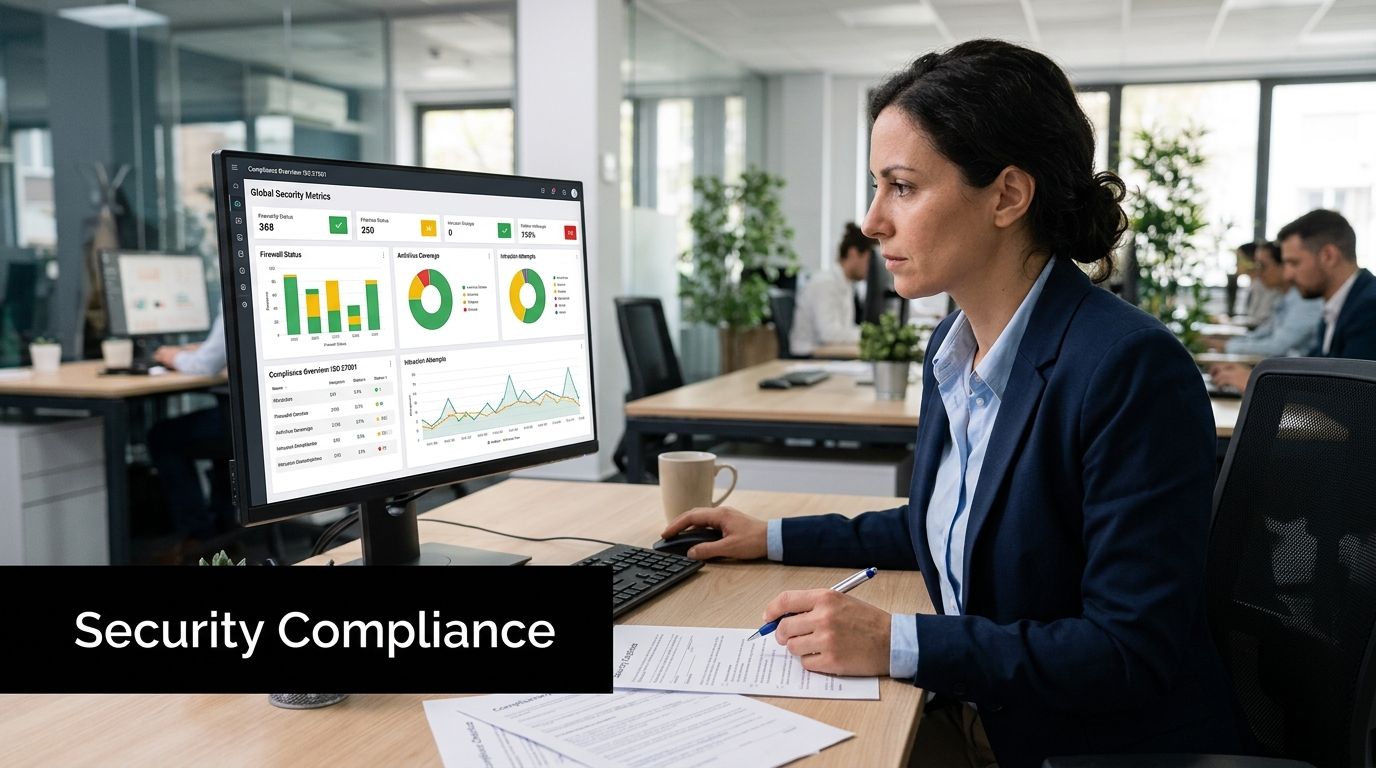
Compliance for remote access comes down to proof. Regulators, insurers, and clients want evidence that access was approved, limited, monitored, and reviewed. For regulated SMBs, that means logging, alerting, and retention need to support business decisions, not just IT troubleshooting.
What monitoring should prove
Good monitoring gives leadership fast answers in four areas:
- Who accessed sensitive systems
- Whether that access matched an approved job role
- Whether the device, time, and location fit normal behavior
- What records, settings, or permissions changed during the session
That is the baseline.
Better maturity adds alerts for unusual vendor activity, after-hours access, repeated failed logins, and logins from unmanaged devices. Best maturity ties those records back to policy reviews, user access certifications, and incident tickets so the business can show a clean chain of decisions.
Cyber incidents consistently disrupt the day-to-day operations of mid-sized organizations. The UK Cyber Security Breaches Survey 2025 reports that medium-sized businesses continue to face a high rate of breaches and attacks. For a growing SMB, even a short lockout can stop billing, delay closings, interrupt patient care, or freeze payroll approvals.
Response plans should fit real business conditions
Most incident response documents fail for one reason. They were written for auditors, not for the people who have to use them during a bad Monday morning.
A workable remote-access response plan should fit on a few pages and assign clear ownership. Who disables the account. Who confirms what systems were touched. Who calls legal counsel, cyber insurance, or outside IT support. Who talks to staff, clients, and regulators if required. If those names are missing, the plan is not finished.
Use a good, better, best approach here too:
| Maturity level | What response looks like |
|---|---|
| Good | Disable access fast, preserve logs, notify leadership |
| Better | Confirm scope, document timeline, coordinate legal and compliance actions |
| Best | Run tabletop exercises, review vendor obligations, and improve controls after every incident |
What your team should do first during a remote access incident
Keep the first steps simple:
- Contain the session or account immediately
- Preserve logs and screenshots before systems are changed
- Confirm which systems, files, and vendors were involved
- Escalate to your IT and compliance leads
- Communicate based on legal, regulatory, and client obligations
- Restore access only after credentials, devices, and permissions are rechecked
Speed matters. So does discipline.
Businesses that have not documented those actions should fix that now. If you need a practical starting point, review this step-by-step guide for what to do after a data breach.
Clean access makes audits easier
Audits go smoother when your access model is easy to explain. Named users. Role-based permissions. MFA. Time limits for vendors. Retained logs. Regular reviews of who still needs access.
That is why mature remote access security pays off twice. It lowers the chance of a breach, and it gives your business the records to defend its decisions when a client, regulator, or insurer starts asking hard questions.
Build a Resilient Business with a Secure Workforce
Remote work isn't the problem. Sloppy access is. Businesses across DFW can support flexible teams, outside vendors, and off-site productivity without turning the company into an easy target.
The smart path is practical. Start with identity. Tighten device standards. Limit access by role. Put vendor sessions under real control. Build logging and response into daily operations, not after a scare. That's how an SMB moves from “probably fine” to resilient.
For regulated businesses, this work does more than satisfy IT concerns. It protects client trust, supports compliance, and keeps operations moving when something goes wrong. It also gives leadership better visibility into who can reach sensitive systems and why.
Security should help the business grow with confidence. It should make remote work safer, cleaner, and easier to manage. When that happens, remote access stops being a liability and becomes part of a stronger operating model.
Technovation LLC helps North Texas businesses turn remote access security into a practical business advantage. For healthcare groups, law firms, financial offices, construction companies, nonprofits, and other growing SMBs, the team provides cybersecurity, compliance support, managed IT, and strategic guidance built for real-world operations. Businesses that want a clearer view of their current risk can schedule a free security audit with Technovation LLC.