
A North Texas orthopedic clinic needs to send an MRI and intake forms to a referring physician before the patient's appointment. The EHR portal is slow, the physician's office is waiting, and a staff member uses a personal Gmail account instead. The message lands in a spam folder, then the attachment is copied into an unsecured cloud archive. Nobody intended to create a compliance problem. The workflow did it anyway.
That moment captures the meaning of secure file sharing. Encryption during upload matters, but it doesn't answer what happens after the recipient opens, downloads, forwards, or stores the file elsewhere. For regulated SMBs across Dallas, Fort Worth, and the surrounding North Texas market, the practical question is whether the business can still govern the information after it leaves the sender's hands.
Table of Contents
- What Secure File Sharing Actually Means for a Small Business
- The Threat Model Most SMBs Underestimate
- Compliance Requirements That Shape Your File Sharing Stack
- Core Technical Controls You Should Not Compromise On
- Policy and Process Recommendations That Make Controls Stick
- Vendor Selection Criteria for Regulated SMBs
- Implementation Roadmap and When to Bring in Local Help
What Secure File Sharing Actually Means for a Small Business
Secure file sharing is the controlled lifecycle of a document, not merely a protected transfer. A regulated business must know who can open a file, how long access lasts, whether access can be revoked, where downstream copies may exist, and which actions are recorded.
The orthopedic clinic's staff member solved an immediate operational problem, but the personal email workflow created unanswered questions. Was the recipient identity verified? Could the link or attachment be forwarded? Could the clinic revoke access after the referral? Did the cloud archive retain the MRI indefinitely? Could an administrator produce an access history if the patient questioned the disclosure?
Those questions distinguish secure sharing from naive file transfer. A basic transfer may encrypt the connection between sender and recipient, but it often stops governing the file once delivery succeeds. NIST's guidance recommends classifying shared data first, then matching controls to its sensitivity, particularly when confidential information includes PII or PHI. The guidance also calls for cryptography that protects confidentiality and integrity, combined with access control, training, and monitoring (NIST secure file exchange guidance).
Three questions should drive the workflow
A regulated SMB should be able to answer these questions before approving a file-sharing system:
- Who has access? The answer should identify named users or verified recipients, not an unrestricted public link.
- What protection travels with the file? Controls should address storage, download, forwarding, synchronization, device access, and external collaboration.
- What happens when access should end? Administrators need a clear revocation process, expiration rules, and an audit record.
Managers who need a practical overview of workplace sharing decisions can also review secure file sharing for managers, especially when staff members work across email, mobile devices, and shared folders.
The platform choice deserves the same scrutiny. A business comparing Dropbox and OneDrive for business use should evaluate permissions, logging, retention, and revocation, not just storage capacity or familiarity. The right system makes the secure path easier than the shortcut.
The Threat Model Most SMBs Underestimate
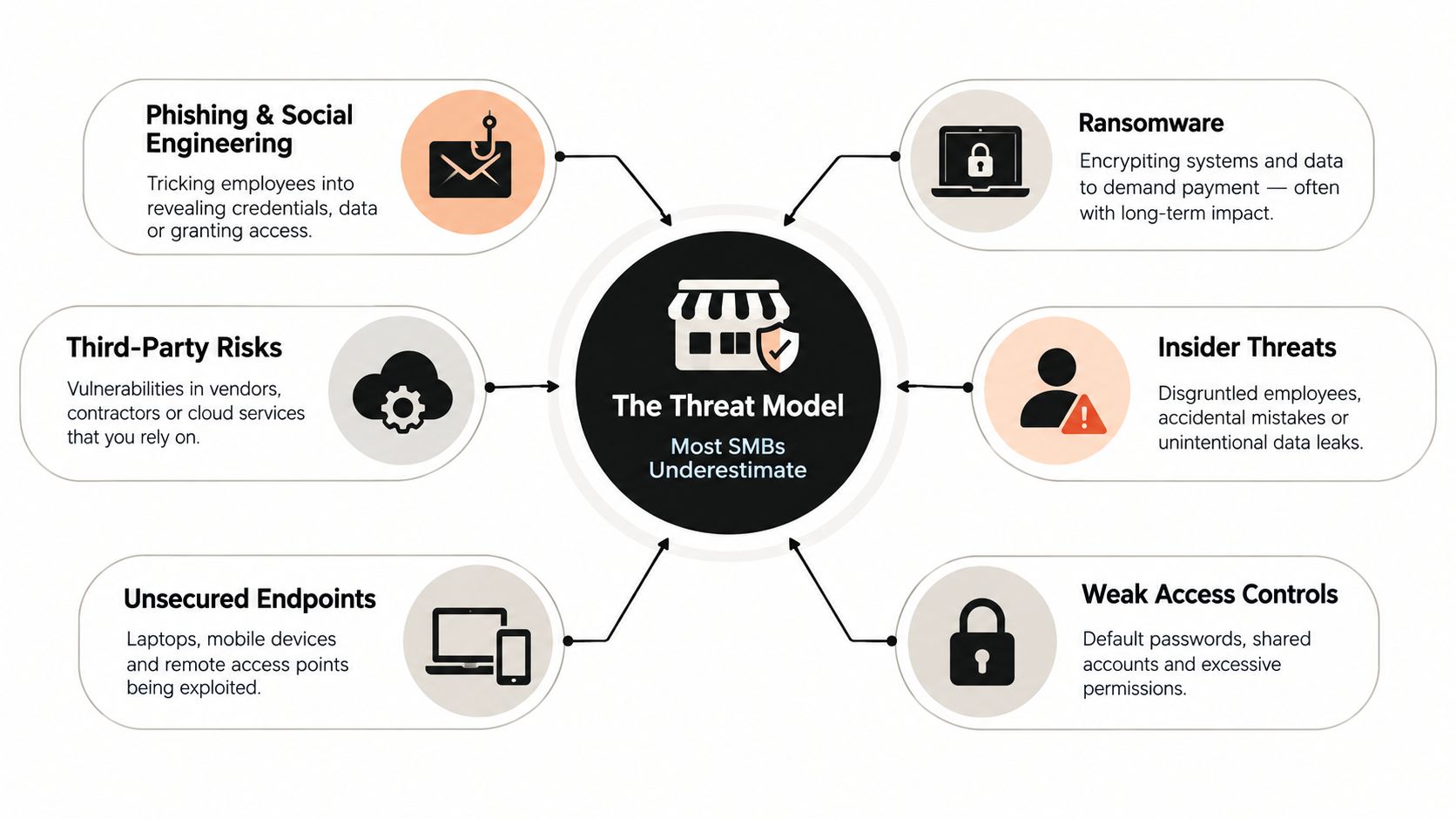
Most regulated SMBs don't need a movie-style attack scenario to lose control of a file. The more common failure begins with an ordinary employee, a rushed request, a broad permission, or a cloud folder nobody remembers configuring.
A 2019 analysis reported that 2.3 billion files were exposed across cloud databases and online shares in one year, an increase of more than 750 million files compared with the prior year and more than a 50% annual rise. About 1.071 billion exposed files were linked to SMB file sharing, a protocol first designed in 1983. The report's significance isn't limited to the protocol itself. It shows how misconfiguration and visibility gaps in routine sharing infrastructure can expose information at enormous scale (analysis of exposed files and misconfigured systems).
Three practical risk buckets
Misconfiguration starts with cloud storage, shared folders, or link permissions that are broader than intended. An administrator may grant access to an entire department when a single case team needs the document. A public link may remain active after the project ends. Without regular reviews, the business may not know which folders are externally reachable.
Human error includes wrong recipients, personal email, unapproved consumer services, and accidental downloads to unmanaged devices. The 2014 Ponemon Institute study on workplace file sharing is an important historical marker. It documented the early enterprise shift from email attachments and ad hoc transfers toward controlled sharing environments, while showing why negligent insiders and everyday handling practices had become a central security concern (Ponemon workplace file-sharing study).
External sharing creates the hardest governance problem. A recipient may forward a document, download it, store it in another service, or route it into an AI-enabled workflow. The initial upload can be protected while the downstream lifecycle remains invisible.
Governance decides the outcome
The post-transfer period is where many SMBs lose control. Revocation determines whether access can stop. Auditability determines whether the business can reconstruct events. Downstream storage controls determine whether copies remain available after the original link expires.
A 2025 MFT survey reported that 76% of organizations used end-to-end encryption in transit, but only 42% protected stored data with AES-256, and 63% had not connected MFT systems to security monitoring. The same source reported that file transfer software accounted for 14% of third-party breaches in the past year (2025 MFT security and compliance report). The lesson for a Dallas accounting firm or medical practice is direct: encryption is necessary, but it isn't the complete control system.
Compliance Requirements That Shape Your File Sharing Stack
Compliance requirements become practical architecture decisions once a clinic, financial firm, or professional-services business starts exchanging regulated information. The governing framework affects identity, audit trails, retention, vendor agreements, data location, and the ability to terminate access.
HIPAA's Security Rule requires safeguards around PHI, including access control, audit controls, integrity, and transmission security. A healthcare practice therefore needs more than encrypted transport. It needs a process that identifies authorized users, records activity, limits exposure, and supports investigation.
Financial firms face a different retention problem. FINRA and SEC Rule 17a-4 requirements can make electronic-record retention and WORM-style storage important for broker-dealers. A file-sharing platform that allows easy deletion without a defensible retention process may be convenient, but it isn't suitable for every financial workflow.
The GLBA Safeguards Rule focuses on protecting customer information through an information-security program. For a financial advisor or accounting firm, that means file-sharing controls should fit into broader risk assessment, access management, monitoring, and incident-response practices. PCI DSS requires careful scope management. If cardholder data never enters the file-sharing environment, the business may reduce the systems that must be treated as part of the cardholder-data environment, but that decision must be documented and maintained.
Texas healthcare organizations also need to account for the Texas Medical Records Privacy Act, which can impose privacy obligations beyond a federal baseline. A Texas clinic should confirm how its records, vendors, retention practices, and disclosures align with applicable state and federal requirements.
How major regulations map to secure file sharing requirements
| Regulation | Applies To | File Sharing Requirements |
|---|---|---|
| HIPAA | Healthcare providers and organizations handling PHI | Named-user access, MFA, transmission security, encryption, audit controls, integrity safeguards, retention, and appropriate contractual support |
| FINRA and SEC Rule 17a-4 | Broker-dealers and financial services firms subject to applicable recordkeeping rules | Retention controls, defensible records management, WORM-style storage where required, searchable audit history, and controlled deletion |
| GLBA Safeguards Rule | Financial institutions handling customer information | Risk-based safeguards, least-privilege access, monitoring, employee procedures, vendor oversight, and incident response |
| PCI DSS | Organizations handling payment-card data | Keep card data out of unnecessary systems, restrict access, document scope, encrypt sensitive data, and monitor relevant activity |
| Texas Medical Records Privacy Act | Texas healthcare organizations and custodians of medical records | Controlled disclosures, appropriate access, privacy procedures, retention awareness, and careful vendor governance |
Architecture questions should be asked before procurement. Can the vendor provide a BAA where applicable? Can the organization select suitable US data residency? Can administrators export audit logs without vendor intervention? Can a live link be revoked immediately? Resources covering data privacy practices can help teams frame those questions, but legal counsel and the organization's compliance owner must determine the requirements that apply.
A secure sharing stack should also sit inside a wider resilience program. Dallas-area businesses evaluating ransomware protection for small business should treat governed file exchange, backup recovery, identity security, and incident response as connected controls rather than separate purchases.
Core Technical Controls You Should Not Compromise On
Secure file sharing is a layered control system. Encryption protects content from interception and unauthorized storage access, but identity, permissions, logging, device posture, and response determine whether the organization can manage real use.
NIST's operational guidance centers on identifying exchange needs, balancing security with usability, training users, applying cryptography, and monitoring exchanges to verify that protection works (NIST operational secure file-exchange guidance). That sequence matters. A technically strong platform can still fail if employees bypass it because the approved workflow is slow or confusing.
Layered controls for secure file sharing
| Control Layer | Required Protection | Verification Evidence |
|---|---|---|
| Encryption | Modern TLS in transit and managed encryption at rest; use end-to-end encryption when the provider must not see content | Configuration records, key-management documentation, and security review |
| Identity | MFA for users and administrators, centralized identity, and phishing-resistant authentication where practical | Authentication policy, enrollment records, and access reports |
| Permissions | Least privilege, role-based access, default-deny external sharing, expiration dates, download restrictions, and approval gates | Permission reviews, approved exceptions, and test results |
| Auditability | Tamper-evident records of access, changes, downloads, shares, and revocations | Searchable logs, export tests, time synchronization, and retention evidence |
| Devices and integrations | Managed mobile access, controlled sync clients, device restrictions, and data-loss prevention | Device compliance reports, alert history, and integration testing |
| Response and recovery | Alerts, tested backups, restoration procedures, incident response, and immediate link revocation | Restoration test, revoked-link test, runbook, and tabletop records |
End-to-end encryption has a legitimate place, particularly when the service provider must never access file content. It can also limit search, previews, malware inspection, or collaboration features. The decision should follow the workflow's confidentiality requirement, not marketing language.
Administrators should configure alerts for unusual downloads, repeated failed logins, permission changes, and public links. During onboarding, the team should send a test file externally, revoke the live link, restore a deleted file, and produce the related audit trail. If staff can't explain those actions, the system isn't ready for regulated data.
For additional context on enterprise data encryption best practices, security leaders can compare key management, access boundaries, and operational evidence rather than treating encryption as a checkbox. The same discipline applies to user access controls, where role design and review frequency matter as much as the initial configuration.
Policy and Process Recommendations That Make Controls Stick
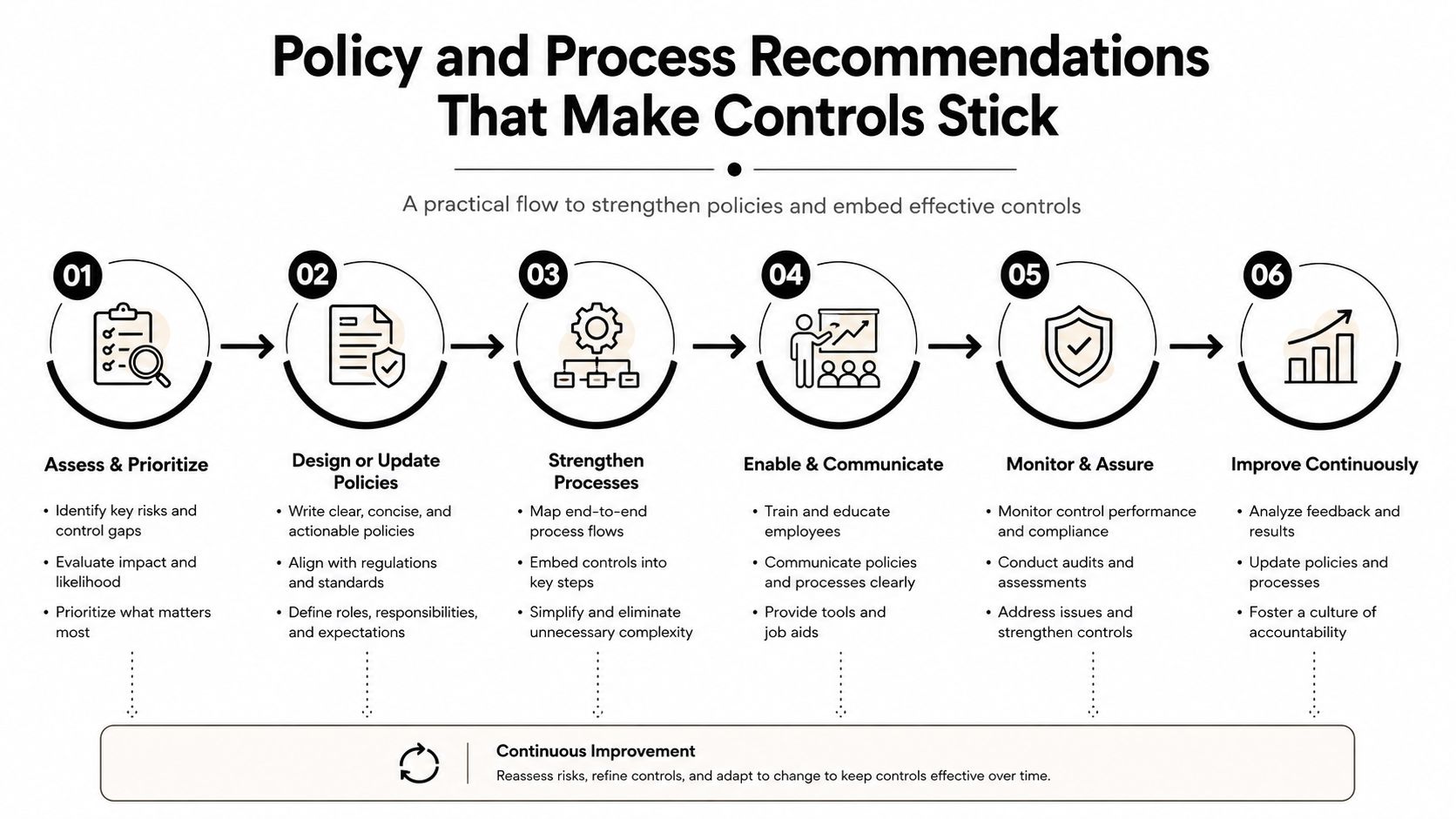
Technology won't correct a policy that leaves employees guessing. A secure file-sharing policy should tell staff what data requires protection, which tools are approved, who may receive it, how long access lasts, and what actions are prohibited.
A useful policy uses plain language:
Approved-use rule: Store client records only in the approved repository, share with named recipients, require MFA, and use expiration dates unless the data owner authorizes a longer period.
The document should prohibit personal email, consumer links, forwarding, unapproved downloads, and storage on unmanaged devices when those actions conflict with the organization's risk requirements. It should also name data owners and trained delegates, so an employee knows who can approve an exception during a busy afternoon.
Build an approval path people can follow
Sensitive outbound transfers should receive a second-person approval based on the data's risk, not merely the file's size. The approval should identify the sender, recipient, data owner, purpose, expiration date, and any restrictions. It should expire and remain recorded with the transfer history.
A practical process includes:
- Classify the file. Mark it as public, internal, confidential, PHI, PII, financial, or another category defined by the organization.
- Confirm the recipient. Use a known channel to validate the address, especially for urgent requests or payment changes.
- Set boundaries. Require MFA, expiration, view-only access, download limits, or watermarking when the risk warrants it.
- Record the decision. Preserve the approval, business purpose, and policy exception if one exists.
- Close the exchange. Revoke access, review downloads, and retain records according to the applicable schedule.
Make lifecycle events part of normal administration
Intake and termination procedures should revoke old links, remove former employees, review vendor access, and preserve records subject to legal hold or retention requirements. Regular access reviews should confirm that each user still needs each folder. Training should cover urgent requests, misdirected attachments, suspicious payment-change instructions, and immediate reporting obligations.
A policy fails when it repeats a regulation without guiding a real decision. The better test is simple: can an employee select the correct sharing method, verify the recipient, apply an expiration, and report a mistake without searching through a long manual?
Vendor Selection Criteria for Regulated SMBs
A file-sharing vendor should be evaluated as part of the compliance program, not as a storage feature. The review must cover the entire workflow, including upload, synchronization, mobile access, external collaboration, revocation, retention, legal hold, backup recovery, and data export.
Encryption questions require precision. The buyer should ask whether encryption applies in transit, at rest, or both; who controls the keys; and how key choices affect search, previews, malware scanning, and support access. A provider may offer strong encryption while the customer's configuration still permits broad links or unmanaged downloads.
Regulated-SMB vendor evaluation scorecard
| Evaluation Area | Questions to Ask | Pass Condition |
|---|---|---|
| Identity and access | Does the service support MFA, role-based permissions, device restrictions, and external-recipient controls? | The organization can enforce named access and default-deny sharing |
| Revocation | Can an administrator terminate access immediately, including active links and external sessions? | A documented test shows access ends as intended |
| Audit logs | Are logs complete, time-synchronized, searchable, and exportable? | The business can produce records without vendor assistance |
| Retention and legal hold | Can records be retained, preserved, and exported according to applicable obligations? | The configuration supports documented retention and hold procedures |
| Assurance | Does the vendor provide independent assurance and relevant healthcare or financial support? | The review includes current reports, scope, exceptions, and customer responsibilities |
| Data location and subprocessors | Where is data stored, who processes it, and how are government requests handled? | Contractual and operational answers fit the organization's requirements |
| Recovery and exit | Can the customer restore deleted content and migrate out? | Recovery and export tests succeed without an emergency services dependency |
| Cost and accountability | Are administrator, storage, retention, eDiscovery, and security-feature charges clear? | The total operating model is documented before approval |
Certifications and assurance reports are useful evidence, but they don't prove that a customer's configuration is compliant. The buyer still owns classification, identity, permissions, training, monitoring, and response.
The evaluation should include a real scenario. Send a file to an external recipient, grant an incorrect permission, revoke access, recover a deleted file, and produce the audit trail. Vendor-management guidance from best practices for vendor management can strengthen the surrounding review, especially when a small team relies heavily on a service provider.
Implementation Roadmap and When to Bring in Local Help
A regulated SMB doesn't need to replace every workflow at once. A disciplined 30/60/90-day rollout creates evidence, limits disruption, and gives staff time to learn the approved process.
Days 1 through 30 establish the baseline
The first phase is discovery. The internal owner should inventory every file-sharing method in use, including personal accounts, email attachments, shared drives, mobile sync, client portals, and informal transfer habits. The review should classify information by sensitivity, identify external recipients, document current gaps against the technical controls, and obtain executive sign-off on the target state.
The inventory should answer practical questions:
- Which departments exchange PHI, financial records, contracts, or identity data?
- Which links and folders have external access?
- Which users and vendors still need access?
- Which logs exist, and who reviews them?
- Which records require retention or legal hold?
Days 31 through 60 pilot the workflow
Select one department with a representative use case, such as patient referrals, client tax documents, or legal matter files. Configure MFA, least-privilege roles, audit logging, expiration rules, approval gates, and revocation procedures before expanding access.
The pilot should include role-specific training. A clinical coordinator needs examples involving PHI and referrals. A financial operations employee needs examples involving customer records and suspicious payment requests. Each participant should complete an external-share test, a misdirected-recipient exercise, and a revocation test.
Days 61 through 90 validate readiness
Extend the approved workflow to the remaining users after the pilot owner resolves defects. Run a tabletop exercise involving a lost device or misdirected share, validate that log retention supports applicable HIPAA and FINRA expectations, test restoration, and hand off runbooks to the people responsible for daily administration.
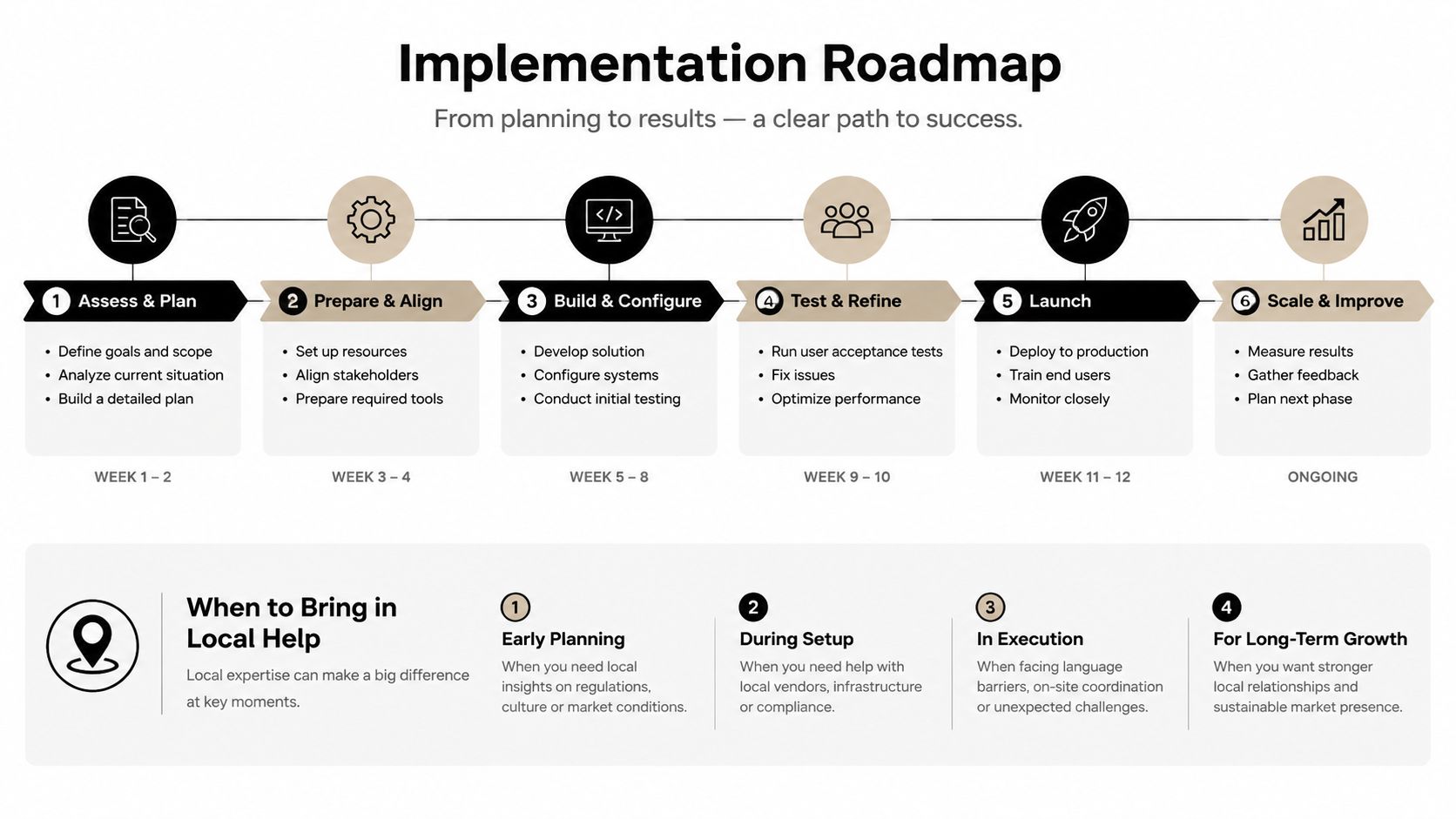
Local help becomes sensible when the business lacks an internal security owner, receives audit findings, operates across multiple sites, or is managing a merger or acquisition. Technovation LLC can assess file-sharing controls, document processes for mobile work, configure governed access, support monitoring, and connect the workflow to broader cybersecurity and compliance operations for DFW organizations.
A secure file-sharing project should finish with an accountable owner, a tested runbook, a review schedule, and a clear answer to one question: can the business prove what happened to a sensitive file after it was shared?
Technovation LLC helps Dallas–Fort Worth SMBs assess file-sharing exposure, configure access and monitoring controls, and prepare practical compliance workflows for healthcare, legal, financial, and other regulated operations. Visit Technovation LLC to request a scoping conversation focused on secure file sharing, audit readiness, and the controls that fit the organization's actual workflow.





