
An IT health check is a systematic review of your technology infrastructure, covering the network, endpoints, backups, security, and compliance, designed to find hidden vulnerabilities before attackers or downtime catch you off guard. In 2025, 63% of surveyed SMEs had not performed any cybersecurity assessment during the previous 12 months, while a 2019 SMB study found that 66% had experienced a cyberattack and only 30% rated their security posture very high.
The popular advice is to check whether systems are “working.” That standard is too low for a business that depends on technology to serve customers, process payments, protect records, and keep employees productive. Computers can boot, email can flow, and staff can log in while unpatched devices, failed recovery procedures, excessive permissions, and unused licenses create operational costs.
A practical assessment asks a more useful question: Does the technology environment work safely, efficiently, and predictably under pressure? For Dallas–Fort Worth businesses, that answer requires more than a quick scan. It requires evidence, prioritization, and a plan that connects technical gaps to money, compliance, and employee time.
Table of Contents
- Why Your Working Computers May Be Hiding Real Problems
- What an IT Health Check Actually Covers
- How an IT Health Check Is Performed Step by Step
- What Real IT Health Check Findings Look Like
- How to Prepare for Your IT Health Check
- The Business Benefits That Go Beyond Security
- Industry-Specific Considerations for North Texas Businesses
Why Your Working Computers May Be Hiding Real Problems
Your servers are humming, employees are online, and nobody has reported an outage. That sounds healthy, but it can be the most misleading state an IT environment reaches. A business can operate normally while attackers probe exposed systems, backup jobs produce unusable files, and former employees retain access that nobody remembers to remove.
ENISA reported in 2025 that 63% of surveyed SMEs had not performed any form of cybersecurity assessment in the previous 12 months. The same report found that 94% struggled to attract cybersecurity staff and 90% struggled to retain them, which helps explain why smaller organizations often lack the internal capacity to validate their controls consistently. ENISA's 2025 cybersecurity investment report also places the scale of the small-business assessment challenge in context by noting that roughly 25 million SMEs existed in the EU-28 in 2018, with 93% classified as micro-SMEs.
The older Ponemon data points to the other side of the problem. In its 2019 global SMB cybersecurity study, 66% of respondents said their organization had experienced a cyberattack in the previous 12 months, but only 30% rated their IT security posture as very high in its ability to mitigate risks, vulnerabilities, and attacks. The SMB cybersecurity benchmark shows why normal daily operations aren't enough evidence.
Practical rule: If nobody has tested the environment, “nothing has gone wrong” means only that no visible failure has occurred.
A health check turns assumption into evidence. It can complement ongoing network monitoring for business systems and help a DFW company decide whether it needs internal remediation, outside assistance, or a managed service such as Wisely's managed IT solutions. The point isn't to create panic. It's to stop normal-looking systems from receiving an undeserved clean bill of health.
What an IT Health Check Actually Covers
An IT health check resembles a full medical exam for a technology environment. A doctor doesn't decide that a patient is healthy because the patient can walk into the office. The examination checks vital signs, looks for early indicators, and tests areas that aren't visible during an ordinary conversation.
A professional assessment usually examines five connected areas:
Network health covers firewalls, routers, switches, wireless coverage, segmentation, configuration drift, and traffic visibility. Poor segmentation can allow a problem on one device to spread farther than it should, while weak capacity or failing hardware can create recurring performance complaints.
Endpoint management includes workstations, laptops, mobile devices, and servers. The review checks patch status, protective software, encryption, unauthorized applications, local administrator rights, and whether every device belongs to an accountable management process.
Backup and recovery goes beyond confirming that a scheduled job completed. The assessor checks whether backup copies are protected, whether at least one copy is offline or immutable, and whether a restore produces usable data.
Security posture includes identity controls, credential practices, email filtering, threat detection, remote access, and alert handling. Installed tools don't prove that anyone can identify and respond to a real event.
Compliance alignment connects technical controls to applicable obligations. Depending on the organization, that can include HIPAA, PCI-DSS, contractual requirements, or state data breach notification laws.
The review should also examine the business context. A slow application may be a configuration issue, a licensing problem, or a workflow that forces employees into manual workarounds. A structured approach, such as the NIST Cybersecurity Framework guidance for small businesses, gives organizations a practical way to organize risk management without requiring a large security department.
How an IT Health Check Is Performed Step by Step
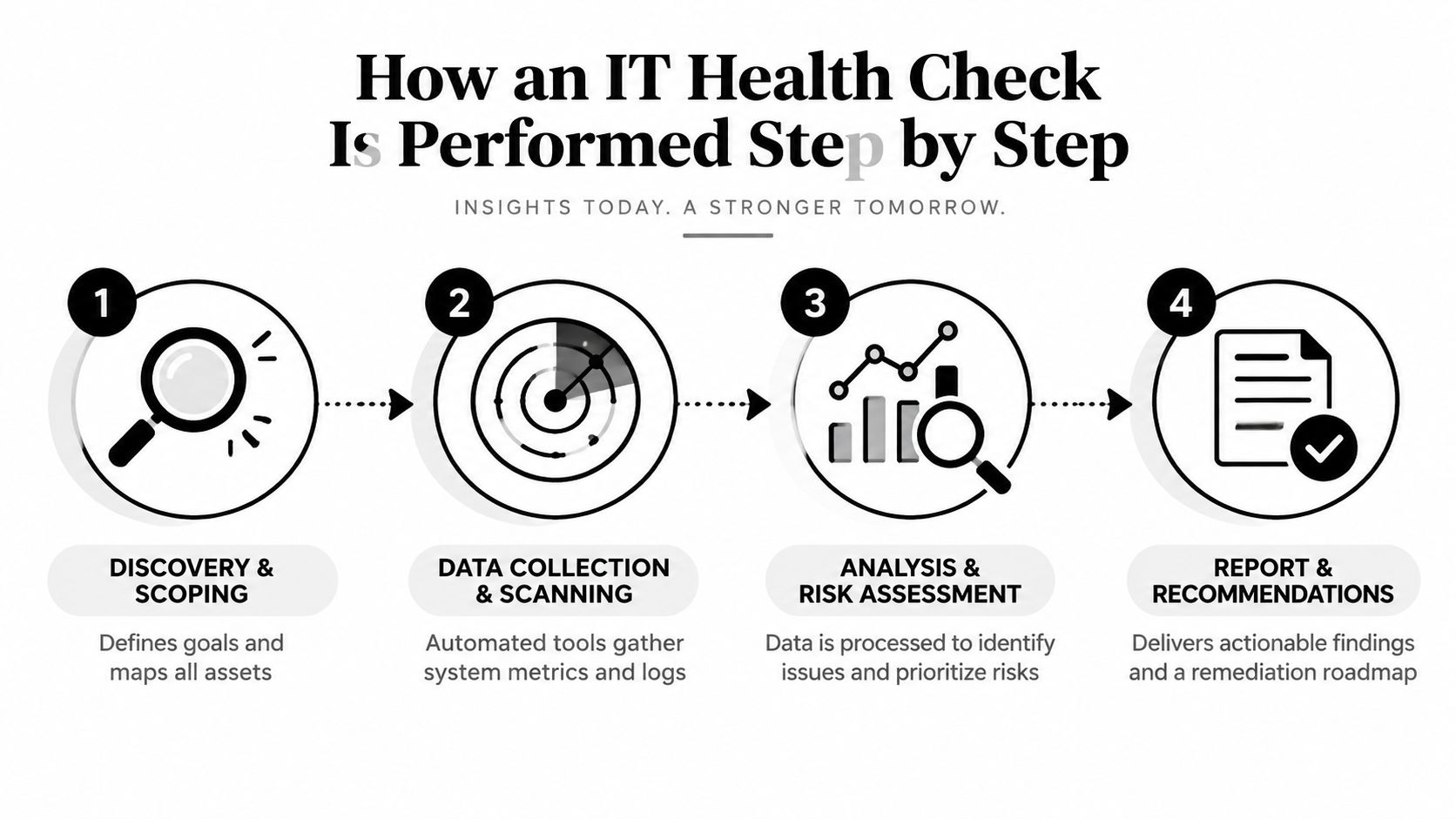
A well-run assessment feels orderly to employees because the assessor separates discovery, validation, testing, and recommendations. The process shouldn't begin with random scanning or end with a report full of unexplained technical labels.
Discovery creates the baseline
The first phase maps devices, applications, accounts, vendors, data flows, and critical business services. Forgotten systems often surface here. A department may have adopted a cloud application without notifying IT, or an old server may still support a workflow nobody has documented.
The assessor then compares the inventory with what the business believes it owns. That comparison matters because an organization can't patch, monitor, or retire an asset it doesn't know exists.
Scanning and interviews reveal the operating reality
Automated and manual checks examine unpatched systems, exposed services, weak access controls, configuration errors, and endpoint coverage. A vulnerability scanning review provides useful technical evidence, but scan output alone doesn't explain business impact.
Interviews fill that gap. Employees can identify workarounds, recurring support problems, shared accounts, and unofficial processes that documentation misses. The assessor also reviews policies, incident procedures, vendor responsibilities, and insurance requirements.
Recovery testing proves whether backups matter
NIST guidance emphasizes testing backup files, validating that restores work, and confirming that recovered data is usable. A completed backup job isn't proof of recoverability. Data can be corrupted, identity dependencies can fail, or production credentials can be compromised.
A meaningful check includes an isolated test restore, integrity verification through checksums or record counts, timed recovery logs, and comparison with the organization's Recovery Time Objective. The restore process itself is part of the security posture, not an administrative checkbox.
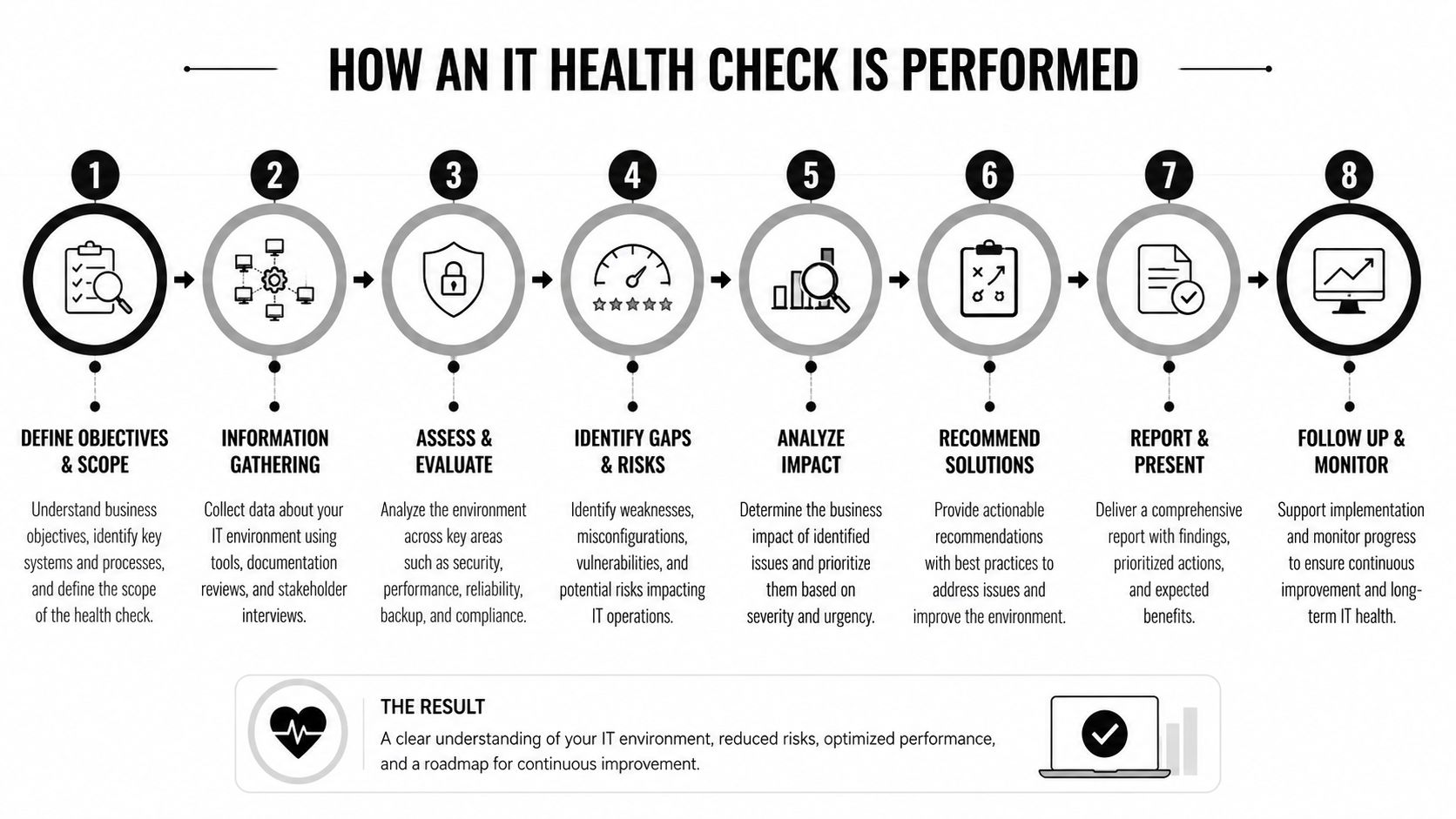
The final report should rank findings by urgency, business effect, effort, and dependency. Executives need to know which issue can interrupt operations, which gap creates compliance exposure, and which improvement can wait. A useful roadmap gives owners a sequence, not a pile of unresolved warnings.
What Real IT Health Check Findings Look Like
A mid-sized accounting firm in Plano can have fully functioning workstations and no obvious security alerts, yet still carry several serious weaknesses. In a realistic composite scenario drawn from DFW engagements, the assessment finds remote access appliances that haven't received current patches, employee computers without full-disk encryption, and nightly backups that haven't undergone a restore test in eight months.
The firm also keeps shared administrator passwords in a spreadsheet on a network drive. Each issue can remain invisible during ordinary work. Employees still open applications, access files, and complete client tasks.
The findings become more useful when translated into business consequences:
- Unpatched remote access: A known weakness can expose remote workers and internal systems, while the remediation may require coordinated maintenance and communication.
- Missing encryption: A lost or stolen laptop can create a data protection concern even when the device itself appears operational.
- Untested recovery: Management may believe the firm can restore client records, but no evidence confirms the process, speed, or completeness.
- Shared administrator credentials: The firm loses individual accountability, and changing access after staff turnover becomes harder.
This is why an audit should distinguish between a visible incident and a condition that makes an incident more likely or more expensive. A detailed IT security audit checklist helps organize those checks, but experienced judgment is still needed to connect findings to the firm's actual workflows.
The report shouldn't shame employees for using a workaround. That workaround may be evidence that the approved system is too slow, poorly configured, or missing a required capability. Fixing the root cause can reduce both exposure and staff frustration.
How to Prepare for Your IT Health Check
Preparation doesn't mean making the environment look perfect. It means giving the assessment team enough context and access to evaluate the environment accurately, without wasting time locating basic records.
Assemble the evidence
Before the visit or remote review, gather:
- System access details: Coordinate authorized access to critical servers, cloud services, network equipment, endpoint consoles, and backup systems.
- Current records: Provide network diagrams, user lists, asset inventories, vendor contracts, previous audit reports, incident notes, and relevant insurance documents.
- Recent changes: Identify newly purchased hardware, recently adopted applications, office moves, remote work changes, and systems added outside normal procurement.
- Account information: Flag temporary credentials, shared accounts, dormant users, service accounts, and access that should be removed or reviewed.
An assessor can discover much of this independently, but organized documentation makes the review faster and exposes discrepancies between written procedures and actual operations.
Prepare the people
Tell employees that the assessment protects the business; it isn't an investigation of individual behavior. Staff are more likely to explain how work really gets done when they don't expect blame for using a workaround or storing information in an unofficial location.
Set aside time for interviews with department leaders and employees who depend on specialized applications. Their comments often reveal licensing waste, repeated support tickets, manual re-entry, and process delays that a technical scan can't measure.
Patch records deserve special attention. A patch management review should account for operating systems, browsers, remote access equipment, edge devices, exceptions, and unmanaged assets. The goal is not to count missing updates. It's to understand coverage and remediation speed, especially for vulnerabilities already known to be exploited.
The Business Benefits That Go Beyond Security
An IT health check earns its place in a budget when the findings connect to how the business spends time and money. Security is one outcome, but the assessment can also expose equipment nearing failure, capacity constraints, duplicated subscriptions, inefficient workflows, and support work that employees have accepted as normal.
A useful review translates each technical observation into an operational question:
| Finding | Business question |
|---|---|
| Aging or unstable hardware | Which teams lose productive time when this device fails? |
| Duplicate applications | Are separate departments paying for overlapping capabilities? |
| Unclear access rights | How much effort goes into onboarding, offboarding, and access corrections? |
| Untested recovery | Can the organization resume critical work with evidence rather than assumption? |
| Weak monitoring coverage | Who notices a problem, and how quickly can that person act? |
This financial framing matters because technical debt often appears as ordinary overhead. Employees submit repeated support tickets, create workarounds, wait for slow systems, or buy unsanctioned tools. Management sees scattered expenses and interruptions rather than one connected technology problem.
Resilience protects more than files
NIST's ransomware guidance makes the recovery distinction clear. Backup completion doesn't establish that a restore will work, and a restore test should measure actual recovery time against the organization's target. A business that validates recovery can make better decisions about staffing, priorities, communication, and continuity.
Patch hygiene offers another practical signal. CISA recommends a centralized patch management process that prioritizes patch application, and a strong health check compares patch latency with known exploited vulnerabilities rather than counting updates in the abstract. Cybersecurity resources for operational planning can supplement that work, but they don't replace an environment-specific review.
Monitoring deserves the same scrutiny. Tools need complete log coverage, deployed endpoint agents, useful alerts, and detection logic that includes identity and cloud activity. A dashboard full of green indicators isn't valuable if nobody has tested whether the right event generates a visible, actionable alert.
For DFW companies that rely on referrals and close client relationships, reliability and trust are commercial assets. A health check helps protect them while also identifying where technology can make daily work less expensive and less frustrating.
Industry-Specific Considerations for North Texas Businesses
The core review stays consistent across industries, but the priorities change with the data being handled and the obligations attached to it.
Healthcare clinics and medical practices need a clear risk-analysis process for electronic protected health information. HIPAA's Security Rule requires covered entities and business associates to conduct an accurate and thorough assessment of potential risks and vulnerabilities to the confidentiality, integrity, and availability of electronic protected health information, as described in HHS guidance on HIPAA risk analysis. A clinic's assessment should therefore connect access rights, backups, mobile devices, vendors, and incident procedures directly to patient information.
Law firms need strong confidentiality controls around client files, correspondence, matter data, and remote access. The review should examine ethical obligations, former-user access, document sharing, personal devices, and the practical behavior of attorneys and support staff.
Financial services and accounting firms face a similar trust burden, with added attention to payment processing, client data, access separation, and applicable PCI-DSS obligations. A firm may need stronger evidence around administrator activity and recovery than a less regulated organization.
Construction, engineering, and architecture companies should focus on project-sensitive intellectual property, mobile workforces, field connectivity, subcontractor access, and supply-chain relationships. Nonprofits may have smaller budgets, but donor records and payment information still require disciplined protection.
NIST's SMB resources point small businesses toward structured assessment and auditing, including its fundamentals guidance for turning scattered tasks into a repeatable process. That structure gives North Texas organizations a practical starting point, while local expertise helps account for office layouts, remote staff, vendors, and industry-specific workflows.
Technovation LLC offers a free security audit and IT health check for DFW businesses, reviewing areas such as backups, access rights, endpoint maintenance, compliance gaps, and recovery readiness. Visit Technovation LLC to request an assessment and get a prioritized view of the technology issues that may be costing the business time, money, and confidence.





