
How can a business confirm that access, backups, patches, monitoring, and vendors would withstand scrutiny because its systems are functioning today? A working application proves availability, not that the right people have the right access, that a restore will succeed, or that a supplier won't introduce avoidable risk.
A practical IT security audit checklist should operate as a domain-based workbook for Dallas–Fort Worth small and mid-sized businesses. Across the ten domains below, each finding should record the control owner, verification result, supporting evidence, business impact, severity, and remediation deadline. The result is an operating record that shows what was tested, what failed, and what happens next.
Use a straightforward severity model. Critical means active exposure or a likely business interruption. High means an exploitable gap affecting sensitive systems. Medium means a control weakness that needs planned correction. Low means a documentation or optimization issue. DFW organizations should map findings to applicable industry obligations and consult qualified professionals for regulatory interpretation. Teams handling sensitive information should also review practical guidance on secure client communications.
Technovation can provide an optional next step through security audits, IT health checks, monitoring, compliance support, and managed or co-managed remediation. The checklist below is designed to help an owner or operations leader identify where independent support would add value.
Table of Contents
- 1. Access Control and Identity Management Verification
- 2. Endpoint Protection and Malware Defense
- 3. Network Segmentation and Firewall Configuration
- 4. Data Backup and Disaster Recovery Validation
- 5. Patch Management and Vulnerability Remediation
- 6. Email Security and Phishing Prevention
- 7. Security Awareness Training and Incident Response Readiness
- 8. Configuration Management and Hardening Standards
- 9. Logging, Monitoring, and Security Event Analysis
- 10. Third-Party Risk Management and Vendor Security Assessment
- 10-Point IT Security Audit Checklist Comparison
- Turn Audit Findings Into a Safer Operating Plan
1. Access Control and Identity Management Verification
Access should match a person's current responsibilities, not an old job description or a former project. Begin with administrators, remote access, email, cloud consoles, financial platforms, electronic health record systems, case-management software, and any application containing sensitive data. Compare each account, group, role, and privilege with an approved business need.
Critical systems should have multi-factor authentication, and access reviews should run on a fixed cadence. Identity and access management gives a DFW business a structured way to connect identity decisions with least privilege, role changes, and audit evidence.

Evidence that proves the control works
A Dallas-area law firm might require MFA for its case-management system and preserve the enrollment report, administrator list, and access approval records. A medical practice should show that billing staff can reach necessary financial functions without viewing clinical notes. A construction firm should issue vendors temporary credentials for project budgets and specifications, then document automatic expiration.
Useful evidence includes:
- Access review records: Show the reviewer, date, accounts examined, decisions made, and unresolved exceptions.
- Joiner, mover, and leaver tickets: Confirm that access changes follow hiring, role-change, and termination events.
- Conditional Access policies: Verify that unusual login patterns trigger stronger authentication or additional restrictions.
- Privileged account inventory: Identify administrator accounts, shared credentials, service accounts, and dormant access.
Start with the systems holding the most sensitive information, then expand systematically. Automating deprovisioning reduces dependence on a manager remembering to notify IT, while documented access decisions create a defensible audit trail.
2. Endpoint Protection and Malware Defense
Can the organization identify every device that connects to business resources, confirm its protection status, and show how the team responds to a serious detection? Start the audit by reconciling the device inventory with the protection console. Laptops, desktops, servers, and mobile devices should show an active agent, current policy, recent check-in, and clear response status. A device missing from the console is an unknown endpoint that may connect to business resources without effective monitoring.
A DFW clinic should verify whether a workstation can isolate itself when ransomware attempts to reach patient records. An accounting firm should confirm that endpoint detections reach the staff responsible for investigation. A construction company with employees at project sites should check that remote laptops receive protection comparable to office desktops, including when connectivity is intermittent.
Test response, not just installation
A security audit should also review policy assignments, behavioral detection settings, isolation capability, alert escalation, and the process for returning a cleaned device to service. Business endpoint protection guidance can help organizations evaluate coverage across hybrid and remote environments.
Practical rule: A protection dashboard should answer which devices are covered, which are stale, which are isolated, and who acted on the last serious alert.
Collect the endpoint inventory, coverage exceptions, recent alert tickets, isolation records, policy screenshots, and documented recovery procedure. Review whether endpoint events connect to incident response and backup validation. If a device detects ransomware, the team must know how to contain it, preserve evidence, assess other systems, and verify that recovery data remains usable.
Monthly endpoint assessments help identify unprotected or outdated systems. Record each finding with its affected device, business access, evidence, severity, owner, and remediation deadline. A missing agent on a low-risk kiosk may receive a lower priority than an unmonitored administrator laptop with access to cloud systems. Technovation can help DFW SMBs turn those findings into coverage corrections, response testing, and a practical remediation plan.
3. Network Segmentation and Firewall Configuration
Segmentation creates boundaries between systems. Those boundaries work only when firewall rules permit necessary traffic and deny unapproved paths.
Start by mapping traffic flows before changing production rules. Record which systems communicate, why they communicate, which ports and protocols they use, and whether each connection is inbound, outbound, or internal. A medical practice might separate electronic health record systems from general office devices, limiting a compromised email account's path to patient data. A law firm might isolate client-data networks, while a nonprofit could separate its donor database from everyday operations.
Review rules for business purpose
Examine DMZ, internal, guest, wireless, server, and remote-access segments. Rules that permit only approved traffic are generally easier to defend than broad rules that allow traffic while blocking known bad destinations. Enable firewall logging so staff can investigate denied connections, unexpected paths, and changes made during an incident.
The firewall configuration service can help an SMB review inherited rules that nobody can explain. Obsolete rules accumulate as vendors, applications, and offices change. Each rule needs an owner, a business purpose, source, destination, expiration or review date, and evidence that the rule was tested.
A useful audit workbook records the segment, rule, business justification, evidence, severity, owner, and remediation deadline. A guest wireless rule reaching a server segment should receive high priority because it creates an unnecessary path to business systems. An unused vendor exception may receive lower priority, but it still needs removal or a documented review decision.
Use VLANs for logical separation where appropriate, and consider physical isolation for highly sensitive systems. Apply changes in phases, beginning with data stores whose compromise would have the greatest business or regulatory impact. Verify the result with a test, such as confirming that guest wireless cannot reach the medical record server, approved administrative traffic is logged, and the rule owner confirmed the exception. Technovation can help DFW SMBs interpret findings, test rule changes, and assign practical remediation steps.
4. Data Backup and Disaster Recovery Validation
Is the business prepared to restore usable data after ransomware, hardware failure, or accidental deletion? A completed backup job is only the first step. Meaningful verification asks whether the restore is isolated from ransomware, whether recovered data is complete, and whether operations can resume within a defined recovery time objective. Recent SMB security guidance identifies backup restore testing as a common gap.
Set recovery point objectives and recovery time objectives by business function. A medical practice may need faster access to patient records than to historical marketing files. A law firm should rank active case files, document repositories, and billing records. A construction company should define how quickly project-management data, estimating files, and communications must return after a server failure.
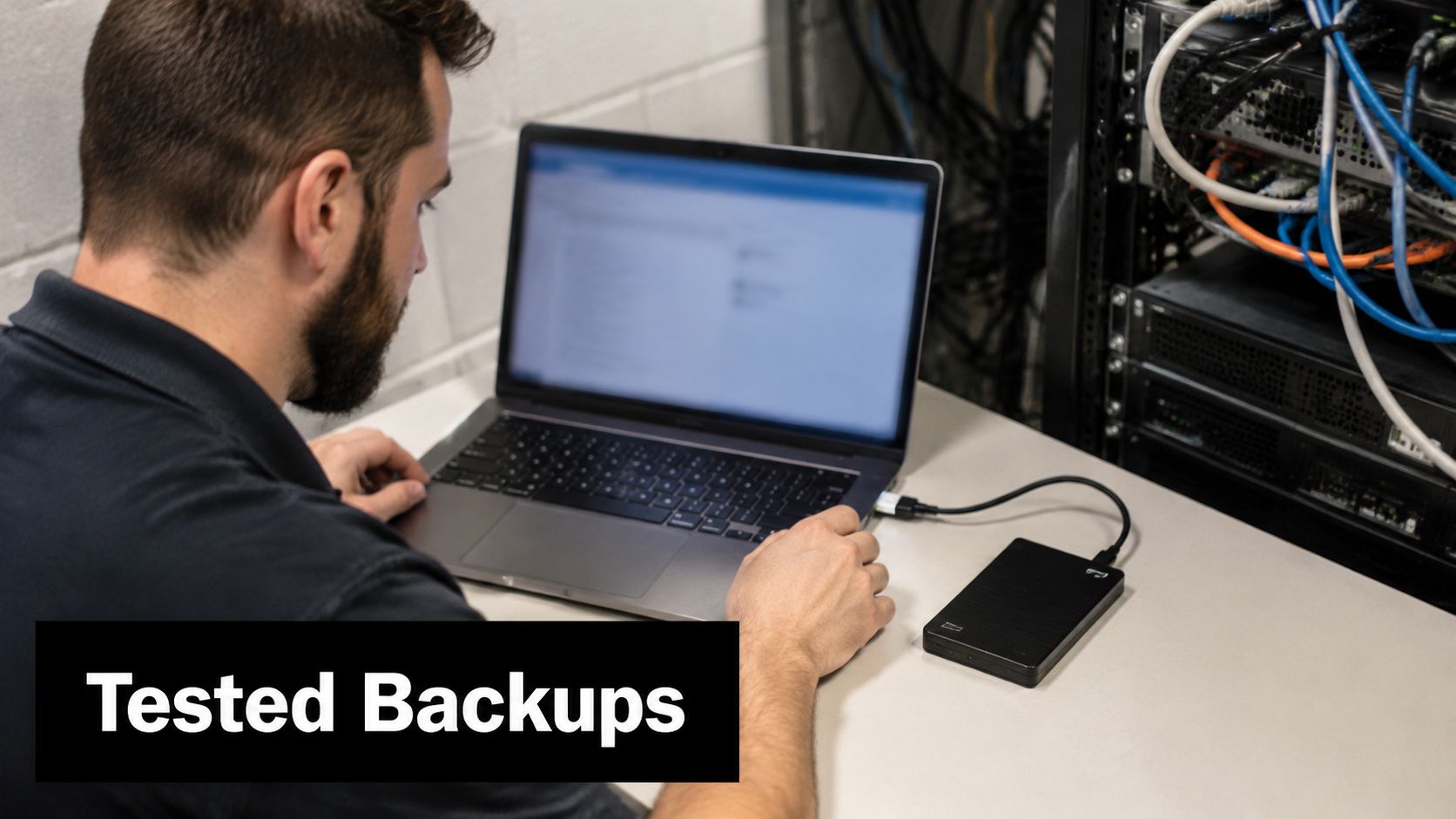
Evidence from a real restore exercise
A practical audit workbook records backup schedules, protected workloads, retention settings, encryption status, storage locations, immutability or air-gap design, and the latest restore result. The test record should identify what was recovered, who verified it, how long the process took, and which errors need correction.
- Isolation evidence: Confirm that at least one recovery copy cannot be modified through production credentials or the same network path.
- Integrity evidence: Open restored files, validate application data, and check that permissions and relationships still work.
- Recovery evidence: Compare actual restoration performance with approved recovery objectives.
- Governance evidence: Include backup procedures in the incident-response plan and record tabletop exercise outcomes.
A cloud backup in one location may leave operational gaps. Separate recovery locations, disconnected copies, automated verification, and clear ownership support a more credible resilience program. Disaster recovery planning services can help DFW SMBs convert backup reports into a recovery process that business leaders can understand, test, and prioritize by severity.
5. Patch Management and Vulnerability Remediation
Patch management fails when it depends on a technician noticing an update and finding a convenient time to install it. The audit should trace the full process from asset discovery to vulnerability identification, testing, deployment, exception handling, and verification. Operating systems are only part of the scope. Applications, firmware, browsers, network devices, databases, and third-party software also require ownership.
An accounting firm should prioritize internet-facing systems and platforms connected to financial workflows. A healthcare clinic needs a documented approach for systems that cannot be patched during patient-care hours. A law firm should know whether its public web server, document platform, and remote-access tools have exceptions, compensating controls, or overdue maintenance.
Make exceptions visible
Automated patching can work well for lower-risk systems, while production systems may need scheduled maintenance windows. Patches should be tested in a representative non-production environment where practical. The audit should verify that the test result, deployment record, rollback plan, and post-installation check exist.
Use vulnerability severity and business impact together. A less severe defect on an internet-facing server may deserve faster attention than a more serious issue on an isolated legacy workstation. Exceptions should include a reason, responsible owner, compensating control, review date, and final remediation plan.
A weekly compliance dashboard helps identify systems falling behind, but a dashboard is only useful when someone acts on exceptions. Emergency procedures should exist for newly disclosed vulnerabilities that require action before the next routine maintenance window. The final evidence package should show current patch status, unresolved exposure, approved exceptions, and verification that remediation closed the original finding.
6. Email Security and Phishing Prevention
Email security should be tested as a layered control rather than treated as a spam-filter setting. Review sender authentication, attachment inspection, URL analysis, impersonation protection, mailbox rules, reporting workflows, and user training. Business email compromise often succeeds because a message looks plausible and the payment process lacks independent verification.
A financial services firm should test whether an executive impersonation attempt would be blocked or escalated before a transfer request reaches the finance team. A law firm can examine filtering for fake settlement documents and credential-harvesting links. A medical practice should verify that suspicious attachments are inspected before delivery and that users know how to report them.

Verify the controls employees depend on
The audit should inspect DMARC configuration, including whether the organization has progressed toward a rejection policy. SPF and DKIM alignment, URL rewriting, attachment sandboxing, external sender labels, and forwarding restrictions should be reviewed against actual business requirements.
Evidence might include email authentication results, quarantine samples, impersonation alerts, reported-message tickets, mailbox forwarding rules, and training records. A clear reporting button or mailbox matters because employees need a fast route to request analysis without forwarding suspicious content informally.
Simulated phishing can support awareness, but click-rate data shouldn't become a punishment mechanism. The more useful question is whether employees report suspicious messages, whether finance verifies unusual payment instructions through a separate channel, and whether the security team closes the feedback loop. Review authentication logs periodically for impersonation attempts and investigate patterns that point to domain abuse or compromised accounts.
7. Security Awareness Training and Incident Response Readiness
Security awareness is measurable through behavior and response quality, not attendance alone. Employees should know how to report suspicious email, confirm payment changes, protect credentials, handle sensitive files, and escalate a possible incident. Training should reflect the person's role. IT administrators need deeper technical guidance, while finance, clinical, legal, and project staff need scenarios connected to their daily decisions.
A medical practice can use a phishing exercise to test whether front-desk staff recognize credential requests. A law firm can run a ransomware tabletop that asks who contacts clients, preserves evidence, and coordinates notification decisions. A nonprofit can train finance staff to challenge unusual wire requests through an independent channel.
Test the plan under pressure
Incident response readiness requires more than a policy stored in a shared folder. The audit should identify the incident commander, technical responders, business owner, legal contact, communications lead, backup decision-maker, and escalation path. It should also verify that contact information is current and that the response team can access critical systems during an outage.
A useful exercise produces evidence such as attendance, scenario notes, decisions, action items, and retest dates. New hires and employees moving into sensitive roles should receive security guidance during onboarding or transition. Short, recurring briefings can reinforce relevant threats more effectively than relying on a single annual presentation.
Employees shouldn't have to decide whether a suspicious message is “bad enough” to report. The process should make reporting easy, immediate, and safe.
Use dashboards for training completion, reporting behavior, exercise participation, and unresolved response actions. Those measures help management see where process friction exists. The audit should prioritize a missing escalation path or untested recovery decision above a minor policy formatting issue.
8. Configuration Management and Hardening Standards
Secure configurations establish a consistent starting point for servers, workstations, network devices, applications, and cloud services. Without a baseline, each administrator may make reasonable but different choices, and configuration drift can leave one system weaker than the others.
The workbook should identify the approved baseline, the system owner, the rationale for important settings, the tool used to detect drift, and the process for approving exceptions. Review unnecessary services, default accounts, exposed management interfaces, weak encryption settings, local administrator rights, risky application features, and permissive file access.
Apply standards without disrupting operations
A healthcare organization may harden an EHR server by disabling services it doesn't need. A financial services firm can apply Windows configuration standards across workstations. A law firm might establish database permissions that restrict access to active matters and reduce unnecessary export capability. Each example requires testing because a setting that improves security can also interrupt a legitimate workflow if implemented without context.
Use industry-specific guidance where relevant, including HIPAA or payment-security requirements, and use recognized hardening benchmarks as a technical reference. Configuration-management tools can deploy approved settings and alert when systems diverge. Production changes should be tested outside production when possible, with a rollback plan for failures.
The Donely trust center can serve as an example of the type of security-policy material stakeholders may review when evaluating documented practices. The audit should still verify the organization's own configurations directly. A policy doesn't prove that a workstation, server, or cloud tenant follows the stated standard.
9. Logging, Monitoring, and Security Event Analysis
Can the organization reconstruct a suspicious event from its records? Logging should cover identity systems, endpoints, firewalls, servers, cloud services, critical applications, and administrative actions. The audit should verify that logs arrive centrally, preserve enough context, resist unauthorized changes, and produce alerts with assigned reviewers.
An accounting firm should be able to examine an after-hours attempt to access tax files. A healthcare practice needs evidence of unusual patient-record access. A law firm requires visibility into external connections to confidential matter repositories. For each scenario, verify the user, system, timestamp, action, source, outcome, and related events.
Connect alerts to decisions
A SIEM can correlate events, but staff still need a defined review process. Test whether high-risk alerts cover after-hours access, bulk downloads, repeated administrative login failures, new forwarding rules, privilege changes, suspicious endpoint activity, and unexpected vendor access. Daily review records should show whether each alert was a true threat, false positive, or accepted risk.
Review the alert queue for ownership and response times. An alert without an assigned reviewer is an unresolved control gap, even when the logging technology is configured correctly.
Logs should use protected transport, and retention should meet business, contractual, and regulatory requirements. Healthcare organizations should preserve audit artifacts in line with applicable obligations. Under HIPAA-focused guidance, audit evidence retention is tied to six years, including records supporting required safeguards and procedures (HIPAA security audit guidance).
Behavior baselines should support investigation rather than treat ordinary work as suspicious. Monitoring rules need tuning, documented owners, and a clear path from alert to containment. For DFW SMBs, Technovation can help connect monitoring, audit review, and response procedures so findings receive severity ratings, remediation owners, and practical follow-up instead of remaining in an unattended dashboard.
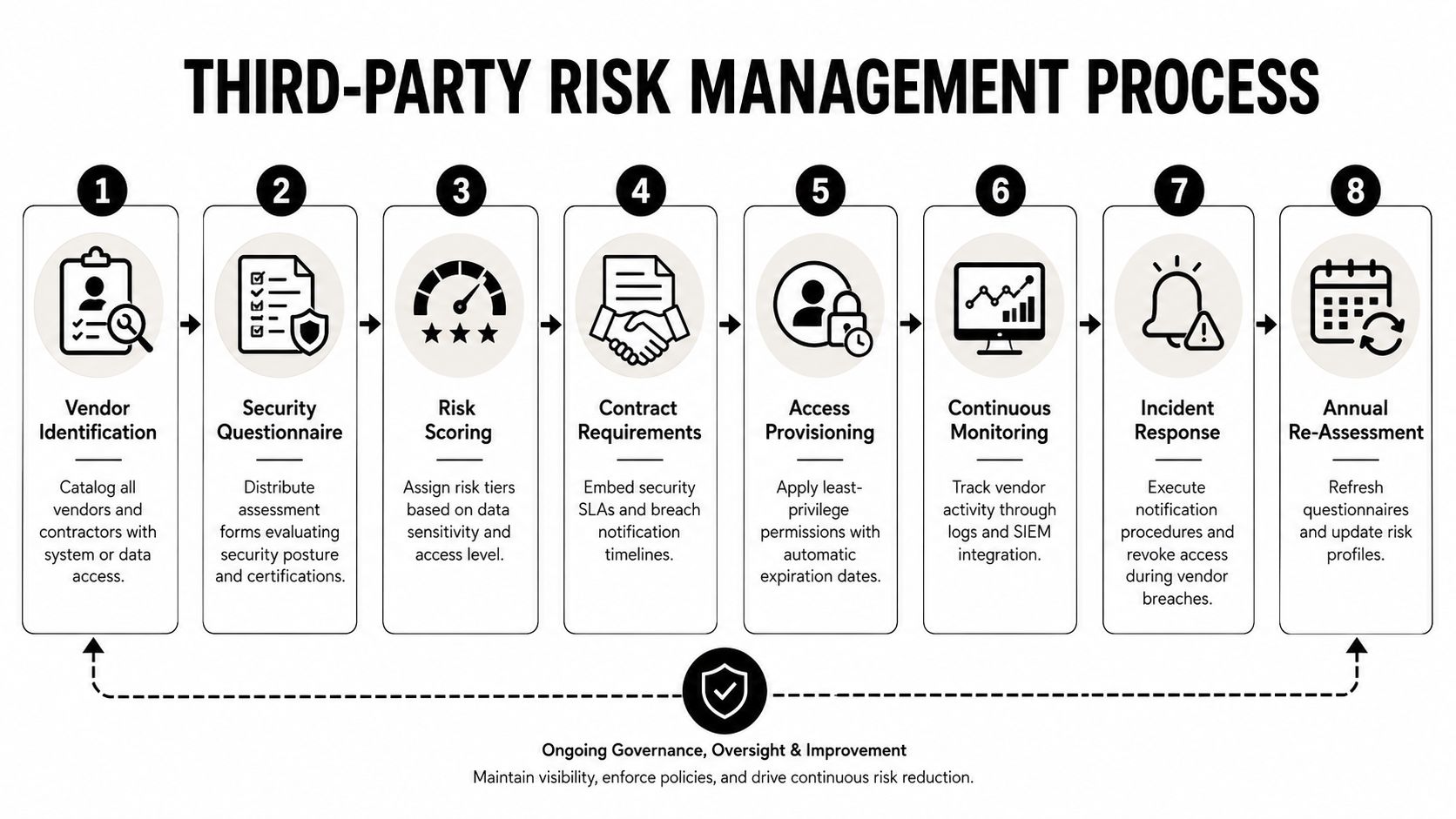
10. Third-Party Risk Management and Vendor Security Assessment
Could a supplier reach more systems or data than its service requires? A third-party audit should answer that question with evidence. Inventory IT providers, software vendors, payment processors, cloud services, consultants, contractors, and temporary project partners. Classify each access path, review contract duties, and confirm that permissions match the work performed.
A healthcare clinic should limit an EHR support provider to approved systems and functions. A law firm can review activity by contracted IT personnel and remove access outside the service scope. A financial services firm may reconsider a payment relationship after an assessment identifies unresolved weaknesses.
Treat procurement as a security decision
Request relevant assurance materials, such as a SOC 2 Type II report, ISO 27001 certification, or industry-specific documentation. Treat them as evidence to examine, not a substitute for reviewing the contract, access model, breach-notification terms, data location, subcontractors, recovery practices, and offboarding process.
The vendor register should include:
- Access scope: Record systems, data categories, privileged functions, and connection methods.
- Contract protections: Confirm security responsibilities, notification requirements, cooperation duties, and evidence expectations.
- Monitoring arrangements: Verify that vendor activity appears in logs and suspicious behavior reaches an accountable reviewer.
- Lifecycle status: Document approval, reassessment, risk rating, renewal decision, and termination steps.
Assign an owner to every vendor relationship. Set an expiration date for access where practical, then verify removal during role changes, renewals, and termination. Guidance on integrating cloud, SaaS, remote-work, and third-party risk is relevant because different teams often manage these areas, leaving gaps between a supplier's access method and the environment it reaches.
For a DFW small or midsize business, severity should reflect data sensitivity, privilege level, business dependency, and the ease of misuse. Technovation can help maintain the register, examine supplier evidence, assign remediation owners, and apply least-privilege controls that fit the operating model. A finding becomes actionable when the record identifies the responsible party, required fix, target timing, and evidence needed for closure.
10-Point IT Security Audit Checklist Comparison
| Control | 🔄 Implementation Complexity | ⚡ Resource Requirements | ⭐📊 Expected Outcomes | Ideal Use Cases | 💡 Key Advantages / Tips |
|---|---|---|---|---|---|
| Access Control and Identity Management Verification | 🔄 Medium–High, RBAC, MFA, PAM design and reviews | ⚡ Moderate, Identity platform, PAM tools, admin effort | ⭐⭐⭐⭐, Strong prevention of unauthorized access; 📊 improves auditability/compliance | Regulated industries (healthcare, finance, legal); remote/hybrid teams | 💡 Start with critical systems; automate deprovisioning; quarterly access reviews |
| Endpoint Protection and Malware Defense | 🔄 Medium, agent deployment and tuning across endpoints | ⚡ Moderate, Endpoint agents, licenses, cloud console, monitoring | ⭐⭐⭐⭐, High prevention of commodity malware; 📊 lowers MTTD/MTTR | Remote work, BYOD, ransomware risk environments | 💡 Use cloud-managed agents; enable automatic isolation; monthly endpoint checks |
| Network Segmentation and Firewall Configuration | 🔄 High, network redesign, NGFW rules, microsegmentation | ⚡ High, Firewalls/IPS, network engineers, ongoing rule maintenance | ⭐⭐⭐, Limits lateral movement; 📊 contains breaches to segments | Environments needing strict data isolation or multi-site networks | 💡 Map traffic flows first; implement in phases; prefer whitelist rules |
| Data Backup and Disaster Recovery Validation | 🔄 Medium, RPO/RTO design, immutable backups, restore testing | ⚡ Moderate–High, Storage, offsite/cloud, testing time and tooling | ⭐⭐⭐⭐, Rapid recovery from incidents; 📊 reduces data loss and downtime | SMBs with critical data and regulated sectors requiring continuity | 💡 Follow 3‑2‑1; schedule monthly restore tests; automate backup verification |
| Patch Management and Vulnerability Remediation | 🔄 Medium, inventory, testing, staged rollouts | ⚡ Moderate, Patch automation tools, test lab, scheduling | ⭐⭐⭐⭐, Eliminates many known vulns; 📊 faster remediation and compliance | All orgs, especially internet-facing systems and regulated environments | 💡 Prioritize by CVSS/business impact; test in lab; automate non-critical patches |
| Email Security and Phishing Prevention | 🔄 Medium, deploy filters, auth protocols, sandboxing | ⚡ Moderate, Advanced gateway/ATP, sandbox, user training | ⭐⭐⭐⭐, Blocks most phishing/BEC; 📊 reduces credential theft and malware delivery | High email-volume orgs; finance/legal/executive-targeted environments | 💡 Enforce DMARC reject; run monthly phishing simulations; use URL rewriting |
| Security Awareness Training & Incident Response Readiness | 🔄 Low–Medium, program rollout, simulations, tabletop exercises | ⚡ Low–Moderate, Training platform, staff time, IR planning | ⭐⭐⭐, Reduces human-caused incidents; 📊 improves reporting and response speed | Any org; critical where human error is primary risk | 💡 Use role-specific content; monthly sims and post-incident coaching; track metrics |
| Configuration Management and Hardening Standards | 🔄 Medium, baseline creation, automation, change control | ⚡ Moderate, Scanning tools, CMDB, expertise | ⭐⭐⭐, Reduces attack surface; 📊 ensures consistent secure configurations | Diverse system environments and compliance-focused organizations | 💡 Adopt CIS/industry benchmarks; automate baseline deployment and drift detection |
| Logging, Monitoring, and Security Event Analysis | 🔄 High, SIEM deployment, correlation, tuning | ⚡ High, Storage/compute, skilled analysts, integrations | ⭐⭐⭐⭐, Rapid detection; 📊 forensic evidence and compliance reporting | High-risk environments needing continuous monitoring | 💡 Retain 90+ days logs; tune alerts to avoid fatigue; integrate with IR playbooks |
| Third-Party Risk Management & Vendor Security Assessment | 🔄 Medium, questionnaires, contracts, ongoing monitoring | ⚡ Moderate, Assessment tools, legal review, SIEM/vendor integrations | ⭐⭐⭐, Reduces vendor-originated breaches; 📊 improves vendor control visibility | Organizations relying on many vendors or third-party access | 💡 Require SOC2/ISO evidence; include breach notification clauses; limit vendor access and recertify annually |
Turn Audit Findings Into a Safer Operating Plan
The completed checklist becomes useful when every finding enters a remediation register. Each record should identify the affected asset or process, the control owner, the evidence reviewed, the evidence gap, the business impact, the severity, the target date, the remediation action, and the method used to verify closure. “Improve MFA” is not a remediation plan. “Enable MFA on the remaining privileged cloud accounts, record the policy assignment, and verify successful challenge events” gives an owner a finish line.
Address critical and high findings first, especially active exposure involving sensitive systems, privileged identities, internet-facing services, untested recovery, or vendor access that cannot be explained. Medium findings can enter a documented improvement roadmap with dependencies, budget needs, and accountable managers. Low findings still matter, but documentation and optimization work shouldn't displace an exposed administrator account or an unreliable restore process.
Severity should reflect business consequences, not only technical terminology. A small accounting firm may prioritize a compromised mailbox tied to payment instructions. A clinic may place patient-record access anomalies above an isolated workstation configuration issue. A construction company may treat an unprotected project-management server as more urgent than a policy update because operational downtime would affect active projects and customer commitments.
Preserve audit evidence in a controlled location. Keep screenshots, exports, tickets, test results, policy versions, approval records, and restoration notes with enough context for a later reviewer to understand what was tested. The workbook should be revisited after major technology, staffing, vendor, office, or cloud changes. A new SaaS application or acquired business can change the asset scope before anyone updates the checklist.
Regulated organizations also need to connect technical findings to applicable obligations. HIPAA uses administrative, physical, and technical safeguard categories, with 18 implementation specifications, and audit evidence should address access control, integrity, authentication, transmission security, and required records (HIPAA safeguard and evidence guidance). Financial firms, service providers, and payment environments may need alignment with FINRA, SOC 2, or PCI-DSS, depending on their activities and contractual commitments. Qualified professionals should interpret those obligations and determine which requirements apply.
For DFW SMBs, the practical advantage of an independent review is the ability to connect technical exposure with business priorities. Technovation's security audits and IT health checks can help identify gaps, organize evidence, and create a remediation sequence. Its DFW team also supports 24/7 monitoring, compliance support, cloud backup, remote access, and managed or co-managed implementation. The right outcome isn't a binder that looks complete. It's a security program that assigns responsibility, verifies controls, and improves when the business changes.
Technovation LLC offers security audits, IT health checks, 24/7 monitoring, compliance support, and managed or co-managed remediation for DFW organizations. Businesses can use its team to turn this IT security audit checklist into verified controls and a practical improvement plan by visiting Technovation LLC.





