A Tuesday afternoon phishing email rarely looks dramatic. A receptionist opens a message that appears to come from a regular client, clicks a link, and hands the attacker a live path into scheduling, billing, or case files before anyone notices. In a DFW clinic, law firm, or accounting practice, the difference between a contained ticket and a reportable incident often comes down to whether the response chain was built to move without waiting for three people to answer the same Slack thread.
That's why cybersecurity automation matters. It's not a gadget, and it's not a substitute for judgment. It's the discipline of making repetitive security work happen fast, consistently, and with an audit trail, so the business doesn't lose hours every time a common threat lands. When the workflow is right, the result is a real operational shift, not a buzzword.
Table of Contents
- When the Right Automation Would Have Saved the Day
- What Cybersecurity Automation Actually Means
- The Core Building Blocks That Make Automation Work
- The Business Case in Numbers, Not Buzzwords
- A Realistic Rollout Roadmap for SMBs
- Pitfalls That Quietly Kill Automation Programs
- Managed, Co-Managed, and the DFW Compliance Reality
- Your First Step Before You Sign Anything
When the Right Automation Would Have Saved the Day
A small medical practice doesn't need a cinematic breach to feel the pain. One fake invoice email, one click, and suddenly someone is checking mailbox rules, resetting credentials, and wondering whether any protected records moved. If the team has to wait for a manual triage queue, the day turns into a scramble that burns staff time and raises the odds of a disclosure problem.
That's the practical value of fast, supervised response. A well-built playbook can pull in alert context, check identity activity, quarantine the message, and isolate the affected endpoint without making one person carry the entire chain. The difference shows up in the clock, and the clock matters because shorter exposure time usually means less business disruption.
Practical rule: if a phishing event needs more than one handoff before containment starts, the process is too slow for a regulated SMB.
Technovation's incident response playbook fits that reality because it treats response as a workflow, not a guess. That's the right mindset for clinics, law offices, and financial firms that can't afford to lose half a day debating who should own the first move.
The point isn't that every click becomes a crisis. The point is that the same common events keep happening, and the organization either absorbs them cleanly or lets them expand into avoidable work. Automation earns its place when it turns a repetitive incident into a routine containment sequence.
What Cybersecurity Automation Actually Means
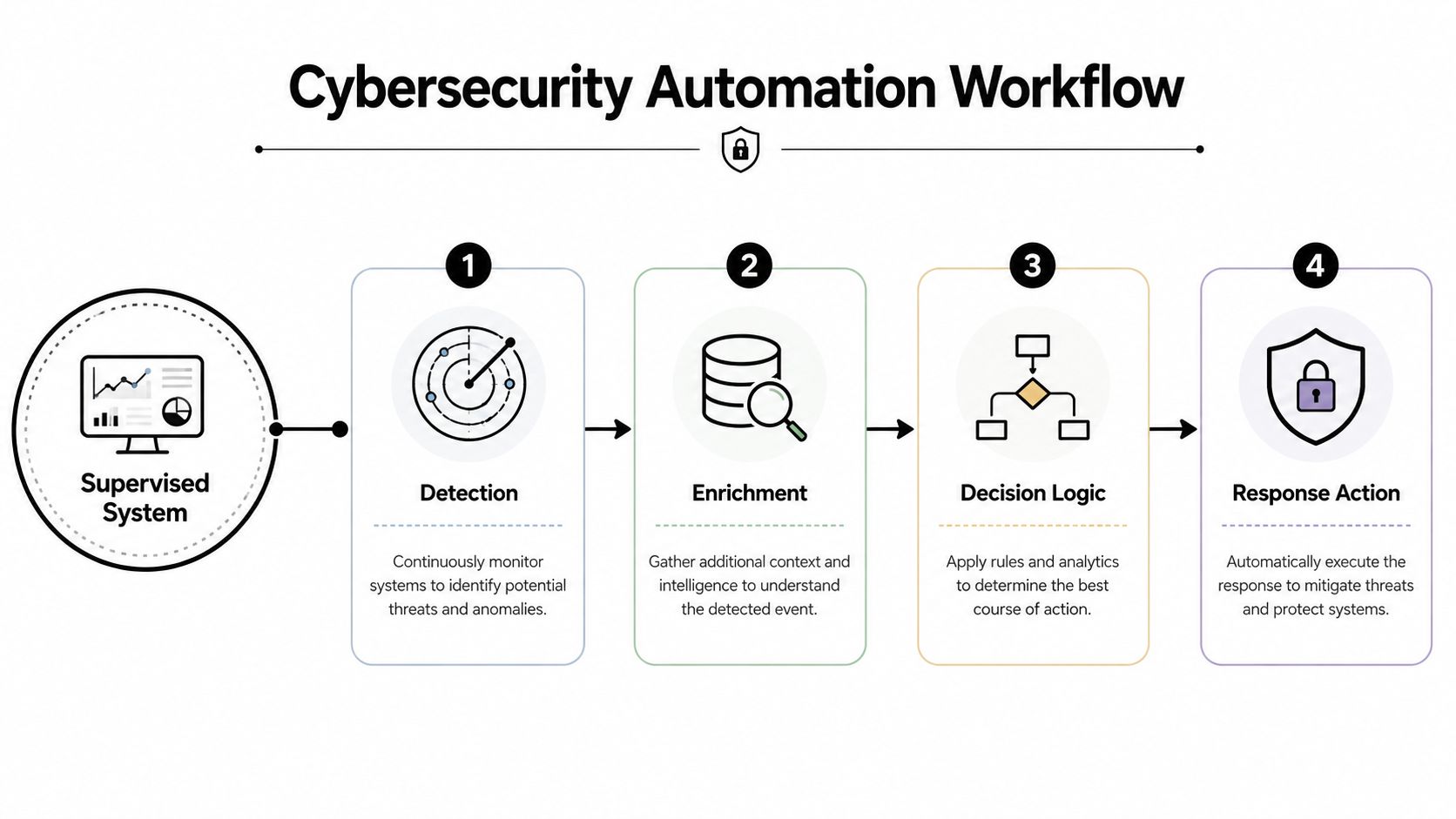
Cybersecurity automation is a supervised workflow system. IBM describes it as the use of AI, machine learning, and predefined workflows to identify, prevent, and respond to attacks with minimal human intervention, across tasks like scanning, identity enforcement, response, and documentation. That means the system does the repetitive work, but people still set the rules, review edge cases, and own exceptions.
Think of it as an operations team with strict guardrails. Detection fires first, enrichment adds context, decision logic checks thresholds, and response actions execute only when the conditions are right. That's very different from a fully autonomous system that makes up its own rules, which is exactly why automation fits regulated environments better than flashy “agent” stories do.
The cleanest way to evaluate a vendor pitch is to ask what happens between the alert and the action. If the answer is “a human has to retype the same facts into three tools,” that isn't automation, it's packaging. A useful outside resource on workflow thinking is identify automation opportunities, because the same logic applies outside security, map the repetitive work first, then automate the handoffs.
Security teams don't need a black box. They need a supervised chain that can explain itself.
Technovation's managed detection and response approach aligns with that model because it combines detection, response, and review rather than pretending every event should be handled with zero human oversight. That's the standard regulated SMBs should demand.
The Core Building Blocks That Make Automation Work
Automation only works when the layers are connected. A SIEM collects and correlates signals, a SOAR workflow orchestrates the response, EDR acts on the endpoint, automated patching closes known gaps on a schedule, and IAM enforces identity rules like conditional access and account suspension. Each one removes a different slice of manual work, but the value compounds only when the trigger-to-action chain is built end to end.
| Layer | Primary Action | What It Replaces for SMBs |
|---|---|---|
| SIEM | Correlates logs and alerts | Manual log hunting and duplicate review |
| SOAR | Runs the playbook | Copying steps between consoles |
| EDR | Contains endpoint threats | Hands-on device isolation |
| Automated patching | Applies fixes on schedule | Repeated maintenance-window work |
| IAM | Enforces identity rules | Manual access changes and resets |
The mistake many SMBs make is buying isolated functionality and expecting orchestration to appear later. It doesn't. If a response action can't be logged, rolled back, or tied to a policy, it's risky for compliance and hard to defend after an incident. That's why a real program starts with the workflow, not the product category.
Rule of thumb: if the workflow can't survive an audit, it's not ready for automation.
The strongest small-business implementations usually start with high-volume, repeatable work, especially phishing response, vulnerability management, and incident response. Those are the areas where decision rules are clear and the business cost of delay is obvious. That's also why patch discipline matters, and Technovation's patch management guidance is worth reviewing before any rollout.
There's also a useful lesson from Ollo's Microsoft RPA best practices. Security automation works best when the process is mapped first, exceptions are defined early, and the team knows which steps should never be fully hands-off. That logic saves time in RPA, and it saves embarrassment in security operations too.
The Business Case in Numbers, Not Buzzwords
Security buyers don't need a motivational speech. They need a budget case. IBM-linked 2024 research reported average breach costs of $3.84 million for organizations with extensive AI and automation in security operations versus $5.72 million for organizations with no AI or automation, a gap of $2.22 million per breach. A related summary also reported average breach costs dropping from $5.52 million to $3.62 million, a difference of $1.90 million. Those numbers explain why automation moved from a side project to a line item.
A 2025 AI SOC report found that 60% of respondents said automation reduced investigation time by at least 25%, and 21% said the reduction was greater than 50%. That matters more than tool activity because a backlog shrinks only when analysts spend less time on repetitive investigation. The point is not just speed, it's reclaiming capacity.

Juniper's research also concludes that cyber automation can save organizations an average of more than $2.3 million annually while strengthening security posture. That gives business owners a useful frame, but only if the automation program is properly scoped to meaningful workflows. Small shops don't need to automate everything to justify the effort, they need to automate the pain points that cost time, force overtime, or create avoidable exposure.
That's where Technovation's service level agreement guidance becomes relevant. A strong SLA tells leadership what's covered, how fast actions happen, and how the service will be measured. Without that clarity, ROI turns into a guess.
If the workflow is low volume and rarely creates delay, automation can become more integration cost than value.
The right business case is short. It should show the current manual burden, the risk of delayed response, and the expected change in analyst time or breach exposure. If those three lines can't be written clearly, the program isn't ready.
A Realistic Rollout Roadmap for SMBs
The safest way to roll out cybersecurity automation is in phases, not as a giant transformation project. A 2026 industry guide frames maturity as a progression from Manual to Task automation, Connected workflows, Outcome-driven, and eventually Agentic SOC, with metrics like MTTD, MTTR, percent auto-closed, and playbook drift. That's the right way to think about it, but SMBs need a simpler entry point.
Start with the work that hurts most
The first 90 days should focus on the obvious wins. Automated patching belongs near the top, phishing response should be reduced to a repeatable playbook, and the SIEM should hand tickets to the service desk automatically instead of waiting for someone to copy-paste an alert. If those three things aren't moving, the program is still theoretical.
Add connection before sophistication
Once the first layer is stable, connect detection to enrichment and enrichment to response. That's when the workflow stops being a collection of alerts and starts acting like a program. This is also the point where the team should test rollback, escalation, and evidence capture, because automation that can't be reversed is a bad fit for regulated work.
A simple 90-day checklist helps keep the rollout honest:
- Map the top repetitive workflows. Identify the tasks that eat the most analyst time.
- Define the decision rules. Set the threshold for what gets closed, escalated, or paused.
- Test on low-risk systems first. Prove the logic before it touches production data.
- Document every exception. If a human had to intervene, record why.
- Review the audit trail. Make sure actions are visible, not just fast.
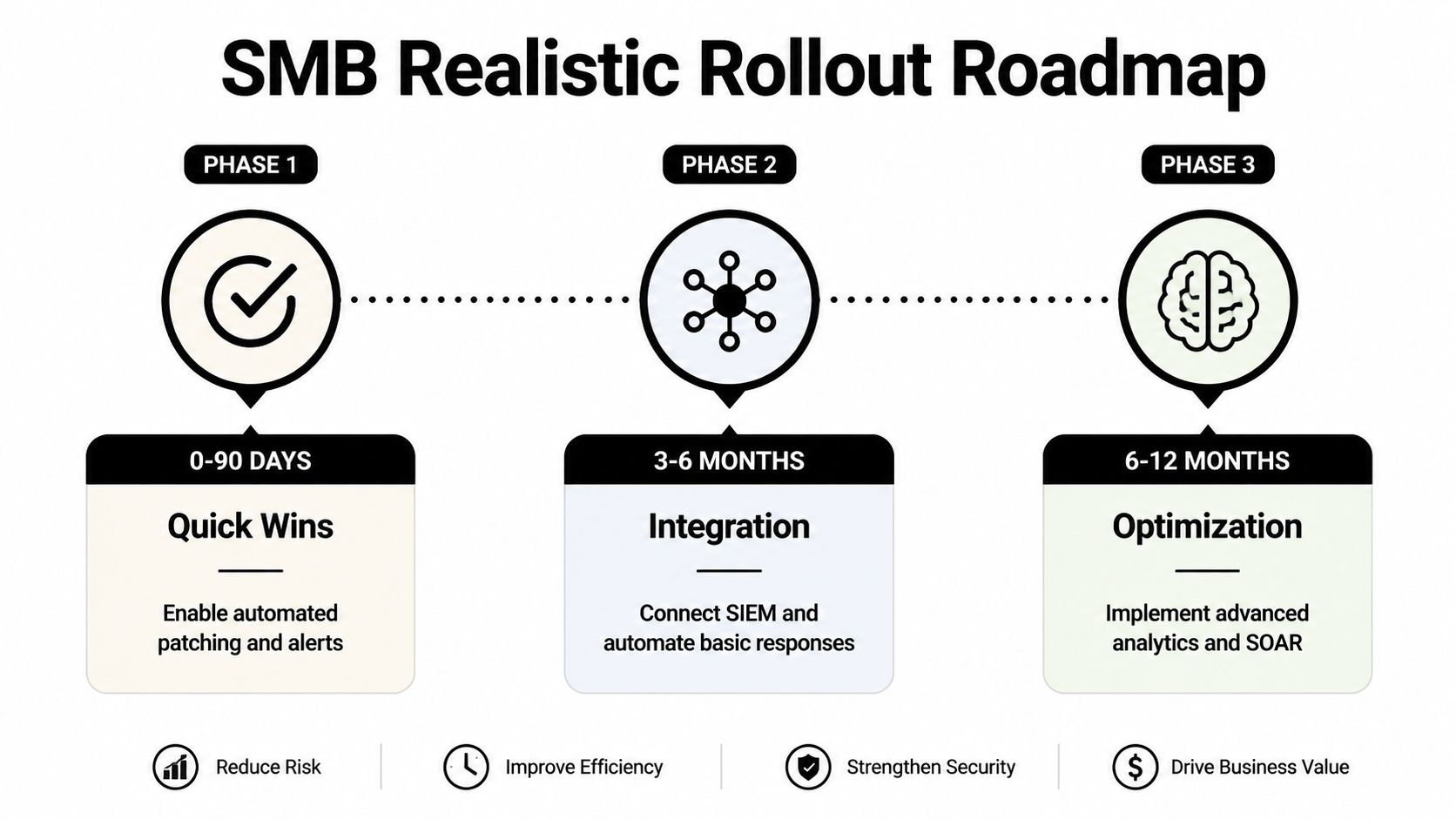
The move from one phase to the next should be earned. Phase one ends when the team can show the automation is stable. Phase two starts when the systems are talking to each other cleanly. Phase three begins only after the organization can measure outcomes, not just activity. That pace is slower than hype suggests, and it's much safer.
Pitfalls That Quietly Kill Automation Programs
Bad data ruins good automation. If alerts are noisy, duplicate, or poorly enriched, the workflow just moves bad decisions faster. The fix is not more rules, it's better signal quality and a clear owner for tuning.
Missing governance is the second killer. Independent and government guidance stresses that automation needs good data, clear playbooks, and human-in-the-loop review for edge cases, because semi-automated systems still need intervention to validate and mitigate. If nobody owns threshold changes, exception handling, or rollback approval, the program drifts until people stop trusting it.
Red flag: when staff say, “the system handles it,” but nobody can explain who reviews exceptions, governance is already thin.
Treating automation as a replacement for analysts is another common mistake. It's a force multiplier, not a substitute for skilled judgment. The best programs free people from repetitive work so they can handle unusual cases, compliance review, and process improvement.
There's also a compliance trap. Automated actions need to be auditable and reversible, especially when they affect identities, endpoints, or records. If a vendor demo can't explain how the action is logged and rolled back, that's a reason to walk away.
Managed, Co-Managed, and the DFW Compliance Reality
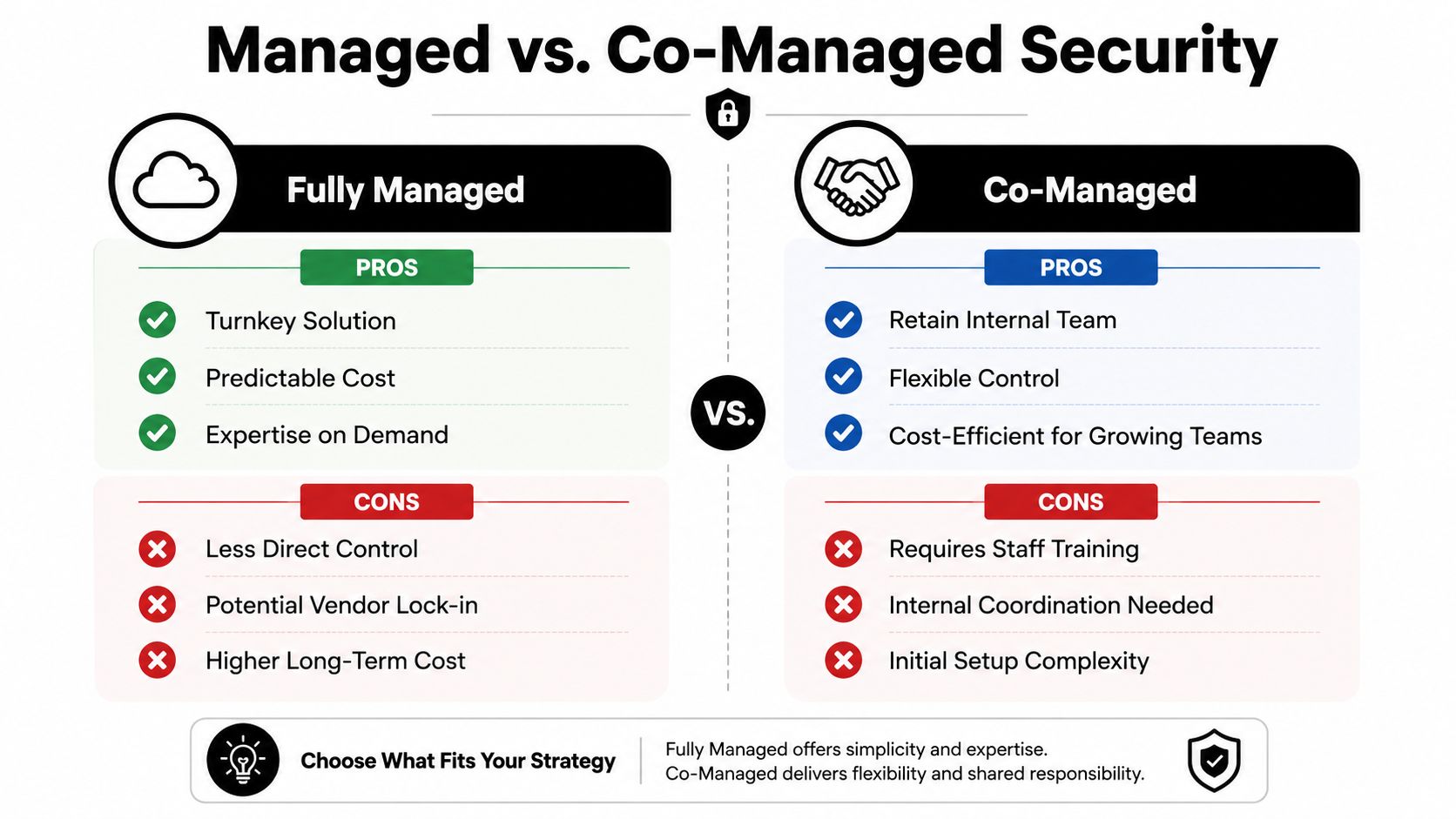
The right model depends on internal capacity, not just budget. Fully managed security operations fit organizations that want outcomes without building the team themselves. Co-managed setups fit firms that already have IT staff but need 24/7 coverage, deeper tooling, and cleaner documentation.
In regulated DFW sectors, that choice matters because audit trails aren't optional. Healthcare, legal, and financial firms need workflows that are defensible, not just fast. If the response chain can't show who approved what, when it happened, and how the evidence was preserved, the service is too loose for compliance work.
A useful companion resource is find the right compliance software. The best compliance stack doesn't sit apart from automation, it helps document the same controls that automation is already enforcing.
The decision comes down to three questions. Does the team need outside coverage after hours. Does the organization have someone who can tune playbooks and review exceptions. Can the business defend the process to an auditor without hand-waving. If the answer is “no” to most of those, fully managed support is usually the cleaner path. If the answer is “yes,” co-managed control can work well.
Your First Step Before You Sign Anything
A business doesn't need to buy a platform before it understands its own baseline. A free security audit or IT health check should show where manual work is piling up, where response is slow, and which workflows are worth automating first. That gives leadership a factual starting point instead of a vendor demo driven by shiny features.
The smartest next move is simple. Get the current process mapped, get the audit trail reviewed, and decide whether the first automation project is patching, phishing response, or ticket routing. Once that baseline exists, every later decision gets easier because the team can measure improvement instead of guessing at it.
Technovation LLC helps DFW organizations turn security automation into a working program, not a pile of disconnected tools. If the goal is faster response, better compliance, and a rollout that fits a real SMB budget, visit Technovation LLC to schedule a free security audit and start with a clear baseline.