A new employee starts work, signs the handbook, and gets access to email, cloud files, business applications, and a company laptop. A few weeks later, someone installs an unapproved browser extension, sends a confidential document to a personal account, or pastes internal information into an AI service. The acceptable use policy exists, but nobody can say which rule applies, who approved the exception, or where the signed acknowledgment is stored.
That's the practical weakness of a generic acceptable use policy template. The document may look complete, yet still fail when an administrator, manager, auditor, or incident-response team needs a clear answer. A useful policy has to connect plain-language expectations with access controls, monitoring, training, and a consistent response.
Table of Contents
- The Reality of an Unenforced Policy
- Building Your Acceptable Use Policy Template
- From Vague Wording to Testable Controls
- Tailoring the Template for Regulated Industries
- Enforcement and Incident Response Workflows
- Adapting Your Policy for GenAI and Modern Tools
- Turning Policy into Proactive Security
The Reality of an Unenforced Policy
Many small businesses treat an acceptable use policy as a legal handout. An employee signs it during onboarding, the file goes into an electronic folder, and the policy disappears from daily operations. That approach creates the appearance of governance without giving managers a dependable operating standard.

An acceptable use policy defines permitted and prohibited behavior when users access an organization's networks, devices, or online services. It also gives the company a legal basis to enforce compliance and penalties for violations, as explained in this definition of an acceptable use policy. That legal foundation matters, but it only helps when the rules are specific enough to apply to a real event.
Why the document became more important
AUPs evolved from simple internal conduct rules into standard controls for modern cyber governance. Remote access, personally owned devices, cloud collaboration, and regulated data handling have expanded the number of ways an employee or contractor can interact with company information.
The policy should therefore identify more than acceptable browsing or email etiquette. It should address:
- Users: Employees, contractors, consultants, service providers, and other third parties with access.
- Assets: Company devices, personal devices used for work, networks, applications, cloud storage, and communication systems.
- Behavior: Data handling, software installation, account use, personal activity, access requests, and reporting obligations.
- Accountability: Monitoring notices, enforcement authority, disciplinary consequences, and review responsibilities.
These elements connect the policy to broader privacy and cybersecurity obligations, including frameworks such as GDPR, CCPA, and NIS2. A company that operates in a regulated environment also needs evidence that access rules were communicated and acknowledged, not merely drafted.
Practical rule: A policy filed away in an employee handbook is documentation. A policy tied to onboarding, access provisioning, monitoring, and incident response is a control.
A business can use an IT health check to identify where policy language and technical practice have drifted apart. That review can reveal unmanaged devices, inconsistent permissions, unapproved applications, or missing records that make an otherwise polished policy difficult to enforce.
Building Your Acceptable Use Policy Template
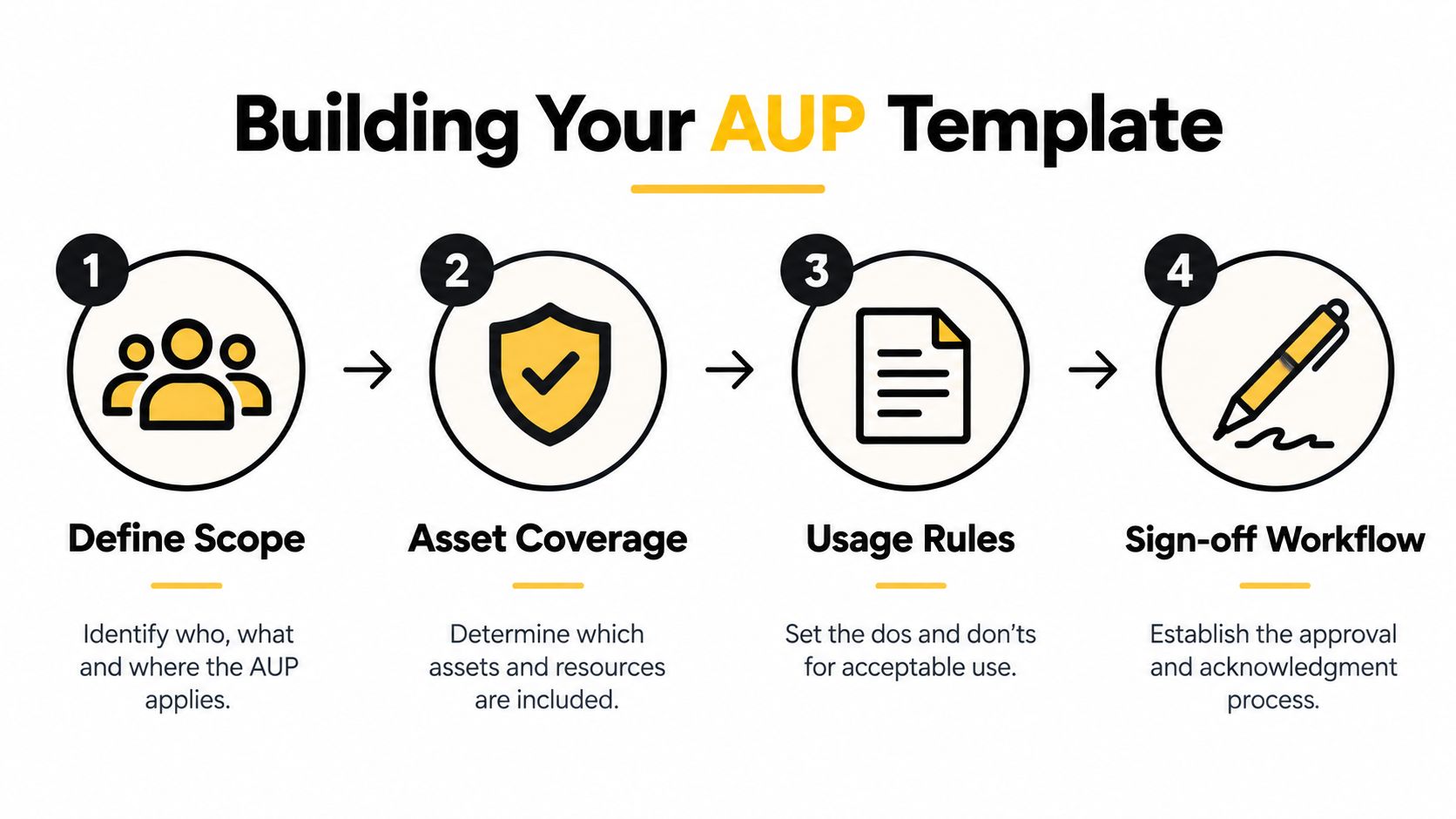
A practical acceptable use policy template starts with scope and ends with proof. The workflow should define covered users and assets, establish understandable rules, capture signed acknowledgments, and create a review process. This acceptable use policy template workflow reflects the need to make the document operational rather than aspirational.
Start with the boundaries
The first step is to define who and what the policy covers. A small business should not assume that only full-time employees matter. Contractors, temporary workers, consultants, vendors, and other third parties may access the same systems or data.
The asset inventory should include:
- Company-owned desktops, laptops, phones, and tablets.
- Personal devices approved for business access.
- Business email, cloud applications, shared drives, and collaboration spaces.
- Wireless networks, remote access services, and communication platforms.
- Data handled by employees, contractors, and external service providers.
The scope should also state whether the policy applies to work performed from home, public locations, customer sites, and personal accounts used for business activity. Ambiguity at this stage becomes an enforcement problem later.
Write rules people can follow
Plain language beats legal-sounding generalities. A rule should tell users what they may do, what they may not do, and what happens when a legitimate business need requires an exception. “Use company technology responsibly” is easy to read and difficult to test. “Do not install software unless it has been approved through the company's technology process” gives employees and administrators a concrete boundary.
The policy should cover credentials, devices, applications, data transmission, personal use, network activity, reporting, monitoring, and consequences. A business can also use a resource on risk controls from AletheionAGI to sharpen the connection between broad policy intent and practical guardrails.
Capture acknowledgment and keep the record
Every covered employee should sign an acknowledgment before receiving access, and the record should be stored centrally. Central storage allows authorized staff to retrieve the acknowledgment during an investigation, audit, access review, or employee dispute.
The document also needs an owner and a review trigger. The established guidance is to review an AUP at least annually or after major IT changes, because devices, access patterns, applications, and regulatory requirements shift quickly. A structured access control policy can help connect the written rules to provisioning, role changes, and offboarding.
From Vague Wording to Testable Controls
Vague language creates the most common failure in an acceptable use policy template. A statement such as “users must not misuse company technology” communicates a general expectation, but it doesn't identify the behavior that administrators should detect or managers should address.
Specific wording works differently. A rule that prohibits installing software not approved by IT can be checked against application inventories, device management records, or an approval log. The distinction is central to the CIS guidance on testable AUP controls, which emphasizes translating broad intent into rules that can be understood, monitored, and enforced.
Compare the language
| Weak policy language | Testable policy language |
|---|---|
| Use systems appropriately. | Users may access only systems authorized for their role. |
| Protect company information. | Users must store confidential business data only in approved locations and must not transmit it through personal accounts. |
| Don't misuse credentials. | Users must not share passwords, reveal authentication information, or permit another person to use an assigned account. |
| Avoid unauthorized software. | Users must not install applications, browser extensions, or scripts that have not passed the company approval process. |
| Use personal devices carefully. | A personal device may access business resources only when it meets the company's stated security and data-handling requirements. |
A strong policy lists enterprise systems, BYOD boundaries, software approval requirements, data-transmission rules, monitoring and enforcement methods, and sanctions. Each rule should answer a practical question: What action is prohibited, what evidence could show it occurred, and who decides how to respond?
Build controls around observable events
The policy should identify behaviors that technical and HR teams can recognize. Examples include unauthorized access attempts, account sharing, automated scraping or bot activity, unsolicited bulk messages, privacy invasion, malicious software, unauthorized copying of licensed material, and disruption of communications.
Rules should also explain permitted exceptions. A security administrator may need to use specialized software for an investigation, or a department may need to transmit data to an approved service provider. An exception process should record the request, business reason, approval, duration, and responsible owner.
A rule that cannot be tested will create debate precisely when the business needs clarity.
Training and periodic re-acknowledgment complete the control. Employees need examples that match their work, while administrators need a policy that aligns with logs, device controls, access reviews, and disciplinary procedures. The document becomes defensible when the written rule, technical evidence, and management response all point in the same direction.
Tailoring the Template for Regulated Industries
A generic template usually fails because different industries face different data, access, and communication risks. A healthcare clinic, law firm, accounting practice, construction company, and nonprofit may all use email and cloud applications, but the consequences of mishandling information and the required safeguards differ.
The customization process should begin with the organization's sensitive data and business workflows. A clinic should define how staff transmit protected health information, which devices may access clinical records, and how lost devices are reported. A law firm should address privileged material, client confidentiality, communication interception, and personal accounts. A financial or accounting firm should identify restrictions around client records, payment information, financial documents, and external sharing.
Make personal use measurable
“Reasonable personal use” sounds fair until a manager has to determine whether an employee crossed the line. Institutional policies provide more usable boundaries. Arizona's template permits personal use only when it isn't abused, doesn't reduce productivity, create extra expense, compromise the company, disrupt network performance, or conflict with other policies, as shown in the Arizona acceptable technology use template.
A business can translate that logic into rules such as:
- Limited activity: Personal use must remain brief, occasional, and appropriate for the workplace.
- No added cost: Users must not create charges for the business through personal activity.
- No operational impact: Personal use must not consume significant resources or interfere with business operations.
- No policy conflict: Personal activity must not violate security, privacy, conduct, or data-handling requirements.
These boundaries support fairer decisions than an undefined ban or an unlimited permission. They give managers observable factors to consider, especially in small teams without a dedicated compliance function.
Match the rule to the exposure
Healthcare policies need practical controls for sensitive records and remote access. Legal policies need special attention to confidentiality and unauthorized interception. Financial policies should clarify approved storage, transmission, and retention practices. Construction and engineering firms may need to address project plans, customer specifications, field devices, and third-party collaboration.
The policy should also define who may approve exceptions and how evidence is preserved. A short rule about personal use is not enough if the business can't explain how it monitors company devices, protects personal devices, or handles work performed through a personal account.
Enforcement and Incident Response Workflows
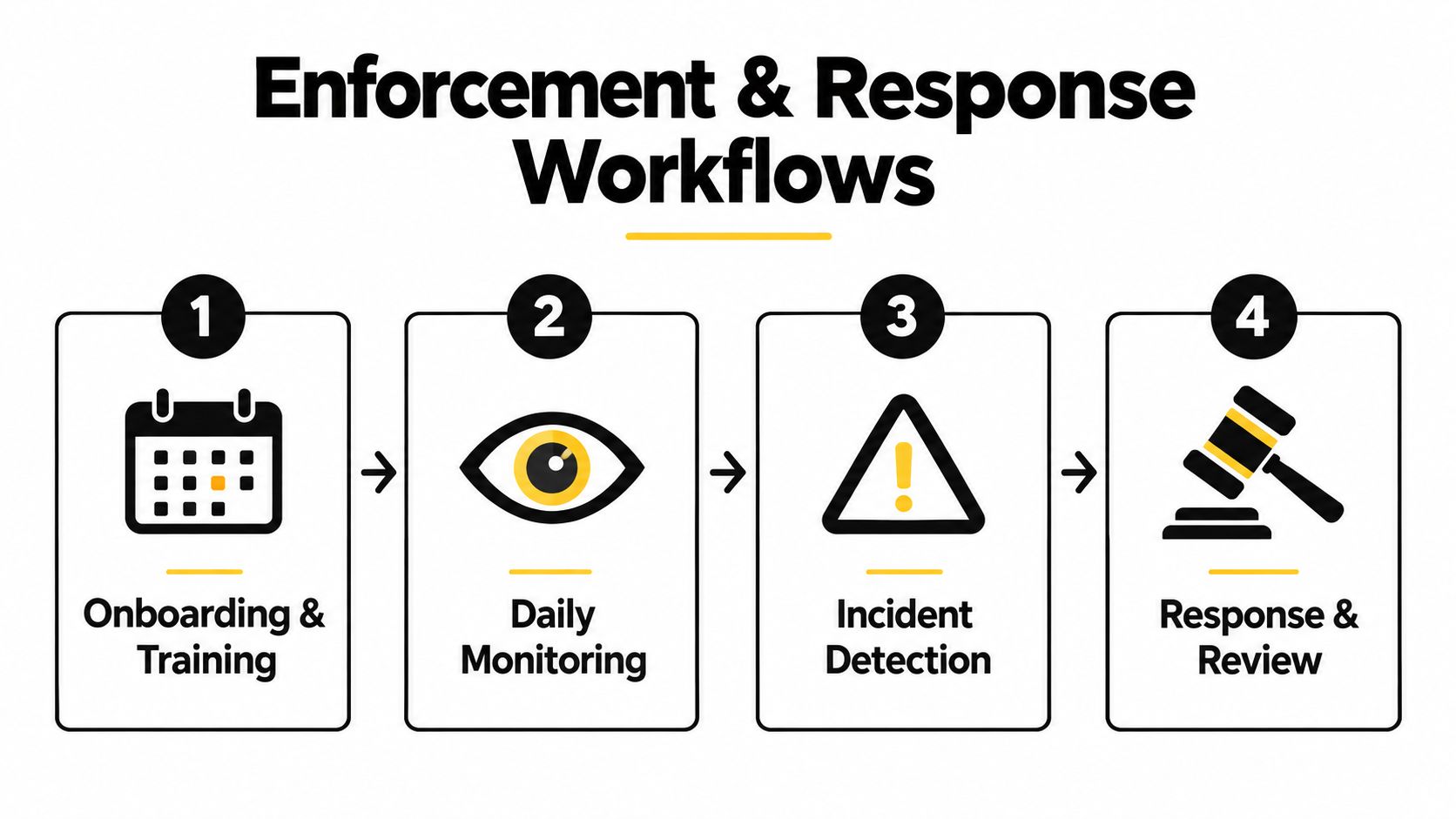
A policy becomes credible through what happens before, during, and after a violation. A new hire should receive the policy during onboarding, complete the required training, sign the acknowledgment, and receive access only after the relevant records are in place. The same process should apply when an employee changes roles, receives access to a new system, or begins using a personal device for work.
Follow the event from detection to review
Suppose an administrator sees an unapproved application on a company laptop. The response shouldn't begin with an accusation. The team should verify the device, identify the user, check whether an approved exception exists, preserve relevant evidence, and compare the event with the policy language.
If the application transferred confidential information to a personal account, the matter may require a broader incident process. If the employee installed a harmless utility without approval, the response may involve removal, coaching, and a documented acknowledgment. Consistency matters because uneven enforcement turns a clear rule into a source of disputes.
The workflow should assign responsibility for:
- Monitoring notices: Explain what activity may be logged and why.
- Exception handling: Provide a documented route for legitimate business needs.
- Incident escalation: Identify when IT, management, HR, legal counsel, or an external response team becomes involved.
- Employee response: Give the affected person a way to provide context without weakening evidence preservation.
- Closure and review: Record the outcome, update controls, and determine whether training or policy changes are needed.
Current guidance identifies enforcement and proof as overlooked parts of AUPs. Template pages often explain acceptable and unacceptable use but don't show how to operationalize monitoring, exceptions, and acknowledgments for an audit or incident review, as discussed in this policy enforcement and acknowledgment guidance.
Connect the policy to the employee lifecycle
Onboarding is only the first checkpoint. Managers should revisit access and acknowledgment records after role changes, while offboarding should remove accounts, recover devices, revoke third-party access, and preserve records needed for investigation. Shadow IT and personal accounts deserve specific attention because employees may use them when an approved workflow feels slow or unclear.
A documented incident response procedure gives the organization a place to apply these rules under pressure. The objective isn't to monitor everything indiscriminately. It's to align transparent monitoring with known risks and ensure that the response is proportionate, documented, and repeatable.
Adapting Your Policy for GenAI and Modern Tools
Signing a traditional AUP doesn't mean a business has addressed generative AI. Employees can access AI features through applications already used for work, browser sessions, personal accounts, and newly adopted services. A template that covers devices and email but says nothing about AI leaves a major gap around confidential information, output review, vendor diligence, and responsibility.
Recent analysis identifies AI-specific governance as an underserved part of acceptable use policy content. Companies need rules for approved and prohibited AI tools, confidential data, vendor diligence, human review, and consequences, as described in this analysis of customized AI use policies.

Define approved use before banning everything
A blanket prohibition may push activity into personal accounts, where the business has less visibility and fewer safeguards. A more useful policy identifies approved systems and permitted use cases, then defines restricted data and activities.
The AI section should answer:
- Which AI systems are approved for official work?
- Which systems or features are prohibited or require review?
- Can employees submit confidential, regulated, proprietary, or client information?
- Who evaluates new vendors and their data-handling practices?
- When must a person verify, edit, cite, or approve generated content?
- How should employees report suspected exposure, inaccurate output, or misuse?
Texas DIR's 2026 AI acceptable use policy restricts users to approved AI systems for official work. That approach supports a clear approval boundary, while still leaving room for a business to define appropriate uses inside approved environments.
Treat AI output as work that needs review
AI-generated text, code, summaries, images, and recommendations can contain errors or expose information through prompts and connected features. The policy should require human review before material affects customers, legal work, financial decisions, clinical activity, hiring, or other sensitive operations.
A generative AI governance approach for business can help connect these requirements to access control, employee training, data classification, and vendor review. The policy should also explain consequences without relying only on punishment. Employees are more likely to report mistakes when the organization provides a clear way to ask questions and contain exposure.
Turning Policy into Proactive Security
An acceptable use policy is valuable because it translates expected behavior into technical and HR rules. It tells employees what is allowed, gives administrators observable controls, helps managers handle exceptions, and creates evidence that the business communicated its expectations.
The strongest template also exposes weaknesses. If a policy prohibits account sharing but shared credentials remain common, access provisioning needs attention. If the policy restricts personal devices but employees can connect unmanaged phones to business systems, the technical environment doesn't match the written rule. If AI use is restricted but no one owns tool approval, the organization has created a boundary without an enforcement mechanism.
A DFW managed IT partner can connect the document to practical safeguards such as access reviews, endpoint oversight, backup, remote access controls, security awareness, monitoring, and incident coordination. Technovation LLC provides managed IT, cybersecurity, compliance, proactive 24/7 monitoring, risk mitigation, cloud backup, remote access, consulting, and IT planning for organizations across North Texas, including regulated and security-conscious businesses.
The right next step isn't downloading another generic document. It's comparing the proposed rules with the systems, users, devices, applications, and data flows already operating in the business. That review shows which controls can be enforced today, which need implementation, and where the acceptable use policy template needs customization.
Businesses that need a usable policy can work with Technovation LLC to assess current access, device, monitoring, and incident-response practices, then turn the acceptable use policy into an operating control. Visit Technovation LLC to request a practical technology review for a Dallas–Fort Worth organization.