The outage never starts with a fireball or a dramatic headline. It starts when a manager opens the dashboard, sees the backup job marked successful, then discovers the restore point won't boot, the application data is inconsistent, or the credentials needed to bring anything back online are locked behind a system that's also down. That's the moment many SMBs learn the hard truth about disaster recovery planning, a documented plan is not the same thing as a recovery capability.
A business can survive a lot of inconvenience. It can't survive guessing during an outage. The companies that come through cleanly treat recovery as an operating discipline, not a binder on a shelf, and they build around evidence, not hope. That shift matters because downtime is expensive, formal planning is still uneven, and the gap between “we have a plan” and “we can restore on demand” is where most losses happen (worldmetrics.org).
Table of Contents
- Why Most Disaster Recovery Plans Fail When It Matters
- Conducting a Business Impact Analysis That Informs Decisions
- Setting Recovery Time and Recovery Point Objectives by System Tier
- Choosing Backup Strategies That Survive Real Incidents
- Testing Your Disaster Recovery Plan with Measurable Outcomes
- Building Runbooks and Escalation Procedures That Work Under Pressure
- Maintaining Compliance and Selecting the Right DRaaS Partner
Why Most Disaster Recovery Plans Fail When It Matters
The owner sees green backup status and assumes the business is protected. Then an outage hits, the first restore fails, and the reason shows up fast. The last clean copy is incomplete, the application dependencies were never captured, or nobody walked through the restore from start to finish. That is a recovery design problem, not an unlucky break.
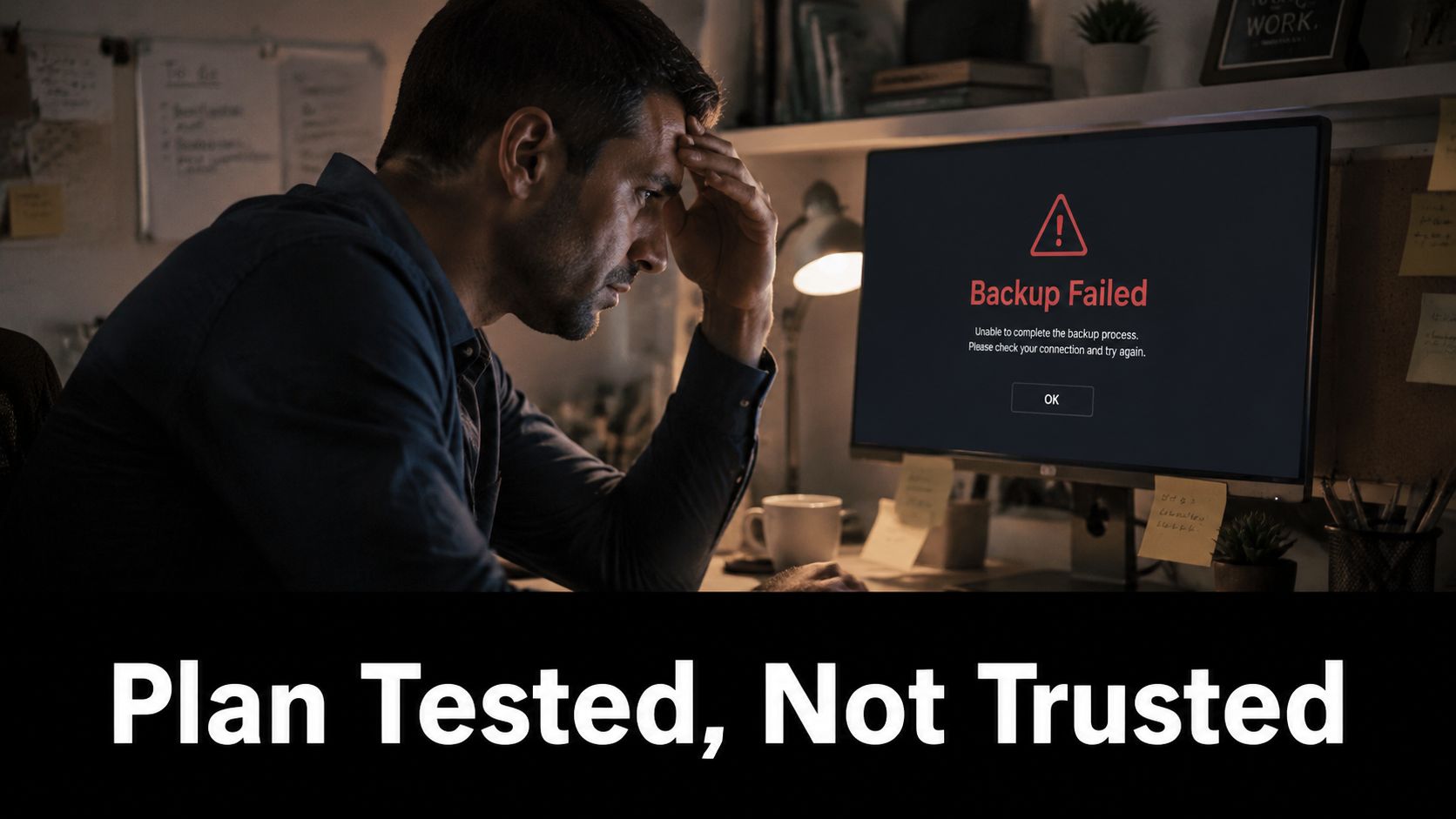
The clean way to think about disaster recovery planning is direct. A documented plan describes intent. A validated plan proves capability under pressure. That gap is why an organization can look ready on paper and still fail the moment a restore has to work in the world.
The plan is not the proof
A workable plan starts with a business impact analysis, risk assessment, and explicit recovery targets. IBM's guidance treats DR as a sequence of analysis, prioritization, objective setting, and continuous testing, not a paperwork exercise (IBM disaster recovery strategy). That order matters because recovery has to be built in the same sequence the business will need it.
Practical rule: if a system has never been restored, treat it as a hypothesis, not a backup strategy.
The industry numbers make the failure pattern obvious. A 2026 industry summary reports 73% of organizations have a formal disaster recovery plan, up from 61% in 2020, yet only 30% of SMEs have a documented plan, and the average cost of downtime is $5,600 per hour (worldmetrics.org). That gap explains why so many smaller firms are one outage away from a cash-flow problem.
A plan earns its keep when it shortens the return to work. The same source says organizations with a documented DR plan experience 40% lower recovery costs. For an SMB, that means fewer improvised decisions, less confusion during the outage, and a better shot at restoring revenue before the interruption spreads into payroll, customer service, and compliance problems.
For business owners who also need help thinking through how interruption coverage fits into the financial side of a loss, a useful starting point is recovering business income after a loss. The operational lesson stays the same. If recovery has not been validated, the business is carrying hidden exposure, and the only honest test is a restore that completes.
Conducting a Business Impact Analysis That Informs Decisions
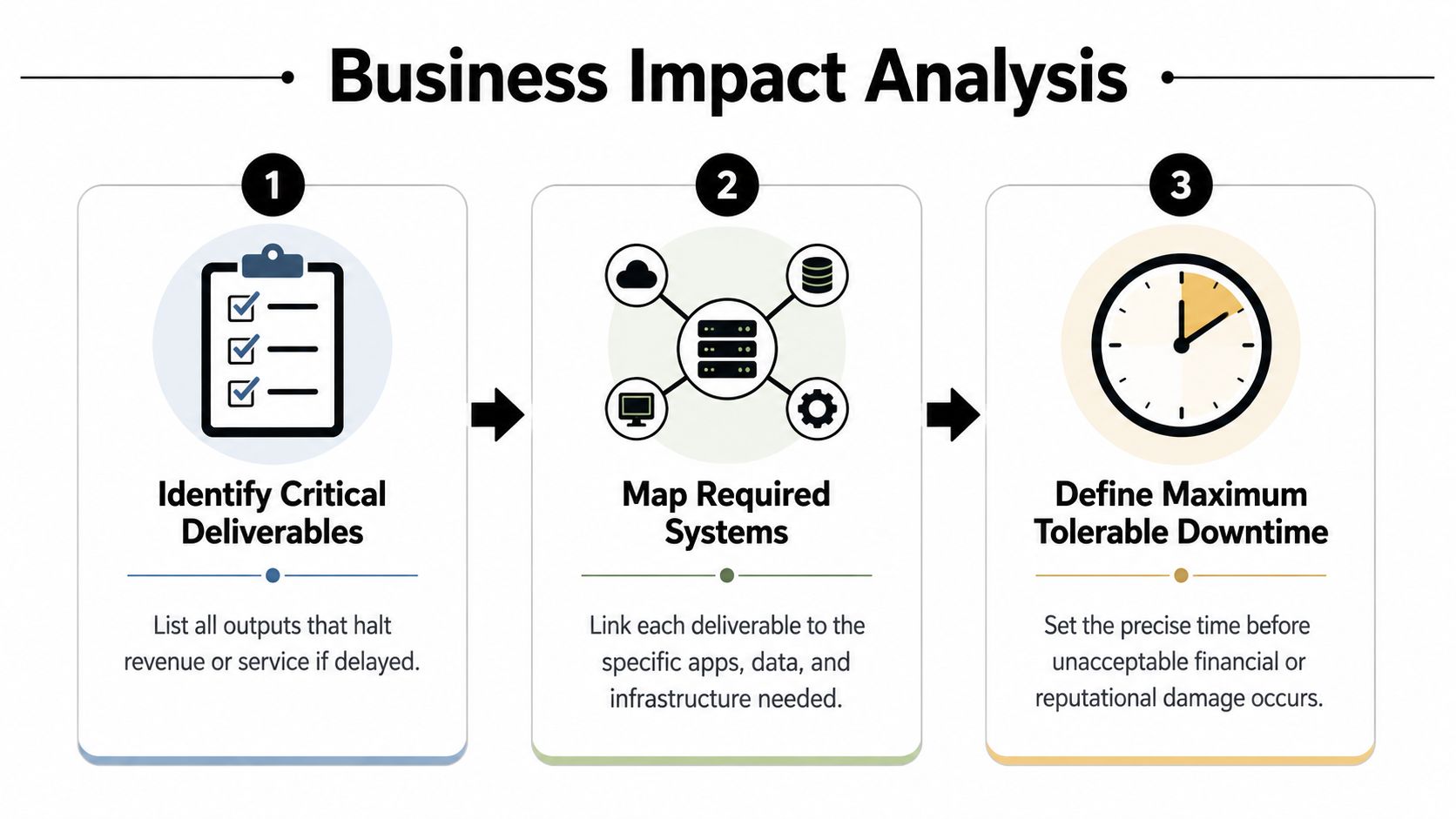
A useful business impact analysis starts with the work that keeps the company open, not with a list of servers. It asks what stops you from serving customers, shipping work, collecting money, or meeting obligations. The DR guidance from IBM makes the same point, the BIA should identify critical deliverables, required resources, disruption impacts over time, and resumption time frames before recovery strategies are chosen.
Start with deliverables, not systems
A healthcare clinic does not need “the EMR” in abstract terms. It needs scheduling, chart access, billing, and the ability to confirm patient identities. A law firm may care most about active case files, document management, email continuity, and deadline-sensitive communications. A financial services firm may prioritize client records, transaction processing, and audit trails.
That is why a BIA has to include people from operations, finance, and compliance. IT can map dependencies, but the business has to define what fails first, what can wait, and what creates unacceptable risk. If the wrong people are missing from the discussion, the result is a polished document that looks good in a binder and fails under pressure.
A practical BIA sequence looks like this:
- List critical deliverables. Identify the outputs that directly affect revenue, service, or legal obligations.
- Map required resources. Tie each deliverable to applications, data, storage, identity, and staff roles.
- Define disruption impact over time. Separate a short interruption from a long one, because the damage is rarely flat.
- Set resumption time frames. Decide when a delay stops being manageable and becomes operationally unacceptable.
A BIA that does not tie each output to a dependency chain does not help recovery. It helps filing.
The point of the exercise is prioritization. Once the business knows which functions fail first, the recovery team can assign tiers, set targets, and avoid spending premium money on systems that do not justify it. A cybersecurity risk assessment template gives SMBs a clean way to connect risk, impact, and recovery priorities without building the framework from scratch.
For a business that also needs to speed up insurance approvals, this same discipline helps show what was lost, what depends on what, and which functions must return first. The test is simple. If the BIA does not change recovery decisions, it was just documentation.
Setting Recovery Time and Recovery Point Objectives by System Tier
A recovery target that looks tidy on paper can still fail in a real outage. If a finance team cannot restore order entry fast enough, the business feels it immediately. If an archive system comes back later, the business barely notices. RTO sets the maximum tolerable downtime. RPO sets the maximum acceptable data loss. Those targets should reflect business tolerance, not IT convenience.
Build tiers around business consequence
Use business consequence to set the tier, then set the target. A payroll database, a customer portal, and a file archive do not belong in the same recovery bucket just because they sit on the same network. Common planning benchmarks include recovery windows of 30 minutes, 2 hours, and 12 hours, paired with data-loss limits of 1 hour, 3 hours, and 1 day. Those numbers are reference points, not a standard to copy blindly, and they are best used to match recovery effort to actual operational pain.
| System Tier | Example Systems | Target RTO | Target RPO |
|---|---|---|---|
| Tier 1 | Billing, scheduling, patient intake, payment capture | 30 minutes | 1 hour |
| Tier 2 | Internal document systems, reporting, shared workflow tools | 2 hours | 3 hours |
| Tier 3 | Archives, reference data, non-urgent back-office systems | 12 hours | 1 day |
A good tiering model follows business role and regulatory pressure. A clinic with live patient intake cannot wait as long as an archive system. A law firm with court deadlines cannot treat email and document access as optional. A finance team handling transactions needs tighter control than a department running a weekly reporting batch.
The budget decision gets easier once the tiers are honest. If an SMB gives every system a 30-minute target, it will waste money on resilience it does not need. If it gives revenue systems a 12-hour target, it will pay for that mistake during the first outage. A solid cloud backup solution for small business should fit the target that each tier needs, not replace the planning work (cloud backup solutions for small business).
For businesses that also need to speed up insurance approvals, this same discipline helps show what was lost, what depends on what, and which functions must return first. Faster restoration cuts friction in finance, service delivery, and management review. It also makes incident reporting easier to defend because the recovery priorities are tied to business impact, not guesswork.
Use a tiering rule, then stick to it
- Tier 1 systems should support immediate revenue or clinical, legal, or financial continuity.
- Tier 2 systems should support the work that keeps the business functional but not instantly exposed.
- Tier 3 systems should support historical, reference, or low-urgency operations.
Technovation's cloud backup solutions for small business are most useful when the tiering is already defined, because backup design should follow the target, not replace it.
The test is simple. If a system cannot meet its target during a restore test, the target is wrong or the recovery design is weak.
Choosing Backup Strategies That Survive Real Incidents
A backup plan that looks good in a spreadsheet can still fail the first time you need it. The better question is whether the backup survives the failure you expect, whether that is ransomware, a fire, or a cloud outage. Each one breaks a different assumption, and each one needs a recovery path that still works under pressure.
Compare the storage models
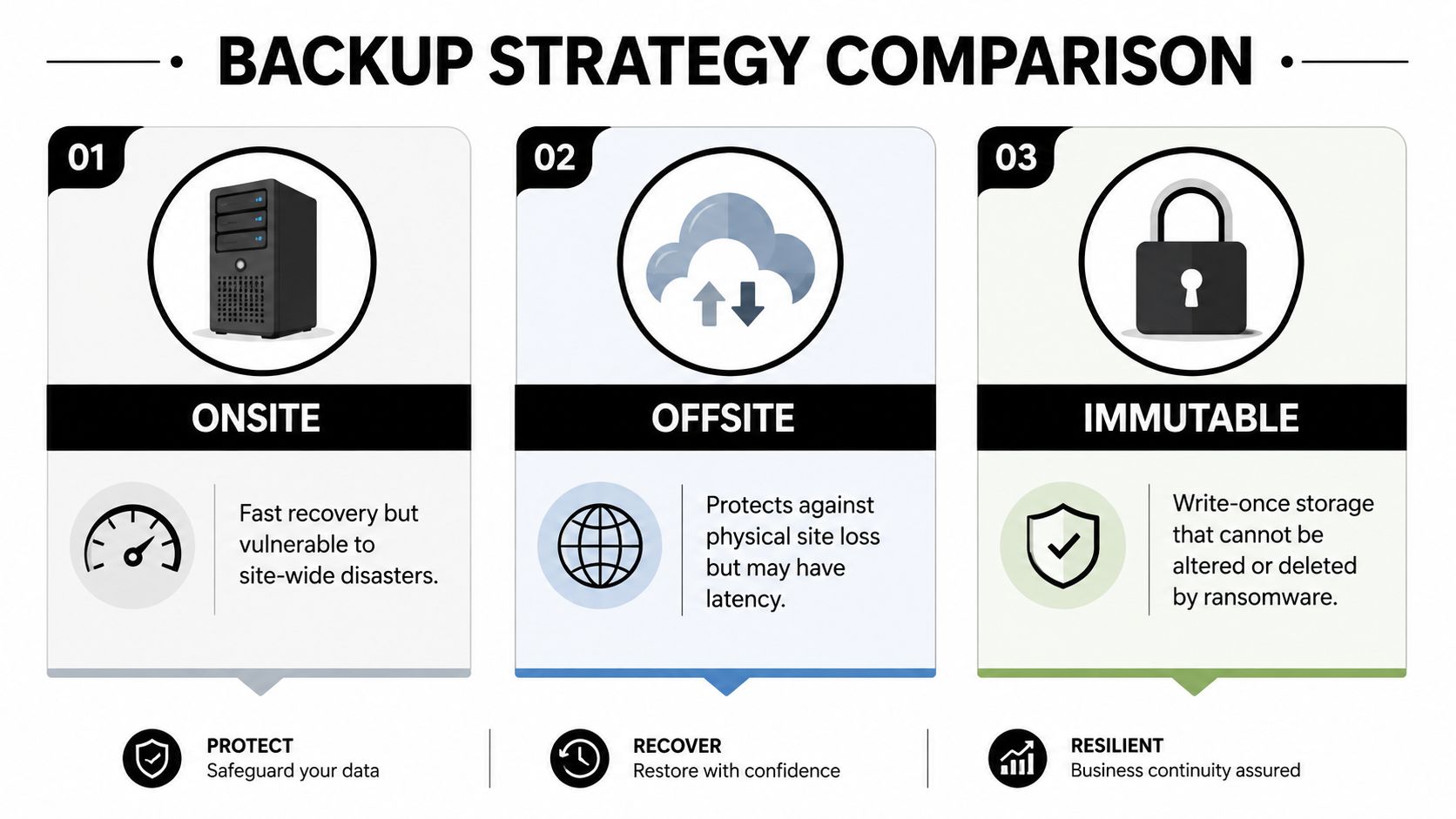
Onsite backups are fast to restore, which is why teams like them. They also fail with the production system if the same event takes down the site. Offsite backups protect against location loss, but they still depend on a working recovery path and clean data. Immutable backups add a different layer of protection because the recovery copy cannot be altered or deleted by ransomware in the same way a normal backup can.
Completeness is where a lot of SMBs get burned. Gitnux reports that 35% of backups are incomplete, 58% of DR plans fail to meet recovery time objectives during tests, and organizations using immutable backups reduce ransomware recovery time by 50%. The operational lesson is straightforward, creating a backup is easy, proving that it restores the business is the hard part.
Backups that never get restored are storage, not resilience.
The gap gets wider under real failure conditions. The same source reports air-gapped backups succeed in 95% of ransomware recovery scenarios, while automated DR orchestration can make recovery 3x faster. It also notes 90% recovery success for offsite backups versus 60% for onsite backups during fires. That difference matters the moment the building, the network, or both are gone.
Use more than one control. Keep offsite copies so a local event does not erase every recovery point. Keep immutable or air-gapped copies so a malicious actor cannot poison the same backups you plan to trust. Then validate application consistency, because a file copy that opens badly is not a recovery point.
The final check is the one teams skip. A restore test has to prove that the backup is complete, the application is consistent, and the recovery path still works with current permissions and dependencies. If the restore has never been exercised, the business is betting on an assumption.
For teams that need a tighter recovery process under stress, a clear incident response playbook keeps backup recovery from turning into improvisation.
Testing Your Disaster Recovery Plan with Measurable Outcomes
A DR test should produce a pass or fail outcome, measured against recovery objectives, not a comforting note that “the meeting went well.” The goal is to prove whether the business can restore service inside its own limits, with its own people, under pressure. That is where a lot of plans fall apart. They look complete on paper, then stall when someone has to restore systems, validate data, and make the call in a live outage.
The gap shows up fast under a real incident. If a restore only works when the network is perfect, the identity system is healthy, and the right administrator happens to be available, it is not a recovery plan. It is a hope statement. A test has to show whether the team can recover with current permissions, current dependencies, and current data, not the version that existed during planning.
Test the objective, not the document
Each critical application needs a target that can be measured in the recovery window. If the objective is a 2-hour RTO, the test should record whether service returned inside that window. If the RPO is 3 hours, the test should confirm the restored data loss stayed within that limit. The scorecard should track outcome against objective, not whether someone sat through a tabletop and nodded along.
A practical cadence starts small and gets stricter:
- Tabletop review. Walk through decision points, escalation paths, and communication steps.
- Restore test. Prove that backups recover the application, not just the files.
- Full recovery exercise. Validate the complete path, including dependencies and failback.
- Retest after change. Run another test after major infrastructure, cloud, or application changes.
That sequence catches weak spots early. A tabletop exposes confusion in decision-making. A restore test exposes broken backups, missing permissions, and bad assumptions about dependencies. A full recovery exercise shows whether the team can bring the service back in the right order, with the right data, before users start hammering support.
The most useful tests simulate failure paths that look ugly during an actual incident. Cyber and hybrid outages often break identity, communications, and third-party access at the same time, which means recovery cannot assume the rest of the environment is healthy. FEMA's National Disaster Recovery Framework stresses maintaining essential functions and tracking recovery status under those conditions.
Test result to care about: whether the team restored the right service in the right order, using the right data, inside the target window.
Technovation's incident response playbook works well alongside DR testing because outage response and recovery are tied together. Better escalation and coordination cut wasted minutes, and wasted minutes are what sink recoveries.
The standard is plain. A recovery test should show whether the business can meet the target, not whether the plan reads well in a document. If the target fails in a test, it is not ready for production.
Building Runbooks and Escalation Procedures That Work Under Pressure
Most recovery failures happen after the decision to declare a disaster, not before it. The team knows something is wrong. Nobody knows whether the event crosses the threshold, who has authority to act, or which sequence of systems has to come up first. That's why a recovery plan needs named authority, explicit trigger conditions, and runbooks written for stressed humans.
Make disaster declaration a decision, not a debate
A good framework spells out who can declare a disaster, what conditions separate a major incident from a routine outage, and what the notification chain looks like once the call is made. That matters because hesitation burns time. A team that waits for consensus during a real outage usually loses momentum before the technical work even begins.
Runbooks should be specific enough to execute without improvisation. That means each system tier needs its own recovery path, with preconditions, secure credential access, validation checks, rollback steps, and estimated step times. The person opening the runbook should not have to guess whether a database must be available before an application, or whether a service can be restored safely without a dependency.
A concise runbook should answer these questions:
- What has to be true first? Define preconditions and dependency status.
- Who can advance to the next step? Name the approver or operator with authority.
- How is success verified? Record the exact validation step.
- What happens if the step fails? Document rollback and fallback options.
- How long should each action take? Estimate step times so the team can spot drift.
The reason this matters is operational, not theoretical. Recovery under pressure is noisy, and people make bad assumptions when systems fail in overlapping ways. That's especially true when a cyber event affects identity, communications, and application access together, which is why the recovery team needs more than a checklist. It needs a sequence that still holds when normal support channels are unstable.
The best runbooks do one thing well. They turn uncertainty into a repeatable sequence that the team can follow without re-litigating the plan.
Maintaining Compliance and Selecting the Right DRaaS Partner
A recovery program that ignores compliance will drift into avoidable risk. A program that ignores ongoing review will drift into irrelevance. IBM's DR guidance includes regulatory compliance and continuous testing and review in the planning sequence, because business changes, application changes, and control changes all affect recovery readiness (IBM disaster recovery). That order is right. Compliance first, then steady maintenance.
Choose support that proves recovery, not just storage
For organizations evaluating Disaster Recovery as a Service, the right questions are plain and practical. Can the provider support the actual RTO and RPO targets? Can recovery be tested without disrupting operations? Can the team review evidence, not just promises? Those questions matter more than marketing language.
A strong partner also treats compliance as part of the operating model, not a box to check after deployment. A useful reference for that mindset is compliance guidance for data center investors, because controlled environments need discipline around evidence, access, and verification. SMB recovery programs need the same discipline. Controls have to be visible before an incident, not invented during one.
Technovation's IT disaster recovery services fit best when a business wants proactive monitoring, repeatable testing, and a partner that can connect backup, compliance, and response into one operating model. That matters for healthcare, legal, financial, and other regulated teams that cannot afford to separate security from continuity. If the restore path cannot be proved, the backup plan is only paper.
Use a simple decision rule. If the internal team cannot keep pace with testing, dependency mapping, and recovery validation as the environment changes, bring in outside help before the next outage exposes the gap. A good partner reduces drift, keeps the plan current, and makes recovery a managed process instead of a scramble.
Technovation LLC helps SMBs build disaster recovery programs that restore, not just look complete on paper. If the current plan has not passed a real restore test, or if the team needs stronger backup, testing, and escalation discipline, visit Technovation LLC and start a conversation about a recovery setup that fits the business.