A DFW business owner can buy another AI app this week and still end up no closer to real business value. The problem usually isn’t access to generative AI. It’s deciding where it fits, what data it can touch, and who will keep it from creating security, compliance, and workflow headaches.
That gap matters now because generative AI for business has moved past the novelty stage. Leaders are using it, budgets are forming around it, and employees are already experimenting with it whether management has a policy or not. The companies that benefit won’t be the ones chasing every new feature. They’ll be the ones that treat AI like any other business system: useful, governed, integrated, and tied to a practical outcome.
Table of Contents
- Is Generative AI Really a Priority for Your Business
- Understanding Generative AI without the Hype
- High-Impact Use Cases for DFW Businesses
- Weighing the Rewards Against the Real-World Risks
- Navigating AI Compliance in Healthcare Legal and Finance
- Your Generative AI Implementation Roadmap
- Make AI a Practical Asset Not a Liability
Is Generative AI Really a Priority for Your Business
A lot of DFW owners are asking the wrong question. They ask whether AI is overhyped. A better question is whether employees, clients, and competitors are already changing expectations around speed, responsiveness, and documentation.
For smaller businesses, skepticism is healthy. It’s also justified. Federal Reserve Bank of San Francisco roundtables found that small-business leaders saw potential for routine work like document processing, but also said custom model development was cost-prohibitive and that they’d likely need multiple third-party apps that don’t communicate well, making integration and process redesign a bigger barrier than basic model access (Federal Reserve Bank of San Francisco on small-business generative AI barriers).
That finding should get more attention in North Texas. Most SMBs don’t fail with AI because the model is weak. They fail because the tool sits outside the business. It doesn’t connect to the file systems, business applications, approval steps, and security controls that run the company.
The real issue is workflow, not hype
A clinic doesn’t need a flashy chatbot. It needs faster intake summaries without exposing patient data. A law office doesn’t need generic content generation. It needs cleaner internal search across matter-related documents. A construction firm doesn’t need an “AI strategy deck.” It needs help organizing project notes, proposals, and field updates into something searchable and usable.
Practical rule: If a generative AI idea can’t be tied to one recurring workflow, one owner, and one business outcome, it’s still a demo.
That’s why AI deserves a spot on the priority list, but not as a science project. It belongs next to cybersecurity, process improvement, and IT planning. Business owners who want a grounded primer can also review this guide on leveraging AI for growth, which is useful because it frames AI as an operational lever rather than a novelty purchase.
Where DFW SMBs should focus first
The strongest first moves usually share three traits:
- Clear repetition: The task happens often enough to justify automation or assisted drafting.
- Low ambiguity: Staff can define what a good output looks like.
- Human review: Someone inside the business can approve the result before it reaches a client, patient, or prospect.
That’s how generative AI for business becomes practical. Not by replacing the team, but by removing routine friction that wastes the team’s time.
Understanding Generative AI without the Hype
Generative AI is best understood as a fast junior analyst with a huge memory and no business judgment. It can draft, summarize, classify, rewrite, and organize information quickly. It can also be confidently wrong if nobody gives it context or checks the output.
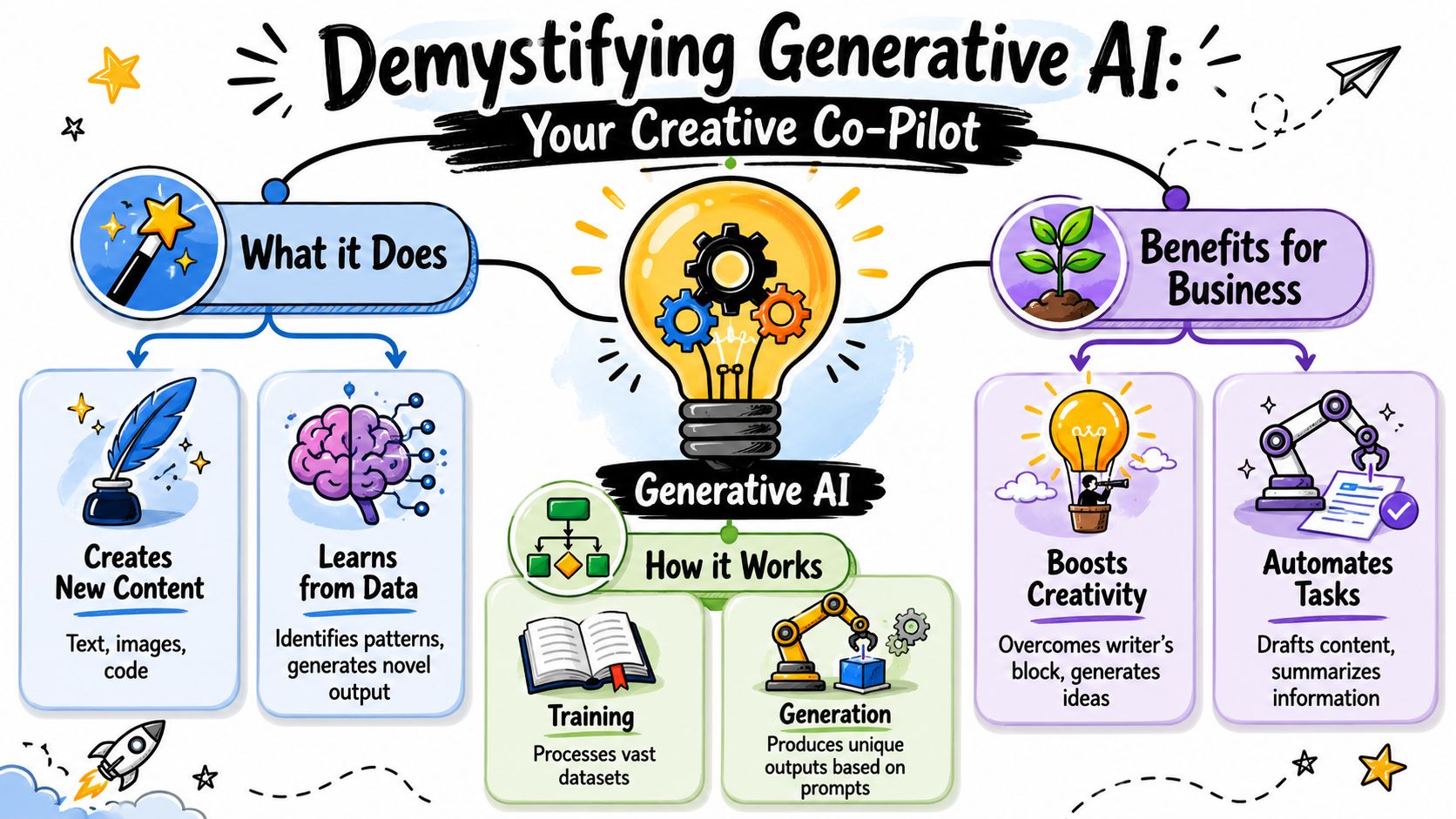
That mental model helps owners separate reality from marketing. Generative AI for business isn’t magic software that runs the company. It’s a system for producing new content and responses based on prompts, examples, and source material.
What it actually is
At a practical level, generative AI can help businesses:
- Draft language: emails, summaries, follow-up messages, policies, outlines, and first-pass marketing copy
- Work with information: summarize meetings, extract action items, convert messy notes into structured records
- Support lightweight coding and automation: assist with scripts, formulas, and simple internal workflow logic
- Create visual assets: draft concepts for presentations, internal explainers, and simple design support
That’s why the best use cases usually involve a human-in-the-loop process. The system produces a strong first draft. Staff members refine it, approve it, and move faster than they would from a blank page.
What businesses can reasonably expect
A business should expect acceleration, not autonomy. Good AI reduces the time spent on repetitive writing, repetitive searching, and repetitive formatting. It also helps teams move from unstructured inputs to usable outputs.
Generative AI works best when the business already knows what “good” looks like.
That’s where many owners miss the opportunity. They evaluate AI as if it needs to replace a role. It doesn’t. It needs to reduce drag inside a role.
For leaders who want another perspective on workflow redesign, this article on How GenAI reimagines work processes is useful because it focuses on the shape of work, not just the software itself.
A simple test helps. If a team member repeats the same type of task every day, but the inputs change, generative AI may fit. If every task is unique, heavily regulated, or dependent on nuanced judgment, AI should assist the process, not run it.
That distinction matters. Used well, AI becomes a creative co-pilot and document engine. Used carelessly, it becomes a source of polished mistakes.
High-Impact Use Cases for DFW Businesses
The most useful AI projects for SMBs aren’t the flashy ones. They’re the quiet fixes that remove administrative bottlenecks, speed up client communication, and make internal knowledge easier to use.

Operations that benefit first
Consider a North Texas professional services firm buried in intake emails, appointment changes, follow-up questions, and proposal revisions. That business doesn’t need a moonshot. It needs a system that turns incoming information into summaries, task lists, and standardized drafts.
Common first wins include:
- Client intake support: turning raw notes, web submissions, or call transcripts into structured summaries for staff review
- Scheduling and communication: drafting reminders, confirmations, and routine updates in a consistent tone
- Invoice and document handling: extracting details from paperwork and preparing clean internal summaries
- Marketing assistance: producing first drafts for newsletters, social posts, or campaign variations that the team edits before release
A business that wants practical examples of task-level automation can review this article on AI for efficiency and daily task automation. The strongest opportunities usually live inside repetitive office work, not only inside customer-facing applications.
Knowledge work that stops bottlenecks
Some of the best use cases are invisible to customers but valuable to staff. Think of a law office searching through prior document templates, a medical practice trying to standardize internal reference information, or a construction company managing years of scattered project knowledge.
McKinsey notes that generative AI can improve data engineering by generating synthetic test data, inferring data-quality rules, and helping map unstructured to structured data, which makes reusable data products such as a 360-degree customer view easier to operationalize (McKinsey on scaling gen AI through better data engineering).
That matters because many SMBs don’t have an AI problem. They have a data mess.
A business gets more value from AI when the system can find the right internal context instead of guessing.
A few practical scenarios make that clear:
- Healthcare practice: Staff use AI assistance to draft patient communication based on approved internal guidance, then review before sending.
- Law firm: Team members search internal documents and get concise summaries tied to the firm’s own materials instead of relying on generic web knowledge.
- Contractor or engineering office: Project managers turn daily logs, meeting notes, and change discussions into cleaner records and status updates.
- Nonprofit or association: Administrative teams draft donor messages, board summaries, and event recaps without starting from scratch each time.
These are achievable projects. They don’t require a giant internal AI team. They require good process selection, secure data handling, and tight review.
Weighing the Rewards Against the Real-World Risks
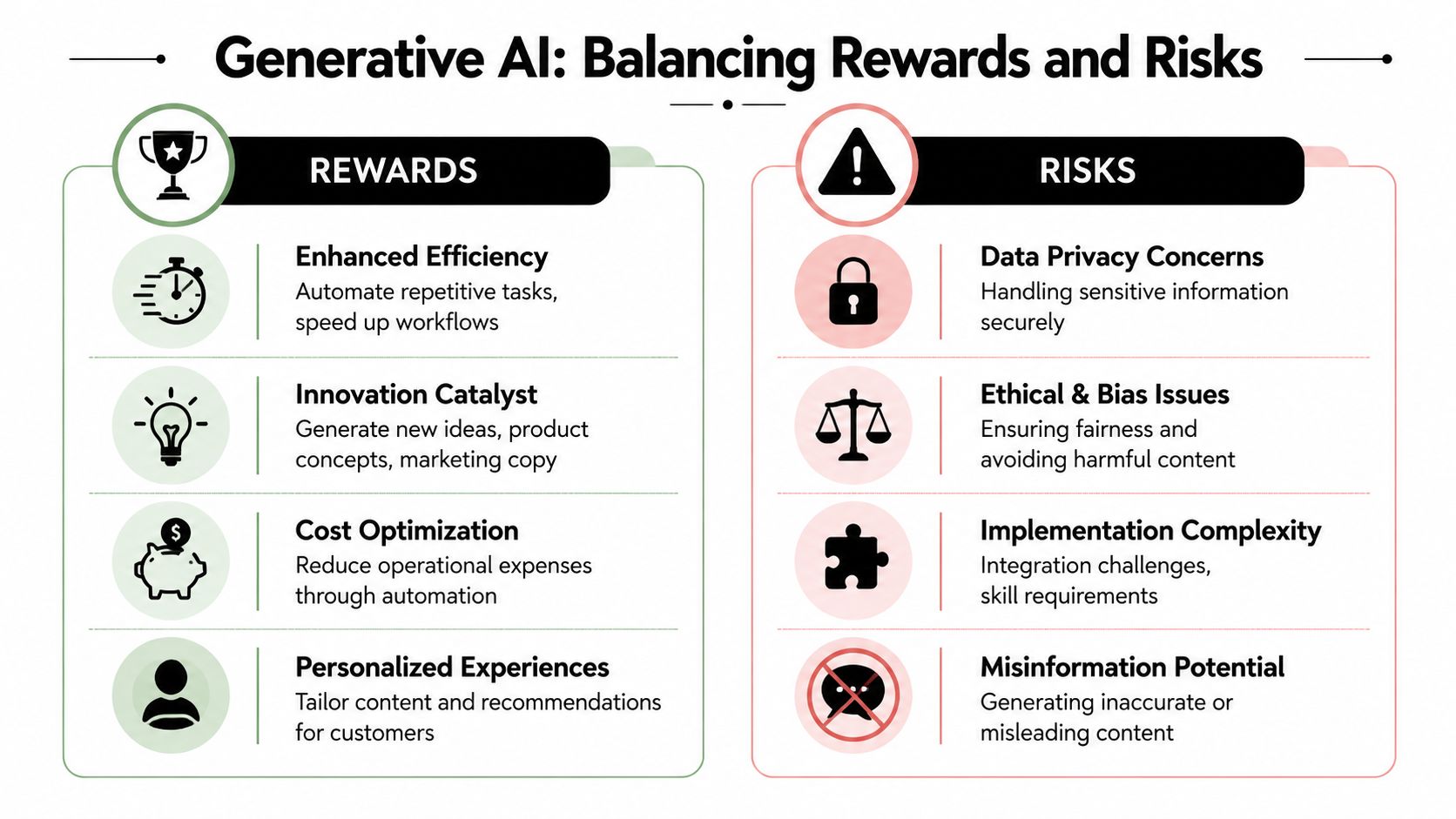
Generative AI can absolutely create value. It can also create bad records, expose sensitive information, and spread confident nonsense if a business treats it like an unsupervised expert. The right stance isn’t fear. It’s control.
The upside is real
Senior leadership adoption is no longer fringe behavior. A 2025 Wharton and GBK Collective report found that 82% of senior leaders use generative AI weekly, three out of four reported positive returns on their AI investments, and 88% planned to increase spending in the next year (Wharton on how companies are using gen AI in 2025).
Those numbers matter for one reason. Serious business leaders aren’t waiting for perfect certainty. They’re putting measurement around AI, watching returns, and moving forward.
That’s the right posture for SMBs too. Start with a constrained use case. Define success. Monitor output quality. Expand only after the workflow proves itself.
The risks are manageable but not optional
The biggest risks usually fall into four buckets:
- Data privacy exposure: Staff paste client, patient, employee, or financial data into tools that weren’t approved for that use.
- Hallucinations: The system generates plausible but inaccurate statements, summaries, or recommendations.
- Intellectual property confusion: Teams create content or code without clear rules around source material and review.
- Shadow AI: Employees adopt tools on their own, outside IT oversight, because the business didn’t give them a safe path.
A policy alone won’t solve this. Businesses need technical controls, approved workflows, and clear boundaries on what information may enter an AI system.
One often-overlooked issue is that AI also changes the threat environment. Attackers are using the same technologies to produce more convincing scams and social engineering content. Businesses that want a practical security perspective should review this resource on how AI is amplifying phishing risk.
The smartest move isn’t banning AI outright. It’s giving employees a secure way to use it and removing the need for risky workarounds.
That’s the difference between a business that governs AI and one that discovers its AI usage after a mistake.
Navigating AI Compliance in Healthcare Legal and Finance
In regulated industries, public AI tools are the wrong starting point. If staff members are entering protected, privileged, or confidential information into public systems without a clear data governance model, the business is creating a compliance problem before it creates any value.
Why public AI tools create compliance problems
Healthcare organizations have to protect patient information. Law firms have to preserve confidentiality and privilege. Financial firms and accounting practices have to handle sensitive records with strict care. In each case, the core issue is the same: business data cannot move into an uncontrolled environment just because a tool is convenient.
That’s why generic prompting is a weak operating model for regulated businesses. It depends too much on user behavior and too little on architecture. Staff members are busy. If the easiest path is unsafe, unsafe usage will happen.
A better approach is to design the workflow so sensitive information stays inside approved boundaries and every output is tied to an accountable process.
Why grounded private AI matters
A recommended deployment pattern is retrieval-augmented generation, or RAG, which grounds model outputs in proprietary data and improves response accuracy while reducing hallucinations. Databricks specifically recommends inventorying internal data sources such as customer interaction logs, product databases, engineering documentation, and operational telemetry before choosing the architecture (Databricks on generative AI for business deployment patterns).
For a regulated DFW business, that translates into a simple principle: the AI should answer from approved internal sources, not from whatever it statistically predicts sounds right.
A grounded private setup helps in several ways:
- It limits data sprawl: Information stays tied to controlled business repositories.
- It improves reliability: Responses are based on the company’s actual documents and records.
- It supports auditability: Teams can review what sources informed an answer.
- It fits compliance better: Security and retention controls can be aligned with existing obligations.
Many firms either overcomplicate the problem or underestimate it. They don’t need an experimental lab. They need a private, governed knowledge layer that lets AI assist staff without breaking the rules that keep the business safe.
Your Generative AI Implementation Roadmap
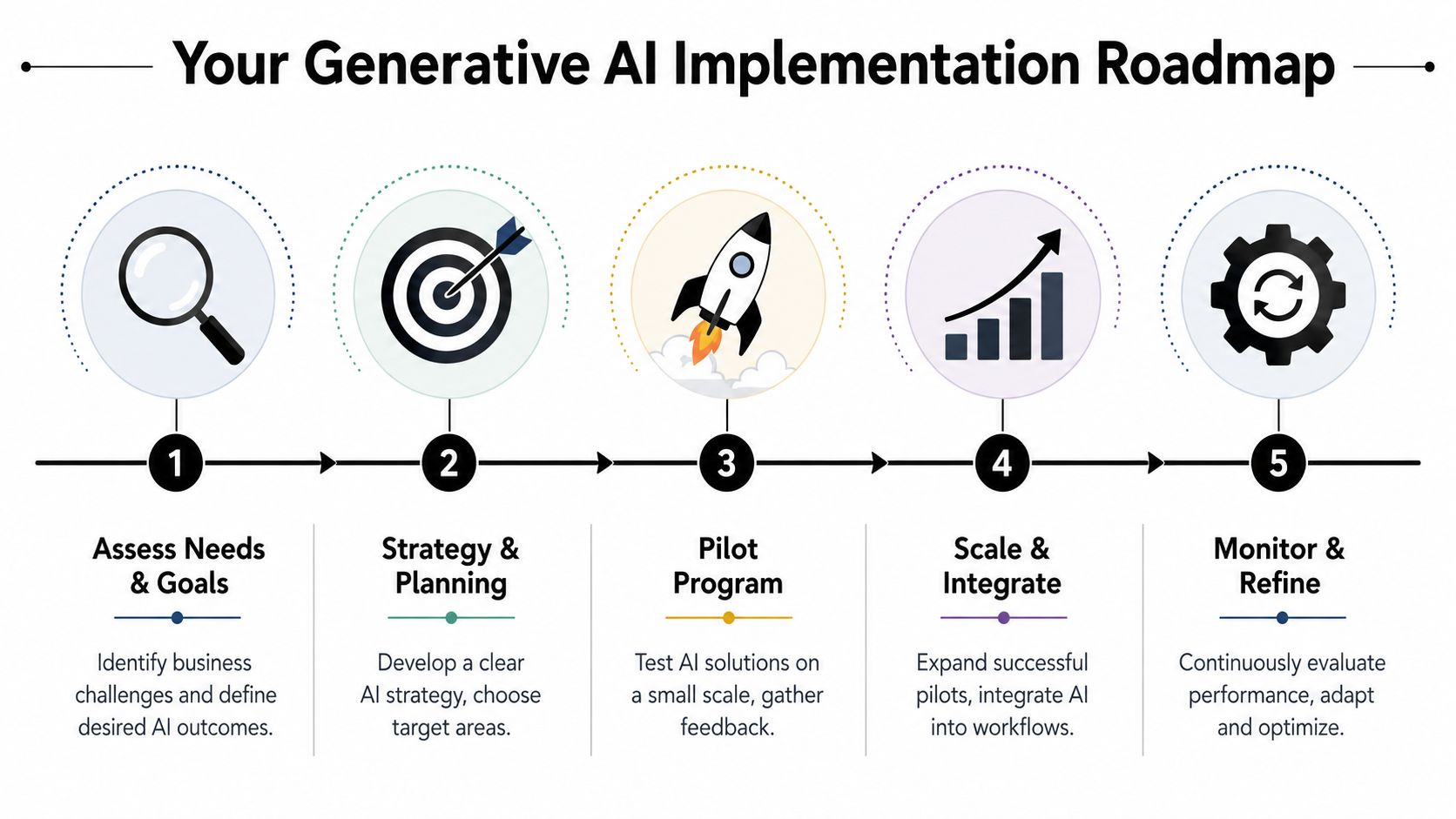
Most failed AI projects start with software selection. That’s backward. The correct sequence is workflow, data, governance, then tooling. Business owners who reverse that order usually end up paying for features they never operationalize.
Enterprise spending trends show why the market is shifting toward workflow-embedded solutions. Menlo Ventures estimates enterprise generative AI spending reached $37 billion in 2025, up from $11.5 billion in 2024, a 3.2x increase, and the application layer captured $19 billion in 2025, showing that businesses were investing in software that embeds AI into workflows rather than only experimenting with model access (Menlo Ventures on the state of generative AI in the enterprise).
Readiness checklist
Before adopting generative AI for business, leadership should answer a few blunt questions.
- Which workflow matters most: Pick one process with repeatable inputs and visible cost in time, delay, or inconsistency.
- What data will power it: Identify the internal files, records, templates, or logs the system would need.
- Who owns the outcome: Assign a business owner, not just an IT contact.
- How will quality be reviewed: Decide who approves outputs and what “acceptable” means.
- What can’t be touched: Define restricted data categories before staff starts experimenting.
A good first project is narrow. It should help one department, solve one recurring problem, and produce outputs a human can review quickly.
Governance and security controls
Once the use case is defined, the controls need to come next. That means written usage rules, access control, data handling boundaries, logging, review procedures, and approval for any integration with business systems.
A minimum governance package should include:
- Acceptable use rules: which teams may use AI, for what tasks, and with what data
- Human review requirements: when outputs must be checked before internal or external use
- Source boundaries: whether the system can pull from public web content, internal repositories, or both
- Retention and monitoring: how prompts, outputs, and access events are tracked
- Security alignment: whether the workflow fits existing compliance obligations and risk policies
Governance doesn’t slow AI adoption. It’s what keeps AI from turning into unmanaged employee behavior.
Businesses that skip this phase usually discover the same issue later: people were using AI all along, just without guardrails.
Evaluating your options
Most SMBs fall into one of three implementation paths.
| Approach | Best For | Key Considerations |
|---|---|---|
| DIY | Firms with strong internal technical leadership and time to manage policy, testing, integrations, and oversight | Easy to underestimate security, compliance, and change-management work |
| Co-Managed IT | Businesses with internal staff that need outside help for architecture, governance, security, or integration | Works well when the business wants control but not full internal burden |
| Fully Managed IT | Firms that need a partner to handle planning, rollout, monitoring, and ongoing support | Best when internal teams are lean, regulated, or already overloaded |
The right choice depends less on company size and more on internal bandwidth. A small firm with sharp technical leadership may handle more in-house than a larger firm with fragmented systems and no owner for the project.
The practical recommendation is simple. Don’t judge AI readiness by enthusiasm. Judge it by data quality, workflow clarity, policy maturity, and support capacity.
Make AI a Practical Asset Not a Liability
Generative AI for business is worth serious attention, but not because it’s trendy. It matters because it can remove administrative friction, improve internal knowledge access, and help teams work faster when it’s tied to a real process and governed like any other business technology.
For DFW SMBs, the biggest mistake isn’t moving too slowly. It’s adopting AI casually. Public tools, disconnected apps, unclear policies, and weak data controls create avoidable risk. The safer path is also the more effective one: pick a focused use case, secure the data, define the rules, and build around workflows the business already understands.
That’s how AI becomes achievable. Not by chasing hype, but by putting structure around it.
Technovation LLC helps Dallas-Fort Worth businesses turn AI from a loose idea into a secure, workable plan. For organizations that need practical guidance on workflow selection, security controls, compliance alignment, and managed implementation, Technovation LLC can provide a complimentary AI readiness assessment and map out the next step with local support that understands North Texas business realities.