A DFW construction owner is often in the same spot right now. The firm has added field tablets, cloud files, estimating software, mobile apps, and remote access. Yet supers still call the office for the latest drawing, payroll still chases missing data, and someone on the team is wondering whether the company is ready for a federal contract.
That's the core issue with IT support for construction. The problem usually isn't a lack of technology. It's fragmented technology, weak accountability, and generic support that doesn't understand how jobs are won, managed, and closed in construction.
For DFW firms pursuing government work, that gap is even more dangerous. A missed sync can slow a project. A missed compliance control can kill a contract.
Table of Contents
- From Foundation to Cloud Your Strategic IT Blueprint
- Connecting the Field and Office in Real Time
- Fortifying Your Assets Security Recovery and Compliance
- Structuring Your Support Choosing an IT Service Model
- Build Your Expert Team A Checklist for Vetting MSPs
- Conclusion Building a More Resilient Future
From Foundation to Cloud Your Strategic IT Blueprint
A superintendent marks up a change in the field. The PM in the office doesn't see it until later. Accounting works from a different project folder. The owner gets the bad news when the issue has already turned into delay, rework, or margin loss.
That's not an IT inconvenience. It's an operating model problem. Miscommunication and poor data coordination between office and job sites cost the construction industry an estimated $15 billion annually, according to Autodesk's report on construction communication costs.
The right response isn't another random software subscription. It's a blueprint.
Start with workflow not hardware
Most firms audit devices first. That's backwards. A construction company should map how information moves from estimating to procurement, from field reporting to billing, and from closeout to archive.
A practical review should answer four questions:
Where does work stall?
Drawing approvals, RFIs, site photos, payroll inputs, and material updates usually expose the first bottlenecks.Who owns each system?
If the answer is “everyone,” then no one owns it. That's how expired licenses, bad permissions, and inconsistent file naming keep spreading.Which processes are still manual?
Manual steps aren't always bad. Uncontrolled manual steps are. Paper forms, texted updates, and USB transfers create avoidable risk.What happens when the internet drops?
A field-first business needs systems that fail gracefully, not workflows that collapse the moment a trailer loses connectivity.
Practical rule: If the office and the field can't confirm they're looking at the same project data at the same time, the firm doesn't have a technology stack. It has a collection of disconnected tools.
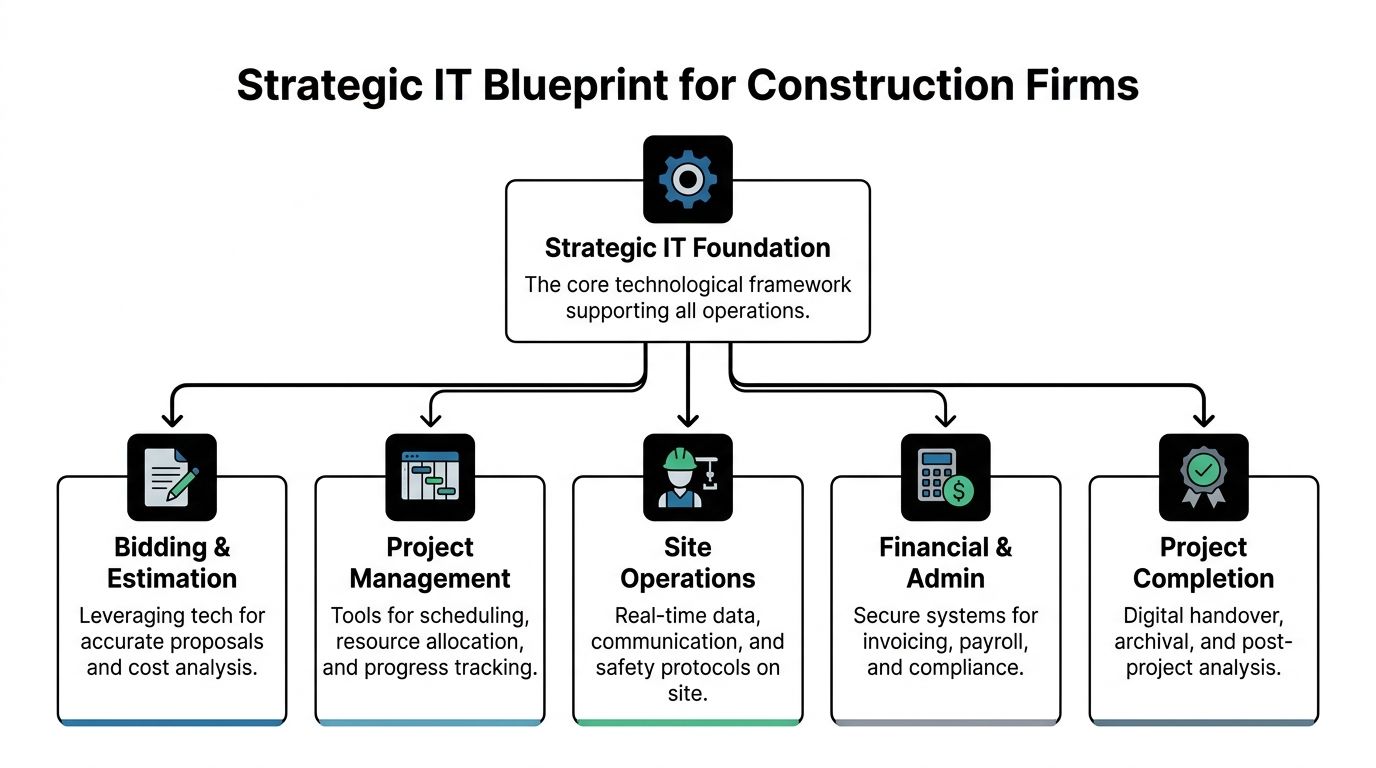
Build the blueprint in practical layers
A solid blueprint for IT support for construction should be built in layers, not purchases.
- Core infrastructure: Internet, Wi-Fi, endpoint management, identity controls, and secure access. This is the base that everything else sits on.
- Operational systems: Estimating, project management, document control, accounting, and field reporting. These need clean permissions and clear ownership.
- Data protection: Backup, recovery, endpoint defense, access logging, and retention policies.
- Governance: Standards for naming, approvals, device usage, onboarding, and offboarding.
- Strategy: A roadmap tied to business goals such as multi-site expansion, federal bidding, or tighter job costing.
Construction firms that want a clean starting point should begin with an IT infrastructure assessment for business operations. That kind of assessment matters because it turns vague complaints into concrete decisions about risk, budget, and sequencing.
A strategic blueprint also forces a harder question. Which technology issues actually hurt profit, and which ones are just annoying? Owners should prioritize the failures that affect schedule, billing, compliance, and bid readiness. Those are the issues that deserve executive attention.
Connecting the Field and Office in Real Time
Most construction technology failures don't start in the server room. They start at the jobsite, where weak connectivity, unmanaged devices, and oversized design files collide at the worst possible moment.
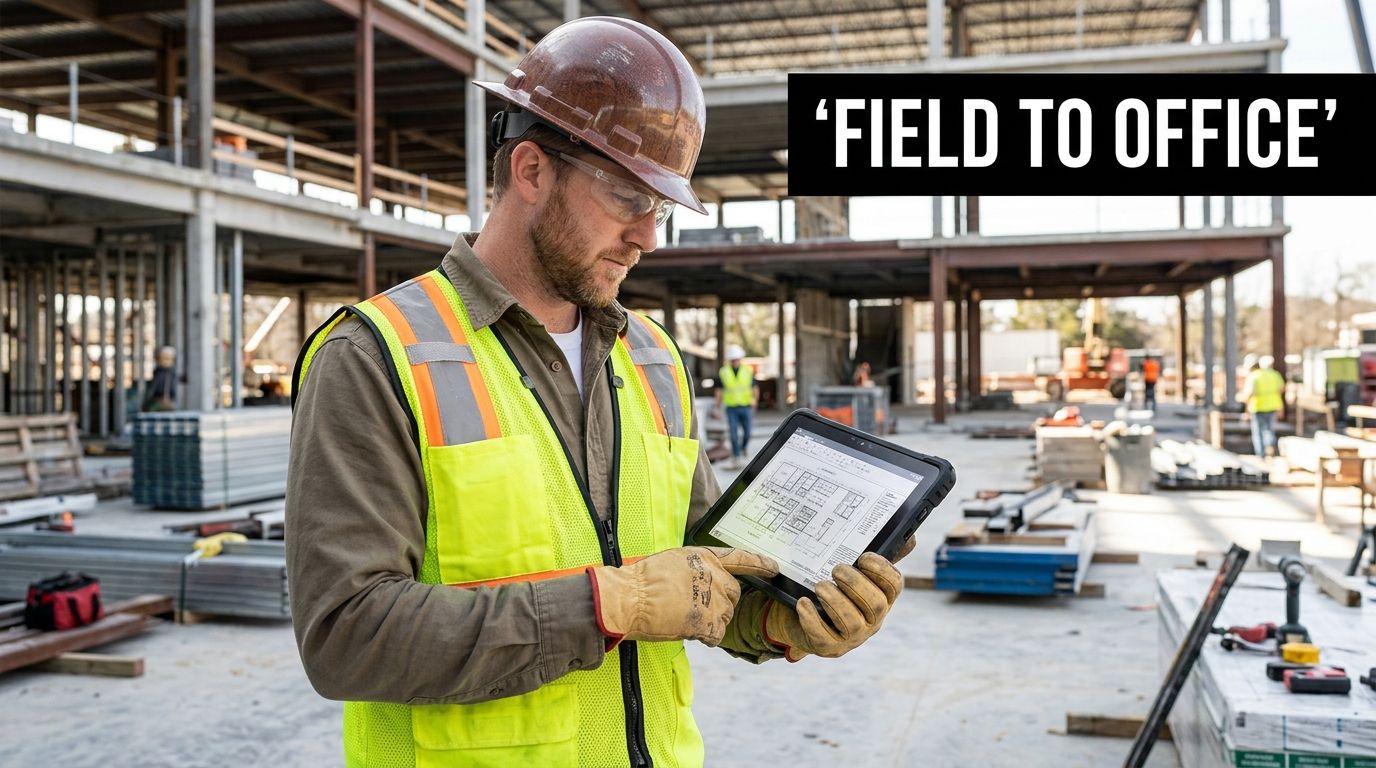
A generic “put it in the cloud” approach usually falls apart here. The critical gap in job site to office latency disrupts real-time BIM collaboration. A 2025 McGraw-Hill Construction report indicates that 42% of delays in digital construction projects stem from connectivity issues at the job site, as standard solutions fail to sync massive files in the 500MB to 2GB+ range in high-latency environments, as noted in this construction IT support analysis.
The real problem is the whole field tech chain
A field team doesn't experience connectivity as an abstract network issue. It shows up as version conflicts, failed uploads, duplicate markups, frozen tablets, and office staff second-guessing whether the latest file is really the latest file.
That means field connectivity has to be treated as an ecosystem with three moving parts:
- The connection itself: Temporary internet, wireless coverage, failover planning, and bandwidth management.
- The endpoint: Phones, tablets, laptops, and shared devices need policy control, update control, and loss response.
- The workflow: File sync behavior, access permissions, offline use, and handoff rules determine whether the system is dependable under pressure.
A company can get one of those right and still struggle. That's why many “working” environments still generate constant friction.
What reliable jobsite connectivity actually requires
Owners should expect an IT partner to design around field conditions, not office assumptions.
A practical construction setup should include:
- Offline-tolerant work methods: Teams need defined procedures for what happens when the site drops offline. If field users can only function with a perfect connection, the design is flawed.
- Segmented traffic priorities: Project-critical sync traffic should take precedence over nonessential usage. Otherwise, entertainment, personal browsing, and uncontrolled downloads can choke operational work.
- Device standardization: Shared models, known configurations, and predictable security policies reduce support chaos.
- Permission discipline: Foremen, PMs, subs, and accounting staff don't need the same access. Loose permissions create confusion and expose sensitive data.
The field doesn't need more apps. It needs fewer points of failure.
A lot of firms also underestimate Wi-Fi design on temporary or changing jobsites. Coverage, interference, trailer layout, and handoff between wireless zones all matter. A useful starting point is understanding the different business Wi-Fi versions and deployment considerations before a site grows into a patchwork of consumer-grade workarounds.
Where software fits and where it does not
Software can improve coordination, but it can't fix a broken operating environment. A team evaluating workflow tools may find value in resources such as OnRoute construction software for CRM and operational coordination, especially when reviewing how customer, project, and communication data should connect.
That said, software only helps when the underlying file access, sync behavior, and device governance are stable.
A construction owner should ask two blunt questions. Can field staff reliably access current information without calling the office? Can the office trust that field updates arrived intact and on time? If the answer is no, the firm doesn't have real-time operations. It has digital-looking delay.
Fortifying Your Assets Security Recovery and Compliance
Construction firms hold bid documents, contract data, employee information, financial records, project files, and increasingly, controlled data tied to public-sector work. Treating security as a side project is a management mistake.

Security in this context isn't just about blocking malware. It's about keeping the company operational, billable, and contract-eligible when something goes wrong.
Security has to protect operations not just devices
A construction firm's most exposed moments often happen during ordinary work. Files move from field to office. Controllers review project costs. Estimators share bid packages. PMs exchange revisions under deadline.
That's why a real protection plan should cover:
- Endpoints: Every laptop, tablet, and phone used for business needs policy enforcement and visibility.
- Access control: Shared credentials and broad permissions should be eliminated. Access has to follow role, not convenience.
- Backup and recovery: Recovery plans should be tested against realistic business scenarios, including lost devices, file corruption, and ransomware events.
- Logging and accountability: When a file moves, changes, or disappears, someone should be able to trace what happened.
Operational advice: A backup isn't a strategy until the firm knows who restores what, in what order, and how long the business can function while that happens.
For broader privacy awareness beyond construction, some firms also review adjacent compliance concepts, such as this guide to CCPA for home service businesses. It's useful for understanding how data obligations can expand as a company grows, even though federal contractor requirements demand a separate, more specific standard.
CMMC is now a revenue issue
For DFW construction firms pursuing federal work, compliance is not optional paperwork. It is a qualification threshold.
There is an overlooked CMMC 2.0 and NIST 800-171 compliance cliff for small government contractors. The Department of Defense's 2024 update mandates that all contractors must meet specific security maturity levels, and failure to do so results in immediate contract termination. The same market view notes that 20% of small construction firms in the DFW area are now pursuing federal work but lack specialized CMMC-ready IT support, according to this construction compliance overview.
That changes the conversation completely. Security is no longer just a defensive issue. It directly affects revenue access.
A firm can be excellent at estimating, scheduling, and field execution and still lose federal opportunities because its access controls, logging, encryption practices, or policy documentation don't hold up. Generic IT support won't close that gap. Generic support usually talks about “security best practices.” Federal compliance requires auditable controls.
What a construction firm should lock down first
The fastest way to reduce exposure is to focus on the controls that usually create immediate operational and contract risk.
| Priority Area | Why It Matters | Immediate Action |
|---|---|---|
| User access | Overbroad access creates unnecessary exposure | Limit access by role and remove unused accounts |
| Multi-factor authentication | Basic account security is no longer enough | Enforce MFA across business systems |
| Device control | Field hardware is easy to lose and hard to monitor without policy | Standardize device enrollment and remote management |
| Data handling | Sensitive files often move through informal channels | Define approved storage and transfer methods |
| Audit trail | Compliance requires evidence, not assumptions | Turn on logging and review it regularly |
For firms that need outside support, Technovation LLC's data security and compliance services are one example of a DFW-based option that addresses cybersecurity controls, compliance readiness, and risk management for regulated environments.
Structuring Your Support Choosing an IT Service Model
Once a construction firm knows what it needs, the next decision is who runs it and how. At this stage, many owners overspend, underspecify, or stay in a reactive model long after the business has outgrown it.
The industry has already shifted. As of 2019, 44% of construction companies have established dedicated IT departments, and that trend coincides with broad MSP usage, with approximately 90% of Fortune 1000 companies using MSPs to supplement IT operations for specialized support, according to Smartsheet's construction technology overview.
What each model really buys
The right model depends on complexity, internal talent, and risk tolerance.
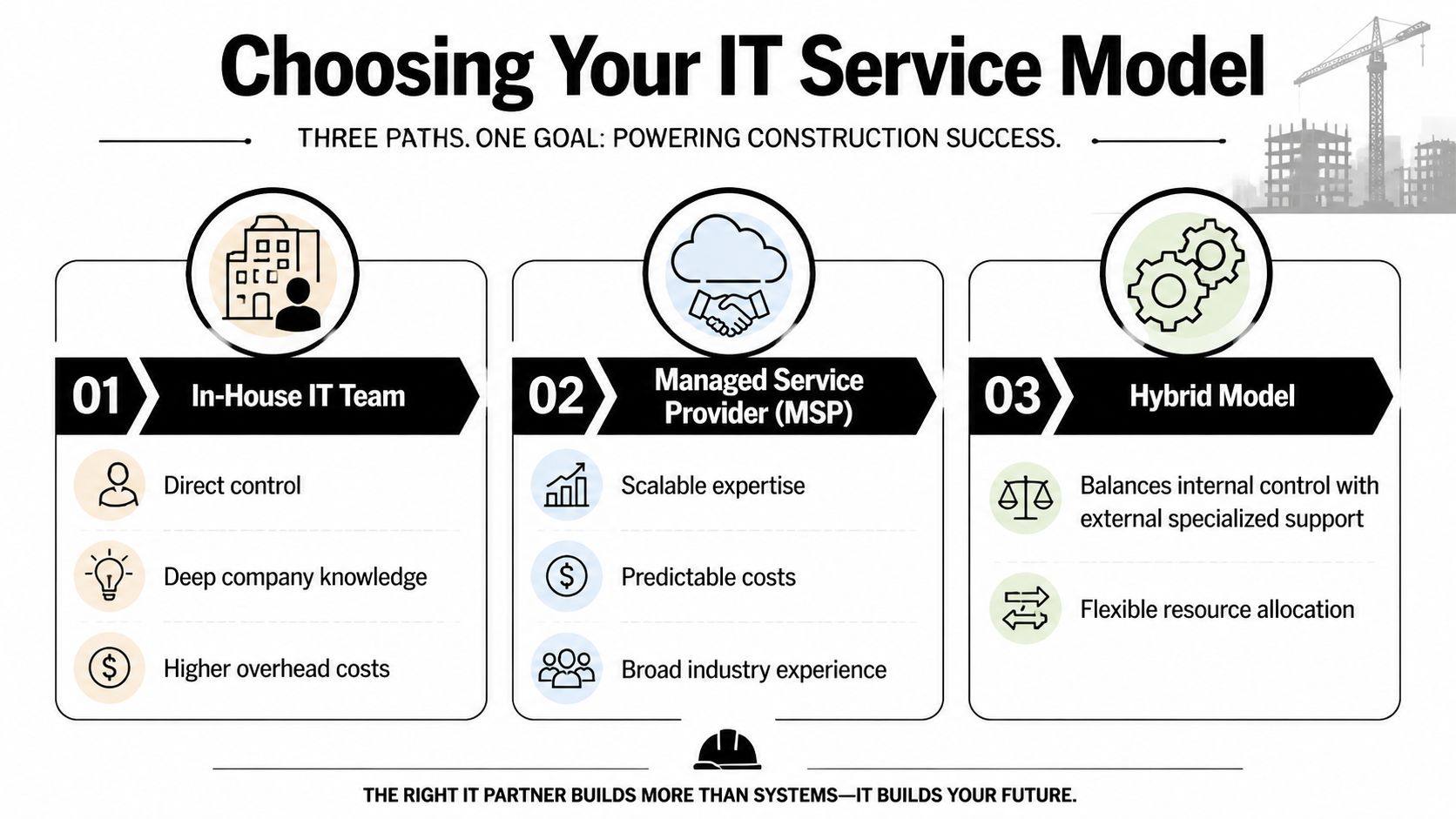
Break-fix support is the cheapest on paper and the most expensive in practice when a firm depends on uptime. It works only when the company can tolerate downtime, inconsistent documentation, and no strategic planning.
Fully managed support fits firms that want an outside team to handle monitoring, maintenance, support, vendor coordination, and planning. This model makes sense when ownership wants predictable accountability rather than piecemeal troubleshooting.
Co-managed IT is often the most practical choice for growing contractors with an internal person or small internal team. Internal staff keep operational context and business relationships. The outside partner fills security, compliance, after-hours, and specialized support gaps.
What most growing firms should avoid
The most common mistake is pretending a company is still small when its technology footprint says otherwise.
A firm with multiple jobsites, remote file access, cloud applications, compliance obligations, and mobile devices shouldn't rely on whoever “knows computers” in the office. That approach fails gradually for a while, then all at once.
Support should be purchased for business continuity, not for ticket closure.
Owners should also look past pricing labels. Per-user, per-device, and flat-rate models can all work. The primary question is whether the service model aligns with the company's operational risk. If the support agreement doesn't clearly define ownership for patching, backups, security review, escalation, and strategic planning, it isn't a service model. It's a loose promise.
Build Your Expert Team A Checklist for Vetting MSPs
Most MSPs can reset passwords and install laptops. That isn't enough for construction. A firm that handles project files, mobile crews, layered permissions, and federal compliance exposure needs a partner that understands how construction work typically breaks.
The most important differentiator is specialized support. Firms adopting a BIM-tiered support model resolve critical software conflicts 42% faster, with a First-Contact Resolution rate of 76% versus 51% for standard help desks. This approach requires specialists certified in specific software stacks to avoid the generic admin trap that delays projects, according to this review of IT support in the construction industry.
The questions that actually matter
A construction owner should stop asking vague questions like “Do you support our industry?” and start asking operational questions with clear consequences.
Ask questions such as:
How do they handle BIM-related incidents?
If the provider routes everything through a generic front-line help desk, delays are almost guaranteed when project files and model conflicts are involved.Can they support field conditions?
Remote-only support sounds efficient until a trailer network fails, a device fleet drifts out of policy, or a site handoff is botched.Do they understand compliance scope?
A firm targeting public-sector contracts needs more than antivirus and backups. It needs a provider that understands documented controls, evidence, and remediation priorities.Who owns strategy?
Someone has to review recurring incidents, aging equipment, access sprawl, and project-specific risk. If no one owns that conversation, the environment will drift.
A construction firm shouldn't hire an IT partner for generic responsiveness. It should hire for operational fit under pressure.
A deeper evaluation framework can start with this guide on how to choose a managed service provider, especially for owners trying to separate polished sales language from real service capability.
MSP Vetting Checklist for Construction Firms
| Capability Check | Why It Matters | Your Notes |
|---|---|---|
| Construction workflow knowledge | Support teams need to understand how field, office, and accounting systems interact | |
| BIM-aware escalation process | Complex file and model issues can't sit in a generic queue | |
| Mobile device management | Field tablets and phones need policy control, updates, and loss response | |
| Jobsite connectivity support | Temporary sites need practical network planning, not office assumptions | |
| Backup and recovery testing | A backup that hasn't been tested is a gamble | |
| Security operations discipline | Monitoring, patching, and access review must happen consistently | |
| Compliance readiness | Federal work requires documented controls and audit awareness | |
| Local onsite capability | Some issues require hands-on support, not another remote session | |
| Documentation standards | Stable environments depend on clear records, not tribal knowledge | |
| Executive reporting | Owners need visibility into risk, trends, and priorities |
The DFW filter
Local context matters more than many owners think. A provider serving DFW construction companies should understand the region's project mix, growth pace, distributed worksites, and the practical reality that support sometimes has to show up, not just call in.
That local filter also matters for compliance work. A DFW contractor pursuing federal jobs doesn't need another recycled security checklist. It needs a partner that can map business operations to control requirements, identify gaps, and help management decide what must be fixed first.
The right MSP should sound less like a help desk and more like an operations partner. It should ask about project lifecycle, data flow, subcontractor access, closeout procedures, and contract direction. If a provider jumps straight to device counts and monthly pricing, it's probably selling support capacity, not strategic fit.
Conclusion Building a More Resilient Future
Construction firms don't need more disconnected technology. They need systems that support the way construction work happens. That means clear assessment, dependable field connectivity, disciplined security, recoverable operations, and support that matches the complexity of the business.
For DFW firms chasing federal contracts, the requirements carry greater weight. CMMC readiness has moved from a niche issue to a board-level business requirement. A firm can no longer separate IT decisions from revenue strategy when contract eligibility depends on technical and procedural controls.
That's why IT support for construction should be treated as part of operations leadership. It affects schedule confidence, bid readiness, project coordination, risk exposure, and the company's ability to grow without adding chaos.
The firms that get this right not only avoid problems. They create a stronger operating environment. Field teams work from current information. Office staff trust the data. Leadership sees risk sooner. Compliance becomes manageable instead of mysterious.
The next step should be practical, not theoretical. Review the current environment, identify where the field and office still disconnect, and determine whether the company's security and compliance posture can support the work it wants to win next.
A DFW construction firm that needs clearer visibility into risk, compliance gaps, jobsite connectivity, and support structure can start with a conversation with Technovation LLC. Their team provides IT health checks, cybersecurity guidance, compliance support, and managed IT services aligned with construction operations across North Texas.