If a server failed this afternoon, would the business recover its critical data within an hour, or would staff discover that “backup” really meant a folder copy nobody had tested?
That gap matters more than ever. Cloud infrastructure is mainstream now, with over 94% of organizations using cloud infrastructure by the end of 2025, and many well-executed migration projects reporting 20 to 30% cost savings according to this cloud migration statistics roundup. The opportunity is real. So is the risk of assuming that cloud storage alone equals resilience.
For regulated small and mid-sized businesses, AWS S3 can be a strong foundation for backup. It's durable, flexible, and well suited to long-term retention. But raw capability doesn't produce recovery. Configuration does. Governance does. Testing does. That's why a practical backup design should be treated as part of broader cloud migration services, not as an afterthought delegated to whoever has admin access this week.
A useful starting point is understanding the difference between file sync, archive copies, and a true recovery strategy. Businesses that want a broader primer on managed protection models can review your guide to cloud protection, then compare that framework with their own environment and existing cloud backup options for small business.
Table of Contents
- Is Your Data Backup Really a Recovery Plan
- Your First Critical Choice AWS Backup vs Native S3 Features
- Building Your Defense Against Data Loss and Disasters
- Automating Security and Cost Controls for Your Backups
- The Most Overlooked Step Validating Your Recovery Plan
- Balancing Cloud Costs with Strict Compliance Requirements
- From Backup Configuration to Business Resilience
Is Your Data Backup Really a Recovery Plan
A real backup plan answers a hard question. What gets restored, by whom, in what order, and how quickly? If those answers aren't documented and tested, the business doesn't have a recovery plan. It has optimism.
Simple file copies fail for predictable reasons. Someone overwrites a shared folder. A workstation syncs corrupted files. A ransomware event encrypts both production data and the connected backup location. An office move changes server paths and scheduled jobs stop running. None of that is unusual.
What a recoverable backup actually includes
A recoverable design has a few essential elements:
- Protected versions: The business can restore an earlier clean copy, not just the latest broken one.
- Separated storage: Backups aren't tied so tightly to production systems that the same incident wipes both out.
- Defined retention: Critical data stays available long enough to meet business and compliance needs.
- Restore procedures: Staff know the exact steps to recover a file, a system, or a broader workload.
- Validation: The business proves recovery works before an emergency forces the issue.
A backup only becomes valuable at the moment of restore.
AWS S3 fits this model well because it supports durable object storage, version-aware protection patterns, replication options, lifecycle management, and access controls. But those features don't arrive assembled into a business policy. Someone has to map legal retention, staff access, operational recovery priorities, and cost limits into an actual design.
Why this matters for cloud migration services
That's where many businesses misread the purpose of cloud migration services. Migration isn't just moving data from one place to another. It's the point where a company should decide which information matters most, how long it must be kept, and what level of downtime is acceptable.
For a medical practice, that may mean preserving patient records and audit trails. For a law firm, it may mean recovering matter files without exposing privileged data. For a finance team, it may mean retaining records while controlling who can delete anything.
S3 is powerful enough for all of that. But “powerful” is never the same as “safe by default.”
Your First Critical Choice AWS Backup vs Native S3 Features
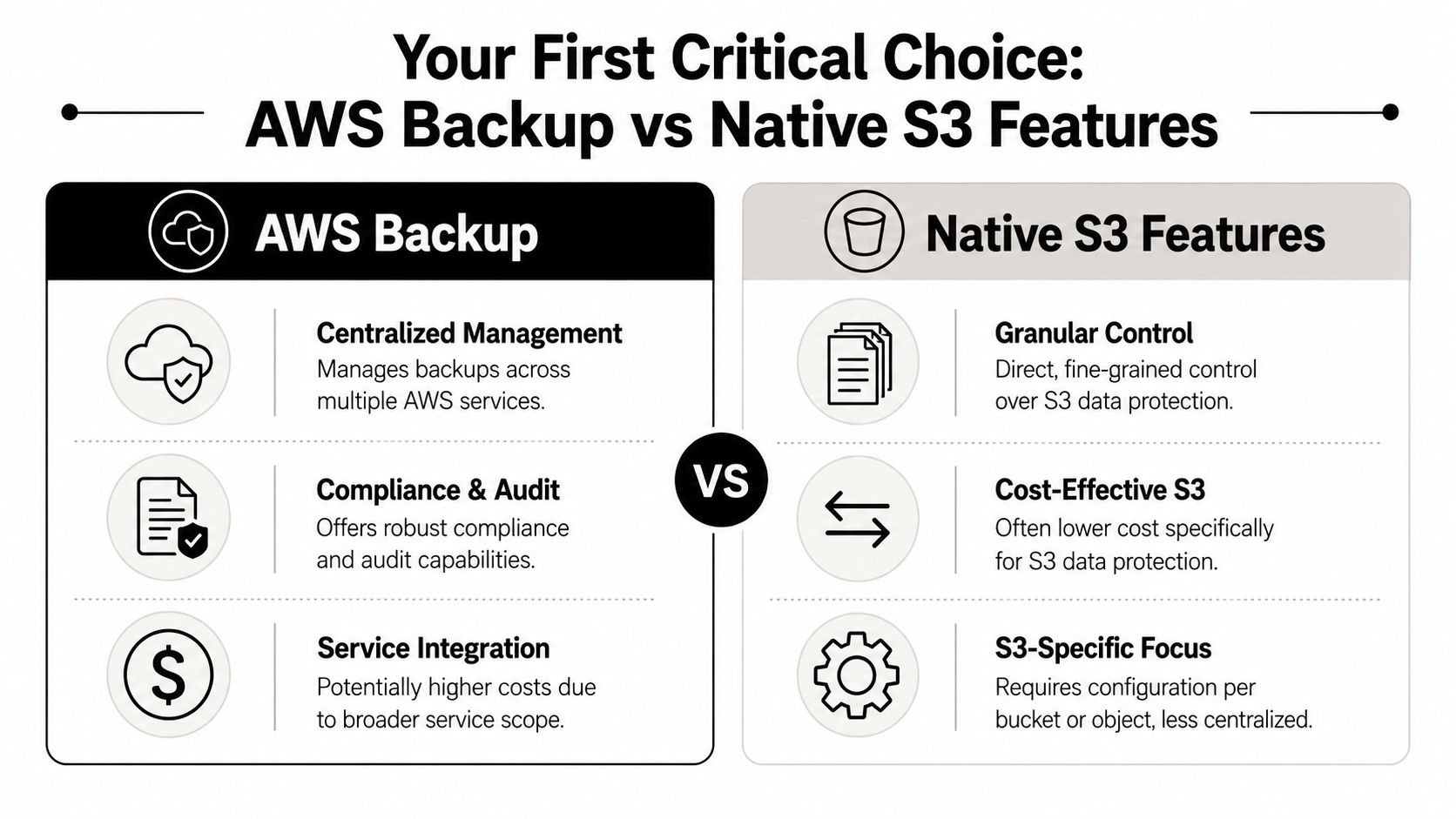
The first decision isn't whether to use S3. It's whether to manage backups through a centralized backup service or build the policy directly with native S3 controls.
That choice shapes how the business handles administration, auditability, and day-to-day maintenance. It also signals whether the backup strategy is being treated as storage plumbing or as a governance decision. Current industry guidance has shifted in that direction. Cloud migration is now seen as a governance and modernization project, not just an infrastructure move, and the main question is how to maintain control, resilience, and compliance while moving, as discussed in this industry video overview.
Side by side decision points
| Approach | Best fit | Main strength | Main trade-off |
|---|---|---|---|
| Centralized backup service | Businesses protecting multiple workload types | Unified policies and administration | Less granular S3-specific tuning |
| Native S3 features | Businesses focused mainly on S3 data | Fine control over versioning, replication, and object behavior | More manual design and oversight |
A useful outside perspective on this distinction appears in Bridge IT Solutions on cloud backup, especially for owners who still equate cloud storage with actual backup.
When centralized backup makes sense
A centralized model is usually the better call when the business has several systems to protect and one small internal team. It reduces fragmentation. Administrators can view policy status in one place, align retention more consistently, and simplify audits.
This matters for SMBs with mixed environments. If accounting data, shared documents, application snapshots, and archived exports all need oversight, centralization cuts down the chance that one system gets ignored.
A centralized approach is also easier to hand off. If staffing changes or an outside advisor needs to review the environment, the logic is visible.
When native S3 features are the smarter choice
Native S3 features make more sense when the business needs tight control over S3 behavior itself. That usually means specific replication rules, object version protection, bucket-level retention planning, and storage lifecycle decisions appropriate for distinct data classes.
This path can be efficient for an S3-centric backup design. It also demands discipline. Teams have to configure each bucket deliberately, document the logic, and monitor for drift. One missed permission or one bucket without versioning creates a hole in the plan.
Decision rule: If the business wants simplicity across several workload types, centralize. If it needs precision inside S3 and has the skill to maintain it, use native controls.
For many regulated SMBs, the strongest answer is not picking a side blindly. It's choosing the operating model the business can manage every month, not just the one that looked elegant on setup day.
Building Your Defense Against Data Loss and Disasters
The two native S3 controls that deserve immediate attention are Versioning and Cross-Region Replication. One protects against human error and malicious changes. The other protects against location-level disruption.

Versioning is the undo button most businesses forget
Without versioning, a mistaken delete or overwrite can become permanent. That's a harsh design flaw for any company handling contracts, patient files, financial records, or project archives.
A common failure looks like this. An employee cleans up a directory, removes the wrong file set, and the backup job runs afterward. If the system only preserves the current state, the clean copy is gone too. With versioning enabled, the earlier object versions remain available for restore.
The practical move is simple:
- Enable versioning on every backup bucket before active use.
- Separate backup buckets by data type or retention need.
- Restrict who can permanently remove object versions.
- Document the restore steps for a single file and a full folder set.
That configuration turns accidental deletion from a crisis into an inconvenience.
Replication is the disaster layer
Versioning protects the object. Replication protects the business when a wider outage or regional event affects access to the original copy.
Cross-Region Replication creates a second copy of protected data in another region. For a regulated SMB, that matters because continuity planning shouldn't rely on a single geographic footprint. If one area has a serious service disruption, operations still have a path to recovery.
This should be planned, not improvised. Replication design needs answers to three business questions:
- Which data must exist in more than one region
- Whether compliance rules limit where that data may live
- Who is authorized to recover from the replicated copy
Recovery design should assume that local assumptions will fail. That's why geographic separation matters.
What to configure first
A sensible starting order is:
- High-value records first: Protect line-of-business exports, shared document repositories, and compliance-sensitive archives.
- Then operational history: Add logs, reports, and less time-sensitive historical material.
- Then broad retention cleanup: Apply lifecycle and monitoring after the protection baseline is stable.
Businesses don't need a perfect cloud architecture diagram to begin. They do need to stop relying on single-copy storage and unverified restore assumptions.
Automating Security and Cost Controls for Your Backups
Who should be able to delete the last clean copy of your financial records or client files?
For many small businesses, the honest answer is "too many people." That is a configuration problem, and it creates real business risk. In a regulated environment, backup automation is not just an IT efficiency move. It is how you reduce the chance of accidental deletion, contain storage costs, and prove that retention and access controls are being enforced consistently.
Secure the backup layer first
Start with access control. Cost tuning can wait. If the wrong user or process can alter backup data, you do not have a dependable recovery position.
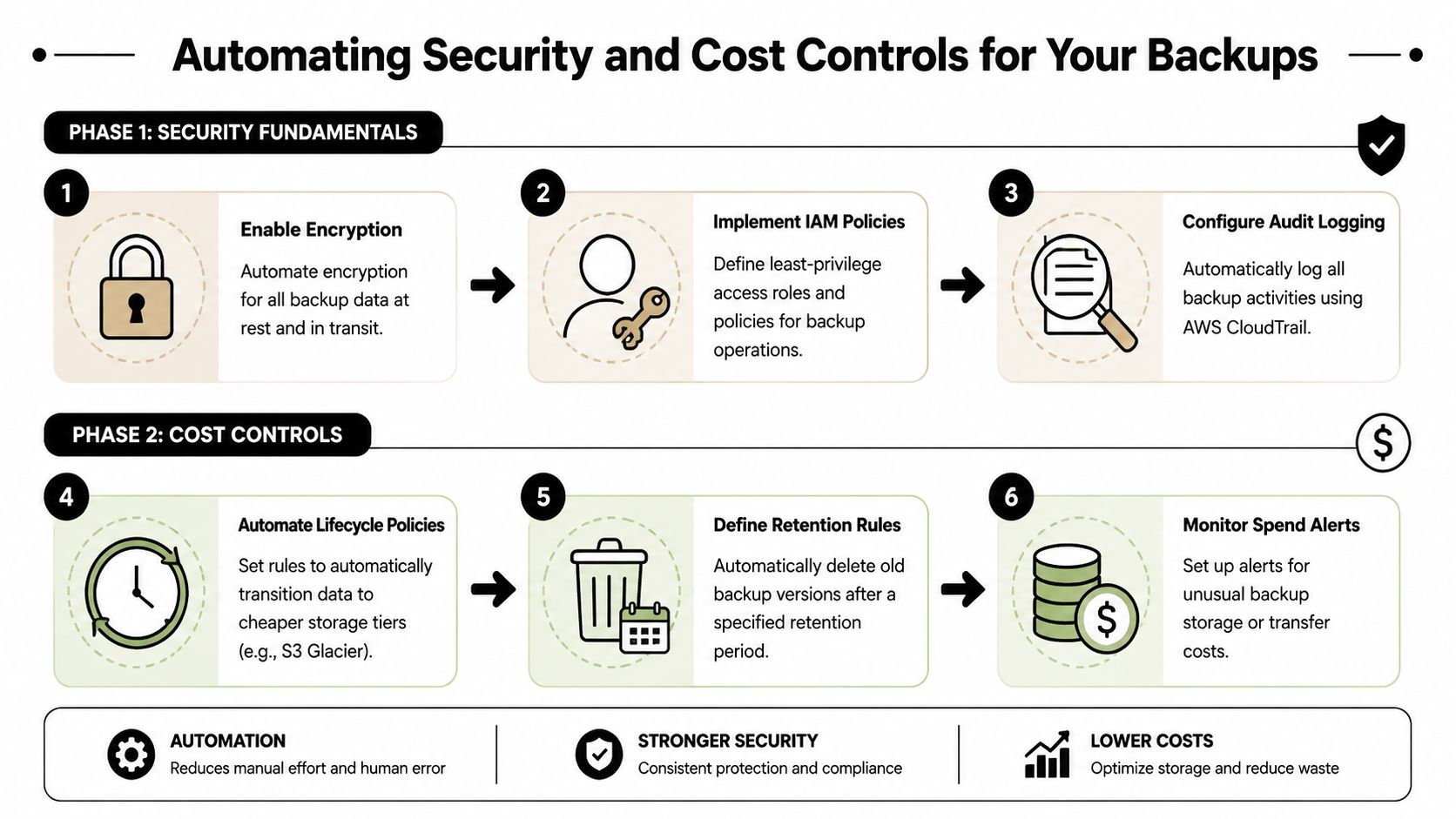
Set backup buckets and policies so they are harder to change than day-to-day production storage. That means limiting delete rights, separating backup roles from restore roles, enforcing encryption at rest, and logging every meaningful access or policy change. Backup data often becomes the evidence set during an audit and the recovery source during an incident. Treating it like general file storage is a mistake.
A practical control set includes:
- Restricted administrators: Keep permanent delete and policy edits with a very small, named group.
- Role-based access: Separate permissions for backup creation, restore operations, and security review.
- Encryption at rest: Use server-side encryption to protect stored backup objects.
- Audit visibility: Log access events and configuration changes for investigation and compliance review.
Small teams get into trouble here because broad permissions feel convenient. They are expensive later. One bad policy change, one compromised account, or one rushed cleanup script can damage the backup set you were counting on to save the business.
Automate retention so cost follows policy
Storage bills rise when retention rules are vague. Compliance exposure rises when records stay around longer than they should. Automation fixes both.
Use lifecycle policies to move aging backups into lower-cost archive tiers based on a written retention schedule, not habit. Keep recent backups readily available for fast restores. Move older data to cheaper storage when recovery speed matters less. Delete expired versions when policy allows it. That is how backup storage starts matching business value instead of growing unchecked.
For regulated SMBs, this is not only a cost discussion. It is a records management discussion. If you cannot explain why a backup is being kept, where it is stored, and when it expires, you are carrying risk without a business reason.
If your team is also standardizing retention and restore workflows across systems, document that process clearly in your data migration and recovery procedure. Good documentation reduces configuration drift and gives auditors a cleaner story.
Build a policy your team can actually maintain
A usable baseline usually looks like this:
- Recent backups in active storage: Support faster recovery for current operations.
- Older backups archived automatically: Lower long-term storage cost without relying on manual cleanup.
- Expired objects removed on schedule: Match retention to legal, contractual, and operational requirements.
- Spend alerts and usage review: Catch abnormal growth before it becomes a billing problem.
Expert management is essential. The controls themselves are not mysterious. The challenge is setting them so security, retention, recovery speed, and compliance all align. Technovation helps businesses make those tradeoffs deliberately, instead of discovering them during an audit, a ransomware event, or a surprise invoice.
The Most Overlooked Step Validating Your Recovery Plan
An untested backup is a guess.
That sounds blunt because it should. The backup may exist. The files may be present. The policy may show “successful.” None of that proves the business can restore the right data, to the right place, in the right time frame. The proof only appears during a real restore test.
Industry reporting points in the same direction. One summary cites a migration success rate of around 89%, but identifies integration, security, and cost overruns as the main post-migration problems, which is a strong sign that operations are where teams lose control after the move, according to this review of migration failure patterns.
What a restore test should look like
Restore testing doesn't need to disrupt production. It should be routine, limited, and documented.
A simple pattern works well:
- Pick a representative data set. Choose something the business depends on.
- Restore to a safe test location. Never test by overwriting production.
- Confirm integrity. Open files, validate structure, and check for missing items.
- Measure time. Record how long the restore took from request to usable data.
- Document obstacles. Note permission issues, confusing steps, or dependency problems.
Businesses planning broader recovery workflows should also review their own data migration procedure considerations because restore friction often exposes upstream process gaps.
Monitoring should be active, not occasional
Manual testing proves recoverability at intervals. Monitoring catches problems between tests.
CloudWatch alerts should notify responsible staff when backup jobs fail, replication stalls, or unusual access activity appears. That turns backup management into an operational process with visibility, not a set-and-forget archive that only gets attention after a bad day.
A good alerting posture focuses on three categories:
- Failure alerts: Backup or replication didn't complete.
- Change alerts: Access policies or retention settings changed unexpectedly.
- Activity alerts: Sensitive backup locations saw unusual access behavior.
If nobody notices a failed backup until a restore is needed, the backup process failed long before the incident.
The businesses that recover cleanly are rarely the ones with the fanciest design. They're the ones that rehearse, monitor, and correct drift before pressure hits.
Balancing Cloud Costs with Strict Compliance Requirements
How do you cut AWS backup costs without creating a compliance problem you only discover during an audit or legal request?
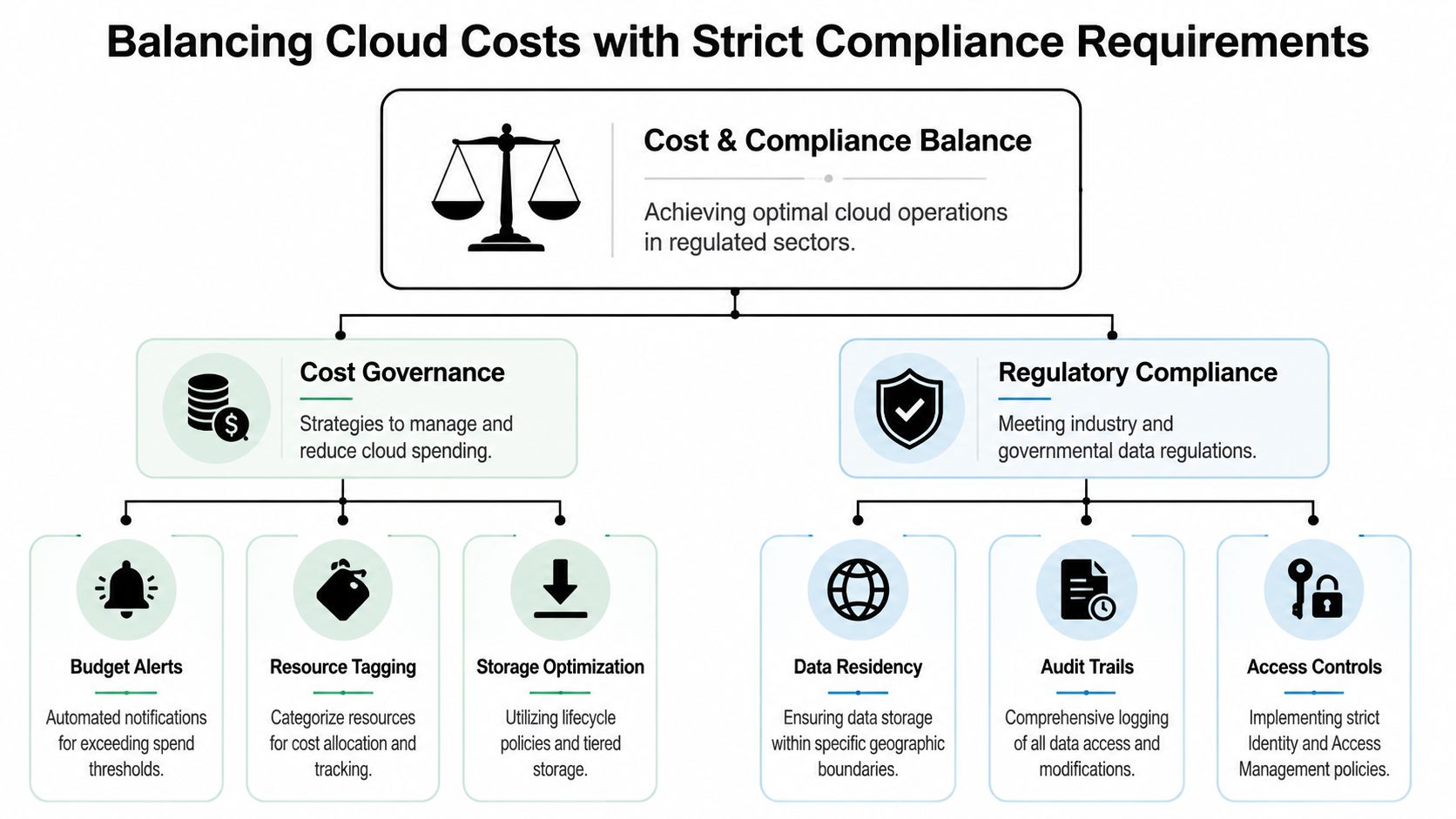
For a regulated SMB, that question should drive every backup decision. Storage class, retention period, replication region, encryption settings, and access rules all affect three outcomes at once. Monthly spend, audit readiness, and your ability to recover data under pressure.
Many small businesses treat cost control as a finance task and compliance as a policy task. That split creates expensive mistakes. A backup moved into the wrong tier can slow recovery. A copy placed in the wrong region can create data residency issues. A retention rule set too loosely can keep sensitive data longer than policy allows.
Shared responsibility needs plain language
AWS protects the underlying cloud infrastructure. Your business is still responsible for backup configuration, user permissions, retention rules, audit logging, and recovery procedures.
That line matters. If protected files are stored in an unapproved region, if broad delete permissions let the wrong employee remove backup data, or if logs are never reviewed, the failure sits with the customer. Regulators and clients will see it the same way.
Cloud migration services should address that from the start. A migration project that copies data without defining controls, ownership, and review processes moves risk into a new environment.
Cost controls should strengthen compliance
The right cost controls do more than trim storage bills. They create order. Order is what makes audits easier, access reviews faster, and retention decisions defensible.
Use a few disciplines consistently:
- Storage analysis: Identify backup data that belongs in archive tiers, backup data that needs faster recovery, and backup data that should be removed under policy.
- Resource tagging: Tag by department, data sensitivity, retention rule, and owner so you can prove who is responsible for what.
- Budget alerts: Flag unusual growth early. A spike may be a billing issue, a failed lifecycle rule, or uncontrolled backup sprawl.
- Regional planning: Replicate data only where contractual and regulatory requirements allow it.
Regulated firms also need backup design that fits the rest of their infrastructure. Backup controls break down fast when the wider environment lacks clear segmentation and oversight, which is why many SMBs pair S3 planning with broader cloud-based network architecture and governance.
Compliance failures usually come from vague ownership, excessive access, and poor review habits.
Where SMBs need expert management
Small businesses usually understand the rulebook. The hard part is keeping backup policies aligned with the business as staff changes, data grows, and requirements shift.
That is where expert oversight matters. Someone needs to review lifecycle rules against actual retention obligations, confirm replication still matches residency requirements, check who can delete or alter backups, and watch for waste that signals configuration drift. Those tasks are operational, not theoretical.
This is also part of the broader case for modernization. The benefits of cloud migration for businesses only show up when the environment is managed with discipline after the move. For regulated SMBs, disciplined backup governance is what turns cloud storage into business resilience instead of a future compliance headache.
From Backup Configuration to Business Resilience
What happens to your business if a regulator, client, or auditor asks you to restore a specific file tomorrow and your team cannot do it?
That is the standard. S3 backup settings only matter if they support recovery, prove retention, limit access, and keep costs under control month after month. For regulated SMBs, backup is part of business resilience. It protects revenue, supports compliance, and reduces the odds that one mistake turns into downtime, legal exposure, or lost trust.
The model is straightforward. Choose the right backup approach for the business. Configure protections that match your recovery and retention needs. Automate security and cost controls so staff are not relying on memory. Test recovery often enough to catch failures before an incident does.
Each of those choices has a business consequence. Poor retention design drives storage waste and compliance risk. Weak access controls create room for accidental deletion or unauthorized changes. Untested restores create false confidence, which is worse than having no plan at all because leadership assumes the risk is covered.
Cloud economics follow the same rule. Savings come from disciplined management after migration, not from merely moving data into AWS. The broader point appears in benefits of cloud migration for businesses, but backups are one of the clearest places where poor oversight shows up fast in both cost and risk.
The practical question owners should ask
Do you have backup settings, or do you have a recovery process your business can defend?
Many internal IT teams can configure S3. Fewer can keep backup policies aligned with changing compliance rules, review access drift, verify restores, tune retention, investigate alerts, and document decisions in a way that stands up under audit. That work competes with support tickets, onboarding, security issues, and every other operational demand.
Business owners should treat backup governance the same way they treat payroll controls or legal record retention. Assign ownership. Review it on a schedule. Document why the policy exists. For companies that need backup oversight tied to wider infrastructure operations, that often fits into managed cloud data center services for security, continuity, and compliance.
The companies that recover well are usually not the ones with the most features turned on. They are the ones that chose the right controls, tied those controls to business requirements, and kept managing them after go live. Expert management matters because backup failure is rarely caused by one dramatic event. It usually comes from small configuration mistakes that nobody reviewed in time.