
A lot of Dallas-Fort Worth businesses are still running critical operations on infrastructure that lives too close to daily chaos. It may be a server in a back room, a line-of-business application sitting on aging hardware, or a patchwork of remote access tools held together by habit more than design. Nothing seems urgent until a drive fails during payroll week, a line goes down before court filings, or a clinic can't reach patient records when staff needs them most.
That pressure hits regulated businesses harder. A medical practice doesn't just lose time when systems wobble. It risks delayed care and compliance exposure. A law firm doesn't just lose convenience. It risks client confidentiality and missed deadlines. A financial office can't shrug off downtime as an IT issue because trust is part of the product.
This is why cloud managed data center services have become a business decision, not just an infrastructure decision. Companies aren't moving because it's fashionable. They're moving because the old model asks too much from internal teams, exposes too much risk, and creates too much financial unpredictability. The shift is large enough to matter at the market level too. The global cloud managed services market was valued at USD 134.44 billion in 2024 and is projected to reach USD 305.16 billion by 2030, growing at a CAGR of 14.7%, while North America held over 44% of the market in 2024, according to Grand View Research's cloud managed services market analysis.
For a business owner, that number matters for one reason. It signals that resilient, outsourced infrastructure management is no longer reserved for enterprise giants with huge internal departments. It has become a practical operating model for firms that need strong uptime, tighter security, and fewer unpleasant surprises.
Table of Contents
- Introduction Beyond Your Server Closet
- What Are Cloud Managed Data Center Services
- The Core Services That Drive Your Business
- Security and Compliance in a Regulated World
- Your Roadmap to the Cloud A Migration Checklist
- Comparing Your Options Managed Services vs In-House IT vs DIY Cloud
- Why DFW Businesses Partner with Technovation
Introduction Beyond Your Server Closet
Many business owners already know the feeling. The office has grown, the staff depends on more systems than it did a few years ago, and the technology that once felt adequate now feels fragile. The server closet may still be running, but it's become a single point of anxiety.
That anxiety usually shows up in ordinary moments. Someone asks whether the backup worked last night. A vendor says the hardware is aging out. An employee complains that remote access is slow again. The office manager notices that every improvement request somehow turns into an expensive hardware conversation.
The real problem isn't just hardware
The server itself usually isn't the whole issue. The deeper problem is that the business has found itself responsible for power, cooling, patching, storage growth, backup verification, outage response, security hardening, and recovery planning. That's a lot to carry for a small or mid-sized company whose actual business is care delivery, legal work, accounting, design, or construction.
For regulated DFW firms, that burden gets heavier. Systems need to stay available. Data needs protection. Access needs to be controlled and documented. Leadership needs confidence that a disruption won't turn into a reportable event or a reputational problem.
Businesses rarely outgrow their server closet all at once. They outgrow it one risk at a time.
A better model for stability
Cloud managed data center services change the operating model. Instead of owning and nursing every piece of infrastructure internally, the business uses professionally managed environments designed for availability, security, and oversight. The business gets management, not just equipment in another location.
That distinction matters. Renting space elsewhere doesn't solve much if nobody is actively watching performance, validating backups, tuning capacity, handling alerts, and planning for recovery. A managed approach turns infrastructure from a reactive burden into a governed service.
A business owner usually doesn't need more dashboards. The owner needs fewer blind spots.
Common triggers that signal it's time to reconsider the old setup include:
- Aging equipment: Hardware replacement is coming, but leadership doesn't want another large capital purchase.
- Compliance pressure: Audits, insurer questions, or client requirements are exposing gaps in documentation or controls.
- Remote work strain: Staff needs dependable access from multiple locations without workarounds.
- Operational fragility: One outage, one ransomware event, or one failed backup could stop the business cold.
Cloud managed data center services answer those issues best when they're approached proactively. Waiting until something breaks usually forces rushed decisions, limited options, and avoidable cost.
What Are Cloud Managed Data Center Services
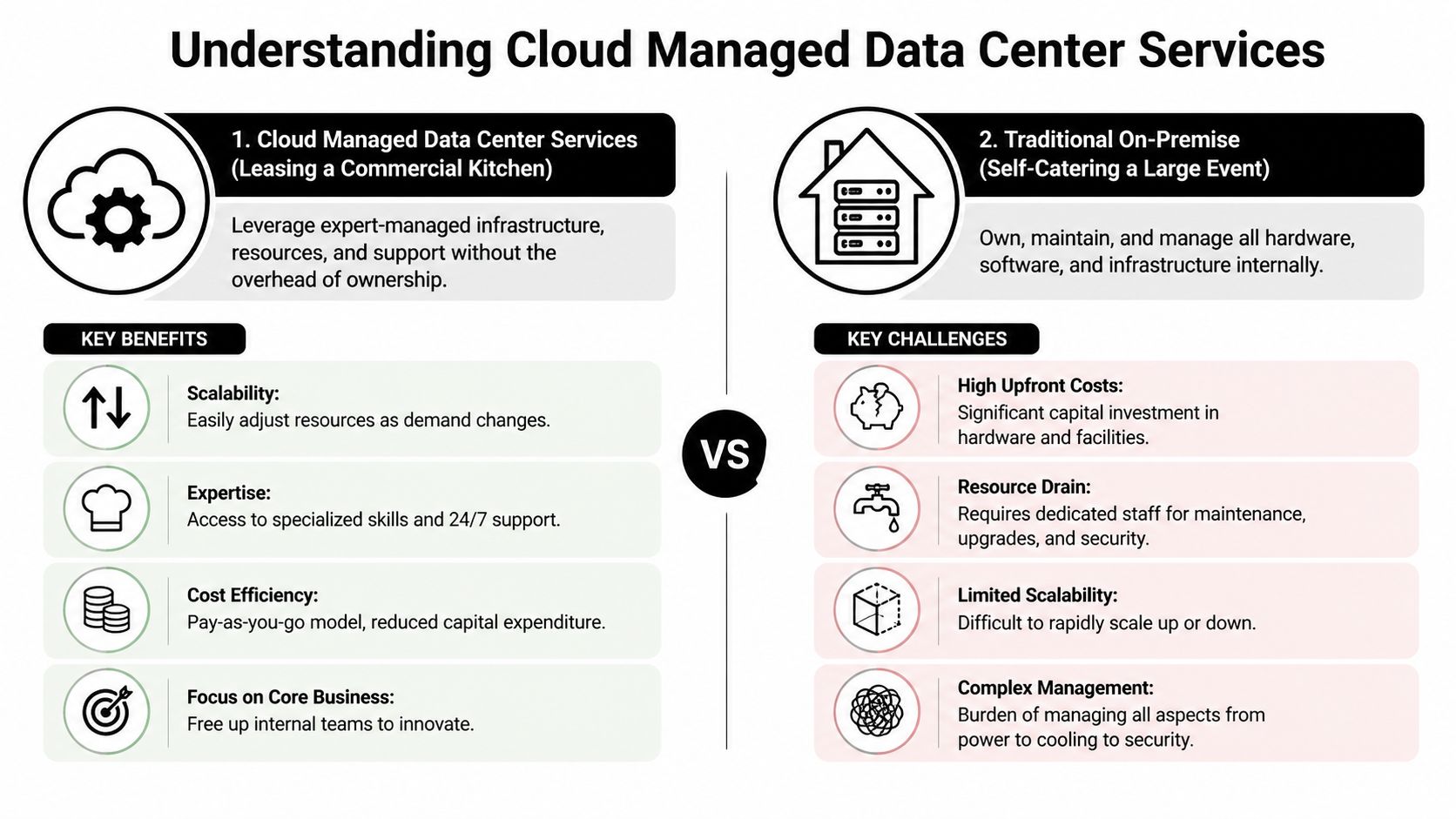
Cloud managed data center services are easiest to understand through a simple business analogy. Think of the difference between trying to cater a major event from a home kitchen and leasing a commercial kitchen with trained staff, equipment support, sanitation processes, and on-call maintenance.
In both cases, food gets made. But only one setup is designed for volume, reliability, and accountability.
The data center is only part of the value
The cloud data center market was valued at USD 26.67 billion in 2024 and is expected to grow to USD 55.94 billion by 2032 at a CAGR of 9.7%, according to Credence Research's cloud data center market report. That growth reflects a clear business reality. Companies need scalable infrastructure, but they also need a practical way to run it.
The raw infrastructure is the kitchen. The managed service is the staff that keeps everything clean, supplied, secure, and operating on schedule.
Without that management layer, a business still has to make dozens of technical decisions it may not be equipped to make well. Capacity planning, patch cycles, workload placement, access control, backup validation, and incident response don't disappear because systems moved offsite. They just change form.
What "managed" actually means
A true managed model typically includes operational oversight that many business owners assume they're already buying when they move to the cloud. In practice, that's often where disappointment starts. A business may rent computing resources but still own the daily complexity.
A managed service fills that gap by handling the work that protects business continuity:
- Infrastructure administration: Systems are configured, maintained, and updated as part of an ongoing service.
- Security operations support: Teams don't just install controls. They monitor, review, and respond.
- Backup and recovery management: Data protection becomes an active process, not a checkbox.
- Performance oversight: Capacity and system health are reviewed before issues become disruptions.
- Operational guidance: Technology choices are tied to business priorities, not just technical convenience.
A business doesn't buy cloud managed data center services to own less hardware. It buys them to carry less operational risk.
For small and mid-sized businesses, that's the primary advantage. They gain access to enterprise-grade environments and disciplined operations without trying to build a full internal infrastructure team from scratch. That makes the model especially useful for firms that need strong controls but can't justify a large, specialized IT department.
The Core Services That Drive Your Business
The best cloud managed data center services don't lead with jargon. They solve specific business problems. If a service doesn't improve uptime, reduce risk, or make technology easier to operate, it's just decoration.
Managed colocation
Some businesses aren't ready for a full cloud-only model. They may have specialized applications, legacy systems, or compliance-sensitive workloads that still need dedicated equipment. Managed colocation gives them a professional facility and expert oversight without forcing all-or-nothing change.
This works well when the business wants better physical resilience and professional management but still needs certain systems to remain on dedicated infrastructure. The practical outcome is less dependence on an office building for critical uptime.
Hybrid cloud management
Most growing businesses don't live in one environment. They run some applications in cloud platforms, keep some systems in private environments, and maintain a few pieces of legacy infrastructure because replacing them immediately isn't realistic.
Hybrid cloud management brings those pieces under one operational model. That matters because fragmented environments create fragmented accountability. When nobody has a complete view, issues fall between teams and linger longer than they should.
A well-managed hybrid setup helps businesses:
- Place workloads logically: Sensitive systems can stay where they make sense while flexible workloads scale more easily.
- Avoid forced replacement: Leadership doesn't need to rebuild every application at once.
- Reduce operational confusion: Monitoring, patching, access review, and support follow a coordinated plan.
Disaster recovery as a service
Disaster recovery as a service is business continuity insurance in operational form. The point isn't just to have copies of data somewhere. The point is to restore business function fast enough that the interruption stays manageable.
For a legal office, that may mean documents remain reachable during a disruption. For a medical practice, it may mean schedules and records can come back online without a long manual workaround. For a finance team, it may mean avoiding a prolonged outage during a critical reporting period.
Recovery planning should answer one question clearly. How will the business keep operating when a system fails, not if one does?
Managed backups
Backups are often discussed as if having them is enough. It isn't. A backup only helps when it's current, isolated appropriately, restorable, and tested against real recovery scenarios.
That's why many companies review cloud backup solutions for small business as part of a broader managed data center strategy. Backup should be treated as a business protection process, not just a storage feature.
24-7 monitoring
Monitoring is what turns IT from reactive to preventive. Instead of finding out about a problem when staff starts calling, trained teams can catch failed jobs, unusual performance, storage strain, and system alerts earlier.
The benefit isn't only technical. It reduces interruptions, shortens troubleshooting, and gives leadership more confidence that technology is being watched even when the office is closed.
Security and Compliance in a Regulated World
A Fort Worth clinic gets hit with suspicious login activity on a Friday evening. By Monday morning, the question is not only whether systems stayed online. Leadership also needs to know whether patient data was exposed, whether access logs were preserved, and whether the practice can explain its response to an auditor or cyber insurer.
That is the reality for regulated businesses in DFW. Healthcare groups, financial firms, and law offices do not buy cloud managed data center services just to modernize infrastructure. They use them to keep operations stable while meeting HIPAA, SEC, FINRA, GLBA, client confidentiality, records retention, and audit requirements that do not pause during an outage or security event.

Why shared responsibility confuses business owners
The most common mistake is assuming that hosted infrastructure transfers accountability. It does not. A provider may run servers, storage, and core systems, but the business still owns the obligation to protect client, patient, and financial data and to prove that controls were followed.
For a regulated company, that gap matters fast. If an incident affects a document system at a law firm or a line-of-business application at a medical practice, someone has to decide who leads triage, who preserves evidence, who approves containment steps, and who handles required notifications if they apply.
A good managed services relationship defines those boundaries before a problem starts. A weak one leaves leadership sorting it out during the incident.
Questions worth answering in advance include:
- Incident ownership: Who coordinates the first response and decision-making?
- Escalation rules: Which leaders are contacted, and how quickly?
- Control boundaries: Which safeguards are handled by the provider, and which stay with your internal team?
- Evidence and logging: Are system activity, access changes, and security events retained in a way that supports audits and investigations?
- Regulatory response: Who helps map the technical event to legal, insurance, and compliance obligations?
How modern controls limit business risk
Strong security design assumes that a bad login, infected device, or stolen password will happen at some point. The job is to contain the damage before it spreads across the business.
Segmentation works like fire doors in a commercial building. If one system is compromised, access to other systems is restricted so the issue stays smaller and easier to control. In a regulated environment, that can mean the difference between an isolated event and a much larger incident involving protected health information, trust account records, or confidential case files.
Access control matters just as much. Regulated businesses usually need tighter rules around who can see what, from where, and under which conditions. That includes role-based permissions, multifactor authentication, logged administrative changes, and closer review of remote access. These are technical controls, but the business outcome is straightforward. Fewer paths for misuse, less exposure during an attack, and cleaner documentation when someone asks what happened.
A local partner adds another layer of value here. DFW firms often have a mix of older applications, industry-specific software, and office workflows that do not fit a generic cloud template. A provider that understands the operating reality of local medical offices, advisory firms, and legal practices can align controls with how the business operates, not how a textbook says it should work.
Compliance needs proof, not promises
Compliance reviews rarely fail because a company used the wrong buzzwords. They fail because access was inconsistent, logs were incomplete, policies were not enforced, or nobody could show who approved a change.
That is why infrastructure decisions should connect to a broader data security and compliance strategy for regulated businesses. The strongest environments are usually the ones with clear ownership, documented controls, repeatable processes, and records that stand up under outside review.
For DFW companies in regulated industries, security and compliance are operational disciplines. Managed data center services help by putting the right controls, oversight, and accountability around systems the business depends on every day.
Your Roadmap to the Cloud A Migration Checklist
Migration feels risky when it sounds like a single large event. In practice, the best moves happen in stages. The business learns what it has, decides what belongs where, moves in a controlled sequence, and then tunes the environment once the dust settles.

Discovery and audit
The first phase is inventory with context. Not just a device list, but a real understanding of applications, dependencies, users, storage needs, compliance requirements, and business criticality.
A useful discovery phase usually identifies:
- Critical systems: What absolutely must stay available.
- Hidden dependencies: What breaks if one older application is moved carelessly.
- Access patterns: Who uses what, from where, and under which conditions.
- Compliance constraints: Which workloads need tighter controls or special handling.
Strategy and planning
Once the environment is visible, leadership can make choices instead of guesses. Some workloads may move quickly. Some may stay in a hybrid model. Some may need remediation before migration.
This phase should answer practical questions, not abstract ones. Which systems move first? What downtime window is acceptable? How will users authenticate? What rollback plan exists if a migration step doesn't behave as expected?
The businesses that migrate cleanly aren't the ones that move fastest. They're the ones that make fewer assumptions.
Execution and migration
Execution should follow a sequence that protects business continuity. Lower-risk systems often move earlier. Mission-critical applications move when dependencies, testing, and support plans are in place.
Communication matters here as much as engineering. Staff should know what changes, when it changes, and where to go if something behaves differently. That sounds simple, but migration failures often feel like communication failures to end users.
Optimization and onboarding
The environment shouldn't be treated as finished on the day workloads go live. New cloud-managed environments need tuning. Access rights should be reviewed. Monitoring thresholds may need adjustment. Backup policies should be validated against actual recovery goals. Internal teams need to know how support and escalation now work.
A practical post-migration checklist includes:
- Validate recovery workflows: Don't assume backups and failover are ready. Test them.
- Review user access: Clean up permissions that made sense before migration but don't fit the new environment.
- Tune monitoring: Alert fatigue helps nobody. The important alerts should be visible and actionable.
- Document responsibilities: Staff should know where internal duties end and managed responsibilities begin.
Comparing Your Options Managed Services vs In-House IT vs DIY Cloud
Not every business should choose the same model. The right choice depends on risk tolerance, internal capability, compliance pressure, and how much operational responsibility leadership wants to keep.
What many firms underestimate is the hidden complexity of the middle option. A pay-as-you-go cloud model sounds straightforward until the business has to manage architecture decisions, security hardening, access rules, cost governance, backup design, and provider transitions on its own. Poorly negotiated agreements and weak portability planning can trap organizations with operational and financial switching complexity, as noted in Grand View Research's discussion of managed data center services market considerations.
IT Infrastructure Models Compared
| Criteria | Cloud Managed Services | In-House IT | DIY Public Cloud |
|---|---|---|---|
| Cost structure | More predictable operating expense | Higher ownership burden and refresh cycles | Flexible spend, but easier to mismanage |
| Internal staffing demand | Lower day-to-day infrastructure burden | Highest staffing and specialization burden | High design and administration burden |
| Compliance support | Strong when roles are defined clearly | Depends heavily on internal maturity | Easy to misunderstand control boundaries |
| Scalability | Easier to adjust as needs change | Slower and tied to hardware cycles | Flexible, but requires disciplined planning |
| Security operations | Shared with a managed partner under defined processes | Fully internal responsibility | Mostly internal responsibility despite hosted infrastructure |
| Recovery readiness | Usually stronger when recovery is actively managed | Varies based on budget and testing discipline | Often inconsistent if not engineered carefully |
| Vendor lock-in risk | Manageable if contracts and exit terms are negotiated well | Lower provider dependency, higher hardware dependency | Can become significant without portability planning |
What works and what usually doesn't
A full in-house approach works best when a company wants maximum direct control and is willing to fund the staffing, tools, procedures, and succession depth that control requires. Many SMBs want the control but not the full operating cost that comes with it.
DIY cloud often appeals to companies trying to modernize quickly. It can work for technically mature teams. It often struggles in regulated small and mid-sized organizations because the cloud removes hardware ownership, not operational accountability.
Cloud managed data center services tend to fit the broad middle. They give businesses stronger resilience and more specialized oversight without forcing them to build a large internal operations function.
Why DFW Businesses Partner with Technovation
A Fort Worth medical practice loses access to patient files for half a day. A Dallas law firm cannot retrieve case documents after a storage failure. A Plano financial company passes its audit on paper, then struggles to produce the right logs during a real client review. In regulated businesses, infrastructure problems turn into revenue, reputation, and compliance problems fast.
That is why many DFW companies choose Technovation. They are not shopping for a generic cloud upgrade. They need a local partner who can keep systems available, protect sensitive data, and document who is responsible for what before an auditor, cyber insurer, or client asks hard questions.
For healthcare, finance, and legal organizations, outsourcing infrastructure does not remove accountability. It changes how accountability is managed. The partner has to define response processes, backup oversight, access controls, and recovery procedures clearly enough that your business is not left guessing during an outage or compliance review. That clarity matters as much as the technology itself.
Local support also changes the working relationship. North Texas businesses often need more than a help desk. They need planning that fits real operating constraints, such as multi-office growth, legacy line-of-business software, retention requirements, and staff who cannot afford downtime during clinic hours, closings, filings, or month-end reporting.
Technovation LLC works with DFW businesses that need cloud managed data center services tied to business outcomes. Better uptime. Tighter security controls. Recovery plans that get tested, not assumed. For owners and operations leaders who want fewer blind spots and a clearer plan, Technovation offers a free, no-obligation security audit to identify risks, clarify responsibilities, and map practical next steps.