If a law firm, clinic, or financial office in Dallas-Fort Worth closes at 6 p.m., is the business protected at 6:15?
That question exposes a blind spot in a lot of cybersecurity conversations. Many companies buy security tools, pass a checklist, and assume they're covered. They aren't. Threats don't respect office hours, and regulated businesses don't get a free pass because the internal IT person is asleep, on vacation, or handling something else.
That's where 24/7 cybersecurity monitoring stops being a technical add-on and starts looking like what it really is. A business resilience service. It protects operations after hours, supports compliance, preserves client trust, and gives leadership a way to scale without betting growth on luck. For firms in DFW, where competition is intense and client expectations are high, that matters.
Business owners who want a broader view of practical security planning can also compare regional perspectives, such as this guide for Atlanta IT risk management. The specifics differ by market, but the leadership problem is the same. Security risk builds up when nobody owns the gap between “we have tools” and “someone is actively watching.”
For companies that haven't revisited their security model in a while, this small business cybersecurity best practices resource helps frame the basics. But basics alone aren't enough once a business handles regulated data, remote access, cloud systems, or a growing number of endpoints.
Table of Contents
- Is Your Business Protected After Everyone Goes Home
- What Is 24/7 Cybersecurity Monitoring Really
- How Round the Clock Monitoring Actually Works
- Why This Matters for Your DFW Business
- Choosing Your Monitoring Delivery Model
- How to Evaluate a Monitoring Partner in North Texas
- Go From Protected to Proactive With Technovation
Is Your Business Protected After Everyone Goes Home
Most SMBs don't have a technology problem. They have a coverage problem.
A clinic may have endpoint protection. A law office may have email filtering. An accounting firm may back up files and require multifactor authentication. Those controls matter, but they don't answer the core question. Who is reviewing suspicious activity at night, on weekends, and during holidays, and who acts when something is wrong?
That gap gets expensive fast in regulated industries because delayed action usually turns a small issue into a larger one. A suspicious login becomes account misuse. A compromised mailbox becomes client exposure. One infected workstation becomes a broader operational event.
Security doesn't fail only because tools are missing
Security often fails because no one is actively connecting the dots. Alerts pile up. Logs collect data nobody reviews. Staff members see something odd, but nobody knows if it's a real incident or harmless noise.
Practical rule: If a business can't say who validates alerts after hours and who has authority to contain a threat, it doesn't have continuous protection.
For DFW organizations, this isn't just an IT concern. It affects growth. Regulated clients, insurance carriers, auditors, and business partners increasingly want evidence that a company can detect and respond quickly, not just buy software and hope for the best.
The real value is operational confidence
24/7 cybersecurity monitoring gives leadership something most internal teams struggle to maintain on their own. Continuity. The business doesn't depend on one person checking alerts before the first meeting of the day. It has a standing process that keeps watch, verifies risk, and supports fast action when something looks wrong.
That's a stronger operating model. It's also a more mature one.
What Is 24/7 Cybersecurity Monitoring Really
A simple way to understand 24/7 cybersecurity monitoring is to compare it to building security.
A business doesn't protect a physical office by installing a lock and walking away forever. It uses sensors, cameras, alarm logic, and trained people who know what normal activity looks like. Digital monitoring works the same way. Systems generate signals, those signals are reviewed, suspicious behavior is investigated, and someone takes action if the threat is real.
A building security model makes this easy to understand
The “sensors” are the business systems that create security telemetry. Workstations, laptops, firewalls, email systems, identity platforms, cloud apps, and remote access systems all produce clues about what's happening.
The “control room” is the place where those clues get collected and analyzed. For readers who want a concise primer on that concept, this overview of a security operations center for business protection lays it out clearly.
The “guards” are the analysts and responders. They don't just stare at screens. They verify whether an alert points to a genuine threat, determine scope, and trigger the right response.
A useful way to frame the operational side is through incident resolution discipline. This incident resolution guide for engineers is aimed at technical teams, but the principle applies to business owners too. Faster, better triage matters because delays increase business impact.
What the monitoring team is actually watching
A mature monitoring function watches for patterns that suggest risk, not just dramatic break-ins. Common examples include:
- Unusual sign-in behavior that suggests credential misuse
- Endpoint activity that looks like unauthorized execution or lateral movement
- Email-based indicators tied to phishing, account abuse, or suspicious attachments
- Firewall and network anomalies that suggest command-and-control traffic or unexpected access paths
- Policy violations such as disabled protections, unexpected privilege changes, or unauthorized remote access
A business should think of monitoring as continuous oversight of digital behavior, not a passive stream of alerts.
That distinction matters. Monitoring isn't valuable because it creates more tickets. It's valuable because it helps stop a security event before the attacker gets what they came for.
How Round the Clock Monitoring Actually Works
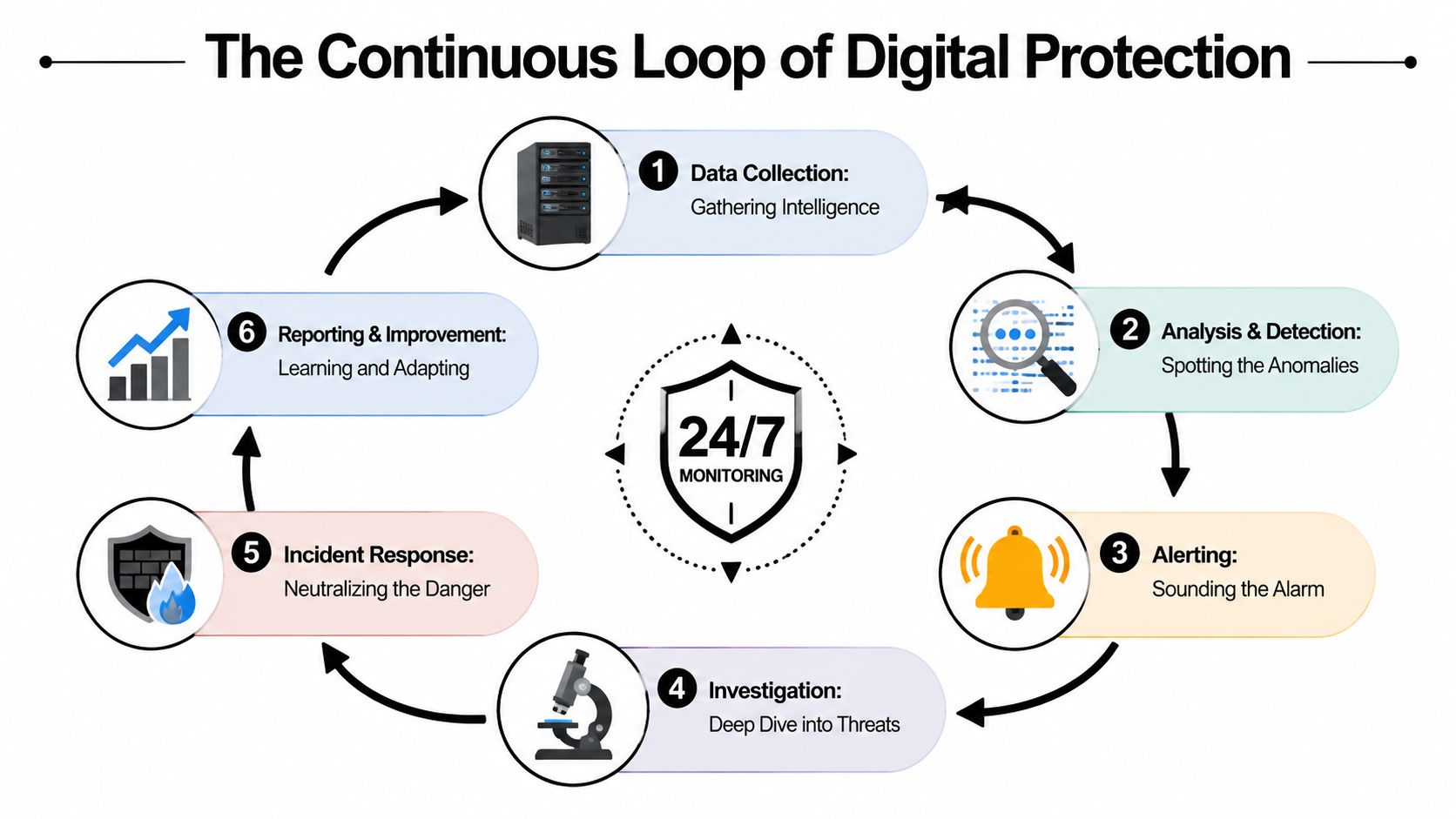
24/7 monitoring works best as a loop, not a one-time check. Data gets collected, patterns get analyzed, alerts get validated, responders act, and the environment gets tuned based on what was learned.
That cycle is why mature monitoring programs perform better than basic alert forwarding. Forwarding says something might be wrong. Monitoring decides whether it is, how serious it is, and what should happen next.
The operating loop behind constant coverage
The mechanics are straightforward when stripped of jargon:
- Collection starts everywhere that matters. Endpoints, email, firewalls, identity systems, and cloud environments all feed events into a central monitoring workflow.
- Analysis sorts normal from suspicious. Correlation rules, behavioral baselines, and smart analytics help separate routine activity from events that deserve review.
- Human validation decides what's real. Analysts review the context. They determine whether the signal points to misconfiguration, user error, or an actual threat.
- Containment stops spread. If the incident is real, the next step is action. That may include isolating a device, resetting a session, or disabling a user account.
- Lessons get folded back into the process. Detection logic improves over time, which makes future response faster and cleaner.
Businesses exploring broader physical and digital convergence may find useful ideas in these specialist integrated security solutions for businesses. The core lesson is relevant: disconnected systems create delays, while integrated visibility improves response.
Why signal quality matters more than alert volume
Many SMBs often get the model wrong. They assume more alerts mean better security. Usually, the opposite is true.
According to Lumu's guidance on monitoring tools and best practices, effective 24/7 monitoring combines telemetry from endpoints, email, and firewalls with fast-response actions, and best practices focus on reducing alert noise so analysts can perform higher-confidence containment actions like isolating a device or resetting a user session before an attack spreads.
That's the standard a business should care about. Not noise. Not dashboard volume. Not how many things blink red.
A company that wants stronger visibility into suspicious activity should also understand the role of intrusion detection systems in business security. Detection is important, but detection without triage and response still leaves the business exposed.
| Monitoring element | What it does for the business |
|---|---|
| Telemetry collection | Creates visibility across systems and users |
| Analyst review | Confirms whether an alert is truly dangerous |
| Fast containment | Limits spread and reduces operational disruption |
| Continuous tuning | Improves future detection quality |
Why This Matters for Your DFW Business
For regulated SMBs, security monitoring isn't just about stopping attackers. It's about protecting the business from slow discovery.
That's the dangerous part. Most leadership teams assume they'll know quickly if something serious happens. Often, they won't.
Regulated businesses have less room for delay
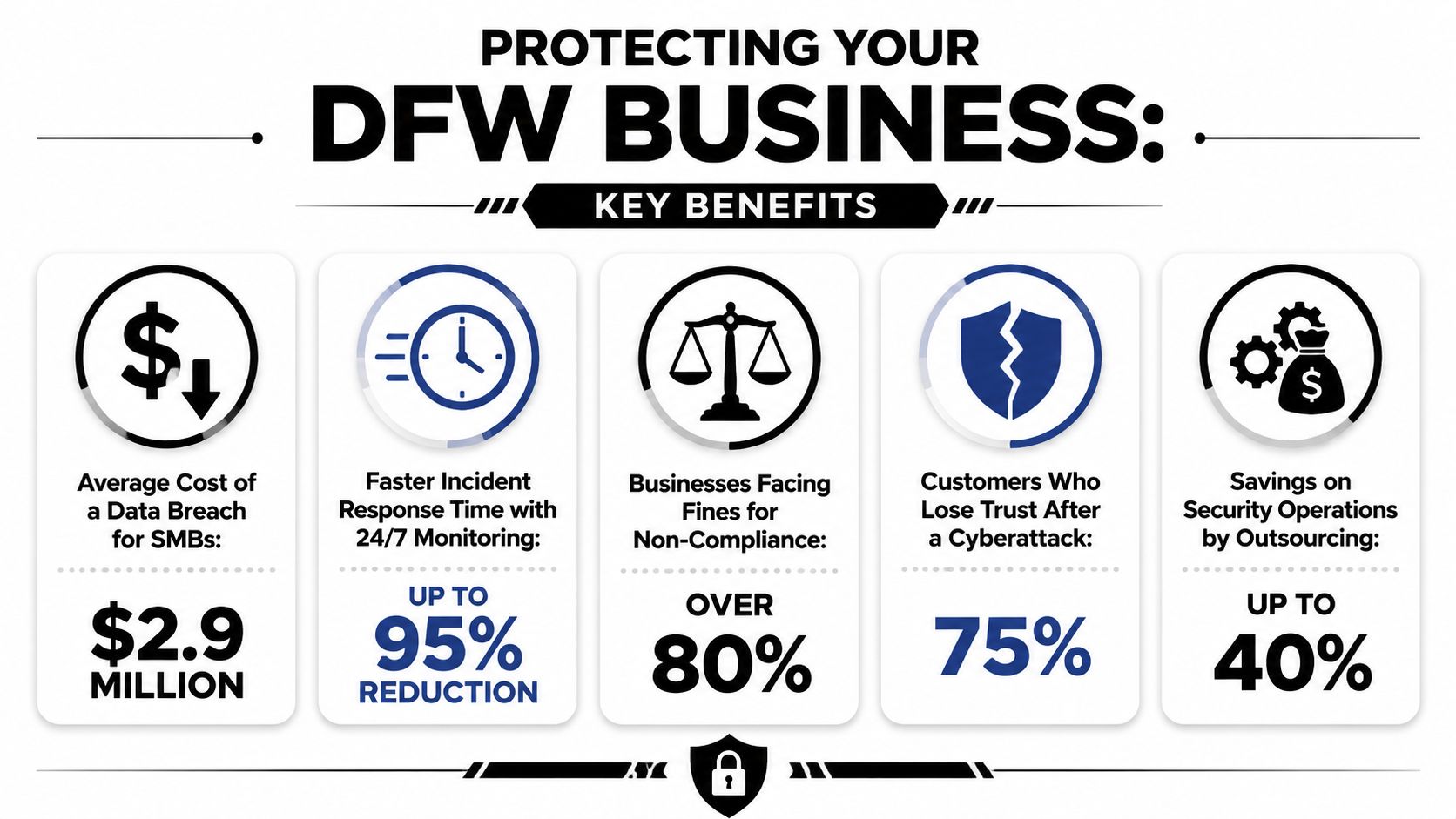
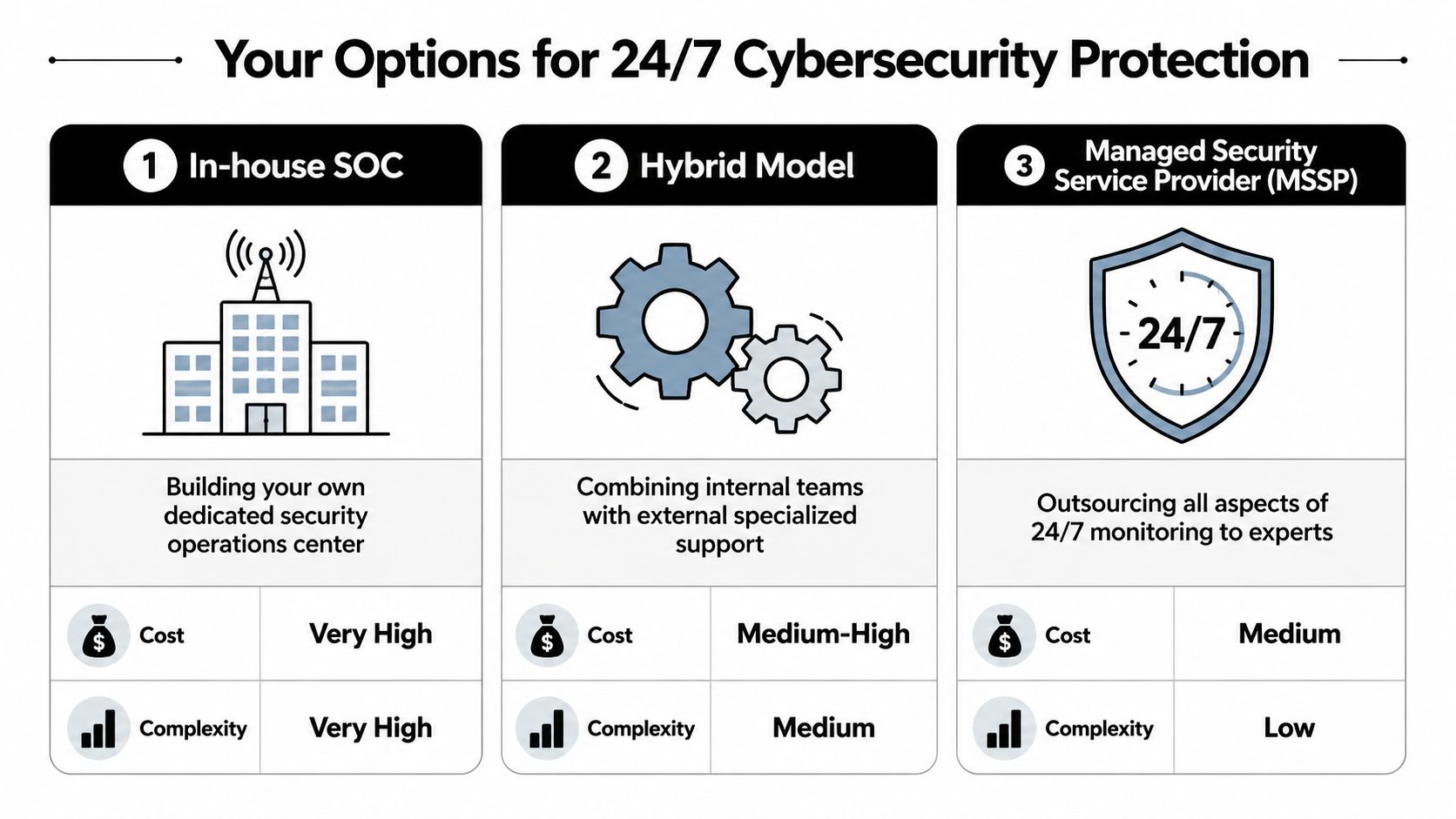
The gap between attack volume and discovery time is exactly why this issue deserves executive attention. Organizations experience about 1,900 cyberattacks per week, or roughly 271 attacks per day, while the average organization takes 258 days to identify and contain a breach, according to the cybersecurity statistics roundup published by Secureframe.
That contrast should change how SMBs think about protection. A law firm doesn't need to be a global enterprise to be exposed. A healthcare practice doesn't need a giant data center to become a target. If the environment holds sensitive information, supports remote work, or connects multiple systems, time matters.
This is about continuity as much as security
For DFW firms in healthcare, legal, finance, construction, and nonprofit work, round-the-clock monitoring supports several business priorities at once:
- Compliance readiness because regulated environments need documented incident handling, defensible controls, and evidence that security isn't only reviewed during office hours
- Client trust because customers expect sensitive records, communications, and financial details to remain protected
- Downtime prevention because the earlier a threat is caught, the fewer systems it can touch
- Leadership confidence because executives can make growth decisions without wondering whether basic after-hours coverage is missing
A business that detects trouble early has options. A business that discovers trouble late usually has cleanup.
This matters in the DFW market because many SMBs are growing faster than their internal security maturity. They add cloud apps, remote workers, outside partners, and new locations. Risk expands unnoticed while leadership still assumes the old model is enough.
It often isn't.
A business-hours-only security process may have worked when technology was simpler. It's a weak fit for a modern regulated business that relies on constant connectivity, vendor access, shared documents, and identity-based systems.
Choosing Your Monitoring Delivery Model
Which model gives your business real after-hours protection without forcing you to overhire, overspend, or miss a compliance obligation?
For most regulated SMBs in Dallas-Fort Worth, the answer is not hard. If you do not already run a mature security operation with enough staff to cover nights, weekends, turnover, and incident response, building 24/7 monitoring in-house is usually the wrong investment. It ties up budget, strains internal IT, and still leaves gaps when key people are unavailable.
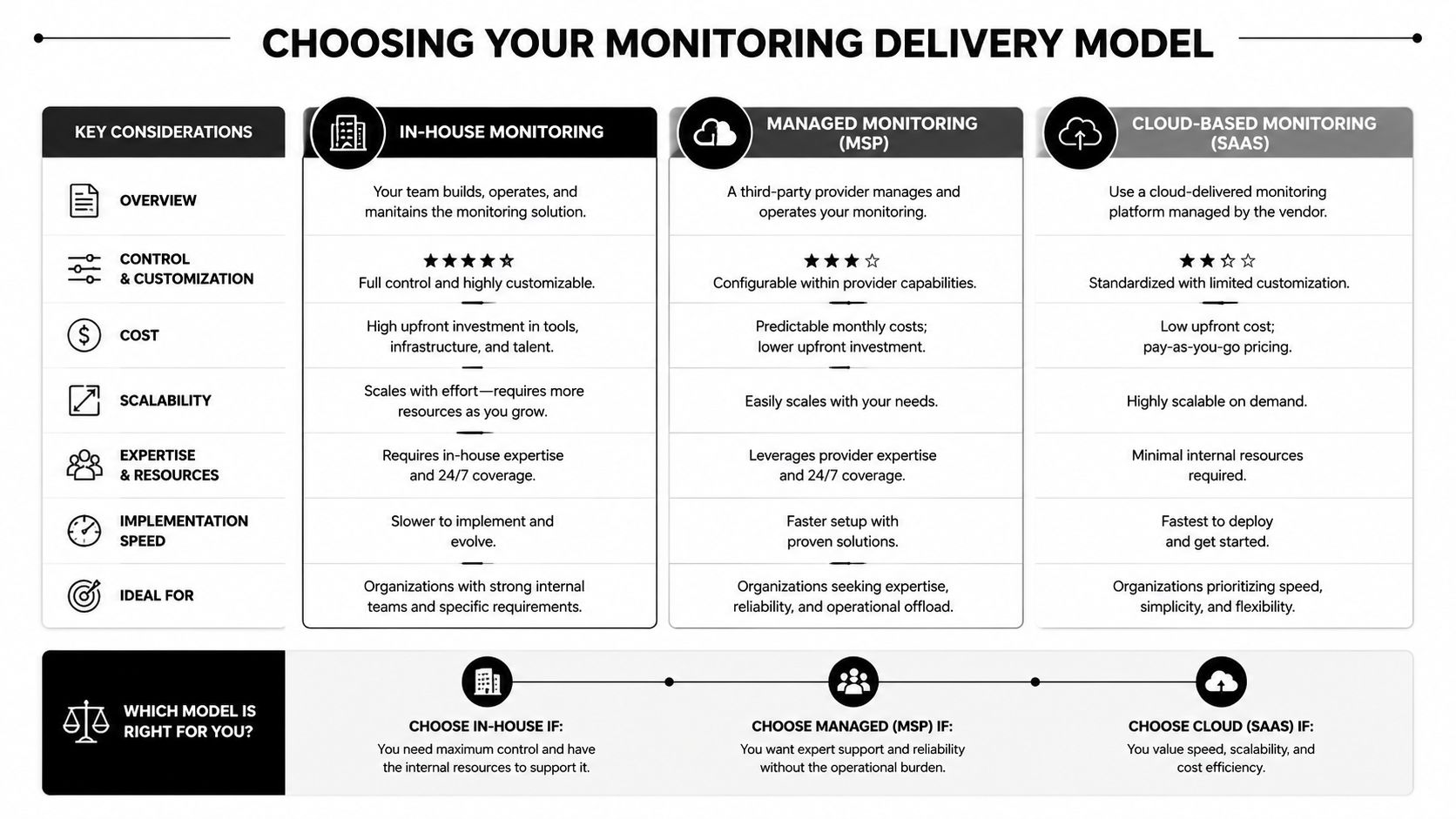
Three ways to get to 24 hour coverage
| Delivery model | Strength | Trade-off |
|---|---|---|
| In-house team | Maximum direct control | Expensive, staffing-heavy, difficult to sustain around the clock |
| Hybrid approach | Balances internal context with outside expertise | Shared ownership can create confusion if roles aren't defined clearly |
| Managed provider | Fast access to mature monitoring and response capability | Requires trust, governance, and clear service expectations |
An in-house model fits organizations with experienced security leadership, documented response processes, and budget for true shift coverage. That usually means more than one capable person. A law firm with a lean IT manager or a clinic with a small support team should not pretend that occasional alert review equals continuous monitoring.
A hybrid model works when the internal team knows the business systems well and an outside partner handles after-hours review or higher-level response. This can be a smart fit for DFW companies with internal IT maturity but no practical way to staff nights and weekends. It only works if alert ownership, containment authority, escalation contacts, and audit documentation are defined in writing.
The managed model is usually the best business decision for regulated SMBs. It gives you continuous monitoring and a response process without turning cybersecurity hiring into a second full-time business problem.
Which model makes sense for most SMBs
The deciding factor is response quality under pressure.
According to DataEndure's guide to 24×7 security monitoring, managed detection and response includes continuous monitoring with human analyst review, and fast threat verification supports quicker containment. That matters to a healthcare practice that cannot afford disruption during patient care and to a law office that cannot leave sensitive client data exposed overnight.
Cost matters too. It should be judged against staffing reality, not against a bare software subscription. Building internal 24-hour coverage requires people, training, management oversight, and turnover planning. A managed service is often the more efficient option for SMBs because it converts a hard hiring problem into a predictable operating expense.
If you are weighing that option, this explanation of managed detection and response for SMBs shows what should be included beyond simple alert forwarding.
Good monitoring is measured by who can verify a threat quickly, contain it decisively, and document the response in a way your business can defend later.
How to Evaluate a Monitoring Partner in North Texas
A lot of providers can promise visibility. Far fewer can explain how they'll protect a regulated business when something happens.
That's why the evaluation process should focus less on feature lists and more on operating discipline. The business doesn't need a flashy dashboard. It needs a partner that can detect, validate, contain, document, and communicate under pressure.
Questions that reveal real capability
A serious buyer should ask direct questions such as:
- What is the actual response commitment? Ask how fast the provider reviews high-priority alerts, what gets escalated immediately, and who is authorized to initiate containment.
- How is compliance supported? A regulated business should ask how the provider documents incidents, supports audits, and aligns reporting with industry obligations.
- What telemetry is included? The provider should speak clearly about coverage across endpoints, email, firewalls, identity systems, and cloud access.
- How are false positives handled? If the answer is vague, the client will drown in noise.
- What happens at 2 a.m.? Ask for the after-hours workflow, not the marketing summary.
- Who communicates with leadership during an incident? If there isn't a named process, confusion will show up at the worst possible moment.
What a strong answer should sound like
The value of 24/7 monitoring is best measured in time to detect, time to respond, and readiness for cyber insurance or compliance audits, and regulated industries often need documented incident response capabilities, with some managed services positioned to support response in under 3 hours, according to DataEndure's breach monitoring guide.
That gives business owners a practical evaluation lens. The right partner should be able to explain:
- How quickly suspicious activity is reviewed
- What containment actions can happen immediately
- How incidents are documented for insurance and audit needs
- How business leadership is informed during and after an event
- How the service reduces business disruption, not just alert counts
A North Texas company should also look for local context. Regulated businesses benefit when the provider understands regional expectations, common operating realities, and how local firms communicate during urgent events. That doesn't replace technical depth, but it improves coordination, especially when executive decisions need to happen quickly.
The right question isn't “Do they monitor 24/7?” The right question is “What exactly happens when they find something real?”
Go From Protected to Proactive With Technovation
How much growth can your business support before security gaps start slowing it down?
For a Dallas-Fort Worth law firm, clinic, or financial office, the decision is not whether cyber risk exists. It is whether you want to address that risk with a defined operating model or keep relying on scattered tools, inbox alerts, and whoever happens to be available when something breaks.
24/7 cybersecurity monitoring gives regulated SMBs a better answer. It helps your business spot suspicious activity early, verify what matters, and contain issues before they interrupt client service, trigger reporting problems, or create expensive downtime. As noted earlier, organizations that combine AI-driven security tools with skilled human oversight see faster breach detection and lower breach costs. The advantage is speed, context, and disciplined response.
That matters more as your company grows. More staff, more endpoints, more cloud apps, more vendors, and more compliance obligations create more ways for risk to hide. If your environment is expanding but your monitoring process is still informal, you are building complexity without control.
Technovation LLC gives North Texas businesses a practical way to fix that. With 25 years of experience, a DFW presence, and a focus on regulated and security-conscious organizations, the firm helps healthcare, legal, financial, construction, nonprofit, and other local businesses turn security into an active business function. That includes proactive monitoring, compliance support, risk reduction, cloud backup, strategic IT planning, and guidance that fits the company's budget, operational pressure, and regulatory demands.
The point is simple.
You do not need more alerts. You need a partner that can help your business stay operational, meet compliance expectations, and make security decisions that support growth instead of distracting from it.
Technovation LLC helps Dallas-Fort Worth businesses build that kind of resilience with managed cybersecurity, compliance support, and 24/7 monitoring suited for regulated environments. Companies that want a practical next step can schedule a free security audit or IT health check with Technovation LLC to identify coverage gaps, strengthen response readiness, and put a smarter protection model in place.