
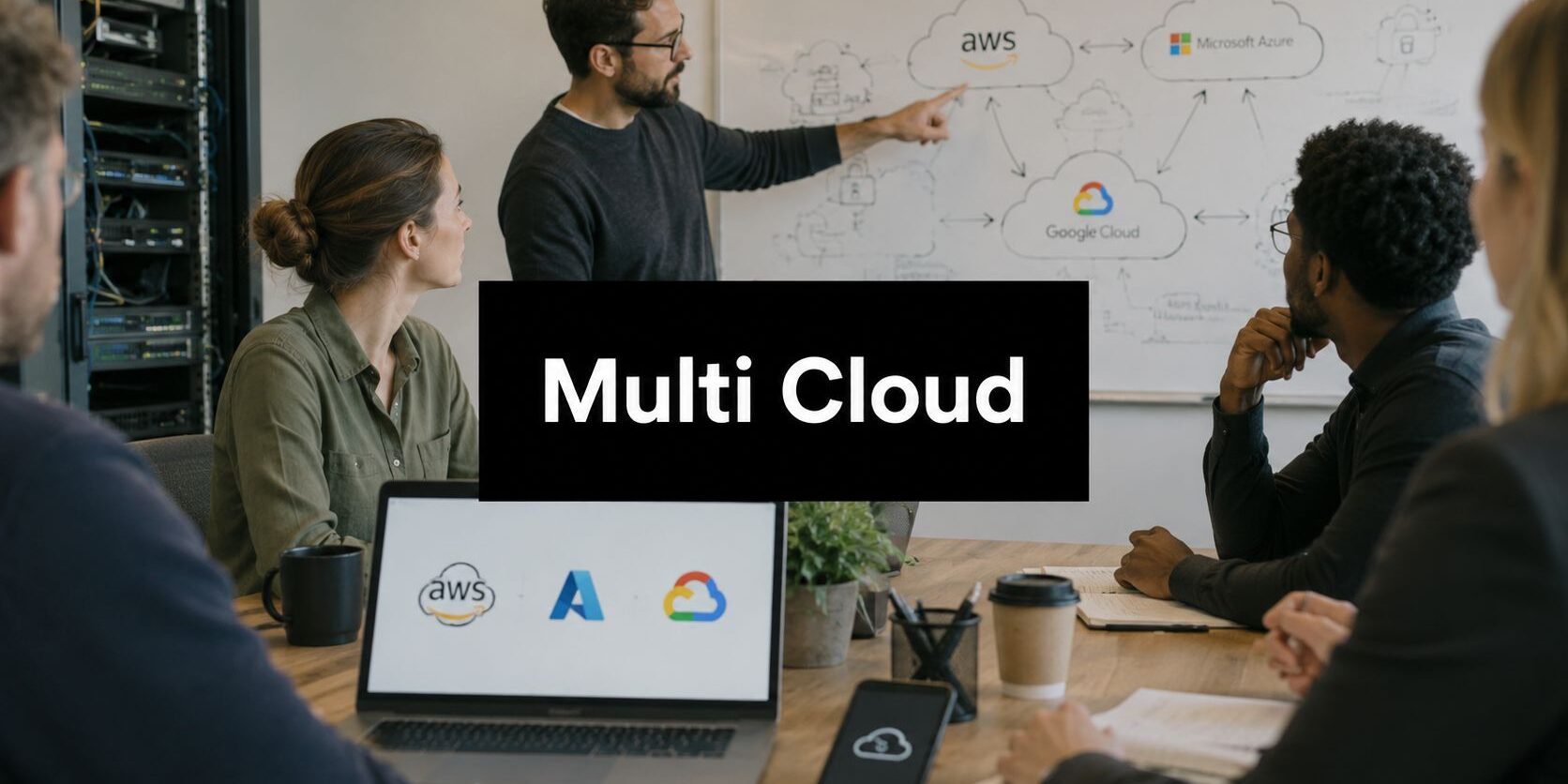
A Dallas–Fort Worth practice owner doesn't need another architecture diagram. They need the front desk working when an electronic health record platform becomes unavailable, the legal team able to open matter files during a provider incident, and the finance staff able to access client reporting without guessing which console contains the alert. Too often, the backup system sits in a separate cloud, identity lives somewhere else, and nobody has tested whether the pieces can work together.
That's the core conversation around a multi-cloud strategy for small and mid-sized businesses. Using multiple providers can improve resilience, portability, and access to specialized services, but it also creates more identities, policies, logs, contracts, and bills to control. For regulated businesses, the right question isn't “How many clouds should the company use?” It's “Which workloads justify another cloud, and who will govern the result?”
Table of Contents
- What a Multi Cloud Strategy Actually Means for Your Business
- Single Cloud, Hybrid, and Multi Cloud Compared
- Benefits That Actually Move the Needle for SMBs
- When Multi Cloud Is the Wrong Move
- Security, Compliance, and Cost Considerations
- A Practical Phased Implementation Plan
- Real Examples Across Healthcare, Legal, and Finance
- Your Multi Cloud Checklist and Next Step
What a Multi Cloud Strategy Actually Means for Your Business
Consider a North Texas medical practice that relies on one cloud for its EHR. An outage freezes front-desk workflows, while an encrypted backup happens to sit in another cloud that staff have never used for live operations. The practice technically has two providers, but it doesn't yet have a strategy. It has a dependency and a backup location.
A multi-cloud strategy means deliberately using two or more public cloud providers for different workloads, with a documented reason for each placement. One application might run where its identity and productivity services already live. Another might use a provider with stronger analytics capabilities. A third might maintain encrypted archives or a recovery environment elsewhere. The design should include access controls, monitoring, data-flow rules, recovery procedures, and an exit path.
The distinction matters because accidental cloud sprawl is not strategy. A department that creates a second account, a developer who stores sensitive files in an unapproved service, or an office manager who purchases a separate backup subscription has increased the company's exposure without creating resilience.
A strategy starts with business decisions
A practical plan answers four questions for every workload:
- What does the workload support? Revenue, patient care, client service, compliance, or internal administration?
- What data does it handle? Sensitive records need stronger placement, retention, access, and residency decisions.
- What happens if it stops? The business should define acceptable recovery expectations before selecting a provider.
- How difficult is it to leave? Proprietary integrations can recreate lock-in even when workloads span several clouds.
The model is now mainstream. A major 2023 industry survey reported that 87% of organizations had a multi-cloud strategy and 72% used a hybrid approach, while nearly nine in ten operated in multi-cloud environments, according to this cloud computing market analysis. That doesn't mean every SMB needs multiple providers. It does mean governance, cost control, and workload visibility deserve attention before another account is opened.
For owners who want broader market context before making a provider decision, a data center market analysis can help explain how infrastructure location and provider availability shape regional planning. The next step is not duplicating everything. It's identifying the one workload where a second cloud solves a real business problem.
Single Cloud, Hybrid, and Multi Cloud Compared
Cloud models should be compared by where workloads belong, not by the number of logos on a presentation slide. A single-cloud model keeps most systems with one public provider. It offers a simpler operating model, fewer skill requirements, and easier cost visibility, but it concentrates dependency in one environment.
Hybrid cloud combines on-premises infrastructure or a private cloud with a public provider. That arrangement often suits organizations with legacy systems, local equipment, specialized applications, or data-handling requirements that make full public-cloud migration impractical. A 40-person legal firm with established local systems may gain more from a disciplined hybrid model than from splitting every application across public clouds. Businesses evaluating that path can review hybrid cloud benefits before changing their operating model.
True multi-cloud intentionally places production workloads across two or more public providers. The reasons should be specific, such as tested recovery, better geographic access, a required service, or reduced dependence on one contract. It isn't a badge of sophistication.
The practical comparison
| Model | Best Fit for SMB | Complexity | Cost Control | Typical Use Case |
|---|---|---|---|---|
| Single Cloud | A small office with stable workloads and limited IT capacity | Low | Simplest to monitor | One provider hosts productivity, applications, backup, and identity |
| Hybrid Cloud | A firm with legacy systems, local equipment, or data-handling constraints | Moderate | Requires both local and cloud tracking | Private infrastructure connects to public cloud services |
| Multi Cloud | A regulated organization with a clear resilience, service, or portability requirement | High | Requires unified tagging and review | Critical workloads are deliberately divided across public providers |
A single-office wealth advisor usually should stay single-cloud if its main problem is weak access control or poor backup testing. Adding another provider won't repair a badly designed primary environment. A multi-state healthcare group with distinct EHR, analytics, portal, and recovery requirements may have a stronger case for multi-cloud because its operational and regulatory needs are more varied.
The decision should account for staff capacity, regulator expectations, growth plans, and the cost of learning another platform. For SMBs, the simplest architecture that meets the actual risk requirement is usually the right architecture.
Benefits That Actually Move the Needle for SMBs
Multi-cloud creates value only when a second provider changes a business outcome. For a 25-to-200-person organization, that outcome usually falls into four categories: continuity, responsiveness, negotiating power, or access to a service the primary provider doesn't handle well.
Resilience has to be usable
A clinic may keep its EHR on one platform and maintain an encrypted recovery environment elsewhere. A law firm may place document archives in a separate environment so a disruption in the primary system doesn't make every matter file unreachable. In both cases, the benefit exists only if staff know the recovery procedure, credentials work, data is current, and the business has tested the process.
Cloud availability is high but not perfect. A 2026 analysis of provider uptime data reported 99.9085% for AWS, 99.8886% for Azure, and 99.7821% for Google Cloud since January 2023, as summarized in this multi-cloud strategy analysis. Those figures reinforce a practical point: redundancy can reduce dependence on one provider, but it cannot replace tested failover, backups, and runbooks.
Location can affect the user experience
A Fort Worth clinic running real-time voice transcription may need application components closer to its users and access networks. A document-review team may work more smoothly when large files and processing services sit near the reviewers rather than crossing unnecessary network paths.
A longitudinal Internet measurement study found that services spanning major public cloud providers reduced round-trip time for users in 20% to 50% of monitored IP prefixes by at least 20% compared with single-cloud deployments, according to this multi-cloud network performance study. The finding points to path diversity and peering, not provider count alone. Traffic engineering still matters.
Choice protects the roadmap
Using more than one provider can give a finance firm access to specialized analytics while its core ERP stays on the platform that integrates with existing operations. It can also create a cleaner exit path if pricing, service terms, or product direction changes. That flexibility has value, but only if data formats, identity, and recovery procedures are documented well enough to support a move.
A Deloitte report found that 80% of businesses believe multi-cloud reduces lock-in and increases autonomy, 84% associate it with improved scalability, and 78% say it improves data distribution and interoperability. The Deloitte multi-cloud overview supports a useful rule for SMBs: assign each workload to the best-fit provider, rather than distributing systems without a governing reason.
For backup planning, businesses can also review cloud backup benefits with a focus on recovery objectives, retention, and operational ownership.
When Multi Cloud Is the Wrong Move
More clouds don't automatically create more resilience. They create more places where an administrator can misconfigure access, where logs can disappear from view, and where a compliance reviewer can ask for evidence nobody has assembled.
A 25-person dental practice running a stable workload in one well-governed tenant usually shouldn't add a second public cloud merely to avoid lock-in. If the problem is weak backup testing, excessive permissions, or poor network design, a second provider adds cost without fixing the root cause. A multi-location cardiology group with different clinical, productivity, imaging, and analytics commitments may have a legitimate reason to separate workloads, but it still needs centralized governance.
The quiet costs deserve a written review
Each added provider can introduce:
- More security exposure: Separate identity systems and policy models increase the chance of inconsistent controls.
- More operational workload: Staff must understand additional consoles, alerts, networking patterns, and recovery procedures.
- More compliance evidence: HIPAA, PCI-DSS, and state bar obligations still apply across the entire data flow, not just the easiest environment to audit.
- More financial friction: Data movement, duplicated services, idle resources, and separate contracts can erode expected savings.
- More training pressure: A small IT team may spend more time maintaining platforms than improving the business.
A survey summarized by TechNewsWorld reported that 52% of respondents using a multi-cloud storage strategy experienced a breach in the prior 12 months, compared with 24% for hybrid-cloud and 24% for single-cloud users. The same report said 69% of multi-cloud users had 11 to 30 breaches, compared with 19% of single-cloud and 13% of hybrid-cloud users, as described in this multi-cloud security risk report. The figures don't prove that multi-cloud causes every incident, but they do show why fragmented controls deserve serious scrutiny.
| What You Are Feeling | Likely Real Problem | Multi Cloud Helps? |
|---|---|---|
| “The provider has too much control.” | Contract terms, proprietary integrations, or weak portability planning | Sometimes |
| “The application is slow.” | Poor architecture, routing, or workload placement | Sometimes |
| “Backups exist, but recovery feels uncertain.” | Untested procedures and unclear ownership | Only if recovery is designed and tested |
| “Cloud spending is unpredictable.” | Missing tagging, rightsizing, and review discipline | Usually not by itself |
| “Audits are painful.” | Incomplete evidence and inconsistent policy enforcement | Only with centralized governance |
The gut-check question is simple: Is the business facing provider lock-in, or is it facing weak architecture inside one provider? The answer should determine whether multi-cloud earns its operational tax.
Security, Compliance, and Cost Considerations
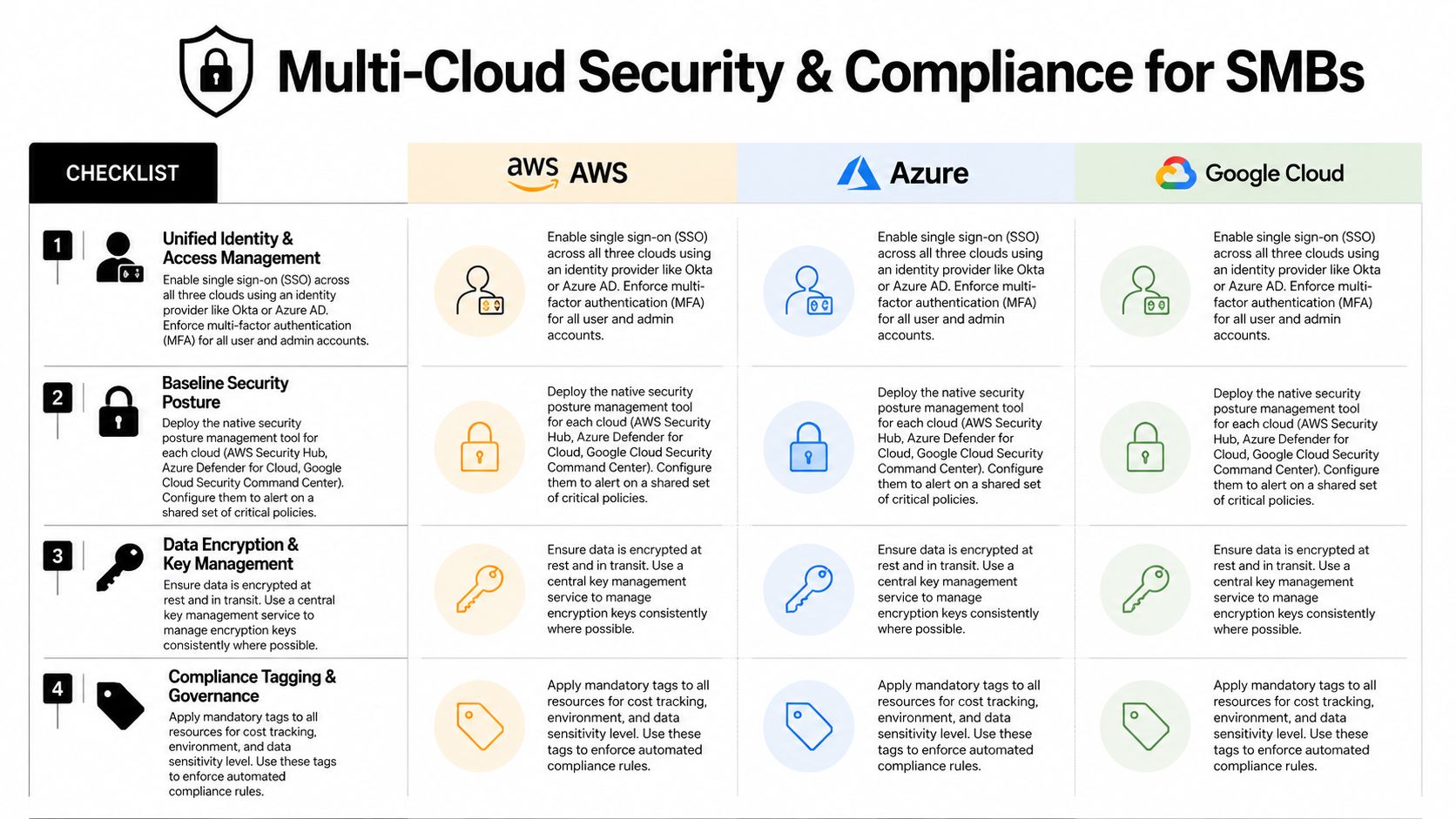
A small regulated business doesn't need an enterprise command center, but it does need one operating model across every cloud. The controls should look familiar to employees and auditors regardless of where a workload runs.
Establish one control plane for identity
Start with a single identity provider that supports single sign-on across cloud accounts and business applications. Require multifactor authentication for administrators and users, separate administrative roles from daily accounts, review access regularly, and remove former employees promptly. A shared identity model prevents each cloud from becoming its own unmonitored directory.
Centralize logs in a security information and event management platform that can ingest authentication, configuration, network, and workload events from every environment. The security team should know who changed a policy, which account accessed sensitive data, and whether an alert requires containment. Encryption should cover data at rest and in transit, with documented key ownership and rotation responsibilities.
Convert compliance into repeatable evidence
For HIPAA, the organization should map the Security Rule safeguards to identity, audit controls, integrity, transmission security, incident response, and vendor agreements. For PCI-DSS 4.0, access restrictions, logging, vulnerability management, and payment-data boundaries need consistent treatment across providers. Legal practices also need documented handling rules for client confidentiality, retention, ethical walls, and state bar expectations.
Data residency and contractual duties deserve review before migration. A documented data residency requirements guide can help business leaders ask the right questions about location, transfer, retention, and access.
Treat cost as a governance process
Assign mandatory tags for owner, department, environment, sensitivity, and recovery tier. Review spend monthly, use showback reports so department leaders can see consumption, and plan for egress before moving large data sets between providers. Committed-use discounts should wait until usage is stable enough to justify the commitment.
An MSP should own the shared responsibility matrix, maintain the evidence register, run a tabletop incident exercise, and coordinate responses when an auditor or forensic investigator asks difficult questions. Businesses comparing external audit support can use this resource to compare SOC 2 audit firms, while keeping operational ownership clearly assigned internally.
Flexera's 2026 cloud report found 29% wasted cloud spend on IaaS and PaaS, and 53% of organizations identified security and compliance risks as their top scaling challenge, according to Flexera's 2026 cloud report analysis. Cost and compliance are connected. Unowned resources and undocumented changes create both financial waste and audit exposure.
A Practical Phased Implementation Plan
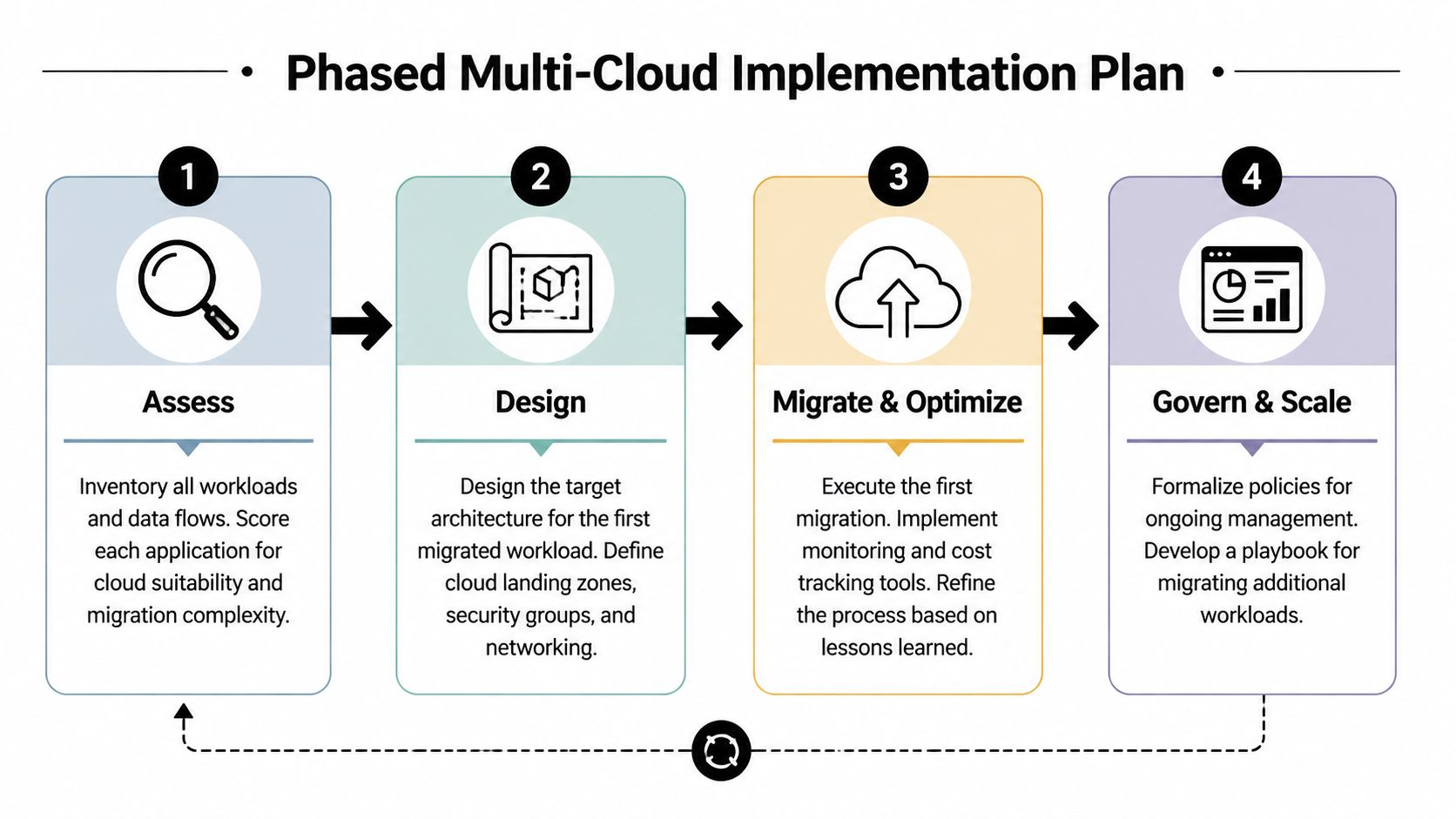
A small operations team shouldn't attempt a broad migration in one motion. A four-phase rollout gives the owner visible checkpoints and gives the MSP clear deliverables.
Phase one assesses the real estate
Inventory applications, data stores, integrations, identities, backup jobs, and dependencies. Score each workload for business criticality, compliance sensitivity, portability, recovery requirements, and migration complexity. The output should be a one-page decision record that states whether each workload stays, moves, or becomes a pilot.
The phase exits when the provider list, data flows, ownership assignments, and risk assumptions are documented. A DFW MSP should hand over the inventory, workload scorecard, data-flow map, preliminary cost model, and decision record.
Businesses that need help establishing a baseline can begin with a cloud computing readiness assessment.
Phase two pilots one manageable workload
Choose a non-critical workload, such as development, a document workflow, or an internal reporting process. Build the landing zone, identity connection, network path, logging, backup, tagging, and rollback procedure before moving production data.
The pilot exits when the team can deploy, monitor, secure, back up, restore, and remove the workload without relying on undocumented personal knowledge. The MSP should provide the architecture diagram, access matrix, policy baseline, cost report, test results, and rollback record.
Practical rule: The first pilot should test the operating model, not showcase the most complicated application.
Phase three expands deliberately
Move one regulated workload into production only after the pilot exposes its gaps. That might be a clinical portal, a document management component, or an analytics service. Define success criteria before migration, including monitoring coverage, access validation, backup completion, user acceptance, and rollback triggers.
The exit package should include the production runbook, incident contacts, recovery procedure, compliance evidence map, and a signed go-live review. A local partner can also help maintain a living security context with DevArmor, so the controls reflect changes instead of becoming a stale document.
Phase four governs the environment
Quarterly reviews should examine provider value, security findings, access changes, workload performance, recovery tests, contract exposure, and spend by owner. Every new workload needs a placement decision before deployment, and every provider needs a removal process if it no longer earns its place.
The final handoff should include policies, runbooks, dashboards, a responsibility matrix, training notes, and the next review date. If those documents don't exist, the business has completed a migration, not built a strategy.
Real Examples Across Healthcare, Legal, and Finance
The strongest multi-cloud designs differ by sector because the trigger differs. The following representative patterns show how workload placement can support a business without turning architecture into a vanity project.
A 40-person North Texas clinic keeps its EHR on one provider under HIPAA-aligned contractual terms, uses a second provider for patient-portal services and mobile access, and stores nightly encrypted image archives in a third environment. The local MSP maps the patient-data flow, verifies access boundaries, tests restoration, and keeps the clinical team out of infrastructure work. The lesson is that patient care determines the priority, not the desire to use every available service.
A 60-attorney firm keeps Microsoft 365, identity, and document workflows together because those systems already support daily matter management. It sends large eDiscovery processing and matter archives to a separate provider when the workload, retention requirements, and cost model justify the split. The MSP maintains ethical-wall permissions, retention evidence, and recovery procedures. The lesson is workload-specific placement, not a blanket multi-cloud mandate.
A small registered investment advisor runs portfolio analytics in one cloud, general operations and compliance logging in another, and protects client-facing portals with a separate security boundary designed for web traffic and denial-of-service resistance. The MSP reviews data movement, access paths, logging coverage, and recovery responsibilities with the compliance lead. The lesson is that client-facing risk and internal processing may deserve different controls.
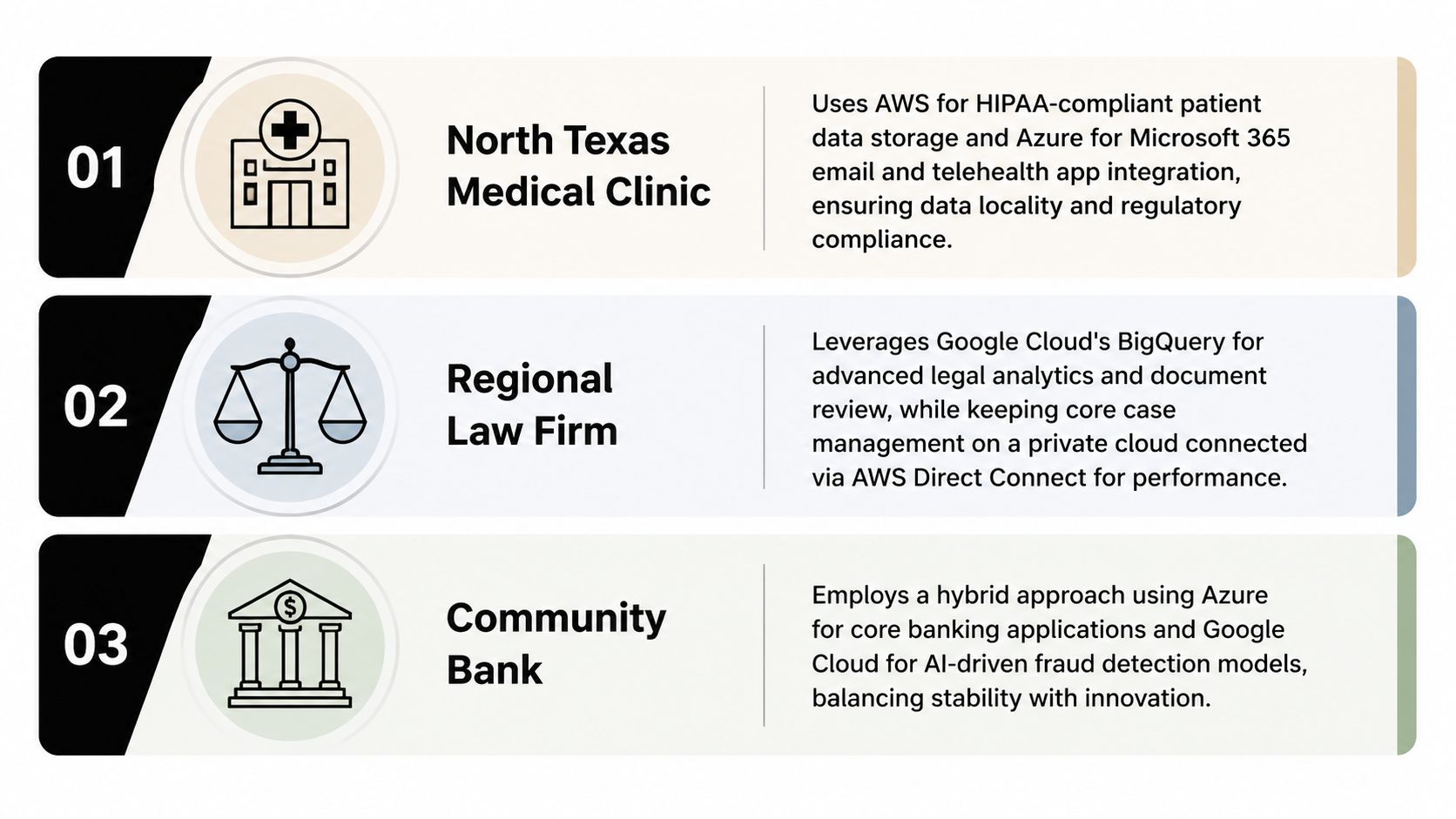
These examples aren't templates to copy. They are decision patterns. A business should start with its data, users, obligations, and recovery needs, then choose the smallest architecture that supports them.
Your Multi Cloud Checklist and Next Step
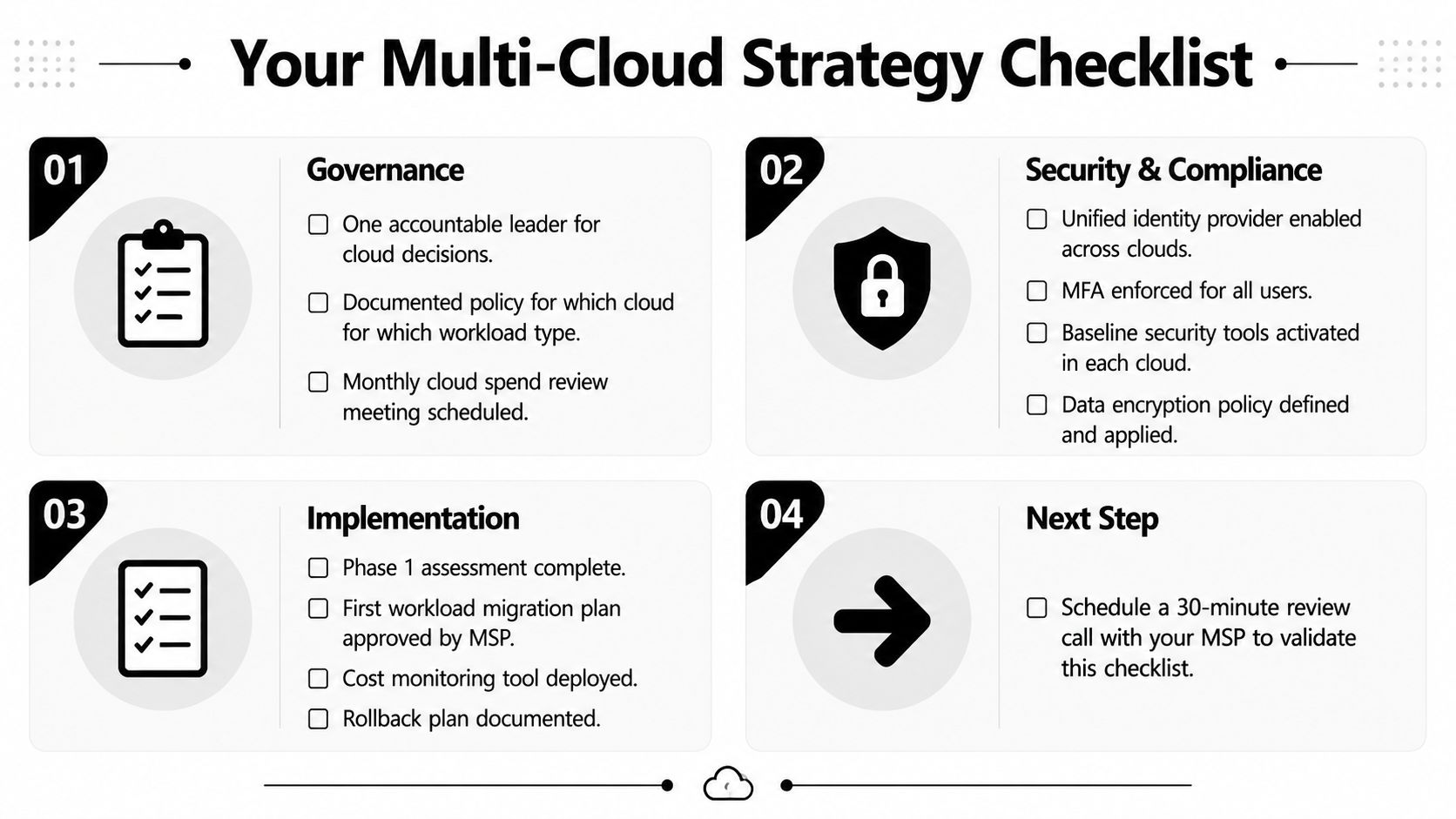
A business owner or office manager should be able to hand this checklist to an IT lead and get clear answers without translating enterprise language.
Governance
- Accountability: One named leader owns cloud decisions and exceptions.
- Placement rules: A written policy explains which workload types belong in which environment.
- Provider control: The business maintains an approved provider list and a removal process.
- Review cadence: Monthly spend reviews and quarterly security and architecture reviews are scheduled.
Security and compliance
- Unified identity: Single sign-on and multifactor authentication cover every cloud.
- Central visibility: Logs and security alerts flow into a common monitoring process.
- Encryption: Data-at-rest and data-in-transit requirements are documented and enforced.
- Contract review: Business associate agreements, data processing agreements, retention rules, and residency obligations are checked before a new workload moves.
- Recovery validation: The workload that matters most has a tested failover or restoration procedure.
Implementation and cost
- Assessment first: Workloads and data flows are inventoried before provider selection.
- Pilot discipline: The first migration has an approved scope, owner, rollback plan, and success criteria.
- Cost tracking: Mandatory tags, monthly showback, and egress planning are in place.
- Exit readiness: Every important service has a written portability or replacement plan.
- Operational ownership: The MSP and business agree on who responds, who documents, and who answers auditors.
The 2026 security picture reinforces the need for this discipline. One 2026 cloud security report found that 88% of organizations operate in hybrid or multi-cloud environments, 81% rely on two or more providers for critical workloads, and 66% lack strong confidence in real-time cloud threat detection and response, according to cloud complexity and security analysis. Adoption is common. Confidence requires operating discipline.
Technovation LLC can map workloads, identity, policy, monitoring, automation, and reporting across environments through its multi-cloud management service, while aligning recommendations with budget, risk, and business priorities. A 30-minute review can determine whether a second cloud solves a real problem or whether stronger governance in the current environment is the better investment.
Technovation LLC helps Dallas–Fort Worth healthcare, legal, and financial organizations assess multi-cloud fit, centralize security and compliance controls, and build recovery plans that staff can use. Visit Technovation LLC to schedule a practical workload review and get a candid recommendation for the next step.





