
The MFA project looked finished on paper. Every employee had been enrolled, the policy showed as enabled, and the audit spreadsheet had a reassuring completion column. Then Monday arrived. A clinician couldn't access a scheduling system, a lawyer's replacement phone wasn't receiving prompts, a finance employee was locked out after changing devices, and the helpdesk started processing reset requests faster than it could document them.
That pattern is common in regulated SMBs. Multi-factor authentication setup rarely fails because the underlying authentication technology is immature. It fails because the rollout doesn't account for legacy applications, shared responsibilities, lost devices, emergency access, user behavior, or the evidence an auditor will request later. A sound deployment treats MFA as an operational change, not a single security switch.
Table of Contents
- Why Most MFA Deployments Fail at the Edges
- Pre-Deployment Inventory and Policy Design
- Platform-Specific Deployment Sequences
- Choosing Authentication Methods That Actually Work
- Rollout Strategy and User Training That Reduces Friction
- Troubleshooting Common MFA Failures
- Compliance and Long-Term Security Posture
Why Most MFA Deployments Fail at the Edges
A practice may protect email and still leave a remote desktop gateway, cloud administration console, VPN, or line-of-business application outside the policy boundary. A law firm may require MFA for individual accounts but continue using a shared mailbox with unclear ownership. A medical office may enroll staff successfully, then discover that the recovery process depends on one administrator who isn't available during an evening incident.

The core control is straightforward. NIST describes MFA as requiring two or more pieces of evidence at login, and its digital identity guidance made MFA a core part of modern identity assurance. The operational consequence is more important than the definition. MFA has moved from optional hardening to a baseline control for security-conscious and regulated organizations, so incomplete enrollment and weak recovery paths now create a false sense of completion.
The gap between enabled and usable
A poorly planned deployment often produces predictable workarounds. Users approve unexpected prompts because they don't know how to report them. Administrators exempt difficult applications indefinitely because nobody has tested compatibility. Helpdesk staff reset factors without consistent identity verification because the documented process is too slow during a busy morning.
Those workarounds can reopen the exact access paths MFA was meant to protect. OWASP cautions that MFA increases management complexity, can cause lockouts when users lose factors, and can fail when reset or bypass processes are exploitable. A healthcare organization reviewing these dependencies may benefit from this practical healthcare identity management guide, particularly when access spans clinical systems, administrative applications, and external services.
Why regulated businesses feel the impact sooner
A large enterprise may absorb an awkward rollout through dedicated identity engineers and a round-the-clock service desk. A smaller clinic, accounting firm, or engineering company usually has fewer administrators, more informal processes, and applications acquired at different times. The result is concentrated friction. One broken integration can affect payroll, patient scheduling, document access, or remote work for an entire team.
MFA adoption has accelerated, but configuration remains uneven. Microsoft reported that adoption increased by over 400% between 2019 and 2022, while over 99.99% of MFA-enabled accounts remained secure during its study period and compromise risk fell by 99.22% across the population. Those results support deployment, but they don't remove the need for careful design. The control works best when the surrounding enrollment, support, and recovery processes work too.
Pre-Deployment Inventory and Policy Design
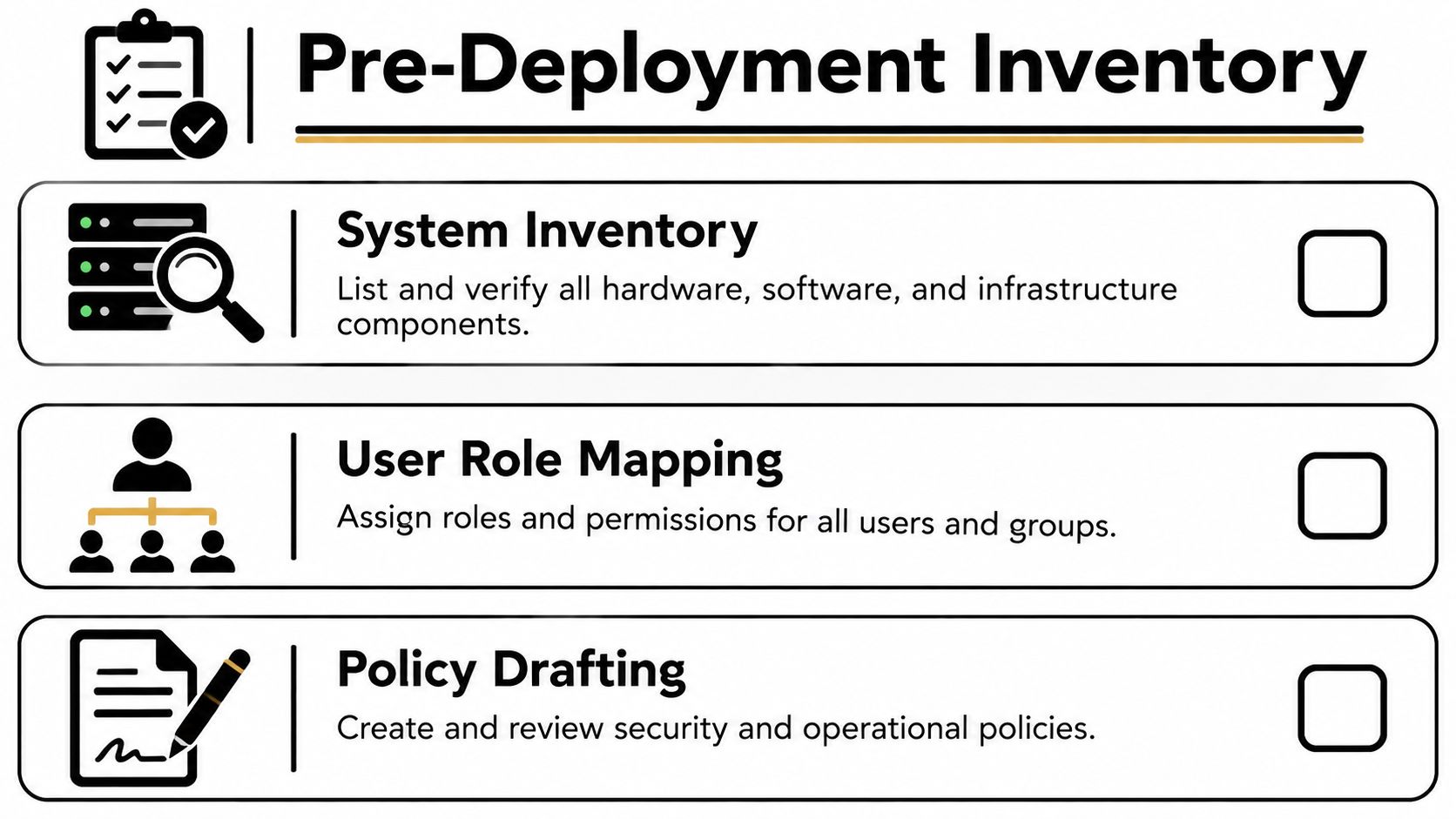
Before opening an administrator console, the business needs an accurate access inventory. The inventory should identify who signs in, what they reach, how authentication occurs, and what happens when the normal factor isn't available. Without that map, administrators tend to protect the most visible applications first and miss the access paths that matter during an incident.
Build an access register
A useful register doesn't need to be complicated. Each row should answer operational questions:
- Application and owner: Record the application, business owner, technical owner, and data classification.
- Authentication path: Note whether access uses a central identity provider, a local account, a VPN, remote desktop, or an application-specific login.
- User population: Separate ordinary users, administrators, contractors, service accounts, and emergency accounts.
- Factor compatibility: Mark whether the system supports modern phishing-resistant methods, authenticator codes, push approval, hardware tokens, or only older options.
- Recovery dependency: Document who can restore access, what identity checks are required, and how the action will be logged.
Legacy systems deserve their own review. An application that accepts only a password shouldn't receive a permanent exemption just because replacement is inconvenient. The owner should document the business need, restrict access through compensating controls, define a migration path, and review the exception regularly.
Write policy before enforcement
Policy design should settle difficult cases before users encounter them. Shared accounts should be eliminated where practical because they weaken accountability. If a shared identity is unavoidable, the business should assign a named owner, restrict its use, protect its credentials through an approved process, and record each authorized use. Service accounts need separate treatment because interactive MFA may not fit their function. Their permissions should be narrow, credentials should be managed securely, and noninteractive access should be monitored.
Emergency access also needs a written rule. A break-glass account should be tightly restricted, monitored, excluded from ordinary user workflows only where necessary, and tested under controlled conditions. The recovery procedure should specify who verifies the requester, who approves the reset, which evidence is retained, and when the account or factor is reviewed afterward.
The business can document these decisions in an access control policy framework that ties technical settings to roles, exceptions, approvals, and review responsibilities. That document becomes useful during audits because it explains not only that MFA exists, but also how the organization manages the cases where standard enrollment doesn't apply.
Platform-Specific Deployment Sequences
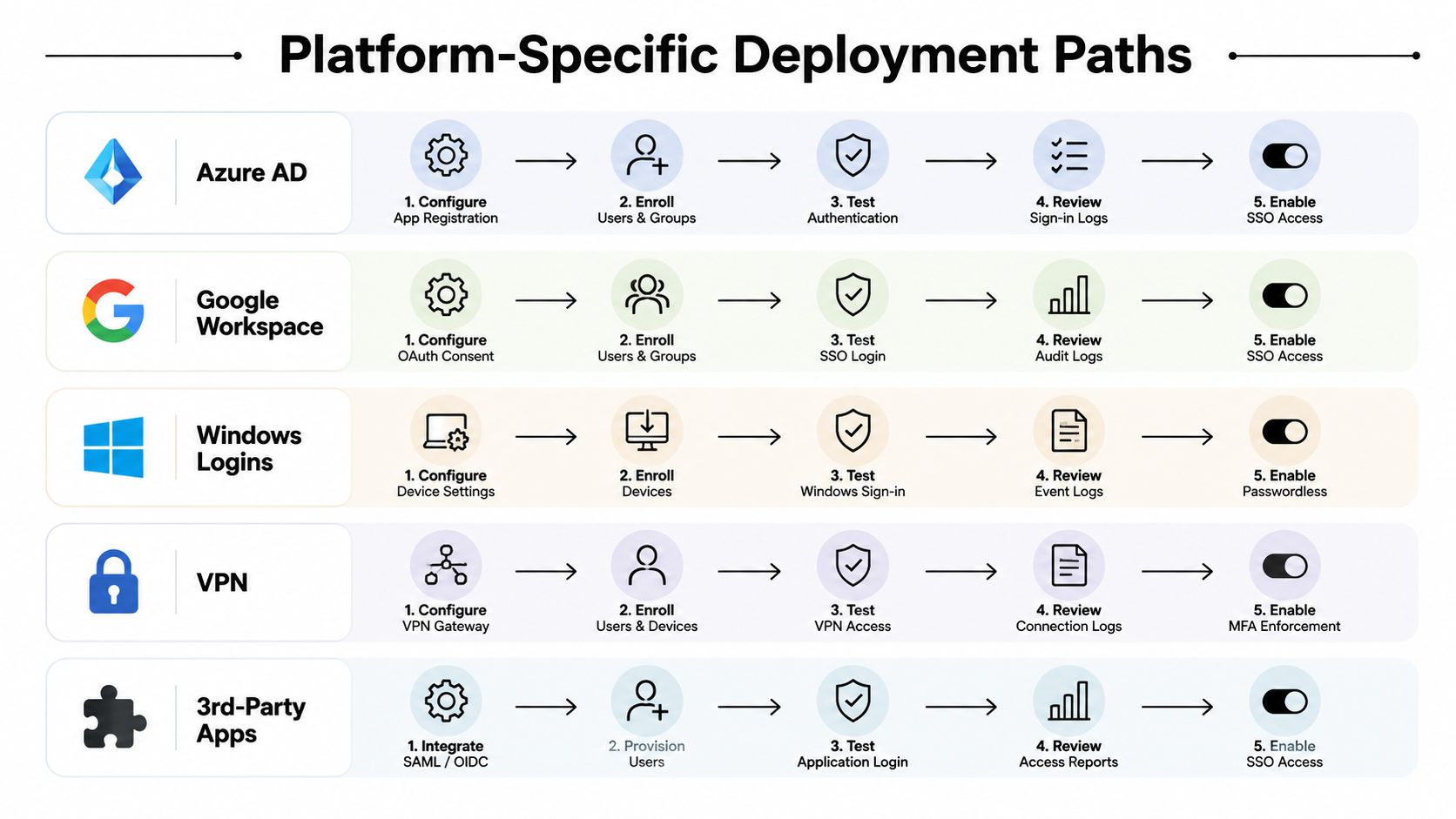
The safest deployment sequence differs by platform, but the principle stays consistent. Establish an administrative safety net, test with a controlled group, migrate authentication to the central identity platform, enforce policy gradually, and verify recovery before expanding coverage.
Central identity platforms
For a cloud directory, begin by confirming that more than one authorized administrator can perform enrollment and recovery. Create a pilot policy for selected users, exclude emergency access accounts where the platform's design requires it, and validate sign-in from managed and unmanaged devices. Only after those tests should the team move toward Conditional Access enforcement.
The policy should distinguish ordinary access from privileged access. Administrators should receive stronger requirements, and sensitive applications should not rely on a broad “all users, all apps” rule without testing legacy dependencies. Review sign-in logs after each change, confirm that exceptions are visible, and keep a documented rollback path that doesn't depend on the same account being tested.
For a workspace environment, preserve administrator recovery options before requiring enrollment. Test browser sessions, mobile access, delegated administration, and external collaborators. A policy that works for an office employee may interrupt a contractor or a user who accesses documents from a managed service.
Windows access and remote connectivity
Windows sign-in needs a separate validation path because device enrollment, local recovery, and user authentication can interact. Test the chosen sign-in method on the actual device types in use, confirm that recovery works without weakening device controls, and verify what happens when a device is offline. Windows Hello for Business can provide a stronger, device-bound experience when the identity platform and endpoint management configuration support it, but it shouldn't be enabled broadly before enrollment and replacement procedures are tested.
VPN deployment often exposes hidden assumptions. Confirm whether the VPN authenticates against the central directory, a local directory, or a separate identity service. Test first with a noncritical group, verify that connection logs reach the monitoring platform, and ensure that a lost phone or token doesn't require disabling MFA for the entire remote workforce.
Third-party applications should be grouped by authentication capability. Move compatible applications to centralized sign-in, isolate systems that require older methods, and assign owners to every exception. The sequence should always end with a real user test, not merely an administrator confirming that a policy saved successfully.
Choosing Authentication Methods That Actually Work
The important question isn't whether a method adds a second step. It's whether the method can resist phishing, whether users can complete it reliably, and whether the support team can recover access without creating a bypass.
SMS remains convenient, but it is vulnerable to SIM swapping and should not be the preferred method where stronger options are available. Push approval reduces typing, yet repeated unsolicited prompts can produce fatigue and mistaken approvals. Authenticator-generated codes are more useful than passwords alone, but users can still disclose codes to an attacker or lose the device that stores them.
Phishing-resistant methods, including passkeys and FIDO2 security keys, use origin-bound cryptographic authentication. They are stronger defaults for privileged users and sensitive workflows, although hardware-dependent methods can create administrative overhead and access barriers for less technical users. The choice should account for replacement, travel, shared workstations, accessibility, and recovery.
Microsoft guidance recommends measuring the percentage of users protected with phishing-resistant MFA, the percentage of sign-ins using those methods, secure proofing through workflows such as temporary access passes plus liveness checks, and support tickets related to fatigue or lockouts. Microsoft-linked reporting says phishing-resistant MFA blocks more than 99% of identity-based attacks. That figure is cited in the guidance on phishing-resistant MFA, and it supports a practical conclusion: enrollment totals alone aren't enough.
| Method | Phishing Resistance | User Friction | Support Overhead | Best For |
|---|---|---|---|---|
| SMS | Low | Low at enrollment | Moderate during phone changes and recovery | Temporary transition cases |
| Authenticator code | Moderate | Moderate | Moderate, especially after device loss | General users during staged migration |
| Push approval | Moderate | Low initially, higher when prompts become excessive | Moderate to high | Users who need a simple mobile workflow |
| FIDO2 security key | High | Moderate, with a physical key required | Higher for replacement and inventory | Privileged users and high-risk access |
| Passkey | High | Low after enrollment | Moderate, dependent on device recovery | Modern managed-device environments |
Teams evaluating the broader identity model can use this overview of stronger authentication strategies alongside an internal identity and access management framework. The decision should be recorded as a risk-based policy, not left to individual preference.
Practical rule: Use the strongest practical method for administrators first, then design a recovery experience ordinary users can complete without helpdesk improvisation.
Rollout Strategy and User Training That Reduces Friction
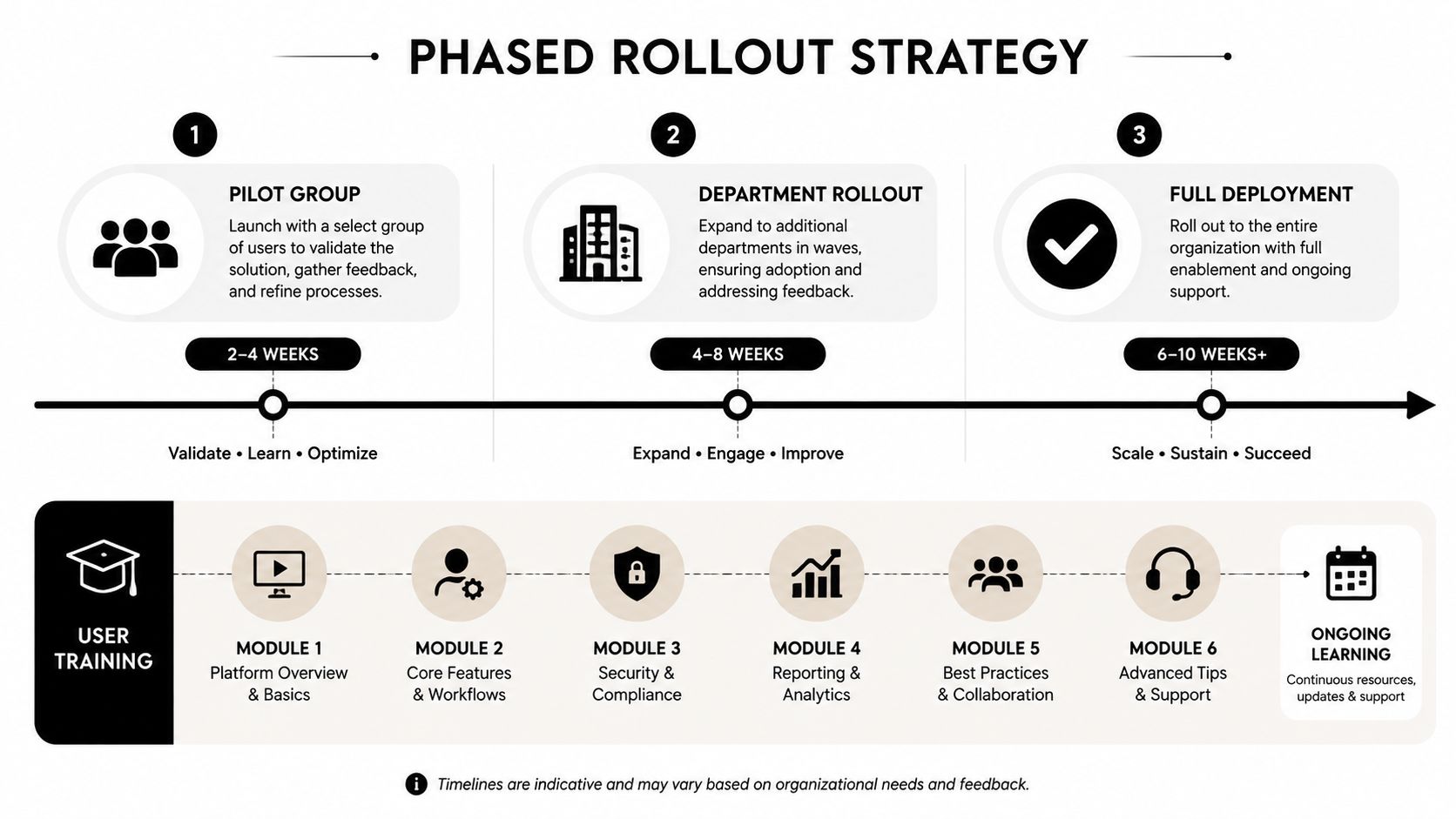
A phased rollout protects both security and business continuity. The first group should include technically confident employees, a manager who understands operational impact, and at least one person who regularly uses the applications most likely to fail. It shouldn't consist only of IT staff. A technically perfect pilot can hide the problems faced by reception staff, field workers, clinicians, or attorneys.
Make the change understandable
The initial message should be short and concrete:
Sample announcement: “MFA will protect company access to email, remote work, and sensitive applications. Enrollment takes place through the approved company process. The IT team will never ask an employee to approve an unexpected sign-in prompt or disclose a verification code.”
That message should appear before enforcement, followed by a short demonstration using the actual sign-in experience. Training should cover enrollment, normal sign-in, suspicious prompts, phone replacement, lost factors, and the approved support route. A one-page guide with screenshots usually works better than a long policy document.
The rollout calendar should separate enrollment from enforcement. Give each group a defined window, monitor failed sign-ins and support requests, and pause expansion when a recurring problem indicates a design flaw. A department that depends on a legacy application may need a different sequence from an office team using only modern cloud services.
Measure more than enrollment
A user who enrolled a factor but can't recover access isn't fully protected operationally. Track successful sign-ins, failed enrollment attempts, reset requests, exceptions, unresolved compatibility issues, suspicious prompt reports, and the time required to restore access after a legitimate factor loss.
The adoption gap remains significant in real environments. Microsoft reported in 2023 that only 22% of Azure Active Directory customers used MFA, while more recent reporting placed workforce adoption at 70% by January 2025, up from 66% a year earlier. The same reporting listed adoption at 87% in the technology sector, 34% among businesses with 26 to 100 employees, and 27% among firms with up to 25 workers. These figures come from the MFA adoption statistics report, and they illustrate why smaller regulated businesses need rollout support rather than a one-time mandate.
Technovation can support this work through a phased implementation, user communication, access reviews, and ongoing helpdesk coordination. Its broader data security best practices can help place MFA inside the rest of the organization's security controls instead of treating it as an isolated project.
Troubleshooting Common MFA Failures
A useful troubleshooting process starts with the failure category, not with a blanket reset. The administrator should identify the user, application, device, factor type, timestamp, and exact error before changing policy. That preserves evidence and prevents a temporary symptom from becoming a permanent exception.
Time and code problems
Time-based codes fail when the device and authentication service disagree about time. Check clock synchronization on the phone, workstation, identity provider, and relevant servers. Verify that the user is entering a current code, confirm that the enrollment secret belongs to the correct account, and re-enroll only after preserving the incident record.
Industry reporting identifies 23% of MFA failures as coming from incorrect time synchronization between devices and servers, according to this MFA statistics compilation. The number reinforces a simple operational practice: clock synchronization belongs in the deployment test plan, not only in the troubleshooting manual.
Push and hardware failures
For missing push notifications, check network connectivity, application notifications, device registration, battery restrictions, and whether the prompt was sent to an old device. Administrators should never solve repeated prompt failures by permanently weakening the policy. A temporary, approved recovery route is safer, followed by device replacement or re-enrollment.
Push fatigue deserves an explicit response. The same reporting says 31% of organizations experience push fatigue, while 35% of MFA-enabled environments still use SMS as the primary method. Disable unnecessary push triggers, investigate unexpected prompts, and move high-risk users toward phishing-resistant methods where feasible.
Lockouts and lost factors
The recovery operator should verify identity through a documented process, revoke the lost factor, enroll the replacement, confirm a successful sign-in, and record the approver and evidence. Backup factors should be enrolled before enforcement, but they mustn't become unmanaged permanent alternatives. Emergency access should be time-limited, monitored, and reviewed after use.
A failed integration also needs visibility. Reporting says 33% of MFA deployments fail to integrate with SIEM systems, and 44% of users write down MFA codes. Log export checks, user education, and code-storage controls belong in post-deployment validation, not as optional improvements.
Compliance and Long-Term Security Posture
Regulated businesses need to show more than an enabled setting. They need evidence that access is assigned appropriately, stronger methods protect higher-risk accounts, exceptions have owners, recovery actions are controlled, and monitoring can identify abnormal authentication activity.
For healthcare organizations, that evidence should align MFA with access control, workforce procedures, incident response, and documented risk management. Law firms and financial services businesses face similar accountability concerns, even when their exact obligations differ. A policy that says “MFA is required” is weaker than a record showing which systems require it, who approved exceptions, when factors were enrolled, and how administrators handled lost devices.
Maintain an audit-ready record
A durable evidence package should include:
- System coverage: The current application and access-point inventory.
- Policy decisions: Authentication requirements by role, application, and risk.
- Enrollment records: Approved enrollment status without storing user secrets.
- Exception evidence: Business justification, compensating controls, owner, and review date.
- Recovery logs: Identity verification, approval, factor revocation, replacement, and closure.
- Monitoring evidence: Sign-in review, alert handling, SIEM integration, and incident records.
- Testing results: Pilot findings, recovery tests, emergency access tests, and remediation actions.
MFA also needs periodic review as applications, staff, devices, and threats change. NIST-oriented organizations can use this NIST compliance checklist to connect MFA evidence with wider control documentation rather than maintaining a disconnected spreadsheet.
Technovation LLC can manage MFA across email, VPN, privileged accounts, cloud administration consoles, and other access points as part of a broader managed IT and compliance program. The practical objective isn't only to increase enrollment. It's to maintain secure authentication, usable recovery, clear audit trails, and a support process that remains dependable after the rollout team has moved on.
Technovation can assess the current MFA configuration, identify legacy and recovery gaps, and build a phased deployment plan for regulated SMBs across Dallas–Fort Worth. Visit Technovation LLC to request a security audit or discuss managed MFA support that fits the organization's applications, staff, and compliance requirements.





