

Most advice about process automation starts in the wrong place. It tells business owners to find repetitive tasks, buy software, and remove people from the sequence. That approach can make a bad process run faster, while leaving the core problems untouched: disconnected systems, unclear approvals, undocumented exceptions, weak access controls, and no reliable audit trail.
For a Dallas–Fort Worth SMB, process automation is less about replacing tasks than orchestrating business transactions across systems. A useful workflow may collect information, validate it, request approval, update several records, notify the right person, and document every decision. In healthcare, legal, and financial services, that control layer often matters more than raw speed.
The practical question isn't just, “What can software do?” It's, “Which process should move automatically, which decisions still require a person, and how can the organization prove what happened?” That distinction separates durable automation from a collection of fragile scripts.
Table of Contents
- Why Most Definitions of Process Automation Miss the Point
- Understanding the Core Concept of Process Automation
- Comparing RPA, BPA, and Workflow Engines
- Measurable Business Benefits and ROI
- Industry-Specific Use Cases for DFW SMBs
- Practical Implementation Considerations
- Common Pitfalls and Best Practices
- Next Steps for SMBs Ready to Automate
Why Most Definitions of Process Automation Miss the Point
The simplest definition of process automation is software performing recurring work that employees previously handled manually. That definition is accurate, but incomplete. It describes a single action, such as copying data from a form into a record, while overlooking the transaction surrounding that action.
A complete business process may begin when a customer submits a request and end only after validation, approval, fulfillment, billing, recordkeeping, and follow-up. Those steps may live in different applications and belong to different departments. Automation becomes valuable when a workflow coordinates the entire chain, rather than improving one isolated handoff.
The tool-buying trap
More software doesn't automatically create a connected operation. An organization can have separate systems for customer records, accounting, document storage, communications, and compliance, yet still depend on employees to rekey information and chase approvals. Each new application may solve a local problem while increasing the number of handoffs that someone must coordinate.
The Gartner definition of business process automation frames BPA as an orchestration capability for repeatable business processes. That perspective is useful because it places rules, system interactions, and exceptions inside a workflow layer instead of treating automation as a macro attached to one screen.
Practical rule: If a workflow can't explain what triggered it, which rule it applied, who approved an exception, and where the resulting record was written, it isn't governed automation. It's unattended activity.
Why regulated firms need a wider definition
A clinic may need to route an intake request, check required information, assign a review, and document completion. A law firm may need to move a matter through conflict review, engagement approval, document production, and billing. A financial firm may need to collect evidence, apply policy rules, obtain authorization, and retain an auditable record.
In each example, the risk sits between systems and decisions. Interoperability, exception handling, and governance are the primary design challenges. Automation should therefore be treated as an operating model for reliable execution, not as a shortcut for reducing headcount.
Understanding the Core Concept of Process Automation
So, what is process automation in operational terms? It's a defined sequence in which software receives a trigger, applies rules, moves information between approved systems, assigns human decisions where necessary, and records the outcome. The workflow may run entirely without intervention, or it may pause when judgment, authorization, or unusual circumstances require a person.
A useful analogy is a well-designed shipping process. A label printer performs one task. A shipping workflow checks the order, confirms inventory, selects the approved route, requests authorization for an exception, updates the customer record, and logs completion. The printer is automated, but the transaction is orchestrated.
From scripts to transactions
Simple scripting works well when one input produces one predictable output. Process automation handles a broader sequence:
- Trigger: A form, message, status change, scheduled event, or approved request starts the workflow.
- Validation: Required fields, permissions, document presence, or policy conditions are checked.
- Routing: The request moves to the correct queue, department, approver, or system.
- Action: Records are updated, notices are sent, files are created, or downstream work begins.
- Exception path: Missing information, conflicting data, or a policy deviation sends the work to a defined human review.
- Evidence: The system records timestamps, decisions, changes, and completion status.
This is why BPA is often described as a “run the business” capability for mission-critical processes. The workflow isn't merely clicking through an application. It coordinates the sequence that produces a business result.
A practical mental model
Teams evaluating a process should map five elements before selecting technology: the trigger, the systems involved, the rules, the human decisions, and the evidence required afterward. If any of those elements remain vague, implementation will likely reproduce the existing confusion.
For organizations that need a concrete example of approval logic, a budget approval workflow for nonprofits offers a useful reference point. The same principles apply to purchasing, hiring, compliance reviews, and client onboarding, even though each organization will need different controls.
Comparing RPA, BPA, and Workflow Engines
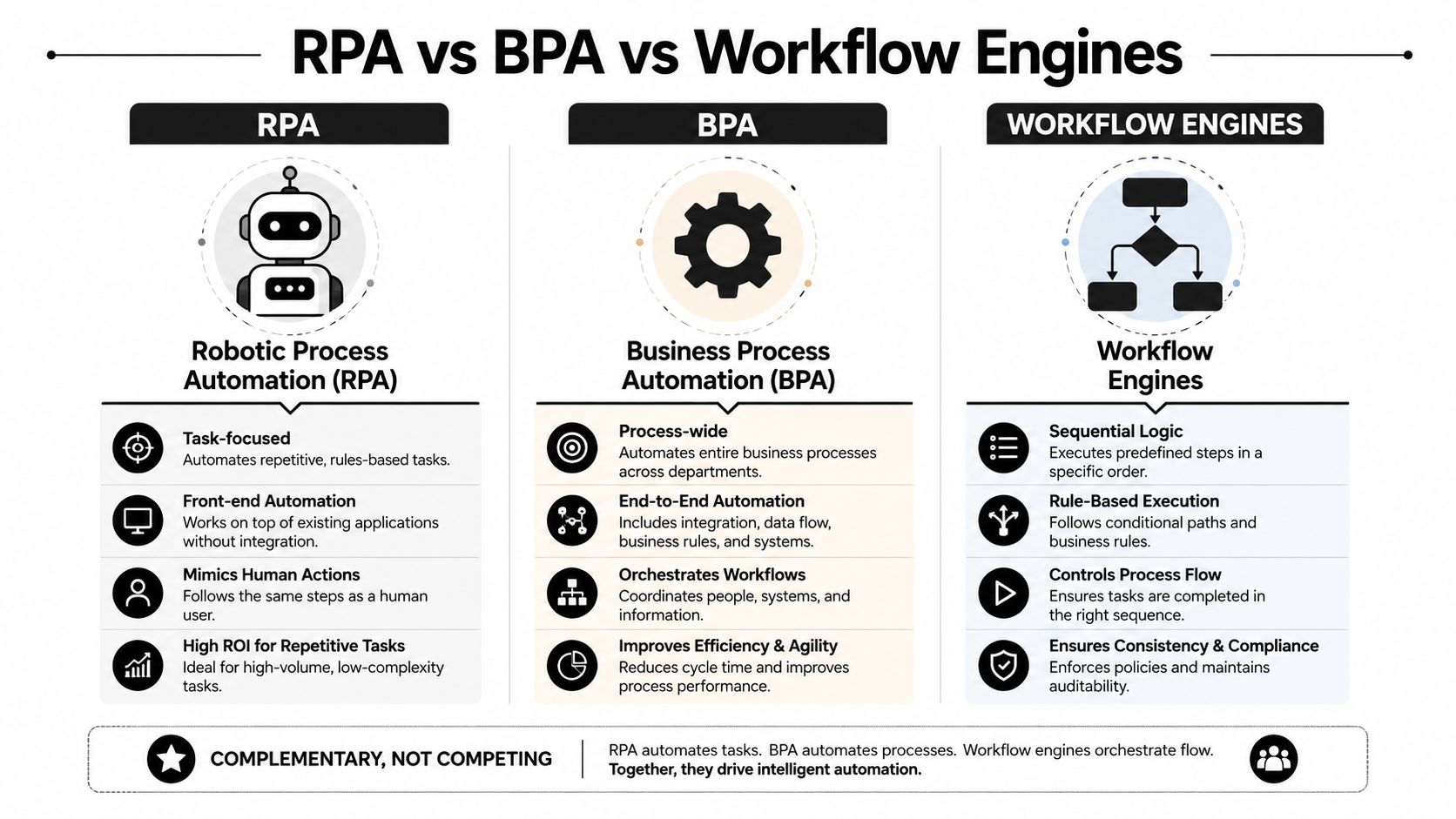
RPA, BPA, and workflow engines overlap, but they solve different problems. The right choice depends on whether the organization needs a digital assistant for a narrow task, orchestration across departments, or a durable control layer for a complex transaction.
| Automation Type | Best For | Complexity | Governance |
|---|---|---|---|
| RPA | Repetitive interaction with a stable application interface | Narrow and task-focused | Requires careful credential, change, and activity controls |
| BPA | Cross-department processes involving rules, approvals, and system handoffs | Moderate to end-to-end | Stronger visibility, ownership, and audit design |
| Workflow Engines | Durable orchestration with sequencing, conditions, events, and exceptions | High when processes span systems | Designed for centralized rules, monitoring, and traceability |
When RPA fits
RPA can be appropriate when an older application lacks an integration interface, the task follows a predictable pattern, and the screen layout is unlikely to change frequently. Examples include transferring a standardized value between approved systems or generating a routine notification from a known status.
Its weakness is brittleness. A changed field, altered screen, unexpected data format, or unavailable session can interrupt the robot. RPA should therefore be treated as a tactical bridge, not automatically as the foundation for every business process.
When BPA fits
BPA is a better fit when a transaction crosses departments or applications. It can route approvals, enforce required steps, notify participants, update records, and expose queue status. This model works well for onboarding, invoice review, service requests, compliance attestations, and other processes with clear business ownership.
When a workflow engine fits
A workflow engine becomes more valuable when the organization needs conditional paths, retries, event-driven triggers, escalation rules, human-in-the-loop decisions, and a durable audit history. It also provides a central place to manage process logic instead of scattering rules across scripts and individual applications.
Organizations exploring automation alongside generative AI can review Technovation's generative AI for business guidance, but AI shouldn't replace workflow design. The process still needs explicit permissions, decision boundaries, and escalation paths.
Measurable Business Benefits and ROI
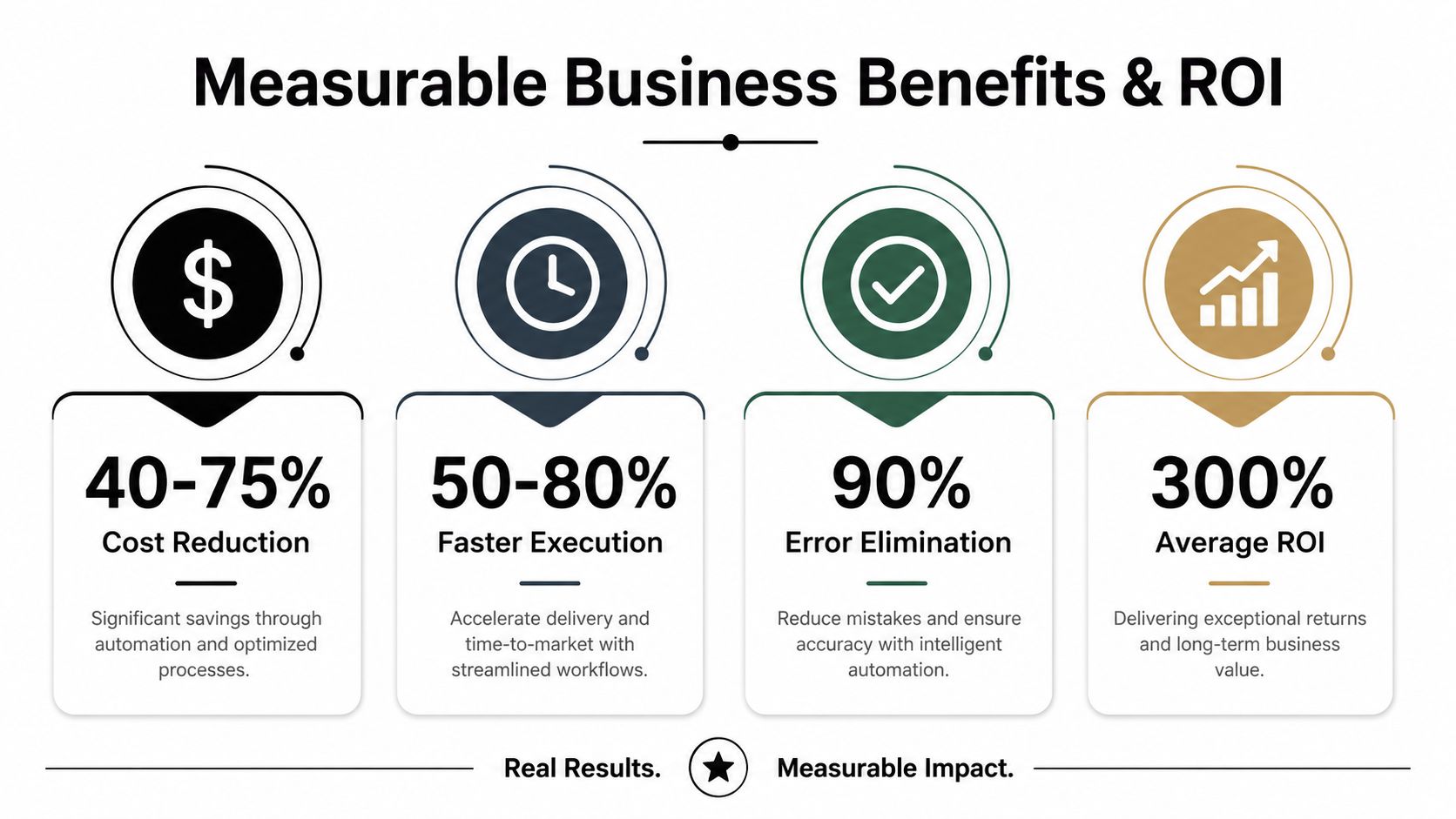
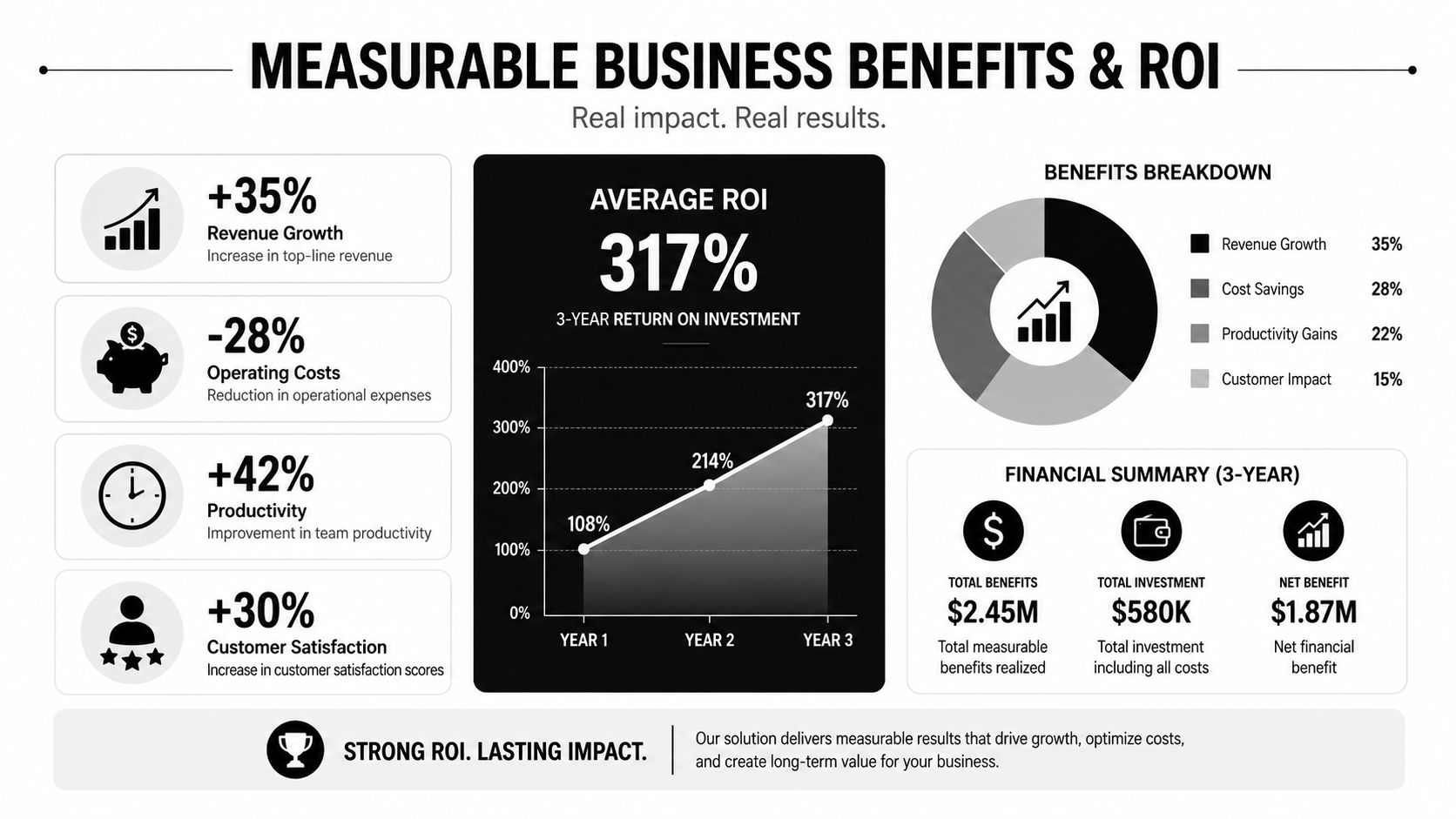
The business case for process automation is stronger when it starts with operational evidence, not a technology purchase. Measure cycle time, correction rates, queue delays, handoffs, and whether each step creates the records required for compliance review. These measures show whether automation is coordinating fragmented systems or merely moving work between them. Technovation's workflow automation benefits overview provides further context for evaluating those outcomes.
Market adoption supports the case for disciplined investment. A business process automation statistics summary reports a global market of roughly $15.3 billion in 2025, with projections that it could roughly double by 2032. The same source reports that about 60% of businesses had implemented some form of process automation by 2024, compared with 84% among large enterprises. For SMBs, the implication is practical: automation is becoming an operating capability, so governance and auditability deserve attention alongside labor savings.
Where the savings come from
Savings usually come from fewer repeated touches, less rework, shorter queues, and better use of staff time. The workflow automation statistics source associates typical operational cost reductions with 20% to 30%, while advanced intelligent automation is associated with 50% to 70% reductions in the processes where it is deployed. Those ranges are useful for setting an evaluation target, not for approving a business case without baseline data.
A workflow can also create costs when ownership is unclear, integrations are fragile, or exceptions lack a human route. In healthcare, legal, and finance, the cheaper process is not necessarily the safer one. Preserve review points where a wrong approval, missing record, or unauthorized access would create regulatory or client risk.
Speed, accuracy, and capacity
A technical evaluation of low-code workflow automation recorded average execution time falling from 185.35 seconds manually to 1.23 seconds automatically, an approximately 151-times speedup. Its observed error rate fell from 5% to zero, as documented in the n8n workflow automation study. The result belongs to that evaluated workflow, but it illustrates the mechanism: fewer handoffs reduce delay, while deterministic steps reduce variation.
A separate workflow automation benefits overview cites error reductions of 70% and more employee capacity for complex work in applicable processes. For operations involving physical movement and administrative coordination, the operational efficiency guide for hauliers offers relevant context. ROI should therefore include capacity, evidence quality, and exception handling, not only hours removed from a task.
Industry-Specific Use Cases for DFW SMBs
A process that works for a medical practice may be inappropriate for a law firm. Each industry has different evidence requirements, approval authority, retention expectations, and tolerance for automated decisions. The strongest implementations start with the transaction and its controls, then choose technology around those needs.
Healthcare and legal services
A healthcare clinic can automate patient intake routing, missing-information notices, appointment preparation, referral tracking, and compliance task reminders. The workflow should limit access by role, avoid unnecessary exposure of sensitive information, and send unusual cases to designated staff rather than forcing every request through a rigid path.
A law firm can coordinate conflict checks, engagement approvals, matter opening, document requests, deadline reminders, and billing preparation. The workflow should preserve attorney review where professional judgment matters and create a clear record of who approved a matter, changed a status, or authorized an exception.
Finance and accounting
Financial and accounting firms often manage recurring evidence collection, approval queues, client requests, reconciliation steps, and reporting preparation. Automation can check completeness, route items by risk or service line, notify responsible staff, and retain activity records for later review.
The key design decision is separating rule-based handling from professional judgment. A workflow may identify missing documentation or route a transaction for review, but it shouldn't make a high-consequence decision without an accountable owner.
Construction and manufacturing operations
Construction firms can connect project requests, subcontractor documentation, purchase approvals, change orders, safety records, and billing checkpoints. The workflow should make responsibility visible when a project moves from estimating to procurement to field execution.
For shops and manufacturers, quoting often depends on drawings, materials, tolerances, machine availability, and customer requirements. The CNC shop quoting software insights offer a useful way to think about how structured information can support faster, more consistent quoting without removing expert review.
Nonprofits
Nonprofits can automate donor acknowledgments, grant documentation, volunteer onboarding, expense approvals, and board reporting preparation. Their workflows need transparent approval paths because limited staff often share responsibilities, and fund restrictions may require evidence that spending followed the approved purpose.
Across these sectors, cybersecurity automation can support the surrounding controls, including access reviews, alerts, and response procedures. Automation should strengthen accountability, not hide it.
Practical Implementation Considerations
Successful automation begins with process discovery, not platform selection. Teams should document the current sequence, the people involved, the systems touched, the rules applied, and the situations that cause work to leave the normal path.
A practical implementation sequence looks like this:
- Choose a stable process. Start with work that has defined inputs, repeatable rules, and an identifiable owner.
- Map every handoff. Record where employees re-enter data, wait for approval, download files, or check another system.
- Define the exception path. Decide what happens when information is missing, a rule fails, or a request exceeds authority.
- Set the evidence standard. Specify which actions, approvals, timestamps, and changes must be retained.
- Pilot with representative work. Test normal cases and difficult cases before expanding the workflow.
- Assign operational ownership. Someone must review failures, approve rule changes, and confirm that the process still reflects policy.
Security and compliance belong in the design
Access should follow role and need. Credentials should be managed centrally, system connections should be limited, and logs should be protected from casual alteration. Healthcare, legal, and financial workflows also need clear retention, review, and escalation practices appropriate to their obligations.
A platform should support integrations, conditional logic, human approvals, monitoring, reporting, and controlled change management. A visually simple builder isn't enough if it can't explain why a workflow made a decision or recover safely from a failed system connection.
DFW SMBs can use a digital transformation roadmap to place automation within a wider technology plan. Technovation LLC provides security audits, IT health checks, managed monitoring, compliance support, and technology consulting that can help organizations evaluate readiness before deployment.
Common Pitfalls and Best Practices
The most common automation failure begins with a bad premise: “The current process is inefficient, so software should copy it faster.” If the process contains duplicate approvals, unclear ownership, stale data, or unnecessary handoffs, automation can make those defects harder to see.
A better approach distinguishes between process improvement and process execution. The team should remove unnecessary steps and clarify authority before encoding rules. Automation then enforces the improved process consistently.
The orchestration gap
Recent manufacturing survey data shows how often automation remains isolated. Seventy percent of surveyed manufacturers had automated 50% or less of core operations, only 40% had automated exception handling, and 78% had automated less than half of critical data transfers, according to the 2026 manufacturing automation outlook. The figures point to an orchestration problem, not just a shortage of automation tools.
An IT automation report cited in the same discussion found that only 21% had reached enterprise-scale AI workflow deployment. For SMBs, the lesson isn't to chase enterprise-scale AI. It's to connect the systems and decisions that matter while keeping ownership visible.
Governance is a scaling requirement
Regulated organizations face a related tension. One 2026 industry survey reported that 81% of respondents identified regulation as the biggest automation challenge, 84% worried about business risk when IT lacked controls, 80% were concerned about transparency into AI use, and 66% cited compliance concerns around AI agents, as reported in this automation governance survey coverage.
Best practices follow directly:
- Automate mature processes: Don't encode rules that staff can't explain.
- Design for failure: Add retries, alerts, queues, and human escalation.
- Separate duties: Keep request, approval, and oversight responsibilities distinct where policy requires it.
- Review changes: Treat workflow logic as controlled operational configuration.
- Monitor outcomes: Track stuck work, exceptions, access events, and unexpected data changes.
Technovation supports this operating model through proactive monitoring, risk mitigation, compliance readiness, and managed IT services. The goal isn't to remove every human decision. It's to make routine execution dependable while preserving control over the decisions that carry risk.
Next Steps for SMBs Ready to Automate
Start with one process that causes visible friction and has a clear owner. Map its trigger, systems, approvals, exceptions, and evidence requirements. Then estimate the current cost of delay, rework, and manual handling without assuming that every step should become automatic.
A sound first project is usually narrow enough to test and important enough to matter. Examples include approval routing, onboarding documentation, recurring compliance checks, invoice review, service-ticket escalation, or secure record updates. The pilot should measure cycle time, exception volume, error correction, queue aging, and user adoption before and after implementation.
Once the workflow performs reliably, the organization can connect adjacent processes. Governance should mature at the same pace as automation, with documented ownership, access reviews, change control, and regular process audits.
Technovation can help DFW SMBs assess readiness, plan secure integrations, strengthen compliance controls, and deploy managed automation around existing business systems. A free security audit or IT health check gives leadership a practical starting point before committing to a larger transformation.
Technovation LLC provides managed IT, cybersecurity, compliance support, technology consulting, and secure workflow automation for DFW organizations that need reliable operations without losing control. Visit Technovation LLC to request a free security audit or IT health check and identify a process worth automating first.





