

You already know the feeling. The team bought the software, the forms are digitized, and the dashboard looks cleaner, but the work still stalls at handoffs, exceptions, and approvals. A clinic still re-keys intake data, a law office still chases missing documents by email, and a construction team still passes change orders around in text threads because nobody fixed the process before layering on another tool.
That's the core mistake in workflow optimization. Most SMBs treat it like a software purchase, when it's really a management discipline that starts with how work moves, where it breaks, and who owns each decision. The history backs that up, from scientific management in the 1910s and 1920s to later software-based coordination, then to modern automation and AI routing that still depend on the same logic, reduce waste, clarify ownership, and shorten cycle time workflow automation deep dive. If the workflow is muddy, the tool just makes the mess faster.
The better lens is organizational, not decorative. A useful starting point for that broader design question is organizational design for 2026, because broken workflows usually reflect broken structure, unclear authority, or both.
Table of Contents
- Why Most SMB Workflows Stall Long Before Anyone Buys Software
- Map the Work as It Actually Runs
- Run a Four-Part Diagnostic Before You Automate Anything
- Automate Only Where It Pays for Itself
- Design for the Exceptions That Break Your Day
- Measure ROI the Way an Owner Actually Reads Numbers
- Build a Continuous Improvement Rhythm and Decide What Comes Next
Why Most SMB Workflows Stall Long Before Anyone Buys Software
A clinic manager looks at the intake queue and thinks the problem is capacity. It isn't. The issue is that front-desk staff are still chasing insurance details, nurses are still correcting missing fields, and someone in the back office is still re-entering information that should've been captured once. The software didn't fail, the workflow was never cleaned up.
That same pattern shows up in law firms, accounting shops, construction companies, and nonprofits. A matter opens, but no one owns the document checklist. A job changes scope, but the change order lives in an email chain. A donor sends a matching gift request, and three people touch it before the acknowledgment goes out. These aren't technology problems first, they're handoff problems.
Practical rule: if a process depends on someone remembering to forward an email, it's already broken.
The reason generic automation checklists disappoint is simple. They focus on repetitive tasks and ignore the messy parts, especially exceptions, compliance gates, and cross-functional handoffs. Those are the places where work slows down, because the standard path looks tidy while the true path is full of missing data, late approvals, and manual workarounds.
SMBs also make the wrong assumption when they see no obvious fires. Quiet processes aren't necessarily healthy, they may just be hiding delays until a customer complains or an audit exposes the gap. Good workflow optimization starts with seeing the work as it really runs, not as the policy manual says it should run.
Map the Work as It Actually Runs
Start with the real path, not the ideal one
The first move is brutally simple, document what people do. Not the procedure binder, not the policy deck, the lived process, including every queue, handoff, and decision point. That matters because delays usually pile up where one person hands work to another, especially across departments.
A clean map should answer five questions, who starts the work, what triggers it, where it waits, who approves it, and what counts as done. If a step has a workaround, write down the workaround. If someone keeps copying the same fields into three systems, that's not trivia, that's evidence.
The point is to create a current-state map you can challenge. Technovation teams that support IT planning and infrastructure reviews often use this same logic before touching systems, and a practical starting point is an IT infrastructure assessment, because workflow failures often sit inside messy systems and unclear ownership.
Make the baseline visible
Before any change, capture the basics, cycle time, error rate, and throughput. Don't guess. Measure enough to compare before and after, then use that baseline to see whether a change helped or just shifted work around.
A healthcare clinic can map patient intake from appointment request to chart completion. A law firm can map matter onboarding from conflict check to signed engagement. A financial team can map monthly close from transaction intake to final review. A construction company can map submittals from receipt to approval. A nonprofit can map donor acknowledgment from gift receipt to thank-you letter. The names differ, but the mechanics are the same.
For a simple visual approach, Tooling Studio's Kanban Tasks can help teams see work states and queue buildup, but the value comes from the map, not the board. Once the work is visible, the bottlenecks stop hiding behind vague complaints.
Run a Four-Part Diagnostic Before You Automate Anything
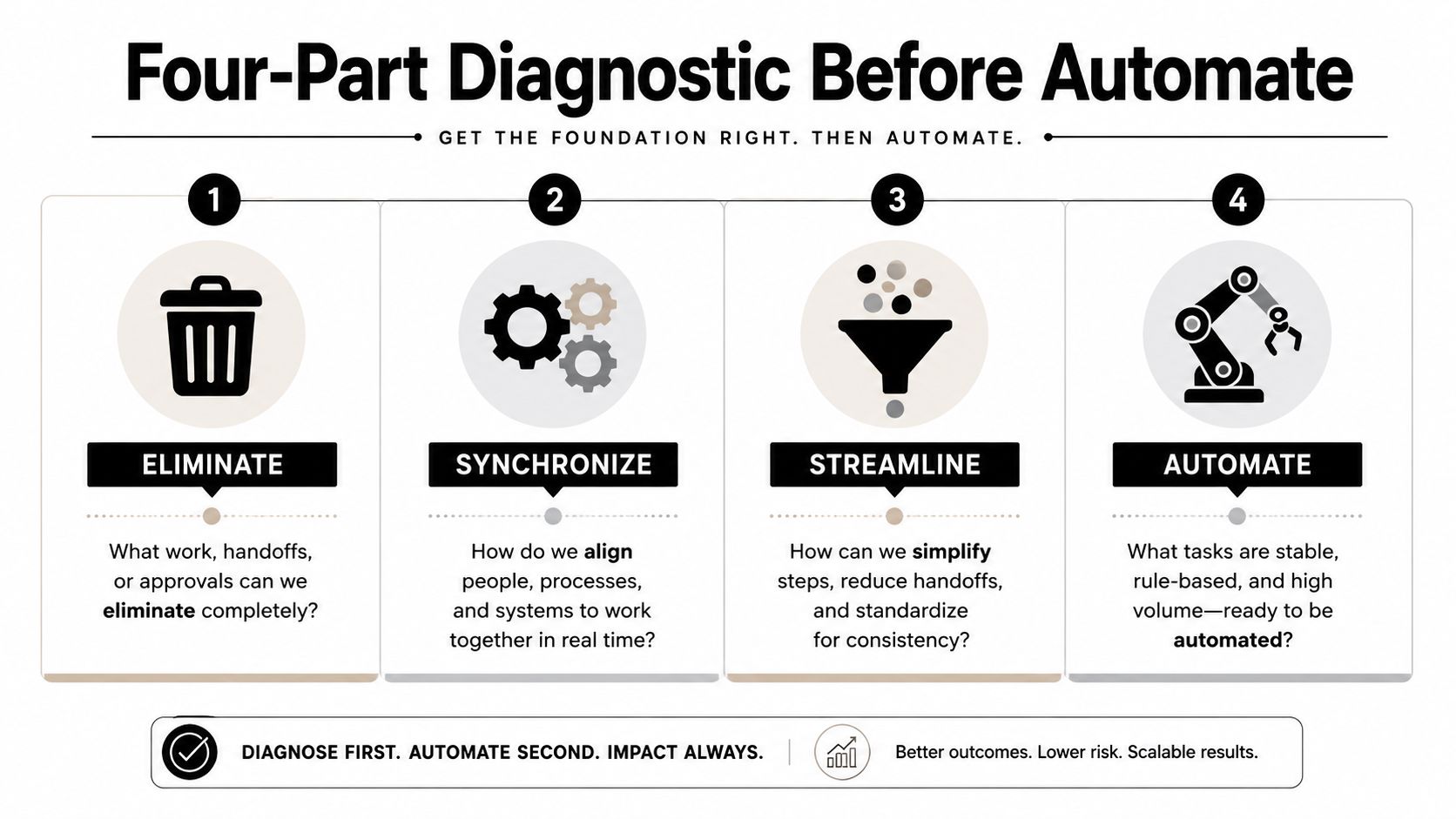
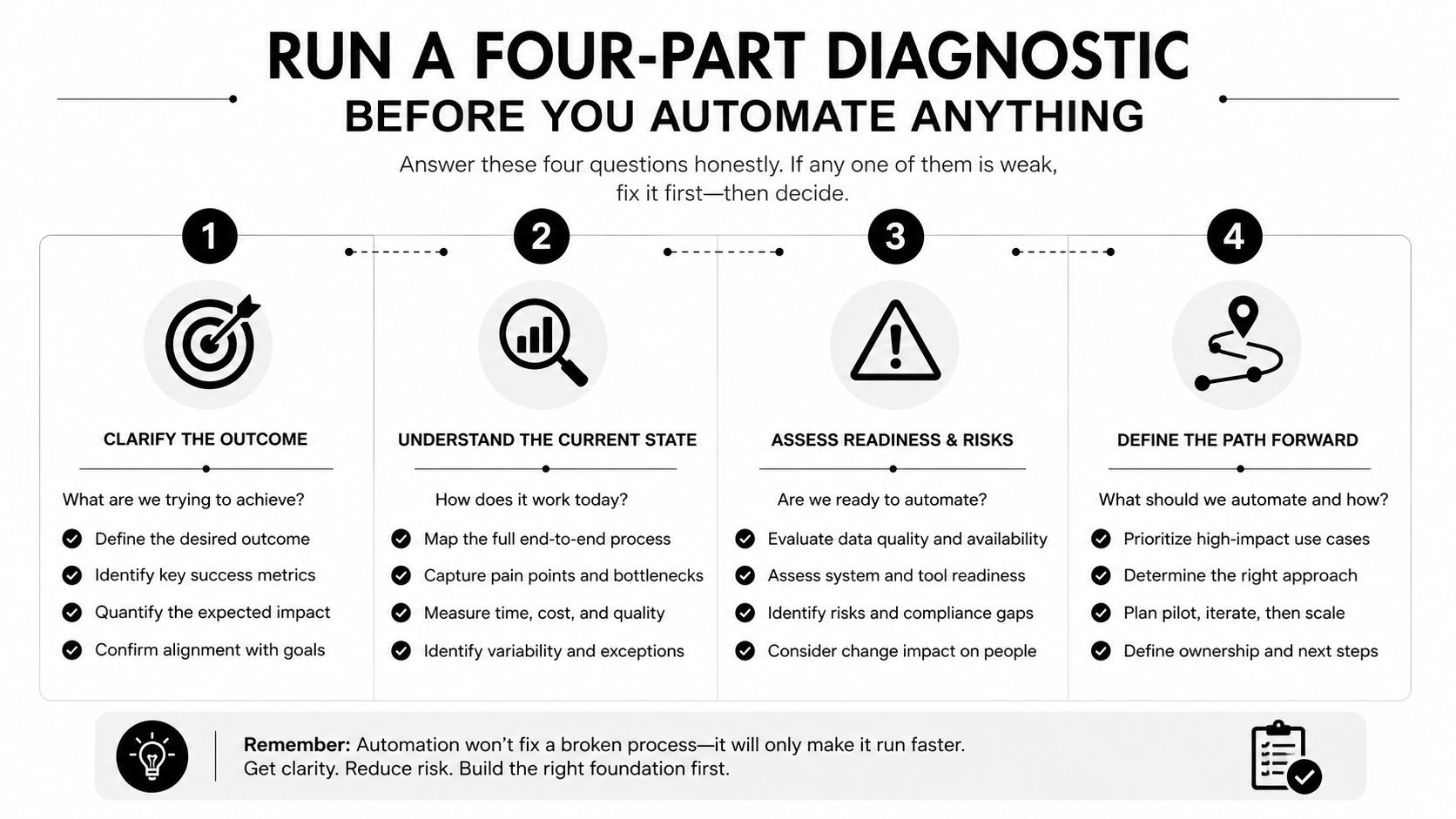
A widely cited productivity framework recommends a simple sequence, eliminate, synchronize, streamline, automate. The order matters because software cannot rescue a bad process. If a step does not need to exist, automation only preserves waste and makes cleanup harder later.
Eliminate the dead work
Start by removing work that adds no decision value. If a quarterly forecast cadence does not improve the decision, cut it to biannual. If a report takes 50 pages to say what fits in five, trim it. If staff are waiting 30 days for information that could arrive in 15, the delay is the problem, not the people.
The same test applies across SMB workflows. Strip out duplicate approvals, status updates nobody reads, and handoffs that only exist because no one ever challenged them. In clinics, law offices, finance teams, and construction firms, dead work usually survives because it feels familiar, not because it helps the business.
Synchronize the people who depend on each other
A clinic cannot speed up intake while billing still waits for missing identifiers. A law firm cannot move matter opening faster if conflicts, engagement letters, and document collection sit in separate silos. A construction team cannot keep momentum if the estimator, project manager, and subcontractor each work from a different version of the truth.
Synchronization is about timing, ownership, and handoff rules. Define who sends what, to whom, and by when. If one team finishes its part and another team is still guessing what comes next, the workflow is not optimized, it is misaligned.
Streamline the output
Cut the material humans have to read, review, and approve. Decision-makers need decision-relevant content, not padded packets. SMBs usually make this worse by adding more templates, more review steps, and more fields, then acting surprised when cycle time gets longer.
Use one version of the form, one source of truth, and one approval path unless there is a clear compliance reason to do more. Every extra checkpoint should earn its place. If it does not reduce risk or rework, remove it.
Automate only what is still worth automating
Automation belongs at the end of the sequence, after the work has been simplified and the handoffs are clear. If the workflow still depends on repeated, rule-based steps with clean inputs, automation can help. If the process is still ambiguous, keep it manual until the rules are stable.
That discipline is the same in healthcare, legal, finance, and construction. The sector changes the details, not the order. A well-run operation cleans up the process first, then applies automation where it pays for itself.
Automate Only Where It Pays for Itself
Automation should repay the effort, not impress the buyer. If the process is high volume, low variance, rule-based, and supported by clean data, it's a candidate. If the process changes every day or relies on judgment at every turn, automation will just bury the exceptions and create cleanup work later.
Here's a simple decision frame owners can use when a vendor starts pitching. Track time recovered, error reduction, accuracy gain, and payback window. If the numbers don't connect to a real operating change, the tool is decoration.
| Metric | Target | What it tells you | When to automate |
|---|---|---|---|
| Time recovered | Material hours returned to the team | Whether the process frees capacity or just shifts work | When staff spend too much time on repetitive steps |
| Error reduction | Fewer rework loops and corrections | Whether the workflow is getting cleaner | When mistakes come from repeatable handoffs |
| Accuracy gain | Better data quality and fewer missing fields | Whether downstream decisions improve | When clean inputs matter to compliance or billing |
| Payback window | A short, defensible recovery period | Whether the business can justify the change | When the process has a clear cost and clear volume |
A vendor claim is more credible when it points to measurable return. One compiled statistic set reports that automation can reduce repetitive manual work by 60% to 90%, recover up to 77% of time spent on manual processes, increase data accuracy by 88%, reduce manual errors by 90%, and deliver positive ROI within six months for 78% of organizations custom workflow optimization statistics. Treat those as decision targets, not guarantees.
The trap is easy to spot. Automating a broken workflow just produces broken output faster. That's especially risky in regulated environments where a bad handoff can become a compliance problem, not just an inconvenience. For SMBs that want to automate without adding exposure, Technovation LLC's security audit and IT health check are sensible starting points, and its workflow automation benefits page aligns with that operational view.
Design for the Exceptions That Break Your Day
A denied claim, an incomplete intake packet, a late change order, or a donor's matching gift request can wreck the day because the exception handling is vague, undocumented, or owned by nobody. That is the primary failure point in most SMB workflows. The happy path looks tidy on paper, then the first exception shows up and the team starts guessing.
Every standard process needs an exception lane. Give it three things, a named owner, a clear trigger, and a measured resolution time. If a claim is denied, who decides whether it is refiled, escalated, or written off? If a client misses a document deadline, who pauses the work and who follows up? If a subcontractor changes scope mid-project, who approves the revision and who updates the schedule?
Exception rule: if the process breaks, the team should know exactly who catches it.
Healthcare clinics need this because incomplete patient records can stall care. Law firms need it because missing documentation can hold up onboarding or filing. Construction firms need it because scope changes happen in the middle of execution, not after the fact. Financial services teams need it because exceptions often carry both review and compliance consequences.
An established incident-management-process gives teams a template for routing exceptions without derailing the standard path. Strong exception design does not slow the main workflow. It keeps the standard path clean and sends edge cases to people who have the authority to decide.
That separation matters. The day-to-day process stays simple, while unusual cases follow a clear route instead of getting buried in inboxes, Slack threads, or hallway conversations. Teams that skip this step end up automating confusion, then wondering why the output is faster and still wrong.
Measure ROI the Way an Owner Actually Reads Numbers
Use four metrics, not a dashboard full of noise
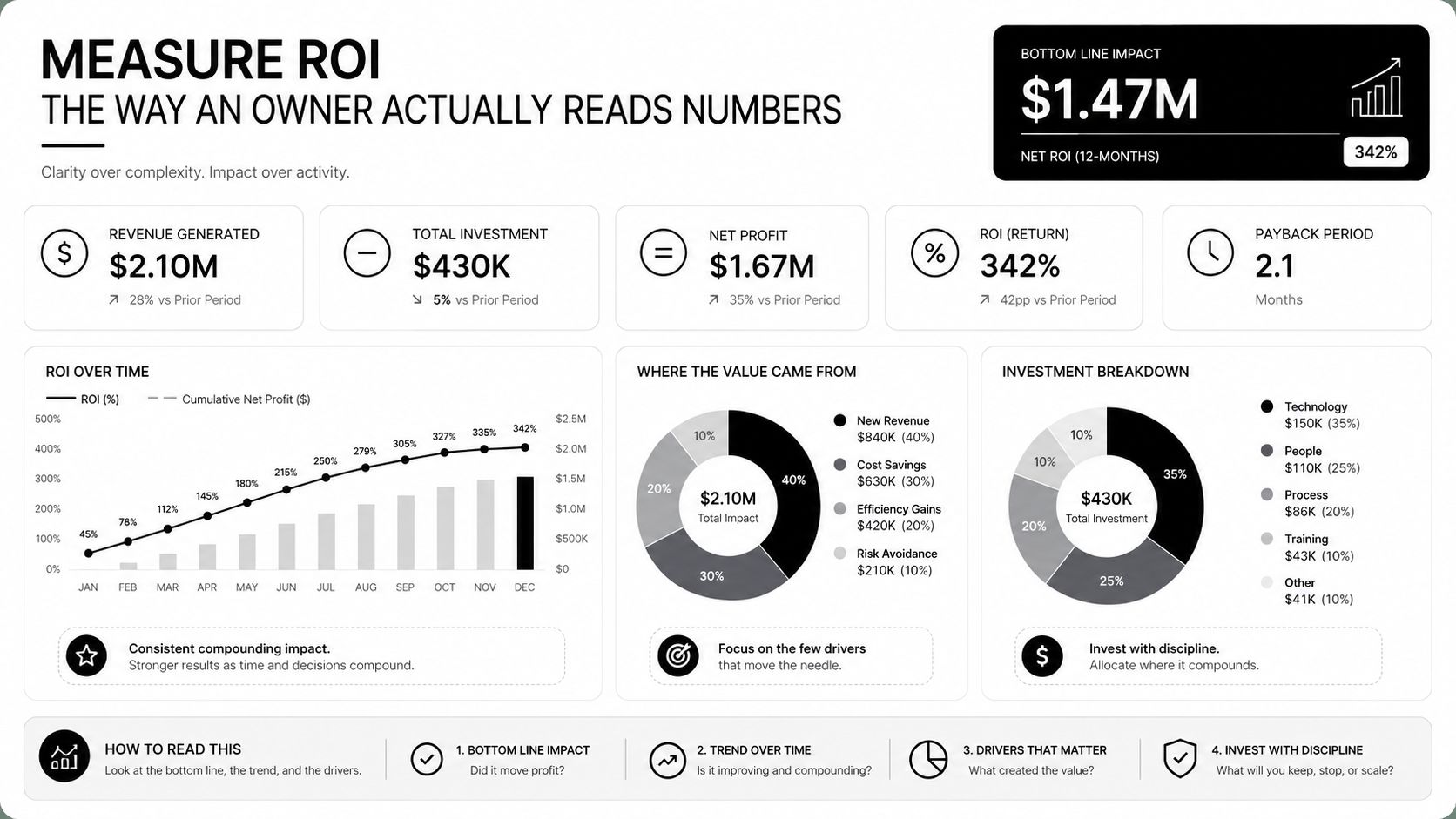
Owners usually care about four things. Hours recovered per week tells them whether the team got capacity back. Error rate per process shows whether rework dropped. Cycle time from request to completion reveals whether customers or patients are waiting less. Cost per transaction shows whether the work is getting cheaper to run.
The review rhythm should be monthly, because that's frequent enough to catch slippage without turning management into a daily audit. If a metric moves, tie it to a decision. More recovered hours may justify moving staff to higher-value work. Lower error rates may justify retiring a manual check. Shorter cycle time may justify widening the rollout.
Read the numbers in context
A healthcare-focused review reports a 45% reduction in documentation time, a 42.8% reduction in scheduling conflicts, and a 47.2% reduction in hospital readmission rates after workflow changes healthcare workflow review. Those numbers matter because they connect process design to both quality and cost. The lesson for SMBs is simple, the right workflow metrics should show up in operations and in customer or patient outcomes, not just in a software report.
Technovation's IT procurement services fit naturally here when a business needs to buy only what the workflow justifies. Procurement should follow the process redesign, not lead it.
Build a Continuous Improvement Rhythm and Decide What Comes Next
The best workflow teams don't run projects, they run a cadence. Once a month, they ask three questions, what changed, what improved, and what regressed. Once a quarter, they pick one process, remap it, diagnose it, automate only the pieces that earn it, and measure the result again.
That rhythm keeps optimization from becoming theater. It also forces accountability, because every change either makes the workflow cleaner or exposes a new failure point. Businesses that stop after one cleanup usually drift back to the old habits.
At that point, the next decision is straightforward. Some SMBs can run the assessment in-house. Others need a co-managed partner. Some need a team that can handle security, compliance, cloud, and process automation together, especially in Dallas-Fort Worth where clinics, firms, and contractors can't afford sloppy handoffs.
Technovation LLC sits in that lane. It provides managed IT services, strategic IT planning, free security audits, and IT health checks for organizations that need workflow improvement tied to compliance-aware execution. If the process is messy, the assessment is the cheapest place to start.
Technovation LLC helps SMBs clean up the systems, security, and process gaps that keep workflows stuck. If the intake, approval, or handoff problems keep showing up, visit Technovation LLC to schedule a security audit, IT health check, or workflow review that points directly to the bottleneck.





