Most Dallas–Fort Worth owners don't sit down and think, “Today's the day to buy a firewall.” They notice a slow login, a vendor portal that won't behave, or a weird email that made it past the filters, and then the question shows up, annoyingly: is the network still doing what the business thinks it is doing?
That's the moment when firewalls for businesses stop being a technical line item and start being an operational decision. If the office has remote staff, cloud apps, old file shares, guest Wi-Fi, or a compliance obligation, the firewall is part of the business rhythm whether anyone likes it or not. For a practical view of how that shows up, We Fix PC Laptop cybersecurity insights offers a useful reminder that defense only works when it matches how people work.
This guide is for owners who want a straight answer, not jargon. It focuses on what to buy, what to skip, and when managed help makes more sense than trying to keep firewall policy inside the office.
Table of Contents
- The Moment a DFW Owner Realizes a Firewall Matters
- What Business Firewalls Actually Do
- Main Firewall Types and Where Each One Fits
- In-House, Co-Managed, or Fully Managed Firewalls
- Compliance and Sector Considerations
- How to Choose the Right Firewall for Your Business
- Implementation and Ongoing Maintenance Best Practices
- Putting It All Together and Your Next Step
The Moment a DFW Owner Realizes a Firewall Matters
A small accounting office in the Dallas area gets a call from a client who says an invoice looks wrong. At the same time, a staff member notices a vendor login is being flagged, and the office manager complains that one workstation has started dragging during file access. Nobody says “firewall” at first. They blame email, they blame the laptop, they blame the internet.
Then the pattern shows up. The office has legacy file sharing, remote access for the bookkeeper, and a few rules nobody remembers approving. A single open path, or a rule that never got cleaned up, can turn a normal workday into an investigation.
That's why the firewall conversation needs to start with business reality, not product brochures. A firewall is only useful if it matches how the office works, how remote staff connect, and what data has to stay controlled. For a broader view of how that fits into risk reduction, the internal guide on ransomware protection for small business is worth reading alongside this one.
Practical rule: if the network has users, vendors, cloud apps, and even one regulated workflow, the firewall is part of the operating model, not just the edge device.
That shift matters because the old “box by the internet line” idea doesn't hold up anymore. Firewalls now sit in the middle of how a business grants access, blocks exposure, and proves control to clients or auditors. Technovation sees this most clearly in small firms that thought they had a simple setup and later discovered they had a stack of exceptions, shared credentials, and remote paths that all needed a clean policy.
The right takeaway is simple. A firewall only earns its keep when it helps a business answer three questions with confidence, who gets in, what gets out, and what gets inspected along the way.
What Business Firewalls Actually Do
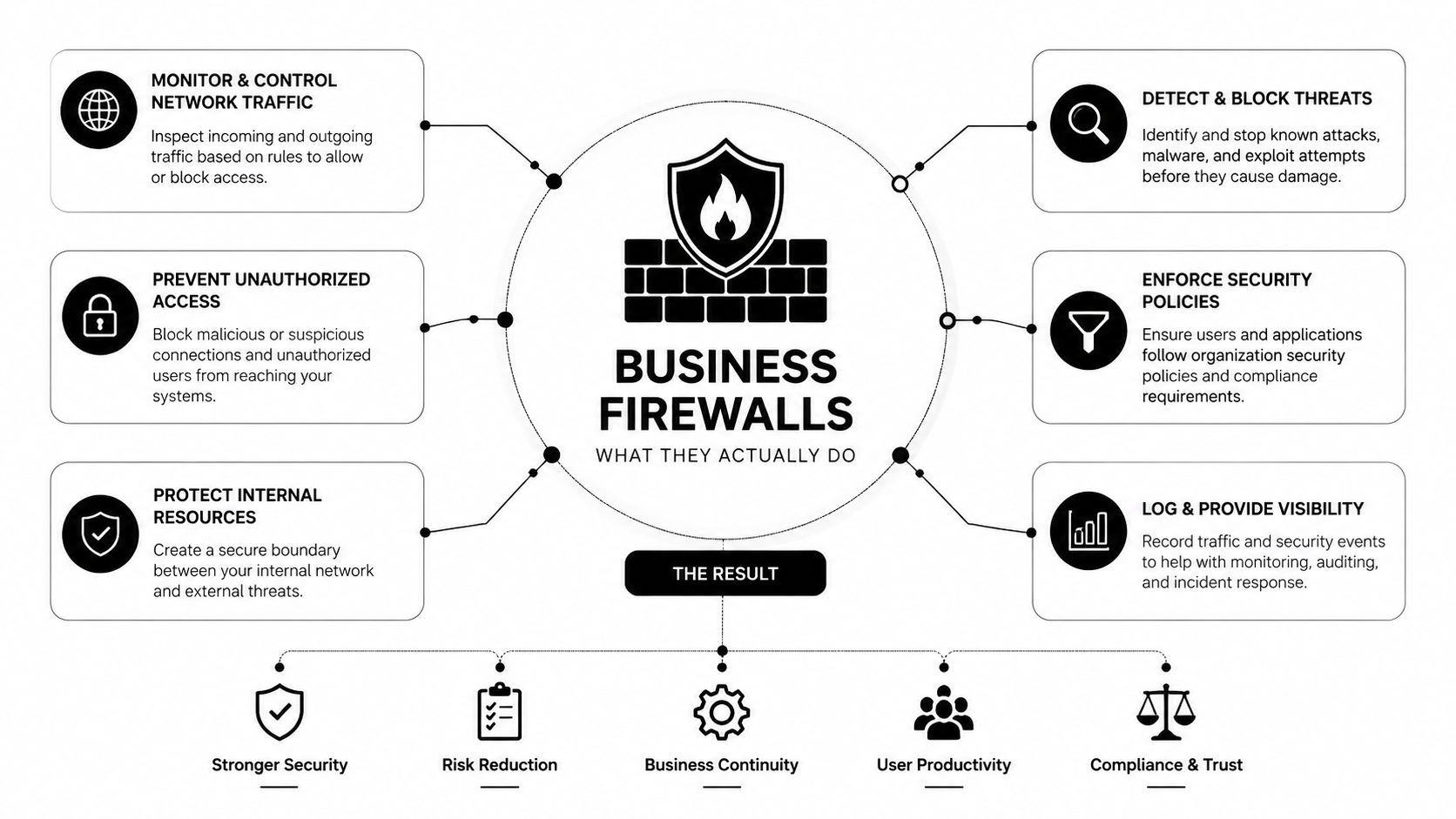
Think of a firewall like the front desk, badge reader, camera system, and hallway door locks in a building. The goal is not just to stop strangers at the entrance. The job is to control movement inside the building, decide which doors can open, and keep records of what was allowed.
That's what modern firewalls do for business networks. They enforce policy across on-premises systems, cloud workloads, and remote-access traffic, and they're judged by the rules they enforce, not the raw traffic they can pass. By 2024, firewall operations had become a scale problem for businesses, with more than half of organizations managing over 50 firewalls, nearly a third managing 100 or more, and 28% dealing with more than 50 firewall change requests per week according to the Tufin State of Firewall Research Report. That same report says only 20% could consistently execute firewall-management duties across on-premises and cloud assets.
For a business owner, that means the firewall is no longer a shelf item. It's a policy engine. The features matter because each one closes a different operational gap.
Ottawa cybersecurity services is a useful point of comparison for businesses trying to understand how firewall policy fits into a wider security stack, since the firewall rarely stands alone anymore.
The core functions that matter
Stateful inspection tracks active sessions so the firewall knows whether a connection is legitimate.
Application awareness helps it recognize the app, not just the port, which matters when business traffic blends into normal web use.
Intrusion prevention catches known attack patterns before they move deeper into the network.
SSL inspection matters because encrypted traffic hides a lot of abuse.
VPN support gives remote users a controlled path back into the office.
Segmentation keeps user devices away from servers and sensitive data unless there's a real business reason.
That last point is where many firms get sloppy. The internal guide on network segmentation is useful because segmentation turns a flat network into smaller, easier-to-defend zones.
A firewall should make the network easier to explain, not harder. If no one can describe the policy in plain English, the policy is probably already too loose.
The business result is better control, fewer exceptions, and less guessing during an audit or incident. That's the difference between owning a firewall and running one.
Main Firewall Types and Where Each One Fits
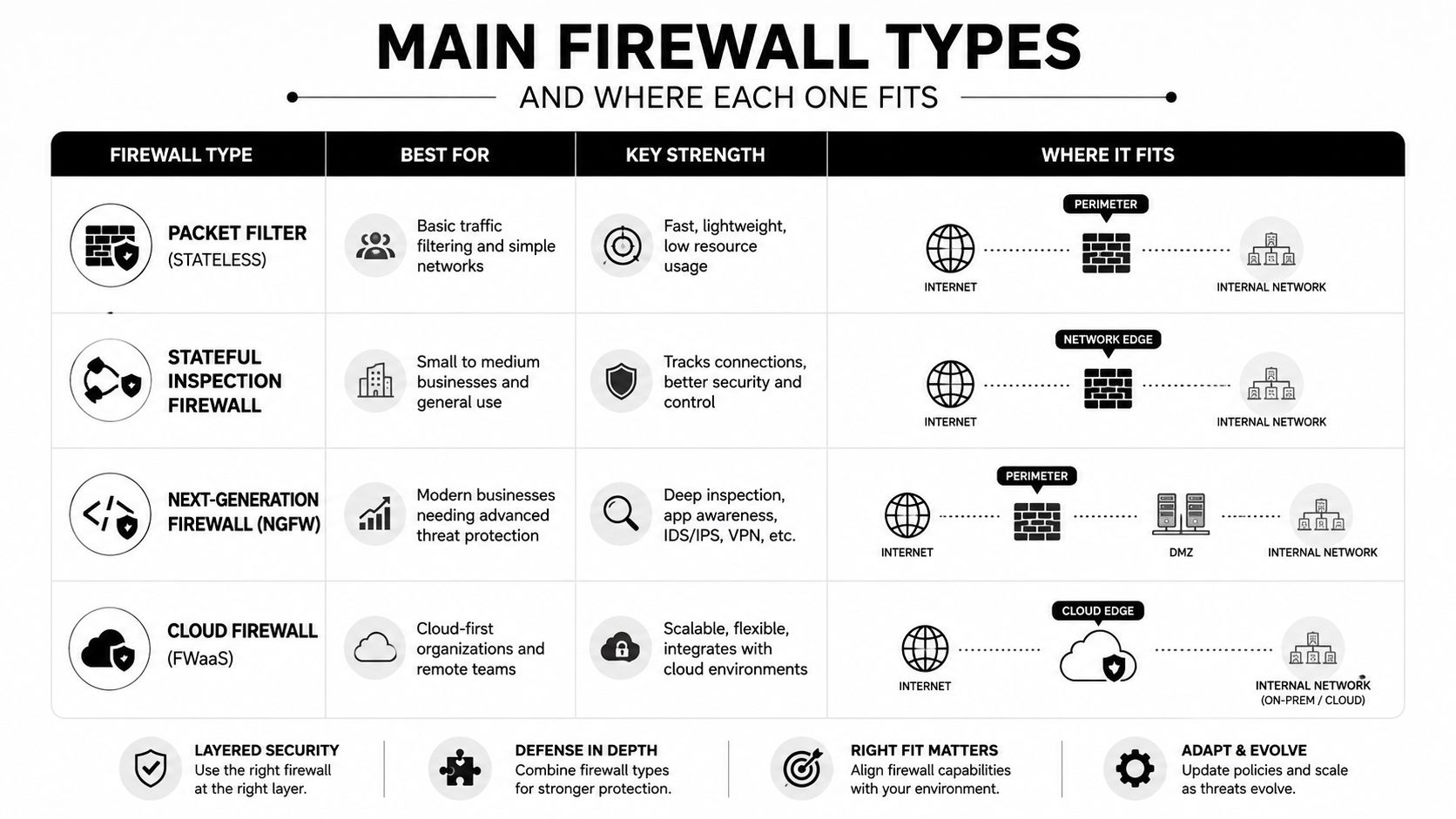
The easiest way to get this wrong is to buy based on labels instead of protection goals. The better way is to ask what each type is protecting and where it lives in the network.
By what they protect
Packet-filtering firewalls are the simplest option. They check basic traffic rules and are fine for very small, low-complexity environments, but they don't give much visibility into modern app traffic.
Stateful firewalls remember active connections and are the practical baseline for most small businesses. They're a much better fit for offices that need reliable control without turning the network into a science project.
Next-generation firewalls, or NGFWs, add application awareness, intrusion prevention, and deeper policy control. They make sense for clinics, law firms, financial firms, and any business that needs stronger inspection, remote access control, or segmentation.
Web application firewalls, or WAFs, protect web-facing applications rather than the whole network. If a firm hosts customer portals, booking systems, or client login pages, a WAF helps protect that web layer specifically.
Cloud-native firewalls and Firewall-as-a-Service fit businesses whose users and workloads live partly outside the office. The buying question shifts from “Which box sits at the edge?” to “What needs protection when the workforce and apps are spread across cloud and remote locations?”
The small business firewalls page on Technovation's site is a helpful companion if the goal is to narrow the field by business size and risk profile rather than vendor hype.
What fits which business
A medical clinic usually needs strong control over patient systems, secure remote access, and tight segmentation.
A law firm often needs strong policy around document access, encrypted traffic, and staff working between office and home.
A construction company with mobile crews usually needs remote access, cloud compatibility, and a firewall model that doesn't depend on everyone being on-site.
The market is moving in the same direction. Recent industry estimates place the global enterprise firewall market at USD 2.61 billion in 2026, rising to USD 5.77 billion by 2034 at a 10.2% CAGR, while another forecast estimates growth from USD 15.12 billion in 2026 to USD 24.61 billion by 2031 at 10.23% CAGR according to Fortune Business Insights. In the same study, on-premise appliances still held 46.58% of revenue in 2025, while cloud-native Firewall-as-a-Service is expected to grow at 13.68% CAGR through 2031.
The rule of thumb is blunt. If the business has simple traffic, few remote users, and little compliance pressure, a straightforward stateful model may be enough. If the business has cloud apps, remote staff, regulated data, or multiple sites, NGFW or cloud-delivered protection is the more honest choice.
In-House, Co-Managed, or Fully Managed Firewalls
The firewall model matters as much as the hardware. A business can buy a strong device and still fail if nobody has time to tune it, review logs, or approve rule changes cleanly.
Three real operating models
In-house administration works when there's an experienced internal IT team and enough time for ongoing review. It gives control, but it also demands discipline, documentation, and coverage when something breaks after hours.
Co-managed firewall support works when there's an internal IT lead but the business still needs outside help for policy work, monitoring, or change control. This is often the most sensible middle ground for firms that want oversight without carrying the full burden alone.
Fully managed firewall service fits businesses that don't have security staff or don't want firewall administration to depend on one overworked generalist. The business keeps visibility, but the provider handles the day-to-day operational load.
The market is already moving that way. Microsoft's 2025 SMB Cybersecurity Survey found 89% of SMBs use AI in their security tools and 47% plan to increase cybersecurity spending, which points to a stronger preference for outsourced and automated security rather than pure appliance ownership.
A fully managed model is also where Technovation fits naturally. The point isn't to sell a box. It's to keep firewall policy current, documented, and aligned with how the business operates. That matters most when a rule change, a remote-access issue, or an audit request shows up at the wrong time.
managed firewall services is the right internal topic to review if the business is weighing whether administration should stay inside or move to a service model.
Bottom line: a firewall is only as strong as the cadence behind it. If nobody owns review, cleanup, and response, the hardware becomes a liability with a warranty.
The trade-off is plain. In-house gives control, co-managed gives balance, and fully managed gives coverage. For many small and mid-sized firms, the cost isn't the subscription, it's the risk of inconsistent rule management and slow response when the network needs a human decision.
Compliance and Sector Considerations
Compliance sounds abstract until it becomes a firewall rule. Then it gets very concrete, very fast.
What the major standards really ask for
PCI DSS Requirement 1 calls for network security controls, documented firewall rules, restricted inbound and outbound traffic to the cardholder data environment, and quarterly rule reviews. In practice, that means no random open ports, no vague exceptions, and no stale rules nobody can justify.
HIPAA pushes healthcare organizations toward disciplined technical safeguards, which in firewall terms means strict access control, segmentation, and remote-access oversight. A clinic does not need broad network openness. It needs carefully documented paths to the systems staff use.
GLBA expectations for financial firms point in the same direction. Financial data should have limited exposure, and firewall policy should support that with controlled access and regular review.
CMMC matters for defense contractors because firewall policy becomes part of controlled access and segmentation discipline. The more sensitive the environment, the less room there is for casual rule creation.
The same firewall habits satisfy all of them, documented rules, clear business justification for open ports, tight remote-access control, and a review cadence that does not depend on memory.
For a healthcare practice, that usually means patient systems stay separated from guest traffic and general office use. For a law firm, it means document systems and remote work paths need tight control. For an accounting firm, it means payment-related systems and tax data need clear traffic boundaries. For a construction firm, it usually means mobile access has to be allowed without opening the whole office network.
The firewall ceases to be a technical afterthought and becomes part of governance. Compliance isn't extra work bolted on later. It's the operational rhythm the firewall should already be following.
How to Choose the Right Firewall for Your Business
The wrong way to size a firewall is to look at the biggest throughput number and stop there. That number often means little once inspection features are turned on.
What to measure before buying
Businesses should look at throughput under security inspection, SSL inspection performance, IPS throughput, max concurrent sessions, and cloud readiness. Those are the numbers that matter when encrypted traffic, remote users, and real-world policy are in play.
Fortinet's NGFW guide shows why headline throughput can mislead. One model lists 39 Gbps firewall throughput but only 2.8 Gbps threat protection throughput and 3 Gbps SSL inspection throughput, while a larger model reaches 164 Gbps firewall throughput but only 30 Gbps threat protection throughput and 16.7 Gbps SSL inspection throughput. The point is simple. Every enabled security function adds processing overhead, so protected throughput is the number that matters most. See the Fortinet NGFW guide for the published figures.
Cisco's Secure Firewall 3100 Series datasheet tells the same story from another angle. The series spans 1.5 million to 10 million sessions, 3.2 Gbps to 11.5 Gbps of IPS throughput, and firewall throughput from 10 Gbps to 45 Gbps. That spread shows why session handling and inspection performance matter together, not separately. The Cisco Secure Firewall 3100 Series datasheet gives the published session and throughput ranges.
Firewall sizing at a glance
| Vendor Series | Firewall Throughput | IPS / Threat Protection Throughput | SSL Inspection Throughput | Max Concurrent Sessions |
|---|---|---|---|---|
| Fortinet NGFW examples | 39 Gbps to 164 Gbps | 2.8 Gbps to 30 Gbps | 3 Gbps to 16.7 Gbps | Not stated in the cited guide |
| Cisco Secure Firewall 3100 Series | 10 Gbps to 45 Gbps | 3.2 Gbps to 11.5 Gbps IPS throughput | Not stated in the cited datasheet | 1.5 million to 10 million |
The table is only useful if the business pairs it with its own numbers. Peak concurrent users, VPN sessions, SaaS dependencies, and encrypted traffic volume should drive the shortlist. That matters more than port count.
A good buying checklist also includes warranty terms, support quality, log visibility, segmentation controls, and whether remote-access policy can be enforced without awkward workarounds. If a vendor can't explain how the firewall supports the business's actual workflow, it's the wrong fit.
Implementation and Ongoing Maintenance Best Practices
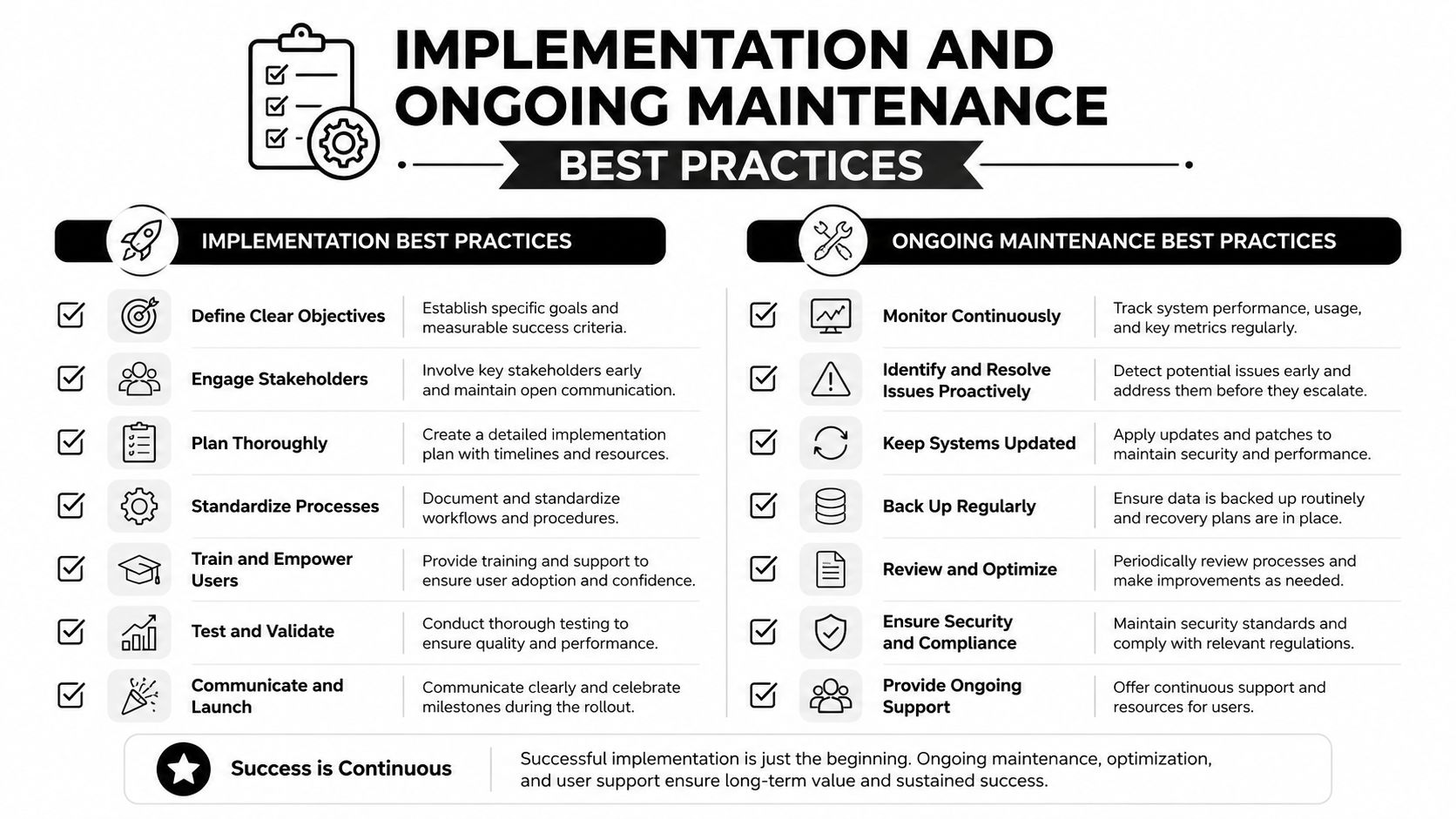
Good firewall work starts with rollout discipline. Bad firewall work starts with a rushed install and never recovers.
What a clean deployment looks like
The first step is a real change window. Rules should be staged, tested, and rolled out in a controlled order, not patched live because someone needs a port open by noon. User, server, and guest networks should be separated so one problem doesn't become everybody's problem.
The second step is a deny-by-default posture. NIST describes this as blocking inbound and outbound traffic unless it is expressly permitted by policy, and that approach reduces attack risk and unnecessary traffic volume. The same principle applies on hosts, where only required services and ports should be allowed. That is the logic behind keeping rules lean instead of “opening it now and fixing it later” according to NIST Special Publication 800-41r1 and Critical Security Controls 7.1, Control 9.4.
A very specific example helps. Microsoft recommends blocking TCP port 445 inbound from the internet at corporate hardware firewalls, and also blocking TCP port 445 outbound to the internet, because exposed SMB traffic creates an unnecessary attack path according to Microsoft's SMB secure traffic guidance. That's the kind of rule a managed provider should be able to justify in plain English.
What the day-two work should include
Quarterly rule reviews keep stale access from accumulating.
Host-based firewalls on servers and endpoints help prevent lateral movement if the network is already inside.
Change logs and ticket links give auditors evidence that policy was reviewed, approved, and applied deliberately.
Alerts and reporting should show who changed what, when, and why.
Stackingo firewall analyzer listing is useful as a reference point for businesses that want better visibility into rule activity and audit trails, especially when the firewall is part of a compliance process rather than a one-time install.
Technovation can handle this cadence for businesses that do not have staff to babysit it. The value is not mysterious. The business gets cleaner policy, better records, and less risk that a forgotten rule turns into a reportable problem.
The firewall is not finished when it goes live. It's finished when someone has a process for reviewing it, proving it, and fixing it before it drifts.
Putting It All Together and Your Next Step
The right firewall decision comes down to three choices, not one. First, pick the type that matches the business, stateful, NGFW, WAF, cloud-native, or managed service. Second, decide the operating model, in-house, co-managed, or fully managed. Third, set the review cadence so policy doesn't rot between emergencies.
The next practical step is straightforward. Map peak concurrent users and VPN sessions, list the systems that hold regulated data, and write down every remote-access path the business depends on. Then compare that list to a firewall model and a management model that can support it without guesswork.

For DFW owners who want a fast, structured read on the current setup, a Technovation security audit or IT health check is the cleanest next move. It gives a business a practical view of rule cleanup, remote-access exposure, and whether the current firewall model fits the way the company works.
Technovation LLC helps Dallas–Fort Worth businesses clean up firewall risk, tighten policy, and match security controls to real operating needs. If the current setup feels too loose, too busy, or too hard to manage, visit Technovation LLC and ask for a security audit or IT health check built around the business's firewall, compliance, and remote-access needs.