

Most business owners in DFW already think they have backups handled. There's a cloud drive somewhere, a backup job that emails green checkmarks, and an assumption that recovery will work when it matters.
Then a server fails, a user deletes the wrong folder, or ransomware hits late on a Friday. That's when the question shows up. Not whether a copy exists somewhere, but whether anyone has proven the business can restore clean data, fast enough, in the right order, with applications still working.
That's the gap most backup advice ignores. It explains storage. It skips recovery.
Table of Contents
- What Off-Site Data Backup Really Means for Your Business
- The Main Types and Architectures Worth Comparing
- The 3-2-1 and 3-2-1-1 Rules Explained in Practice
- Recovery Targets and the Policy Mechanics That Hold Up
- Implementation Checklist With Restore Testing at the Center
- Cost Models and What Off-Site Backup Really Costs Over Time
- Choosing a Local MSP and Where Technovation Fits In
- The Question That Should Replace Do We Have Backups
What Off-Site Data Backup Really Means for Your Business
A common scenario for a North Texas business goes like this. A professional services firm gets hit with ransomware, calls IT, and hears the reassuring phrase every owner wants to hear: “We have cloud backup.” A few hours later, that confidence starts to crack because the “backup” was really sync. The encrypted files had been replicating off-site right along with the healthy ones.
That's why off-site data backup needs a plain-English definition. It's a copy of business data stored in a physically separate location from the systems people use every day. That can mean a second data center, a cloud region, or a hardened storage vault on infrastructure the business doesn't own. The key is separation.
Copy and store is not the same as recover
NIST has treated off-site backup as a core contingency practice for years. Its guidance tells organizations to store backup media off-site in a secure, environmentally controlled location, and its 3-2-1 guidance says to keep three copies of important files, on two different media types, with one copy off-site, as described in NIST contingency planning guidance.
That matters because file sync and backup aren't interchangeable. Sync is built to mirror change. If a user deletes a folder, corrupts a file, or encryption spreads across mapped drives, sync can faithfully copy the damage. Backup should give the business a clean recovery point from before the bad event.
Off-site storage only helps when the copy can be rolled back, verified, and restored under pressure.
For owners trying to sort through data center language, a useful reference is the Data Centers List Earthdatasafe profile, which shows the kind of off-site facility context many backup conversations leave out.
The question that matters in the middle of an incident
A practical backup conversation should include three things:
- Where the copy lives: Not just “in the cloud,” but in a separate location with clear security controls.
- How far back recovery can go: Whether the business can restore yesterday's clean version, last week's database, or a full server image.
- Who has tested it recently: Because untested backups are assumptions dressed up as process.
Businesses that want a simpler explanation of cloud-based off-site protection can review Technovation's cloud backup overview. The important point is straightforward. A copy somewhere else is the starting line, not the finish line.
The Main Types and Architectures Worth Comparing
Most SMBs don't need a lecture on every backup method ever invented. They need a clean comparison of the options they're going to buy, inherit, or outgrow.
Four architectures show up again and again
| Off-Site Backup Architectures Compared | Best For | Strengths | Weaknesses for SMBs |
|---|---|---|---|
| Off-site tape rotation | Long-term retention and strong isolation | Air-gapped by nature, solid for ransomware separation, predictable archival pattern | Slow restores, handling friction, chain-of-custody burden, operational discipline required |
| Secondary colocation or private cloud | Businesses that want control and geographic separation | Greater control over storage design, clearer infrastructure ownership, useful for custom compliance needs | Higher management overhead, more moving parts, can become expensive to maintain |
| Public cloud backup target | SMBs needing flexible capacity and off-site reach | Easy to scale, strong geographic separation, no physical media logistics | Restore speed depends on bandwidth, costs get murky during large recoveries, security settings must be managed carefully |
| Hybrid local plus cloud replication | Most 20 to 150-person businesses | Fast local recovery plus off-site copy, balanced recovery paths, practical for mixed workloads | More components to monitor, bad configurations can create blind spots, still requires restore testing |
What each model gets right
Tape still has one big advantage. It creates real separation. For ransomware resilience, that matters. The trade-off is obvious. Restoring from tape isn't graceful, and no owner wants to learn that during a downtime event.
Public cloud targets solve a different problem. They make off-site capacity easier to scale and avoid the hassle of physical transport. But cloud-only plans struggle when a business needs a large restore back quickly. If the company has to recover a large server set over a constrained connection, speed becomes the issue.
A secondary facility gives more control, but control cuts both ways. Someone still has to own patching, storage health, replication jobs, and recovery runbooks.
Why hybrid usually wins for SMBs
For many DFW companies, hybrid is the most sensible architecture. Local image-based backup handles fast restores for common failures. Off-site replication covers site loss, ransomware fallout, and broader business continuity.
A helpful outside perspective on this design trade-off appears in local vs cloud data protection, which frames why many businesses end up needing both local recovery speed and off-site resilience.
Practical rule: If a business can't tolerate waiting on internet-dependent recovery for critical systems, cloud-only is usually the wrong answer.
For owners comparing service models around this architecture, Technovation's cloud backup solutions for small business lays out how off-site protection is typically packaged for SMB environments.
The 3-2-1 and 3-2-1-1 Rules Explained in Practice
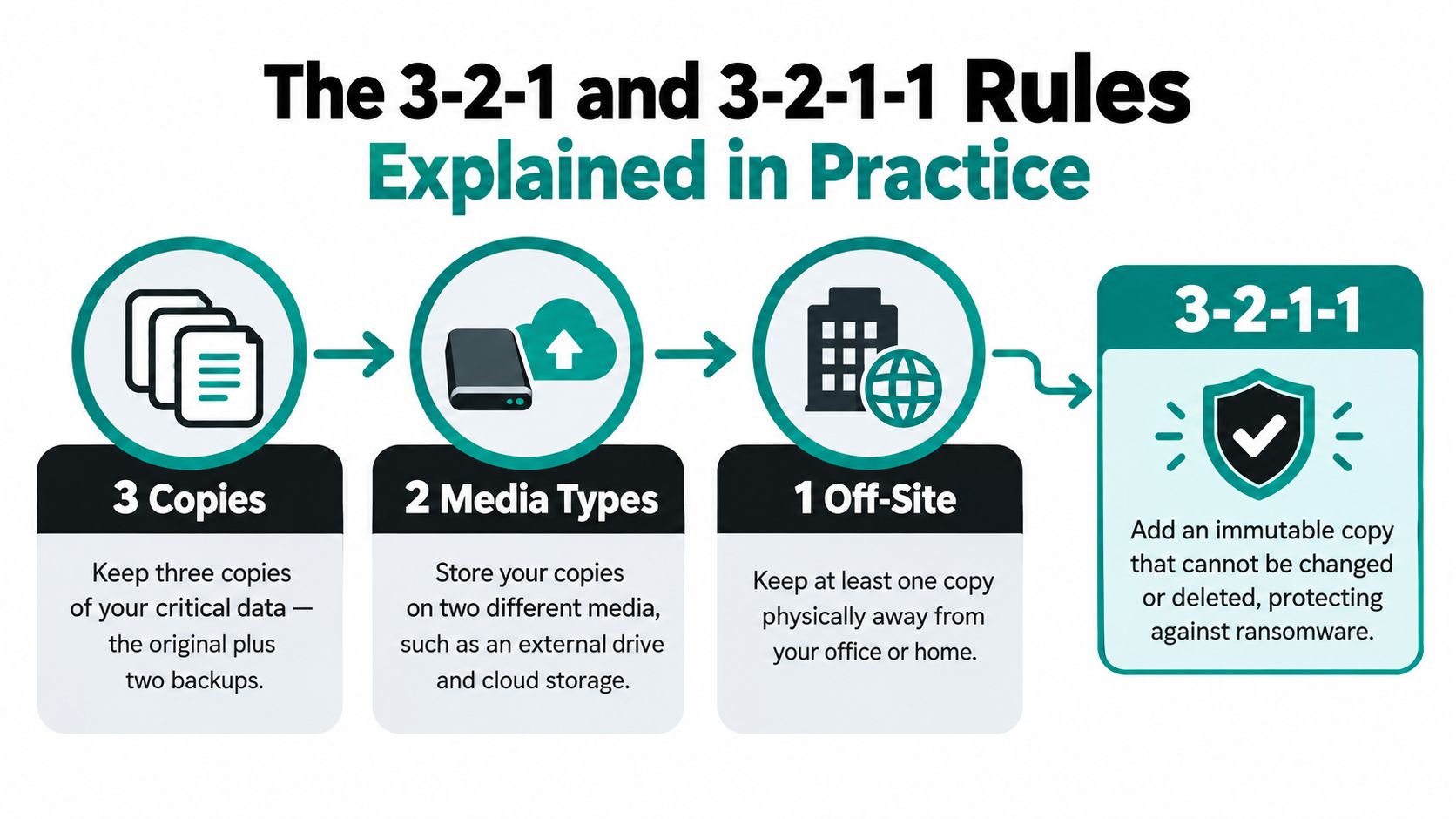
The 3-2-1 rule is still the simplest way to explain sane backup design. Keep three copies of important data, on two different media types, with one copy off-site, as outlined by the 3-2-1 backup rule from the U.S. Chamber of Commerce.
That sounds abstract until it gets mapped to a real business.
What the copies actually look like
For a small firm, the three copies might look like this:
- Production data on the live file server, line-of-business application, or workstation set.
- A local backup copy on a dedicated appliance or storage device for fast operational restores.
- An off-site copy in a separate region or vault that isn't sitting in the same building as production.
Those aren't interchangeable. Production is for daily work. The local copy is for quick recovery from mistakes and common outages. The off-site copy is what keeps a building problem, theft, or wider incident from taking everything out at once.
Why 3-2-1-1 is the modern version that matters
The stronger variant is 3-2-1-1. It adds one immutable copy, meaning at least one backup can't be altered, deleted, or encrypted by attackers, as described in this overview of the 3-2-1-1 backup rule.
That extra “1” matters because modern attacks don't stop at production systems. Attackers go after backup consoles, repositories, and admin credentials. If every copy is editable, every copy is in play.
A practical small-business design often looks like this:
- Live environment: The production server or application.
- Fast restore layer: Local snapshots or image backups.
- Geographic separation: Replicated off-site backup.
- Tamper protection: An immutable copy with a retention lock or an offline replica.
Businesses thinking through ransomware-specific recovery sequencing can pair this framework with a ransomware recovery plan. The lesson is simple. Extra copies help. A copy that can't be changed is what closes the loop.
Recovery Targets and the Policy Mechanics That Hold Up
A backup strategy gets real when it has recovery targets and written controls. Without those, storage turns into a pile of copies with no promise attached.
RTO and RPO decide what “recovered” actually means
RPO is the maximum acceptable data loss measured in time. RTO is the maximum acceptable downtime. Those targets should drive backup frequency, infrastructure choices, and restore design, as explained in this guide to backup and disaster recovery procedures.
For an SMB, that's not theory. If an accounting firm can only tolerate losing a few hours of work during tax season, daily backup isn't enough. If a clinic needs access to scheduling and records the same day, “we'll rebuild by tomorrow” isn't an acceptable RTO.
The policies that separate real plans from loose habits
For regulated or sensitive data, planning should include explicit mechanics such as encryption, retention windows, approved transport methods, restore-test cadence, and documented chain-of-custody for any physical media moved off-site, as described in NIST media protection guidance.
That means owners should expect to see specifics like these:
| Backup Policy Mechanics at a Glance | What It Controls | SMB-Sensible Default | Common Gap |
|---|---|---|---|
| RPO | How much recent data the business can afford to lose | Set by application criticality, not by convenience | One blanket backup schedule for everything |
| RTO | How long systems can stay down | Written by business function and tested in practice | Recovery promises with no time measurement |
| Encryption at rest | Protects stored backup data | AES-256 for sensitive or regulated data | Backups exist, but encryption settings aren't documented |
| Encryption in transit | Protects data moving to off-site storage | TLS-protected transfer | Jobs run, but transport security isn't reviewed |
| Retention policy | Determines how long restore points stay available | Long enough to survive delayed discovery and audit needs | Retention too short to recover from older corruption |
| Chain-of-custody | Tracks who handled data and where it moved | Ticketed logs, rotation records, signed test results | No defensible audit trail |
Chain-of-custody isn't paperwork theater
A proper chain-of-custody log shows who touched the backup set, when it moved, where it was stored, and what happened during restore testing. That includes off-site rotation logs, restore tickets, exception handling, and signed test reports.
Auditors, insurers, and leadership don't trust “it should be fine.” They trust records.
That documentation is what turns backup from a background task into a defensible recovery posture.
Implementation Checklist With Restore Testing at the Center
Most backup failures aren't caused by a lack of software. They're caused by sloppy execution. The fix is to put restore testing at the center, not at the end.
Government backup-recovery guidance requires critical systems to be restore-tested at least annually, including validation of integrity and application function in an isolated environment, with failed tests remediated within 30 days. That same guidance recommends protecting backup data in transit with TLS 1.2 minimum and using immutable or air-gapped copies to reduce ransomware exposure, as detailed in this backup recovery guide.
The checklist that prevents ugly surprises
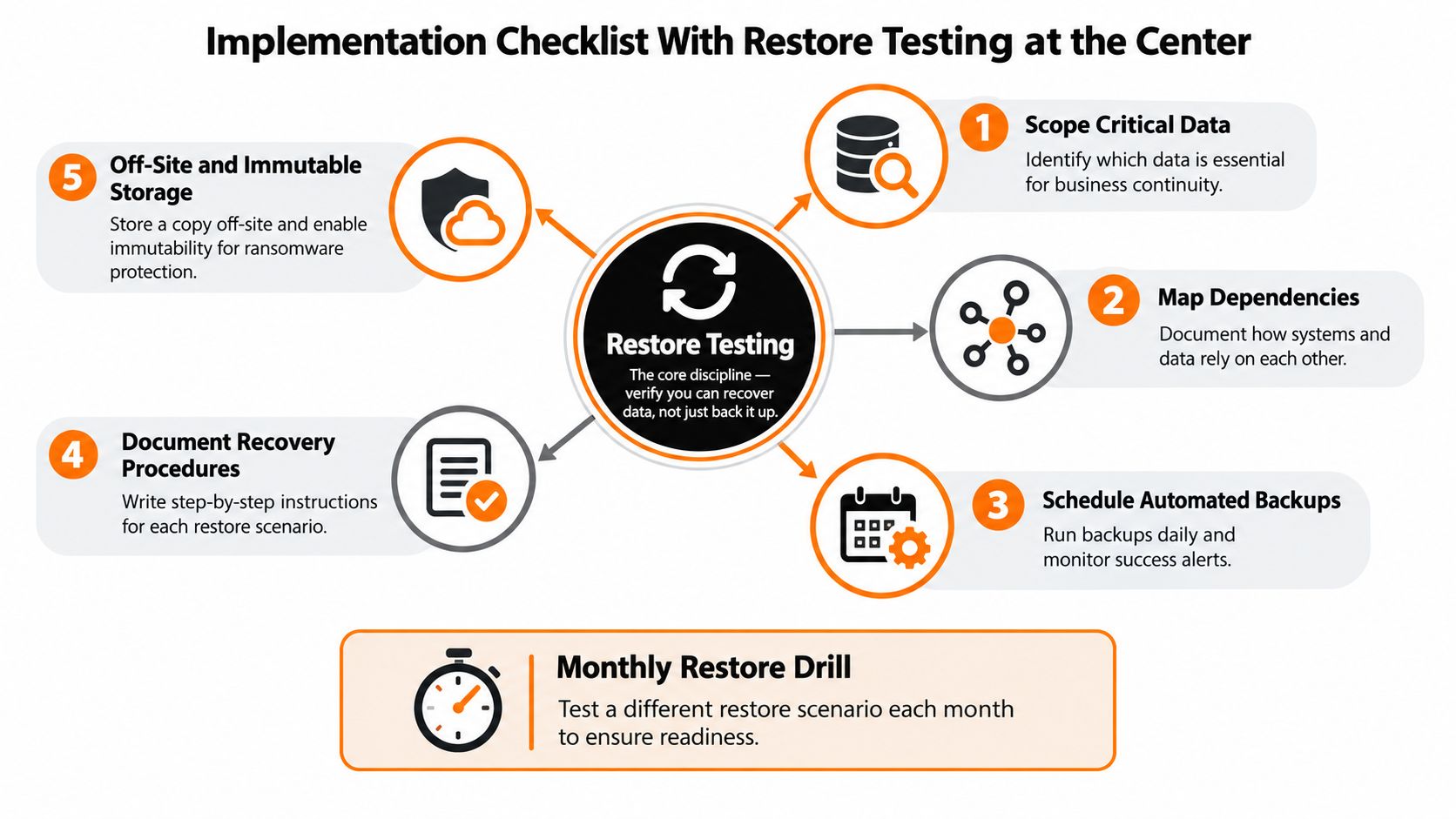
Scope critical data first. Identify the systems that keep the business running. This prevents the classic failure where a backup exists, but not for the data set that matters most.
Map dependencies. Document what has to come back together. File shares, app servers, databases, identity services, and workstation access often depend on one another. This prevents partial restores that technically finish but leave staff unable to work.
Choose the off-site target and lock down transport. Separate location, encrypted transfer, and access controls come before convenience. This prevents the business from relying on exposed or loosely managed storage.
Configure immutability and retention deliberately. Set retention windows based on business risk, not on leftover storage. This prevents discovering that the only clean restore point aged out before anyone noticed the problem.
Run restore drills on a schedule. Monthly for critical systems, quarterly for full server restores, and at least one annual simulated failover in a clean environment is a sensible operating rhythm for many SMBs. This prevents false confidence.
What testing should prove
A real restore test should validate more than file presence.
- Checksum verification: Confirms the restored data matches the expected backup set.
- Application-level checks: Verifies the app opens, authenticates users, and reaches required data.
- Measured restore time: Records how long recovery took against the target.
- Business sign-off: Confirms the restored system is usable, not just technically online.
For companies that want that discipline handled as an operational service, Technovation's IT disaster recovery services align backup work with documented recovery procedures rather than leaving testing to spare time.
Cost Models and What Off-Site Backup Really Costs Over Time
The cheapest backup proposal on day one often becomes the most expensive recovery model by year three. That's because off-site backup costs don't stop at storage.
The three cost paths SMBs usually face
| Three-Year Cost Comparison of Off-Site Backup Approaches | DIY + Cloud | Cloud-Only BaaS | Managed MSP |
|---|---|---|---|
| Storage growth | Variable and often underestimated | Usually simple at first, then grows with retention | Usually packaged into a planned service scope |
| Restore egress and retrieval | Directly borne by the business | Often overlooked until a large recovery | Usually planned and discussed up front |
| Backup software licensing | Separate line item | Embedded in service pricing | Embedded in service pricing |
| On-prem hardware refresh | Business owns replacement cycle | Little to none | Typically included or coordinated |
| Monitoring and failed job response | Internal staff time | Limited unless premium support exists | Assigned operational responsibility |
| Restore testing labor | Often skipped or ad hoc | Customer responsibility in many cases | Scheduled and documented as part of service |
| Security hardening and immutability setup | Internal burden | Depends on service maturity | Part of solution design and oversight |
| Cost predictability | Low to moderate | Moderate | Higher predictability |
The hidden line item is labor
DIY looks affordable because the spreadsheet focuses on storage and ignores staff time. Someone still has to watch failed jobs, rotate credentials, review retention, chase alerts, and run restores. In many SMBs, that work gets assigned to whoever is least overloaded that week. That's not a strategy.
Cloud-only backup services reduce infrastructure burden, but they often leave the hardest part with the customer. When recovery gets messy, the business still has to orchestrate sequencing, validation, and user impact.
Why the three-year view changes the answer
By the third year, retention has grown, data volume has expanded, and recovery expectations usually haven't gotten easier. That's when sticker pricing stops being useful.
If a backup plan looks cheap only because nobody priced testing, restore labor, and exception handling, it isn't cheap. It's incomplete.
For many businesses with roughly 25 to 100 employees, the value of managed off-site backup is cost predictability tied to documented recovery outcomes, not just raw terabytes stored somewhere.
Choosing a Local MSP and Where Technovation Fits In
A backup portal is not the same thing as a recovery partner. That distinction matters a lot more during an outage than during a sales demo.
What a DFW business should actually evaluate
A local MSP should be judged on operational criteria, not branding.
| MSP Evaluation Criteria for Off-Site Backup | Local DFW MSP | Remote-Only Provider |
|---|---|---|
| On-site response capability | Can often send staff within hours when physical recovery work is needed | Usually remote only |
| Knowledge of the environment | Named technicians often know the network, workloads, and dependencies | Support may rotate across generalized teams |
| Ownership of the backup stack | More likely to coordinate policy, monitoring, testing, and recovery together | Often limited to platform access and ticket support |
| Restore testing cadence | Can be built into recurring service reviews | Frequently left to the customer |
| Chain-of-custody transparency | Easier to document local handling and escalation paths | Can be harder to trace operational ownership |
| Accountability during recovery | One team can own the outcome | Recovery responsibility may be split |
The right questions are blunt
Business owners should ask any provider:
- Who performs restore tests, and how often?
- Can the provider show documented RPO and RTO targets per critical system?
- What happens if the office is unavailable and the restore needs to happen elsewhere?
- Who owns immutability settings, retention reviews, and failed-job remediation?
- Will named technicians support the recovery, or will it go to a general queue?
These questions expose whether the provider is selling storage or selling recoverability.
Where Technovation fits
For North Texas SMBs that don't want to hire an internal backup specialist, Technovation LLC is one practical option because it provides managed IT, cybersecurity, cloud backup, and recovery planning in a local support model. That's a better fit for companies that need one accountable team to align backup operations, compliance expectations, and restore testing instead of juggling multiple vendors and internal guesswork.
The local angle matters most for healthcare, legal, financial, construction, and nonprofit organizations where downtime usually creates operational and client-facing problems long before anyone starts debating infrastructure theory.
The Question That Should Replace Do We Have Backups
“Do we have backups?” is the wrong question.
The useful question is this: Can the business prove it can recover clean systems and data within an acceptable time frame?
That shift changes everything. It forces leadership to ask whether recovery targets are written down, whether backup copies are protected from tampering, whether chain-of-custody is documented, and whether anyone has recently run a restore that business staff signed off on.
Recent backup reliability data shows why that matters. One industry survey reported that only 57% of backups were successful, only 61% of restores met the desired outcome, and 56% of recoveries using backups were successful. It also found that 39% of IT decision-makers said their organizations need to restore from backups at least once a month, while 84% reported using cloud drive services that sync data off-site even though sync tools aren't true backups, according to this 2024 state of backup and disaster recovery summary.
A separate ransomware report pushed the same point further. It found that the use of backups to restore encrypted data fell to 54% in 2025, while 89% of organizations said backup repositories were targeted, 32% used immutable repositories, and 28% restored into a sandbox for integrity checks, based on the Sophos State of Ransomware 2025 report.
One next step is enough. Request the current backup report. Then schedule a live restore test. If nobody can show both, the business has a backup story, not a backup strategy.
Technovation LLC helps DFW businesses turn off-site data backup into a verified recovery process with managed backup, security controls, restore testing, and disaster recovery planning. Businesses that want a practical gap review instead of another vague backup conversation can visit Technovation LLC and start with the systems that would hurt most if they stayed down.





