
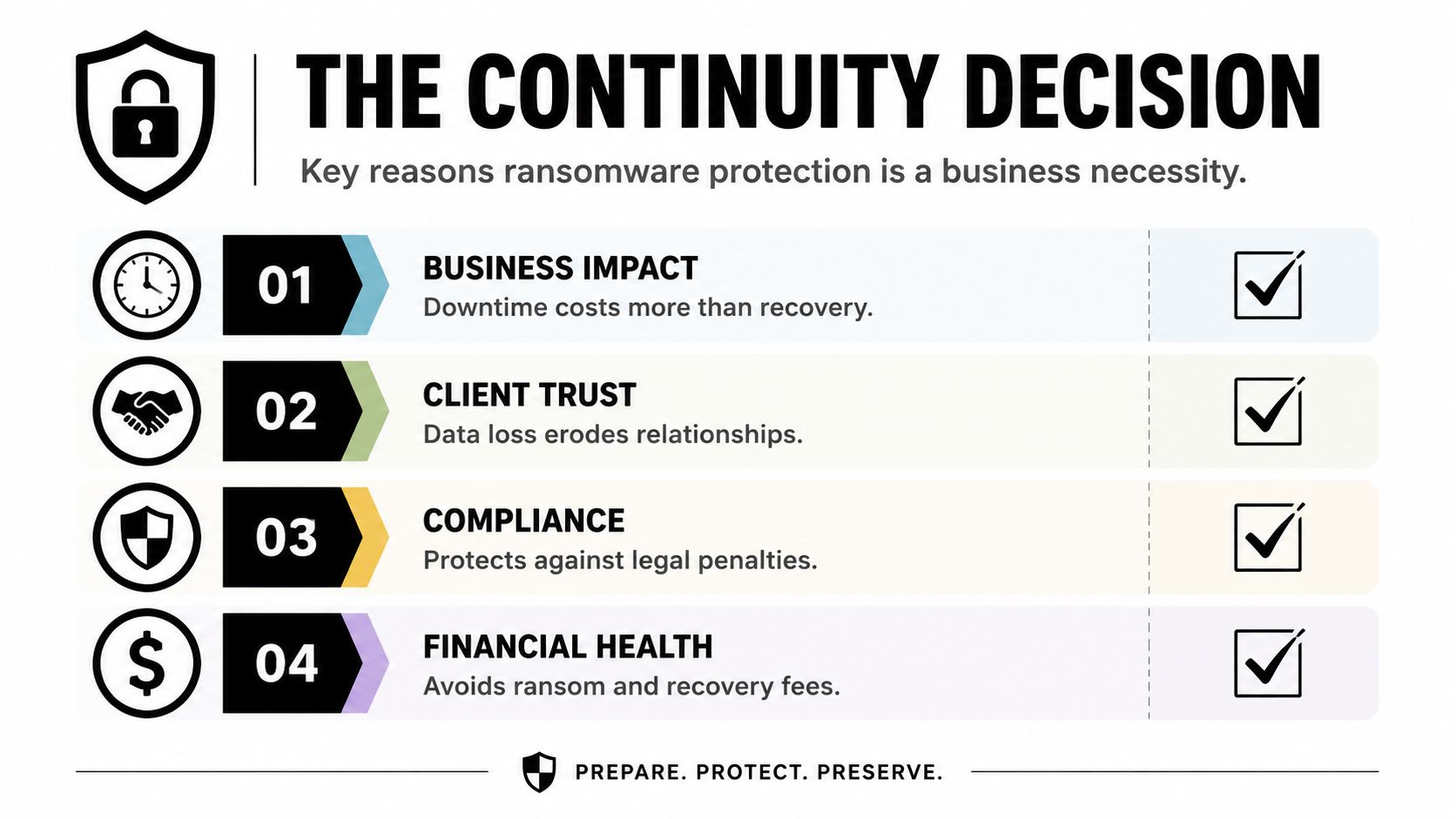
Most small businesses in Dallas–Fort Worth don't think about ransomware until a Friday afternoon turns into a triage call. The owner is trying to close payroll, the office manager can't open shared files, and someone is asking whether the whole network needs to come down. That's the core issue with ransomware protection for small business: it's not a fear story, it's a continuity decision.
The hard truth is that small firms are not flying under the radar. Verizon's 2025 breach data found 88% of breaches affecting small and midsize businesses involved ransomware, compared with 39% for larger enterprises, and 29% of small-business incidents started with an unpatched vulnerability while 30% involved a stolen credential (Halcyon summary of Verizon's 2025 DBIR). That means the first job is not buying a shiny tool, it's closing the doors attackers already use.
For a DFW owner, the question is simple. If an attacker lands tomorrow, does the business keep working, slow down, or stop? The rest of this plan answers that question in order.
Table of Contents
- Why Ransomware Protection Is Really a Continuity Decision
- The Human Layer You Have to Lock Down First
- Endpoint, Email, and Network Defenses That Actually Matter
- Backups You Can Actually Restore From
- Your First 24 Hours After an Attack and the Hard Decision
- Fully Managed, Co-Managed, or In-House
- Your 30 60 90 Plan and a Practical Next Step
Why Ransomware Protection Is Really a Continuity Decision
A North Texas accounting firm does not need a headline-grabbing breach to feel ransomware pain. One compromised mailbox, one reused password, or one unpatched system can lock the file server, freeze client work, and turn every deadline into a hard conversation with clients who still expect answers. The question is simple. Can the business keep operating if an attack gets through?
The backup-only mindset misses what breaks a small business. Copies of data do not matter if they are stale, infected, untested, or too slow to restore under pressure. Continuity is the better frame because the bill is not just recovery work. It is downtime, lost trust, and the rush to answer the same questions from employees, customers, and insurers.
Practical rule: if the business cannot describe what happens in the first day after a ransomware hit, then it does not have a ransomware plan, it has a hope.
That is why continuity topics belong before any tool purchase. The same logic shows up in broader risk planning discussions like Professional Insurance Advisors' continuity topics, because insurance, operations, and IT all collide the moment an incident lands. A local MSP makes the difference when someone has to decide what stays online, what gets disconnected, and what gets restored first, as outlined in our IT disaster recovery services.
A business owner can run a fast exposure check without a framework or consultant in the room. Start with the data that would hurt most if it disappeared, the systems that keep revenue moving, and the accounts that can open the door to everything else. Then check whether those doors are protected with MFA, whether patches follow a fixed cadence, and whether backups are isolated from the same network the attacker would touch.
A 15-minute exposure check
Use these questions as a scoring sheet, not a quiz. If the answer is “no” to several of them, the business is exposed. If the answer is “somewhat,” it is partial. If the answer is “yes” across the board, it is ready enough to focus on hardening and drills.
- Critical data inventory: Do the owners know which files, apps, and records would stop the business if they disappeared?
- Identity hygiene: Are email, cloud admin, finance, and remote-access accounts protected with MFA?
- Access discipline: Do shared logins exist anywhere in finance, operations, or client service?
- Patch cadence: Are internet-facing systems and firewalls updated on a fixed schedule, not whenever someone remembers?
- Backup posture: Are backups separated from the main network and protected from the same attacker?
- Remote access exposure: Is RDP or another remote path open without strict controls?
- Restore confidence: Has the team tested a restore, not just verified that backup jobs completed?
A three-tier rating keeps this honest. Exposed means several entry points are open and recovery is unproven. Partial means some controls exist, but one bad day could still be ugly. Ready means the obvious doors are closed and the recovery process has been rehearsed. For a small business, that baseline is enough to decide what gets fixed first.
One more point matters here. Halcyon summary of Verizon's 2025 DBIR notes that SMBs faced ransomware at a much higher rate than larger organizations. That does not call for panic. It means the business should assume it is visible and act like it.
The Human Layer You Have to Lock Down First
The fastest way to cut risk is to make stolen credentials less useful. That starts with phishing-resistant multi-factor authentication on the accounts that matter most, email, cloud admin, finance, and remote access. If those accounts are weak, every other control has to work overtime to compensate.
A small team should deploy this in order. First, turn on MFA for the email tenant and remote access. Then remove shared logins from finance and operations, because shared accounts make investigation and containment harder. Next, enforce least privilege, which means people get only the access they need for their job, not broad access “just in case.” That one shift limits how far a single stolen password can travel.
If one person's login can reach payroll, billing, file shares, and admin panels, the network is already too flat.
Recurring phishing simulations belong in the same conversation. Annual training is compliance theater. Short, frequent simulations make people slower to click and faster to report something suspicious. That doesn't eliminate human error, but it gives the business a chance to catch the attack while it is still just an email.
A quick self-check helps prioritize the rollout:
- Email protection: Is MFA enforced on every mailbox that can send internal invoices or approve payments?
- Remote access: Can someone sign in remotely without a second factor?
- Finance workflow: Are wire approvals and vendor changes tied to one shared inbox or one shared password?
- Training cadence: Do people see small, recurring phishing exercises, or just a yearly slideshow?
- Account cleanup: Are old accounts, contractors, and unused admin rights still active?
The internal signal to watch is simple. If staff can't explain which accounts are protected and which ones are privileged, the human layer is not locked down yet. A useful internal reference for that cleanup work is Technovation's insider threat indicators, because insider risk and credential misuse often look the same at the keyboard.
Endpoint, Email, and Network Defenses That Actually Matter
Once the human layer is tighter, the next job is to catch what slips through. Endpoint detection and response is the control that watches devices for suspicious behavior, isolates a machine when it starts acting like ransomware, and gives the business a chance to contain the blast radius before everything goes dark. For a small business, the point is automation. There usually isn't a spare analyst sitting around at 2:00 a.m.
Email filtering matters because ransomware often arrives through a message, a link, or an attachment, not a dramatic network assault. A strong allow-list approach keeps the inbox from becoming a free-for-all and helps block the obvious junk before people can click it. For a plain-English explanation of that approach, allow-list email filtering explained is a useful reference for owners who want the logic without the jargon.
The network side has a few essentials. Exposed remote desktop access, stale admin accounts, and unpatched internet-facing systems are still the classic SMB failure points. If remote access is necessary, it should be tightly controlled, not left open because “it's easier that way.” If a clinic's scheduling system, file shares, and guest Wi-Fi all live on the same flat network, one compromised device can reach too much too quickly.
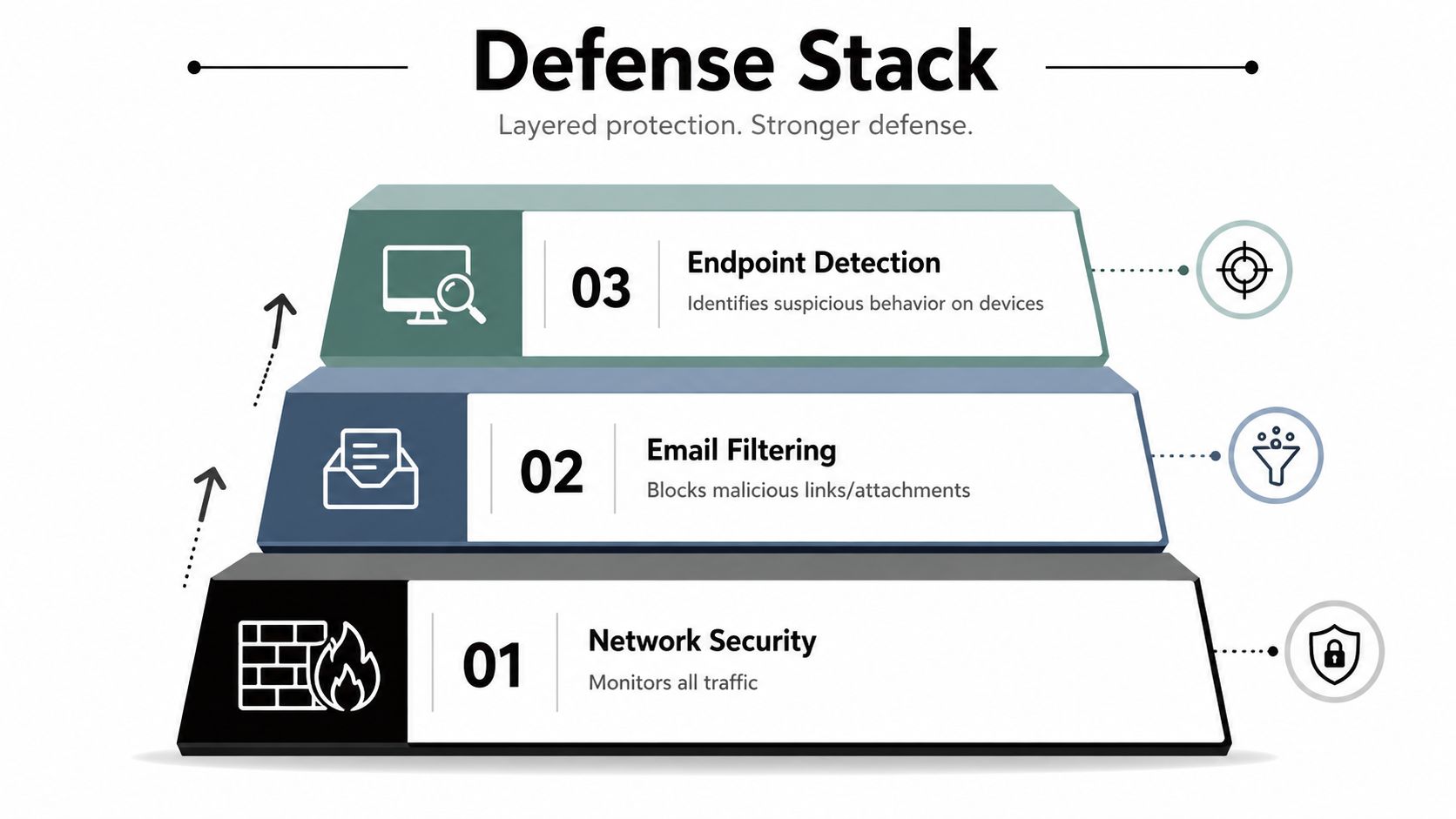
A fixed monthly patching cadence for firewalls and VPN appliances is smarter than a vague promise to “keep things updated.” The reason is simple, internet-facing systems don't wait politely for a convenient time to fail. The same goes for endpoint and email defenses, they need to be part of one layered stack, not separate boxes that each assume the other will save the day.
Bottom line: no single control stops ransomware on its own. The win comes from stacking controls so one failure doesn't become a full outage.
For a practical summary of how the endpoint piece should behave, Technovation's best endpoint protection guidance fits the same layered logic. The ideal outcome is not that a tool looks impressive in a dashboard. It's that a suspicious device gets isolated, evidence is preserved, and the rest of the network keeps moving.
Backups You Can Actually Restore From
Backups only matter if they survive the attack and restore cleanly. That's why the 3-2-1-1 model is the right target for a small business, three copies of data, on two media types, with one offsite and one immutable or offline copy. The extra “1” matters because ransomware doesn't care that a backup exists if the same attacker can encrypt or delete it.
A practical setup can be straightforward. One copy can live on a local network-attached device for fast restores. Another copy can sit in an immutable cloud object store. A third can be on an offline external drive that's disconnected after backup windows close. The exact hardware matters less than the behavior, especially whether the attacker can reach it.
Here's the key distinction owners miss. A backup that exists is not the same thing as a backup that can be restored under pressure. Files may be present, but corrupted, incomplete, or infected. That's why restore testing is part of the control, not an extra courtesy.
| Component | What It Means | SMB Example | Verification |
|---|---|---|---|
| Three copies | Keep multiple recoverable versions of the same data | Primary data, local backup, offsite backup | Confirm all copies complete successfully |
| Two media types | Don't rely on one storage format alone | Local disk plus cloud object storage | Check that both storage paths are reachable |
| One offsite | Keep a copy outside the office network | Replicated cloud storage or a remote vault | Validate access from outside the local environment |
| One immutable or offline | Keep one copy that the attacker can't encrypt | Immutable cloud copy or unplugged external drive | Restore from it during a test, not just a file check |
The testing cadence should be quarterly. Not annually. Not “when there's time.” Quarterly restore drills prove the business can come back after a real incident, which is the only test that matters. A helpful internal overview of the operational side is Technovation's cloud backup benefits, because backup design is only useful if someone is responsible for checking it.
Your First 24 Hours After an Attack and the Hard Decision
The first hour is mechanical, not strategic. The FTC's small-business guidance says to disconnect infected devices immediately, power down partially affected computers that haven't been fully corrupted, and change all account and network passwords during containment (FTC ransomware guide). That is the right sequence because speed matters more than perfect diagnosis at the start.
After containment, the owner faces the hard question: pay, restore, or bring in incident response. This should be treated as an economic decision, not a moral performance. If backups are tested, isolated, and clean, payment is usually the worst path because it adds uncertainty to a problem that already has enough of it. If only part of the environment can be restored quickly, partial recovery may be enough to keep the business moving while the rest is rebuilt. If the attacker still has a foothold, professional incident response changes the math because it helps identify scope, preserve evidence, and avoid restoring straight back into a compromised environment.
A good crisis packet should already include a communication template. For example, cyber attack press release examples can help a team understand the structure of a public response, even though the wording should be customized to the actual event and reviewed by counsel. The main point is that the business shouldn't be inventing statements while the network is still burning.
Decision rule: if restore paths are clean and tested, pay less often. If restore paths are unclear, the business is negotiating blind.
A local MSP changes the economics. A good provider shortens the time between containment and recovery, which makes the business less likely to make a rushed payment decision under pressure. The goal is not heroics, it's a controlled recovery path that's already been rehearsed.
Fully Managed, Co-Managed, or In-House
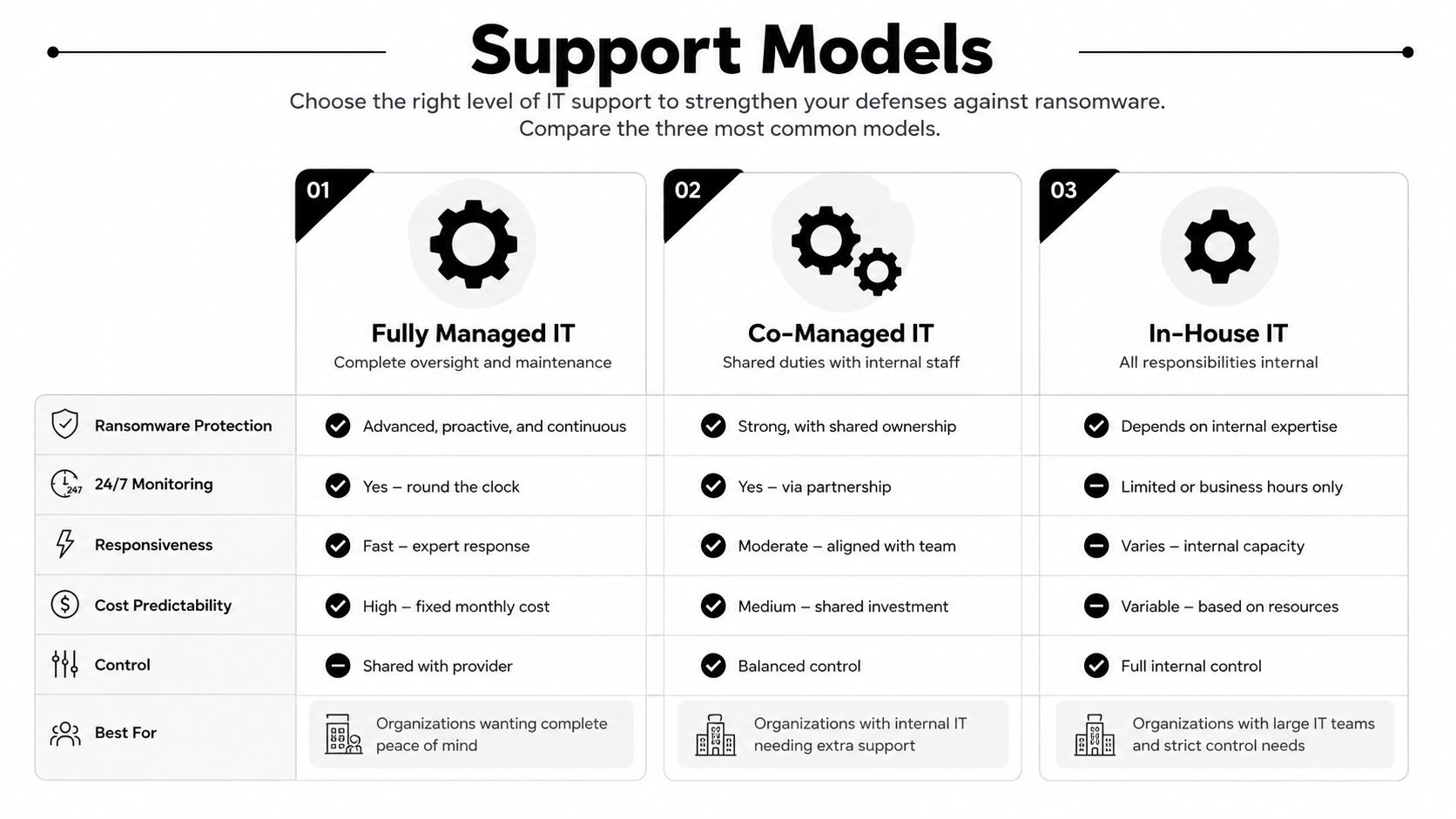
A 5 to 50-person firm in North Texas usually lands in one of three operating models. Fully managed IT fits owners who want one team responsible for monitoring, patching, backup validation, and response. Co-managed works when there's an internal admin who needs specialist support and better coverage. In-house only makes sense when the business is willing to own every gap itself, including nights, weekends, and incident handling.
The difference shows up during a bad night, not in the sales pitch. A fully managed model gives the clearest accountability. Co-managed support leaves room for an internal admin to keep local control while an outside team handles the heavier security and recovery work. In-house keeps everything internal, but it also means the business is relying entirely on the skills and availability of a very small team.
For a regulated healthcare practice, documented controls and response readiness usually matter more than bare-bones support. For a construction firm, reliable endpoints, backups, and fast response may be the bigger priority. The right choice is the one that closes the gaps the owner can't realistically staff internally.
Technovation sits naturally in the fully managed and co-managed lane for DFW firms that want local accountability, 25 years of experience, 24/7 monitoring, free security audits, and IT health checks built around business risk rather than generic checklists. A local provider matters because the first call after an incident needs to reach someone who already knows the environment.
Your 30 60 90 Plan and a Practical Next Step
The next quarter should be boring on purpose. In the first 30 days, lock down MFA, remove exposed remote access, clean up shared logins, and verify that backups are restorable. In days 31 to 60, roll out endpoint detection, tighten network segmentation, and enforce patch and password discipline. In days 61 to 90, document incident response, run a quarterly restore drill, and align the plan with healthcare, legal, or financial compliance needs if the business operates in those sectors.
That sequence works because it attacks the biggest holes first. It also avoids the common trap of buying controls out of order and never proving they work together. Owners don't need a 60-page policy binder to get started. They need a list, ownership, and a date on the calendar.
A simple comparison helps the decision stay practical. Fully managed IT is the cleanest path for owners who want one accountable team. Co-managed support is the best fit when an internal admin already exists but needs more security depth and recovery coverage. In-house only works when the business has enough internal expertise to keep controls current, test restores, and respond quickly without outside help.
For most DFW firms, the right move is to get a security audit before another quarter passes. Technovation's free security audit or IT health check is the fastest way to turn this roadmap into a real plan without hiring a full security team.
Technovation LLC helps DFW businesses build ransomware protection that holds up on the day an attack lands. Their team can tighten the human layer, harden endpoints, validate backups, and map a recovery plan to the way the business really operates. Visit Technovation LLC to schedule a free security audit and get a clear next step this quarter.





