
A new employee arrives ready to work, but access to email, shared files, scheduling systems, and line-of-business applications still sits in an inbox somewhere. Days later, the employee is technically hired but not operational. At the same time, a former worker's primary login may be disabled while old group memberships, application permissions, tokens, or shared credentials remain active.
That isn't a simple helpdesk inconvenience. User access provisioning is a lifecycle control that determines who can enter business systems, what they can do, and whether access changes when their job changes. For small and mid-sized businesses, the challenge is rarely a lack of concern. It's the gap between partial automation, disconnected applications, and manual ticket chaos.
Table of Contents
- The Hidden Bottleneck in Employee Onboarding and Offboarding
- Mapping the Joiner Mover Leaver Lifecycle
- The Cost of Over-Entitlement and Partial Deprovisioning
- Aligning Access Controls with Compliance Standards
- A Pragmatic Automation Strategy for Growing Businesses
- Your Implementation Checklist for Secure Provisioning
- How Managed IT Support Operationalizes Identity Security
The Hidden Bottleneck in Employee Onboarding and Offboarding
Many owners still treat provisioning as a short administrative sequence: HR sends an email, IT creates an account, a manager requests access, and IT disables everything when someone leaves. That model breaks as soon as a business uses several cloud applications, local systems, shared groups, contractors, and temporary workers.
The operational delay is substantial. In a 2025 survey, more than half of organizations said they couldn't provision a new employee's access and application permissions in under 7 days, while only 10% could complete it in 1–2 days and 29% required at least 11 days. Those figures make provisioning a productivity issue, not just a security issue. (The 2025 IGA survey also found that 84% still rely heavily or entirely on manual processes for access reviews and provisioning, while fewer than 6% have full automation.)
A new hire waiting for access can't complete assigned work, review client records, or join a project at full capacity. A contractor who receives broad access through a manual request may retain it after the engagement ends. A terminated employee can lose the main login while connected services continue to recognize group membership or active tokens.
The real problem is the missing source of truth
HR knows when someone starts, transfers, changes department, or leaves. The identity directory knows accounts and groups. Individual applications hold their own permissions. When those systems don't exchange reliable lifecycle events, staff members bridge the gap with email, spreadsheets, and memory.
That creates two separate records of reality. One says the worker changed roles. Another still grants the previous role's access. The longer the mismatch remains, the harder it becomes to prove whether permissions were appropriate.
Turn On Work offers useful frontline onboarding tips for organizations trying to make a new employee productive from the start. But a polished onboarding experience still depends on the underlying access process. HR communication and manager preparation matter, yet neither replaces a reliable mechanism for creating, changing, and removing accounts.
Provisioning must follow the whole employment lifecycle
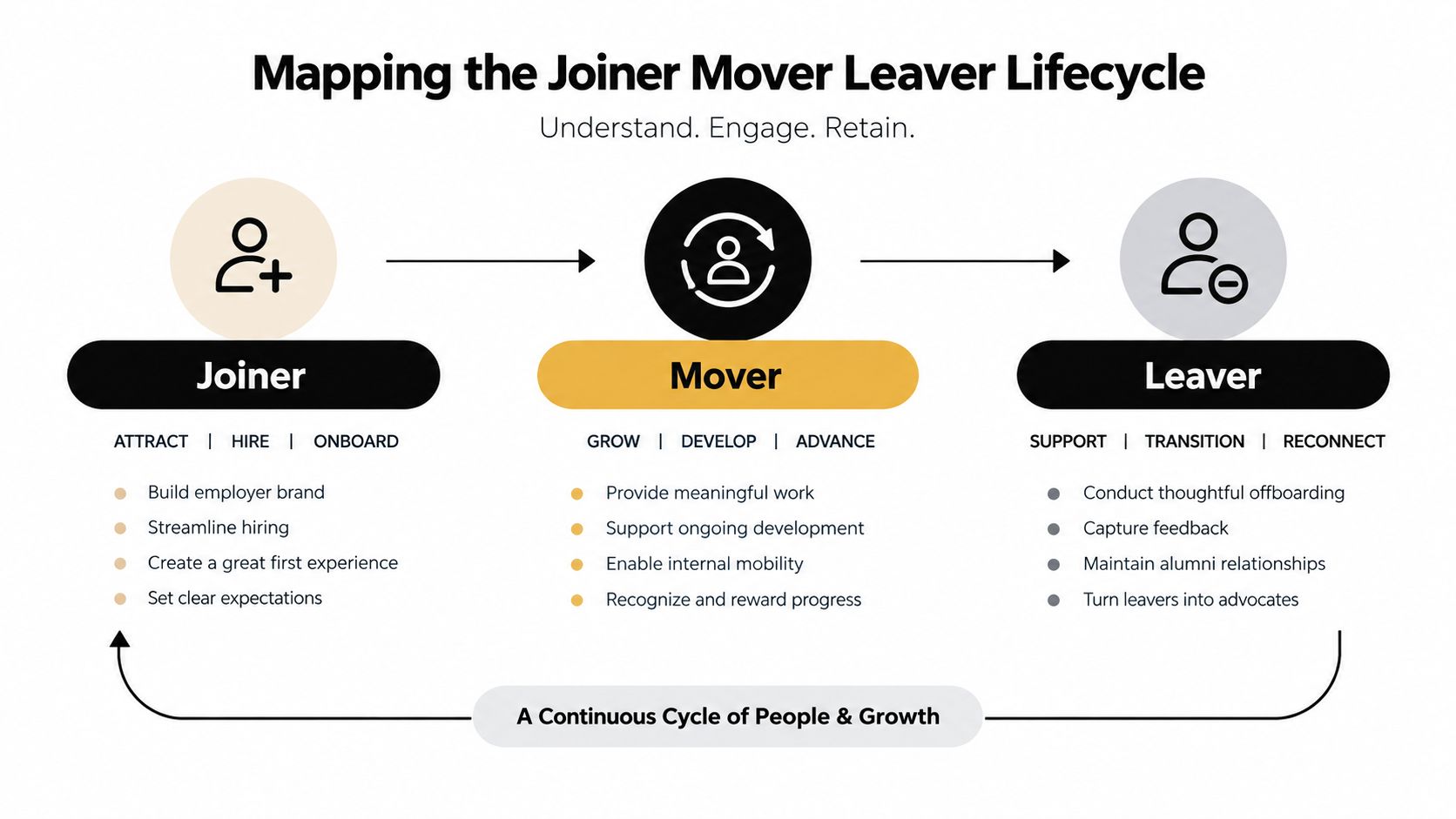
The safer model treats a workforce identity as a record that changes over time. A joiner receives approved baseline access. A mover loses permissions tied to the previous role and receives the new role's entitlements. A leaver is disabled and removed from connected applications, groups, tokens, and app-specific permissions.
The automated provisioning lifecycle guidance from Okta describes this architecture as an authoritative source triggering joiner, mover, and leaver events, with connected applications consuming changes through standardized interfaces such as SCIM or LDAP. That approach reduces manual ticket handling and recalculates access when job attributes change instead of leaving permissions static after onboarding.
Practical rule: If HR can change an employee's status but that change doesn't reliably reach every target application, the business doesn't have lifecycle control. It has a collection of reminders.
Mapping the Joiner Mover Leaver Lifecycle
The joiner, mover, leaver model gives an SMB a practical way to organize identity decisions. It works like a personnel record connected to a set of system keys. When the authoritative record changes, the appropriate keys should be issued, changed, or collected.
Joiners receive a defined starting point
A joiner is a new employee, contractor, or other approved worker entering the environment. The workflow should begin with an authoritative HR or contractor record, not an informal email request. From that record, mapped attributes such as job title, department, location, and employment status determine the standard roles, groups, and entitlements.
A medical practice might map a clinical role to approved clinical systems, while a billing role receives financial and scheduling access. A law firm may separate attorney, paralegal, intake, and administrative permissions. The principle stays the same. The worker receives a documented baseline rather than whatever access a manager happens to remember.
Pre-start provisioning can be useful, but it needs a logged future effective date. Access should become active according to the approved employment or engagement timing, not because an account was created early. The access management standard for joiner, mover, and leaver controls supports this approach by tying provisioning to authoritative records, role-defined entitlements, and separation timing.
Movers require subtraction as well as addition
A mover changes department, title, location, responsibilities, or employment type. Many businesses fail here. Managers request the new permissions, but nobody removes the old ones. The employee accumulates access with every transfer.
Attribute mapping prevents that drift by translating current workforce data into current roles. A department change should trigger both actions: add the new approved access and remove permissions no longer justified by the job. NIST's role-based access control model defines this relationship clearly. Users receive roles, and roles receive privileges engineered around the minimum permissions needed for assigned work.
Leavers need application-level verification
A leaver event must disable the identity and verify revocation across each connected target. Removing the central login alone isn't enough if application-specific entitlements, group memberships, tokens, or other access paths remain active.
Technovation's identity management services can help an SMB document these workflows across cloud, SaaS, and on-premises systems. The operational test is simple: can the business show which systems received the leaver event, when each system processed it, and whether access was removed?
The Cost of Over-Entitlement and Partial Deprovisioning
An employee changes roles on Monday, keeps old group memberships on Tuesday, and still holds them during the next access review. A contractor receives broad permissions to avoid a project delay. A project account remains active after the work ends. These routine events create hidden residual access across SMB environments.
Least privilege requires a current answer to two questions: which permissions does each person need today, and what evidence confirms that unnecessary permissions were removed? Partial deprovisioning makes the second answer difficult. Disabling a primary login may leave application-specific entitlements, tokens, or separate authorization paths active.
The directory can show a closed account while a connected application still permits activity. The automated provisioning guidance from Okta identifies partial deprovisioning as a core failure mode when group memberships, tokens, or application entitlements remain active.
Review activity doesn't equal access control
The 2025 IGA survey reported that 73.9% of respondents said people in their organizations have access privileges beyond what they require, while 99% of companies perform user access reviews. The 2025 State of IGA insights show why review frequency alone cannot demonstrate control. A review can identify excess access, but removal still depends on accurate application data, informed approval, and a revocation process that reaches every target.
A business may complete recurring reviews and retain excessive permissions when managers lack context or exception handling has no owner. Review completion then becomes an administrative record instead of evidence that access was corrected.
Integration gaps create residual access
The same reporting cites complexity or integration difficulty as the main blocker for automating IGA tasks, reported by 82–83% of respondents. (The same 2025 IGA reporting links that integration barrier to weak cleanup and incomplete automation.) SMBs feel this constraint sharply when a central directory connects to newer applications but older systems still require manual action.
Treat every exception path as a control obligation. Assign an owner, set a deadline, record the action, and retain evidence of completion. The least connected application otherwise becomes the place where former employees, transferred staff, and expired contractors retain access.
Technovation's access control policies can support documented role profiles, temporary access rules, and offboarding triggers. The measurable outcome is verified, timely removal across every target, with unresolved exceptions documented.
Aligning Access Controls with Compliance Standards
A former employee's account can remain active after the exit ticket is closed, while a transferred employee keeps permissions from a previous role. That gap creates an audit problem: the business must explain who accessed sensitive information, why access existed, and when it ended. Regulated SMBs need provisioning controls that answer those questions with records, not recollection.
NIST SP 800-53 AC-6 establishes least privilege. Organizations should grant only the access required for assigned work, review role privileges at a defined frequency, and remove or reassign rights that no longer serve the job. The NIST AC-6 reference connects that principle to daily provisioning decisions.
RBAC makes least privilege operational
Role-Based Access Control, or RBAC, assigns users to defined roles and assigns privileges to those roles. The business identifies each job function, documents its baseline access, and records approved exceptions separately. Enforcing appropriate permissions starts with precise job descriptions; RBAC labels are secondary.
A workable RBAC design includes:
- Documented role bundles: Define baseline access for clinical, billing, attorney, paralegal, accounting, project, and administrative functions.
- Mover rules: Remove old-role entitlements when a worker changes responsibilities, department, or location.
- Temporary access controls: Give contractors and temporary workers an expiration date instead of durable employee access.
- Approval evidence: Record who approved an exception, what access was granted, when it began, and when it must end.
- Review ownership: Assign managers responsibility for confirming that access still matches current work.
The Zynthoro role-based access explained resource can help business leaders understand the model before they define internal roles. The practical test is straightforward: can the company connect a permission to a current job duty, an approver, and a documented exception when needed?
Compliance evidence must follow the action
An auditor-ready process preserves a timestamped trail from the workforce record to the final application result. That record should show the worker's status, mapped role, approval decision, affected systems, and confirmation that access was removed or updated.
The access management standard provides a concrete control framework for authoritative workforce records, logged effective dates for pre-start access, limited baseline entitlements, and disabled access on or before separation. SMB owners should measure whether those records exist for every access change, including exceptions handled outside the automated path. That evidence exposes residual access before an auditor does.
A Pragmatic Automation Strategy for Growing Businesses
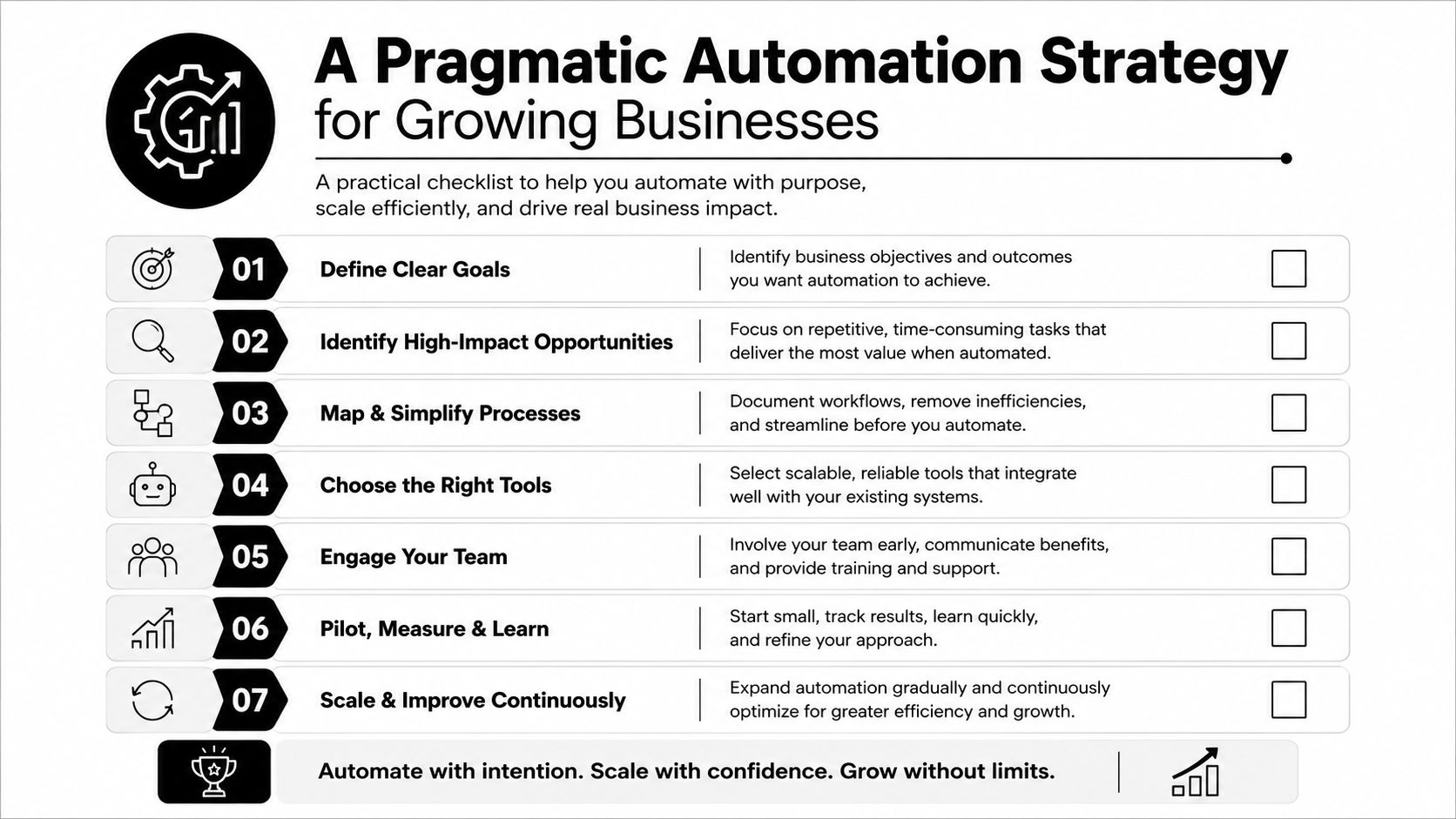
SMBs don't need to automate every legacy application before automation becomes worthwhile. They need to automate the actions that are predictable, repeatable, and risky when delayed.
A sound program starts with the authoritative source, standard role bundles, and the applications that hold the most sensitive information. The business then creates a controlled exception path for systems that can't yet integrate. This avoids the common mistake of launching a broad, fragile project that delivers complexity without complete lifecycle coverage.
Automate deterministic actions first
The system should handle actions that follow a clear rule:
- Standard account creation: Create accounts from approved HR or contractor records.
- Baseline role assignment: Apply the role bundle associated with current job attributes.
- Mover updates: Add current entitlements and remove permissions from the previous role.
- Termination revocation: Disable access and send removal events to connected targets.
- Expiration handling: End temporary and contractor access according to the recorded date.
Human governance still matters. Managers should approve exceptions, security teams should review unusual access, and policy owners should decide whether a new role bundle is appropriate. Automation should execute a known decision, not conceal an undefined one.
Prioritize applications by consequence
The first targets should be systems containing regulated records, client files, financial information, administrative control, or sensitive credentials. A small firm may start with its identity directory, email, file storage, practice management system, accounting system, remote access, and critical line-of-business applications.
Legacy systems that lack integration shouldn't be ignored. They should receive a named owner, a documented manual procedure, a required completion timestamp, and verification inside the application. The access provisioning lifecycle guidance from Zluri emphasizes complete coverage across onboarding, role changes, and offboarding, including verification within each target application.
Independent industry research reports that fewer than 4% of organizations have fully automated core identity workflows, while 59% still handle user access provisioning, offboarding, or both manually. (The Identity Defined Security Alliance analysis supports a phased approach built around authoritative data, standard approvals, and timestamped evidence.)
Your Implementation Checklist for Secure Provisioning
A secure provisioning program starts with an inventory, not a software purchase. The business needs to know which identities exist, where they can authenticate, what privileges they hold, and which systems fall outside the normal workflow.
Establish the baseline
-
Inventory every account: Include workforce accounts, contractor accounts, service accounts, shared accounts, application identities, and remote access paths. Record the owner, purpose, system, role, status, and last review decision.
-
Identify the authoritative record: Select the HR or contractor source that controls employment status, department, location, title, and separation date. Stop treating email requests as the primary lifecycle signal.
-
Document role bundles: Map each job function to minimum required groups and entitlements. Separate standard access from approved exceptions so reviewers can see what falls outside the baseline.
-
Separate worker types: Permanent employees, temporary workers, contractors, and service identities shouldn't share the same lifecycle. Temporary access needs an expiration condition and a responsible owner.
Test the workflow instead of trusting it
-
Measure provisioning speed: Record the time between an approved authoritative record and usable access in each priority application. The business should know where onboarding stalls, not assume that a central account means the worker is ready.
-
Verify deprovisioning inside targets: Confirm removal in each application, including groups, tokens, app-specific entitlements, remote access, and shared resources. A directory status alone isn't proof of revocation.
-
Track mover completeness: For every role change, compare old and new entitlements. The question is whether the employee gained the right access and lost the access that no longer belongs to the job.
-
Preserve evidence: Keep timestamps, approvals, mapping decisions, exceptions, and application results. This record supports audits and gives IT a way to diagnose failed workflows.
The business can reinforce the broader identity process with multi-factor authentication setup guidance. MFA doesn't replace lifecycle controls, but it adds another barrier when credentials are exposed or a forgotten account remains available.
How Managed IT Support Operationalizes Identity Security
A policy only protects the business when people apply it consistently. In a growing organization, the operational burden includes role design, application integration, exception review, contractor expiration, mover changes, offboarding verification, and audit evidence. Those responsibilities compete with daily support work, so manual processes often degrade when the internal team gets busy.
A managed service provider can turn the policy into a repeatable operating process. The work begins with an account inventory and application map. From there, the provider helps define standard approval paths, connect authoritative workforce data to supported targets, and create documented procedures for systems that still require manual handling.
Turning events into evidence
For a joiner, the record should show the approved worker status, effective date, role mapping, account creation, and assigned access. For a mover, it should show the old and new role decisions. For a leaver, it should show the disablement event and verification in each target application.
That evidence gives business owners a practical compliance outcome. It also helps support staff identify where an integration failed instead of discovering the problem during an audit or after an employee has already departed.
Technovation LLC can provide identity management, access policy support, managed security operations, and strategic IT planning for DFW organizations across healthcare, legal, financial services, construction, nonprofits, and other security-conscious industries. Its managed IT security services can help operationalize access controls alongside broader monitoring, endpoint protection, network hardening, backup, and compliance readiness.
The right objective isn't blind automation. It's complete, verifiable lifecycle coverage. Every worker should receive appropriate access, every role change should recalculate permissions, and every departure should produce evidence that access was removed where it mattered.
Technovation LLC helps DFW businesses assess current access, define role-based permissions, automate joiner-mover-leaver workflows, and verify offboarding across cloud and legacy systems. Visit Technovation LLC to request a security audit or discuss a managed provisioning program built around the organization's applications, compliance obligations, and growth plans.