
An employee checks a personal phone between appointments, approves a request, opens a client document, and replies to a work message. Nothing feels unusual. The problem begins when that phone is lost, shared with a family member, running outdated software, or connected to an untrusted network. In a regulated small or midsized business, informal permission isn't a defensible security program.
A bring your own device policy must define more than whether staff can use personal phones. It must establish which data employees may access, what protections are mandatory, what IT can see, and how the business will remove corporate information without touching personal content. That balance matters for healthcare organizations handling protected health information, financial firms subject to FINRA obligations, law practices protecting privileged material, and any company accountable for confidential client data.
Table of Contents
- Understanding the Modern Bring Your Own Device Policy
- Core Elements of a Secure Bring Your Own Device Policy
- Navigating Compliance and Privacy Boundaries
- Designing the Network and Security Architecture
- Building Your Implementation Checklist and Template
- Managing Cross-Device Access and Emerging Trends
- Partnering with an MSP for Reliable BYOD Management
Understanding the Modern Bring Your Own Device Policy
A staff member uses a personal phone to check email, approve a workflow request, authenticate to a cloud application, or answer a client. In a regulated SMB, that routine activity creates operational and legal obligations. BYOD is no longer a side arrangement for avoiding company-issued hardware. It is part of how work gets done, and it requires a defensible policy.
Industry research reports that 83% of companies had adopted some form of BYOD policy, while 58% of organizations allowed employees to bring their own devices, according to documented BYOD adoption statistics. These figures point to a governance shift. Personal devices are already involved in business access, whether leadership has formally approved them or not.
Employees may also be expected to remain reachable away from the office, including in roles without a company-issued phone. That expectation creates pressure to permit personal smartphones for work, but convenience cannot determine access rights. A healthcare practice must protect patient information, a financial firm must account for FINRA obligations, and a law office must preserve confidential material. The controls should reflect the data and the role.
Practical rule: If employees can access business data from a personal device, that device belongs in the company's governance model.
A verbal instruction such as “be careful with patient information” does not define access boundaries, provide audit evidence, or tell IT what to do after a phone is lost. A formal endpoint management framework connects policy language with enrollment, authentication, application controls, monitoring, and offboarding.
Use privacy-preserving controls where possible. Application containers can isolate business data from personal photos, messages, and files, while Zero Trust can require verified identity, device condition, and application context for each access request. Full-device management may be appropriate for company-owned equipment, but forcing it onto personal phones can create employee resistance and privacy concerns.
The policy should specify which information may be viewed but not downloaded, which applications are approved, and which duties require company-owned equipment. A nurse reviewing schedules, an accountant accessing financial records, and an attorney handling discovery documents do not present identical risks. Set access by role and data sensitivity, with documented consent and limited visibility. Personal ownership is not automatic trust, and employee privacy is not a reason to leave corporate data unmanaged.
Core Elements of a Secure Bring Your Own Device Policy
A personal phone becomes part of the company's control environment as soon as it reaches regulated business data. The policy must turn that reality into specific access conditions, privacy limits, and response duties. “Use reasonable security” gives administrators no admission test and employees no clear standard.
Define eligibility before granting access
Write the admission standard before asking employees to enroll:
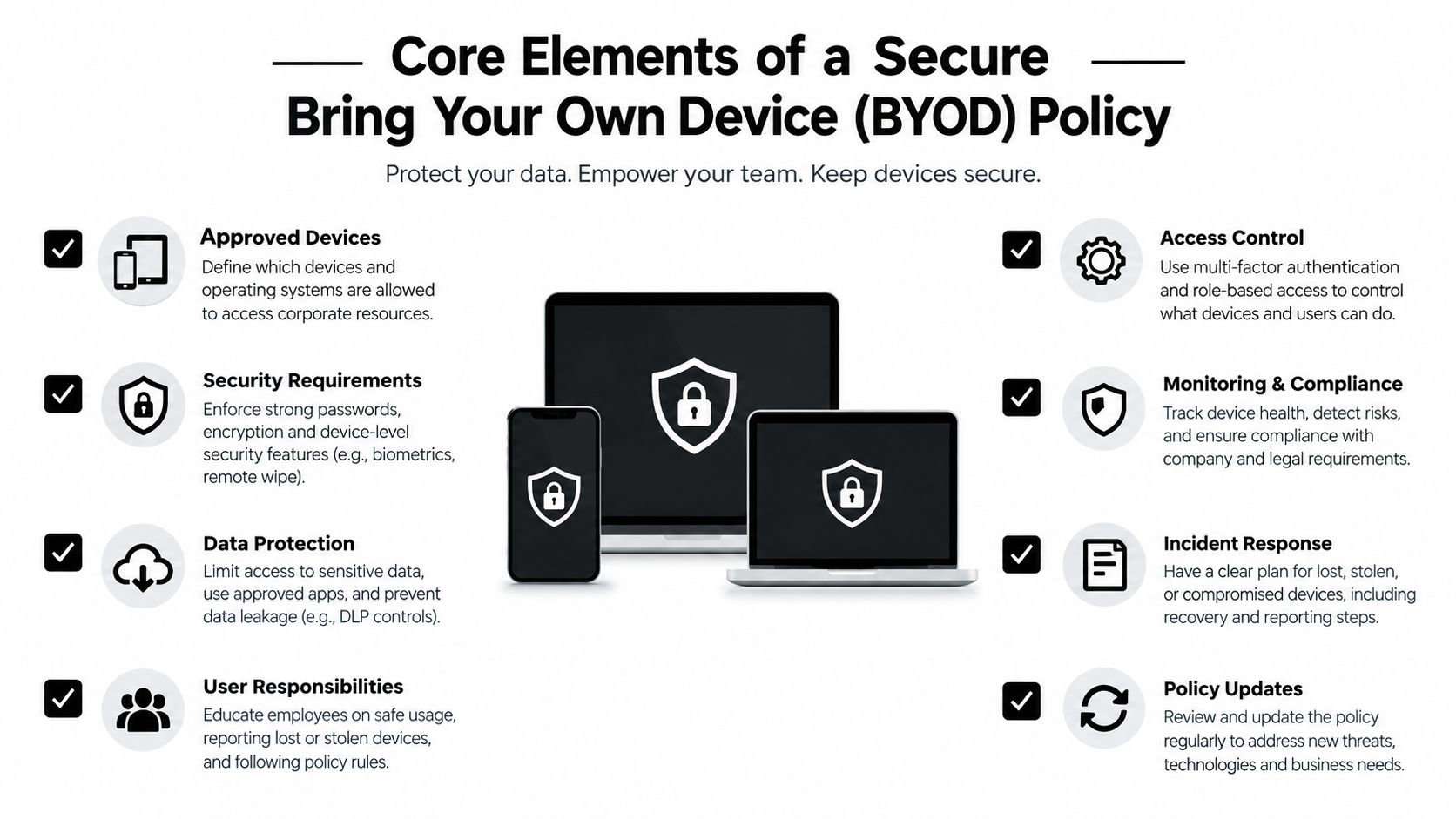
- Approved devices: List the device types and operating systems permitted to connect to business applications. Block rooted or jailbroken devices because their built-in security boundaries have been bypassed.
- Enrollment: Require registration through the approved device-management or application-protection process before access begins.
- Ownership and support: Make clear that employees remain responsible for hardware condition, cellular service, repairs, and personal applications. IT supports the business connection, not every consumer feature.
- Role restrictions: Keep sensitive workflows on company-owned or otherwise managed equipment when a personal device cannot provide the required assurance.
Separate permission to view information from permission to store it. An employee might review a record through a protected browser session but remain barred from downloading it to local storage or forwarding it through a personal messaging application. Use user access controls to tie permissions to identity, role, and data sensitivity rather than to device ownership alone.
Set a measurable security baseline
Require a strong device passcode, multi-factor authentication, encryption for stored business data, current manufacturer updates, automatic locking, and prompt reporting of loss or theft. NIST recommends limiting personally owned devices to enterprise resources explicitly allowed by policy, applying centralized mobile device management, controlling approved and blocked applications, using strong passwords or MFA, and encrypting stored data in its mobile device security guidance.
Use an app container or sandbox to keep corporate email, documents, and application data separate from personal photos, messages, and consumer applications. This gives a regulated SMB a defensible privacy boundary without granting IT unnecessary visibility into an employee's personal life. The policy must prohibit copying work information into unapproved storage, sharing credentials, disabling required protections, or handling sensitive data through unauthorized applications.
Budget for the full operating model. Licensing is only one cost; support, implementation, labor, and compliance administration also require funding. A practical overview of mobile device management cost per endpoint can help owners assess software pricing without treating it as the total cost of a secure program.
Make incident response explicit
A lost or stolen device needs a written sequence. Employees must know how to report it, the help desk must know how to revoke sessions and start a selective wipe, and management must know when the event becomes reportable.
Authorize removal of corporate accounts, tokens, certificates, and container data while protecting personal content. Require cooperation with investigation, identify the support channel, and explain the result of refusing enrollment or disabling required safeguards. Offboarding should remove business access immediately, even when the employee keeps the device.
Privacy-preserving controls protect both sides. They reduce exposure of personal content while giving the business an audit trail, defined permissions, and a reliable way to contain corporate data.
Navigating Compliance and Privacy Boundaries
A clinician checks work email from a personal phone. A financial adviser reviews a client file from a home laptop. The business needs to protect that activity under HIPAA or FINRA-related controls, while the employee expects personal messages, photographs, browsing activity, and unrelated accounts to remain private. That tension defines BYOD in a regulated SMB.
The business has a legitimate duty to protect its information. IT does not have a legitimate reason to inspect every part of an employee-owned device. Full-device management can collect excessive personal information and create resistance that pushes employees toward shadow IT. Set the boundary before enrollment, then enforce it consistently.
Widespread BYOD adoption makes a written boundary practical, not optional. The privacy-focused BYOD guidance reports that about 95% of businesses allow personal devices for work and more than 80% have some form of BYOD policy. Those figures support a clear recommendation: define privacy limits before personal hardware touches protected data.
Use the smallest effective control
Ask one operational question: what is the minimum visibility and control required to protect the data? For a regulated SMB, the answer should focus on business applications, identities, sessions, and corporate content, not the employee's entire phone.
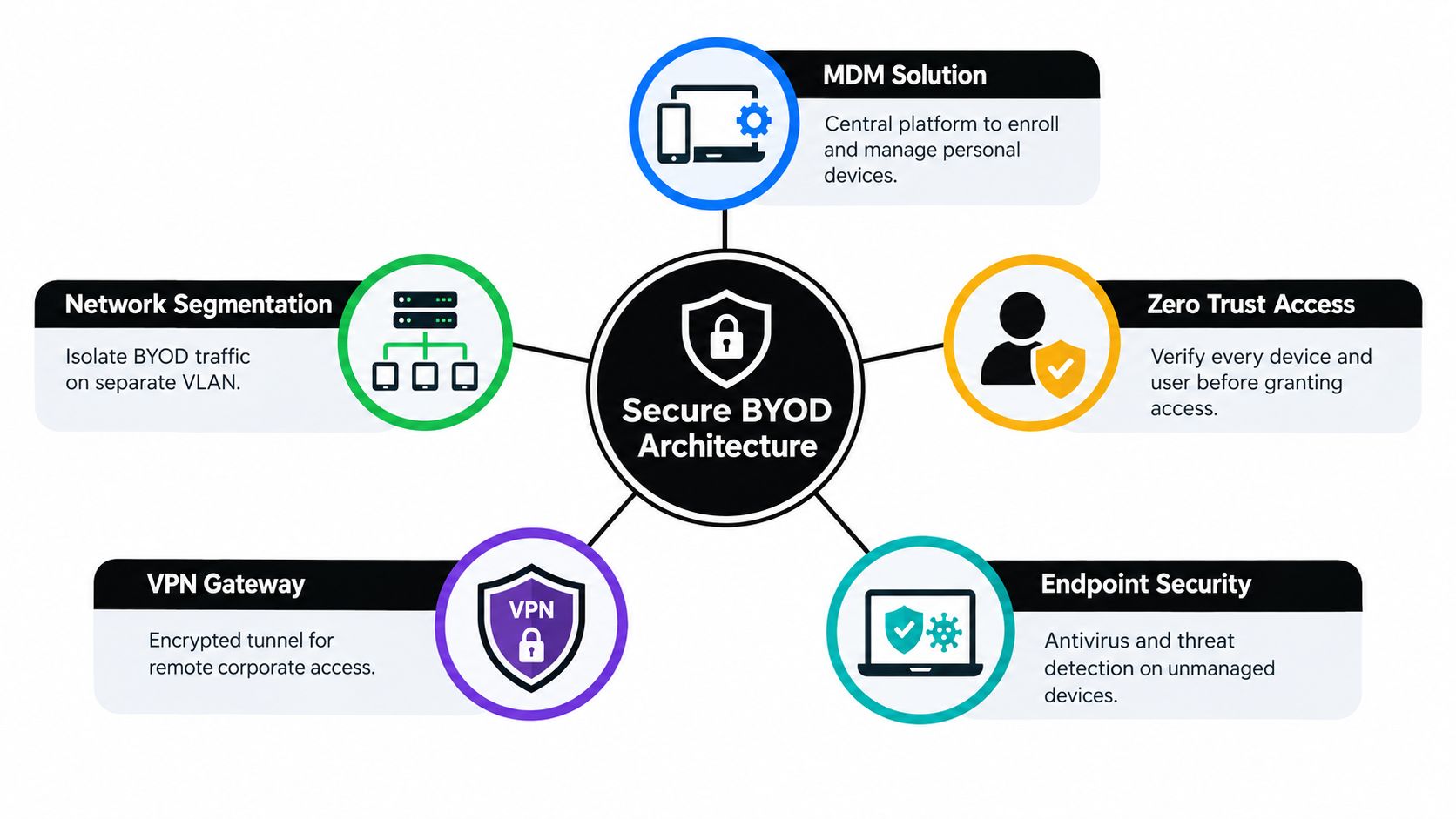
A privacy-preserving model should combine:
- Application containers: Keep corporate email, files, and credentials inside a protected work area separate from personal applications.
- Application allowlisting: Permit access through approved business applications and sanctioned workflows.
- Selective wipe: Remove corporate data, accounts, and access tokens without erasing personal photos or messages.
- Identity-based access: Apply MFA, role-based permissions, and session controls even when the endpoint remains personally owned.
- Transparent reporting: Explain in plain language what IT can see, what it cannot see, and which events activate a control.
Secure containers or sandboxes isolate work data from personal applications when one device handles both personal and corporate email. That separation reduces accidental cross-contamination without requiring full-device inspection, consistent with mobile device security guidance.
Write privacy terms employees can understand
State exactly whether IT can view the device type, operating-system status, enrollment state, corporate applications, security posture, and access logs. State the exclusions separately: IT cannot read personal messages, inspect personal photographs, review unrelated browsing activity, or access personal financial information.
Data classification should determine which information may enter a protected mobile workflow and which information requires a company-managed endpoint. Technovation's data classification resource provides a practical foundation for assigning those boundaries. Classification turns privacy language into an operating rule tied to data sensitivity.
The policy also needs a clear offboarding notice. Employees must understand that departure, device loss, or a security event may trigger removal of corporate content. That is the necessary condition for allowing personal hardware to access protected systems, not a punishment.
Designing the Network and Security Architecture
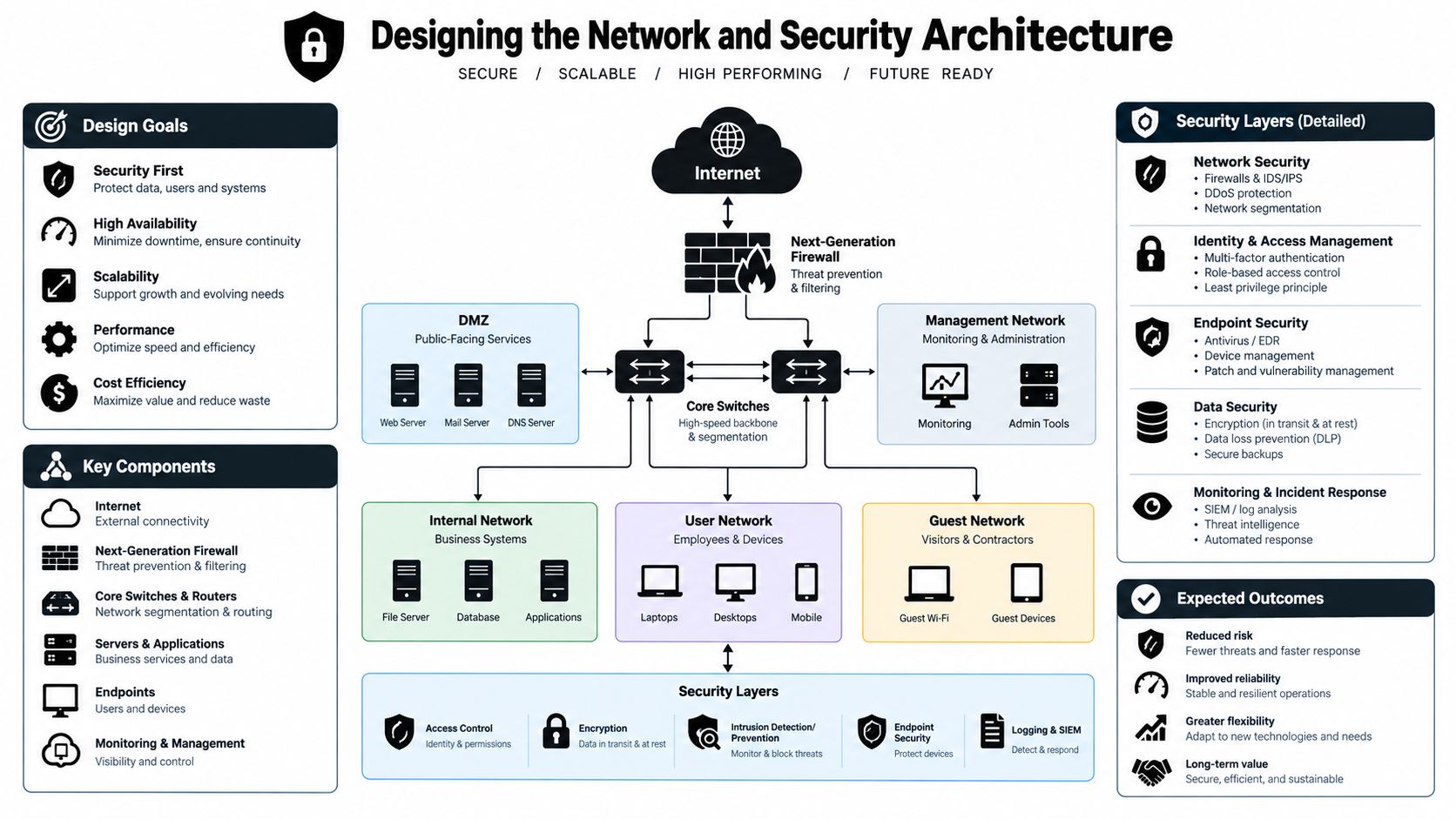
A signed policy can't stop lateral movement. Network architecture must assume that a personal device may become infected and must limit what that device can reach.
NIST advises organizations that permit BYOD to place those devices on a separate external network segment rather than the internal LAN. The BYOD segment should be secured and monitored at least as strictly as remote-access infrastructure, as described in NIST network security guidance for remote access.
Compare access designs
An internal-LAN approach is simple for users and dangerous for the business. It places an untrusted personal endpoint close to servers, file shares, and administrative systems. If an attacker compromises that phone or laptop, the network may provide opportunities for credential theft, discovery, or lateral movement.
A segmented design creates a separate BYOD network with tightly limited routes. Employees can reach approved cloud services, remote applications, or gateways, but the personal device can't freely communicate with internal systems. A Zero Trust design adds another layer by evaluating identity, authentication, application, and device conditions rather than accepting network location as proof of trust.
Remote application delivery can reduce local data exposure further. The user interacts with a controlled business environment, while the personal device receives only the screen and input needed for the session. This approach doesn't eliminate every risk, but it narrows the amount of corporate information stored on personal hardware.
Treat operating systems as different risk profiles
Apple and Android devices shouldn't automatically receive identical access conditions. A U.S. government review concluded that Android devices presented more serious security risks than Apple devices in BYOD environments, according to the government review of mobile device security. The practical recommendation is to assess operating-system version, patch status, management capability, encryption, application controls, and manufacturer support rather than relying on brand preference.
The policy can apply different controls without creating unfairness. A device that can't meet the required security posture can receive browser-only access, application-only access, or no access to regulated systems. Manufacturer updates also matter. Prompt patching reduces the chance that known vulnerabilities will be exploited against the enterprise network, so access checks should account for update status.
A federal review found 68 critical and high-risk vulnerabilities in one month, with 18 classified as critical, or 26%, in one BYOD program, as documented in the federal oversight report. That finding doesn't justify panic. It justifies containment, testing, and a refusal to place personal devices beside core systems without meaningful controls.
Building Your Implementation Checklist and Template
Implementation should begin with data and workflows, not a product demo. A clinic, financial advisory firm, and law office may all allow personal phones, but each handles different records, retention obligations, and business applications.
Roll out the policy in a controlled sequence
Inventory access paths. Identify every business application employees reach from personal phones, laptops, tablets, home networks, or wearables. Include email, file storage, collaboration, remote desktop, and authentication applications.
Classify the information. Mark which workflows contain regulated, confidential, privileged, or routine data. Prohibit BYOD access where the business can't enforce adequate protections.
Choose the enforcement model. Decide whether the business needs full device management, application protection, a secure container, browser-only access, or a remote session. The least invasive model that protects the data is usually easier to explain and sustain.
Configure identity controls. Require MFA, role-based permissions, session expiration, and immediate access revocation when employment status changes.
Test the security baseline. Confirm encryption, passcode enforcement, update status, application restrictions, network separation, logging, and selective wipe before approving production access.
Publish the employee agreement. Explain privacy boundaries, support limits, reimbursement responsibilities, prohibited actions, incident reporting, and offboarding in plain language.
Rehearse failure. Test a lost phone, a departing employee, a disabled work container, a compromised account, and a device that falls out of compliance. A policy that works only in normal conditions isn't ready.
NIST's practice guide frames BYOD as a standards-based security and privacy controls problem supported by commercially available technologies, as explained in its mobile device security practice guide.
Use adaptable policy language
A handbook clause can be direct:
“Access from a personally owned device is conditional on enrollment in the approved business access system, use of MFA, an active device passcode, current security updates, and compliance with application and data-handling requirements.”
A privacy clause should be equally specific:
“The organization may view business security status, approved application state, and access activity. The organization won't access personal messages, photographs, unrelated browsing activity, or personal accounts. Corporate data may be removed selectively when access ends or a security incident requires action.”
A response clause should remove ambiguity:
“Employees must report a lost, stolen, or suspected-compromised device through the designated support channel immediately. The organization may revoke business sessions and remove corporate data from the protected work area.”
Select the appropriate enforcement tier
| Enforcement Model | Privacy Impact | Security Strength | Best For |
|---|---|---|---|
| Browser-only access | Low | Moderate | Routine cloud workflows with limited local storage |
| Application container | Low to moderate | Strong | Regulated email, files, and business applications |
| Zero Trust application access | Low | Strong | Distributed teams requiring identity and context checks |
| Full device management | High | Very strong | High-sensitivity workflows where personal ownership is unsuitable |
| Company-owned equipment | Clear corporate control | Very strong | Critical systems and highly restricted information |
The table isn't a substitute for risk assessment. It gives owners a disciplined way to compare convenience, privacy, and enforceability before the first enrollment invitation is sent.
Managing Cross-Device Access and Emerging Trends
BYOD no longer means only a smartphone. A hybrid employee may use a personal laptop, home wireless network, tablet, smartwatch, and personal browser during one workday. A policy that covers only the phone leaves several access paths outside governance.
Trend reporting describes movement toward Zero Trust, third-party access controls, and “Bring Your Own Network,” reflecting work across personal devices and home internet connections, as discussed in current BYOD trend analysis. The important shift is operational. The business must evaluate the identity, application, session, and network conditions around access rather than asking whether a particular device is personally owned.
Expand the inventory
Personal laptops deserve different treatment from phones because they may store downloaded files, browser credentials, local backups, and unmanaged applications. Home networks also require attention. Employees should use secured wireless settings, updated network equipment, and protected business connections instead of assuming that a familiar home connection is automatically safe.
A resource on secure WiFi for multiple devices can help business owners think beyond a single endpoint and examine how many devices share a home or small-office connection. The policy should define which devices may access corporate services, which require application controls, and which are prohibited from handling regulated data.
Replace device trust with continuous verification
Zero Trust doesn't mean blocking all personal technology. It means verifying the user, requiring MFA, checking relevant device conditions, limiting access by role, and reevaluating the session as circumstances change. A healthy personal laptop might receive access to a collaboration application, while an outdated device receives browser-only access or a remediation prompt.
Wearables and smart assistants create another boundary problem because notifications can display sensitive information in public or on shared devices. The policy should address notification previews, voice commands, screen sharing, personal backups, and automatic synchronization where those features could expose confidential content.
The forward-looking question isn't “Should the business allow personal devices?” It's “Which identity, network, and application controls provide acceptable risk for each workflow?” That framing gives regulated SMBs more choices than either unrestricted access or an impractical total ban.
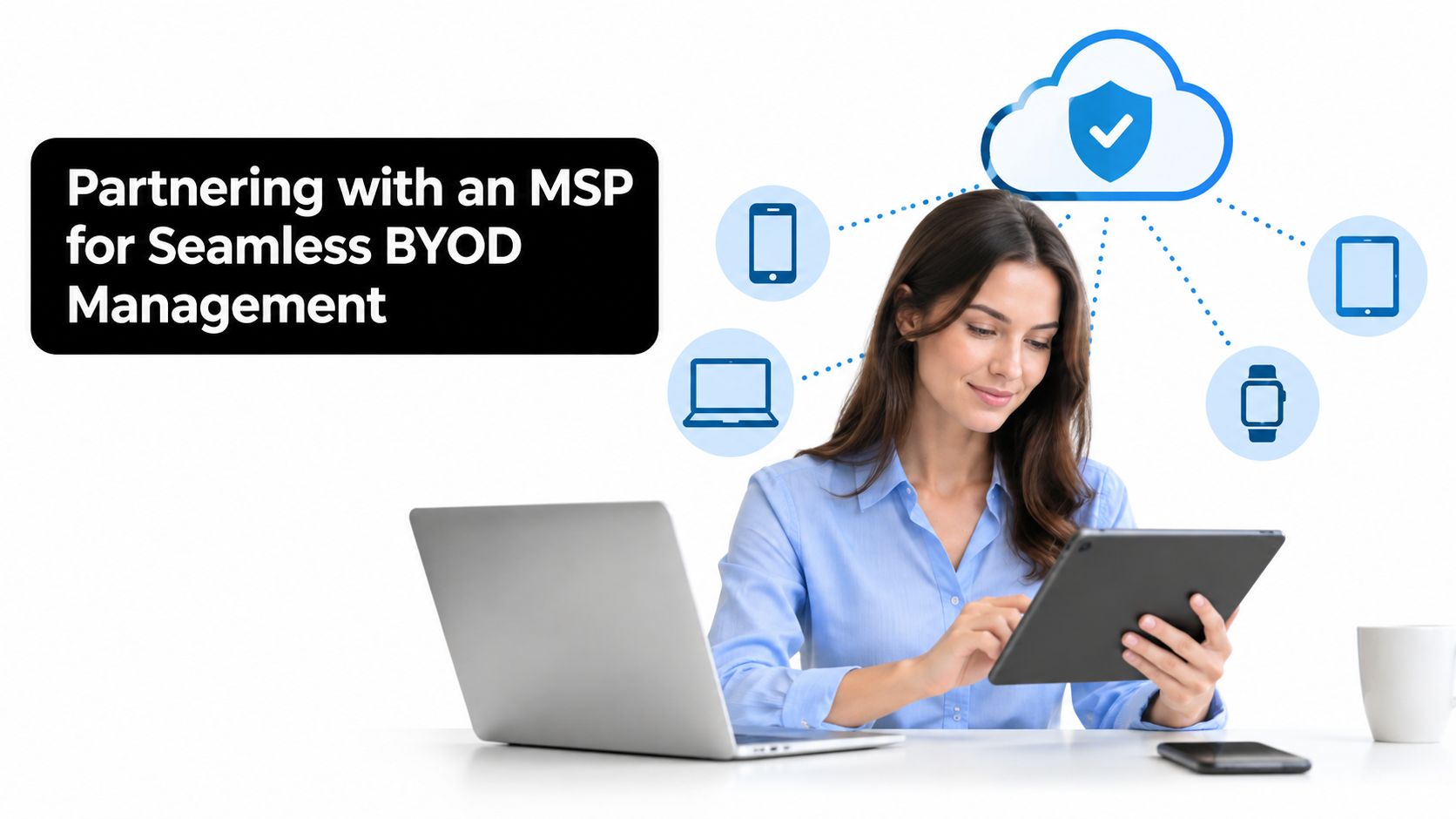
Partnering with an MSP for Reliable BYOD Management
BYOD creates recurring operational work. IT must review enrollment, monitor device posture, respond to lost hardware, remove access during offboarding, investigate alerts, maintain policy evidence, and support employees without exposing personal information. For a small internal team, that workload competes with infrastructure projects, user support, compliance preparation, and business growth.
The risk is established. A 2014 survey found that 73% of organizations said BYOD created greater security risk, while 59% still approved personal-device use for business. More recent reporting found that only 67% of organizations had official BYOD security measures, and 32% required employees to register personal devices with IT for security software installation, according to BYOD security statistics and historical analysis.
Outsource the operating burden, not the decision-making
An MSP should turn the policy into repeatable operations: enrollment workflows, app containers, identity rules, network segmentation, monitoring, patch review, backup, and incident response. Use application-level controls and Zero Trust verification to protect regulated data without granting full visibility into an employee's personal device. The business decides which roles may access patient, client, or financial information and where privacy limits apply. The MSP administers those decisions and documents the results.
Technovation LLC provides mobile device and application management, remote workforce support, proactive monitoring, risk mitigation, compliance readiness, and strategic IT planning for security-conscious organizations. Its Dallas, Fort Worth focus and 25 years of experience support local businesses coordinating endpoint protection, network hardening, cloud access, and regulated workflows.
Use this guide to choosing a managed service provider to assess response capability, compliance knowledge, support boundaries, and accountability. Require clear answers about what the provider can see, what it will manage, how incidents escalate, and how service records support audits. A provider that cannot explain those boundaries should not manage personal devices carrying regulated information.
UK government guidance recommends planning and rehearsing incidents involving a personally owned device that accesses sensitive business information and is lost, stolen, or compromised, as stated in official BYOD incident guidance. An MSP can run that rehearsal, test access revocation, confirm remote-wipe limits, and preserve the required evidence. A tested process is faster, less disruptive, and easier to defend than a policy kept only in an employee handbook.
Technovation LLC helps regulated SMBs operate privacy-conscious BYOD programs through mobile application management, identity controls, network hardening, monitoring, and compliance-focused IT support. Visit Technovation LLC to request a security audit or discuss managed BYOD support for a healthcare, legal, financial, or other security-sensitive organization.





