Most DFW business owners still ask the wrong question about IT. They ask, “What does support cost?” The better question is, “What does weak infrastructure cost when compliance, uptime, and client trust are on the line?”
That gap in thinking matters most in regulated industries. A medical practice, law firm, financial office, or construction company doesn’t need “internet and computers.” It needs a system that keeps data available, users productive, access controlled, backups recoverable, and problems visible before they become interruptions. That’s what networked IT services should mean in practice.
A reactive setup usually looks cheaper until a file share slows down, remote staff can’t connect, a firewall rule drifts, or a backup fails when it’s finally needed. A managed, network-first approach does the opposite. It turns IT into an operating layer for growth, compliance, and daily stability.
Table of Contents
- Is Your IT a Strategic Asset or Just a Cost?
- The Core Components of a Modern Business Network
- Beyond Connectivity The Business Benefits of Strategic IT
- Navigating Compliance and Security in Regulated Industries
- Risks of Neglect Common Pitfalls for Unmanaged IT
- Choosing Your DFW Partner A Vetting Checklist
- Your Implementation Roadmap and Next Steps
Is Your IT a Strategic Asset or Just a Cost?
A business owner can spot the difference quickly. If IT only gets attention when something breaks, it’s being treated like overhead. If IT is shaping uptime, compliance, hiring flexibility, client service, and risk reduction, it’s being treated like an asset.
That shift is already happening. The share of IT leaders who viewed the network as a strategic asset rose from 38% to 49%, while tactical-only thinking declined, according to research on the evolution of network services. That change didn’t happen because networking became fashionable. It happened because bandwidth-heavy applications and mobile work became core to business performance.
A business system, not a utility bill
Networked it services should be viewed like the central systems in a commercial building. Electricity powers the space. Plumbing keeps it usable. Security controls who gets in. If any one of those systems fails, the whole building becomes harder to operate.
Business IT works the same way. The network isn’t just a connection to the internet. It’s the framework that ties together devices, cloud apps, access permissions, monitoring, backups, and security controls.
Practical rule: If a company’s revenue depends on access to data, staff coordination, and secure communication, its network is already a strategic asset whether leadership treats it that way or not.
For a DFW clinic, that means stable access to patient records. For a law office, it means secure document movement and dependable remote work. For a financial firm, it means controlled access, auditability, and consistent performance during client-facing activity.
Leaders who need that level of alignment usually need more than a help desk. They need planning. A structured virtual CIO service helps translate technical decisions into business priorities, budgets, and risk controls.
Cost thinking creates short-term decisions
A cost-only mindset usually produces fragmented buying. One vendor handles internet. Another installs a firewall. Backups live somewhere else. Nobody owns the whole picture.
That model breaks down under pressure. Regulated businesses need an environment where support, security, continuity, and strategy work together. Otherwise, every issue turns into a scramble across disconnected systems and unclear accountability.
The Core Components of a Modern Business Network
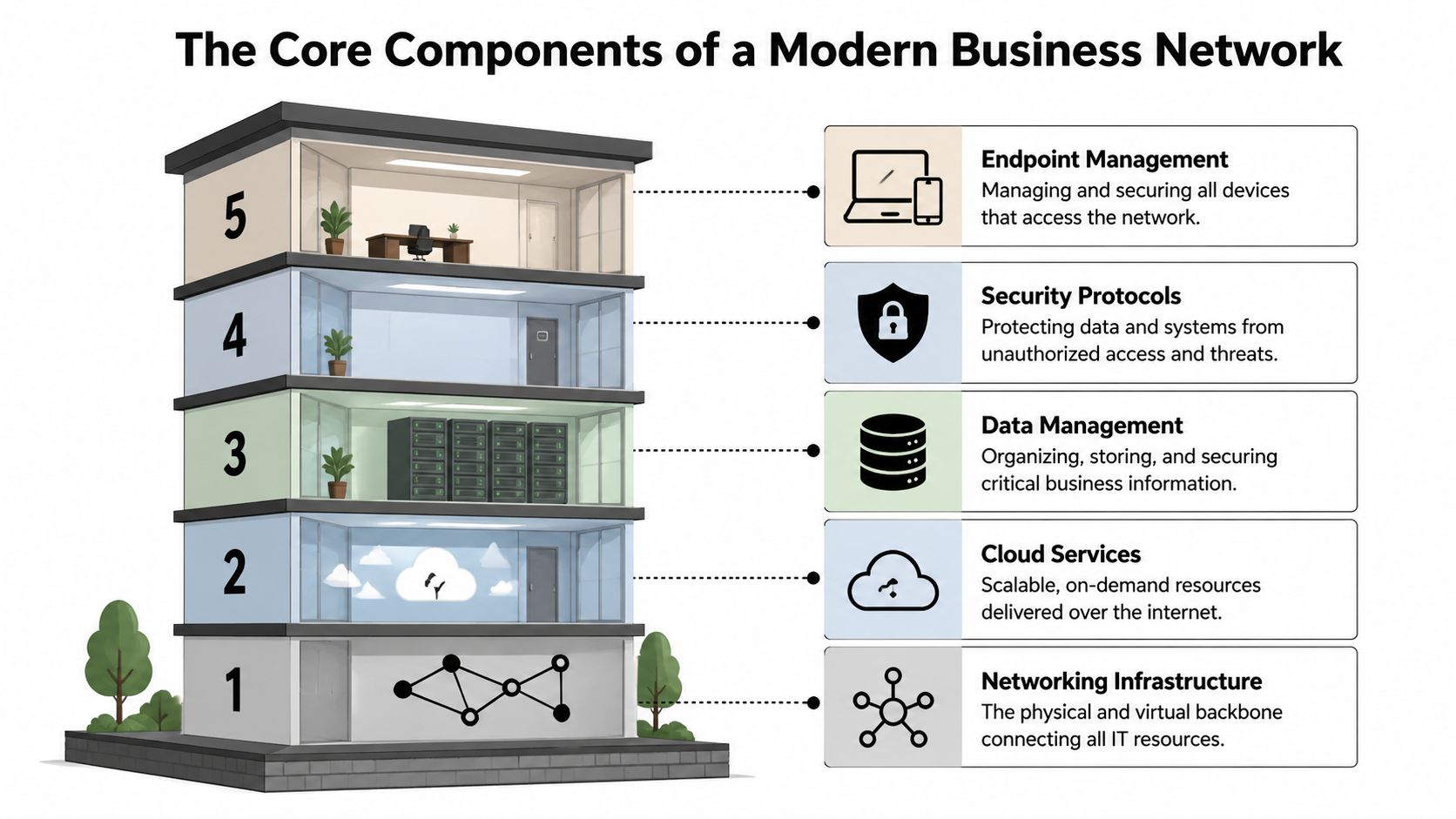
Most companies don’t need more jargon. They need a clear picture of what a complete environment includes. The easiest way to understand networked it services is to think of a business property with structural systems that all have to work together.
Infrastructure comes first
The foundation is the network infrastructure itself. That includes switching, routing, wireless coverage, segmentation, and the design choices that determine whether traffic flows cleanly or stalls under load. When that layer is weak, every cloud app and every endpoint inherits the weakness.
In higher-performance environments, internal networks often use dual 10 Gbps switches linked with Virtual Link Aggregation, which creates a faster virtual switch, reduces single points of failure, and can support query response times under 5ms with 99.99% internal network availability, according to IBM network specifications. A smaller DFW business may not need that exact architecture, but the lesson is simple. Good design prevents bottlenecks and removes fragile dependencies.
A strong provider doesn’t wait for complaints about slowness. It reviews bottlenecks, capacity, wireless dead zones, and weak handoffs before users start opening tickets. That’s the point of disciplined network support and maintenance. It treats the network like infrastructure, not like a side task.
Monitoring, protection, access, and recovery
A complete setup also needs four operating layers above the foundation.
- 24/7 monitoring catches failed services, unstable devices, suspicious activity, and capacity strain early. This is the building alarm system plus the control room.
- Endpoint protection secures laptops, desktops, and mobile devices. Every unsecured endpoint is a side door into the business.
- Remote access gives approved users a secure way in without exposing the entire environment. This is keycard access, not a propped-open back entrance.
- Cloud backup and disaster recovery protect the business when hardware fails, files are deleted, or a ransomware event forces recovery. This is the offsite vault.
A network that isn’t monitored is being managed by user complaints.
That’s a terrible operating model for regulated industries. Employees usually notice a problem late. Clients notice even later. By then, leadership is already paying for disruption.
A modern business network also needs data management and security protocols that travel with the user and the workload, not just with the building. Staff may be in the office, at a project site, or working remotely. The controls still have to apply.
A practical way to evaluate maturity is this short checklist:
- Can the company see problems before employees report them?
- Can it control which users reach which systems?
- Can it restore data reliably after deletion, corruption, or outage?
- Can remote workers connect securely without workarounds?
- Can leadership explain how the environment supports compliance?
If those answers are inconsistent, the business doesn’t have a network strategy yet. It has a collection of tools.
Beyond Connectivity The Business Benefits of Strategic IT
Business owners don’t invest in networked it services because cabling diagrams are interesting. They invest because reliable systems protect revenue, speed up work, and remove friction that saps the day.

Two firms, two outcomes
Consider two DFW firms with similar headcount and similar regulatory pressure.
The first firm treats IT as emergency repair. Internet works most days. Remote access exists, but nobody reviews it. Backups are assumed to be fine. Staff share one overloaded connection for calls, file sync, and cloud applications. When a disruption hits, the whole office feels it at once.
The second firm treats the network as an operating platform. Traffic is segmented. Remote access is controlled. Monitoring is active. Backups are checked. Critical systems get priority. When a disruption hits, the business bends instead of stopping.
That difference shows up in ordinary moments, not just disasters. A busy Monday morning. A remote employee logging in from home. A legal assistant uploading case files while another employee is on a client call. A clinic syncing records while the front desk handles scheduling.
Why prioritization changes business performance
Not all traffic matters equally. Voice, remote desktops, and line-of-business applications shouldn’t have to compete with every background sync and noncritical workload. Modern networks can use Class of Service to prioritize mission-critical traffic, with premium applications supported by latency under 12ms, according to Comcast Ethernet Network Service technical specifications. The same specifications note that packet loss in voice or virtual desktop sessions can contribute to 20% to 30% productivity drops.
That matters more than most owners think. A slow call platform doesn’t just annoy staff. It breaks client conversations. A laggy remote desktop doesn’t just inconvenience a hybrid worker. It slows every task behind that screen.
The real return on strategic IT comes from uninterrupted work. Staff don’t wait, clients don’t repeat themselves, and managers don’t burn time chasing avoidable technology issues.
The strongest business case for networked it services isn’t lower spend on repairs. It’s better throughput from the people already on payroll.
A strategic approach also helps growth. When a business opens a second location, hires remote staff, adds a new application, or tightens compliance controls, a well-run network absorbs the change. A patchwork environment fights it.
Navigating Compliance and Security in Regulated Industries
Regulated businesses don’t need security theater. They need controls that stand up to scrutiny and hold up under daily use. That’s why networked it services matter so much in healthcare, legal, finance, and other high-trust sectors across DFW.
Compliance starts with control
Most compliance requirements trace back to a few practical questions.
Who can access sensitive data?
How is that access restricted?
Can the business show that systems were monitored, maintained, and protected?
Can it recover data accurately after an incident?
Can it demonstrate due diligence instead of vague intent?
Those aren’t abstract policy questions. They are network questions.
Access control lives in the way users authenticate, the systems they can reach, and the logs retained around those events. Data integrity depends on secure transmission, stable infrastructure, and recoverable backups. Ongoing oversight depends on monitoring, alerting, and documented response.
A reliable network supports evidence, not just access
The roots of modern reliability go back decades. The move from early protocol networks to the NSFNET backbone in 1986 created scalable, high-speed connectivity that handled about 12 billion packets per month, helping establish the foundation for dependable, always-on services, according to the Internet Society’s history of internet-related networks. That history matters because compliance today still depends on the same core idea. A business can’t prove integrity and availability without dependable networked systems underneath.
For a healthcare organization, that means secure access to records with recoverable backups and monitoring that supports due diligence. For a law firm, it means controlling access to sensitive client files while preserving reliable remote work. For a financial office, it means protecting communications, restricting permissions, and keeping service continuity during normal operations and disruptions.
A constructive compliance posture usually includes:
- Access governance so staff only reach the systems they need.
- Logging and monitoring that create a usable trail of activity and alerts.
- Backup discipline so data can be restored in a controlled way.
- Secure remote access for hybrid work without exposing sensitive systems.
- Review cycles for permissions, patching, endpoint health, and risk areas.
Compliance is easier when the network already produces the evidence. It’s harder when the business has to reconstruct what happened after the fact.
That’s why regulated firms should stop treating compliance as a stack of forms. It’s an operating model. The right network design makes that model easier to run every day.
Risks of Neglect Common Pitfalls for Unmanaged IT
The most expensive IT problems often don’t begin with a dramatic event. They begin with drift.
A firewall rule gets added and never reviewed. Wireless coverage weakens in one part of the office. A backup job keeps reporting success, but nobody checks recoverability. Staff start using workarounds because remote access feels unreliable. None of that triggers panic. All of it raises risk.
The slow failures hurt the most
Reactive support trains a business to tolerate gradual decline. Applications feel a little slower. Shared files open a little later. Calls glitch once in a while. Employees adapt, then leadership assumes the environment is acceptable because nobody has stopped working.
That is a bad benchmark. People can work through friction for a long time. The business still pays for it in delays, repeat work, errors, and frustrated clients.
A neglected environment also loses strategic value. Leadership can’t expand confidently because the foundation is uncertain. New hires create more strain. New locations expose more inconsistency. More cloud adoption magnifies old network weaknesses instead of solving them.
Assumptions create avoidable exposure
One assumption deserves special attention in DFW. Many businesses assume broadband reliability is settled because they’re in a major metro area. That’s risky. Reporting on broadband mapping issues and BEAD challenges notes that flawed FCC mapping can misclassify locations as served, which can hide connectivity gaps and create false confidence.
That matters for urban and adjacent service areas alike. If connectivity is central to compliance, voice, cloud applications, remote access, or jobsite coordination, a business shouldn’t trust an address label or a provider brochure. It should verify real performance, resilience, and failover options.
A neglected network usually has these warning signs:
- Unknown recovery status because backups exist but haven’t been validated in practice.
- Silent exposure because no one is reviewing access sprawl, endpoint condition, or configuration drift.
- Unclear ownership because multiple vendors touch pieces of the environment and nobody owns outcomes.
- Performance decay because bandwidth, switching, and wireless design haven’t kept pace with usage.
No outage doesn’t mean no risk. It often means the business hasn’t looked closely enough yet.
Choosing Your DFW Partner A Vetting Checklist
How do you tell the difference between an IT provider that helps your business grow and one that just waits for the next outage?
Start with this rule. If a provider talks mainly about tickets, devices, and hourly tasks, you are buying labor. If they talk about risk ownership, compliance support, uptime, documentation, and planning, you are buying management. For a DFW business in healthcare, legal, finance, construction, or any other regulated field, that difference affects audits, insurance questions, client trust, and how confidently you can scale.
Treat provider selection like hiring an operations leader. Your network touches billing, file access, remote work, phones, vendor systems, and protected data. A weak partner creates confusion during incidents and leaves your team guessing about responsibility. A strong partner gives leadership clear priorities, measurable standards, and fewer expensive surprises.
Questions that expose the difference
Ask direct questions. Then listen for specifics.
Ask how the provider prevents problems. You want to hear about monitoring, patching, configuration reviews, backup testing, access reviews, and regular planning meetings. A provider that mainly describes how fast they respond after something breaks is selling reactive support with a managed label.
Ask how they handle regulated environments in DFW. Local businesses often deal with multi-office operations, remote staff, industry-specific retention requirements, cyber insurance pressure, and clients who expect documented controls. A qualified partner should explain how they support secure access, reporting, policy enforcement, and audit preparation in plain English.
Ask who owns strategy. Someone should be responsible for connecting IT decisions to growth plans, budget limits, and risk reduction. If nobody owns that layer, the business gets a pile of tools instead of a system.
Ask how they communicate with leadership. Good partners do not bury owners in technical jargon. They explain what changed, what needs attention, what can wait, and what the business risk looks like if you delay action.
MSP Vetting Checklist for DFW Businesses
| Evaluation Criteria | What to Ask | Why It Matters |
|---|---|---|
| Local presence | How do you support DFW clients when an issue requires onsite work? | Hands-on response matters for office moves, failed hardware, wiring problems, and location-specific compliance concerns. |
| Proactive operations | What do you monitor, maintain, and review every month without waiting for a ticket? | This shows whether the provider works to prevent downtime or simply cleans up after it. |
| Regulated industry fit | Which regulated environments do you support, and what controls do you manage regularly? | Compliance is part of daily operations, not a once-a-year project. |
| Security alignment | How do you handle endpoint protection, patching, remote access, firewall changes, and user access together? | Security gaps often appear between tools and teams, not inside one product. |
| Backup and recovery | How do you test recovery, and how often do you confirm backups can actually restore operations? | A backup report is not the same as a recovery plan. |
| Documentation | What do you document, who can access it, and how is it kept current? | During turnover, audits, or incidents, undocumented systems slow every decision. |
| Strategic guidance | Who helps leadership plan for growth, new locations, cloud changes, and compliance requirements? | Businesses need direction, not just technical tasks. |
| Accountability | What does your agreement say about responsibilities, escalation paths, and review cadence? | Clear ownership reduces delays and finger-pointing when something goes wrong. |
| Executive communication | What reporting will leadership receive, and how will you explain risk and priorities? | Owners need decisions they can act on quickly. |
One more test matters. Notice whether the provider answers with a process or with slogans. Process is a good sign. It means they can show how work gets done, how risks are reviewed, and how standards are enforced across your environment. Slogans usually mean the business is buying promises instead of controls.
Your Implementation Roadmap and Next Steps
Most businesses don’t need a dramatic overhaul. They need an orderly path from uncertainty to control. The cleanest way to approach networked it services is in three phases.

Phase one assessment and discovery
Start by identifying what the business has. That includes connectivity, switching, wireless coverage, firewall rules, endpoint condition, backup status, remote access paths, vendor sprawl, and compliance-sensitive workflows.
This phase should answer basic operational questions without guesswork. What is fragile? What is outdated? What is undocumented? What already works well enough to keep?
Phase two planning and phase three execution
The second phase turns findings into decisions. Leadership should prioritize around business outcomes, not technical vanity. That means defining what matters most: uptime for a clinic, secure file handling for a law office, reliable hybrid access for a finance team, or resilience across office and field operations for construction.
The third phase is implementation followed by ongoing management. That usually works best in stages.
- Stabilize the base by fixing visibility gaps, access issues, backup weaknesses, and obvious infrastructure risks.
- Standardize controls across endpoints, remote access, monitoring, and documentation.
- Manage continuously through review cycles, maintenance, and strategic planning tied to the business calendar.
A practical roadmap should feel manageable, not overwhelming. Good planning reduces noise. It gives leadership a sequence, a budget shape, and a clearer risk posture.
Businesses don’t need perfect IT before they act. They need a clear starting point and a partner that can turn that starting point into a disciplined plan.
A DFW business that depends on uptime, secure access, and compliance shouldn’t wait for a painful incident to learn where its weak spots are. Technovation LLC offers free security audits and IT health checks that can help leadership understand current risk, clarify priorities, and decide what a smarter network strategy should look like next.