A lot of Dallas business owners are in the same spot right now. The company is growing, clients expect fast response, staff depend on cloud apps all day, and the technology stack has grown to be too important to stay on autopilot.
The warning signs usually aren’t dramatic at first. A clinic’s staff waits on slow access to records. A law office worries whether remote work is secure enough. A construction team struggles to keep field crews connected without exposing project files. A nonprofit leans on aging systems because replacing them feels harder than tolerating the friction.
That’s where smart decisions about IT services in Dallas start to matter. Not as a vague support function, but as a practical business discipline tied to uptime, compliance, staff productivity, and risk control. In a market as active as DFW, companies don’t need more generic advice. They need clear guidance on what to buy, what to ignore, and what kind of partner can keep technology aligned with the business instead of constantly reacting to it.
Table of Contents
- Your Business Runs on Technology Who Keeps It Running?
- Decoding Modern IT Services for Your Business
- Aligning IT with Your Industry in the DFW Metroplex
- How to Select the Right IT Services Provider in Dallas
- The Tangible Benefits of Local DFW IT Support
- How Proactive IT Transforms Dallas Businesses
- Frequently Asked Questions About IT Services in Dallas
Your Business Runs on Technology Who Keeps It Running?
At 7:45 on a Monday in Dallas, a clinic cannot pull patient records, a law office loses access to case files, or a controller at a manufacturing firm is waiting on approvals that should have gone out before the market opens. In regulated businesses, IT trouble is rarely just an inconvenience. It can delay service, create compliance exposure, and interrupt cash flow on the same day.
That is the core management issue. Someone has to own the health of the environment across backups, patching, user access, endpoint security, vendor coordination, and recovery planning. If those jobs only get attention after a failure, the business is operating with preventable risk.
I see the same pattern across DFW. One employee becomes the unofficial tech contact. Department heads approve software one at a time. Remote access expands, but policies for onboarding, offboarding, retention, and incident response never catch up.
Practical rule: If the business cannot clearly name who manages security, backups, access control, and compliance readiness, those responsibilities are not being managed. They are being postponed.
That gap shows up faster in healthcare, legal, financial services, and other regulated operations. A missed patch is not only a maintenance problem. It can affect audit readiness, cyber insurance requirements, record protection, and the ability to prove that controls were followed. For a local business owner, the trade-off is straightforward. Spend predictably on oversight now, or pay later through downtime, cleanup, and avoidable compliance work.
Many companies do not need a large internal IT department. They do need clear ownership, documented standards, and a support model that fits the risk level of the business. In Dallas-Fort Worth, that usually means deciding whether internal staff can handle regulated workflows, security expectations, and day-to-day support without letting one area slip.
Good IT service reduces operational drag and lowers the chance that a routine issue turns into a reportable event. Bad IT service lets small problems sit unaddressed until they affect revenue, audits, or customer trust.
Decoding Modern IT Services for Your Business
A Dallas medical office loses access to patient files for two hours on a Monday morning. A law firm discovers a former employee still has remote access to case documents. An accounting team cannot confirm whether backups will restore cleanly before a reporting deadline. Those are not edge cases. They are common examples of what happens when IT services are purchased as separate tools instead of as an operating system for the business.
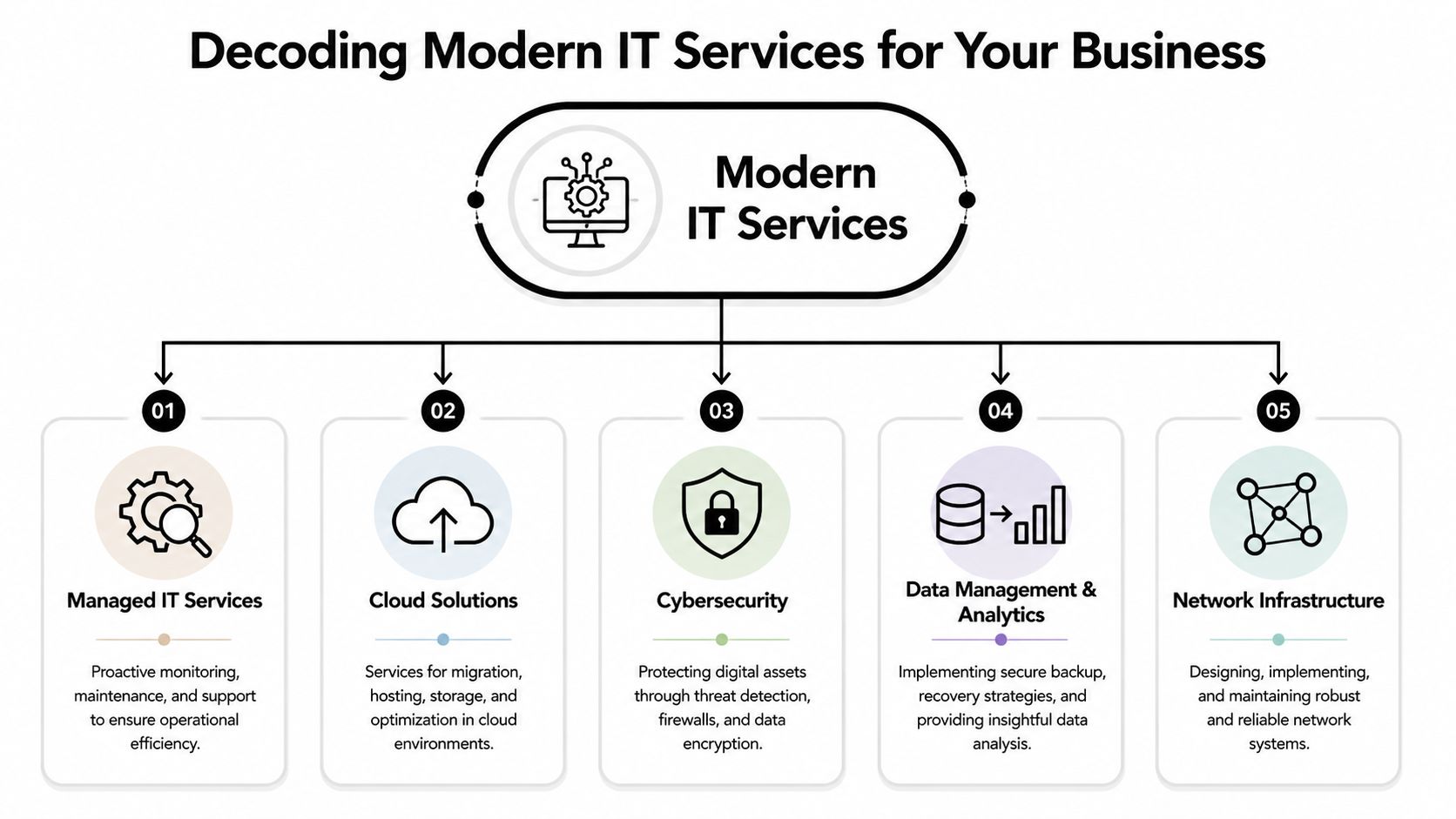
Business owners usually need a plain answer to one question. What does each IT service category prevent, improve, or control?
What managed IT changes in day-to-day operations
Managed IT covers the ongoing work that keeps systems stable, users supported, and risks from stacking up in the background. That includes monitoring, patching, account administration, device standards, vendor coordination, documentation, and issue response. In regulated businesses, it also supports the controls that auditors, insurers, and clients expect to see.
The practical benefit is consistency.
Without that consistency, a company ends up with one set of rules for the office, another for remote staff, and no clear proof that either is being followed. In healthcare, that can affect record access and retention. In legal and financial firms, it can create problems with confidentiality, offboarding, and document handling. The issue is rarely one dramatic outage. More often, it is a string of small decisions that weaken reliability and make review harder later.
The five service categories that matter most
A sound IT support model usually includes five parts, each tied to a business outcome.
-
Managed support and monitoring
This keeps devices, servers, user accounts, and routine maintenance from becoming recurring interruptions. For a busy office, the return is less downtime and fewer hours lost to avoidable support tickets. -
Cybersecurity controls
This includes endpoint protection, email security, multi-factor authentication, access policies, security reviews, and incident response procedures. For regulated organizations, those controls help reduce the chance that a security event turns into a compliance problem. -
Cloud backup and disaster recovery
Backup has one job. Restore the business after deletion, hardware failure, ransomware, or a local outage. The key measure is recovery speed, recovery accuracy, and whether someone tests the process before an emergency. -
Secure remote work
Staff need reliable access from home, court, branch offices, and client sites without exposing the business to unmanaged devices or loose permissions. Convenience matters, but control matters more. -
Compliance readiness
This covers access logs, retention settings, policy enforcement, device management, documentation, and audit support. Compliance is built into system setup, user permissions, and daily process discipline. It is not a separate layer you add at the end.
Good IT service is a set of repeatable operating practices. Tools matter, but the value comes from how they are configured, reviewed, and enforced.
Technovation LLC provides these functions for North Texas organizations through managed support, cybersecurity, cloud backup, remote access, and strategic planning, with a focus on regulated and security-conscious environments.
The main trade-off is straightforward. Buying isolated fixes can lower the cost of one problem today, but it often raises the cost of ownership later. A stronger firewall will not fix weak user permissions. Cloud software will not cover a failed recovery process. Helpdesk support alone will not close gaps in documentation, access review, or policy enforcement.
The businesses that get the best return from IT services in Dallas usually buy outcomes. They want fewer interruptions, cleaner audits, faster recovery, tighter access control, and less dependence on informal workarounds.
Aligning IT with Your Industry in the DFW Metroplex
At 8:05 on a Monday, a clinic in Dallas can feel the cost of bad IT before the first patient is roomed. A login issue at check-in slows the front desk. A backup alert from the weekend still has not been reviewed. Staff start sharing workarounds to keep the day moving, and that is usually where compliance trouble begins.
Industry fit matters because the operational pressure is different from one business to the next. A generic support model may keep email working and replace failed hardware, but regulated organizations in DFW need tighter control over access, retention, audit trails, and recovery. The business case is practical. Fewer workflow interruptions, fewer avoidable findings during reviews, and less time spent cleaning up preventable mistakes.
Where regulated industries feel the pressure
A healthcare practice needs systems that support patient flow and protect records at the same time. That means role-based access, tested backups, secure messaging, device controls, and documented procedures that staff can follow during a busy day. If charting drags or an exam room workstation drops connection, revenue and care quality both take a hit.
Law firms run into a different set of risks. Matters move across attorneys, assistants, clients, experts, and court systems. Remote access is common, but document exposure, weak permissions, and unmanaged phones create real liability. In practice, legal teams usually need stricter file access rules, better logging, and mobile device management that does not get in the way of billable work.
Finance and accounting firms depend on timing and trust. Tax deadlines, reporting cycles, client portals, and approval workflows all break down fast when systems are unstable or account permissions are sloppy. These firms usually get better results from IT plans built around access review, secure communications, logging, and documented change control.
Construction and engineering companies in the Metroplex have a field problem as much as an office problem. Staff move between headquarters, trailers, vehicles, and job sites. Drawings are large, connections can be inconsistent, and lost devices are common. The right setup gives project teams reliable access without letting every tablet and laptop become a security exception.
Nonprofits face tighter budget pressure, but the risk is not lower. Donor data, grant reporting, board communications, and remote staff still need protection. The better approach is to rank systems by business impact and fund the controls that reduce the most exposure first.
Industry-Specific IT Solutions in Dallas
| Industry Vertical | Primary Challenge | Key Technovation Solution |
|---|---|---|
| Healthcare | Protecting sensitive records while keeping staff productive | Secure access controls, backup planning, endpoint protection, compliance-oriented monitoring |
| Legal | Preserving confidentiality across remote and in-office work | Document access governance, secure remote access, device management, incident response readiness |
| Finance | Supporting secure transactions and audit expectations | Network hardening, log visibility, account controls, policy-aligned security management |
| Construction | Connecting field teams without exposing plans and project data | Reliable remote connectivity, mobile device controls, cloud backup, structured user permissions |
| Nonprofits | Balancing risk reduction with budget discipline | Co-managed support options, prioritized security controls, scalable backup and user support |
The right provider should shape support around the way your business operates. An accounting firm, a specialty clinic, and a commercial contractor may all use cloud apps and remote access, but their risk tolerance, documentation needs, and outage costs are not the same.
Good alignment starts with process review. Which systems stop revenue if they fail. Who needs access to what. What records must be retained. Which devices leave the office. Those answers should drive the service plan, security controls, and support standards.
If you want a useful framework for evaluating that fit, this guide on how to choose a managed service provider is a practical place to start.
How to Select the Right IT Services Provider in Dallas
A Dallas medical practice loses access to patient records at 8:10 a.m. A law firm cannot reach its document system an hour before a filing deadline. A construction company has field supervisors locked out of project files while crews are waiting onsite. In each case, the true cost is not the ticket. It is missed revenue, staff time, client frustration, and added compliance exposure.
That is why provider selection should start with operating discipline, not a price sheet. Monthly cost matters. It just matters less than whether the provider can keep regulated systems stable, secure, and auditable.

Reactive support has its place. Hardware fails. Users click bad links. Internet circuits go down. But if a provider mainly talks about fixing problems after they appear, the business is buying labor by the incident. A stronger model focuses on prevention, documentation, standards, and regular review so small issues do not keep turning into expensive interruptions.
What to test before signing anything
Start with the provider’s method, not the sales pitch.
-
Ask how they reduce recurring issues
Look for clear answers about monitoring, patching, asset tracking, backup checks, security baselines, and written documentation. If the answer stays at the level of “submit a ticket and call us if it’s urgent,” expect recurring disruption. -
Ask how they handle regulated environments in practice
Dallas-Fort Worth businesses in healthcare, legal, finance, and similar fields need more than generic IT support. The provider should be able to explain how they manage access controls, audit logs, retention requirements, encrypted remote access, and backup validation without turning every question into a separate consulting project. -
Ask what happens in the first 30 to 60 days
Good onboarding includes discovery, network and identity review, documentation, risk ranking, and a short list of immediate fixes. Vague onboarding usually leads to vague accountability. -
Ask how service levels work in real terms
A fast response time does not guarantee a fast resolution. Get specific. Who owns the issue, how escalations work, what gets handled after hours, and what is excluded from the monthly agreement.
A practical evaluation process helps. This guide to choosing a managed service provider is useful for comparing fit, support structure, and accountability.
What works and what usually disappoints
The best providers are plainspoken about trade-offs. Sometimes the right move is not a new platform or a full infrastructure refresh. It is cleaning up permissions, replacing aging endpoints that keep failing, standardizing Microsoft 365 settings, or fixing backups that have never been tested under pressure.
That kind of advice saves money because it targets the actual source of risk.
What disappoints business owners in Dallas is usually the same pattern. The contract looks simple, the monthly rate looks low, and the service sounds broad until the fine print appears. Projects cost extra. Security reviews cost extra. Compliance help costs extra. Onsite work costs extra. By the time the business gets the support it expected, the cheap agreement is no longer cheap.
One more point matters for regulated companies. Ask who will help during an audit, security questionnaire, insurance review, or incident investigation. If the answer is unclear before the contract is signed, it will be worse when the pressure is real.
Buying advice: Choose a provider that can explain what they monitor, what they document, how they verify backups, and how they support your compliance requirements during normal operations, not just after something breaks.
The right fit supports current operations and leaves room for cleaner security, better reporting, and controlled growth. That is how IT support turns into a business asset instead of an ongoing source of risk.
The Tangible Benefits of Local DFW IT Support
Local support still matters, even in a cloud-heavy environment. Businesses may run software from anywhere, but when an office loses connectivity, a workstation fails, or a network closet needs hands-on work, geography stops being an abstract issue.

Why geography still matters
Dallas has become a serious infrastructure market for digital operations. The local data center market was valued at 2.01 GW in 2025 and is projected to grow, supported by strong power and fiber access, according to this Dallas data center market report. For local businesses, that translates into stronger conditions for low-latency cloud backup, cybersecurity operations, and resilient hosted services.
That regional strength creates a useful combination. Businesses can benefit from large-scale infrastructure while still working with a provider that understands how DFW companies operate. A local firm sees realities behind the ticket queue. Multiple offices across the metroplex. Field teams. Medical tenants in shared buildings. Growth through acquisition. Aging line-of-business systems that can’t be replaced overnight.
What local support changes day to day
A nearby provider can visit when remote support isn’t enough. That sounds basic, but it affects outcomes in practical ways.
-
Hardware issues get handled faster
Failed switches, office connectivity problems, and workstation replacements often need hands-on work. -
Planning gets more realistic
Providers who know the local market can align support with how Dallas businesses actually staff, grow, and expand locations. -
Relationships improve accountability
Face-to-face review meetings usually surface issues that never make it into a standard helpdesk exchange.
Many companies also choose local outsourcing because it gives them broader capability without hiring a full internal team. This overview of the benefits of outsourcing IT support explains why that model works for organizations that need more structure than break-fix support but don’t want the overhead of building everything in-house.
Proximity doesn’t replace good process. It strengthens it when the provider already has good process.
How Proactive IT Transforms Dallas Businesses
The impact of managed service is easiest to see in ordinary business situations. Not dramatic disasters. Daily friction that keeps good teams from working smoothly.
A medical office that needed stability
A growing medical practice had the usual symptoms of an overstretched setup. Staff dealt with slow access to records, inconsistent workstation performance, and uncertainty around whether remote access rules were tight enough.
The fix wasn’t exotic. The environment needed standardization, better endpoint management, clearer access controls, and backup procedures that were properly reviewed. Once the systems were organized around workflow instead of ad hoc fixes, the staff spent less time waiting on technology and more time moving patients through the day.
A construction company that needed secure access
A contractor with office staff and field supervisors had a different problem. Teams needed drawings, schedules, and project files from multiple locations, but the access model had grown messy. Too many shared credentials. Too little visibility. Too much reliance on convenience.
The better approach was controlled remote access, cleaner permissions, and device-level protections tied to who needed what. That reduced confusion for crews and lowered the chance that sensitive project data would end up in the wrong place.
A nonprofit that needed structure without excess
A nonprofit didn’t need a massive overhaul. It needed priorities. Staff relied on a small team, turnover made account management inconsistent, and leadership wanted stronger protection without introducing complexity the organization couldn’t maintain.
The answer was a phased support model. Start with documented user management, dependable backup, and a few high-value security controls. Then build from there. For many organizations, that’s what transformation looks like. Not bigger IT. Better disciplined IT.
Frequently Asked Questions About IT Services in Dallas
What’s the difference between fully managed and co-managed IT
The choice usually comes down to staffing, accountability, and regulatory pressure.
Fully managed IT means an outside provider handles daily support, monitoring, maintenance, security oversight, and vendor coordination. Co-managed IT works better when your company already has an internal IT lead or systems administrator but needs added depth for after-hours coverage, security operations, compliance work, or larger projects.
In Dallas-Fort Worth, I see co-managed models fit well in healthcare groups, finance firms, and manufacturers that already have someone internal who knows the business, but not enough bench strength to cover security, documentation, audits, and ongoing infrastructure work alone.
How long are typical IT service contracts
Terms vary, but the contract length matters less than the operating details inside it.
A one-year agreement with clear response times, defined project boundaries, onboarding steps, escalation paths, and offboarding terms is usually safer than a shorter contract with vague language. Regulated businesses should also check whether the provider will support audit requests, maintain proper documentation, and help with policy enforcement. Those items often matter more than a minor difference in monthly cost.
When should a small business invest in managed IT
Usually before a compliance issue, ransomware event, or extended outage forces the decision.
If your team relies on shared systems, cloud apps, remote access, line-of-business software, or stores client, patient, financial, or legal data, you are already at the point where structured IT support starts paying for itself. The return is not just fewer help desk tickets. It is less downtime, better control over access, cleaner backups, and fewer surprises during insurance reviews, client security questionnaires, or compliance checks.
For many DFW companies, the trigger is simple. Technology stopped being a back-office utility and became part of revenue, service delivery, and risk management.
What happens during a free IT audit
A useful audit should show how your environment holds up under day-to-day operations and where the weak points are.
That usually includes user accounts and permissions, backup status, endpoint health, patching, network configuration, remote access, email security, documentation, and basic recovery readiness. For regulated organizations, it should also look at logging, device controls, data handling practices, and whether current processes would stand up to an audit or incident review.
A good security audit can surface gaps that stay hidden for months. Shared credentials, old accounts that were never disabled, backup jobs that have not been tested, or remote access tools with loose controls are common examples. Fixing those issues early is usually far less expensive than dealing with downtime, data loss, or a failed compliance review later.
The best audits are practical. They should separate immediate risks from lower-priority cleanup, explain the business impact in plain language, and give you a realistic order of operations instead of pushing a full rebuild.
If the current technology environment feels harder to manage than it should, a practical next step is to talk with Technovation LLC. The firm works with North Texas businesses that need stronger cybersecurity, compliance readiness, backup, remote access, and day-to-day IT structure without adding unnecessary complexity. A focused conversation or audit can help clarify whether the biggest issue is risk, downtime, limited internal bandwidth, or an IT model that no longer fits how the business operates.