If a company only calls IT when something breaks, is that really an IT strategy, or just deferred risk?
That question matters more in North Texas than many owners realize. In Dallas-Fort Worth, technology isn’t just sitting in the background. It runs phones, files, billing, scheduling, client communications, remote access, compliance controls, and day-to-day operations. When those systems fail, work slows down immediately. When they’re exposed, the business carries the risk.
Most business owners already know they need support. The gap is how they define it. A lot of firms still buy IT like plumbing. A problem appears, someone shows up, a bill follows. That works for a clogged sink. It’s a poor model for cybersecurity, uptime, compliance, and growth planning.
Table of Contents
- Why DFW Businesses Are Rethinking Their IT Strategy
- What Are Managed IT Services Really
- Core Services That Protect and Grow Your Business
- Managed IT for Your DFW Industry
- Understanding Managed IT Services Pricing Models
- How to Choose the Right MSP in Dallas Fort Worth
- Your Next Step Toward IT Peace of Mind
Why DFW Businesses Are Rethinking Their IT Strategy
Dallas-Fort Worth businesses aren’t operating in a quiet market. They’re operating in one of North America’s top five largest data center markets, and over 40% of all cyber attacks target small businesses, which makes proactive IT support a practical business requirement, not a luxury, as noted in this Dallas managed IT market overview.

That changes the conversation. A local company isn’t just deciding whether to outsource passwords, laptops, and support tickets. It’s deciding whether technology will be managed as a business function or tolerated until it causes pain.
A reactive model always sounds cheaper at first. It also obscures the actual cost. Staff wait on systems. Leaders postpone upgrades because there’s no roadmap. Security gaps sit open because nobody owns prevention. Then a single outage, failed device, or security event turns a “money-saving” decision into a scramble.
Why local conditions raise the stakes
DFW companies face a specific mix of pressure:
- Dense competition: Buyers can choose from local firms, metro-wide providers, or niche specialists. That means every business has to run clean, fast, and securely.
- Operational complexity: Teams work across offices, job sites, clinics, home offices, and cloud platforms. Someone has to keep that connected.
- Higher expectations: Clients don’t care whether an issue came from a workstation, firewall, access policy, or vendor account. They care whether the business stayed available.
Businesses don’t outgrow reactive IT. They outgrow the damage reactive IT causes.
What smart owners are changing
The companies rethinking their IT strategy aren’t necessarily the biggest. They’re the ones asking better questions.
Instead of “Who can fix this when it breaks?” they ask:
- Who is watching the environment before users feel a problem?
- Who owns security hardening and patch discipline?
- Who ties infrastructure decisions to hiring, expansion, compliance, and budget planning?
That’s the shift behind managed it services dallas fort worth. It moves IT from emergency response into operations management. That gives leadership more control, fewer surprises, and a clearer path to growth.
What Are Managed IT Services Really
A lot of providers explain managed services with technical checklists. That misses the point.
Managed IT services are less like hiring a handyman and more like hiring a professional property manager. A handyman gets called after the ceiling leaks. A property manager checks the roof, schedules maintenance, handles vendors, tracks recurring issues, and prevents small problems from wrecking the building. Business IT works the same way.
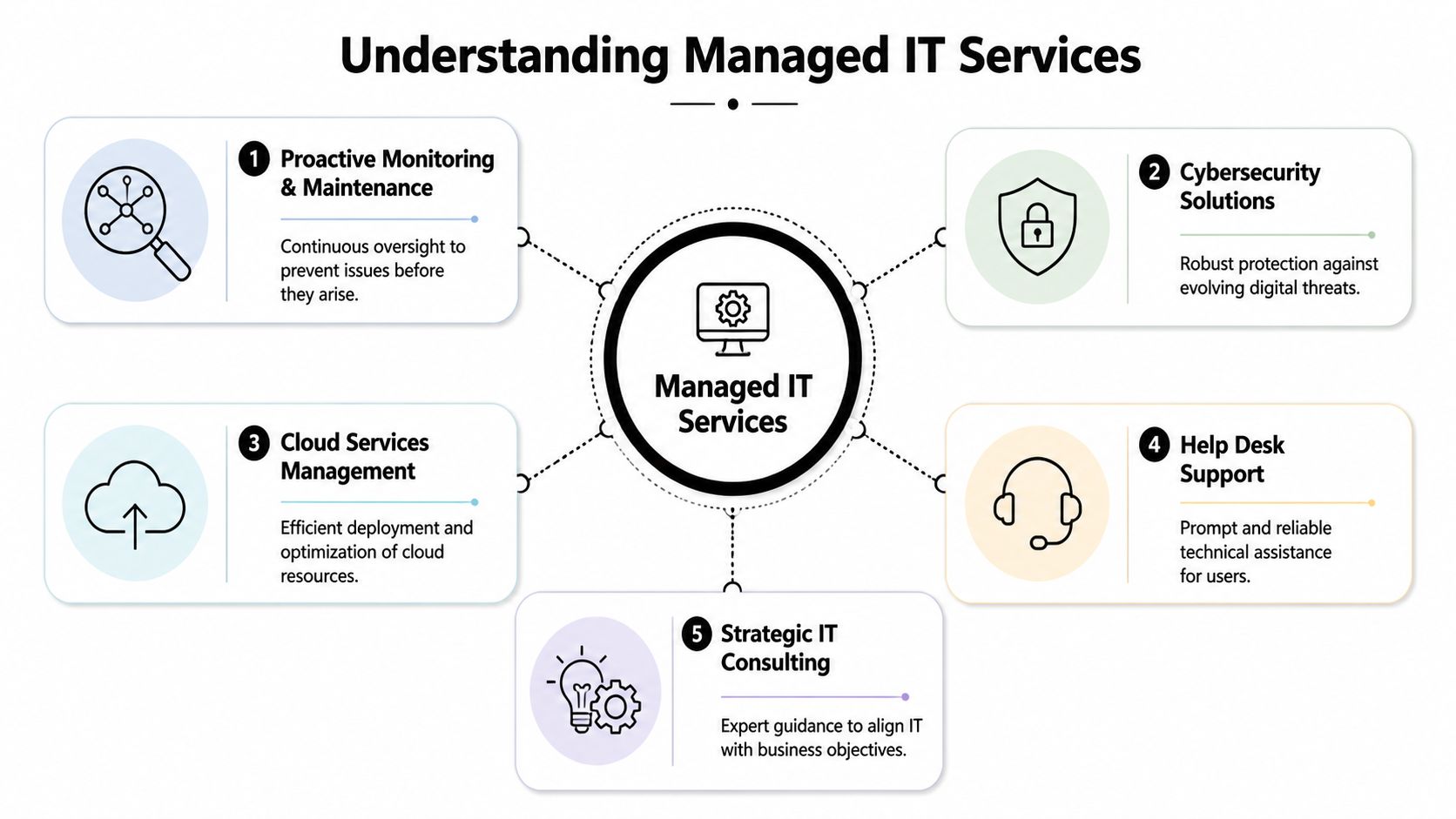
The break-fix model versus managed support
In a break-fix arrangement, the business pays for motion. A technician responds, troubleshoots, patches the immediate issue, and leaves. The provider gets involved after the damage has already interrupted the workday.
In a managed model, the business pays for stability. Systems are monitored. Updates are handled on a schedule. Security controls are reviewed. End users have support. Leadership gets guidance before an office move, hiring wave, compliance review, or infrastructure change creates chaos.
That’s why the term managed matters. It implies ownership, routine, and accountability.
Practical rule: If no one is reviewing risk, lifecycle, backups, and user support on a recurring basis, the business doesn’t have managed IT. It has occasional repair work.
What business owners should expect
A real MSP should function like an outsourced IT department. Not just a help desk. Not just an emergency number. A department.
That usually includes several connected responsibilities:
- Daily oversight: Someone is watching servers, devices, connectivity, user issues, and recurring alerts.
- Security administration: Patch management, endpoint protection, access controls, and policy enforcement aren’t left to chance.
- User support: Staff can get help without waiting until a minor issue becomes a lost afternoon.
- Planning: Leadership gets advice on refresh cycles, cloud changes, compliance needs, and business continuity.
- Coordination: The IT partner works with internet providers, software vendors, phone systems, and other outside parties when problems cross boundaries.
Why this matters to a growing company
Small and midsize businesses often delay managed services because they think it sounds like enterprise overhead. In practice, it does the opposite. It gives a growing company structure without requiring a fully staffed internal IT department.
That matters when a firm adds remote employees, opens another location, expands file access, faces audit pressure, or needs more predictable support. Without a managed approach, every growth step creates new technical debt. With one, growth gets operational support instead of operational friction.
Technovation LLC provides managed IT services in DFW with proactive monitoring, cybersecurity, compliance support, cloud backup, strategic planning, and both fully managed and co-managed options for North Texas organizations.
Core Services That Protect and Grow Your Business
The value of managed services isn’t the service list. It’s the business result. Stable operations, fewer disruptions, tighter security, cleaner recovery, and better planning all come from a handful of core disciplines done consistently.
The standard to look for is straightforward. Proactive 24/7 monitoring and automated patch management can deliver 99.9% uptime guarantees, ransomware breaches can average $1.85 million in recovery costs in reactive environments, and a proactive model can reduce threat exposure by 50-70%, according to this DFW managed services guide.
Monitoring that stops small issues from becoming business outages
Good monitoring isn’t glamorous. It’s one of the most valuable things an MSP does.
A healthy environment gets checked continuously. Storage issues, failed backups, unusual device behavior, degraded performance, and account problems get attention before employees start calling in. That’s how uptime becomes a process rather than a wish.
For a DFW business, that also matters because local operations aren’t always confined to one office. Many firms support field teams, hybrid staff, multiple sites, and cloud platforms. Monitoring gives someone a view of the whole environment instead of waiting for each department to report that “something feels slow.”
Security that goes beyond antivirus
Security is where many business owners still underestimate the gap between basic support and real management.
A serious MSP doesn’t stop at installing endpoint software. It should help manage patching, access, device security, user risk, backup protections, and response planning. The point isn’t to create complexity. It’s to reduce avoidable exposure.
A simple way to evaluate this is to ask whether the provider can explain security in layers. If the answer starts and ends with antivirus, that’s not a mature approach.
- Endpoint controls: Workstations and laptops need active protection and disciplined updates.
- Identity management: User access should match role, and former employees shouldn’t linger in systems.
- Email and user risk: Many incidents start with human error. Policies and training matter.
- Recovery posture: Security isn’t only about blocking attacks. It’s also about recovering cleanly.
A company doesn’t need to be reckless to have a security problem. It only needs one neglected system, one weak account, or one missed patch.
Backups and recovery that support actual continuity
Many companies think they have backups because files sync somewhere. That’s not the same as recovery.
Business continuity depends on whether data can be restored, systems can come back online, and leadership knows the order of operations. A backup strategy should answer practical questions. What gets backed up? How often? Where does it live? Who verifies it? How does recovery happen if the office can’t function normally?
That’s where managed support becomes more than maintenance. It gives the business a repeatable plan, not hopeful assumptions.
Strategic consulting that keeps IT tied to business goals
The strongest MSP relationships include planning, not just support. Otherwise the company stays in a loop of ticket response, aging hardware, and delayed decisions.
A useful IT partner should help leadership think through issues such as:
| Business decision | IT question that should be answered |
|---|---|
| Hiring new staff | How will devices, access, and onboarding be handled? |
| Opening or moving offices | What needs to happen for connectivity, security, phones, and file access? |
| Meeting compliance demands | Which controls, policies, and documentation need attention? |
| Supporting remote work | How will access stay secure and consistent outside the office? |
That’s where managed it services dallas fort worth becomes a growth function. It keeps technology aligned with what the business is trying to do.
Managed IT for Your DFW Industry
Generic IT support fails most often in regulated or operationally messy environments. That’s why industry context matters. A healthcare practice doesn’t need the same support model as a law firm. A construction company doesn’t run like a financial office. The right MSP should understand the difference before the first ticket is opened.
The gap is real. General MSP guides often miss regulated DFW sectors, 68% of breaches in finance and healthcare stem from compliance gaps, and searches for managed IT Dallas HIPAA yield only 15% specialized results, according to this review of DFW managed IT gaps.

Healthcare and medical practices
A clinic can’t afford vague IT support. Staff need access to systems during patient care. Administrative teams need stable scheduling, billing, and document workflows. Leadership also has to think about privacy controls, device security, and compliance readiness.
That’s why healthcare support should include role-based access, secure remote workflows, patch discipline, backup testing, and documentation that stands up to scrutiny. For organizations that want a more focused view of that environment, managed IT services for medical practices shows what healthcare-specific support should cover.
Legal firms and professional services
Law firms don’t just store files. They hold confidential communications, case records, financial details, and privileged material. A downtime event doesn’t only hurt productivity. It can interrupt deadlines, filings, and client confidence.
A legal-focused MSP should treat document access, secure mobility, workstation reliability, and user permissions as operational priorities. The value of local support is especially obvious here. When a partner can respond on-site, work through office-specific issues, and coordinate directly with firm leadership, problems get resolved with less disruption.
In legal environments, speed matters. So does discretion. Support teams need both.
Financial firms and compliance-sensitive teams
Accounting offices, advisors, and finance-related firms usually deal with a blend of security pressure and workflow pressure. They handle sensitive records, recurring deadlines, and systems that employees need to trust every day.
The right MSP should help create disciplined operations. That includes tighter access management, secure endpoint controls, reliable backups, and practical procedures for onboarding, offboarding, and permissions review. Generic support may keep devices running. It won’t necessarily support the audit trail and consistency these organizations need.
Construction nonprofits and distributed operations
These organizations often get overlooked, but they have some of the most frustrating IT environments.
Construction firms operate between office staff, field teams, mobile devices, files, and outside partners. Nonprofits often stretch lean budgets while still needing dependable access, secure donor or client information, and staff support across multiple locations. In both settings, remote access, device management, and responsive support aren’t extras. They’re basic operating requirements.
A DFW MSP that understands distributed work can reduce the friction that slows these organizations down. That might mean cleaner onboarding, better file access from outside the office, more reliable backup processes, or faster escalation when a local visit is necessary.
Understanding Managed IT Services Pricing Models
Most buyers ask the wrong first question. They ask, “What does managed IT cost?” A better question is, “What kind of cost behavior does this model create?”
That distinction matters because pricing structure affects budget control, support incentives, and how often a business gets surprised.
Why pricing structure matters more than the sticker price
Break-fix support creates variable expense. Quiet month, small bill. Chaotic month, larger bill. Security issue, hardware failure, or repeated user problems, and the number climbs. That might feel flexible, but it also means the provider gets paid when things go wrong.
Managed services usually shift that into a recurring model. The exact pricing format varies, but the logic is more stable. The provider is responsible for maintaining an environment, supporting users, and reducing incidents over time. That aligns better with how businesses want IT to perform.
For many SMBs, that predictability matters as much as the technical support itself. It lets leadership budget for technology as an operating function instead of waiting for surprise repair invoices.
Comparing IT support cost models
| Model | Cost Structure | Best For |
|---|---|---|
| Break-fix | Variable billing based on incidents, projects, and emergency work | Very small firms with minimal complexity and high tolerance for disruption |
| Per-user managed services | Recurring fee tied to employee count and support scope | Offices that want predictable support for growing teams |
| Per-device managed services | Recurring fee tied to covered hardware and systems | Environments where device count matters more than headcount |
| Tiered managed services | Recurring pricing based on service bundle and security depth | Businesses that want options based on risk, compliance, and support needs |
| Co-managed IT | Shared responsibility between internal staff and outside partner | Companies with in-house IT that need added capacity or specialized support |
A smart buyer should also ask what’s included. Does onboarding cost extra? Are after-hours issues covered? Is strategic planning part of the agreement or billed separately? Are security and backup services built in, or sold as add-ons later?
Cheap IT support often becomes expensive at the exact moment the business needs competence most.
The better approach is to judge pricing by predictability, accountability, and fit. A flat monthly model with clear scope often gives leadership more control than a lower rate attached to constant exceptions and emergency charges.
How to Choose the Right MSP in Dallas Fort Worth
An MSP shouldn’t be selected because a sales pitch sounded polished. It should be selected because the provider can answer operational questions clearly and back them up with process.
Many searches for managed IT services in Dallas-Fort Worth frequently go off course. Buyers compare broad promises instead of measurable service behavior. The stronger DFW providers set a higher bar. Top providers achieve first-call resolution rates of 82% and can reduce MTTR for critical issues to under 15 minutes, which gives businesses a practical benchmark to use during evaluations, as noted in this Fort Worth managed IT services analysis.

Questions that expose whether an MSP is strategic or just reactive
A serious buyer should ask questions that force specificity.
- Industry fit: What regulated or security-sensitive environments does the provider support regularly?
- Response model: How are urgent issues triaged, escalated, and handled after hours?
- On-site support: When a local visit is needed in DFW, what does that process look like?
- Security ownership: Who manages patching, access reviews, endpoint controls, and recovery planning?
- Leadership guidance: Is there recurring planning, or does the relationship stay stuck in ticket resolution?
For business owners that want a more structured evaluation process, how to choose a managed service provider is a useful checklist.
What a serious evaluation should include
The best MSP conversations usually sound less like product demos and more like operational reviews. The provider should want to understand users, locations, compliance pressure, support volume, remote access needs, and recurring pain points.
A useful audit discussion should cover at least these areas:
- Current-state risk: What is aging, unsupported, inconsistent, or poorly documented?
- Support experience: How do users get help, and what happens when the issue is urgent?
- Security posture: Which controls are active, missing, or inconsistently enforced?
- Continuity readiness: If a critical system fails, what happens next?
Some red flags are easy to spot.
| Warning sign | Why it matters |
|---|---|
| Vague answers about response times | It usually means service delivery isn’t tightly managed |
| No discussion of planning | The provider may function only as a help desk |
| Generic compliance language | Regulated businesses need more than surface-level familiarity |
| No local presence or on-site clarity | Remote support alone doesn’t solve every operational issue |
The right MSP should make the business feel more organized, not more dependent. It should create visibility, structure, and confidence.
Your Next Step Toward IT Peace of Mind
A skeptical business owner is right to question any recurring expense. But proactive IT management isn’t a convenience purchase. It’s an operational decision about control.
The companies that handle technology well usually aren’t obsessed with gadgets. They’re focused on continuity, accountability, and cleaner execution. They want staff working, clients served, data protected, and growth plans supported. That’s what managed services should deliver.
The next few years will push that even further. A projected 42% of DFW businesses are adopting AI for IT processes, and co-managed IT models can save 25-40%, according to this 2026 DFW market guide. That means business owners will need partners who can help them adopt new capabilities without creating new risk.
Waiting until systems fail is still a decision. It’s just the one with the least control.
A smart next step is a practical conversation with Technovation LLC about a free security audit or IT health check. That gives a DFW business a clear view of risk, support gaps, and where proactive management could improve uptime, security, compliance, and day-to-day operations without guesswork.