
Why do so many nonprofits still treat technology like a utility bill instead of a growth tool?
That mindset creates a quiet drag on the mission. Staff lose time to password resets, slow laptops, donor records scattered across systems, and improvised access for volunteers or board members. Leadership sees IT as overhead because the most visible moments are usually problems. What gets missed is the strategic cost of unstable systems, weak security practices, and poor reporting when grants, donor trust, and service delivery all depend on reliable technology.
For a nonprofit executive director, the question isn't whether the organization can afford stronger IT support. It's whether the organization can keep scaling programs, protecting sensitive information, and competing for funding with a reactive setup. Managed it services for nonprofits matter because they turn technology into an operating system for the mission, not just a repair function.
Table of Contents
- Is Your Technology Helping or Hindering Your Mission
- What Managed IT Services Mean for a Nonprofit
- The Real Benefits More Time for Your Mission
- Solving Unique Nonprofit IT and Grant Challenges
- Choosing the Right Service Model and DFW Partner
- Onboarding and Measuring Your Return on Investment
- Your Next Step Toward a More Resilient Nonprofit
Is Your Technology Helping or Hindering Your Mission
Most nonprofits don't notice technology strain all at once. It shows up in small interruptions that compound over time. A program manager can't access a file from the field. A volunteer gets more access than they should because no one has time to set permissions properly. A donor report takes hours longer than expected because records live in too many places.
These issues aren't just annoyances. They pull energy away from service delivery, fundraising, finance, and leadership decision-making. When that pattern continues long enough, the organization starts adapting to weak systems instead of fixing them.
The hidden cost of making do
A nonprofit can operate for years with outdated devices, patchwork cloud access, shared logins, and a part-time support arrangement. From the outside, that can look efficient. Inside the organization, it usually means senior staff are making IT decisions without enough visibility, and frontline staff are absorbing the operational friction.
That friction affects more than productivity. It affects confidence. Staff become cautious about trying new processes because they assume tools won't work reliably. Leadership delays upgrades because every change feels risky. Board conversations about growth stay focused on budget constraints instead of operational readiness.
Strong nonprofit operations depend on trust. Donors trust the organization to protect data, funders trust it to report accurately, and staff trust it to keep essential systems available.
The conventional thinking is that technology should be kept lean until the nonprofit reaches some larger stage. That assumption often backfires. The right question isn't whether the organization is big enough for managed support. It's whether the mission depends on stable communications, secure data, and dependable workflows. For most nonprofits, the answer is already yes.
Where leaders should look first
Executive directors don't need to start with technical jargon. They need to assess whether technology is helping people do their jobs cleanly.
A useful first review includes:
- Staff time lost to workarounds: Notice how often teams rely on personal devices, repeated manual steps, or side conversations to solve simple tech problems.
- Access sprawl: Review who has access to donor records, finance files, shared drives, and remote systems. Informal access is a governance issue, not just an IT issue.
- Unclear accountability: Identify who owns cybersecurity decisions, backup checks, vendor coordination, and device lifecycle planning.
- Funding readiness: Consider whether the organization could quickly produce the security and compliance documentation a grant application or audit may require.
When leadership looks at technology through that lens, managed it services for nonprofits stop sounding like a technical purchase. They start looking like operating discipline.
What Managed IT Services Mean for a Nonprofit
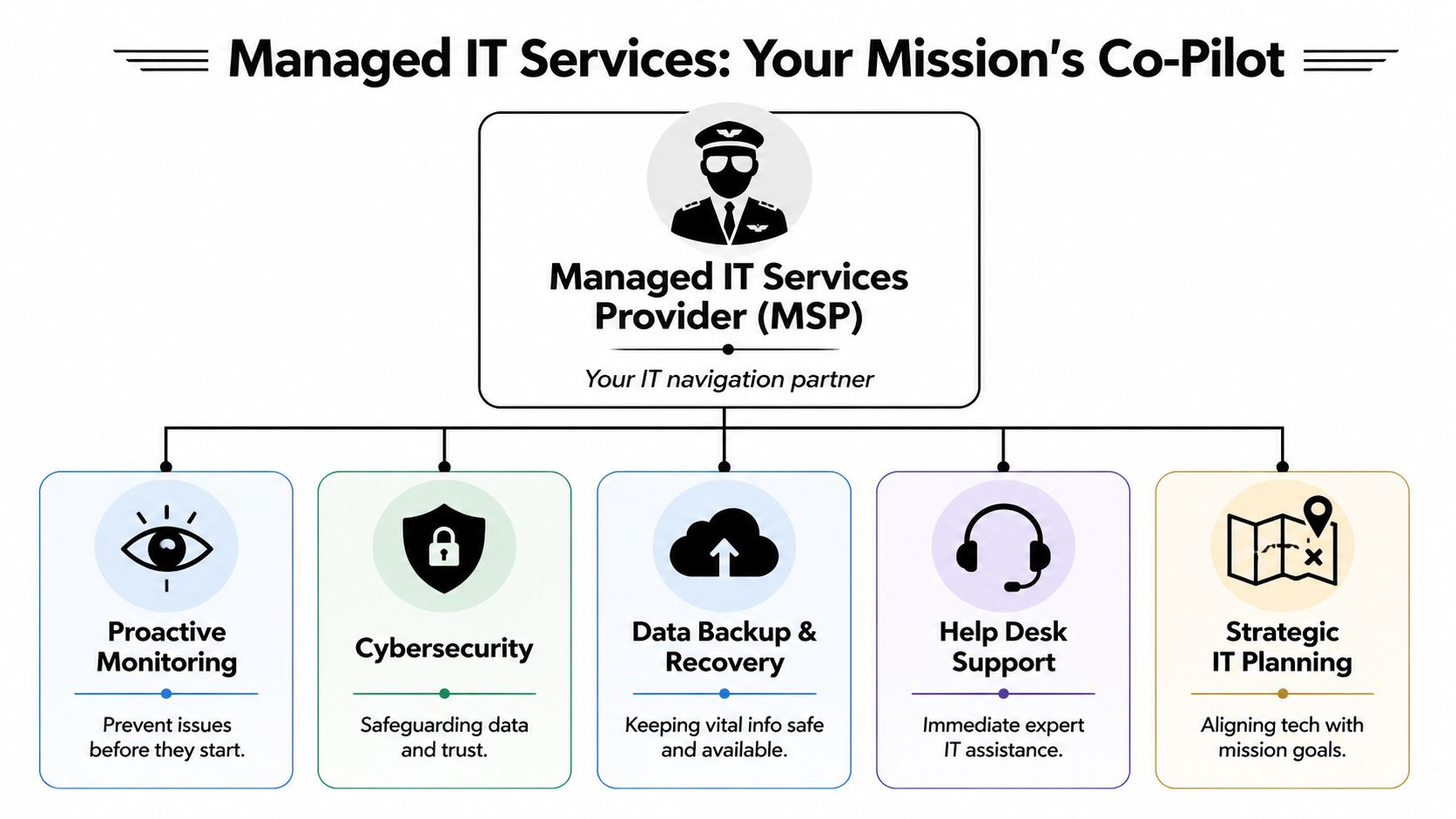
Managed IT works best when it's understood as an ongoing management model, not a help desk subscription. For a nonprofit, that means one partner oversees the health, security, support, and planning of the digital environment so internal teams don't have to assemble that capability themselves.
A practical analogy helps. Think of a managed service provider as the property manager for the nonprofit's digital building. The staff and volunteers still use the space. Leadership still decides where the organization is going. But the provider handles maintenance, security, access, inspections, repairs, and planning so the building doesn't become a constant distraction.
The shift from break fix to managed support
The biggest difference is proactive oversight. Traditional support waits for something to fail. Managed support is built to reduce the number of failures in the first place.
One nonprofit case example showed that continuous monitoring of firewalls, servers, and devices created a more stable IT environment, improved issue resolution speed, and reduced reliance on internal staff for technical fixes, according to this nonprofit IT support case study.
That shift matters because nonprofit teams rarely have spare capacity. Every avoidable outage or recurring login issue steals time from programs, donor communications, or finance operations. Reactive support often looks cheaper until leadership adds up the interruptions.
What a nonprofit should expect in scope
A real managed service relationship usually covers more than troubleshooting. It should include a coordinated set of responsibilities that support daily operations and long-term planning.
| Service area | What it should do for a nonprofit |
|---|---|
| Proactive monitoring | Detect device, server, and network issues early so staff aren't the first to discover a problem |
| Help desk support | Give employees and authorized volunteers a clear path for fast assistance |
| Cybersecurity management | Protect donor, financial, and beneficiary data with structured controls |
| Backup and recovery | Preserve access to essential information when systems fail or data is lost |
| Strategic planning | Connect technology decisions to program growth, staffing changes, and reporting needs |
| Compliance support | Organize documentation and controls that support audits, grant requirements, and governance expectations |
Practical rule: If a provider only talks about fixing tickets, that's support. If they also talk about planning, risk, access, backup, and governance, that's managed service.
For nonprofits, that broader scope is the point. It creates a way to run technology intentionally, with clear ownership and fewer surprises.
The Real Benefits More Time for Your Mission
The most important return from managed it services for nonprofits isn't technical. It's organizational capacity. Staff get to spend more of their day on people, programs, fundraising, and reporting instead of chasing avoidable tech issues.
That change is easy to underestimate. In many nonprofits, technology interruptions don't show up on a budget line. They show up as slower onboarding, delayed grant reporting, frustrated volunteers, and leaders spending time on problems they were never hired to solve.

Less friction for staff and volunteers
When support is proactive, staff stop carrying the burden of unstable systems. That affects morale, execution, and consistency.
Nonprofits using managed services can reduce technology downtime by up to 80% and resolve issues 60% faster than traditional break-fix support, according to this managed IT analysis for nonprofits. In practice, that means fewer disruptions during donor campaigns, fewer program delays, and less time spent waiting for someone to respond to a recurring issue.
A smoother environment also helps with volunteer and staff turnover, which many nonprofits manage constantly. New users can be set up with the right level of access from day one. Former users can be removed cleanly. Shared files and communication tools can be structured so people don't have to guess where information lives.
Three benefits usually become visible quickly:
- Cleaner onboarding: New staff can start work faster when devices, accounts, and permissions are prepared before their first day.
- Less role confusion: Program leaders don't need to become unofficial IT coordinators.
- Better use of leadership time: Executive staff can focus on funding, strategy, and partnerships instead of incident management.
Trust and continuity matter as much as speed
The mission doesn't pause when systems are down. If a nonprofit provides direct services, a failed device or inaccessible record can disrupt real interactions with clients and communities. If it relies heavily on development activity, donor communications and campaign execution can stall.
There's also a reputation issue. Supporters may never see the internal workflow problems, but they do notice delayed responses, inconsistent reporting, or uncertainty around data handling. Reliable IT strengthens donor trust because it supports continuity, professionalism, and secure stewardship of information.
A nonprofit doesn't need enterprise complexity. It needs enterprise discipline in the areas that protect the mission.
Consequently, leaders often change how they frame the investment. The value isn't merely that technology works better. The value is that the organization becomes easier to run.
Solving Unique Nonprofit IT and Grant Challenges
Nonprofits don't face a standard business problem set. They operate with budget pressure, rotating volunteers, sensitive donor information, board oversight, grant restrictions, and public trust all at the same time. Treating those issues separately leads to piecemeal decisions. A stronger managed IT strategy connects them.
Budget pressure and donor data can't be separated
Leaders often try to save money by delaying upgrades, stretching aging hardware, or depending on ad hoc support. That can work for a while. It also creates a cycle where the organization pays in interruption, confusion, and risk instead of paying through a planned operating model.
Donor and beneficiary data raise the stakes. A nonprofit has an ethical duty to control access, maintain backups, and document how systems are protected. The board may not need technical detail, but it does need assurance that the organization isn't improvising around sensitive information.
This is why compliance and security shouldn't sit in separate conversations. They depend on the same foundations:
- Access control: Staff, contractors, and volunteers should only see what they need.
- Documented processes: Backup checks, account changes, and incident response need repeatable procedures.
- Reporting discipline: Leadership and funders often need evidence, not verbal reassurance.
- Policy alignment: Written expectations should match how systems are configured.
For organizations reviewing their compliance posture, data security and compliance guidance for regulated organizations is a useful reference point when evaluating how operational controls connect to audit readiness.
Grant compliance is where strategy shows up
This is the area many nonprofits overlook until an application or audit forces the issue. General cybersecurity language isn't enough when a grant requires documented controls, evidence of access management, or alignment to a framework such as NIST 800-171.
A 2025 survey found that 62% of nonprofits have lost grant opportunities due to IT compliance gaps, and organizations with stronger audit-ready documentation can secure up to 25% more funding, according to this grant compliance and nonprofit MSP overview.
That finding changes the conversation. Managed IT isn't just about support or security. It's about funding readiness.
What works for nonprofits pursuing grants is usually very practical:
- Map requirements early. Before applying, identify what the grant expects around data handling, reporting, retention, and access.
- Tie controls to evidence. A policy is helpful. Documentation proving it is followed is what usually matters.
- Assign ownership. Someone must be responsible for collecting reports, maintaining records, and preparing for reviews.
- Review before deadlines. Waiting until the application window opens often exposes gaps too late to address cleanly.
A capable MSP supports that process by turning technical controls into documentation leadership can effectively use. That's a very different value proposition from merely responding to tickets.
Choosing the Right Service Model and DFW Partner
Not every nonprofit needs the same support model. The right fit depends on internal capacity, complexity, and how much responsibility leadership wants to own directly. Choosing well matters because a mismatch creates frustration even if the provider is technically capable.

Which service model fits the organization
A simple comparison helps.
| Model | Best fit | Where it works well | Common limitation |
|---|---|---|---|
| Fully managed | Nonprofits with little or no internal IT capacity | One partner owns support, security, monitoring, and planning | Leadership must choose a provider they trust with broad responsibility |
| Co-managed | Organizations with an internal IT generalist or small team | Internal staff keep control while outside specialists add coverage and expertise | Roles must be clearly defined or tasks will overlap |
| Project-based | Teams with stable daily support but a one-time need | Migrations, upgrades, security reviews, or compliance preparation | It won't solve ongoing governance or recurring support gaps |
Fully managed service makes sense when the nonprofit needs structure, consistency, and outside ownership. Co-managed support often fits growing organizations that have one capable internal person but need deeper cybersecurity, after-hours coverage, or strategic planning support.
Project work has value, but it shouldn't be mistaken for a long-term operating model. A successful migration or audit project doesn't create sustained accountability for monitoring, support, and compliance.
How to evaluate a local partner
Executive teams shouldn't evaluate providers only on response promises. The better questions are operational.
Use this checklist:
- Nonprofit fluency: Ask how the provider handles board visibility, shared devices, volunteer turnover, donor data access, and grant documentation.
- Local presence: DFW organizations benefit from support that understands local operations and can respond in person when needed.
- Strategic cadence: Ask whether the relationship includes planning reviews, risk discussions, and lifecycle guidance, not just ticket resolution.
- Security maturity: Confirm that cybersecurity, backup, access control, and compliance support are built into the model.
- Scalability: The provider should support current needs and also help the nonprofit adopt new workflows responsibly.
For teams comparing options, this guide to choosing a managed service provider covers practical decision criteria.
Technovation LLC is one local DFW option that provides managed IT, cybersecurity, compliance support, and strategic planning for nonprofits and other regulated organizations. Its profile is relevant for nonprofits that want either fully managed or co-managed support with local response and structured planning.
Another consideration is future readiness. A 2026 report noted that 70% of nonprofits face IT integration barriers with AI, while a strategic co-managed partnership can support outcomes such as a 30% uplift in donor retention, according to this nonprofit IT support outlook on AI adoption. That doesn't mean every nonprofit should rush into AI. It means leadership should choose a partner capable of evaluating new tools without compromising governance or mission focus.
The right provider doesn't just keep systems running. They help leadership decide what technology the organization should adopt, postpone, or avoid.
Onboarding and Measuring Your Return on Investment
Many nonprofit leaders delay managed services because they assume the transition will be disruptive. A good onboarding process does the opposite. It reduces uncertainty by making the environment visible, assigning ownership, and setting expectations before major changes happen.
What a healthy onboarding process looks like
Most strong transitions follow a phased pattern rather than a sudden cutover.
A typical sequence looks like this:
Discovery and health check
The provider reviews devices, accounts, backup practices, security controls, vendors, and recurring issues. This stage should expose both technical gaps and process gaps.Priority setting
Leadership and the provider decide what needs immediate attention and what can be phased in over time. Critical security issues and unstable systems should move first.Documentation and standardization
Accounts, devices, permissions, escalation paths, and support contacts are organized. Through this, many nonprofits realize how much knowledge was previously trapped with one staff member or outside contractor.Support launch
Staff receive a clear process for requesting help. Leadership receives a clearer picture of who is doing what, and how service will be measured.Ongoing review
The relationship should continue with regular check-ins on risk, staffing changes, hardware lifecycle, and upcoming business needs.
A rushed onboarding usually creates confusion. A disciplined onboarding creates control.
How nonprofit leaders should read an SLA
An SLA matters because it converts technical promises into operating expectations. Executive directors don't need to memorize service language, but they should understand what the agreement means for staff and program continuity.
Focus on these questions:
- Response time: How quickly will the provider acknowledge a serious issue?
- Resolution process: What happens after the first response, and who owns follow-through?
- Coverage window: Is support available only during business hours, or when events, campaigns, or remote staff need it?
- Escalation path: If an issue affects finance, donor systems, or service delivery, how fast can it move up the chain?
- Reporting: Will leadership receive understandable summaries of trends, risks, and recurring problems?
Financially, the model is often easier to plan around than patchwork support. By replacing expensive in-house hires or unpredictable break-fix bills with a flat-fee subscription, nonprofits often reduce IT expenses by 30% to 50%, while eliminating capital expenditures and improving budget predictability, according to this report on managed IT cost structure for nonprofits.
That matters because ROI in a nonprofit isn't just lower spending. It's better forecasting, fewer surprises, and more funds available for programs.
Your Next Step Toward a More Resilient Nonprofit
A resilient nonprofit isn't the one with the most software. It's the one with clear control over access, support, risk, reporting, and decision-making. Technology should make the organization easier to lead, easier to fund, and easier to trust.
Start with visibility, not a big overhaul
The next step doesn't need to be a major transformation project. It should be a practical review of what exists today and where the largest points of operational drag or compliance exposure sit.
For many nonprofits, the first useful questions are simple:
- What systems are mission-critical right now
- Who has access to donor, finance, and program data
- Where are support delays costing staff time
- What documentation would be needed for a grant audit tomorrow
- Which risks are being accepted by habit rather than by decision
Those questions give leadership a baseline. Without that baseline, IT decisions usually stay reactive.
Resilience supports growth
The strongest argument for managed it services for nonprofits isn't fear. It's capacity. A stable, secure, well-governed environment supports grant readiness, donor confidence, smoother operations, and more consistent service delivery.
That matters in DFW, where many nonprofits are trying to grow impact without building a large internal administrative structure. Local support can help because it shortens communication lines and makes strategic conversations easier to sustain over time.
Nonprofits don't need technology for its own sake. They need technology that protects trust and creates room for the mission to grow.
A leadership team that treats IT as a mission accelerator usually makes better decisions about staffing, security, compliance, and funding readiness. That's the shift that turns technology from a recurring source of friction into an asset.
A practical next step is to schedule a conversation with Technovation LLC for a no-obligation IT health check or security review. That gives a nonprofit executive team a clearer view of operational gaps, compliance exposure, and where managed support could create the most value without overbuilding the environment.