A construction firm can have excellent superintendents, solid crews, and a healthy backlog and still lose money because its technology is stuck in trailer-office mode. The warning sign usually isn't a dramatic outage. It's the daily grind of RFIs buried in email, plan sets floating around in text threads, field photos disconnected from cost tracking, and office staff re-entering the same information into multiple systems.
That gap is where most firms underestimate risk. They think about IT as internet service, laptops, and fixing printers. They should be thinking about construction IT solutions as the operating system for the business. If the field and the office aren't working from the same digital blueprint, delays get harder to spot, mistakes get more expensive to fix, and margins get thinner than they look on paper.
For DFW construction firms, this matters even more. Crews move, jobsites change, subcontractors rotate, weather shifts schedules, and owners expect faster answers. A patchwork setup might limp along for a while, but it won't support growth. Firms that need a better cloud and connectivity model can see why modern infrastructure matters in this guide to cloud-based business networks.
Table of Contents
- Is Your Technology Keeping Up with Your Job Sites
- Building a Digital Foundation for Your Firm
- The Essential Tech Toolkit for Modern Construction
- Calculating the Real ROI of Your IT Investment
- Your Checklist for Choosing an IT Partner in DFW
- Build Your Business on a Stronger Digital Foundation
Is Your Technology Keeping Up with Your Job Sites
How much profit slips through the cracks because your office, field teams, and systems are all working from different versions of the truth?
Most construction firms do not notice the problem when a server fails. They notice it when a superintendent is waiting on the wrong drawing, a project manager is chasing updates by text, or accounting cannot bill because job cost details are stuck in a trailer inbox. By that point, the delay has already hit production.
That is the meaning of construction IT solutions. It is not about piling on more software. It is about building one working system for communication, records, access, security, and reporting, so the office and the job site stay aligned under pressure.
Practical rule: If your team has to ask three people which file is current, your technology is not supporting the project. It is creating rework.
For DFW contractors, this problem shows up fast. You are dealing with multiple job sites, tight schedules, subcontractor coordination, weather swings, and owners who expect answers immediately. A disconnected tech stack turns normal job site friction into margin erosion. Small gaps add up. One missed update can delay a pour, trigger a change order dispute, or leave your team making decisions from stale information.
The fix is not complicated, but it does require discipline. Your systems need to work like a clean set of blueprints. One source of truth, clear access rules, and reliable handoff from field to office. That usually starts with cloud-based network infrastructure built for distributed construction teams so files, communications, and project data are available where the work is happening, not trapped at headquarters.
Construction is too operationally demanding for loose handoffs and patchwork tools. The firms that protect margins treat technology the same way they treat site logistics. Planned, coordinated, and tied directly to production.
Building a Digital Foundation for Your Firm
A lot of construction firms buy software before they fix the ground underneath it. That is backward. If your network is unreliable, user access is loose, field devices are unmanaged, and file rules are inconsistent, every new app sits on a shaky base.
Why reactive IT keeps firms behind
Break-fix support is a bad fit for construction. Waiting until something fails might be tolerable in a small office with low stakes. On a live job, it burns time, slows decisions, and chips away at margin.
The problem is not the single outage. It is the pattern. A superintendent loses access to plans. A PM cannot pull the latest submittal. A foreman works from an old file because syncing failed in the trailer. Each one looks minor on its own. Together, they create rework, delay approvals, and force your team to spend labor on admin cleanup instead of production.
A stronger model includes monitored systems, scheduled updates, secure access by role, tested backups, and clear rules for how project information moves between field and office. That is why managed support fits construction better than casual, on-call help.
As noted earlier, connected cloud workflows are becoming standard practice. Firms that still treat IT like an occasional repair bill usually end up paying for the same problem three times. First in downtime, then in rework, then in missed visibility.
A useful companion read on this point is mastering construction software integration, especially for firms that already have systems in place but have not made them work together.
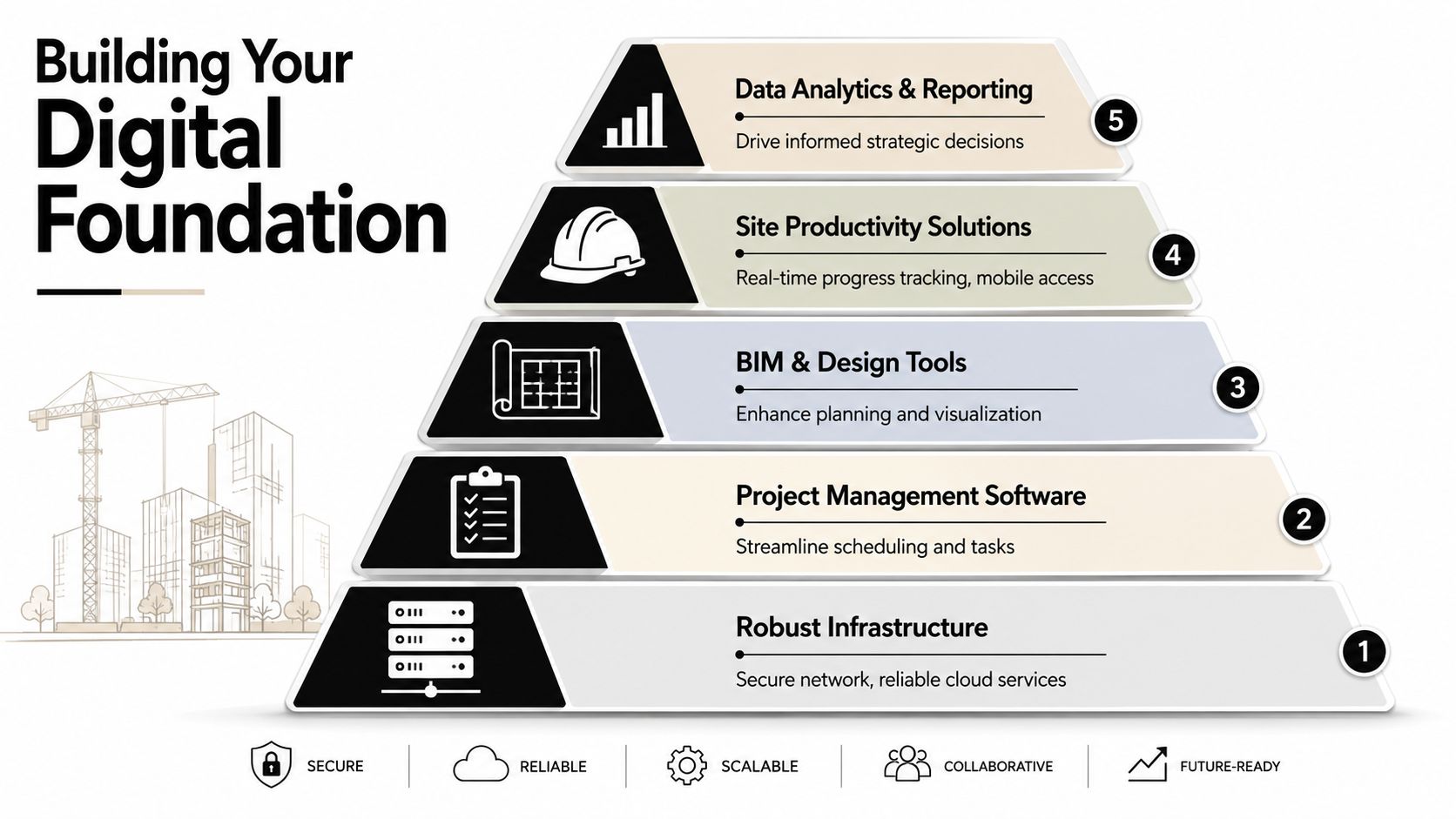
What a real digital foundation looks like
A real digital foundation works like a well-built slab. It spreads the load evenly so one weak point does not crack the whole structure.
| Layer | What it does for the business |
|---|---|
| Infrastructure | Keeps internet, networks, and cloud services stable across the office, trailers, and active job sites |
| Identity and access | Gives the right employees, subcontractors, and leaders access to the right systems without creating security holes |
| Core workflow systems | Connects schedules, drawings, approvals, communication, and records into one operating model |
| Mobile field enablement | Gives superintendents, PMs, and foremen fast access in the field without forcing workarounds on personal devices |
| Reporting and visibility | Turns daily project activity into decision-ready information for leadership |
For DFW contractors, this matters even more. You are often managing several sites at once, dealing with constant movement between office and field, and answering owners fast. If your systems are not tied together, your team fills the gaps manually. Manual work is expensive. It also hides problems until they hit schedule or cash flow.
The right approach is to design the digital blueprint first, then support it with networked IT services built for distributed business operations. That keeps your infrastructure, access controls, devices, and workflows aligned instead of patched together over time.
Too many firms buy isolated tools to solve isolated pain points. Then they act surprised when people still duplicate entries, chase documents, and call each other to confirm which version is current. A solid foundation fixes that at the system level.
The Essential Tech Toolkit for Modern Construction
Construction IT should reduce rework, protect margin, and keep the field and office aligned. If a tool does not help crews build faster, answer questions sooner, or prevent expensive mistakes, it is clutter.
Project control and document discipline
Jobsite confusion usually starts with bad records, not bad people. A crew builds from an outdated drawing. A PM approves one version while the field sees another. Someone stores photos and notes on a personal phone, then they disappear when that person leaves the project. That is not a training issue. It is a system issue.
Strong construction IT solutions tie project management, document control, mobile access, and security into one operating model. That keeps the latest drawings, RFIs, approvals, and field updates connected to the same job record instead of scattered across inboxes, text threads, and local folders.
A firm should expect four things here:
- Current drawings in one controlled location so crews are not building from old files.
- Approval history attached to each record so disputes do not turn into detective work.
- Field updates connected to the project record so photos, notes, and punch items stay usable.
- Office reports pulled from live project data so leadership is not waiting on weekly manual summaries.
If your superintendent still has to call the office to verify which sheet is current, your digital blueprint is incomplete.
Mobile access that works on real job sites
Field access has to work in trucks, trailers, concrete shells, and half-finished buildings. Slow logins, clumsy apps, and weak permissions force people into shortcuts. Shortcuts create risk and bad data.
Your crew should be able to capture photos, notes, approvals, and progress updates from company-managed mobile devices without exposing project data when a phone is lost, stolen, or handed to the next worker. That requires mobile device management, access controls by role, and secure connectivity that holds up outside the office.
Good field tech respects how construction runs. It supports quick decisions, fast documentation, and limited patience.
Communication also needs the same discipline. Missed calls and fragmented voicemail chains delay approvals, dispatch, procurement, and owner updates. DFW contractors with crews spread across office, trucks, and jobsites should review Dallas business phone system options for distributed teams and compare them with enterprise-grade VoIP for dallas businesses if they want tighter call routing and cleaner communication between field and office.
Support for heavy files and fast answers
Large plan sets, takeoff files, renderings, and models expose weak IT fast. If your team waits on files to open, sync, upload, or download, the business is burning time every day. Estimators stall. Preconstruction slips. PMs wait for answers. The field keeps moving and makes decisions with incomplete information.
This part of the toolkit needs proper workstation planning, storage built for large files, reliable remote access, and enough network capacity to handle several active projects at once. Generic small-business setups rarely hold up here, especially for firms in DFW managing multiple jobs across the metroplex.
Ask these questions:
- Can teams open and work in large project files without routine delays?
- Can remote staff and jobsites get what they need securely without using personal file-sharing habits?
- Can your environment handle larger projects without performance dropping across the company?
Any hesitation is a warning sign. In construction, slow systems act like a bad foundation. Every floor above them becomes harder to trust.
Backup, remote access, and security
Construction companies carry data that directly affects cash flow and legal exposure. Contracts, bid details, payroll, banking information, schedules, and owner communications all matter. A ransomware event, accidental deletion, or permission mistake can stop work faster than a broken piece of equipment.
Your baseline toolkit should include:
- Cloud backup and recovery so deleted files, failed hardware, and outages do not shut down operations.
- Secure remote access for staff working from home, on the road, or from temporary site offices.
- Account permissions tied to role changes so former employees and rotating project staff do not keep access they should lose.
- Proactive monitoring and response so problems get handled before your team finds them during payroll, billing, or submittal deadlines.
The right toolkit is not flashy. It is reliable, controlled, and built for the way construction firms make money.
Calculating the Real ROI of Your IT Investment
What is weak IT costing you on every job, every week, across every crew and office process?
That is the ROI question that matters.
Construction owners in DFW do not lose margin because a software bill looks high. They lose margin because bad information, slow approvals, file confusion, and preventable downtime drag work off schedule and push labor into the wrong tasks. A shaky IT setup works like a slab poured out of level. You can keep building on it, but every floor above it gets harder and more expensive to manage.
The cost of unused information
Construction firms produce a flood of data from field updates, RFIs, schedules, change activity, photos, time entries, invoices, and email threads. A large share of that information never gets turned into a decision, a warning, or a useful report. That means your team is paying to collect job intelligence without getting the operational benefit.
This gap hits profit fast. If a superintendent enters an update that never reaches accounting in time, billing slips. If a PM cannot spot a pattern across change orders, cost creep keeps growing. If leaders cannot trust what they are seeing, they spend time verifying details instead of fixing problems.
A smart ROI conversation should include the method, not just the invoice. This overview of Foundation's ROI methodology is useful because it pushes leaders to compare internal effort, time burden, and business impact rather than looking only at the line-item price.
Where returns show up first
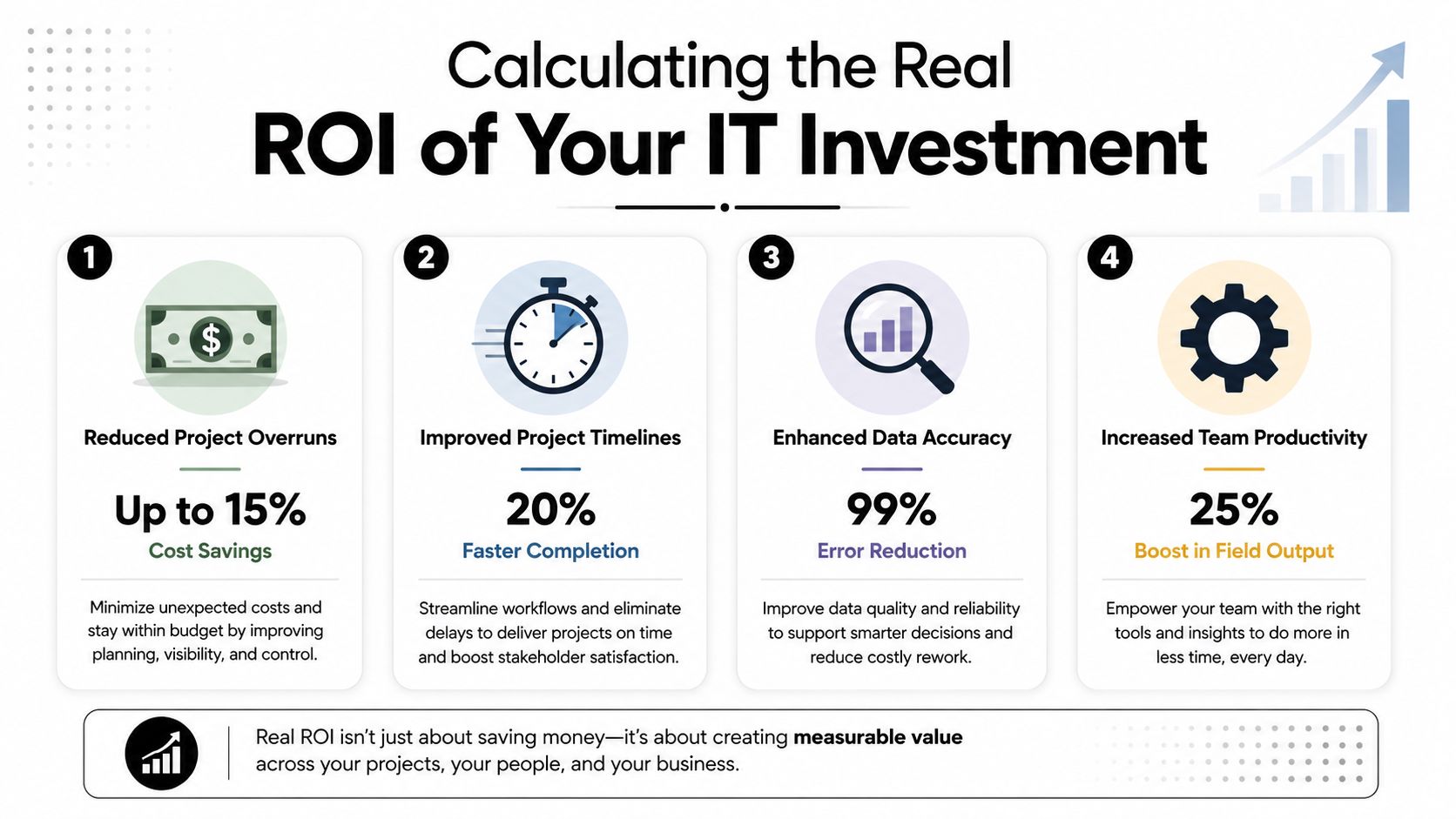
Returns from construction IT usually appear in four places.
- Less rework: Current drawings, cleaner document control, and tighter communication keep crews from building off the wrong version.
- Less downtime: Stable systems and support reduce interruptions to payroll, billing, procurement, and project coordination.
- Faster decisions: Leaders can respond sooner when field, office, and financial data line up.
- Better risk control: Access rules, backups, and security policies reduce damage when devices fail, employees leave, or an attack hits.
Use a scorecard that ties technology to margin, not gadgets:
| Business area | Weak IT result | Strong IT result |
|---|---|---|
| Project execution | Teams chase updates | Teams work from current information |
| Finance | Costs are explained late | Issues are flagged earlier |
| Security | Data exposure grows through weak controls | Risk is managed intentionally |
| Growth | Complexity overwhelms staff | Systems scale with workload |
Owners do not need a flashy dashboard. They need timely signals that help them act before a small field issue turns into a change order fight, a billing delay, or a hit to gross profit.
For many firms, especially those juggling several jobs across DFW, the best financial move is to stop forcing project staff or a thin internal team to carry the full IT load. If you are weighing that option, review these benefits of outsourcing IT support. Good ROI comes from prevention, consistency, and tighter execution on live jobsites. Not from buying more tech for the sake of it.
Your Checklist for Choosing an IT Partner in DFW
How do you tell the difference between an IT company that understands construction and one that only knows office tech?
Ask better questions. A polished sales pitch means nothing if the provider cannot explain how they will keep a superintendent, a PM, accounting, and leadership working from the same set of information when a job site is under pressure. In DFW, that gap shows up fast. Crews move, trailers get added, connections fail, devices walk off, and file access problems turn into schedule problems.

Questions that expose weak providers fast
Use this checklist like you would review a set of plans. If the foundation is sloppy, the rest of the build will cost you.
- Do they understand how construction work flows? They should speak clearly about document control, RFIs, submittals, field reporting, approval chains, and the handoff between office staff and job site teams.
- Can they support changing job conditions without drama? New sites, temporary trailers, rotating crews, new devices, and shifting permissions should be routine work, not a recurring emergency.
- Do they prevent problems or just wait for calls? A capable provider should offer system monitoring, cloud support, backup and recovery, security reviews, and help desk coverage that fits after-hours and field operations.
- Can they support DFW firms on the ground? Local presence matters when internet drops at a trailer, hardware needs to be replaced fast, or leadership wants strategy meetings with someone who can sit at the table.
- Do they understand communication as an operations issue, not just a phone issue? Missed calls, poor routing, and weak remote calling setups slow down estimating, vendor coordination, and client communication. For firms reviewing phone and remote communication options, this overview of enterprise-grade VoIP for Dallas businesses is worth a look.
What a strong answer sounds like
A good answer is specific.
Ask how they handle a specific problem: a trailer loses connectivity at 6:30 a.m., the PM cannot open current drawings, payroll still needs to run, and the owner wants an update before lunch. If the provider answers with vague language about service excellence, keep looking. If they walk you through response steps, fallback access, restoration priorities, and who owns each action, you are talking to someone useful.
A strong IT partner should be able to explain five things plainly:
- How they spot issues before the field reports them
- How they secure phones, tablets, laptops, and remote logins across active jobs
- How they restore files, systems, and access after an outage or attack
- How they add sites, users, and software without rebuilding the whole setup
- How they help leadership make better decisions about risk, growth, and margin protection
That last point gets missed all the time. You are not hiring someone to reset passwords and swap laptops. You are choosing a partner that protects uptime on active jobs, keeps project information moving, and reduces the small failures that eat margin one delay, one mistake, and one missed handoff at a time.
For DFW construction firms, the right IT partner should feel like a solid superintendent. Organized, accountable, and calm under pressure. If they cannot show that in the sales process, they will not show it when a live project is on the line.
Build Your Business on a Stronger Digital Foundation
What is weak technology costing your firm before anyone sees it on a budget line?
In construction, small cracks in the foundation turn into expensive problems later. Your IT works the same way. If field teams cannot get current drawings, approvals stall between the trailer and the office, or project data lives in five different places, margin starts leaking long before someone labels it an IT issue.
Strong construction IT solutions are built for the way work happens on real job sites. Crews move. Connections drop. Deadlines tighten. Systems need to keep drawings, photos, RFIs, payroll, budgets, and communication aligned across the field and the office without slowing people down.
That is where many firms still fall short. They digitized paperwork, but they did not connect field activity to financial control. The better approach is to tie daily reports, photo updates, marked-up plans, equipment data, and team communication into one operating picture so leadership can spot slippage early, address it fast, and protect profit before rework, delay, or confusion spreads.
Speed matters here.
A superintendent should not wait until the end of the week for someone to piece together what the job site already knows. If labor is drifting, a subcontractor is behind, or material issues are pushing the schedule, leadership needs that signal while there is still time to adjust staffing, sequencing, or spend. That is how integrated technology protects margin. It turns scattered job site inputs into usable decisions.
For DFW construction firms, this does not start with a massive rip-and-replace project. It starts with a blunt assessment. Are your systems giving the office and the field one version of the truth? Can teams work through spotty connectivity? Can leadership see risk early enough to do something useful about it? If the answer is no, the business is carrying hidden cost and calling it normal.
Technovation LLC helps DFW construction firms evaluate that risk with practical, low-friction guidance. A complimentary IT health check or security audit can uncover weak spots in connectivity, backup, access control, field mobility, and overall system design before they turn into downtime, confusion, or margin pressure. For construction owners who want a clearer digital blueprint, Technovation is a local team worth talking to.