Most business owners ask the wrong question about IT.
They ask whether the systems are working. A better question is whether the technology setup is helping the business grow, stay compliant, and avoid expensive distractions. A company can go weeks without a major outage and still run a weak, wasteful IT model that drains leadership time and blocks progress.
That gap matters in Dallas-Fort Worth, especially for healthcare clinics, law firms, accounting groups, construction companies, and nonprofits. These organizations do not just need computers fixed. They need stable operations, smarter budgeting, tighter security, and support that keeps pace with growth. Here, the benefits of outsourcing IT support appear. Not as a nice-to-have help desk, but as a business decision that reduces drag.
A strong outsourced IT partner acts less like a repair shop and more like an operations layer. Problems get handled faster. Risk gets managed earlier. Internal leaders stop babysitting technology and start using it to move the business forward.
Table of Contents
Is Your IT Department Helping You Grow or Holding You Back
A business does not win because its printer works and the Wi-Fi usually stays up.
It wins when technology supports faster decisions, cleaner processes, safer data handling, smoother onboarding, reliable remote access, and fewer interruptions for staff. If leadership still treats IT as a maintenance line item, the company is probably leaving money and momentum on the table.
That is the first mindset shift. Working IT is not the same as strategic IT. A small internal team can be hardworking and still be trapped in a cycle of password resets, device issues, vendor calls, and after-hours emergencies. That model keeps the lights on. It rarely creates strategic advantage.
The question leadership should ask
An owner should ask three things:
Is IT predictable: Can the business forecast support costs and replacement needs without surprises?
Is IT reducing risk: Are systems monitored, backups verified, and security issues caught before they become business issues?
Is IT freeing up talent: Are senior employees spending time on improvement, or just cleaning up avoidable messes?
If the answer is unclear, that is the problem.
A company does not need more tech noise. It needs an operating model where IT stops interrupting growth.
The best benefits of outsourcing IT support come from replacing a reactive culture with a managed one. That means documented processes, specialist coverage, structured escalation, and support that does not depend on one employee having a good day. For regulated industries, it also means technology choices that hold up under scrutiny from auditors, clients, and insurers.
An owner should not have to wonder who is watching the network, whether backups are recoverable, or whether the office can survive one key employee leaving. That uncertainty is expensive even before it becomes visible on a financial statement.
The True Cost of Managing IT In-House
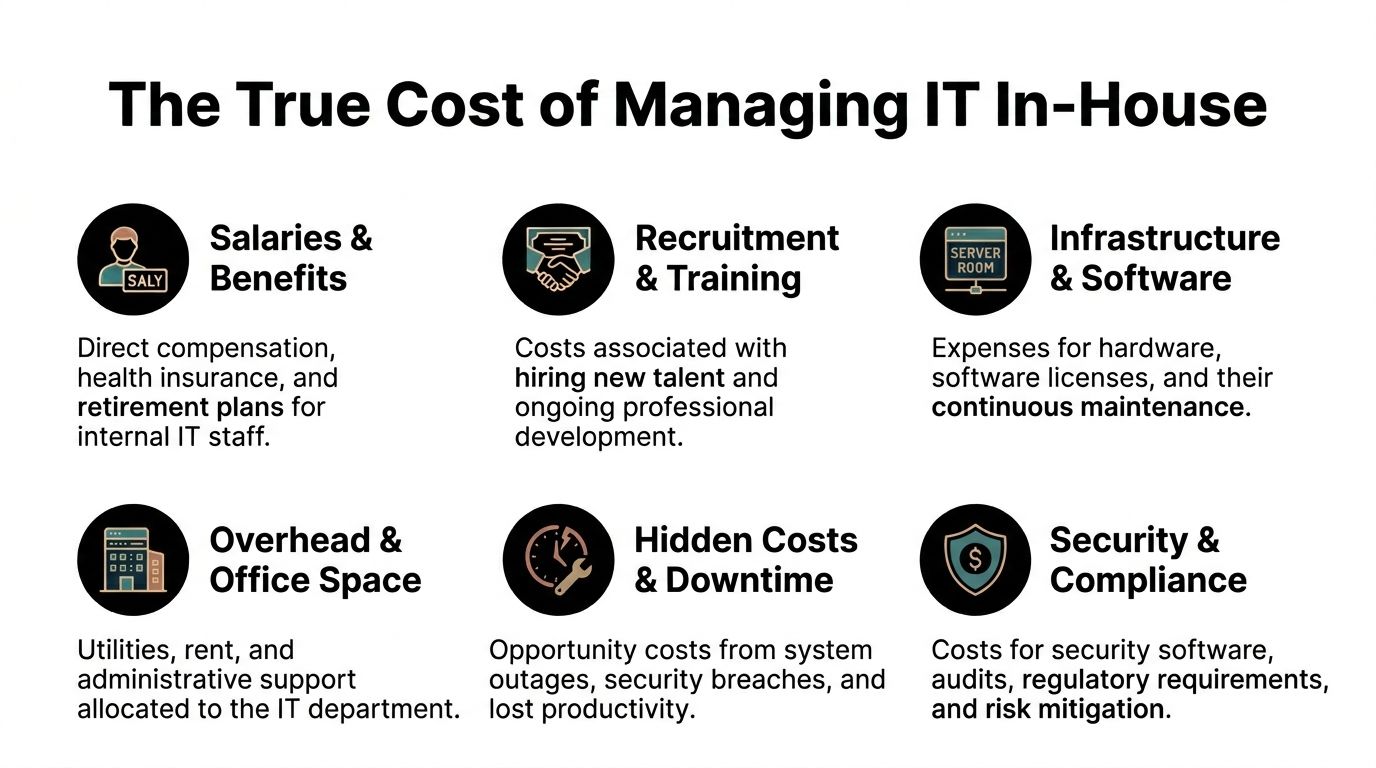
The in-house IT cost discussion usually starts with salary and stops there. That is a mistake.
A single internal hire brings payroll, benefits, recruiting, onboarding, continuing training, taxes, tools, management overhead, and the constant risk that one person’s skill set will not match every problem the business faces. Support may look cheaper on paper right up until the first stretch of overtime, turnover, or downtime.
The salary is only the beginning
The hard truth is simple. Many companies are not really buying an IT employee. They are buying an incomplete department and hoping one person can cover support, cybersecurity, vendor management, cloud administration, backups, compliance tasks, and strategic planning.
That is why outsourcing often changes the math so quickly. ConnectBit’s IT outsourcing statistics state that outsourcing IT support delivers 70-90% reductions in labor costs compared to in-house teams, and that 59% of businesses use outsourcing to turn variable IT expenses into fixed, manageable ones.
One client outcome from Technovation captures this clearly. The biggest cost saving came from avoiding the need to hire full-time employees. That is not a small accounting tweak. It changes payroll burden, hiring pressure, and long-term overhead.
| Cost Factor | Annual In-House IT Cost (1 Employee) | Annual Outsourced IT Cost (MSP) |
|---|---|---|
| Salary and benefits | High and recurring | Included in service model |
| Recruitment and onboarding | Separate cost and management time | Typically avoided |
| Training and certifications | Ongoing expense | Included through provider expertise |
| Coverage after hours and during leave | Limited unless more staff are hired | Built into managed support model |
| Specialized tools and platforms | Additional purchase and maintenance | Often included or bundled |
| Budget predictability | Variable | More stable monthly planning |
What predictable support buys
Predictable cost is not just an accounting preference. It changes decision-making.
When support runs through a managed service model, leadership can budget around a known operating expense instead of guessing whether the next quarter will include a major outage, staff replacement, or rushed consulting engagement. That matters for firms with tight margins and for organizations that cannot afford surprise spending because one server patch was missed or one line-of-business app broke after an update.
There is also a hidden executive tax in the in-house model:
Manager time lost: Someone inside the company still has to supervise vendors, approve purchases, and chase unresolved issues.
Single-point dependency: If one internal technician leaves, the company loses both labor and institutional memory.
Skills mismatch: A generalist may handle daily tickets well but still struggle with cloud architecture, compliance documentation, or incident response.
The cheapest IT model is often the one that prevents the business from needing an extra hire, an emergency consultant, and a week of leadership distraction.
For companies weighing the benefits of outsourcing IT support, this is the key recommendation. Stop comparing one employee to one contract. Compare an unpredictable internal structure to an outsourced model that covers support, process, documentation, and deeper expertise under one roof.
Unlocking Strategic Growth and Innovation
Cost savings get attention. Opportunity is the bigger story.
The strongest IT environments remove friction from the business. They let engineers, operations leaders, office managers, and executives spend less time wrestling with systems and more time improving how the company works. That is where outsourcing moves from tactical decision to growth decision.

Break-fix work crowds out valuable work
One example from Technovation says a lot. Outsourcing allowed higher-tier engineers to focus on continuous improvement instead of break-fix work.
That is exactly what smart companies want. Senior technical people should not spend their day clearing routine tickets, chasing endpoint issues, or fielding repetitive support requests. They should be improving workflows, tightening security controls, supporting expansion, and helping leadership make better technology decisions.
Outsourced support earns its keep operationally in these ways:
Routine requests move off internal plates: Password issues, device support, software access, and common troubleshooting no longer consume top talent.
Projects get oxygen: Process improvement, cloud standardization, automation, and governance work stop getting delayed.
Leadership gets better planning input: The company can think in terms of roadmap, not just repairs.
A firm that wants structured guidance around bigger initiatives can also pair managed support with planning services such as strategic planning for growth and innovation in 2026.
A broader bench changes what gets done
One internal IT person may be capable. A team of specialists is more practical.
ATLAS Systems notes in its discussion of outsourced IT help desk services that outsourcing provides access to enterprise-grade tools such as AI-driven chatbots and automated diagnostics, along with certified experts in platforms like Azure and AWS, and that service agreements often guarantee 99.9% uptime. That matters because growth projects usually touch more than one domain at once. A cloud migration may involve identity, security policy, endpoint configuration, backup strategy, user training, and vendor coordination.
An outsourced team can spread that load. One person handles escalations. Another manages cloud architecture. Another supports security operations. Another handles documentation and rollout coordination. The business gets coverage that would be difficult to reproduce with one or two internal generalists.
This is one of the most overlooked benefits of outsourcing IT support. It does not just remove work. It upgrades what the business can realistically attempt.
A company that wants to open another location, modernize its file systems, tighten remote access, or standardize compliance processes needs more than someone who can fix Outlook. It needs enough bench strength to execute without dropping daily support.
Proactive Security and Risk Mitigation in 2026
Reactive IT support belongs to an earlier era.
Waiting until users notice a problem is like waiting for smoke to confirm the wiring is bad. By the time the issue is visible, the business has already absorbed disruption. Security works the same way. Malware, account compromise, and data loss rarely announce themselves politely during business hours.

Reactive support is too slow for modern threats
The clearest case for prevention is financial. ReformIT’s summary of outsourcing statistics reports that global ransomware payments exceeded $1 billion in 2023, and that hourly downtime costs have risen 32% over the last seven years.
Those numbers matter because they reframe security from an IT issue into a business continuity issue. A company does not need a dramatic breach to suffer damage. A locked workstation, unavailable file share, broken line-of-business app, or corrupted endpoint backup can halt invoicing, scheduling, intake, project coordination, and client communication.
For many smaller organizations, internal coverage is too thin to monitor these risks around the clock. A single technician cannot realistically watch alerts, tune protections, respond quickly, support users, and maintain documentation without something slipping.
Monitoring and backups do the heavy lifting
Technovation identified the most effective proactive services directly. Cybersecurity monitoring and endpoint backups have prevented both malware intrusion and data loss.
That tracks with what strong managed environments prioritize:
24/7 monitoring: Suspicious behavior gets reviewed before users feel the impact.
Patch and vulnerability discipline: Common weaknesses do not stay open longer than necessary.
Endpoint backup and recovery: If a machine fails or data is corrupted, operations recover faster.
Rapid response workflow: Incidents get escalated and contained with less confusion.
A useful framework for owners is this. Security maturity is not about owning more software. It is about having people and process around the tools. Alerts without response are just noise. Backups without recovery testing are wishful thinking.
Businesses looking at long-range protection strategy should also review protecting business data in 2026 and beyond.
The right outsourced IT model does not promise that nothing will ever go wrong. It makes sure one bad event does not become a business-wide mess.
For DFW firms, that is the practical security case. Better visibility. Faster containment. Cleaner recovery. Less operational chaos.
How Outsourced IT Solves Challenges in Your Industry
Generic IT advice is not enough for regulated and operationally complex businesses.
A healthcare clinic does not face the same risk profile as a construction firm. A law office does not need the same support model as a nonprofit. The benefits of outsourcing IT support become more obvious when they are tied to the actual pressure points inside each industry.

Healthcare and legal need discipline, not improvisation
Healthcare organizations need systems that support privacy, access control, backup integrity, and documentation. They also need help proving that controls exist and are followed. That is where outsourced support becomes more than a help desk function.
That matters in practical terms:
For clinics: Staff need secure access to records, reliable backups, and documented processes that stand up during reviews.
For specialty practices: Device growth, remote access, and vendor sprawl create risk fast when nobody owns the standards.
For medical offices with lean admin teams: Outsourced compliance support reduces the burden of chasing documentation internally.
Law firms have a different pressure set, but the same need for structure. Client confidentiality, matter management systems, remote work security, and reliable document access all depend on stable IT operations. A law office cannot afford casual user provisioning, weak endpoint controls, or sloppy vendor access. If attorneys and staff lose access in the middle of filing deadlines or negotiations, the cost is immediate.
Finance, construction, and nonprofits need fit-for-purpose support
Accounting firms and financial service providers need consistency. Permissions have to be clean. Software updates cannot break critical workflows during busy periods. Audit readiness cannot live in someone’s head. Outsourced support helps by creating documented standards and repeating them reliably.
Construction and engineering firms deal with a different kind of complexity. They have office staff, field users, project files, mobile devices, and pressure to keep teams connected across jobsites. That environment does not need fancy language. It needs resilient remote access, device controls, practical backup coverage, and support that can solve problems quickly when a project manager is away from headquarters.
Nonprofits face a budget and bandwidth problem. They still need secure systems, user management, and dependable support, but every dollar pulled into avoidable tech cleanup is a dollar not going toward mission work. Outsourcing helps these groups gain process maturity without committing to full internal staffing.
A local provider can fit naturally here. Technovation offers managed IT, cybersecurity, compliance support, cloud backup, and strategic guidance for DFW organizations in healthcare, legal, financial, construction, general business, and nonprofit settings. For buyers comparing options, that combination matters when internal teams need both day-to-day support and compliance-aware operations.
Industry fit matters more than a generic service list. A provider should understand the workflows, risk points, and audit pressure inside the client’s field.
A Checklist for Choosing the Right DFW IT Partner
Many providers can answer tickets. Fewer can support growth, compliance, and risk reduction in a way that holds up over time.
A business owner should vet an IT partner the same way they would vet a financial controller or legal advisor. The relationship affects daily operations, exposure, and decision quality. A weak fit creates noise. A strong fit creates breathing room.
What to verify before signing anything
Local presence: A DFW business should ask how the provider handles on-site needs, office visits, hardware issues, and urgent escalations that cannot stay remote.
Regulated industry experience: Healthcare, legal, and financial firms should ask for a plain-language explanation of how the provider handles documentation, access controls, vendor coordination, and audit support.
Proactive service model: If the conversation is mostly about fixing things after they break, keep looking. Monitoring, patching, backups, and risk review should be part of the operating model.
Transparent scope: The agreement should clearly show what is included, what triggers extra work, and how projects are separated from recurring support.
Clear escalation path: Owners should know who handles frontline support, who handles advanced issues, and how strategic decisions get reviewed.
What a solid partner should discuss early
A capable provider usually asks better questions than the buyer expected.
The discussion should include business applications, remote access, cyber insurance requirements, staff onboarding and offboarding, leadership pain points, backup expectations, and growth plans. If the provider never asks how the business makes money or what would hurt most if systems failed, the conversation is too shallow.
A company that needs leadership-level planning should also evaluate whether the provider offers virtual CIO service. That matters when decisions about budgeting, lifecycle planning, security priorities, and platform changes need more than ticket support.
A final recommendation is simple. Ask every provider how they document the environment. Good IT support is not just human responsiveness. It is a repeatable system. Without documentation, every change is harder, every handoff is slower, and every emergency costs more attention than it should.
Frequently Asked Questions About Outsourcing IT
Business owners usually hesitate for practical reasons, not theoretical ones. They worry about control, responsiveness, fit, and continuity.
Those are fair concerns. They also have straightforward answers when the provider operates with discipline.
Will outsourcing mean losing control
No. A good outsourcing relationship increases visibility.
The business should still approve major decisions, budgets, priorities, user policies, and vendor direction. The provider handles execution, monitoring, support workflow, and technical recommendations. That is not loss of control. It is the difference between owning a building and having a facilities team run it properly.
A company should expect regular reporting, documented standards, ticket transparency, and strategic review. If those are missing, the problem is provider quality, not the outsourcing model.
What if the provider changes staff
This concern matters more than most articles admit.
Field Nation’s discussion of outsourced IT support considerations notes that key staff departures can cause 25% productivity dips, and that outsourced models retain 95% operational continuity compared with 70% for in-house teams during personnel changes because providers use cross-trained teams and documented processes.
That is one of the strongest practical arguments for managed support. A business relying on one internal IT employee carries a fragile model. If that person leaves, knowledge goes with them. A mature provider spreads knowledge across documentation, systems, escalation paths, and shared responsibility.
Is a smaller business too small for managed IT
Usually not.
Smaller organizations often benefit the most because they cannot justify building a full internal department. They still face the same categories of risk as larger companies. They still need account security, vendor management, backup oversight, endpoint protection, user support, and planning discipline.
A lean company should not ask whether it is too small for outsourced support. It should ask whether it can afford to run critical systems without structured support.
Outsourcing makes the most sense when the business needs a whole function, not just one more employee.
The right fit may be fully managed support or a co-managed model that works alongside internal staff. The important point is continuity, accountability, and process.
Your Next Step Toward Strategic IT
The smartest DFW businesses do not treat IT as a side utility.
They treat it like finance, legal, or operations. It needs structure, accountability, planning, and the right level of expertise. That is why the benefits of outsourcing IT support are bigger than faster ticket resolution. Its primary value is steadier costs, better operational focus, stronger compliance posture, and less dependence on fragile internal workarounds.
A business owner should be blunt about the current state. If leadership spends too much time reacting to tech issues, if internal staff are stretched thin, if compliance feels manual and messy, or if security depends on luck and memory, the company is overdue for a better model.
The practical move is not to buy more tools blindly. It is to evaluate whether the current support structure matches the risk, growth goals, and regulatory pressure the business faces.
For many organizations, the answer is no.
The next step should be low friction. Review the environment. Identify where time is being wasted, where risk is poorly managed, and where support is blocking better work. Then compare that reality to a managed model built around consistency, coverage, and planning.
A DFW business that wants a clearer view of its risk, support gaps, and compliance readiness can contact Technovation LLC for a free security audit or IT health check. That kind of review gives leadership a practical baseline, not a sales pitch, and helps determine whether outsourced support is the right fit for the next stage of growth.