A lot of Dallas-Fort Worth business owners think they're secure because nothing looks wrong. Staff can log in. Email works. Files open. Clients aren't complaining. That's a dangerous standard.
Cybersecurity problems usually don't announce themselves with flashing red lights. They reside in email accounts, vendor portals, cloud apps, remote access tools, and unpatched systems. By the time a company notices, the issue has often moved from IT nuisance to legal, financial, and operational problem. The average data breach now takes 258 days to identify and contain, and healthcare breaches cost an average of $9.77 million in 2024, according to SentinelOne's cybersecurity statistics roundup. That's the crucial gap in conventional thinking. The question isn't “Has anything bad happened yet?” The question is “How would the business know?”
That's where a practical view of IT security services matters. Not buzzwords. Not a shopping list of software. A real operating model that helps a company prevent avoidable incidents, catch suspicious activity faster, and recover cleanly when something does go wrong. For DFW companies that need a local starting point, Dallas IT security support is one way to turn vague concern into an actual plan.
Table of Contents
- Are You Sure Your Business Is Secure
- Beyond Antivirus A Look Inside Modern IT Security
- Protecting Your Business in Healthcare Legal and Finance
- Your On-Demand Security Team Explained
- A Checklist for Evaluating Local IT Providers
- IT Security Pricing and Taking the First Step
Are You Sure Your Business Is Secure
Most small and mid-sized companies don't fail at security because they're careless. They fail because they confuse basic IT support with actual protection. A help desk can reset passwords and fix printers. That doesn't mean anyone is watching for suspicious sign-ins, verifying backups can be restored, or checking whether a vendor connection created a new risk.
That matters in DFW because many growing firms operate in a hybrid setup. One office in Dallas, another in Fort Worth, a remote bookkeeper in one suburb, field staff connecting from somewhere else, and a pile of cloud apps stitched together over time. From the owner's seat, it can all feel stable right up until one weak point gets exploited.
Silent problems are still business problems
A company can have no visible outage and still be exposed. Stale admin accounts may still exist. Multifactor authentication may only be enabled for some users. Backups may run without anyone proving they can restore cleanly. Security logs may exist, but nobody may be reviewing them.
Practical rule: If a business can't answer who has access to sensitive systems, how alerts are reviewed, and how recovery is tested, it isn't secure. It's just hoping.
This is why “we've never had an issue” isn't a strategy. It's a rearview mirror. Security has to be measured by readiness, visibility, and response discipline.
What business owners should ask instead
A better set of questions looks like this:
- Access control: Who can reach financial data, client files, medical records, or executive email?
- Detection: Who reviews unusual login activity, impossible travel, privilege changes, or mass file deletion?
- Recovery: When was the last successful restore test?
- Vendor exposure: Which third parties touch company data, and how are they vetted?
- Operational discipline: Are systems patched on a defined schedule, or whenever someone remembers?
A business owner doesn't need to become a security engineer. That would be the wrong use of time. But leadership does need clear answers to basic risk questions, because security failures almost always turn into leadership problems. They affect revenue, trust, service delivery, and compliance.
Beyond Antivirus A Look Inside Modern IT Security
Antivirus is still useful. It's just nowhere near enough.
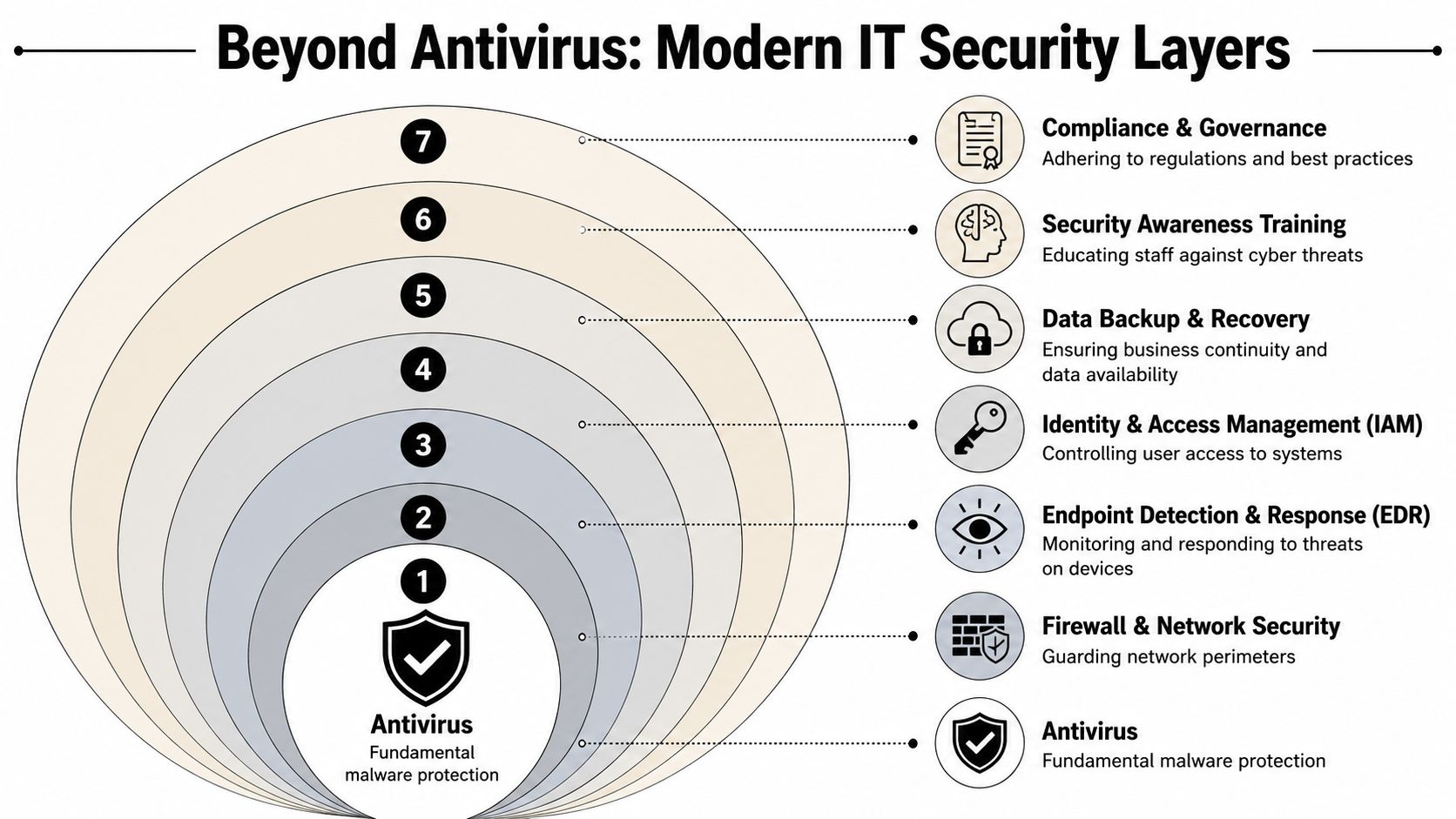
Treating antivirus as the whole plan is like putting a deadbolt on the front door and leaving the server room open, the file cabinets unsecured, and nobody at the front desk after hours. Modern IT security services work in layers because businesses don't face one kind of threat. They face credential theft, phishing, vendor risk, accidental exposure, missed patches, weak remote access, and plain old human error.
Security works like a building not a single lock
The building analogy works because it's how most owners already think about physical protection.
A firewall is the front entrance policy. It decides what traffic gets in and what gets turned away. Multifactor authentication is the badge reader on restricted doors. A password alone shouldn't open the executive suite. Encryption is the locked filing cabinet. Even if someone gets the cabinet, the contents aren't readable without the key.
Then there's monitoring. Intrusion detection and centralized logging act like cameras, door alarms, and a guard who watches the feed. If nobody reviews alerts, those systems become expensive wallpaper. That's one reason companies look at managed detection and response services when they need someone actively watching rather than passively collecting data.
What a real security stack includes
The technical backbone is well established. Effective IT security relies on layered controls like firewalls, intrusion detection, encryption, and patch management, paired with ongoing operations such as vulnerability scanning, logging, and configuration audits, as described in this NIH/PMC overview of cybersecurity controls. The important point for a business owner is simple. Security is a system of habits, not a one-time purchase.
A mature setup usually includes:
- Network boundary protection: Firewalls, secure remote access, and sensible segmentation so one compromised device doesn't become everyone's problem.
- Identity control: Multifactor authentication, least-privilege access, and removal of old accounts when staff or vendors no longer need entry.
- Endpoint protection: Devices need more than antivirus. They need visibility into suspicious behavior and a way to isolate trouble fast.
- Patch discipline: Delayed patching leaves known openings available longer than necessary.
- Backups and recovery: Backups are only real if restoration is tested.
- Centralized logging and review: Security information belongs in one place, with someone responsible for review and escalation.
- Incident response playbooks: Staff shouldn't be debating next steps during an active event.
A strong security program doesn't promise that nothing bad will ever happen. It makes sure one bad click doesn't become a company-wide outage.
For SMBs around DFW, the practical sequence is straightforward. Inventory devices and applications. Identify sensitive data. Tighten access. Centralize visibility. Test recovery. Most companies don't need more complexity. They need more discipline.
Protecting Your Business in Healthcare Legal and Finance
Generic security advice falls apart fast in regulated industries. A medical clinic, a law firm, and a CPA office may all use email, cloud storage, and line-of-business apps, but the risk profile is different in each case. The security plan should reflect that.

Healthcare can't separate care from data protection
Healthcare organizations don't just protect files. They protect continuity of care, patient trust, and regulated information. A front-desk email compromise can become a scheduling disruption, a privacy issue, and a reporting problem all at once.
The common mistake is focusing only on the clinic's internal systems while ignoring everyone connected to them. Modern compliance guidance increasingly expects vendor assessments and audits across frameworks such as HIPAA, NIST, and SOC 2 because third-party exposure matters, as explained in Anglepoint's overview of IT security compliance services. If a billing partner, hosted records provider, or outside support firm has weak controls, the clinic still absorbs the damage.
For healthcare leaders, the practical priorities are:
- Protect patient data access: Limit who can view records, billing details, and administrative systems.
- Review vendor relationships: Business partners should be evaluated, not assumed safe.
- Secure guest and staff connectivity: Public and semi-public environments need tighter wireless controls. For businesses offering guest access, this guide on how to secure open WiFi networks is useful because convenience shouldn't create an easy lane into sensitive systems.
Legal firms hold trust in digital form
Law firms sit on high-value information. Case strategy, contracts, privileged communications, merger documents, HR disputes, and financial records often live in the same ecosystem. The reputational damage from mishandling that information can be worse than the technical event itself.
Legal practices need a security model built around confidentiality and auditability. That means restricted matter access, strong controls around email and file sharing, and documented processes for mobile work. It also means planning for the quiet risks, such as former staff retaining access through an old account or a third-party assistant receiving more permissions than needed.
Security in a law office should be built around one question. If a dispute arose tomorrow, could the firm prove who had access to what, and when?
Finance and accounting firms need control not guesswork
Accounting and financial services firms deal with payroll data, tax records, banking information, client identities, and approval workflows. Attackers know that. So do regulators and clients.
For these firms, good IT security services should reduce the odds of two common failures. First, unauthorized access to sensitive records. Second, fraudulent transactions approved through compromised email or weak verification practices. That requires stronger user controls, better logging, and tighter process design around approvals, file transfer, and vendor management.
A broad checklist isn't enough for regulated firms. They need security and compliance tied together. One option for that kind of work is data security and compliance support, where the focus is on defensible controls rather than generic software installations.
A DFW business in any of these sectors should expect a provider to understand industry workflows, outside dependencies, and documentation requirements. If the provider only talks about antivirus and passwords, the conversation is too shallow.
Your On-Demand Security Team Explained
Most SMBs don't need to build a mini security department from scratch. They need the outcomes a good security team produces.
That distinction matters because cybersecurity staffing is expensive and competitive. The U.S. Bureau of Labor Statistics reports a median annual wage of $124,910 for information security analysts in May 2024 and projects 29% growth in employment from 2024 to 2034, with strong demand for these roles in the years ahead, according to the BLS occupational outlook for information security analysts. For a small or mid-sized company, that hiring market doesn't make internal staffing easy.
Why the hiring math doesn't work for most SMBs
A business usually doesn't need one security person. It needs several functions covered consistently. Monitoring. Alert triage. Patch coordination. Access review. Backup oversight. Incident response. Reporting. Compliance evidence. Those are separate responsibilities, even if a small company tries to stuff them into one job title.
That's why the old break-fix model falls short. Calling for help after ransomware hits isn't security. It's cleanup. Real protection requires someone paying attention before the disruption reaches staff and customers.
What managed security should actually deliver
Managed IT security services make sense when they provide active coverage, not just a software bundle. The provider should own recurring security work that most internal teams don't have time to do well.
That usually includes:
- Continuous monitoring: Reviewing alerts and spotting abnormal activity before staff notices symptoms.
- Patch and vulnerability coordination: Turning “we should update that” into a routine process with deadlines and accountability.
- Access oversight: Tightening privileges and removing stale accounts quickly.
- Incident handling: Containing suspicious activity fast, documenting what happened, and guiding recovery.
- Compliance support: Producing the evidence auditors, insurers, or clients may ask for.
One practical model in the DFW market is to use an external partner for the specialized security operations while internal staff handle day-to-day business applications and user support. Technovation LLC offers that kind of managed cybersecurity and compliance support as part of its broader business IT services. For many SMBs, that's a more sensible division of labor than expecting an office manager or general IT admin to moonlight as a security operations center.
A Checklist for Evaluating Local IT Providers
Most providers sound capable in a sales meeting. The right questions separate polished language from operational depth.
A DFW business owner should evaluate a security partner the same way they'd evaluate a financial controller or outside counsel. Not by charisma. By process, clarity, and accountability.
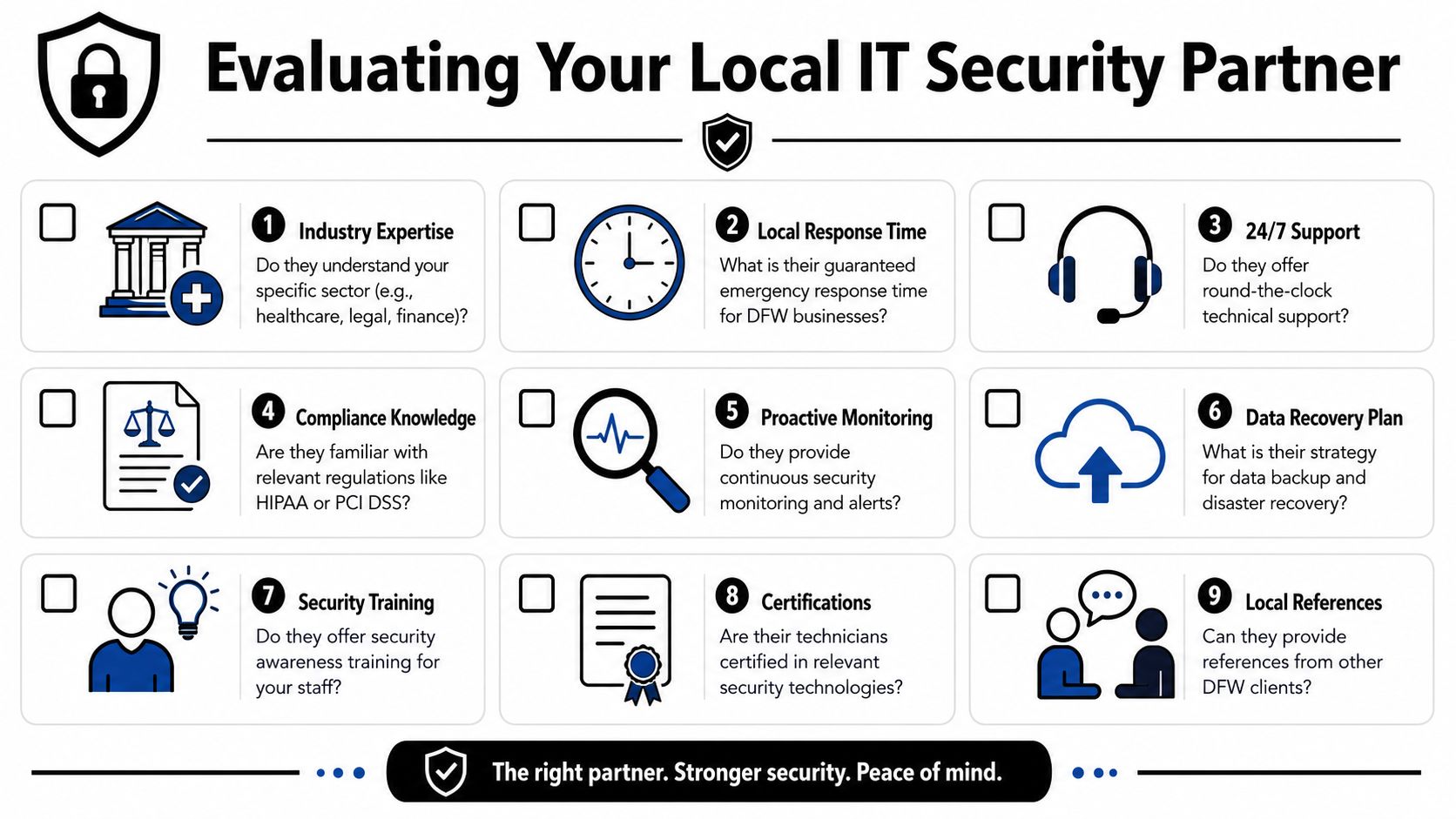
Questions that reveal real capability
These questions tend to expose whether a provider is running a real operation or just reselling a stack of tools.
- Industry fit: Have they worked with businesses that handle regulated or sensitive data similar to yours?
- Local response: Can they support on-site issues in the Dallas-Fort Worth area when remote support isn't enough?
- Monitoring scope: Who reviews alerts, when are they reviewed, and what happens after an alert is confirmed?
- Patch accountability: How do they track missed updates, exceptions, and remediation deadlines?
- Backup proof: How often do they test restores, and how is that documented?
- Access control: How do they handle onboarding, offboarding, privileged access, and account reviews?
- Compliance support: Can they help produce records for audits, insurers, and client questionnaires?
- Vendor risk: Do they evaluate third-party exposure, or do they only manage internal devices?
- Onboarding method: What does the first month look like, and how do they establish a baseline?
For businesses comparing options, this related guide on how to choose a managed service provider helps frame the broader decision.
What strong answers usually sound like
A good answer is specific. It includes ownership, cadence, and documentation. A weak answer stays vague and leans on marketing words.
| Question area | Strong signal | Weak signal |
|---|---|---|
| Monitoring | Named process for review, escalation, and response | “We get alerts if something happens” |
| Patching | Defined schedule and exception handling | “We update as needed” |
| Backups | Restore testing with documented results | “Backups are running” |
| Compliance | Evidence collection and audit support | “We're familiar with compliance” |
| Vendor risk | Assessments and review process | “That's outside our scope” |
Buyer's test: If a provider can't explain who does the work, how often it happens, and what proof the client receives, the service probably isn't mature enough for a security-conscious business.
The best local provider isn't necessarily the one with the flashiest presentation. It's the one that can show repeatable habits, clear communication, and a realistic plan for the client's size, budget, and industry.
IT Security Pricing and Taking the First Step
Security pricing confuses a lot of business owners because providers package services in different ways. That's normal. What matters is whether the pricing model matches the business model.
The labor market helps explain why managed security is often the cleaner option. The cybersecurity workforce is large globally, at about 4.7 million professionals, while the U.S. Bureau of Labor Statistics projects about 16,000 openings per year on average for information security analysts and reports a median annual wage of $124,910 in May 2024, as summarized in National University's cybersecurity statistics article. Skilled security coverage isn't cheap, and hiring remains competitive.
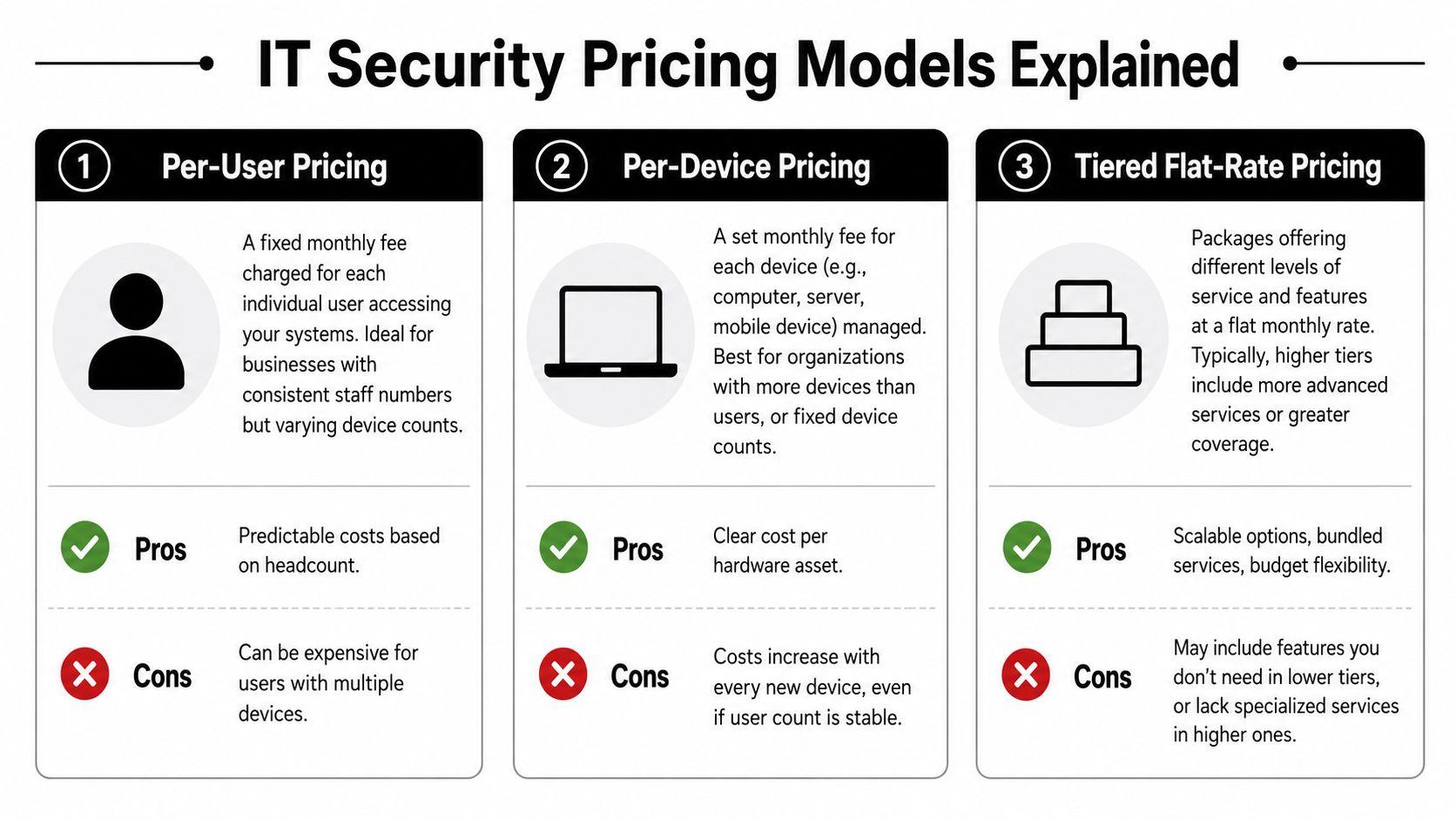
How pricing models usually work
Most IT security services for SMBs fall into a few common approaches.
- Per-user pricing: Useful when staff count is stable and each employee needs a similar service bundle.
- Per-device pricing: Better when device count is the main driver, such as shared workstations, servers, or specialized endpoints.
- Tiered flat-rate pricing: Helpful when a company wants predictable monthly costs and a defined package of services.
None of these models is automatically right. A clinic with strict compliance requirements may need a different structure than a construction firm with field tablets and a small back office. The useful question isn't “Which model is cheapest?” It's “Which model covers the risks that would hurt the business?”
What a smart first step looks like
A company shouldn't buy security the same way it buys office supplies. Start with a baseline. Identify systems, data types, remote access paths, vendors, and weak points in current operations. Then match coverage to actual risk.
A practical first conversation should answer four things:
- What is the business protecting most? Client records, financial data, operational uptime, regulated information, or all of the above.
- Where are the blind spots? Access sprawl, unmanaged devices, weak vendor controls, poor visibility, or untested recovery.
- What level of support is needed? Co-managed help for an internal IT contact, or fully managed coverage.
- What proof will leadership receive? Reporting, remediation plans, audit documentation, and incident records.
The right first step isn't a long contract. It's clarity.
A Dallas-Fort Worth business that wants that clarity can start with a conversation with Technovation LLC. A practical review of current risks, security gaps, compliance demands, and support needs can show whether the business needs tighter access control, better monitoring, stronger backup validation, or a more complete managed security program. That kind of audit-first approach keeps the decision grounded in business reality instead of guesswork.