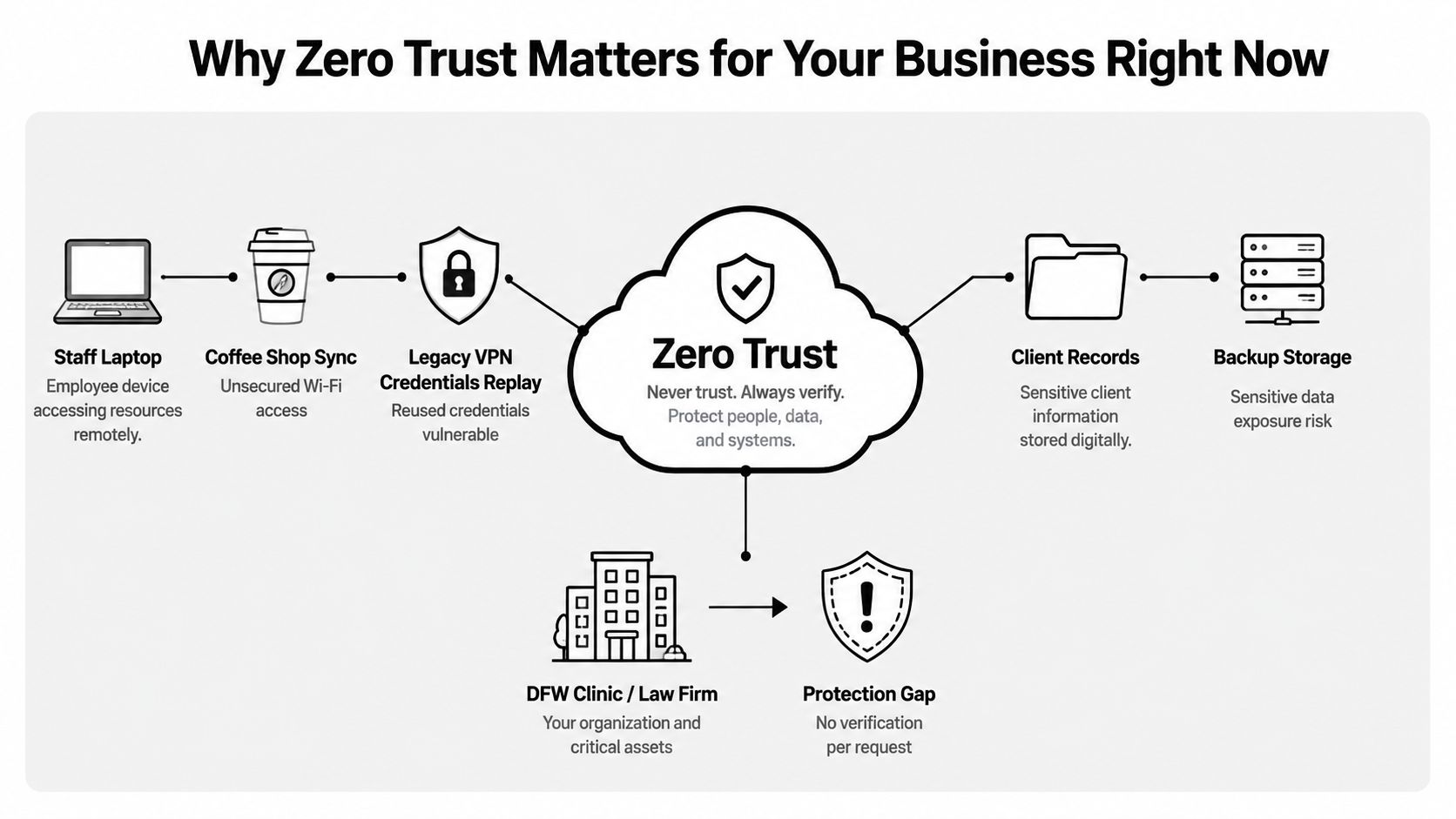
A clinic manager in DFW may approve a remote login from a familiar employee, while the system sees only a username, a password, and a connection that looks acceptable. The employee could be working from a coffee shop, using an unmanaged laptop, while a legacy VPN grants access to more systems than the job requires. Somewhere else, patient or client records may still sit on a backup device that nobody has reviewed recently.
That scenario doesn't require a dramatic failure or an attacker. It reflects an operating model built around assumed trust. How to implement zero trust starts with replacing that assumption with documented decisions about every user, device, application, and request. NIST describes this model in SP 800-207, where access is continuously evaluated instead of being granted implicitly because a connection appears to come from inside the network.
Table of Contents
- Why Zero Trust Matters for Your Business Right Now
- Mapping What You Have and Where the Risk Lives
- Designing the Four Pillars of Your Architecture
- Choosing Tools That Fit a Mid-Market Budget
- Running a Phased Rollout That Actually Sticks
- Monitoring, Metrics, and Keeping It Healthy
- Turning the Roadmap Into Real-World Results
Why Zero Trust Matters for Your Business Right Now
The DFW clinic or mid-sized law firm in this example has several connected weaknesses. The local network assumes that an authenticated user is safe once inside. A shared administrator account prevents investigators from tying a change to one person. The VPN checks credentials but not whether the laptop is encrypted, patched, or managed. A backup drive expands the exposure because sensitive records exist outside the controls applied to the primary system.
The same pattern appears in healthcare, legal, financial, and other regulated SMB environments. HIPAA, PCI, and GDPR-adjacent obligations don't turn every business into an enterprise security department, but they do make undocumented access and weak evidence harder to defend. Insurance questionnaires and audits increasingly ask whether access depends on identity, device condition, least privilege, and reviewable logs rather than on a VPN alone.
NIST formally published its foundational zero trust architecture guidance as SP 800-207 in August 2020. It defines zero trust as an enterprise approach that never grants implicit trust and continuously evaluates access across identities, devices, workloads, and infrastructure, as described in NIST's announcement of SP 800-207. CISA's maturity model and NIST's architecture guidance point organizations toward identity-aware and device-aware controls, not a stronger perimeter.
The business problem is operational
Zero trust isn't a firewall upgrade. It's a 12-month operating model that changes how a business approves access, manages devices, records exceptions, and responds when a person or machine behaves unexpectedly.
A practical program begins with identity and asset visibility, moves into policy enforcement for the highest-value resources, and then expands across applications, networks, and data. Technovation's cybersecurity threat management services can help a DFW business turn that sequence into a managed operating process instead of leaving a small internal team to maintain disconnected controls.
Mapping What You Have and Where the Risk Lives
Zero trust fails before deployment when the organization doesn't know what it owns. Discovery should be treated as a working session, not a spreadsheet exercise delegated to nobody.
Start with identities
The first inventory should cover every identity source. That includes the directory used for employee accounts, cloud identities, synchronized accounts, service accounts, contractors, former employees, and applications created outside the approved process. The question isn't only who works for the business. It's who or what can request access.
Review privileged accounts separately. A permanent administrator role creates a larger consequence when credentials are stolen or misused. Record the business owner, current access, last review, and required purpose for each privileged identity. The output should make stale accounts and excessive permissions visible before any enforcement begins.
A related governance issue is how staff receive access to internal resources. Clear role definitions and secure workforce platform access can help organizations connect employee roles with the resources those roles require, provided the access records remain current.
Build the asset and data map
List company laptops, personal phones approved for work, vendor appliances, printers, servers, cloud workloads, and applications. Mark whether each device is managed, encrypted, patched, and capable of producing useful security records. An unmanaged printer may not look important, but it can still connect to a network containing systems that handle regulated information.
Then map data flows in plain language. Identify which application stores patient information or client files, which file shares remain active, which vendors connect remotely, and which backup systems retain copies. Score each asset by data sensitivity and exposure, not by how familiar the system feels.
Produce a decision document
NIST guidance places asset identification at the start because policy decisions are unreliable when the organization doesn't know what must be protected. Its practical implementation work also reflects the need for phased execution, with the NCCoE project using 24 collaborators to produce 19 example implementations, as documented in NIST SP 1800-35B.
The discovery week should end with two artifacts:
- One-page asset register: Owner, purpose, data type, access path, device requirements, and current control status.
- Prioritized gap list: Stale identities, unmanaged devices, broad administrator rights, flat network paths, missing logs, and unreviewed backups.
Technovation can use a cybersecurity risk assessment template to organize that baseline into decisions an owner, auditor, or insurer can understand.
Designing the Four Pillars of Your Architecture
The four pillars aren't four products. They're four decision points that work together. A user should receive access only when identity, device, network path, and application policy agree that the request is appropriate.
Identity comes first
Require phishing-resistant MFA for privileged access and sensitive applications. Use conditional policies that consider user risk, device state, and the sensitivity of the requested resource. Replace permanent domain administration with just-in-time elevation, approval, and logging.
Microsoft states that MFA reduces the likelihood of account compromise by 99.9%, making it a high-impact starting point, as explained in Microsoft's zero trust guidance. A business should pair MFA with single sign-on and adaptive access so stronger protection doesn't force employees to manage a confusing collection of passwords.
Device policy answers a different question. A managed laptop may qualify for access when encryption is enabled, the operating system is supported, and security updates are current. Jailbroken or unmanaged devices should be blocked from regulated applications, not merely warned.
Network and application controls complete the decision
Most users don't need an always-on VPN that exposes a broad internal network. A zero trust network access gateway or identity-aware proxy can place a specific internal application behind an access decision, while segmentation separates user networks from server networks and limits lateral movement.
Application controls should centralize sign-on, remove orphaned accounts, and record access decisions. For organizations handling complex financial workflows, a practical overview of access management for fintech apps can help clarify how application permissions should follow business roles rather than broad network membership.
A clinic EHR policy might require a managed device, MFA, and an approved U.S. session before granting write access. A request missing any condition receives no write access, and the exception process requires a named approver and an expiration date.
| Pillar | Core Control | SMB-Friendly Policy Example | Tool Category |
|---|---|---|---|
| Identity | MFA, conditional access, least privilege | Require stronger authentication for administrators and sensitive records | Identity provider |
| Device | Managed posture and health checks | Block access when encryption or patch status fails | Device management |
| Network | ZTNA and segmentation | Permit access to one application, not the entire network | Access gateway and firewall |
| Application | SSO, role control, and logging | Review every sensitive access decision | Application access and logging |
Businesses that need a plain-language foundation for these decisions can review identity and access management before selecting products.
Choosing Tools That Fit a Mid-Market Budget
A 25-to-150-person company doesn't need an enterprise shopping list. It needs a small set of controls that integrate with existing cloud productivity systems, generate usable evidence, and don't create a helpdesk burden the business can't support.
Compare categories by operating value
An identity provider should support MFA, role-based access, lifecycle changes, conditional policies, and audit records. The important licensing question is whether those capabilities apply to every relevant user and privileged identity, not whether the sales proposal includes a long feature list.
A ZTNA gateway should connect users to named applications rather than expose an internal network. Check whether it requires an endpoint agent, how it handles older applications, and whether remote access records can be reviewed without specialist engineering.
Device management should establish whether a laptop or phone meets the access policy. A company may not need advanced mobile analytics in the first year, but it does need inventory, encryption status, patch visibility, and the ability to remove access when a device fails policy.
Log aggregation or a SIEM should answer practical questions. Which administrator changed a permission? Which account generated a suspicious request? Which access policy denied a device? A lightweight service with a weekly review can be more useful than a complex platform nobody tunes.
| Category | Must-Have Capability | Nice-to-Have | Watch Out For |
|---|---|---|---|
| Identity provider | MFA, lifecycle control, conditional access, audit logs | Advanced identity analytics | Features restricted to higher licensing tiers |
| ZTNA gateway | Application-level access and remote visibility | Broad protocol support | Recreating VPN-style network exposure |
| Device management | Inventory, encryption, patch, and posture checks | Advanced automation | Agent deployment gaps on unmanaged devices |
| Log aggregation or SIEM | Searchable access events and retention | Extensive correlation rules | Alert volume without an owner |
Read the quote operationally
A low price can conceal missing evidence, manual provisioning, limited log retention, or a device policy that can't distinguish compliant from unmanaged equipment. Those gaps matter more in regulated environments than a skipped dashboard or advanced reporting module.
The first-year plan can usually defer behavior analytics, broad automation, and controls unrelated to the highest-risk workflow. It shouldn't defer MFA for privileged users, access reviews, device inventory, or logging for sensitive applications.
Technovation LLC can assess the existing environment, coordinate these categories, and provide managed monitoring and compliance-oriented support so the owner isn't left responsible for maintaining every policy alone.
Running a Phased Rollout That Actually Sticks
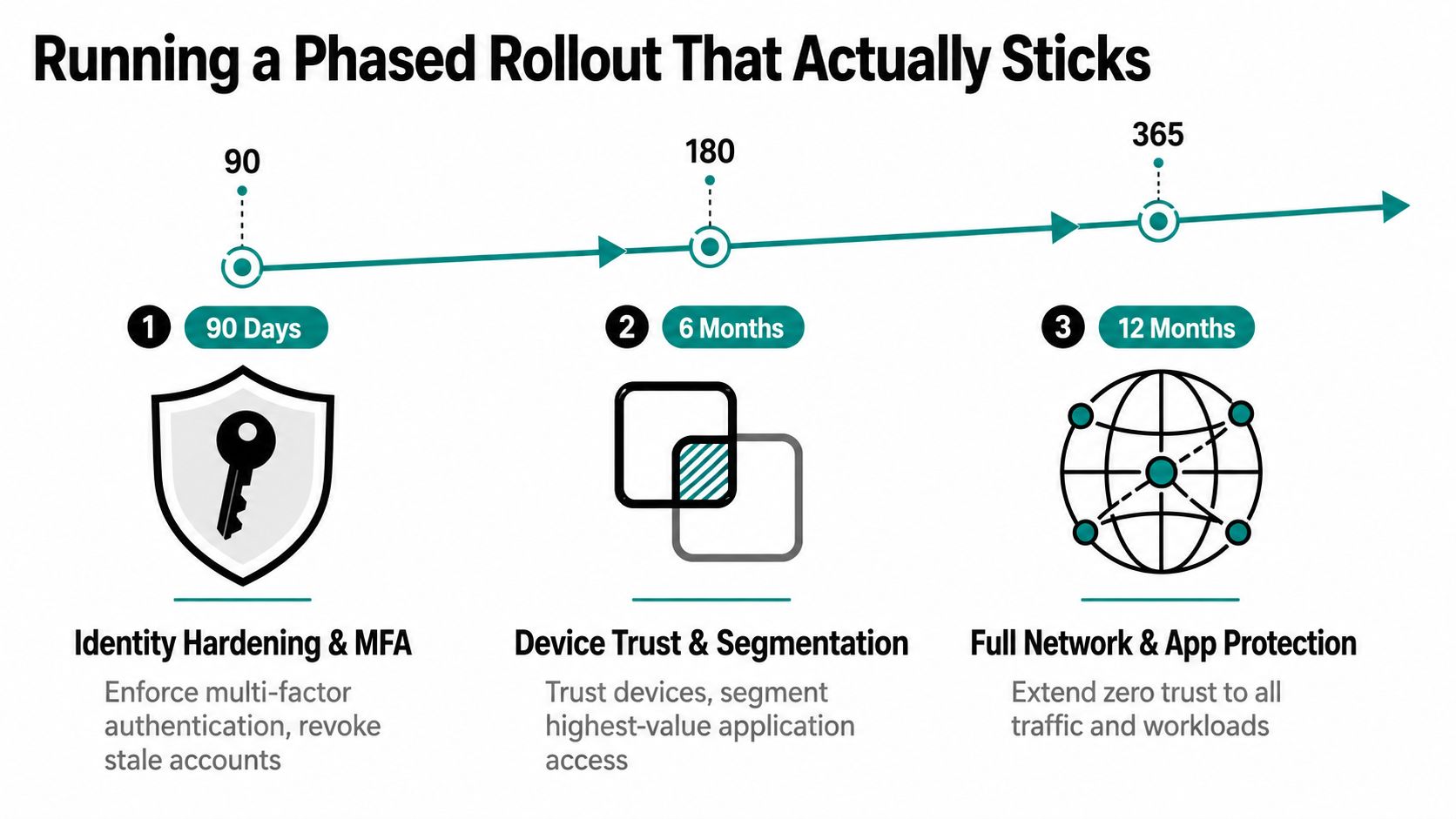
A zero trust rollout should have a calendar, a pilot group, and clear pause points. For most SMBs, the useful sequence is 90 days for identity hardening, six months for device trust and priority segmentation, and 12 months for broader network and application policy.
First 90 days
Select one department or clinic location with a cooperative manager. The first phase should establish MFA, remove stale accounts, protect privileged identities, document exceptions, and test sign-in recovery. Staff need a clear support path before enforcement begins.
The checkpoint is operational, not cosmetic. Expansion should wait if employees can't complete legitimate work, administrators still use shared accounts, or access decisions can't be explained in a log. The business owner should be able to state which identities now require stronger verification and which accounts were removed or restricted.
By six months
Add device posture checks and segment the highest-value application. A healthcare pilot might begin with the EHR team. A law firm might begin with the document management workflow used by attorneys and paralegals. Start in observation mode, compare expected access with actual access, then enforce the smallest policy that protects the workflow.
The team should measure whether unmanaged devices are being blocked, whether sensitive application access is limited to approved roles, and whether exceptions have owners and expiration dates. A policy that creates constant helpdesk tickets needs redesign, not blind enforcement.
By 12 months
Extend policy across remaining applications, remote access paths, server networks, cloud workloads, and third parties. Keep the controls understandable. Employees should know why a request was denied and what legitimate action resolves it.
Practical rule: Expand only after the pilot proves that security controls protect the workflow without pushing staff toward workarounds.
The main failure modes are predictable:
- Scope creep: A pilot becomes a redesign of the entire environment before the first policy works.
- Ignored friction: Helpdesk tickets reveal missing workflow knowledge, not user resistance.
- No experience test: A rule works technically but blocks urgent clinical, legal, or financial work.
- Unowned exceptions: Temporary access becomes permanent because nobody reviews it.
Monitoring, Metrics, and Keeping It Healthy
Monitoring should answer whether the original risks are shrinking. An alert count doesn't prove that access is safer. A small team needs metrics tied to identity, device, data, and policy decisions.
Track the following in a weekly review:
- Privileged actions behind MFA: Identify administrator activity that still bypasses stronger authentication.
- Stale account count: Confirm that departures, contractors, and unused service identities lose access.
- Patch latency: Find devices that remain outside the approved security posture.
- Segmentation exception rate: Review every rule that permits traffic outside the intended application path.
- Suspicious identity containment time: Measure how quickly the team can restrict an account after unusual activity.
NIST's cloud-native guidance calls for dynamic authentication and authorization supported by status assessments, network and identity policies, monitoring, telemetry, and step-up authentication, as described in NIST's SP 800-207A publication. The practical implication is straightforward. Logs must support decisions, not merely accumulate in storage.
Keep the review cadence realistic
A lean IT team or managed provider can aggregate identity, device, application, and network events into a searchable record. The weekly review should focus on denied requests, privileged changes, new devices, unusual access, and policy exceptions. The process matters more than buying an oversized monitoring platform.
A quarterly maintenance ritual should include:
- Policy review: Confirm that access rules still match current roles and workflows.
- Access recertification: Ask application owners to approve, remove, or modify access.
- Exception cleanup: Close temporary permissions that no longer have a business reason.
- Tabletop testing: Rehearse the assumed-breach scenario involving a remote laptop, reused credentials, and exposed backup data.
- Roadmap adjustment: Move the next highest-risk resource into the rollout.
Technovation's network security monitoring can provide the operational coverage needed when internal staff can't maintain weekly reviews and quarterly testing consistently.
Turning the Roadmap Into Real-World Results
Executives don't need a list of security products. They need evidence that the business can control access, detect suspicious activity, and explain decisions to a board, insurer, or auditor.
A useful one-page report should show three outcomes:
- Reduced incident dwell time: How quickly the team identifies and contains a suspicious identity event.
- Audit-ready evidence: Whether privileged changes, access denials, approvals, and exceptions are recorded and reviewable.
- Fewer helpdesk-dependent requests: How often authorized access flows through policy instead of manual intervention.
That report should connect directly to the inventory created at the beginning. If the priority was patient data, the report should show who can access the relevant application, which device conditions apply, what exceptions remain, and whether the logs confirm enforcement. If the priority was client confidentiality, the same logic should apply to document repositories, remote access, and backup systems.
Make ownership visible
Zero trust becomes durable when every control has a named owner. The identity owner reviews accounts. The application owner approves roles. The IT or managed security team maintains policies and monitoring. Business leadership accepts documented exceptions rather than allowing informal workarounds.
The architecture also needs a maintenance rhythm. Access reviews, policy updates, exception records, and tabletop exercises prevent the environment from drifting away from the documented design. Organizations that try to sustain the program without dedicated operational ownership can lose consistency as staff change, applications multiply, and urgent work creates shortcuts.
The adoption gap remains substantial. One global survey reported 61% of organizations had a defined zero trust initiative, while 28% planned implementation within 6 to 12 months and 7% within 13 to 18 months, according to the Okta State of Zero Trust report. Another finding in that source reported 18% full implementation and 12% partial implementation, showing why intent must become a managed sequence of policies, reviews, and evidence.
A working session with Technovation should begin with the asset register, access paths, priority application, and current exceptions. The useful question isn't whether a business has purchased zero trust. It's whether the business can prove that the right person, on the right device, received the right access for the right reason.
Technovation LLC helps DFW businesses implement zero trust through security audits, identity and device reviews, access policy design, managed monitoring, and compliance-focused IT support. Visit Technovation LLC to schedule a practical working session and identify the first access control to fix this quarter.