Most business owners ask the wrong question about security. They ask whether anything bad has happened yet.
That’s not cybersecurity threat management. That’s gambling.
A business can go months without a visible incident and still have weak passwords, exposed devices, stale backups, missing alerts, and no real response process. In regulated industries, that gap matters. A medical practice, law firm, accounting office, or construction company doesn’t need a dramatic breach headline to suffer damage. A single locked server, stolen account, or missed compliance requirement can interrupt payroll, scheduling, billing, client service, and trust.
Cybersecurity threat management is the discipline of finding risk early, reducing exposure, detecting trouble fast, and responding before downtime spreads. It’s less like buying antivirus and more like running a monitored security system for the whole business.
Table of Contents
- Is Your Business Protected or Just Lucky
- The Four Stages of Proactive Threat Management
- Your Digital Security Toolkit Explained
- Implementing Threat Management Without Breaking the Bank
- How to Measure Your Security Performance
- Why Local Expertise Matters for DFW Compliance
- Your Next Step Toward Proactive Security
Is Your Business Protected or Just Lucky
“No incidents” doesn’t automatically mean “secure.”
It often means nobody is looking closely enough.
That’s the gap many Dallas-Fort Worth businesses miss. They assume security is fine because the internet still works, staff can log in, and no one has called to report fraud. But modern attacks are built to stay quiet until the damage is hard to reverse. They don’t always smash the front door. They copy keys, walk in through a side entrance, and wait.
A better analogy is a building. Locking the door at night is useful, but it’s not a full security program. Real protection includes cameras, motion sensors, badge access, monitoring, and a team that knows what to do when an alarm goes off.
Cybersecurity threat management works the same way.
It’s not a one-time software purchase. It’s an operating model.
For regulated businesses, that distinction matters more than ever. In 2025, ransomware was implicated in 44% of all data breaches, with a 37% year-over-year rise in incidents, according to 2025 ransomware and breach data. That isn’t just a technical problem. It’s a business interruption problem.
Healthcare clinics can lose access to scheduling and records. Law firms can lose document access during active matters. Financial firms can face account exposure and compliance scrutiny. Construction companies can lose project files, vendor communications, and field coordination.
Practical rule: If a business doesn’t know what it would do in the first hour of a cyber incident, it isn’t protected. It’s hoping.
DIY security fails here because it usually centers on tools, not coverage. Someone installs a firewall, adds antivirus, and assumes the job is done. Meanwhile, nobody reviews alerts, tests backups, verifies access policies, or checks whether a vendor connection created a new risk.
Threat management fixes that blind spot. It treats cybersecurity as an ongoing business function tied to uptime, client trust, and compliance. That’s the standard regulated SMBs need to adopt.
The Four Stages of Proactive Threat Management
Threat management works best as a loop. Not a checklist.
A business identifies what matters, protects it, watches for signs of trouble, and responds quickly when something slips through. Then it repeats the cycle with better information than before.
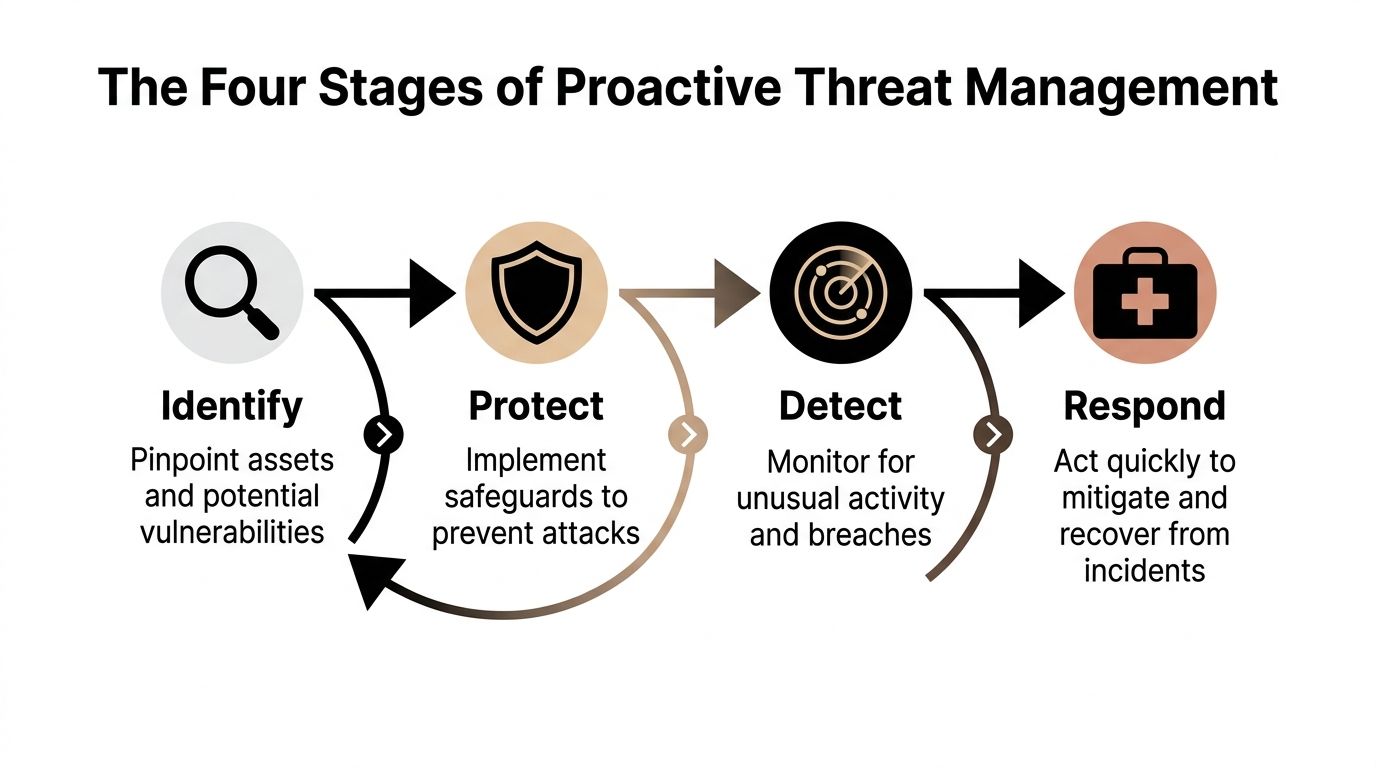
Identify what actually matters
Most small businesses protect everything the same way, or worse, protect whatever happens to be most visible.
That’s backwards.
The first job is to identify critical assets. That usually includes email, line-of-business apps, shared files, financial systems, backup platforms, cloud accounts, remote access points, and any device that touches regulated data. It also includes outside connections such as vendors, consultants, and hosted services.
A short list helps:
- Critical systems: The platforms that would stop operations if they failed.
- Sensitive data: Client, patient, employee, financial, or legal information.
- High-risk access points: Remote logins, shared accounts, old devices, and unmanaged endpoints.
- Third-party dependencies: Anyone outside the company who can touch systems or data.
If a business can’t name its most important systems and who has access to them, it can’t defend them well.
Protect the business, not just the network
Protection is where many owners overspend in the wrong places.
They buy isolated tools instead of building layers. Good protection includes network controls, endpoint security, access rules, patching, backup discipline, and staff training. It should also reflect how the company works. A hybrid office, a field crew, and a clinic front desk don’t face the same risks.
Protection should answer basic operational questions:
- Who can access what?
- Which devices are trusted?
- Which systems get patched first?
- What happens if a laptop is lost?
- Can an attacker move freely after one login is compromised?
That last question matters. Strong protection contains problems. Weak protection lets them spread.
Detect fast enough to matter
Detection is the difference between a minor incident and a long outage.
A business needs continuous visibility into suspicious logins, unusual device behavior, privilege changes, abnormal file activity, and signs that someone is testing the environment before launching something worse. Without that visibility, teams discover incidents late, usually after users complain.
The best alert is the one a trained team reviews before the owner even knows there was a problem.
Threat management becomes operational, not theoretical. Monitoring needs to run even when the office is closed.
Respond with a plan, not panic
Every business will eventually face a suspicious login, malware event, email compromise, or vendor-related issue.
Response determines whether that incident becomes a short interruption or a full business crisis.
A real response capability includes isolation steps, communication paths, backup validation, documentation, leadership roles, and decisions made in advance. Who approves shutdowns? Who contacts legal counsel? Who informs staff? Who checks whether regulated data was involved?
Businesses that answer those questions before an incident recover faster and make fewer expensive mistakes.
Your Digital Security Toolkit Explained
Most cybersecurity jargon sounds harder than it is. Understanding the acronyms isn’t the issue. It’s knowing what job each tool performs and where human oversight is still required.
What each part does
Threat intelligence is the outside awareness layer. It helps a business understand what attackers are targeting, which techniques are common, and what warning signs deserve attention. Think of it as the neighborhood crime bulletin for digital threats.
A security monitoring platform acts like a central control room. It pulls activity from systems, devices, accounts, and logs into one place so unusual behavior is easier to spot. Without this, alerts stay scattered across inboxes and dashboards that no one checks consistently.
Endpoint detection and response puts visibility directly on laptops, desktops, and servers. If a device starts running suspicious processes or behaving in ways that don’t fit normal use, the system can flag it quickly. That matters because attackers often start with one device and move from there.
Managed detection and response adds people to the process. This is the difference between owning cameras and having trained staff watching the feeds around the clock. That human layer matters because many alerts require judgment, context, and fast action.
Vulnerability management is regular maintenance. It identifies outdated software, exposed services, missing patches, and weak configurations before an attacker uses them. It’s the digital version of checking doors, windows, and alarm batteries before a break-in happens.
Incident response is the emergency process. It defines who does what when a threat is confirmed, what gets isolated first, how evidence is preserved, and how operations are restored with the least damage.
A strong toolkit isn’t a random pile of products. It’s a coordinated system.
Why DIY security breaks down
DIY security usually starts with good intentions and ends with alert fatigue.
An internal office manager or general IT person can install basic defenses, but cybersecurity threat management requires constant tuning, review, escalation, and business-context decisions. That’s where regulated SMBs get stuck. The tools generate signals, but no one has the time or depth to decide which ones matter right now.
Managed threat hunting adds another layer that DIY setups rarely provide. Analyst-led hunts can reduce threat dwell time by 50-70%, according to managed threat hunting findings. That matters because hidden threats do the most damage when they linger.
A practical toolkit for an SMB usually includes:
- Network control: Strong perimeter defenses and segmentation. Properly configured small business firewalls become foundational.com/small-business-firewalls/) become foundational.
- Device protection: Monitoring and containment on endpoints, not just antivirus.
- Access security: Tight login controls, limited privileges, and role-based access.
- Continuous review: Someone must investigate alerts, validate changes, and update the plan.
Security tools without a response process create a false sense of control.
That’s why business owners should stop asking, “What software should be bought?” The better question is, “Who is accountable for watching, deciding, and acting?”
Implementing Threat Management Without Breaking the Bank
Most SMBs don’t need a giant security overhaul on day one. They need a sequence.
A smart rollout starts with the basics, adds visibility where it counts, and matures over time. That approach is far more practical than buying a dozen disconnected products and hoping they work together.
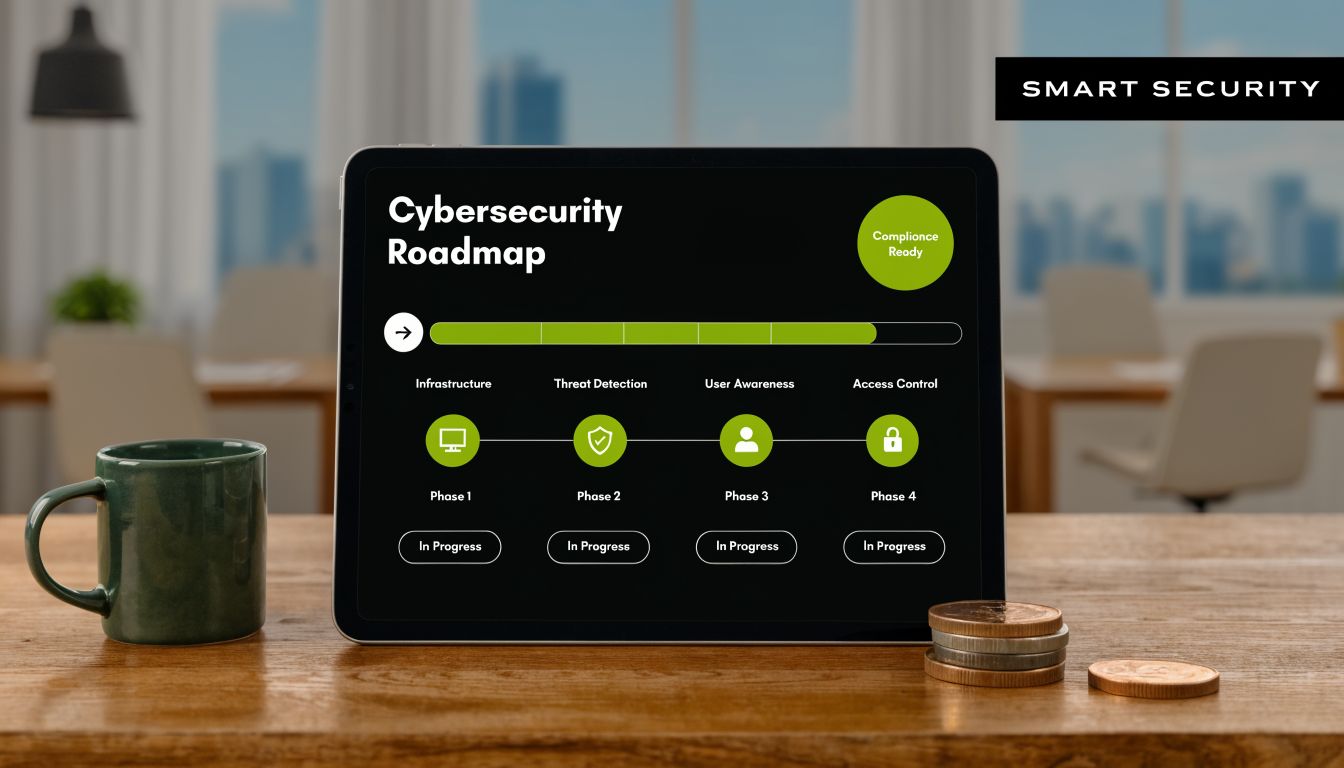
Phase one builds the floor
The first phase is about stability.
A business should inventory critical systems, identify regulated data, review user access, and close obvious gaps. That includes endpoint protection, secure remote access, backup checks, and baseline network protection. Access controls should also be tightened early, especially for email, cloud apps, and admin accounts.
For most regulated firms, multi-factor authentication guidance for small businesses belongs in this first phase, not on some future wish list.
This phase should produce three things:
- An asset picture: What systems exist, where data lives, and who touches it.
- A priority list: Which risks threaten uptime or compliance first.
- A baseline policy set: Access, patching, backups, and escalation rules.
Phase two adds visibility and control
Once the floor is solid, the next investment should go into seeing what’s happening.
That means monitored alerts, endpoint visibility, routine vulnerability scanning, and someone responsible for after-hours review. Businesses often skip this stage because it feels less tangible than a hardware purchase. That’s a mistake. Visibility is what keeps small issues from turning into multi-day outages.
This is also where a co-managed or outsourced model makes sense. An SMB doesn’t need a full internal security operations team to get strong coverage. It needs a practical service model that brings enterprise-grade oversight within budget.
Buying tools is capital expense. Building a repeatable operating process is risk reduction.
Phase three brings maturity
The final phase is where cybersecurity threat management starts acting like a business discipline instead of a technical project.
That includes proactive threat hunting, formal compliance mapping, third-party risk review, recurring tabletop exercises, and periodic outside assessment. By this point, leadership should have clear visibility into what’s protected, what still needs work, and how incident handling would unfold under pressure.
This phased approach works because it respects reality. SMBs have budgets, staffing constraints, and legacy systems. But those limits don’t justify inaction. They justify prioritization.
A good roadmap doesn’t try to copy a large enterprise. It gives a smaller regulated business the controls it needs, in the order that makes business sense.
How to Measure Your Security Performance
Security performance shouldn’t be judged by how many tools are installed.
It should be judged by how quickly problems are found, how cleanly they’re contained, and how consistently the business closes known gaps. That’s how owners move cybersecurity from overhead to operational discipline.
Track response speed, not just tool count
Two metrics matter more than most business owners realize.
Mean Time to Detect (MTTD) measures how long it takes to identify a threat after it appears. Mean Time to Respond (MTTR) measures how long it takes to contain and resolve it. Mature programs aim for MTTD under 1 hour and MTTR below 4 hours, according to security metrics guidance for MTTD and MTTR.
Those numbers matter because delayed response multiplies business pain. The longer a threat moves unchecked, the more systems, files, and accounts it can touch.
Boards and leadership teams should ask simple questions:
- How fast are suspicious events reviewed?
- How long does isolation take once a threat is confirmed?
- Are critical vulnerabilities patched on a reliable cadence?
- Would the business pass a compliance review today?
If those answers are vague, the security program is vague too.
Key Threat Management KPIs for SMBs
| KPI | What It Measures | Why It Matters for Your Business |
|---|---|---|
| MTTD | How quickly threats are detected | Faster detection limits spread, downtime, and investigation scope |
| MTTR | How quickly threats are contained and resolved | Shorter response time protects operations and reduces disruption |
| Vulnerability patching cadence | How consistently known weaknesses are fixed | Regular patching lowers exposure from preventable issues |
| Compliance readiness score | How prepared the business is for audit or assessment | Better readiness reduces scramble, missed controls, and regulatory stress |
A useful scorecard should also connect technical activity to business outcomes. If detection improved, did downtime risk go down? If patching improved, did emergency remediation work drop? If access reviews tightened, did audit preparation get easier?
A security program earns trust when leadership can see performance, not just invoices.
That’s the point of measurement. Not vanity reporting. Business proof.
Why Local Expertise Matters for DFW Compliance
Generic cybersecurity advice doesn’t solve local business problems.
A healthcare practice in Fort Worth, a law office in Dallas, and a nonprofit in Arlington may all need stronger security, but they don’t need the same rollout, the same documentation, or the same support model. That’s why local expertise matters.
Regulated businesses need translation, not noise
Many SMBs face two obstacles at the same time. They lack internal security depth, and they still have to meet industry obligations.
That’s not a minor problem. Enterprise-grade cybersecurity for SMBs in regulated industries is a critically underserved market, especially in hubs like Dallas-Fort Worth, as noted in analysis of the underserved SMB cybersecurity market.
The issue isn’t just protection. It’s translation.
Business owners need someone who can turn security work into plain business decisions:
- What needs immediate attention: Not every alert or gap belongs at the top of the list.
- What supports compliance: Controls should align with actual regulatory obligations, not generic best-practice theater.
- What fits the budget: Good planning prevents overspending on products while underinvesting in monitoring and response.
- What the staff can sustain: A policy nobody follows is paperwork, not protection.
Local context changes the plan
DFW businesses often operate with hybrid teams, multiple offices, outside accountants, third-party software, mobile devices, and aging line-of-business platforms. Those realities change the threat management plan.
A local advisor can account for operational details that national templates miss. Response expectations are different when a clinic opens early, when a construction team works from the field, or when a law firm handles urgent filings under deadline. A compliance issue is never just a compliance issue. It touches scheduling, billing, records, client communication, and reputation.
The strongest partner in this space isn’t just technical. It’s practical.
That means clear priorities, local responsiveness, realistic budgeting, and support that understands how regulated SMBs operate in North Texas. Business owners don’t need another stack of abstract recommendations. They need a plan they can run.
Your Next Step Toward Proactive Security
Eliminating every possible threat isn’t the goal. No business can do that.
The goal is to stop operating on luck.
Cybersecurity threat management gives SMBs a practical way to do that. It identifies what matters most, puts the right protections in place, creates visibility across the environment, and builds a response process that protects uptime and trust when something goes wrong.
That shift is especially important for regulated businesses. DIY security usually looks cheaper at the start because the hidden costs haven’t shown up yet. Those costs arrive later as downtime, missed compliance issues, delayed response, and leadership distraction during an incident.
A better approach is steady, measurable, and budget-conscious. Start with the assets that matter most. Secure access. Add monitoring. Build response discipline. Track performance. Improve from there.
That’s how a business moves from “nothing bad has happened” to “the business is ready.”
The first useful step is simple. Get an outside view of the current environment, the biggest exposures, and the gaps that would hurt operations most if ignored.
Technovation LLC helps Dallas-Fort Worth businesses turn cybersecurity from a patchwork of tools into a managed business function. With 25 years of experience, proactive 24/7 monitoring, compliance-focused support, and a complimentary security audit, the team gives regulated SMBs a clear picture of current risk and a practical roadmap to reduce it. Contact Technovation LLC to schedule a no-cost audit and get a security plan built around the business, budget, and compliance needs.