
Identity and access management is the framework that verifies who a user is, decides what they can access, and records those decisions across systems. In practice, that means a former employee who left months ago can still get into a SaaS app if nobody removed the account, which is exactly why IAM has become a core control layer in modern businesses, not just a login feature.
In North Texas, that gap shows up in ordinary offices all the time. A front desk assistant changes roles, a contractor finishes a project, or a promoted manager keeps old permissions, and suddenly no one can say with confidence who still has access to what.
Table of Contents
- What Is Identity Access Management in Plain English
- Core Components That Make IAM Work
- The IAM Lifecycle From Hire to Retire
- Why Regulated SMBs Cannot Afford to Skip IAM
- The Hidden Identities Most IAM Plans Miss
- Real SMB Scenarios That Put IAM in Context
- A Practical IAM Readiness Checklist
- Turning IAM Into a Business Advantage
What Is Identity Access Management in Plain English
Identity and access management, or IAM, is the system that checks who someone is, decides what they're allowed to do, and keeps a record of those decisions. A simple way to think about it is a building with a badge reader at the door, a guest list at reception, and a locked filing cabinet inside. The badge says who you are, the guest list says where you can go, and the filing cabinet keeps the sensitive items out of reach.
That matters because businesses rarely have one app or one login anymore. A staff member might use email, billing software, a payroll portal, and a cloud file share, and each system needs consistent rules about access. If a former contractor still has a badge, the problem isn't just forgotten housekeeping, it's a broken access process.
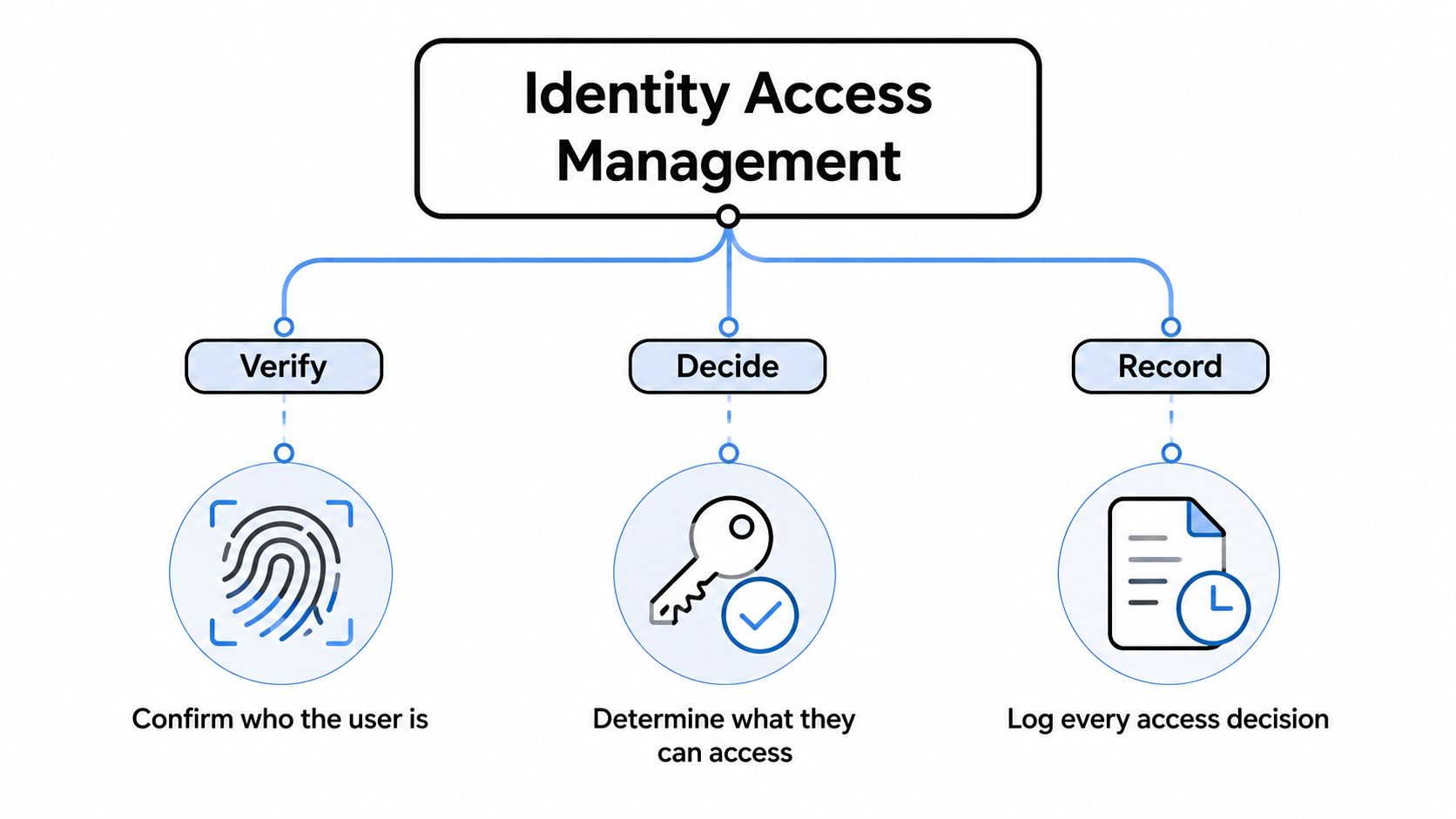
Three checks that make the model work
IAM always comes back to three connected questions. Who are you is the identity check, what can you do is the authorization check, and where is it written down is the audit trail.
Those steps sound simple, but they solve a real business problem. If access is only handled by memory or a spreadsheet, mistakes pile up fast. A clean IAM process makes access decisions repeatable, reviewable, and easier to explain when a client, insurer, or auditor asks why someone had access in the first place.
For a deeper technical lens on how identity is handled across digital experiences, the Kogifi guide to DXP identity management is a useful companion read. For a business-facing service view, Technovation's identity management services sit in the same practical lane, focused on turning access rules into something a business can operate.
Core Components That Make IAM Work
A real IAM setup is more than a password screen. It's a collection of controls that work together, so the business can decide who gets in, how they prove it, and what gets logged when they do.
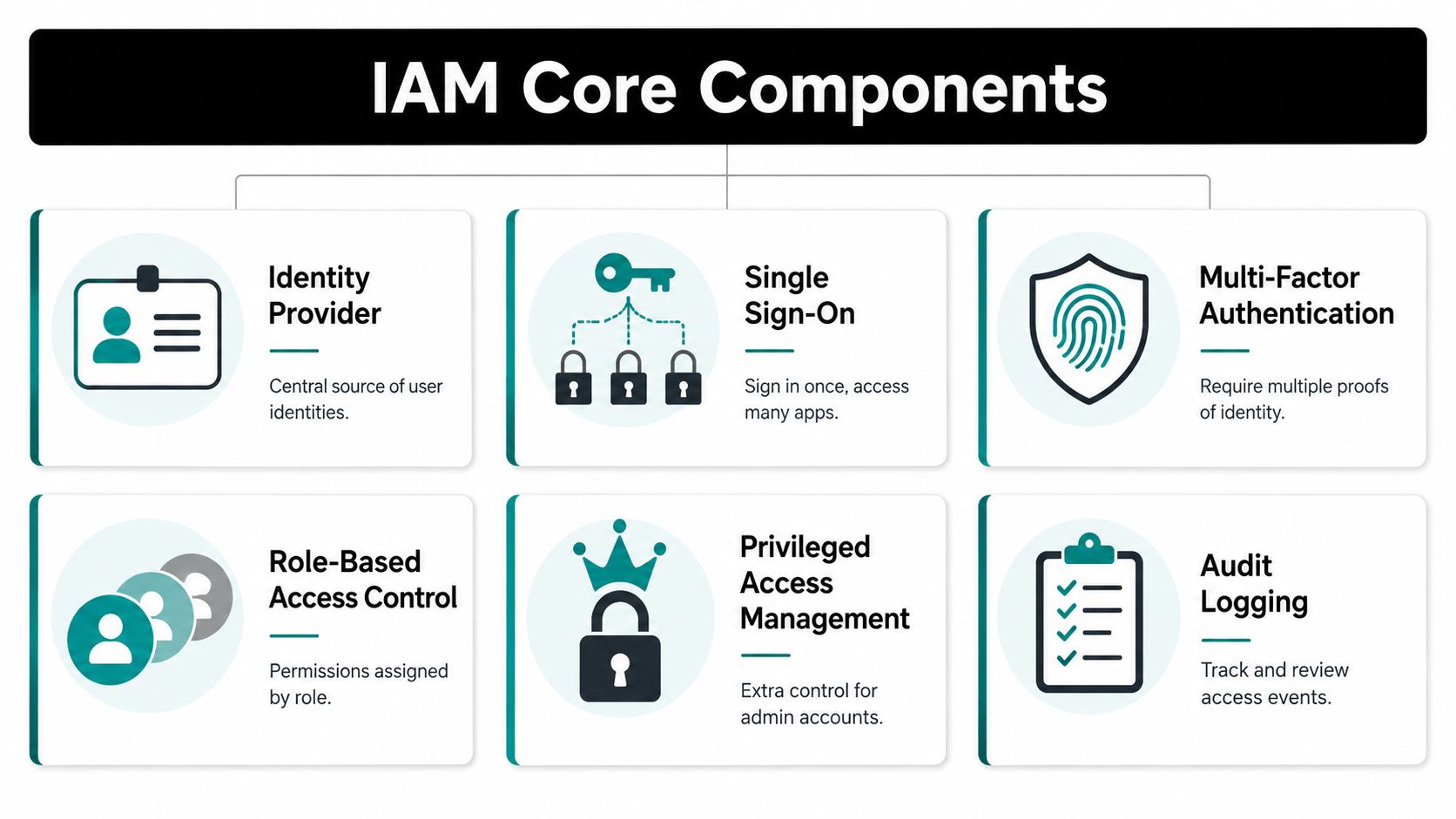
The pieces that carry the load
An identity provider acts like the central roster for users. Instead of each app keeping its own version of employee data, one trusted source holds the names, roles, and account status that other systems rely on. That matters in a 25-person office just as much as in a larger firm, because duplicated records create confusion quickly.
Single sign-on reduces password sprawl. A staff member signs in once, then moves into approved apps without starting over every time. That doesn't just make the day easier, it cuts down on the “what's my password” cycle that often sends people into insecure workarounds.
Multi-factor authentication adds a second proof of identity. A stolen password alone should not be enough to get in, especially when access often reaches client records, financial systems, or internal files. Identity guidance from Microsoft and CrowdStrike both frame authentication as a core part of the access decision, and that distinction matters because a correct username still doesn't guarantee the right permission set. See Microsoft's overview of identity and access management concepts and CrowdStrike's explanation of IAM and the authentication versus authorization split.
Role-based access control groups permissions by job function. Instead of granting access one folder or one system at a time, the business defines a role, then maps that role to the access needed for the work. Privileged access management adds extra control for admin-level accounts, which deserve stricter rules because they can change settings, not just view data.
Practical rule: if an account can change security settings, reset permissions, or export sensitive records, it should never be treated like an ordinary user account.
Audit logging closes the loop. It records who accessed what and when, so the business has evidence instead of guesswork. That evidence is what turns access control into something a regulator, insurer, or internal reviewer can verify, which is why logging is part of the control plane, not a side feature. For a structured policy lens, Technovation's access control policies align closely with that approach.
The IAM Lifecycle From Hire to Retire
IAM works best when it follows the employee lifecycle, not when it's treated like a one-time setup. A new hire needs the right access on day one, but that access has to change as the role changes and disappear when the person leaves.
Onboarding, changes, and exit all matter
Onboarding is where many SMBs start well and drift later. HR sends a start date, IT creates accounts, and the user begins work. The risk starts when that setup is manual and inconsistent, because every exception becomes another place where access can be forgotten.
A promotion is a classic example. A person moves into a new department, gets more responsibility, and keeps old permissions because no one removed them. That creates access creep, where a user accumulates more access than the job requires.
Offboarding is even more exposed. A contractor wraps up a project, or a staff member is terminated, but the account remains live in a cloud app. Tanium describes IAM as a lifecycle process across systems, applications, and data, and Microsoft's framing makes the same point, access has to be checked every time it's requested, not just when the account is created. See the HR employee life cycle overview for a broader view of how business processes and account changes should move together.
When access changes are tied to HR events, the business stops relying on memory and starts relying on process.
Where automation pays off
Automated provisioning and deprovisioning solve the biggest gap. When job data changes, the access list should change with it, which reduces stale permissions and keeps help desk requests from turning into endless manual cleanup. That's especially useful in smaller firms, where a single office manager or IT generalist may be doing too much by hand.
A mature lifecycle process also helps with audits. If the business can show account creation, role updates, review points, and removal steps, it's much easier to prove that access has been managed intentionally. In plain terms, the lifecycle is the operational backbone of IAM, not an optional add-on.
Why Regulated SMBs Cannot Afford to Skip IAM
For healthcare clinics, law firms, and accounting practices, IAM isn't just about security hygiene. It helps prove that sensitive records are only reachable by the people who need them, which is exactly where compliance and liability start to overlap.
A dental office is a clear example. If every front desk employee can see every patient record, the issue isn't convenience, it's overexposure. Role-based access control lets the business separate scheduling, billing, and clinical access so each person sees only the data needed for the job.
A financial or accounting practice faces a similar problem. A junior staff member should not be able to edit prior-year returns or browse client files outside their assignment. IAM makes those boundaries enforceable instead of informal, and audit logs give the firm a record of what was accessed and when.
Compliance is easier when access is intentional
Regulated firms often need to show that access is limited, reviewed, and tied to job duties. IAM helps with that because it turns access into a documented decision rather than a casual favor. That's why it supports the kinds of records auditors look for across healthcare, finance, and legal work.
The compliance angle also reaches beyond cyberattacks. Access mistakes can create privacy violations, client trust issues, and operational confusion even when nothing obvious is breached. For a broader view of how access mistakes create business risk, the LeaveWizard discussion of compliance risks from payroll to data privacy maps closely to the same accountability problem.
Bottom line: in regulated SMBs, IAM protects data, but it also protects the business's ability to prove restraint.
The practical value is simple. Least privilege limits the blast radius if one account is compromised, and auditability makes it easier to answer tough questions without scrambling for evidence. That combination is why IAM belongs in compliance planning, not just IT planning.
The Hidden Identities Most IAM Plans Miss
Most owners think of IAM as something that manages employees signing into email or business apps. That view leaves out a large part of the actual attack surface, the accounts and keys that never show up in a normal user list.
Non-human identities are part of the inventory
Service accounts, API keys, shared mailboxes, legacy local admin accounts, and old test logins all count as identities in practice, even if nobody treats them that way. These are the pieces of identity dark matter that can sit outside standard governance and stay invisible until something breaks.
A payroll integration may still be using a key from a former vendor relationship. A shared mailbox may exist because a practice needed quick access years ago, and now no one remembers who owns it. Those accounts can outlive the people and projects that created them, which makes them especially risky when permissions are broad and review is inconsistent.
The same issue shows up in vendor relationships. If access was created for a contractor or integration partner and never revisited, the business can end up with active credentials that no one monitors. A practical review of those third-party access paths belongs in the same conversation as IAM, which is why Technovation's vendor management practices guide fits naturally here.
Why these accounts are attractive
Attackers like hidden identities because they often lack clear ownership. No owner means no one notices if the account stays active, and no one is accountable for reviewing the permission set. That makes them easier to overlook than ordinary user accounts.
The business lesson is direct. A credible IAM review can't stop at employee logins. It has to inventory both human and non-human identities, then ask who owns each one, why it exists, and whether it still deserves access.
Real SMB Scenarios That Put IAM in Context
Three common business stories show how IAM problems turn into day-to-day trouble. None of them require a dramatic breach to matter, they just show how easily access can drift out of control.
A small medical practice ends a billing contractor's engagement, but the contractor still has access to a cloud billing app. Nothing looks unusual at first because the account still works and no one has checked the offboarding step. The fix would have been simple, remove access at termination, then verify the removal in a final review.
A boutique law firm has a partner whose email is compromised after a phishing message slips through because MFA wasn't enforced. A fraudulent wire instruction follows, sent under the partner's name to a client contact. In IAM terms, the weakness wasn't just email, it was the missing second proof of identity on a high-value account.
A regional accounting firm discovers that a former employee's SaaS login was used to export client data. The account should have been deactivated, but the offboarding task was buried in a manual handoff and never completed. The lesson is blunt, access that outlives employment invites exactly the kind of misuse no business wants to explain later.
What those stories have in common
Each case starts with a normal business event, ending a contract, receiving a phishing email, or finishing employment. The access failure is what turns that ordinary event into a problem. Better IAM would have made the fix part of the workflow instead of a scramble after the fact.
These examples are useful because they're ordinary. They don't depend on rare technical mistakes, only on weak process, unclear ownership, and stale access that nobody reviewed.
A Practical IAM Readiness Checklist
A business doesn't need a giant project plan to get started. It needs a clean baseline, a clear owner for each step, and a way to spot where access is being granted by habit instead of policy.
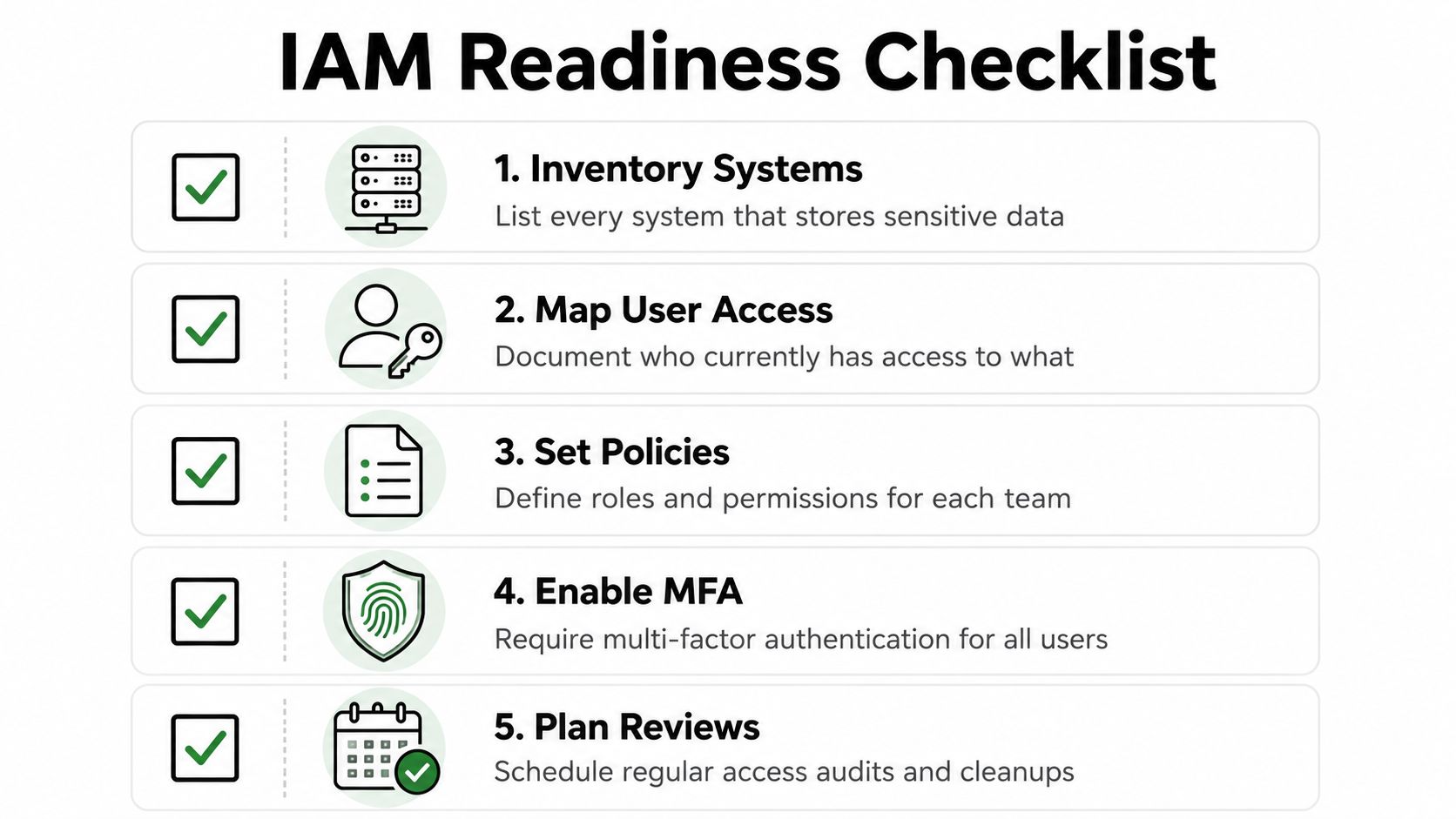
Five checks that reveal the weak spots
- Inventory systems: List every system that stores sensitive data, because access can only be controlled if the business knows where the data lives. This includes email, file storage, billing tools, HR records, and any app that touches client or patient information.
- Map user access: Document who currently has access to what, including humans and non-human accounts. That baseline often exposes stale permissions faster than any other exercise.
- Set policies: Define roles and permissions for each team, so access matches job duties instead of being granted one request at a time. The business moves from custom favors to repeatable rules.
- Enable MFA: Require multi-factor authentication for all users, especially anyone touching financial, legal, or health data. A password alone is too weak a gate for sensitive systems.
- Plan reviews: Schedule regular access audits and cleanups, because permissions drift over time even in well-run offices. Reviews catch the accounts that should have been removed, narrowed, or reassigned.
What to do after the checklist
Each item should lead to a simple question. Who owns this system, who approves this access, and what happens when the role changes? If those answers aren't obvious, the IAM process is probably living in emails and memory instead of policy and workflow.
For many SMBs, the fastest next step is a free security audit or IT health check from a local MSP that understands regulated environments. Technovation's cybersecurity risk management approach fits this kind of review because it can translate a long access list into a prioritized plan the business can act on.
Turning IAM Into a Business Advantage
IAM pays off when the business treats it as an operating discipline, not a software purchase. Clean access rules reduce help desk friction, make onboarding smoother, and give leadership a fast answer to the question every owner eventually hears, who can access what.
That matters because IAM sits at the center of several teams at once. HR triggers hiring and exit events, operations defines job roles, the help desk handles access requests, and leadership sets the standard for what's acceptable. When those groups work from the same access model, the business spends less time cleaning up preventable mistakes.
Identity has become the new security perimeter because users, devices, and apps no longer live behind one neat office firewall. Access now has to be checked at the identity layer, which is why a mature IAM process is both a security control and a management tool. For North Texas SMBs, especially those in healthcare, legal, and financial services, that makes IAM a practical business decision, not a technical luxury.
Technovation LLC helps Dallas–Fort Worth businesses turn access control into a working process, not a pile of disconnected settings. If a free security audit or IT health check would help show where your user accounts, permissions, and offboarding steps are drifting, visit Technovation LLC and start the conversation about tightening IAM before the next access problem becomes a bigger one.