A manager is trying to send a client proposal. An employee gets locked out of email. Another team member can't print the final contract. A remote user loses access to a shared folder. None of those issues sounds dramatic on its own. Together, they can stall revenue, frustrate staff, and expose weak points that attackers often notice before leadership does.
That's the answer to what is help desk support. It isn't just a person answering calls about passwords and printers. It's the operating layer that keeps work moving when technology breaks, and it's often the first place where security issues surface. For a DFW business, that matters far more than most owners realize. A weak help desk creates downtime. A disciplined one protects productivity, preserves trust, and gives the business room to grow without chaos.
Table of Contents
- What Happens When Your Technology Fails
- The Structure of Professional IT Support
- Core Processes That Ensure Fast Resolution
- Help Desk vs Service Desk vs Managed IT Services
- Your Help Desk as a Cybersecurity Frontline
- How to Choose the Right IT Support Partner
- Turn Your IT Support into a Strategic Advantage
What Happens When Your Technology Fails
Most business owners don't ask what help desk support is until something stops working at the worst possible moment. That's usually when the difference between casual tech help and real operational support becomes obvious. One is reactive scrambling. The other is a system.
A professional help desk gives employees a clear place to go when they hit a technical problem. It handles incidents, service requests, and common failures in a structured way so staff can get back to work quickly instead of chasing whoever "knows computers" around the office. That structure matters because repeated interruptions don't just waste time. They break focus, delay sales activity, and slow client delivery.
The business world has already moved in this direction. The adoption of help desk software has risen from 11% in 2020 to 53% in 2024, with an estimated 670 working hours saved per year for an organization. That isn't a minor process improvement. It's a sign that businesses now treat organized support as part of normal operations.
Downtime is rarely about one broken device
When a single employee can't log in, leadership often sees one isolated issue. The business feels something bigger.
- Sales delays: Quotes, contracts, and proposals don't go out on time.
- Service disruption: Staff can't access client records, calendars, or communication tools.
- Internal bottlenecks: Managers get pulled into triage instead of running the business.
- Hidden risk: Strange login failures, missing files, and device slowdowns can signal a security problem, not just a support problem.
Practical rule: If a business depends on technology for payroll, scheduling, billing, communication, or compliance, then help desk support isn't overhead. It's operating infrastructure.
Help desk support creates order
The core value is simple. Employees report an issue. The request gets logged. Someone trained to handle frontline incidents responds based on urgency and process. If the problem is routine, it gets fixed quickly. If it isn't, it gets escalated instead of sitting in limbo.
That's why a proper help desk should be judged the same way a business judges any other critical function. Not by whether it exists, but by whether it protects output. If support is informal, inconsistent, or dependent on one internal employee, the company is running a fragile system.
A business wouldn't let accounting run off sticky notes. It shouldn't let IT support run that way either.
The Structure of Professional IT Support
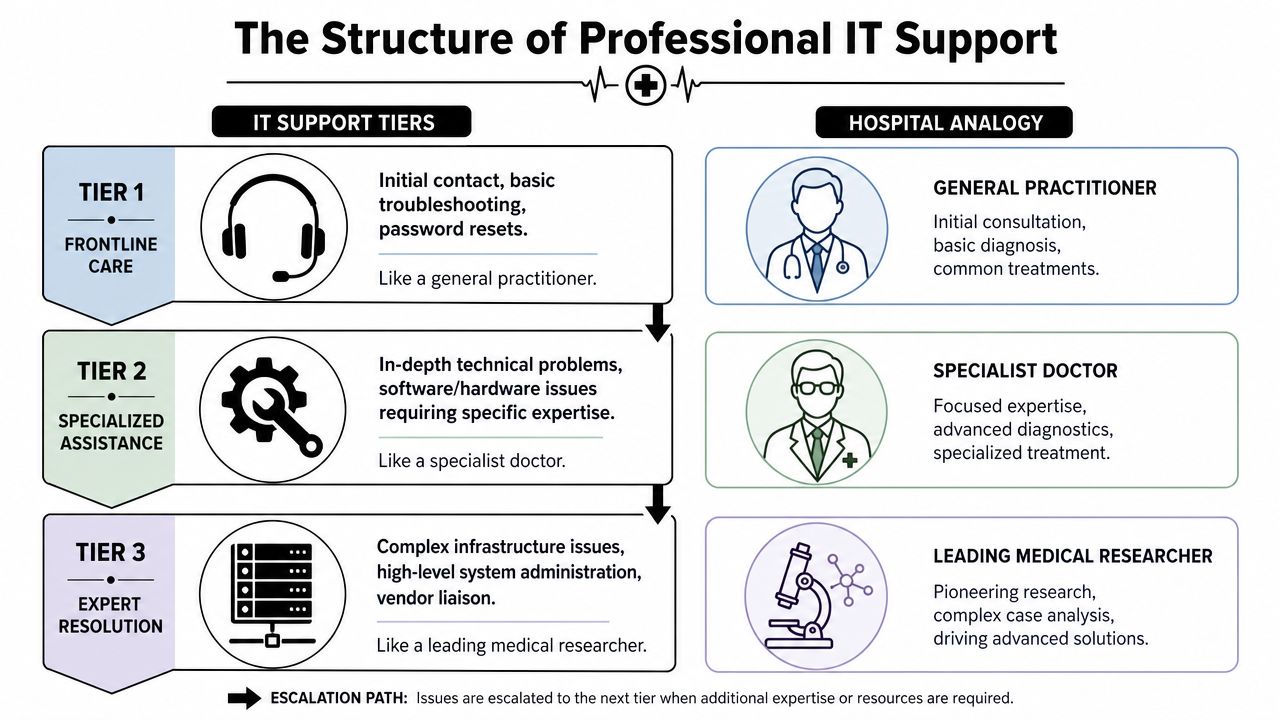
Professional IT support works like hospital triage. The frontline team handles common issues first, stabilizes the situation, and decides what needs deeper expertise. That model keeps simple problems from clogging the entire system.
Why tiers exist
Tier 1 is the frontline; users typically encounter help desk support at this level. Tier 1 handles password resets, account lockouts, connectivity issues, basic software errors, and standard device troubleshooting. Tier 1 support resolves approximately 70-80% of incoming tickets at first contact, which is exactly why a business wants discipline at this level. Every issue solved here keeps more expensive technical resources focused on harder work.
Tier 2 takes the cases that need more specialized knowledge. That may include persistent application failures, device conflicts, permissions problems, or issues that require deeper system access. Tier 3 handles the most complex work, such as infrastructure problems, advanced system administration, and vendor-level coordination.
That hierarchy isn't bureaucracy. It's cost control and speed.
A business that sends every issue straight to senior engineers is using specialists like receptionists. That's expensive and slow.
For readers looking at the people side of scaling support, this resource on addressing B2B support team challenges is useful because it highlights the practical strain that growing support environments put on teams. Businesses evaluating support maturity should also understand the role breakdown covered in tiers of IT support.
What users actually interact with
Most employees never think about support architecture. They just want a fast answer through the easiest channel available. A strong help desk supports that reality.
Common user-facing channels include:
- Phone support: Best for urgent disruptions where a user needs immediate guidance.
- Email support: Useful for non-urgent requests that need documentation.
- Live chat: Good for quick troubleshooting while the employee keeps working.
- Self-service portals: Useful for submitting requests, checking status, and finding known fixes.
Behind those channels, the help desk should use one consistent process. Otherwise, requests come in through five doors and disappear into ten different conversations. That's how tickets get missed, priorities get confused, and employees start bypassing process because they don't trust it.
A mature support structure gives the business two things at once. Fast handling for routine issues, and a clean path upward when a problem needs more skill. That's what makes help desk support professional instead of improvised.
Core Processes That Ensure Fast Resolution
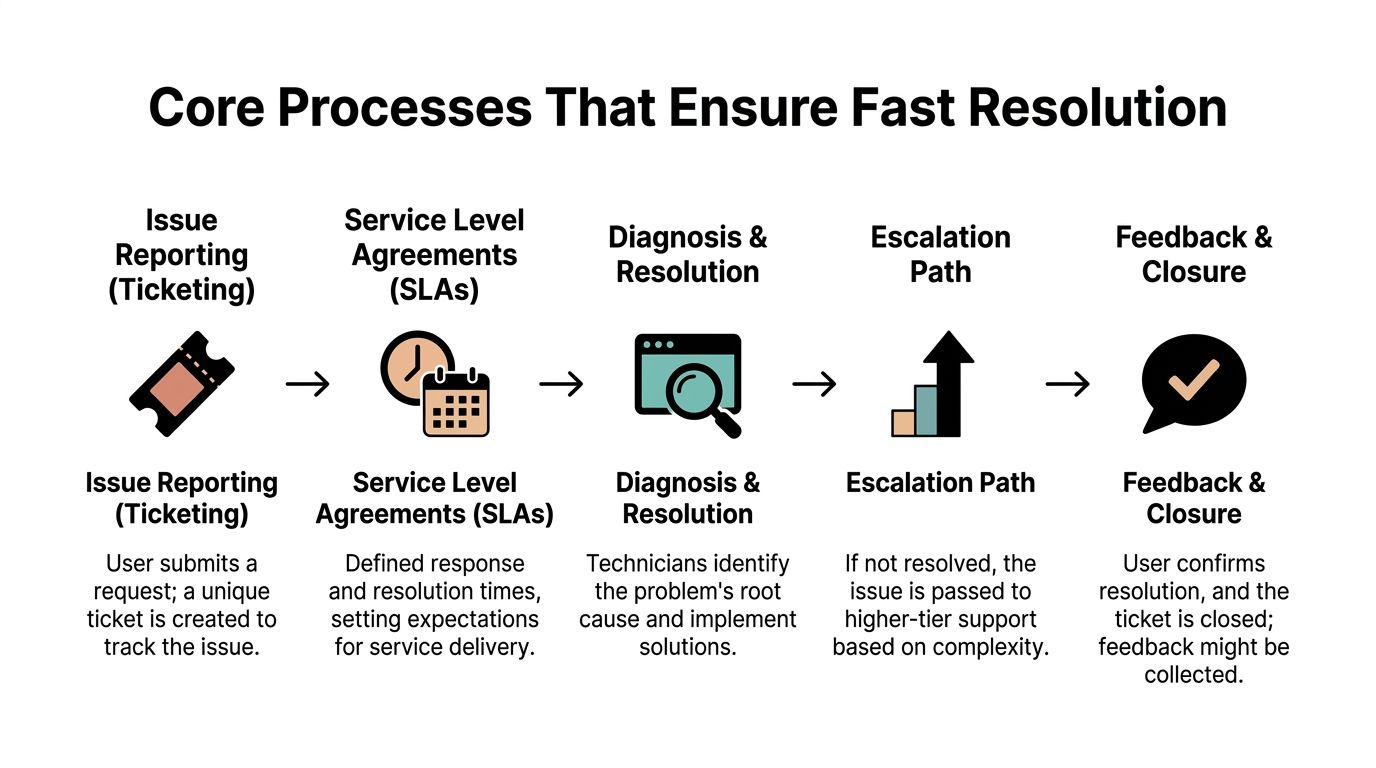
Fast resolution doesn't happen because a technician is "good at computers." It happens because the operation is designed to move issues from report to resolution without confusion. When support feels smooth, there's usually a disciplined process underneath it.
Ticketing turns noise into action
A ticketing system is the control center. Every issue gets logged, categorized, prioritized, assigned, and tracked. That sounds basic, but it solves one of the biggest operational problems in small and mid-sized companies. People stop relying on hallway conversations, forgotten emails, and verbal promises.
A proper help desk also gathers consistent intake data. The technician identifies whether the issue is tied to hardware, software, or the network, then documents what happened and what was done. That documentation matters because recurring issues shouldn't be rediscovered from scratch every time.
Key process benefits include:
- Clear ownership: Every issue belongs to someone.
- Visible status: Employees know whether the issue is new, in progress, escalated, or closed.
- Repeatable diagnosis: Teams follow a method instead of guessing.
- Knowledge capture: Known fixes can be reused for future incidents.
SLAs and escalation prevent drift
Without service level agreements, support becomes vague. "Someone will look at it soon" isn't a service model. It's a hope.
SLAs define expected response and resolution targets based on the seriousness of the issue. That gives the business a predictable way to measure support. Escalation rules do the same thing for technical complexity. If frontline support can't solve the issue within scope, the case moves up instead of stalling.
Break-fix support usually fails. It can solve a one-off problem, but it often lacks the machinery to manage queue discipline, urgency, or pattern recognition. Businesses end up with recurring pain because nobody is tracking the whole environment.
The best support teams don't just close tickets. They reduce repeat tickets.
That's also why support should connect to broader operational visibility. Network events, device health, and recurring failures should inform the help desk queue, not sit in a separate silo. Businesses exploring that side of the equation should understand how network monitoring supports faster detection and smarter triage.
A strong process does one more thing that owners often overlook. It builds trust. When employees know where to report issues, how urgent problems are prioritized, and when to expect updates, they stop wasting time chasing status. The support function becomes dependable, which means the business itself becomes more dependable.
Help Desk vs Service Desk vs Managed IT Services
These terms get used interchangeably, and that causes bad buying decisions. A business asks for "help desk support" when it needs service coordination, proactive management, and security oversight. Then leadership wonders why recurring issues never stop.
The easiest way to separate them is by scope.
A help desk focuses on immediate user issues. It fixes what's broken and restores productivity. A service desk operates more broadly. It handles incidents, service requests, and process-driven service delivery with more structure. Managed IT services go further. They wrap support into an ongoing business function that includes planning, preventive maintenance, security, and operational accountability.
IT Support Models Compared
| Feature | Help Desk | Service Desk | Managed IT Services (Technovation) |
|---|---|---|---|
| Primary role | Fixes user issues | Manages incidents and service requests | Aligns IT operations with business needs |
| Typical posture | Reactive | Process-oriented | Proactive and strategic |
| Main focus | Restoring work fast | Service delivery consistency | Uptime, security, planning, and resilience |
| User interaction | Tickets, calls, common support requests | Tickets plus formal service workflows | Ongoing support plus monitoring, guidance, and risk management |
| Best fit | Basic support needs | Growing organizations needing more process | Businesses that need IT tied to growth and risk control |
That table matters because many companies outgrow basic help desk support without noticing it. The signs are familiar. The same issues keep returning. Staff complain that nothing is documented. Leadership gets surprised by outages, renewals, access problems, or security gaps. Those aren't isolated support failures. They usually signal that the business needs a broader model.
For owners reviewing service agreements, LicenseTrim's contract insights are useful because the contract often reveals what a provider will do when things go wrong, not what they promise in sales conversations.
Consider it this way:
- Help desk: "Fix my problem."
- Service desk: "Manage the request properly."
- Managed IT services: "Keep the environment stable, secure, and aligned with the business."
If a company depends on compliance, remote access, cloud systems, or uninterrupted client service, basic ticket handling won't be enough.
That doesn't make help desk support unimportant. It makes it foundational. The help desk is the front door. But a business that wants fewer disruptions, better planning, and less exposure to risk needs more than a front door. It needs a full operating model behind it.
Your Help Desk as a Cybersecurity Frontline
Most SMBs still treat the help desk like a repair counter. That's outdated thinking. In practice, frontline support is often the first human layer that encounters suspicious behavior. A locked account might be a password issue. It might also be a sign of repeated unauthorized attempts. A user reporting a weird pop-up might be describing malware. An employee asking whether an email is legitimate may be surfacing a phishing attempt before damage spreads.
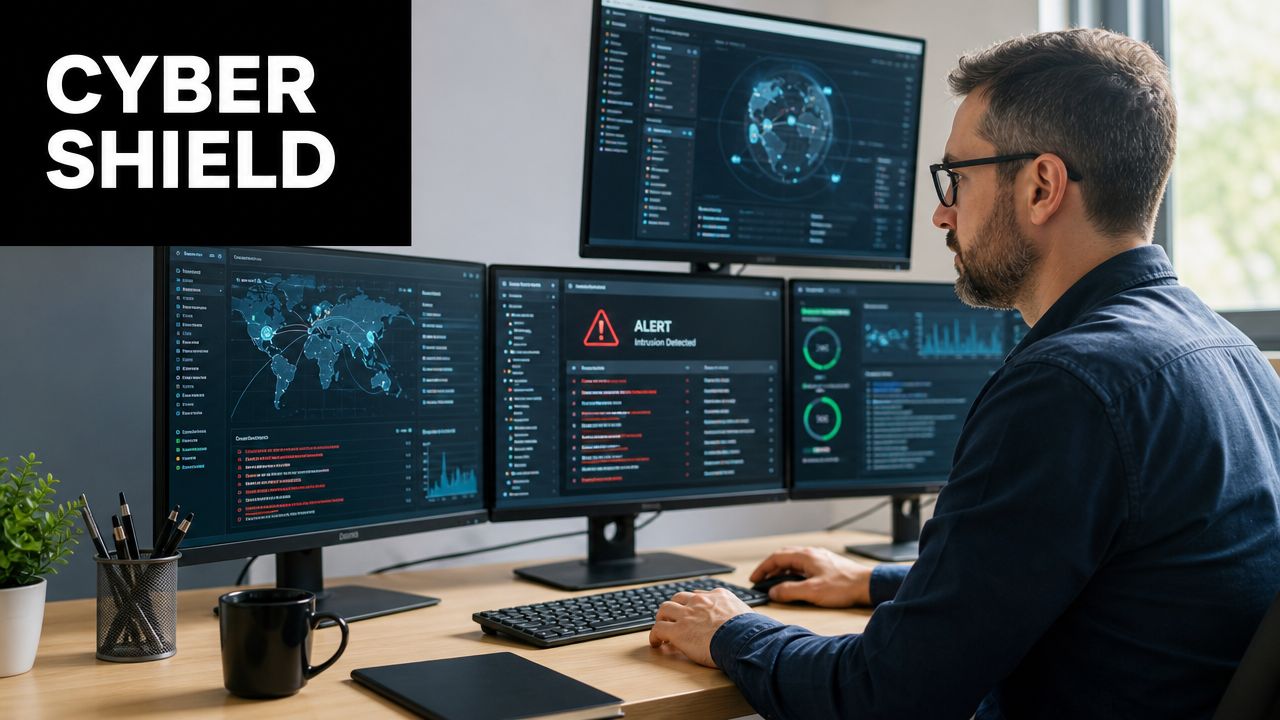
Routine support tasks often reveal security problems
The gap is simple. Many businesses train frontline support to restore access and close tickets. They don't train that same team to recognize threat indicators and escalate them correctly. That's a mistake, especially in smaller organizations.
The critical gap between help desk support and cybersecurity incident response is that effective help desk support in 2026 must include security awareness training and clear escalation protocols for phishing and malware. For SMBs without a large internal security function, the help desk may be the first place an attack becomes visible.
Examples of security-relevant support events include:
- Unusual password reset requests: These can indicate account takeover attempts.
- Repeated lockouts: These may point to bad actors testing credentials.
- Unexpected file behavior: Missing or renamed files can be early warning signs.
- Reports of strange emails or pop-ups: Frontline staff should know when to pause, isolate, and escalate.
For organizations with public-facing brands and distributed teams, this perspective on brand security for social teams is useful because security risk often starts in the same operational gaps where support teams first hear complaints.
Compliance depends on disciplined frontline response
Support and compliance are tightly connected. Regulated businesses don't just need someone to fix access. They need documented handling, timely escalation, and clear accountability when something looks suspicious.
The NIST Special Publication 800-61 Rev. 2 standard referenced here states that organizations must establish a defined incident response process with a minimum SLA of 1 hour for critical security incidents and 4 hours for non-critical incidents. That should change how business owners think about help desk operations. A provider that can't explain how security-related tickets get identified and escalated isn't just weak on support. It's weak on risk control.
That matters even more for healthcare and similar regulated environments. The HIMSS data cited here reports that 74% of healthcare organizations face compliance gaps due to inadequate IT governance, and the average time to detect a breach in healthcare exceeds 200 days. A frontline team that misses warning signs can unintentionally extend that window.
Businesses that want a stronger operational-security link should look at how 24/7 cybersecurity monitoring supports detection beyond user-reported issues. The strongest model is simple. The help desk sees the signal. Monitoring confirms the pattern. The response process moves fast.
A smart business doesn't separate uptime from security anymore. The same frontline function that gets employees back to work should also know when not to treat an issue as routine.
How to Choose the Right IT Support Partner
Most providers can talk about responsiveness. Fewer can explain how their support model protects operations, supports compliance, and handles risk under pressure. That's what business owners in DFW should evaluate.
The right partner shouldn't sound impressive only in a proposal. The right partner should give clear answers to practical questions.
Questions that expose weak providers fast
How are support requests triaged? A serious provider should explain how urgent issues are identified, who handles them first, and how escalation works when a problem moves beyond frontline support.
What counts as a security event? If the answer is vague, that's a red flag. Password issues, suspicious emails, unusual access behavior, and malware indicators should all have a defined response path.
What response commitments are documented? Verbal assurances don't matter much when systems are down. The business should ask what service levels are formalized and how performance is tracked.
How is knowledge captured after issues are solved? Good providers don't just fix problems. They document patterns, improve procedures, and reduce repeat disruption.
Ask for process, not personality. A provider shouldn't win trust because they seem nice. They should win trust because they can explain exactly how support works.
What experience do they have with regulated environments? Healthcare, legal, finance, and nonprofit organizations face different operational and documentation demands. A provider should understand those demands without needing a crash course from the client.
How do they handle local support expectations? For many DFW businesses, proximity still matters. Some issues are remote. Others require rapid coordination, real-world context, and practical familiarity with local operations.
Can they support growth, not just maintenance? The business should ask how the provider handles new hires, location changes, cloud expansion, remote access, and evolving security requirements.
A strong evaluation process also includes broader buying criteria. This guide on how to choose a managed service provider is a useful reference because support quality usually reflects the provider's overall operating model.
The biggest mistake owners make is shopping for help desk support as if they're buying a commodity. They compare only price or response speed. That's too narrow. A weak provider can answer tickets quickly and still leave the business exposed, undocumented, and reactive.
The better question is this. Does the provider close tickets, or do they make the company harder to disrupt?
Turn Your IT Support into a Strategic Advantage
A business doesn't grow by treating IT support like a janitorial function for broken devices. It grows by treating support as an operational control system. Good help desk support restores work fast, reduces noise for internal teams, and creates process discipline around recurring issues. Great help desk support does all of that while strengthening security awareness, escalation, and resilience.
That shift matters because the cost of reactive thinking is high. The Ponemon Institute data cited here says 98% of organizations experienced a data breach in the last two years, and the average cost reached $4.8 million for mid-sized businesses. Those numbers make one point clear. Waiting until something breaks is expensive. Waiting until something breaks and turns into a security event is far worse.
For DFW businesses, the practical takeaway is straightforward:
- Support should protect revenue, not just devices.
- Frontline technicians should recognize threats, not just errors.
- Process should drive response, not memory or improvisation.
- Technology planning should support growth, not just cleanup after failure.
A help desk isn't just where tickets go. It's where business continuity starts. Owners who understand that build stronger companies. Owners who don't usually learn the lesson during an outage, an audit problem, or a preventable security event.
Technovation LLC helps DFW businesses turn IT support into a business advantage through managed services, cybersecurity, compliance guidance, and proactive operational oversight. Organizations that need stronger frontline support, better escalation, and a more security-focused IT model can contact Technovation LLC for a conversation, a free security audit, or an IT health check.